This is the multi-page printable view of this section. .
Four Component Manuals
-
1: Patroni 4.1.5 Documentation
- 1.1: Introduction
- 1.2: Installation
-
1.3: Patroni configuration
- 1.3.1: Dynamic Configuration Settings
- 1.3.2: YAML Configuration Settings
- 1.3.3: Environment Configuration Settings
- 1.4: Patroni REST API
- 1.5: patronictl
- 1.6: Replica imaging and bootstrap
- 1.7: Replication modes
- 1.8: Standby cluster
- 1.9: Watchdog support
- 1.10: Pause/Resume mode for the cluster
- 1.11: DCS Failsafe Mode
- 1.12: Using Patroni with Kubernetes
- 1.13: Citus support
- 1.14: Convert a Standalone to a Patroni Cluster
- 1.15: Integration with other tools
- 1.16: Security Considerations
- 1.17: HA multi datacenter
- 1.18: FAQ
- 1.19: Release notes
- 1.20: Contributing guidelines
-
2: pgBackRest 2.59.0 Documentation
- 2.1: News
- 2.2: User Guide (Debian/Ubuntu)
- 2.3: User Guide (RHEL)
-
2.4: Command Reference
- 2.4.1: Annotate Command (annotate)
- 2.4.2: Archive Get Command (archive-get)
- 2.4.3: Archive Push Command (archive-push)
- 2.4.4: Backup Command (backup)
- 2.4.5: Check Command (check)
- 2.4.6: Expire Command (expire)
- 2.4.7: Help Command (help)
- 2.4.8: Info Command (info)
- 2.4.9: Repository Get Command (repo-get)
- 2.4.10: Repository List Command (repo-ls)
- 2.4.11: Restore Command (restore)
- 2.4.12: Server Command (server)
- 2.4.13: Server Ping Command (server-ping)
- 2.4.14: Stanza Create Command (stanza-create)
- 2.4.15: Stanza Delete Command (stanza-delete)
- 2.4.16: Stanza Upgrade Command (stanza-upgrade)
- 2.4.17: Start Command (start)
- 2.4.18: Stop Command (stop)
- 2.4.19: Verify Command (verify)
- 2.4.20: Version Command (version)
- 2.5: Configuration Reference
- 2.6: Release Notes
- 2.7: Frequently Asked Questions
- 2.8: Project Metrics
-
3: PgBouncer 1.25.2 Documentation
- 3.1: Features
- 3.2: Configuration: pgbouncer.ini
- 3.3: Usage: pgbouncer command
- 3.4: PgBouncer compilation and installation
- 3.5: Source Releases Download
- 3.6: Changelog
- 3.7: Community
- 3.8: Frequently Asked Questions
-
4: pgBadger 13.2 Documentation
- 4.1: Download and Installation
- 4.2: Command-Line Reference
- 4.3: PostgreSQL Logging Configuration
- 4.4: Parallel Processing
- 4.5: Incremental Reports
- 4.6: Output Formats
- 4.7: Sample Reports
-
4.8: Release History
- 4.8.1: pgBadger 13.x Release Notes
- 4.8.2: pgBadger 12.x Release Notes
- 4.8.3: pgBadger 11.x Release Notes
- 4.8.4: pgBadger 10.x Release Notes
- 4.8.5: pgBadger 9.x Release Notes
- 4.9: Support and Contributing
- 4.10: License and Credits
Choose Patroni, pgBackRest, PgBouncer, or pgBadger. Each component opens its own manual, sidebar, and reading sequence.
1 - Patroni 4.1.5 Documentation
Running Patroni on memory-restricted systems with Python 3.11+
If you run Patroni on a system with strict memory limits, for example with vm.overcommit_memory=2 (recommended for PostgreSQL), and use Python 3.11 or newer, you may observe unexpected behavior:
- Patroni appears healthy
- PostgreSQL continues to run
- Patroni REST API becomes unresponsive
- The operating system reports that Patroni is listening on the REST API port
- Patroni logs look normal; however, following messages may appear once:
Exception ignored in thread started by: <object repr() failed>,MemoryError - Kernel logs may contain messages such as
not enough memory for the allocation
This behavior is caused by a bug in Python 3.11+. Under strict memory conditions, starting a new thread may hang indefinitely when there is not enough free memory.
Recommended solution
Recent Patroni releases (4.1.1+, 4.0.8+) reduce the impact of this issue by starting all required threads early during startup, before the system is under memory pressure.
Additional recommendations (Linux, glibc)
When running with vm.overcommit_memory=2 (recommended for PostgreSQL), we also recommend starting Patroni with the following environment variables configured:
MALLOC_ARENA_MAX=1- reduces the amount of virtual memory allocated by glibc for multi-threaded applicationsPG_MALLOC_ARENA_MAX=- resets the value ofMALLOC_ARENA_MAXfor PostgreSQL processes started by Patroni.
In addition, you may tune the following Patroni configuration parameters:
thread_stack_size- stack size used for threads started by Patroni. Lowering this value reduces memory usage of the Patroni process. The default value set by Patroni is512kB. Increasethread_stack_sizeif Patroni experiences stack-related crashes; otherwise the default value is sufficient.thread_pool_size- size of the thread pool used by Patroni for asynchronous tasks and REST API communication with other members during leader race or failsafe checks. The default value is5, which is sufficient for three-node clusters.restapi.thread_pool_size- size of the thread pool used to process REST API requests. The default value is5, allowing up to five parallel REST API requests. Note that requests involving SQL queries are effectively serialized because a single database connection is used, so increasing this value typically provides no benefit.
Patroni is a template for high availability (HA) PostgreSQL solutions using Python. For maximum accessibility, Patroni supports a variety of distributed configuration stores like ZooKeeper, etcd, Consul or Kubernetes. Database engineers, DBAs, DevOps engineers, and SREs who are looking to quickly deploy HA PostgreSQL in datacenters — or anywhere else — will hopefully find it useful.
We call Patroni a “template” because it is far from being a one-size-fits-all or plug-and-play replication system. It will have its own caveats. Use wisely. There are many ways to run high availability with PostgreSQL; for a list, see the PostgreSQL Documentation.
Currently supported PostgreSQL versions: 9.3 to 18.
Note to Citus users: Starting from 3.0 Patroni nicely integrates with the Citus database extension to Postgres. Please check the Citus support page in the Patroni documentation for more info about how to use Patroni high availability together with a Citus distributed cluster.
Note to Kubernetes users: Patroni can run natively on top of Kubernetes. Take a look at the Kubernetes chapter of the Patroni documentation.

1.1 - Introduction
Source: https://patroni.readthedocs.io/en/latest/README.html
Patroni is a template for high availability (HA) PostgreSQL solutions using Python. Patroni originated as a fork of Governor, the project from Compose. It includes plenty of new features.
For additional background info, see:
- PostgreSQL HA with Kubernetes and Patroni, talk by Josh Berkus at KubeCon 2016 (video)
- Feb. 2016 Zalando Tech blog post
Development Status
Patroni is in active development and accepts contributions. See our Contributing section below for more details.
We report new releases information here.
Technical Requirements/Installation
Go here for guidance on installing and upgrading Patroni on various platforms.
Planning the Number of PostgreSQL Nodes
Patroni/PostgreSQL nodes are decoupled from DCS nodes (except when Patroni implements RAFT on its own) and therefore there is no requirement on the minimal number of nodes. Running a cluster consisting of one primary and one standby is perfectly fine. You can add more standby nodes later.
2-node clusters (primary + standby) are common and provide automatic failover with high availability. Note that during failover, you’ll temporarily have no redundancy until the failed node rejoins.
DCS requirements: Your DCS (etcd, ZooKeeper, Consul) has to run with 3 or 5 nodes for proper consensus and fault tolerance. A single DCS cluster can store information for hundreds or thousands of Patroni clusters using different namespace/scope combinations.
Running and Configuring
The following section assumes Patroni repository as being cloned from https://github.com/patroni/patroni. Namely, you will need example configuration files postgres0.yml and postgres1.yml. If you installed Patroni with pip, you can obtain those files from the git repository and replace ./patroni.py below with patroni command.
To get started, do the following from different terminals: :
> etcd --data-dir=data/etcd --enable-v2=true
> ./patroni.py postgres0.yml
> ./patroni.py postgres1.yml
You will then see a high-availability cluster start up. Test different settings in the YAML files to see how the cluster’s behavior changes. Kill some of the components to see how the system behaves.
Add more postgres*.yml files to create an even larger cluster.
Patroni provides an HAProxy configuration, which will give your application a single endpoint for connecting to the cluster’s leader. To configure, run:
> haproxy -f haproxy.cfg

> psql --host 127.0.0.1 --port 5000 postgres
YAML Configuration
Go here for comprehensive information about settings for etcd, consul, and ZooKeeper. And for an example, see postgres0.yml.
Environment Configuration
Go here for comprehensive information about configuring(overriding) settings via environment variables.
Replication Choices
Patroni uses Postgres’ streaming replication, which is asynchronous by default. Patroni’s asynchronous replication configuration allows for maximum_lag_on_failover settings. This setting ensures failover will not occur if a follower is more than a certain number of bytes behind the leader. This setting should be increased or decreased based on business requirements. It’s also possible to use synchronous replication for better durability guarantees. See replication modes documentation for details.
Applications Should Not Use Superusers
When connecting from an application, always use a non-superuser. Patroni requires access to the database to function properly. By using a superuser from an application, you can potentially use the entire connection pool, including the connections reserved for superusers, with the superuser_reserved_connections setting. If Patroni cannot access the Primary because the connection pool is full, behavior will be undesirable.
Testing Your HA Solution
Testing an HA solution is a time-consuming process, with many variables. This is particularly true considering a cross-platform application. You need a trained system administrator or a consultant to do this work. It is not something we can cover in depth in the documentation.
That said, here are some pieces of your infrastructure you should be sure to test:
- Network (the network in front of your system as well as the NICs themselves)
- Disk IO
- file limits (nofile in Linux)
- RAM. Even if you have oomkiller turned off, the unavailability of RAM could cause issues.
- CPU
- Virtualization Contention (overcommitting the hypervisor)
- Any cgroup limitation (likely to be related to the above)
kill -9of any postgres process (except postmaster!). This is a decent simulation of a segfault.
One thing that you should not do is run kill -9 on a postmaster process. This is because doing so does not mimic any real life scenario. If you are concerned your infrastructure is insecure and an attacker could run kill -9, no amount of HA process is going to fix that. The attacker will simply kill the process again, or cause chaos in another way.
1.2 - Installation
Source: https://patroni.readthedocs.io/en/latest/installation.html
Pre-requirements for Mac OS
To install requirements on a Mac, run the following:
Psycopg
Starting from psycopg2-2.8 the binary version of psycopg2 will no longer be installed by default. Installing it from the source code requires C compiler and postgres+python dev packages. Since in the python world it is not possible to specify dependency as psycopg2 OR psycopg2-binary you will have to decide how to install it.
There are a few options available:
- Use the package manager from your distro
- Specify one of
psycopg,psycopg2, orpsycopg2-binaryin the list of dependencies when installing Patroni with pip.
General installation for pip
Patroni can be installed with pip:
where dependencies can be either empty, or consist of one or more of the following:
etcd or etcd3
python-etcd module in order to use Etcd as Distributed Configuration Store (DCS)
consul
py-consul module in order to use Consul as DCS
zookeeper
kazoo module in order to use Zookeeper as DCS
exhibitor
kazoo module in order to use Exhibitor as DCS (same dependencies as for Zookeeper)
kubernetes
kubernetes module in order to use Kubernetes as DCS in Patroni
raft
pysyncobj module in order to use python Raft implementation as DCS
aws
boto3 in order to use AWS callbacks
jsonlogger
python-json-logger module in order to enable logging in json format
systemd
systemd-python in order to use sd_notify integration
all
all of the above (except psycopg family)
psycopg3
psycopg\[binary\]\>=3.0.0 module
psycopg2
psycopg2\>=2.5.4 module
psycopg2-binary
psycopg2-binary module
For example, the command in order to install Patroni together with psycopg3, dependencies for Etcd as a DCS, and AWS callbacks is:
Note that external tools to call in the replica creation or custom bootstrap scripts (i.e. WAL-E) should be installed independently of Patroni.
Package installation on Linux
Patroni packages may be available for your operating system, produced by the Postgres community for:
- RHEL, RockyLinux, AlmaLinux;
- Debian and Ubuntu;
- SUSE Enterprise Linux.
You can also find packages for direct dependencies of Patroni, like python modules that might not be available in the official operating system repositories.
For more information see the PGDG repository documentation.
If you are on a RedHat Enterprise Linux derivative operating system you may also require packages from EPEL, see EPEL repository documentation.
Once you have installed the PGDG repository for your OS you can install patroni.
Patroni packages are not maintained by the Patroni developers, but rather by the Postgres community. If you require support please first try connecting on Postgres slack.
Installing on Debian derivatives
With PGDG repo installed, see above, install Patroni via apt run:
Installing on RedHat derivatives
With PGDG repo installed, see above, install patroni with an etcd DCS via dnf on RHEL 9 (and derivatives) run:
You can install etcd from PGDG if your RedHat derivative distribution does not provide packages. On the nodes that will host the DCS run:
You can replace the version of RHEL with 8 in the repo to make pgdg-rhel8-extras if needed. The repo name is still pgdg-rhelN-extras on RockyLinux, AlmaLinux, Oracle Linux, etc…
Installing on SUSE Enterprise Linux
You might need to enable the SUSE PackageHub repositories for some dependencies. see SUSE PackageHub documentation.
For SLES 15 with PGDG repo installed, see above, you can install patroni using:
With the SUSE PackageHub repo enabled you can also install etcd:
Upgrading
Upgrading patroni is a very simple process, just update the software installation and restart the Patroni daemon on each node in the cluster.
However, restarting the Patroni daemon will result in a Postgres database restart. In some situations this may cause a failover of the primary node in your cluster, therefore it is recommended to put the cluster into maintenance mode until the Patroni daemon restart has been completed.
To put the cluster in maintenance mode, run the following command on one of the patroni nodes:
Then on each node in the cluster, perform the package upgrade required for your OS:
Restart the patroni daemon process on each node:
Then finally resume monitoring of Postgres with patroni to take it out of maintenance mode:
The cluster will now be full operational with the new version of Patroni.
1.3 - Patroni configuration
Source: https://patroni.readthedocs.io/en/latest/patroni_configuration.html
There are 3 types of Patroni configuration:
-
Global dynamic configuration.
These options are stored in the DCS (Distributed Configuration Store) and applied on all cluster nodes. Dynamic configuration can be set at any time using patronictl_edit_config tool or Patroni REST API. If the options changed are not part of the startup configuration, they are applied asynchronously (upon the next wake up cycle) to every node, which gets subsequently reloaded. If the node requires a restart to apply the configuration (for PostgreSQL parameters with context postmaster, if their values have changed), a special flagpending_restartindicating this is set in the members.data JSON. Additionally, the node status indicates this by showing"restart_pending": true. -
Local configuration file (patroni.yml).
These options are defined in the configuration file and take precedence over dynamic configuration.patroni.ymlcan be changed and reloaded at runtime (without restart of Patroni) by sending SIGHUP to the Patroni process, performingPOST /reloadREST-API request or executing patronictl_reload. Local configuration can be either a single YAML file or a directory. When it is a directory, all YAML files in that directory are loaded one by one in sorted order. In case a key is defined in multiple files, the occurrence in the last file takes precedence. -
Environment configuration.
It is possible to set/override some of the “Local” configuration parameters with environment variables. Environment configuration is very useful when you are running in a dynamic environment and you don’t know some of the parameters in advance (for example it’s not possible to know your external IP address when you are running insidedocker).
Important rules
PostgreSQL parameters controlled by Patroni
Some of the PostgreSQL parameters must hold the same values on the primary and the replicas. For those, values set either in the local patroni configuration files or via the environment variables take no effect. To alter or set their values one must change the shared configuration in the DCS. Below is the actual list of such parameters together with the default and minimal values:
- max_connections: default value 100, minimal value 25
- max_locks_per_transaction: default value 64, minimal value 32
- max_worker_processes: default value 8, minimal value 2
- max_prepared_transactions: default value 0, minimal value 0
- wal_level: default value hot_standby, accepted values: hot_standby, replica, logical
- track_commit_timestamp: default value off
For the parameters below, PostgreSQL does not require equal values among the primary and all the replicas. However, considering the possibility of a replica to become the primary at any time, it doesn’t really make sense to set them differently; therefore, Patroni restricts setting their values to the dynamic configuration.
- max_wal_senders: default value 10, minimal value 3
- max_replication_slots: default value 10, minimal value 4
- wal_keep_segments: default value 8, minimal value 1
- wal_keep_size: default value 128MB, minimal value 16MB
- wal_log_hints: on
These parameters are validated to ensure they are sane, or meet a minimum value.
There are some other Postgres parameters controlled by Patroni:
- listen_addresses - is set either from
postgresql.listenor fromPATRONI_POSTGRESQL_LISTENenvironment variable - port - is set either from
postgresql.listenor fromPATRONI_POSTGRESQL_LISTENenvironment variable - cluster_name - is set either from
scopeor fromPATRONI_SCOPEenvironment variable - hot_standby: on
To be on the safe side parameters from the above lists are written into postgresql.conf, and passed as a list of arguments to the postgres which gives them the highest precedence (except wal_keep_segments and wal_keep_size), even above ALTER SYSTEM
There also are some parameters like postgresql.listen, postgresql.data_dir that can be set only locally, i.e. in the Patroni config file or via configuration variable. In most cases the local configuration will override the dynamic configuration.
When applying the local or dynamic configuration options, the following actions are taken:
- The node first checks if there is a
postgresql.base.conffile or if thecustom_confparameter is set. - If the
custom_confparameter is set, the file it specifies is used as the base configuration, ignoringpostgresql.base.confandpostgresql.conf. - If the
custom_confparameter is not set andpostgresql.base.confexists, it contains the renamed “original” configuration and is used as the base configuration. - If there is no
custom_confnorpostgresql.base.conf, the originalpostgresql.confis renamed topostgresql.base.confand used as the base configuration. - The dynamic options (with the exceptions above) are dumped into the
postgresql.confand an include is set inpostgresql.confto the base configuration (eitherpostgresql.base.confor the file atcustom_conf). Therefore, we would be able to apply new options without re-reading the configuration file to check if the include is present or not. - Some parameters that are essential for Patroni to manage the cluster are overridden using the command line.
- If an option that requires restart is changed (we should look at the context in pg_settings and at the actual values of those options), a pending_restart flag is set on that node. This flag is reset on any restart.
The parameters would be applied in the following order (run-time are given the highest priority):
- load parameters from file
postgresql.base.conf(or from acustom_conffile, if set) - load parameters from file
postgresql.conf - load parameters from file
postgresql.auto.conf - run-time parameter using
-o --name=value
This allows configuration for all the nodes (2), configuration for a specific node using ALTER SYSTEM (3) and ensures that parameters essential to the running of Patroni are enforced (4), as well as leaves room for configuration tools that manage postgresql.conf directly without involving Patroni (1).
PostgreSQL parameters that touch shared memory
PostgreSQL has some parameters that determine the size of the shared memory used by them:
- max_connections
- max_prepared_transactions
- max_locks_per_transaction
- max_wal_senders
- max_worker_processes
Changing these parameters require a PostgreSQL restart to take effect, and their shared memory structures cannot be smaller on the standby nodes than on the primary node.
As explained before, Patroni restrict changing their values through dynamic configuration, which usually consists of:
- Applying changes through patronictl_edit_config (or via REST API
/configendpoint) - Restarting nodes through patronictl_restart (or via REST API
/restartendpoint)
Note: please keep in mind that you should perform a restart of the PostgreSQL nodes through patronictl_restart command, or via REST API /restart endpoint. An attempt to restart PostgreSQL by restarting the Patroni daemon, e.g. by executing systemctl restart patroni, can cause a failover to occur in the cluster, if you are restarting the primary node.
However, as those settings manage shared memory, some extra care should be taken when restarting the nodes:
-
If you want to increase the value of any of those settings:
- Restart all standbys first
- Restart the primary after that
-
If you want to decrease the value of any of those settings:
- Restart the primary first
- Restart all standbys after that
Note: if you attempt to restart all nodes in one go after decreasing the value of any of those settings, Patroni will ignore the change and restart the standby with the original setting value, thus requiring that you restart the standbys again later. Patroni does that to prevent the standby to enter in an infinite crash loop, because PostgreSQL quits with a FATAL message if you attempt to set any of those parameters to a value lower than what is visible in pg_controldata on the Standby node. In other words, we can only decrease the setting on the standby once its pg_controldata is up-to-date with the primary in regards to these changes on the primary.
More information about that can be found at PostgreSQL Administrator’s Overview.
Patroni configuration parameters
Also the following Patroni configuration options can be changed only dynamically:
- ttl: 30
- loop_wait: 10
- retry_timeout: 10
- maximum_lag_on_failover: 1048576
- max_timelines_history: 0
- check_timeline: false
- postgresql.use_slots: true
Upon changing these options, Patroni will read the relevant section of the configuration stored in DCS and change its run-time values.
Patroni nodes are dumping the state of the DCS options to disk upon for every change of the configuration into the file patroni.dynamic.json located in the Postgres data directory. Only the leader is allowed to restore these options from the on-disk dump if these are completely absent from the DCS or if they are invalid.
Configuration generation and validation
Patroni provides command-line interfaces for a Patroni local configuration generation and validation. Using the patroni executable you can:
- Create a sample local Patroni configuration;
- Create a Patroni configuration file for the locally running PostgreSQL instance (e.g. as a preparation step for the Patroni integration);
- Validate a given Patroni configuration file.
Sample Patroni configuration
Description
Generate a sample Patroni configuration file in yaml format. Parameter values are defined using the Environment configuration, otherwise, if not set, the defaults used in Patroni or the #FIXME string for the values that should be later defined by the user.
Some default values are defined based on the local setup:
- postgresql.listen: the IP address returned by
gethostnamecall for the current machine’s hostname and the standard5432port.- postgresql.connect_address: the IP address returned by
gethostnamecall for the current machine’s hostname and the standard5432port.- postgresql.authentication.rewind: is only defined if the PostgreSQL version can be defined from the binary and the version is 11 or later.
- restapi.listen: IP address returned by
gethostnamecall for the current machine’s hostname and the standard8008port.- restapi.connect_address: IP address returned by
gethostnamecall for the current machine’s hostname and the standard8008port.
Parameters
configfile - full path to the configuration file used to store the result. If not provided, the result is sent to stdout.
Patroni configuration for a running instance
Description
Generate a Patroni configuration in yaml format for the locally running PostgreSQL instance. Either the provided DSN (takes precedence) or PostgreSQL environment variables will be used for the PostgreSQL connection. If the password is not provided, it should be entered via prompt.
All the non-internal GUCs defined in the source Postgres instance, independently if they were set through a configuration file, through the postmaster command-line, or through environment variables, will be used as the source for the following Patroni configuration parameters:
- scope:
cluster_nameGUC value;- postgresql.listen:
listen_addressesandportGUC values;- postgresql.datadir:
data_directoryGUC value;- postgresql.parameters:
archive_command,restore_command,archive_cleanup_command,recovery_end_command,ssl_passphrase_command,hba_file,ident_file,config_fileGUC values;- bootstrap.dcs: all other gathered PostgreSQL GUCs.
If scope, postgresql.listen or postgresql.datadir is not set from the Postgres GUCs, the respective Environment configuration value is used.
Other rules applied for the values definition:
- name:
PATRONI_NAMEenvironment variable value if set, otherwise the current machine’s hostname.- postgresql.bin_dir: path to the Postgres binaries gathered from the running instance.
- postgresql.connect_address: the IP address returned by
gethostnamecall for the current machine’s hostname and the port used for the instance connection or theportGUC value.- postgresql.authentication.superuser: the configuration used for the instance connection;
- postgresql.pg_hba: the lines gathered from the source instance’s
hba_file.- postgresql.pg_ident: the lines gathered from the source instance’s
ident_file.- restapi.listen: IP address returned by
gethostnamecall for the current machine’s hostname and the standard8008port.- restapi.connect_address: IP address returned by
gethostnamecall for the current machine’s hostname and the standard8008port.
Other parameters defined using Environment configuration are also included into the configuration.
Parameters
configfile
Full path to the configuration file used to store the result. If not provided, result is sent to stdout.
dsn
Optional DSN string for the local PostgreSQL instance to get GUC values from.
Validate Patroni configuration
Description
Validate the given Patroni configuration and print the information about the failed checks.
Parameters
configfile
Full path to the configuration file to check. If not given or file does not exist, will try to read from the PATRONI_CONFIG_VARIABLE environment variable or, if not set, from the Patroni environment variables.
--ignore-listen-port | -i
Optional flag to ignore bind failures for listen ports that are already in use when validating the configfile.
--print | -p
Optional flag to print out local configuration (including environment configuration overrides) after it has been successfully validated.
1.3.1 - Dynamic Configuration Settings
Source: https://patroni.readthedocs.io/en/latest/dynamic_configuration.html
Dynamic configuration is stored in the DCS (Distributed Configuration Store) and applied on all cluster nodes.
In order to change the dynamic configuration you can use either patronictl_edit_config tool or Patroni REST API.
- loop_wait: the number of seconds the loop will sleep. Default value: 10, minimum possible value: 1
- ttl: the TTL to acquire the leader lock (in seconds). Think of it as the length of time before initiation of the automatic failover process. Default value: 30, minimum possible value: 20
- retry_timeout: timeout for DCS and PostgreSQL operation retries (in seconds). DCS or network issues shorter than this will not cause Patroni to demote the leader. Default value: 10, minimum possible value: 3
when changing values of loop_wait, retry_timeout, or ttl you have to follow the rule:
- maximum_lag_on_failover: the maximum bytes a follower may lag to be able to participate in leader election.
- primary_race_backoff: postpones leader race on standbys by
primary_race_backoffseconds if WAL replication from the primary is still advancing. It allows to minimize unnecessary failovers caused by briefly unresponsive Patroni. Default value: 0 (disabled). - maximum_lag_on_syncnode: the maximum bytes a synchronous follower may lag before it is considered as an unhealthy candidate and swapped by healthy asynchronous follower. Patroni utilize the max replica lsn if there is more than one follower, otherwise it will use leader’s current wal lsn. Default is -1, Patroni will not take action to swap synchronous unhealthy follower when the value is set to 0 or below. Please set the value high enough so Patroni won’t swap synchrounous follower frequently during high transaction volume.
- max_timelines_history: maximum number of timeline history items kept in DCS. Default value: 0. When set to 0, it keeps the full history in DCS.
- primary_start_timeout: the amount of time a primary is allowed to recover from failures before failover is triggered (in seconds). Default is 300 seconds. When set to 0 failover is done immediately after a crash is detected if possible. When using asynchronous replication a failover can cause lost transactions. Worst case failover time for primary failure is: loop_wait + primary_start_timeout + loop_wait, unless primary_start_timeout is zero, in which case it’s just loop_wait. Set the value according to your durability/availability tradeoff.
- primary_stop_timeout: The number of seconds Patroni is allowed to wait when stopping Postgres and effective only when synchronous_mode is enabled. When set to > 0 and the synchronous_mode is enabled, Patroni sends SIGKILL to the postmaster if the stop operation is running for more than the value set by primary_stop_timeout. Set the value according to your durability/availability tradeoff. If the parameter is not set or set <= 0, primary_stop_timeout does not apply.
- synchronous_mode: turns on synchronous replication mode. Possible values:
off,on,quorum. In this mode the leader takes care of management ofsynchronous_standby_names, and only the last known leader, or one of synchronous replicas, are allowed to participate in leader race. Synchronous mode makes sure that successfully committed transactions will not be lost at failover, at the cost of losing availability for writes when Patroni cannot ensure transaction durability. See replication modes documentation for details. - synchronous_mode_strict: prevents disabling synchronous replication if no synchronous replicas are available, blocking all client writes to the primary. When this option is set and no eligible replica is streaming, Patroni keeps
synchronous_standby_namespointing to the last known synchronous nodes from the/syncDCS key, or uses the internal placeholder__patroni_strict_sync_replica_placeholder__when no prior sync state exists. The nodenameinpatroni.yamlmust not be set to__patroni_strict_sync_replica_placeholder__. See replication modes documentation for details. - synchronous_node_count: if synchronous_mode is enabled, this parameter is used by Patroni to manage the precise number of synchronous standby instances and adjusts the state in DCS and the
synchronous_standby_namesparameter in PostgreSQL as members join and leave. If the parameter is set to a value higher than the number of eligible nodes, it will be automatically adjusted. Defaults to1. - failsafe_mode: Enables DCS Failsafe Mode. Defaults to
false. - postgresql:
- use_pg_rewind: whether or not to use pg_rewind. Defaults to
false. Note that either the cluster must be initialized withdata page checksums(--data-checksumsoption forinitdb) and/orwal_log_hintsmust be set toon, orpg_rewindwill not work. - use_slots: whether or not to use replication slots. Defaults to
trueon PostgreSQL 9.4+. - recovery_conf: additional configuration settings written to recovery.conf when configuring follower. There is no recovery.conf anymore in PostgreSQL 12, but you may continue using this section, because Patroni handles it transparently.
- parameters: configuration parameters (GUCs) for Postgres in format
{max_connections: 100, wal_level: "replica", max_wal_senders: 10, wal_log_hints: "on"}. Many of these are required for replication to work. - parameters_primary: (optional) role-specific parameter overrides for primary. These values are merged with and override the base parameters.
- parameters_replica: (optional) role-specific parameter overrides for replica. These values are merged with and override the base parameters.
- parameters_standby_leader: (optional) role-specific parameter overrides for standby_leader. These values are merged with and override the base parameters.
- pg_hba: list of lines that Patroni will use to generate
pg_hba.conf. Patroni ignores this parameter ifhba_filePostgreSQL parameter is set to a non-default value.- - host all all 0.0.0.0/0 md5
- - host replication replicator 127.0.0.1/32 md5: A line like this is required for replication.
- pg_hba_primary: (optional) role-specific pg_hba entries for primary. These completely replace pg_hba (no merging). If not defined, pg_hba is used.
- pg_hba_replica: (optional) role-specific pg_hba entries for replica. These completely replace pg_hba (no merging). If not defined, pg_hba is used.
- pg_hba_standby_leader: (optional) role-specific pg_hba entries for standby_leader. These completely replace pg_hba (no merging). If not defined, pg_hba is used.
- pg_ident: list of lines that Patroni will use to generate
pg_ident.conf. Patroni ignores this parameter ifident_filePostgreSQL parameter is set to a non-default value.- - mapname1 systemname1 pguser1
- - mapname1 systemname2 pguser2
- pg_ident_primary: (optional) role-specific pg_ident entries for primary. These completely replace pg_ident (no merging). If not defined, pg_ident is used.
- pg_ident_replica: (optional) role-specific pg_ident entries for replica. These completely replace pg_ident (no merging). If not defined, pg_ident is used.
- pg_ident_standby_leader: (optional) role-specific pg_ident entries for standby_leader. These completely replace pg_ident (no merging). If not defined, pg_ident is used.
- use_pg_rewind: whether or not to use pg_rewind. Defaults to
- standby_cluster: if this section is defined, we want to bootstrap a standby cluster.
- host: an address of remote node
- port: a port of remote node
- primary_slot_name: which slot on the remote node to use for replication. This parameter is optional, the default value is derived from the instance name (see function
slot_name_from_member_name). - create_replica_methods: an ordered list of methods that can be used to bootstrap standby leader from the remote primary, can be different from the list defined in postgresql_settings
- restore_command: command to restore WAL records from the remote primary to nodes in a standby cluster, can be different from the list defined in postgresql_settings
- archive_cleanup_command: cleanup command for standby leader
- recovery_min_apply_delay: how long to wait before actually apply WAL records on a standby leader
- member_slots_ttl: retention time of physical replication slots for replicas when they are shut down. Default value:
30min. Set it to0if you want to keep the old behavior (when the member key expires from DCS, the slot is immediately removed). The feature works only starting from PostgreSQL 11. - slots: define permanent replication slots. These slots will be preserved during switchover/failover. Permanent slots that don’t exist will be created by Patroni. With PostgreSQL 11 onwards permanent physical slots are created on all nodes and their position is advanced every loop_wait seconds. For PostgreSQL versions older than 11 permanent physical replication slots are maintained only on the current primary. The logical slots are copied from the primary to a standby with restart, and after that their position advanced every loop_wait seconds (if necessary). Copying logical slot files performed via
libpqconnection and using either rewind or superuser credentials (see postgresql.authentication section). There is always a chance that the logical slot position on the replica is a bit behind the former primary, therefore application should be prepared that some messages could be received the second time after the failover. The easiest way of doing so - trackingconfirmed_flush_lsn. Enabling permanent replication slots requires postgresql.use_slots to be set totrue. If there are permanent logical replication slots defined Patroni will automatically enable thehot_standby_feedback. Since the failover of logical replication slots is unsafe on PostgreSQL 9.6 and older and PostgreSQL version 10 is missing some important functions, the feature only works with PostgreSQL 11+.- my_slot_name: the name of the permanent replication slot. If the permanent slot name matches with the name of the current node it will not be created on this node. If you add a permanent physical replication slot which name matches the name of a Patroni member, Patroni will ensure that the slot that was created is not removed even if the corresponding member becomes unresponsive, situation which would normally result in the slot’s removal by Patroni. Although this can be useful in some situations, such as when you want replication slots used by members to persist during temporary failures or when importing existing members to a new Patroni cluster (see Convert a Standalone to a Patroni Cluster for details), caution should be exercised by the operator that these clashes in names are not persisted in the DCS, when the slot is no longer required, due to its effect on normal functioning of Patroni.
- type: slot type. Could be
physicalorlogical. If the slot is logical, you have to additionally definedatabaseandplugin. If the slot is physical, you can optionally definecluster_type. - database: the database name where logical slots should be created.
- plugin: the plugin name for the logical slot.
- cluster_type: the type of cluster (
primaryorstandby) the slot should only be created on, otherwise it will not be created or an already existing slot will be dropped.
- type: slot type. Could be
- my_slot_name: the name of the permanent replication slot. If the permanent slot name matches with the name of the current node it will not be created on this node. If you add a permanent physical replication slot which name matches the name of a Patroni member, Patroni will ensure that the slot that was created is not removed even if the corresponding member becomes unresponsive, situation which would normally result in the slot’s removal by Patroni. Although this can be useful in some situations, such as when you want replication slots used by members to persist during temporary failures or when importing existing members to a new Patroni cluster (see Convert a Standalone to a Patroni Cluster for details), caution should be exercised by the operator that these clashes in names are not persisted in the DCS, when the slot is no longer required, due to its effect on normal functioning of Patroni.
- ignore_slots: list of sets of replication slot properties for which Patroni should ignore matching slots. This configuration/feature/etc. is useful when some replication slots are managed outside of Patroni. Any subset of matching properties will cause a slot to be ignored.
- name: the name of the replication slot.
- type: slot type. Can be
physicalorlogical. If the slot is logical, you may additionally definedatabaseand/orplugin. - database: the database name (when matching a
logicalslot). - plugin: the logical decoding plugin (when matching a
logicalslot).
Note: slots is a hashmap while ignore_slots is an array. For example:
Note: When running PostgreSQL v11 or newer Patroni maintains physical replication slots on all nodes that could potentially become a leader, so that replica nodes keep WAL segments reserved if they are potentially required by other nodes. In case the node is absent and its member key in DCS gets expired, the corresponding replication slot is dropped after member_slots_ttl (default value is 30min). You can increase or decrease retention based on your needs. Alternatively, if your cluster topology is static (fixed number of nodes that never change their names) you can configure permanent physical replication slots with names corresponding to the names of the nodes to avoid slots removal and recycling of WAL files while replica is temporarily down:
Permanent replication slots are synchronized only from the primary/standby_leader to replica nodes. That means, applications are supposed to be using them only from the leader node. Using them on replica nodes will cause indefinite growth of pg_wal on all other nodes in the cluster. An exception to that rule are physical slots that match the Patroni member names (created and maintained by Patroni). Those will be synchronized among all nodes as they are used for replication among them.
Setting nostream tag on standby disables copying and synchronization of permanent logical replication slots on the node itself and all its cascading replicas if any.
1.3.2 - YAML Configuration Settings
Source: https://patroni.readthedocs.io/en/latest/yaml_configuration.html
Global/Universal
- thread_pool_size: size of thread pool used by Patroni to execute asynchronous tasks and communicate via REST API with other members during leader race or failsafe checks. Minimal value is
5, default value is5. - thread_stack_size: specifies the stack size to be used for threads started by Patroni. Value must be aligned by
64kB. Minimal value is64kB, default value (set by Patroni) is512kB. - name: the name of the host. Must be unique for the cluster. The value
__patroni_strict_sync_replica_placeholder__is reserved for internal use by Patroni and cannot be used as a node name. - namespace: path within the configuration store where Patroni will keep information about the cluster. Default value: “/service”
- scope: cluster name
Log
- type: sets the format of logs. Can be either plain or json. To use json format, you must have the jsonlogger installed. The default value is plain.
- level: sets the general logging level. Default value is INFO (see the docs for Python logging)
- traceback_level: sets the level where tracebacks will be visible. Default value is ERROR. Set it to DEBUG if you want to see tracebacks only if you enable log.level=DEBUG.
- format: sets the log formatting string. If the log type is plain, the log format should be a string. Refer to the LogRecord attributes for available attributes. If the log type is json, the log format can be a list in addition to a string. Each list item should correspond to LogRecord attributes. Be cautious that only the field name is required, and the %( and ) should be omitted. If you wish to print a log field with a different key name, use a dictionary where the dictionary key is the log field, and the value is the name of the field you want to be printed in the log. Default value is %(asctime)s %(levelname)s: %(message)s
- dateformat: sets the datetime formatting string. (see the formatTime() documentation)
- static_fields: add additional fields to the log. This option is only available when the log type is set to json.
- max_queue_size: Patroni is using two-step logging. Log records are written into the in-memory queue and there is a separate thread which pulls them from the queue and writes to stderr or file. The maximum size of the internal queue is limited by default by 1000 records, which is enough to keep logs for the past 1h20m.
- dir: Directory to write application logs to. The directory must exist and be writable by the user executing Patroni. If you set this value, the application will retain 4 25MB logs by default. You can tune those retention values with
file_numandfile_size(see below). - mode: Permissions for log files (for example,
0644). If not specified, permissions will be set based on the current umask value. - file_num: The number of application logs to retain.
- file_size: Size of patroni.log file (in bytes) that triggers a log rolling.
- loggers: This section allows redefining logging level per python module
- patroni.postmaster: WARNING
- urllib3: DEBUG
- deduplicate_heartbeat_logs: If set to
true, successive heartbeat logs that are identical shall not be output. Default value isfalse.
The time the HA loop executes at can be very valuable information in diagnosing failovers due to resource exhaustion and similar problems. When deduplicate_heartbeat_logs is set to true there will be no log generated for the HA loop execution (unless the leader changes) and hence this potentially useful information will not be available from the logs.
Here is an example of how to config patroni to log in json format.
Bootstrap configuration
Once Patroni has initialized the cluster for the first time and settings have been stored in the DCS, all future changes to the bootstrap.dcs section of the YAML configuration will not take any effect! If you want to change them please use either patronictl_edit_config or the Patroni REST API.
- bootstrap:
-
dcs: This section will be written into /<namespace>/<scope>/config of the given configuration store after initializing the new cluster. The global dynamic configuration for the cluster. You can put any of the parameters described in the Dynamic Configuration settings under
bootstrap.dcsand after Patroni has initialized (bootstrapped) the new cluster, it will write this section into /<namespace>/<scope>/config of the configuration store. -
method: custom script to use for bootstrapping this cluster.
See custom bootstrap methods documentation for details. When
initdbis specified revert to the defaultinitdbcommand.initdbis also triggered when nomethodparameter is present in the configuration file. -
initdb: (optional) list options to be passed on to initdb.
- - data-checksums: Must be enabled when pg_rewind is needed on 9.3.
- - encoding: UTF8: default encoding for new databases.
- - locale: UTF8: default locale for new databases.
-
post_bootstrap or post_init: An additional script that will be executed after initializing the cluster. The script receives a connection string URL (with the cluster superuser as a user name). The PGPASSFILE variable is set to the location of pgpass file.
-
Citus
Enables integration Patroni with Citus. If configured, Patroni will take care of registering Citus worker nodes on the coordinator. You can find more information about Citus support here.
- group: the Citus group id, integer. Use
0for coordinator and1,2, etc… for workers - database: the database where citus extension should be created. Must be the same on the coordinator and all workers. Currently only one database is supported.
Consul
Most of the parameters are optional, but you have to specify one of the host or url
- host: the host:port for the Consul local agent.
- url: url for the Consul local agent, in format: http(s)://host:port.
- port: (optional) Consul port.
- scheme: (optional) http or https, defaults to http.
- token: (optional) ACL token.
- verify: (optional) whether to verify the SSL certificate for HTTPS requests.
- cacert: (optional) The ca certificate. If present it will enable validation.
- cert: (optional) file with the client certificate.
- key: (optional) file with the client key. Can be empty if the key is part of cert.
- dc: (optional) Datacenter to communicate with. By default the datacenter of the host is used.
- consistency: (optional) Select consul consistency mode. Possible values are
default,consistent, orstale(more details in consul API reference) - checks: (optional) list of Consul health checks used for the session. By default an empty list is used.
- register_service: (optional) whether or not to register a service with the name defined by the scope parameter and the tag master, primary, replica, or standby-leader depending on the node’s role. Defaults to false.
- service_tags: (optional) additional static tags to add to the Consul service apart from the role (
primary/replica/standby-leader). By default an empty list is used. - service_check_interval: (optional) how often to perform health check against registered url. Defaults to ‘5s’.
- service_check_tls_server_name: (optional) override SNI host when connecting via TLS, see also consul agent check API reference.
The token needs to have the following ACL permissions:
service_prefix "${scope}" {
    policy = "write"
}
key_prefix "${namespace}/${scope}" {
    policy = "write"
}
session_prefix "" {
    policy = "write"
}
Etcd
Most of the parameters are optional, but you have to specify one of the host, hosts, url, proxy or srv
- host: the host:port for the etcd endpoint.
- hosts: list of etcd endpoint in format host1:port1,host2:port2,etc… Could be a comma separated string or an actual yaml list.
- use_proxies: If this parameter is set to true, Patroni will consider hosts as a list of proxies and will not perform a topology discovery of etcd cluster.
- url: url for the etcd.
- proxy: proxy url for the etcd. If you are connecting to the etcd using proxy, use this parameter instead of url.
- srv: Domain to search the SRV record(s) for cluster autodiscovery. Patroni will try to query these SRV service names for specified domain (in that order until first success):
_etcd-client-ssl,_etcd-client,_etcd-ssl,_etcd,_etcd-server-ssl,_etcd-server. If SRV records for_etcd-server-sslor_etcd-serverare retrieved then ETCD peer protocol is used do query ETCD for available members. Otherwise hosts from SRV records will be used. - srv_suffix: Configures a suffix to the SRV name that is queried during discovery. Use this flag to differentiate between multiple etcd clusters under the same domain. Works only with conjunction with srv. For example, if
srv_suffix: fooandsrv: example.orgare set, the following DNS SRV query is made:_etcd-client-ssl-foo._tcp.example.com(and so on for every possible ETCD SRV service name). - protocol: (optional) http or https, if not specified http is used. If the url or proxy is specified - will take protocol from them.
- username: (optional) username for etcd authentication.
- password: (optional) password for etcd authentication.
- cacert: (optional) The ca certificate. If present it will enable validation.
- cert: (optional) file with the client certificate.
- key: (optional) file with the client key. Can be empty if the key is part of cert.
Etcdv3
If you want that Patroni works with Etcd cluster via protocol version 3, you need to use the etcd3 section in the Patroni configuration file. All configuration parameters are the same as for etcd.
Keys created with protocol version 2 are not visible with protocol version 3 and the other way around, therefore it is not possible to switch from etcd to etcd3 just by updating Patroni config file. In addition, Patroni uses Etcd’s gRPC-gateway (proxy) to communicate with the V3 API, which means that TLS common name authentication is not possible.
ZooKeeper
- hosts: List of ZooKeeper cluster members in format: .
- use_ssl: (optional) Whether SSL is used or not. Defaults to
false. If set tofalse, all SSL specific parameters are ignored. - cacert: (optional) The CA certificate. If present it will enable validation.
- cert: (optional) File with the client certificate.
- key: (optional) File with the client key.
- key_password: (optional) The client key password.
- verify: (optional) Whether to verify certificate or not. Defaults to
true. - set_acls: (optional) If set, configures Kazoo to apply a default ACL to each ZNode that it creates. ACLs can use either the
x509schema (default) or other supported ZooKeeper schemes such asdigest. They should be specified as a dictionary where the key is the full principal (optionally prefixed with the scheme) and the value is a list of permissions. Permissions may be one or more ofCREATE,READ,WRITE,DELETE,ADMIN, orALL. For example,set_acls: {CN=principal1: [CREATE, READ], digest:principal2:+pjROuBuuwNNSujKyH8dGcEnFPQ=: [ALL]}. - auth_data: (optional) Authentication credentials to use for the connection. Should be a dictionary in the form that
schemeis the key andcredentialis the value. Defaults to empty dictionary.
It is required to install kazoo>=2.6.0 to support SSL.
Exhibitor
- hosts: initial list of Exhibitor (ZooKeeper) nodes in format: ‘host1,host2,etc…’. This list updates automatically whenever the Exhibitor (ZooKeeper) cluster topology changes.
- poll_interval: how often the list of ZooKeeper and Exhibitor nodes should be updated from Exhibitor.
- port: Exhibitor port.
Kubernetes
- bypass_api_service: (optional) When communicating with the Kubernetes API, Patroni is usually relying on the kubernetes service, the address of which is exposed in the pods via the
KUBERNETES_SERVICE_HOSTenvironment variable. Ifbypass_api_serviceis set totrue, Patroni will resolve the list of API nodes behind the service and connect directly to them. - namespace: (optional) Kubernetes namespace where Patroni pod is running. Default value is
default. - labels: Labels in format
{label1: value1, label2: value2}. These labels will be used to find existing objects (Pods and either Endpoints or ConfigMaps) associated with the current cluster. Also Patroni will set them on every object (Endpoint or ConfigMap) it creates. - scope_label: (optional) name of the label containing cluster name. Default value is
cluster-name. - bootstrap_labels: (optional) Labels in format
{label1: value1, label2: value2}. These labels will be assigned to a Patroni pod when its state is eitherinitializing new cluster,running custom bootstrap script,starting after custom bootstraporcreating replica. - role_label: (optional) name of the label containing role (
primary,replica, or other custom value). Patroni will set this label on the pod it runs in. Default value isrole. - leader_label_value: (optional) value of the pod label when Postgres role is
primary. Default value isprimary. - follower_label_value: (optional) value of the pod label when Postgres role is
replica. Default value isreplica. - standby_leader_label_value: (optional) value of the pod label when Postgres role is
standby_leader. Default value isprimary. - tmp_role_label: (optional) name of the temporary label containing role (
primaryorreplica). Value of this label will always use the default of corresponding role. Set only when necessary. - use_endpoints: (optional) if set to true, Patroni will use Endpoints instead of ConfigMaps to run leader elections and keep cluster state.
- pod_ip: (optional) IP address of the pod Patroni is running in. This value is required when
use_endpointsis enabled and is used to populate the leader endpoint subsets when the pod’s PostgreSQL is promoted. - ports: (optional) if the Service object has the name for the port, the same name must appear in the Endpoint object, otherwise service won’t work. For example, if your service is defined as
{Kind: Service, spec: {ports: [{name: postgresql, port: 5432, targetPort: 5432}]}}, then you have to setkubernetes.ports: [{"name": "postgresql", "port": 5432}]and Patroni will use it for updating subsets of the leader Endpoint. This parameter is used only ifkubernetes.use_endpointsis set. - cacert: (optional) Specifies the file with the CA_BUNDLE file with certificates of trusted CAs to use while verifying Kubernetes API SSL certs. If not provided, patroni will use the value provided by the ServiceAccount secret.
- retriable_http_codes: (optional) list of HTTP status codes from K8s API to retry on. By default Patroni is retrying on
500,503, and504, or if K8s API response hasretry-afterHTTP header.
Raft (deprecated)
-
self_addr:
ip:portto listen on for Raft connections. Theself_addrmust be accessible from other nodes of the cluster. If not set, the node will not participate in consensus. -
bind_addr: (optional)
ip:portto listen on for Raft connections. If not specified theself_addrwill be used. -
partner_addrs: list of other Patroni nodes in the cluster in format:
-
data_dir: directory where to store Raft log and snapshot. If not specified the current working directory is used.
-
password: (optional) Encrypt Raft traffic with a specified password, requires
cryptographypython module. -
min_timeout: (optional) minimum election timeout in seconds for the underlying pysyncobj Raft implementation. Must be greater than 3 *
append_entries_period. Default:0.4. -
max_timeout: (optional) maximum election timeout in seconds for the underlying pysyncobj Raft implementation. Must be greater than
min_timeout. Default:1.4. -
connection_timeout: (optional) time in seconds after which a connection with no data received is considered dead. Must be greater than or equal to
max_timeout. Default:3.5. -
append_entries_period: (optional) interval in seconds for sending heartbeat (append_entries) commands. Must be less than one-third of
min_timeout. Default:0.1. -
connection_retry_time: (optional) interval in seconds between reconnection attempts to offline nodes. Default:
5.0. -
leader_fallback_timeout: (optional) time in seconds after which a leader with no response from the majority falls back to follower state. Must be greater than
append_entries_period. Default:30.0.
These timeout parameters are useful for high-latency networks where the default pysyncobj timeouts are too aggressive. The following constraints must be satisfied: min_timeout > 3 * append_entries_period, max_timeout > min_timeout, connection_timeout >= max_timeout, and leader_fallback_timeout > append_entries_period. Patroni validates these at startup and will refuse to start if they are violated. These values cannot be changed at runtime and require a restart.
[!WARNING]
These knobs only relax the pysyncobj election and connection timeouts; they do not extend the per-command deadline that Patroni applies to Raft operations. Each Raft command (leader-lock refresh, cluster-state write) must still complete within retry_timeout (default 10). On very high-latency links - roughly above a few seconds of round-trip time - a single command can exceed retry_timeout even when connection_timeout is raised well above the RTT, so the DCS will appear unreachable and the primary may demote. On such links you must also raise retry_timeout and ttl accordingly, keeping loop_wait + 2 * retry_timeout <= ttl.
Short FAQ about Raft implementation
-
Q: How to list all the nodes providing consensus?
A:
syncobj_admin -conn host:port -statuswhere the host:port is the address of one of the cluster nodes -
Q: Node that was a part of consensus and has gone and I can’t reuse the same IP for other node. How to remove this node from the consensus?
A:
syncobj_admin -conn host:port -remove host2:port2where thehost2:port2is the address of the node you want to remove from consensus. -
Q: Where to get the
syncobj_adminutility?A: It is installed together with
pysyncobjmodule (python RAFT implementation), which is Patroni dependency. -
Q: it is possible to run Patroni node without adding in to the consensus?
A: Yes, just comment out or remove
raft.self_addrfrom Patroni configuration. -
Q: It is possible to run Patroni and PostgreSQL only on two nodes?
A: Yes, on the third node you can run
patroni_raft_controller(without Patroni and PostgreSQL). In such a setup, one can temporarily lose one node without affecting the primary.
PostgreSQL
- postgresql:
-
authentication:
- superuser:
- username: name for the superuser, set during initialization (initdb) and later used by Patroni to connect to the postgres.
- password: password for the superuser, set during initialization (initdb).
- sslmode: (optional) maps to the sslmode connection parameter, which allows a client to specify the type of TLS negotiation mode with the server. For more information on how each mode works, please visit the PostgreSQL documentation. The default mode is
prefer. - sslkey: (optional) maps to the sslkey connection parameter, which specifies the location of the secret key used with the client’s certificate.
- sslpassword: (optional) maps to the sslpassword connection parameter, which specifies the password for the secret key specified in
sslkey. - sslcert: (optional) maps to the sslcert connection parameter, which specifies the location of the client certificate.
- sslrootcert: (optional) maps to the sslrootcert connection parameter, which specifies the location of a file containing one or more certificate authorities (CA) certificates that the client will use to verify a server’s certificate.
- sslcrl: (optional) maps to the sslcrl connection parameter, which specifies the location of a file containing a certificate revocation list. A client will reject connecting to any server that has a certificate present in this list.
- sslcrldir: (optional) maps to the sslcrldir connection parameter, which specifies the location of a directory with files containing a certificate revocation list. A client will reject connecting to any server that has a certificate present in this list.
- sslnegotiation: (optional) maps to the sslnegotiation connection parameter, which controls how SSL encryption is negotiated with the server, if SSL is used.
- gssencmode: (optional) maps to the gssencmode connection parameter, which determines whether or with what priority a secure GSS TCP/IP connection will be negotiated with the server
- channel_binding: (optional) maps to the channel_binding connection parameter, which controls the client’s use of channel binding.
- replication:
- username: replication username; the user will be created during initialization. Replicas will use this user to access the replication source via streaming replication
- password: replication password; the user will be created during initialization.
- sslmode: (optional) maps to the sslmode connection parameter, which allows a client to specify the type of TLS negotiation mode with the server. For more information on how each mode works, please visit the PostgreSQL documentation. The default mode is
prefer. - sslkey: (optional) maps to the sslkey connection parameter, which specifies the location of the secret key used with the client’s certificate.
- sslpassword: (optional) maps to the sslpassword connection parameter, which specifies the password for the secret key specified in
sslkey. - sslcert: (optional) maps to the sslcert connection parameter, which specifies the location of the client certificate.
- sslrootcert: (optional) maps to the sslrootcert connection parameter, which specifies the location of a file containing one or more certificate authorities (CA) certificates that the client will use to verify a server’s certificate.
- sslcrl: (optional) maps to the sslcrl connection parameter, which specifies the location of a file containing a certificate revocation list. A client will reject connecting to any server that has a certificate present in this list.
- sslcrldir: (optional) maps to the sslcrldir connection parameter, which specifies the location of a directory with files containing a certificate revocation list. A client will reject connecting to any server that has a certificate present in this list.
- sslnegotiation: (optional) maps to the sslnegotiation connection parameter, which controls how SSL encryption is negotiated with the server, if SSL is used.
- gssencmode: (optional) maps to the gssencmode connection parameter, which determines whether or with what priority a secure GSS TCP/IP connection will be negotiated with the server
- channel_binding: (optional) maps to the channel_binding connection parameter, which controls the client’s use of channel binding.
- rewind:
- username: (optional) name for the user for
pg_rewind; the user will be created during initialization of postgres 11+ and all necessary permissions will be granted. - password: (optional) password for the user for
pg_rewind; the user will be created during initialization. - sslmode: (optional) maps to the sslmode connection parameter, which allows a client to specify the type of TLS negotiation mode with the server. For more information on how each mode works, please visit the PostgreSQL documentation. The default mode is
prefer. - sslkey: (optional) maps to the sslkey connection parameter, which specifies the location of the secret key used with the client’s certificate.
- sslpassword: (optional) maps to the sslpassword connection parameter, which specifies the password for the secret key specified in
sslkey. - sslcert: (optional) maps to the sslcert connection parameter, which specifies the location of the client certificate.
- sslrootcert: (optional) maps to the sslrootcert connection parameter, which specifies the location of a file containing one or more certificate authorities (CA) certificates that the client will use to verify a server’s certificate.
- sslcrl: (optional) maps to the sslcrl connection parameter, which specifies the location of a file containing a certificate revocation list. A client will reject connecting to any server that has a certificate present in this list.
- sslcrldir: (optional) maps to the sslcrldir connection parameter, which specifies the location of a directory with files containing a certificate revocation list. A client will reject connecting to any server that has a certificate present in this list.
- sslnegotiation: (optional) maps to the sslnegotiation connection parameter, which controls how SSL encryption is negotiated with the server, if SSL is used.
- gssencmode: (optional) maps to the gssencmode connection parameter, which determines whether or with what priority a secure GSS TCP/IP connection will be negotiated with the server
- channel_binding: (optional) maps to the channel_binding connection parameter, which controls the client’s use of channel binding.
- username: (optional) name for the user for
- superuser:
-
callbacks: callback scripts to run on certain actions. Patroni will pass the action, role and cluster name. (See scripts/aws.py as an example of how to write them.)
- on_reload: run this script when configuration reload is triggered.
- on_restart: run this script when the postgres restarts (without changing role).
- on_role_change: run this script when the postgres is being promoted or demoted.
- on_start: run this script when the postgres starts.
- on_stop: run this script when the postgres stops.
-
connect_address: IP address + port through which Postgres is accessible from other nodes and applications.
-
proxy_address: IP address + port through which a connection pool (e.g. pgbouncer) running next to Postgres is accessible. The value is written to the member key in DCS as
proxy_urland could be used/useful for service discovery. -
create_replica_methods: an ordered list of the create methods for turning a Patroni node into a new replica. “basebackup” is the default method; other methods are assumed to refer to scripts, each of which is configured as its own config item. See custom replica creation methods documentation for further explanation.
-
data_dir: The location of the Postgres data directory, either existing or to be initialized by Patroni.
-
config_dir: The location of the Postgres configuration directory, defaults to the data directory. Must be writable by Patroni.
-
bin_dir: (optional) Path to PostgreSQL binaries (pg_ctl, initdb, pg_controldata, pg_basebackup, postgres, pg_isready, pg_rewind). If not provided or is an empty string, PATH environment variable will be used to find the executables.
-
bin_name: (optional) Make it possible to override Postgres binary names, if you are using a custom Postgres distribution:
- pg_ctl: (optional) Custom name for
pg_ctlbinary. - initdb: (optional) Custom name for
initdbbinary. - pgcontroldata: (optional) Custom name for
pg_controldatabinary. - pg_basebackup: (optional) Custom name for
pg_basebackupbinary. - postgres: (optional) Custom name for
postgresbinary. - pg_isready: (optional) Custom name for
pg_isreadybinary. - pg_rewind: (optional) Custom name for
pg_rewindbinary.
- pg_ctl: (optional) Custom name for
-
listen: IP address + port that Postgres listens to; must be accessible from other nodes in the cluster, if you’re using streaming replication. Multiple comma-separated addresses are permitted, as long as the port component is appended after to the last one with a colon, i.e.
listen: 127.0.0.1,127.0.0.2:5432. Patroni will use the first address from this list to establish local connections to the PostgreSQL node. -
use_unix_socket: specifies that Patroni should prefer to use unix sockets to connect to the cluster. Default value is
false. Ifunix_socket_directoriesis defined, Patroni will use the first suitable value from it to connect to the cluster and fallback to tcp if nothing is suitable. Ifunix_socket_directoriesis not specified inpostgresql.parameters, Patroni will assume that the default value should be used and omithostfrom the connection parameters. -
use_unix_socket_repl: specifies that Patroni should prefer to use unix sockets for replication user cluster connection. Default value is
false. Ifunix_socket_directoriesis defined, Patroni will use the first suitable value from it to connect to the cluster and fallback to tcp if nothing is suitable. Ifunix_socket_directoriesis not specified inpostgresql.parameters, Patroni will assume that the default value should be used and omithostfrom the connection parameters. -
pgpass: path to the .pgpass password file. Patroni creates this file before executing pg_basebackup, the post_init script and under some other circumstances. The location must be writable by Patroni.
-
recovery_conf: additional configuration settings written to recovery.conf when configuring follower.
-
custom_conf : path to an optional custom
postgresql.conffile, that will be used in place ofpostgresql.base.conf. The file must exist on all cluster nodes, be readable by PostgreSQL and will be included from its location on the realpostgresql.conf. Note that Patroni will not monitor this file for changes, nor backup it. However, its settings can still be overridden by Patroni’s own configuration facilities - see dynamic configuration for details. -
parameters: configuration parameters (GUCs) for Postgres in format
{ssl: "on", ssl_cert_file: "cert_file"}. -
parameters_primary: (optional) role-specific parameter overrides for primary. These values are merged with and override the base parameters.
-
parameters_replica: (optional) role-specific parameter overrides for replica. These values are merged with and override the base parameters.
-
parameters_standby_leader: (optional) role-specific parameter overrides for standby_leader. These values are merged with and override the base parameters.
-
pg_hba: list of lines that Patroni will use to generate
pg_hba.conf. Patroni ignores this parameter ifhba_filePostgreSQL parameter is set to a non-default value. Together with dynamic configuration this parameter simplifies management ofpg_hba.conf.- - host all all 0.0.0.0/0 md5
- - host replication replicator 127.0.0.1/32 md5: A line like this is required for replication.
-
pg_hba_primary: (optional) role-specific pg_hba entries for primary. These completely replace pg_hba (no merging). If not defined, pg_hba is used.
-
pg_hba_replica: (optional) role-specific pg_hba entries for replica. These completely replace pg_hba (no merging). If not defined, pg_hba is used.
-
pg_hba_standby_leader: (optional) role-specific pg_hba entries for standby_leader. These completely replace pg_hba (no merging). If not defined, pg_hba is used.
-
pg_ident: list of lines that Patroni will use to generate
pg_ident.conf. Patroni ignores this parameter ifident_filePostgreSQL parameter is set to a non-default value. Together with dynamic configuration this parameter simplifies management ofpg_ident.conf.- - mapname1 systemname1 pguser1
- - mapname1 systemname2 pguser2
-
pg_ident_primary: (optional) role-specific pg_ident entries for primary. These completely replace pg_ident (no merging). If not defined, pg_ident is used.
-
pg_ident_replica: (optional) role-specific pg_ident entries for replica. These completely replace pg_ident (no merging). If not defined, pg_ident is used.
-
pg_ident_standby_leader: (optional) role-specific pg_ident entries for standby_leader. These completely replace pg_ident (no merging). If not defined, pg_ident is used.
-
pg_ctl_timeout: How long should pg_ctl wait when doing
start,stoporrestart. Default value is 60 seconds. -
use_pg_rewind: try to use pg_rewind on the former leader when it joins cluster as a replica. Either the cluster must be initialized with
data page checksums(--data-checksumsoption forinitdb) and/orwal_log_hintsmust be set toon, orpg_rewindwill not work. -
rewind: (optional) custom options to pass to the
pg_rewindcommand. Can be specified as a list of strings and/or single key-value dictionaries. Not allowed options include:target-pgdata,source-pgdata,source-server,write-recovery-conf,dry-run,restore-target-wal,config-file,no-ensure-shutdown,version, andhelp. Example usage:YAML -
remove_data_directory_on_rewind_failure: If this option is enabled, Patroni will remove the PostgreSQL data directory and recreate the replica. Otherwise it will try to follow the new leader. Default value is false.
-
remove_data_directory_on_diverged_timelines: Patroni will remove the PostgreSQL data directory and recreate the replica if it notices that timelines are diverging and the former primary can not start streaming from the new primary. This option is useful when
pg_rewindcan not be used. While performing timelines divergence check on PostgreSQL v10 and older Patroni will try to connect with replication credential to the “postgres” database. Hence, such access should be allowed in the pg_hba.conf. Default value is false. -
replica_method: for each create_replica_methods other than basebackup, you would add a configuration section of the same name. At a minimum, this should include “command” with a full path to the actual script to be executed. Other configuration parameters will be passed along to the script in the form “parameter=value”.
-
pre_promote: a fencing script that executes during a failover after acquiring the leader lock but before promoting the replica. If the script exits with a non-zero code, Patroni does not promote the replica and removes the leader key from DCS.
-
before_stop: a script that executes immediately prior to stopping postgres. As opposed to a callback, this script runs synchronously, blocking shutdown until it has completed. The return code of this script does not impact whether shutdown proceeds afterwards.
-
REST API
- restapi:
- thread_pool_size: size of thread pool used by Patroni to process REST API requests. Minimal value is
5, default value is5. - connect_address: IP address (or hostname) and port, to access the Patroni’s REST API. All the members of the cluster must be able to connect to this address, so unless the Patroni setup is intended for a demo inside the localhost, this address must be a non “localhost” or loopback address (ie: “localhost” or “127.0.0.1”). It can serve as an endpoint for HTTP health checks (read below about the “listen” REST API parameter), and also for user queries (either directly or via the REST API), as well as for the health checks done by the cluster members during leader elections (for example, to determine whether the leader is still running, or if there is a node which has a WAL position that is ahead of the one doing the query; etc.) The connect_address is put in the member key in DCS, making it possible to translate the member name into the address to connect to its REST API.
- listen: IP address (or hostname) and port that Patroni will listen to for the REST API - to provide also the same health checks and cluster messaging between the participating nodes, as described above. to provide health-check information for HAProxy (or any other load balancer capable of doing a HTTP “OPTION” or “GET” checks).
- authentication: (optional)
- username: Basic-auth username to protect unsafe REST API endpoints.
- password: Basic-auth password to protect unsafe REST API endpoints.
- certfile: (optional): Specifies the file with the certificate in the PEM format. If the certfile is not specified or is left empty, the API server will work without SSL.
- keyfile: (optional): Specifies the file with the secret key in the PEM format.
- keyfile_password: (optional): Specifies a password for decrypting the keyfile.
- cafile: (optional): Specifies the file with the CA_BUNDLE with certificates of trusted CAs to use while verifying client certs.
- ciphers: (optional): Specifies the permitted cipher suites (e.g. “ECDHE-RSA-AES256-GCM-SHA384:DHE-RSA-AES256-GCM-SHA384:ECDHE-RSA-AES128-GCM-SHA256:DHE-RSA-AES128-GCM-SHA256:!SSLv1:!SSLv2:!SSLv3:!TLSv1:!TLSv1.1”)
- verify_client: (optional):
none(default),optionalorrequired. WhennoneREST API will not check client certificates. Whenrequiredclient certificates are required for all REST API calls. Whenoptionalclient certificates are required for all unsafe REST API endpoints. Whenrequiredis used, then client authentication succeeds, if the certificate signature verification succeeds. Foroptionalthe client cert will only be checked forPUT,POST,PATCH, andDELETErequests. - allowlist: (optional): Specifies the set of hosts that are allowed to call unsafe REST API endpoints. The single element could be a host name, an IP address or a network address using CIDR notation. By default
allow allis used. In case ifallowlistorallowlist_include_membersare set, anything that is not included is rejected. - allowlist_include_members: (optional): If set to
trueit allows accessing unsafe REST API endpoints from other cluster members registered in DCS (IP address or hostname is taken from the membersapi_url). Be careful, it might happen that OS will use a different IP for outgoing connections. - http_extra_headers: (optional): HTTP headers let the REST API server pass additional information with an HTTP response.
- https_extra_headers: (optional): HTTPS headers let the REST API server pass additional information with an HTTP response when TLS is enabled. This will also pass additional information set in
http_extra_headers. - request_queue_size: (optional): Sets request queue size for TCP socket used by Patroni REST API. Once the queue is full, further requests get a “Connection denied” error. The default value is 5.
- server_tokens: (optional): Configures the value of the
ServerHTTP header.Minimal: The header will contain only the Patroni version, e.g.Patroni/4.0.0.ProductOnly: The header will contain only the product name, e.g.Patroni.Original(default): The header will expose the original behaviour and display the BaseHTTP and Python versions, e.g.BaseHTTP/0.6 Python/3.12.3.
- thread_pool_size: size of thread pool used by Patroni to process REST API requests. Minimal value is
Here is an example of both http_extra_headers and https_extra_headers:
Warning
- The
restapi.connect_addressmust be accessible from all nodes of a given Patroni cluster. Internally Patroni is using it during the leader race to find nodes with minimal replication lag. - If you enabled client certificates validation (
restapi.verify_clientis set torequired), you also must provide valid client certificates in thectl.certfile,ctl.keyfile,ctl.keyfile_password. If not provided, Patroni will not work correctly.
CTL
- ctl: (optional)
- authentication:
- username: Basic-auth username for accessing protected REST API endpoints. If not provided patronictl will use the value provided for REST API “username” parameter.
- password: Basic-auth password for accessing protected REST API endpoints. If not provided patronictl will use the value provided for REST API “password” parameter.
- insecure: Allow connections to REST API without verifying SSL certs.
- cacert: Specifies the file with the CA_BUNDLE file or directory with certificates of trusted CAs to use while verifying REST API SSL certs. If not provided patronictl will use the value provided for REST API “cafile” parameter.
- certfile: Specifies the file with the client certificate in the PEM format.
- keyfile: Specifies the file with the client secret key in the PEM format.
- keyfile_password: Specifies a password for decrypting the client keyfile.
- authentication:
Watchdog
- mode:
off,automaticorrequired. Whenoffwatchdog is disabled. Whenautomaticwatchdog will be used if available, but ignored if it is not. Whenrequiredthe node will not become a leader unless watchdog can be successfully enabled. - device: Path to watchdog device. Defaults to
/dev/watchdog. - safety_margin: Number of seconds of safety margin between watchdog triggering and leader key expiration.
Tags
- clonefrom:
trueorfalse. If set totrueother nodes might prefer to use this node for bootstrap (takepg_basebackupfrom). If there are several nodes withclonefromtag set totruethe node to bootstrap from will be chosen randomly. The default value isfalse. - noloadbalance:
trueorfalse. If set totruethe node will return HTTP Status Code 503 for theGET /replicaREST API health-check and therefore will be excluded from the load-balancing. Defaults tofalse. - replicatefrom: The name of another replica to replicate from. Used to support cascading replication.
- nosync:
trueorfalse. If set totruethe node will never be selected as a synchronous replica. - sync_priority: integer, controls the priority this node should have during synchronous replica selection when synchronous_mode is set to
on. Nodes with higher priority will be preferred over lower-priority nodes. If thesync_priorityis 0 or negative - such node is not allowed to be written tosynchronous_standby_namesPostgreSQL parameter (similar tonosync: true). Keep in mind, that this parameter has the opposite meaning tosync_priorityvalue reported inpg_stat_replicationview. - nofailover:
trueorfalse, controls whether this node is allowed to participate in the leader race and become a leader. Defaults tofalse, meaning this node can_ participate in leader races. - failover_priority: integer, controls the priority this node should have during failover. Nodes with higher priority will be preferred over lower-priority nodes if they received/replayed the same amount of WAL. However, nodes with higher values of receive/replay LSN are preferred regardless of their priority. If the
failover_priorityis 0 or negative - such node is not allowed to participate in the leader race and to become a leader (similar tonofailover: true). Known limitation:failover_prioritycurrently doesn’t work with quorum-based synchronous replication. - nostream:
trueorfalse. If set totruethe node will not use replication protocol to stream WAL. It will rely instead on archive recovery (ifrestore_commandis configured) andpg_wal/pg_xlogpolling. It also disables copying and synchronization of permanent logical replication slots on the node itself and all its cascading replicas. Setting this tag on primary node has no effect.
Provide only one of nofailover or failover_priority. Providing nofailover: true is the same as failover_priority: 0, and providing nofailover: false will give the node priority 1.
In addition to these predefined tags, you can also add your own ones:
- key1:
true - key2:
false - key3:
1.4 - key4:
"RandomString"
Tags are visible in the REST API and patronictl_list You can also check for an instance health using these tags. If the tag isn’t defined for an instance, or if the respective value doesn’t match the querying value, it will return HTTP Status Code 503.
1.3.3 - Environment Configuration Settings
Source: https://patroni.readthedocs.io/en/latest/ENVIRONMENT.html
It is possible to override some of the configuration parameters defined in the Patroni configuration file using the system environment variables. This document lists all environment variables handled by Patroni. The values set via those variables always take precedence over the ones set in the Patroni configuration file.
Global/Universal
- PATRONI_CONFIGURATION: it is possible to set the entire configuration for the Patroni via PATRONI_CONFIGURATION environment variable. In this case any other environment variables will not be considered!
- PATRONI_THREAD_POOL_SIZE: size of thread pool used by Patroni to execute asynchronous tasks and communicate via REST API with other members during leader race or failsafe checks. Minimal value is
5, default value is5. - PATRONI_THREAD_STACK_SIZE: specifies the stack size to be used for threads started by Patroni. Value must be aligned by
64kB. Minimal value is64kB, default value (set by Patroni) is512kB. - PATRONI_NAME: name of the node where the current instance of Patroni is running. Must be unique for the cluster. The value
__patroni_strict_sync_replica_placeholder__is reserved for internal use by Patroni and cannot be used as a node name. - PATRONI_NAMESPACE: path within the configuration store where Patroni will keep information about the cluster. Default value: “/service”
- PATRONI_SCOPE: cluster name
- PG_MALLOC_ARENA_MAX: custom value for
MALLOC_ARENA_MAXenvironment variable forpostmasterprocess. If not set,postmasterwill inheritMALLOC_ARENA_MAXvalue.
Log
- PATRONI_LOG_TYPE: sets the format of logs. Can be either plain or json. To use json format, you must have the jsonlogger installed. The default value is plain.
- PATRONI_LOG_LEVEL: sets the general logging level. Default value is INFO (see the docs for Python logging)
- PATRONI_LOG_TRACEBACK_LEVEL: sets the level where tracebacks will be visible. Default value is ERROR. Set it to DEBUG if you want to see tracebacks only if you enable PATRONI_LOG_LEVEL=DEBUG.
- PATRONI_LOG_FORMAT: sets the log formatting string. If the log type is plain, the log format should be a string. Refer to the LogRecord attributes for available attributes. If the log type is json, the log format can be a list in addition to a string. Each list item should correspond to LogRecord attributes. Be cautious that only the field name is required, and the %( and ) should be omitted. If you wish to print a log field with a different key name, use a dictionary where the dictionary key is the log field, and the value is the name of the field you want to be printed in the log. Default value is %(asctime)s %(levelname)s: %(message)s
- PATRONI_LOG_DATEFORMAT: sets the datetime formatting string. (see the formatTime() documentation)
- PATRONI_LOG_STATIC_FIELDS: add additional fields to the log. This option is only available when the log type is set to json. Example
PATRONI_LOG_STATIC_FIELDS="{app: patroni}" - PATRONI_LOG_MAX_QUEUE_SIZE: Patroni is using two-step logging. Log records are written into the in-memory queue and there is a separate thread which pulls them from the queue and writes to stderr or file. The maximum size of the internal queue is limited by default by 1000 records, which is enough to keep logs for the past 1h20m.
- PATRONI_LOG_DIR: Directory to write application logs to. The directory must exist and be writable by the user executing Patroni. If you set this env variable, the application will retain 4 25MB logs by default. You can tune those retention values with
PATRONI_LOG_FILE_NUMandPATRONI_LOG_FILE_SIZE(see below). - PATRONI_LOG_MODE: Permissions for log files (for example,
0644). If not specified, permissions will be set based on the current umask value. - PATRONI_LOG_FILE_NUM: The number of application logs to retain.
- PATRONI_LOG_FILE_SIZE: Size of patroni.log file (in bytes) that triggers a log rolling.
- PATRONI_LOG_LOGGERS: Redefine logging level per python module. Example
PATRONI_LOG_LOGGERS="{patroni.postmaster: WARNING, urllib3: DEBUG}" - PATRONI_LOG_DEDUPLICATE_HEARTBEAT_LOGS: If set to
true, successive heartbeat logs that are identical shall not be output. Default value isfalse.
The time the HA loop executes at can be very valuable information in diagnosing failovers due to resource exhaustion and similar problems. When PATRONI_LOG_DEDUPLICATE_HEARTBEAT_LOGS is set to true there will be no log generated for the HA loop execution (unless the leader changes) and hence this potentially useful information will not be available from the logs.
Citus
Enables integration Patroni with Citus. If configured, Patroni will take care of registering Citus worker nodes on the coordinator. You can find more information about Citus support here.
- PATRONI_CITUS_GROUP: the Citus group id, integer. Use
0for coordinator and1,2, etc… for workers - PATRONI_CITUS_DATABASE: the database where citus extension should be created. Must be the same on the coordinator and all workers. Currently only one database is supported.
Consul
- PATRONI_CONSUL_HOST: the host:port for the Consul local agent.
- PATRONI_CONSUL_URL: url for the Consul local agent, in format: http(s)://host:port
- PATRONI_CONSUL_PORT: (optional) Consul port
- PATRONI_CONSUL_SCHEME: (optional) http or https, defaults to http
- PATRONI_CONSUL_TOKEN: (optional) ACL token
- PATRONI_CONSUL_VERIFY: (optional) whether to verify the SSL certificate for HTTPS requests
- PATRONI_CONSUL_CACERT: (optional) The ca certificate. If present it will enable validation.
- PATRONI_CONSUL_CERT: (optional) File with the client certificate
- PATRONI_CONSUL_KEY: (optional) File with the client key. Can be empty if the key is part of certificate.
- PATRONI_CONSUL_DC: (optional) Datacenter to communicate with. By default the datacenter of the host is used.
- PATRONI_CONSUL_CONSISTENCY: (optional) Select consul consistency mode. Possible values are
default,consistent, orstale(more details in consul API reference) - PATRONI_CONSUL_CHECKS: (optional) list of Consul health checks used for the session. By default an empty list is used.
- PATRONI_CONSUL_REGISTER_SERVICE: (optional) whether or not to register a service with the name defined by the scope parameter and the tag master, primary, replica, or standby-leader depending on the node’s role. Defaults to false
- PATRONI_CONSUL_SERVICE_TAGS: (optional) additional static tags to add to the Consul service apart from the role (
primary/replica/standby-leader). By default an empty list is used. - PATRONI_CONSUL_SERVICE_CHECK_INTERVAL: (optional) how often to perform health check against registered url
- PATRONI_CONSUL_SERVICE_CHECK_TLS_SERVER_NAME: (optional) override SNI host when connecting via TLS, see also consul agent check API reference.
Etcd
- PATRONI_ETCD_PROXY: proxy url for the etcd. If you are connecting to the etcd using proxy, use this parameter instead of PATRONI_ETCD_URL
- PATRONI_ETCD_URL: url for the etcd, in format: http(s)://(username:password@)host:port
- PATRONI_ETCD_HOSTS: list of etcd endpoints in format ‘host1:port1’,‘host2:port2’,etc…
- PATRONI_ETCD_USE_PROXIES: If this parameter is set to true, Patroni will consider hosts as a list of proxies and will not perform a topology discovery of etcd cluster but stick to a fixed list of hosts.
- PATRONI_ETCD_PROTOCOL: http or https, if not specified http is used. If the url or proxy is specified - will take protocol from them.
- PATRONI_ETCD_HOST: the host:port for the etcd endpoint.
- PATRONI_ETCD_SRV: Domain to search the SRV record(s) for cluster autodiscovery. Patroni will try to query these SRV service names for specified domain (in that order until first success):
_etcd-client-ssl,_etcd-client,_etcd-ssl,_etcd,_etcd-server-ssl,_etcd-server. If SRV records for_etcd-server-sslor_etcd-serverare retrieved then ETCD peer protocol is used do query ETCD for available members. Otherwise hosts from SRV records will be used. - PATRONI_ETCD_SRV_SUFFIX: Configures a suffix to the SRV name that is queried during discovery. Use this flag to differentiate between multiple etcd clusters under the same domain. Works only with conjunction with PATRONI_ETCD_SRV. For example, if
PATRONI_ETCD_SRV_SUFFIX=fooandPATRONI_ETCD_SRV=example.orgare set, the following DNS SRV query is made:_etcd-client-ssl-foo._tcp.example.com(and so on for every possible ETCD SRV service name). - PATRONI_ETCD_USERNAME: username for etcd authentication.
- PATRONI_ETCD_PASSWORD: password for etcd authentication.
- PATRONI_ETCD_CACERT: The ca certificate. If present it will enable validation.
- PATRONI_ETCD_CERT: File with the client certificate.
- PATRONI_ETCD_KEY: File with the client key. Can be empty if the key is part of certificate.
Etcdv3
Environment names for Etcdv3 are similar as for Etcd, you just need to use ETCD3 instead of ETCD in the variable name. Example: PATRONI_ETCD3_HOST, PATRONI_ETCD3_CACERT, and so on.
Keys created with protocol version 2 are not visible with protocol version 3 and the other way around, therefore it is not possible to switch from Etcd to Etcdv3 just by updating Patroni configuration. In addition, Patroni uses Etcd’s gRPC-gateway (proxy) to communicate with the V3 API, which means that TLS common name authentication is not possible.
ZooKeeper
- PATRONI_ZOOKEEPER_HOSTS: Comma separated list of ZooKeeper cluster members: “‘host1:port1’,‘host2:port2’,’etc…’”. It is important to quote every single entity!
- PATRONI_ZOOKEEPER_USE_SSL: (optional) Whether SSL is used or not. Defaults to
false. If set tofalse, all SSL specific parameters are ignored. - PATRONI_ZOOKEEPER_CACERT: (optional) The CA certificate. If present it will enable validation.
- PATRONI_ZOOKEEPER_CERT: (optional) File with the client certificate.
- PATRONI_ZOOKEEPER_KEY: (optional) File with the client key.
- PATRONI_ZOOKEEPER_KEY_PASSWORD: (optional) The client key password.
- PATRONI_ZOOKEEPER_VERIFY: (optional) Whether to verify certificate or not. Defaults to
true. - PATRONI_ZOOKEEPER_SET_ACLS: (optional) If set, configures Kazoo to apply a default ACL to each ZNode that it creates. ACLs can use either the
x509schema (default) or other supported ZooKeeper schemes such asdigest. They should be specified as a dictionary where the key is the full principal (optionally prefixed with the scheme) and the value is a list of permissions. Permissions may be one or more ofCREATE,READ,WRITE,DELETE,ADMIN, orALL. For example,set_acls: {CN=principal1: [CREATE, READ], digest:principal2:+pjROuBuuwNNSujKyH8dGcEnFPQ=: [ALL]}. - PATRONI_ZOOKEEPER_AUTH_DATA: (optional) Authentication credentials to use for the connection. Should be a dictionary in the form that
schemeis the key andcredentialis the value. Defaults to empty dictionary.
It is required to install kazoo>=2.6.0 to support SSL.
Exhibitor
- PATRONI_EXHIBITOR_HOSTS: initial list of Exhibitor (ZooKeeper) nodes in format: ‘host1,host2,etc…’. This list updates automatically whenever the Exhibitor (ZooKeeper) cluster topology changes.
- PATRONI_EXHIBITOR_PORT: Exhibitor port.
Kubernetes
- PATRONI_KUBERNETES_BYPASS_API_SERVICE: (optional) When communicating with the Kubernetes API, Patroni is usually relying on the kubernetes service, the address of which is exposed in the pods via the
KUBERNETES_SERVICE_HOSTenvironment variable. IfPATRONI_KUBERNETES_BYPASS_API_SERVICEis set totrue, Patroni will resolve the list of API nodes behind the service and connect directly to them. - PATRONI_KUBERNETES_NAMESPACE: (optional) Kubernetes namespace where the Patroni pod is running. Default value is
default. - PATRONI_KUBERNETES_LABELS: Labels in format
{label1: value1, label2: value2}. These labels will be used to find existing objects (Pods and either Endpoints or ConfigMaps) associated with the current cluster. Also Patroni will set them on every object (Endpoint or ConfigMap) it creates. - PATRONI_KUBERNETES_SCOPE_LABEL: (optional) name of the label containing cluster name. Default value is
cluster-name. - PATRONI_KUBERNETES_BOOTSTRAP_LABELS: (optional) Labels in format
{label1: value1, label2: value2}. These labels will be assigned to a Patroni pod when its state is eitherinitializing new cluster,running custom bootstrap script,starting after custom bootstraporcreating replica. - PATRONI_KUBERNETES_ROLE_LABEL: (optional) name of the label containing role (
primary,replicaor other custom value). Patroni will set this label on the pod it runs in. Default value isrole. - PATRONI_KUBERNETES_LEADER_LABEL_VALUE: (optional) value of the pod label when Postgres role is
primary. Default value isprimary. - PATRONI_KUBERNETES_FOLLOWER_LABEL_VALUE: (optional) value of the pod label when Postgres role is
replica. Default value isreplica. - PATRONI_KUBERNETES_STANDBY_LEADER_LABEL_VALUE: (optional) value of the pod label when Postgres role is
standby_leader. Default value isprimary. - PATRONI_KUBERNETES_TMP_ROLE_LABEL: (optional) name of the temporary label containing role (
primaryorreplica). Value of this label will always use the default of corresponding role. Set only when necessary. - PATRONI_KUBERNETES_USE_ENDPOINTS: (optional) if set to true, Patroni will use Endpoints instead of ConfigMaps to run leader elections and keep cluster state.
- PATRONI_KUBERNETES_POD_IP: (optional) IP address of the pod Patroni is running in. This value is required when
PATRONI_KUBERNETES_USE_ENDPOINTSis enabled and is used to populate the leader endpoint subsets when the pod’s PostgreSQL is promoted. - PATRONI_KUBERNETES_PORTS: (optional) if the Service object has the name for the port, the same name must appear in the Endpoint object, otherwise service won’t work. For example, if your service is defined as
{Kind: Service, spec: {ports: [{name: postgresql, port: 5432, targetPort: 5432}]}}, then you have to setPATRONI_KUBERNETES_PORTS='[{"name": "postgresql", "port": 5432}]'and Patroni will use it for updating subsets of the leader Endpoint. This parameter is used only ifPATRONI_KUBERNETES_USE_ENDPOINTSis set. - PATRONI_KUBERNETES_CACERT: (optional) Specifies the file with the CA_BUNDLE file with certificates of trusted CAs to use while verifying Kubernetes API SSL certs. If not provided, patroni will use the value provided by the ServiceAccount secret.
- PATRONI_RETRIABLE_HTTP_CODES: (optional) list of HTTP status codes from K8s API to retry on. By default Patroni is retrying on
500,503, and504, or if K8s API response hasretry-afterHTTP header.
Raft (deprecated)
- PATRONI_RAFT_SELF_ADDR:
ip:portto listen on for Raft connections. Theself_addrmust be accessible from other nodes of the cluster. If not set, the node will not participate in consensus. - PATRONI_RAFT_BIND_ADDR: (optional)
ip:portto listen on for Raft connections. If not specified theself_addrwill be used. - PATRONI_RAFT_PARTNER_ADDRS: list of other Patroni nodes in the cluster in format
"'ip1:port1','ip2:port2'". It is important to quote every single entity! - PATRONI_RAFT_DATA_DIR: directory where to store Raft log and snapshot. If not specified the current working directory is used.
- PATRONI_RAFT_PASSWORD: (optional) Encrypt Raft traffic with a specified password, requires
cryptographypython module. - PATRONI_RAFT_MIN_TIMEOUT: (optional) minimum election timeout in seconds for the underlying pysyncobj Raft implementation. Must be greater than 3 *
PATRONI_RAFT_APPEND_ENTRIES_PERIOD. Default:0.4. - PATRONI_RAFT_MAX_TIMEOUT: (optional) maximum election timeout in seconds for the underlying pysyncobj Raft implementation. Must be greater than
PATRONI_RAFT_MIN_TIMEOUT. Default:1.4. - PATRONI_RAFT_CONNECTION_TIMEOUT: (optional) time in seconds after which a connection with no data received is considered dead. Must be greater than or equal to
PATRONI_RAFT_MAX_TIMEOUT. Default:3.5. - PATRONI_RAFT_APPEND_ENTRIES_PERIOD: (optional) interval in seconds for sending heartbeat commands. Must be less than one-third of
PATRONI_RAFT_MIN_TIMEOUT. Default:0.1. - PATRONI_RAFT_CONNECTION_RETRY_TIME: (optional) interval in seconds between reconnection attempts to offline nodes. Default:
5.0. - PATRONI_RAFT_LEADER_FALLBACK_TIMEOUT: (optional) time in seconds after which a leader with no response from the majority falls back to follower state. Must be greater than
PATRONI_RAFT_APPEND_ENTRIES_PERIOD. Default:30.0.
Patroni validates these constraints at startup and will refuse to start if they are violated. These values cannot be changed at runtime and require a restart. See Raft settings for details, including the high-latency limitation.
PostgreSQL
- PATRONI_POSTGRESQL_LISTEN: IP address + port that Postgres listens to. Multiple comma-separated addresses are permitted, as long as the port component is appended after to the last one with a colon, i.e.
listen: 127.0.0.1,127.0.0.2:5432. Patroni will use the first address from this list to establish local connections to the PostgreSQL node. - PATRONI_POSTGRESQL_CONNECT_ADDRESS: IP address + port through which Postgres is accessible from other nodes and applications.
- PATRONI_POSTGRESQL_PROXY_ADDRESS: IP address + port through which a connection pool (e.g. pgbouncer) running next to Postgres is accessible. The value is written to the member key in DCS as
proxy_urland could be used/useful for service discovery. - PATRONI_POSTGRESQL_DATA_DIR: The location of the Postgres data directory, either existing or to be initialized by Patroni.
- PATRONI_POSTGRESQL_CONFIG_DIR: The location of the Postgres configuration directory, defaults to the data directory. Must be writable by Patroni.
- PATRONI_POSTGRESQL_BIN_DIR: Path to PostgreSQL binaries. (pg_ctl, initdb, pg_controldata, pg_basebackup, postgres, pg_isready, pg_rewind) The default value is an empty string meaning that PATH environment variable will be used to find the executables.
- PATRONI_POSTGRESQL_BIN_PG_CTL: (optional) Custom name for
pg_ctlbinary. - PATRONI_POSTGRESQL_BIN_INITDB: (optional) Custom name for
initdbbinary. - PATRONI_POSTGRESQL_BIN_PG_CONTROLDATA: (optional) Custom name for
pg_controldatabinary. - PATRONI_POSTGRESQL_BIN_PG_BASEBACKUP: (optional) Custom name for
pg_basebackupbinary. - PATRONI_POSTGRESQL_BIN_POSTGRES: (optional) Custom name for
postgresbinary. - PATRONI_POSTGRESQL_BIN_IS_READY: (optional) Custom name for
pg_isreadybinary. - PATRONI_POSTGRESQL_BIN_PG_REWIND: (optional) Custom name for
pg_rewindbinary. - PATRONI_POSTGRESQL_PGPASS: path to the .pgpass password file. Patroni creates this file before executing pg_basebackup and under some other circumstances. The location must be writable by Patroni.
- PATRONI_REPLICATION_USERNAME: replication username; the user will be created during initialization. Replicas will use this user to access the replication source via streaming replication
- PATRONI_REPLICATION_PASSWORD: replication password; the user will be created during initialization.
- PATRONI_REPLICATION_SSLMODE: (optional) maps to the sslmode connection parameter, which allows a client to specify the type of TLS negotiation mode with the server. For more information on how each mode works, please visit the PostgreSQL documentation. The default mode is
prefer. - PATRONI_REPLICATION_SSLKEY: (optional) maps to the sslkey connection parameter, which specifies the location of the secret key used with the client’s certificate.
- PATRONI_REPLICATION_SSLPASSWORD: (optional) maps to the sslpassword connection parameter, which specifies the password for the secret key specified in
PATRONI_REPLICATION_SSLKEY. - PATRONI_REPLICATION_SSLCERT: (optional) maps to the sslcert connection parameter, which specifies the location of the client certificate.
- PATRONI_REPLICATION_SSLROOTCERT: (optional) maps to the sslrootcert connection parameter, which specifies the location of a file containing one or more certificate authorities (CA) certificates that the client will use to verify a server’s certificate.
- PATRONI_REPLICATION_SSLCRL: (optional) maps to the sslcrl connection parameter, which specifies the location of a file containing a certificate revocation list. A client will reject connecting to any server that has a certificate present in this list.
- PATRONI_REPLICATION_SSLCRLDIR: (optional) maps to the sslcrldir connection parameter, which specifies the location of a directory with files containing a certificate revocation list. A client will reject connecting to any server that has a certificate present in this list.
- PATRONI_REPLICATION_SSLNEGOTIATION: (optional) maps to the sslnegotiation connection parameter, which controls how SSL encryption is negotiated with the server, if SSL is used.
- PATRONI_REPLICATION_GSSENCMODE: (optional) maps to the gssencmode connection parameter, which determines whether or with what priority a secure GSS TCP/IP connection will be negotiated with the server
- PATRONI_REPLICATION_CHANNEL_BINDING: (optional) maps to the channel_binding connection parameter, which controls the client’s use of channel binding.
- PATRONI_SUPERUSER_USERNAME: name for the superuser, set during initialization (initdb) and later used by Patroni to connect to the postgres. Also this user is used by pg_rewind.
- PATRONI_SUPERUSER_PASSWORD: password for the superuser, set during initialization (initdb).
- PATRONI_SUPERUSER_SSLMODE: (optional) maps to the sslmode connection parameter, which allows a client to specify the type of TLS negotiation mode with the server. For more information on how each mode works, please visit the PostgreSQL documentation. The default mode is
prefer. - PATRONI_SUPERUSER_SSLKEY: (optional) maps to the sslkey connection parameter, which specifies the location of the secret key used with the client’s certificate.
- PATRONI_SUPERUSER_SSLPASSWORD: (optional) maps to the sslpassword connection parameter, which specifies the password for the secret key specified in
PATRONI_SUPERUSER_SSLKEY. - PATRONI_SUPERUSER_SSLCERT: (optional) maps to the sslcert connection parameter, which specifies the location of the client certificate.
- PATRONI_SUPERUSER_SSLROOTCERT: (optional) maps to the sslrootcert connection parameter, which specifies the location of a file containing one or more certificate authorities (CA) certificates that the client will use to verify a server’s certificate.
- PATRONI_SUPERUSER_SSLCRL: (optional) maps to the sslcrl connection parameter, which specifies the location of a file containing a certificate revocation list. A client will reject connecting to any server that has a certificate present in this list.
- PATRONI_SUPERUSER_SSLCRLDIR: (optional) maps to the sslcrldir connection parameter, which specifies the location of a directory with files containing a certificate revocation list. A client will reject connecting to any server that has a certificate present in this list.
- PATRONI_SUPERUSER_SSLNEGOTIATION: (optional) maps to the sslnegotiation connection parameter, which controls how SSL encryption is negotiated with the server, if SSL is used.
- PATRONI_SUPERUSER_GSSENCMODE: (optional) maps to the gssencmode connection parameter, which determines whether or with what priority a secure GSS TCP/IP connection will be negotiated with the server
- PATRONI_SUPERUSER_CHANNEL_BINDING: (optional) maps to the channel_binding connection parameter, which controls the client’s use of channel binding.
- PATRONI_REWIND_USERNAME: (optional) name for the user for
pg_rewind; the user will be created during initialization of postgres 11+ and all necessary permissions will be granted. - PATRONI_REWIND_PASSWORD: (optional) password for the user for
pg_rewind; the user will be created during initialization. - PATRONI_REWIND_SSLMODE: (optional) maps to the sslmode connection parameter, which allows a client to specify the type of TLS negotiation mode with the server. For more information on how each mode works, please visit the PostgreSQL documentation. The default mode is
prefer. - PATRONI_REWIND_SSLKEY: (optional) maps to the sslkey connection parameter, which specifies the location of the secret key used with the client’s certificate.
- PATRONI_REWIND_SSLPASSWORD: (optional) maps to the sslpassword connection parameter, which specifies the password for the secret key specified in
PATRONI_REWIND_SSLKEY. - PATRONI_REWIND_SSLCERT: (optional) maps to the sslcert connection parameter, which specifies the location of the client certificate.
- PATRONI_REWIND_SSLROOTCERT: (optional) maps to the sslrootcert connection parameter, which specifies the location of a file containing one or more certificate authorities (CA) certificates that the client will use to verify a server’s certificate.
- PATRONI_REWIND_SSLCRL: (optional) maps to the sslcrl connection parameter, which specifies the location of a file containing a certificate revocation list. A client will reject connecting to any server that has a certificate present in this list.
- PATRONI_REWIND_SSLCRLDIR: (optional) maps to the sslcrldir connection parameter, which specifies the location of a directory with files containing a certificate revocation list. A client will reject connecting to any server that has a certificate present in this list.
- PATRONI_REWIND_SSLNEGOTIATION: (optional) maps to the sslnegotiation connection parameter, which controls how SSL encryption is negotiated with the server, if SSL is used.
- PATRONI_REWIND_GSSENCMODE: (optional) maps to the gssencmode connection parameter, which determines whether or with what priority a secure GSS TCP/IP connection will be negotiated with the server
- PATRONI_REWIND_CHANNEL_BINDING: (optional) maps to the channel_binding connection parameter, which controls the client’s use of channel binding.
REST API
- PATRONI_RESTAPI_THREAD_POOL_SIZE: size of thread pool used by Patroni to process REST API requests. Minimal value is
5, default value is5. - PATRONI_RESTAPI_CONNECT_ADDRESS: IP address and port to access the REST API.
- PATRONI_RESTAPI_LISTEN: IP address and port that Patroni will listen to, to provide health-check information for HAProxy.
- PATRONI_RESTAPI_USERNAME: Basic-auth username to protect unsafe REST API endpoints.
- PATRONI_RESTAPI_PASSWORD: Basic-auth password to protect unsafe REST API endpoints.
- PATRONI_RESTAPI_CERTFILE: Specifies the file with the certificate in the PEM format. If the certfile is not specified or is left empty, the API server will work without SSL.
- PATRONI_RESTAPI_KEYFILE: Specifies the file with the secret key in the PEM format.
- PATRONI_RESTAPI_KEYFILE_PASSWORD: Specifies a password for decrypting the keyfile.
- PATRONI_RESTAPI_CAFILE: Specifies the file with the CA_BUNDLE with certificates of trusted CAs to use while verifying client certs.
- PATRONI_RESTAPI_CIPHERS: (optional) Specifies the permitted cipher suites (e.g. “ECDHE-RSA-AES256-GCM-SHA384:DHE-RSA-AES256-GCM-SHA384:ECDHE-RSA-AES128-GCM-SHA256:DHE-RSA-AES128-GCM-SHA256:!SSLv1:!SSLv2:!SSLv3:!TLSv1:!TLSv1.1”)
- PATRONI_RESTAPI_VERIFY_CLIENT:
none(default),optionalorrequired. WhennoneREST API will not check client certificates. Whenrequiredclient certificates are required for all REST API calls. Whenoptionalclient certificates are required for all unsafe REST API endpoints. Whenrequiredis used, then client authentication succeeds, if the certificate signature verification succeeds. Foroptionalthe client cert will only be checked forPUT,POST,PATCH, andDELETErequests. - PATRONI_RESTAPI_ALLOWLIST: (optional): Specifies the set of hosts that are allowed to call unsafe REST API endpoints. The single element could be a host name, an IP address or a network address using CIDR notation. By default
allow allis used. In case ifallowlistorallowlist_include_membersare set, anything that is not included is rejected. - PATRONI_RESTAPI_ALLOWLIST_INCLUDE_MEMBERS: (optional): If set to
trueit allows accessing unsafe REST API endpoints from other cluster members registered in DCS (IP address or hostname is taken from the membersapi_url). Be careful, it might happen that OS will use a different IP for outgoing connections. - PATRONI_RESTAPI_HTTP_EXTRA_HEADERS: (optional) HTTP headers let the REST API server pass additional information with an HTTP response.
- PATRONI_RESTAPI_HTTPS_EXTRA_HEADERS: (optional) HTTPS headers let the REST API server pass additional information with an HTTP response when TLS is enabled. This will also pass additional information set in
http_extra_headers. - PATRONI_RESTAPI_REQUEST_QUEUE_SIZE: (optional): Sets request queue size for TCP socket used by Patroni REST API. Once the queue is full, further requests get a “Connection denied” error. The default value is 5.
- PATRONI_RESTAPI_SERVER_TOKENS: (optional) Configures the value of the
ServerHTTP header.Original(default) will expose the original behaviour and display the BaseHTTP and Python versions, e.g.BaseHTTP/0.6 Python/3.12.3.Minimal: The header will contain only the Patroni version, e.g.Patroni/4.0.0.ProductOnly: The header will contain only the product name, e.g.Patroni.
Warning
- The
PATRONI_RESTAPI_CONNECT_ADDRESSmust be accessible from all nodes of a given Patroni cluster. Internally Patroni is using it during the leader race to find nodes with minimal replication lag. - If you enabled client certificates validation (
PATRONI_RESTAPI_VERIFY_CLIENTis set torequired), you also must provide valid client certificates in thePATRONI_CTL_CERTFILE,PATRONI_CTL_KEYFILE,PATRONI_CTL_KEYFILE_PASSWORD. If not provided, Patroni will not work correctly.
CTL
- PATRONICTL_CONFIG_FILE: (optional) location of the configuration file.
- PATRONI_CTL_USERNAME: (optional) Basic-auth username for accessing protected REST API endpoints. If not provided patronictl will use the value provided for REST API “username” parameter.
- PATRONI_CTL_PASSWORD: (optional) Basic-auth password for accessing protected REST API endpoints. If not provided patronictl will use the value provided for REST API “password” parameter.
- PATRONI_CTL_INSECURE: (optional) Allow connections to REST API without verifying SSL certs.
- PATRONI_CTL_CACERT: (optional) Specifies the file with the CA_BUNDLE file or directory with certificates of trusted CAs to use while verifying REST API SSL certs. If not provided patronictl will use the value provided for REST API “cafile” parameter.
- PATRONI_CTL_CERTFILE: (optional) Specifies the file with the client certificate in the PEM format.
- PATRONI_CTL_KEYFILE: (optional) Specifies the file with the client secret key in the PEM format.
- PATRONI_CTL_KEYFILE_PASSWORD: (optional) Specifies a password for decrypting the client keyfile.
1.4 - Patroni REST API
Source: https://patroni.readthedocs.io/en/latest/rest_api.html
Patroni has a rich REST API, which is used by Patroni itself during the leader race, by the patronictl tool in order to perform failovers/switchovers/reinitialize/restarts/reloads, by HAProxy or any other kind of load balancer to perform HTTP health checks, and of course could also be used for monitoring. Below you will find the list of Patroni REST API endpoints.
Health check endpoints
For all health check GET requests Patroni returns a JSON document with the status of the node, along with the HTTP status code. If you don’t want or don’t need the JSON document, you might consider using the HEAD or OPTIONS method instead of GET.
-
The following requests to Patroni REST API will return HTTP status code 200 only when the Patroni node is running as the primary with leader lock:
GET /GET /primaryGET /read-write
-
GET /standby-leader: returns HTTP status code 200 only when the Patroni node is running as the leader in a standby cluster. -
GET /leader: returns HTTP status code 200 when the Patroni node has the leader lock. The major difference from the two previous endpoints is that it doesn’t take into account whether PostgreSQL is running as theprimaryor thestandby_leader. -
GET /replica: replica health check endpoint. It returns HTTP status code 200 only when the Patroni node is in the staterunning, the role isreplicaandnoloadbalancetag is not set. -
GET /replica?replication_state=<required state>: replica check endpoint. In addition to checks fromreplica, it also checks if the replication state matches the required one. Mainly useful withreplication_state=streaming, to exclude replicas still catching up in archive recovery. -
GET /replica?lag=<max-lag>: replica check endpoint. In addition to checks fromreplica, it also checks replication latency and returns status code 200 only when it is below specified value. The key cluster.last_leader_operation from DCS is used for Leader wal position and compute latency on replica for performance reasons. max-lag can be specified in bytes (integer) or in human readable values, for e.g. 16kB, 64MB, 1GB.GET /replica?lag=1048576GET /replica?lag=1024kBGET /replica?lag=10MBGET /replica?lag=1GB
-
GET /replica?tag_key1=value1&tag_key2=value2: replica check endpoint. In addition, It will also check for user defined tagskey1andkey2and their respective values in the tags section of the yaml configuration management. If the tag isn’t defined for an instance, or if the value in the yaml configuration doesn’t match the querying value, it will return HTTP Status Code 503.In the following requests, since we are checking for the leader or standby-leader status, Patroni doesn’t apply any of the user defined tags and they will be ignored.
GET /?tag_key1=value1&tag_key2=value2GET /leader?tag_key1=value1&tag_key2=value2GET /primary?tag_key1=value1&tag_key2=value2GET /read-write?tag_key1=value1&tag_key2=value2GET /standby_leader?tag_key1=value1&tag_key2=value2GET /standby-leader?tag_key1=value1&tag_key2=value2
-
GET /read-only: like the above endpoint, but also includes the primary. -
GET /synchronousorGET /sync: returns HTTP status code 200 only when the Patroni node is running as a synchronous standby. -
GET /read-only-sync: like the above endpoint, but also includes the primary. -
GET /quorum: returns HTTP status code 200 only when this Patroni node is listed as a quorum node insynchronous_standby_nameson the primary. -
GET /read-only-quorum: like the above endpoint, but also includes the primary. -
GET /asynchronousorGET /async: returns HTTP status code 200 only when the Patroni node is running as an asynchronous standby. -
GET /asynchronous?lag=<max-lag>orGET /async?lag=<max-lag>: asynchronous standby check endpoint. In addition to checks fromasynchronousorasync, it also checks replication latency and returns status code 200 only when it is below specified value. The key cluster.last_leader_operation from DCS is used for Leader wal position and compute latency on replica for performance reasons. max-lag can be specified in bytes (integer) or in human readable values, for e.g. 16kB, 64MB, 1GB.GET /async?lag=1048576GET /async?lag=1024kBGET /async?lag=10MBGET /async?lag=1GB
-
GET /health: returns HTTP status code 200 only when PostgreSQL is up and running. -
GET /liveness: returns HTTP status code 200 if Patroni heartbeat loop is properly running and 503 if the last run was more thanttlseconds ago on the primary or2*ttlon the replica. Could be used forlivenessProbe. -
GET /readiness?lag=<max-lag>&mode=apply|write: returns HTTP status code 200 when the Patroni node is running as the leader or when PostgreSQL is up, replicating and not too far behind the leader. The lag parameter sets how far a standby is allowed to be behind, and it defaults tomaximum_lag_on_failover. Lag can be specified in bytes or in human-readable values, for example 16kB, 64MB, or 1GB. Mode sets whether the WAL needs to be replayed (apply) or just received (write). The default is apply.When used as Kubernetes
readinessProbeit will make sure freshly started pods only become ready when they have caught up to the leader. This combined with a PodDisruptionBudget will protect against leader being terminated too early during a rolling restart of nodes. It will also make sure that replicas that cannot keep up with replication do not service read-only traffic. The endpoint could be used forreadinessProbewhen it is not possible to use Kubernetes endpoints for leader elections (OpenShift).
The liveness endpoint is very light-weight and not executing any SQL. Probes should be configured in such a way that they start failing about time when the leader key is expiring. With the default value of ttl, which is 30s example probes would look like:
Monitoring endpoint
The GET /patroni is used by Patroni during the leader race. It also could be used by your monitoring system. The JSON document produced by this endpoint has the same structure as the JSON produced by the health check endpoints.
Example: A healthy cluster
Example: An unlocked cluster
Example: An unlocked cluster with DCS failsafe mode enabled
Example: A cluster with the pause mode enabled
Retrieve the Patroni metrics in Prometheus format through the GET /metrics endpoint.
PostgreSQL State Values
The patroni_postgres_state metric provides a numeric representation of the current PostgreSQL instance state. This is useful for monitoring and alerting systems that need to track state changes over time. The numeric values are generated using the PostgresqlState.get_metrics_description() static method.
| Value | State Name | Description |
|---|---|---|
| 0 | initdb | Initializing new cluster |
| 1 | initdb_failed | Initialization of new cluster failed |
| 2 | custom_bootstrap | Running custom bootstrap script |
| 3 | custom_bootstrap_failed | Custom bootstrap script failed |
| 4 | creating_replica | Creating replica from primary |
| 5 | running | PostgreSQL is running normally |
| 6 | starting | PostgreSQL is starting up |
| 7 | bootstrap_starting | Starting after custom bootstrap |
| 8 | start_failed | PostgreSQL start failed |
| 9 | restarting | PostgreSQL is restarting |
| 10 | restart_failed | PostgreSQL restart failed |
| 11 | stopping | PostgreSQL is stopping |
| 12 | stopped | PostgreSQL is stopped |
| 13 | stop_failed | PostgreSQL stop failed |
| 14 | crashed | PostgreSQL has crashed |
PostgreSQL State Values
These numeric values are fixed and will never change to maintain backward compatibility with existing monitoring systems. If new states are added in the future, they will be assigned new numeric values without changing existing ones.
Cluster status endpoints
- The
GET /clusterendpoint generates a JSON document describing the current cluster topology and state:
- The
GET /historyendpoint provides a view on the history of cluster switchovers/failovers. The format is very similar to the content of history files in thepg_waldirectory. The only difference is the timestamp field showing when the new timeline was created.
Config endpoint
GET /config: Get the current version of the dynamic configuration:
PATCH /config: Change the existing configuration.
The above REST API call patches the existing configuration and returns the new configuration.
Let’s check that the node processed this configuration. First of all it should start printing log lines every 5 seconds (loop_wait=5). The change of “max_connections” requires a restart, so the “pending_restart” flag should be exposed:
Removing parameters:
If you want to remove (reset) some setting just patch it with null:
The above call removes postgresql.parameters.max_connections from the dynamic configuration.
PUT /config: It’s also possible to perform the full rewrite of an existing dynamic configuration unconditionally:
Switchover and failover endpoints
Switchover
/switchover endpoint only works when the cluster is healthy (there is a leader). It also allows to schedule a switchover at a given time.
When calling /switchover endpoint a candidate can be specified but is not required, in contrast to /failover endpoint. If a candidate is not provided, all the eligible nodes of the cluster will participate in the leader race after the leader stepped down.
In the JSON body of the POST request you must specify the leader field. The candidate and the scheduled_at fields are optional and can be used to schedule a switchover at a specific time.
Depending on the situation, requests might return different HTTP status codes and bodies. Status code 200 is returned when the switchover or failover successfully completed. If the switchover was successfully scheduled, Patroni will return HTTP status code 202. In case something went wrong, the error status code (one of 400, 412, or 503) will be returned with some details in the response body.
DELETE /switchover can be used to delete the currently scheduled switchover.
Example: perform a switchover to any healthy standby
Example: perform a switchover to a specific node
Example: schedule a switchover from the leader to any other healthy standby in the cluster at a specific time.
Failover
/failover endpoint can be used to perform a manual failover when there are no healthy nodes (e.g. to an asynchronous standby if all synchronous standbys are not healthy enough to promote). However there is no requirement for a cluster not to have leader - failover can also be run on a healthy cluster.
In the JSON body of the POST request you must specify the candidate field. If the leader field is specified, a switchover is triggered instead.
Example:
Be very careful when using this endpoint, as this can cause data loss in certain situations. In most cases, the switchover endpoint satisfies the administrator’s needs.
POST /switchover and POST /failover endpoints are used by patronictl_switchover and patronictl_failover, respectively.
DELETE /switchover is used by patronictl flush cluster-name switchover.
| Failover | Switchover | |
|---|---|---|
| Requires leader specified | no | yes |
| Requires candidate specified | yes | no |
| Can be run in pause | yes | yes (only to a specific candidate) |
| Can be scheduled | no | yes (if not in pause) |
Failover/Switchover comparison
Healthy standby
There are a couple of checks that a member of a cluster should pass to be able to participate in the leader race during a switchover or to become a leader as a failover/switchover candidate:
- be reachable via Patroni API;
- not have
nofailovertag set totrue; - have watchdog fully functional (if required by the configuration);
- in case of a switchover in a healthy cluster or an automatic failover, not exceed maximum replication lag (
maximum_lag_on_failoverconfiguration parameter); - in case of a switchover in a healthy cluster or an automatic failover, not have a timeline number smaller than the cluster timeline if
check_timelineconfiguration parameter is set totrue; - in synchronous mode:
- In case of a switchover (both with and without a candidate): be listed in the
/synckey members; - For a failover in both healthy and unhealthy clusters, this check is omitted.
- In case of a switchover (both with and without a candidate): be listed in the
In case of a manual failover in a cluster without a leader, a candidate will be allowed to promote even if: - it is not in the /sync key members when synchronous mode is enabled; - its lag exceeds the maximum replication lag allowed; - it has the timeline number smaller than the last known cluster timeline.
Restart endpoint
POST /restart: You can restart Postgres on the specific node by performing thePOST /restartcall. In the JSON body ofPOSTrequest it is possible to optionally specify some restart conditions:- restart_pending: boolean, if set to
truePatroni will restart PostgreSQL only when restart is pending in order to apply some changes in the PostgreSQL config. - role: perform restart only if the current role of the node matches with the role from the POST request.
- postgres_version: perform restart only if the current version of postgres is smaller than specified in the POST request.
- timeout: how long we should wait before PostgreSQL starts accepting connections. Overrides
primary_start_timeout. - schedule: timestamp with time zone, schedule the restart somewhere in the future.
- restart_pending: boolean, if set to
DELETE /restart: delete the scheduled restart
POST /restart and DELETE /restart endpoints are used by patronictl_restart and patronictl flush cluster-name restart respectively.
Reload endpoint
The POST /reload call will order Patroni to re-read and apply the configuration file. This is the equivalent of sending the SIGHUP signal to the Patroni process. In case you changed some of the Postgres parameters which require a restart (like shared_buffers), you still have to explicitly do the restart of Postgres by either calling the POST /restart endpoint or with the help of patronictl_restart.
The reload endpoint is used by patronictl_reload.
Reinitialize endpoint
POST /reinitialize: reinitialize the PostgreSQL data directory on the specified node. It is allowed to be executed only on replicas. Once called, it will remove the data directory and start pg_basebackup or some alternative replica creation method.
The call might fail if Patroni is in a loop trying to recover (restart) a failed Postgres. In order to overcome this problem one can specify {"force":true} in the request body.
You can specify {“from-leader”:true} in the request body to directly get basebackup from leader node. This is useful when executing reinit during all replica nodes fail.
The reinitialize endpoint is used by patronictl_reinit.
1.5 - patronictl
Source: https://patroni.readthedocs.io/en/latest/patronictl.html
Patroni has a command-line interface named patronictl, which is used basically to interact with Patroni’s REST API and with the DCS. It is intended to make it easier to perform operations in the cluster, and can easily be used by humans or scripts.
Configuration
patronictl uses 3 sections of the configuration:
- ctl: how to authenticate against the Patroni REST API, and how to validate the server identity. Refer to ctl settings for more details;
- restapi: how to authenticate against the Patroni REST API, and how to validate the server identity. Only used if
ctlconfiguration is not enough. patronictl is mainly interested inrestapi.authenticationsection (in casectl.authenticationis missing) andrestapi.cafilesetting (in casectl.cacertis missing). Refer to REST API settings for more details; - DCS (e.g. etcd): how to contact and authenticate against the DCS used by Patroni.
Those configuration options can come either from environment variables or from a configuration file. Look for the above sections in Environment Configuration Settings or YAML Configuration Settings to understand how you can set the options for them through environment variables or through a configuration file.
If you opt for using environment variables, it’s a straight forward approach. Patronictl will read the environment variables and use their values.
If you opt for using a configuration file, you have different ways to inform patronictl about the file to be used. By default patronictl will attempt to load a configuration file named patronictl.yaml, which is expected to be found under either of these paths, according to your system:
- Mac OS X:
~/Library/Application Support/patroni - Mac OS X (POSIX):
~/.patroni - Unix:
~/.config/patroni - Unix (POSIX):
~/.patroni - Windows (roaming):
C:\Users\<user>\AppData\Roaming\patroni - Windows (not roaming):
C:\Users\<user>\AppData\Local\patroni
You can override that behavior either by:
- Setting the environment variable
PATRONICTL_CONFIG_FILEwith the path to a custom configuration file; - Using the
-c/--config-filecommand-line argument of patronictl with the path to a custom configuration file.
If you are running patronictl in the same host as patroni daemon is running, you may just use the same configuration file if it contains all the configuration sections required by patronictl.
Usage
patronictl exposes several handy operations. This section is intended to describe each of them.
Before jumping into each of the sub-commands of patronictl, be aware that patronictl itself has the following command-line arguments:
-c / --config-file
As explained before, used to provide a path to a configuration file for patronictl.
-d / --dcs-url / --dcs
Provide a connection string to the DCS used by Patroni.
This argument can be used either to override the DCS and namespace settings from the patronictl configuration, or to define it if it’s missing in the configuration.
The value should be in the format DCS://HOST:PORT/NAMESPACE, e.g. etcd3://localhost:2379/service to connect to etcd v3 running on localhost with Patroni cluster stored under service namespace. Any part that is missing in the argument value will be replaced with the value present in the configuration or with its default.
-k / --insecure
Flag to bypass validation of REST API server SSL certificate.
This is the synopsis for running a command from the patronictl:
This is the syntax for the synopsis:
- Options between square brackets are optional;
- Options between curly brackets represent a “choose one of set” operation;
- Options with
[, ... ]can be specified multiple times; - Things written in uppercase represent a literal that should be given a value to.
We will use this same syntax when describing patronictl sub-commands in the following sub-sections. Also, when describing sub-commands in the following sub-sections, the commands’ synopsis should be seen as a replacement for the SUBCOMMAND in the above synopsis.
In the following sub-sections you can find a description of each command implemented by patronictl. For sake of example, we will use the configuration files present in the GitHub repository of Patroni (files postgres0.yml, postgres1.yml and postgres2.yml).
patronictl demote-cluster
Synopsis
Description
patronictl demote-cluster converts a regular Patroni cluster into a standby cluster.
The command patches the dynamic configuration with a standby_cluster section built from the provided remote primary connection options, then waits until the leader is running as a standby leader. It prints the current cluster topology before changing the configuration and asks for confirmation unless --force is used.
At least one of --host, --port or --restore-command must be specified.
Parameters
CLUSTER_NAME: Name of the Patroni cluster.
If not given, patronictl will attempt to fetch that from the scope configuration, if it exists.
--host: Address of the remote node.
--port: Port of the remote node.
--restore-command: Command to restore WAL records from the remote primary.
--primary-slot-name: Name of the replication slot on the remote node to use for replication.
--force: Flag to skip confirmation prompts when demoting the cluster.
Useful for scripts.
Examples
Demote the cluster to a standby cluster that follows a remote primary endpoint:
patronictl dsn
Synopsis
Description
patronictl dsn gets the connection string for one member of the Patroni cluster.
If multiple members match the parameters of this command, one of them will be chosen, prioritizing the primary node.
Parameters
CLUSTER_NAME: Name of the Patroni cluster.
If not given, patronictl will attempt to fetch that from the scope configuration, if it exists.
-r / --role
Choose a member that has the given role.
Role can be one of:
leader: the leader of either a regular Patroni cluster or a standby Patroni cluster; orprimary: the leader of a regular Patroni cluster; orstandby-leader: the leader of a standby Patroni cluster; orreplica: a replica of a Patroni cluster; orstandby: same asreplica; orany: any role. Same as omitting this parameter; or
-m / --member
Choose a member of the cluster with the given name.
MEMBER_NAME is the name of the member.
--group
Choose a member that is part of the given Citus group.
CITUS_GROUP is the ID of the Citus group.
Examples
Get DSN of the primary node:
Get DSN of the node named postgresql1:
patronictl edit-config
Synopsis
Description
patronictl edit-config changes the dynamic configuration of the cluster and updates the DCS with that.
When invoked through a TTY the command attempts to show a diff of the dynamic configuration through a pager. By default, it attempts to use either less or more. If you want a different pager, set the PAGER environment variable with the desired one.
Parameters
CLUSTER_NAME: Name of the Patroni cluster.
If not given, patronictl will attempt to fetch that from the scope configuration, if it exists.
--group
Change dynamic configuration of the given Citus group.
If not given, patronictl will attempt to fetch that from the citus.group configuration, if it exists.
CITUS_GROUP is the ID of the Citus group.
-q / --quiet
Flag to skip showing the configuration diff.
-s / --set
Set a given dynamic configuration option with a given value.
CONFIG is the name of the dynamic configuration path in the YAML tree, with levels joined by . .
VALUE is the value for CONFIG. If it is null, then CONFIG will be removed from the dynamic configuration.
-p / --pg
Set a given dynamic Postgres configuration option with the given value.
It is essentially a shorthand for --s / --set with CONFIG prepended with postgresql.parameters..
PG_CONFIG is the name of the Postgres configuration to be set.
PG_VALUE is the value for PG_CONFIG. If it is null, then PG_CONFIG will be removed from the dynamic configuration.
--apply
Apply dynamic configuration from the given file.
It is similar to specifying multiple -s / --set options, one for each configuration from CONFIG_FILE.
CONFIG_FILE is the path to a file containing the dynamic configuration to be applied, in YAML format. Use - if you want to read from stdin.
--replace
Replace the dynamic configuration in the DCS with the dynamic configuration specified in the given file.
CONFIG_FILE is the path to a file containing the new dynamic configuration to take effect, in YAML format. Use - if you want to read from stdin.
--force
Flag to skip confirmation prompts when changing the dynamic configuration.
Useful for scripts.
Examples
Change max_connections Postgres GUC:
Change loop_wait and ttl settings:
Remove maximum_lag_on_failover setting from dynamic configuration:
patronictl failover
Synopsis
Description
patronictl failover performs a manual failover in the cluster.
It is designed to be used when the cluster is not healthy, e.g.:
- There is no leader; or
- There is no synchronous standby available in a synchronous cluster.
It also allows to fail over to an asynchronous node if synchronous mode is enabled.
Nothing prevents you from running patronictl failover in a healthy cluster. However, we recommend using patronictl switchover in those cases.
Triggering a failover can cause data loss depending on how up-to-date the promoted replica is in comparison to the primary.
Parameters
CLUSTER_NAME: Name of the Patroni cluster.
If not given, patronictl will attempt to fetch that from the scope configuration, if it exists.
--group
Perform a failover in the given Citus group.
CITUS_GROUP is the ID of the Citus group.
--candidate
The node to be promoted on failover.
CANDIDATE_NAME is the name of the node to be promoted.
--force
Flag to skip confirmation prompts when performing the failover.
Useful for scripts.
Examples
Fail over to node postgresql2:
patronictl flush
Synopsis
Description
patronictl flush discards scheduled events, if any.
Parameters
CLUSTER_NAME
Name of the Patroni cluster.
MEMBER_NAME
Discard scheduled events for the given Patroni member(s).
Multiple members can be specified. If no members are specified, all of them are considered.
Only used if discarding scheduled restart events.
restart
Discard scheduled restart events.
switchover
Discard scheduled switchover event.
--group
Discard scheduled events from the given Citus group.
CITUS_GROUP is the ID of the Citus group.
-r / --role
Discard scheduled events for members that have the given role.
Role can be one of:
leader: the leader of either a regular Patroni cluster or a standby Patroni cluster; orprimary: the leader of a regular Patroni cluster; orstandby-leader: the leader of a standby Patroni cluster; orreplica: a replica of a Patroni cluster; orstandby: same asreplica; orany: any role. Same as omitting this parameter.
Only used if discarding scheduled restart events.
--force
Flag to skip confirmation prompts when performing the flush.
Useful for scripts.
Examples
Discard a scheduled switchover event:
Discard scheduled restart of all standby nodes:
Discard scheduled restart of nodes postgresql0 and postgresql1:
patronictl history
Synopsis
Description
patronictl history shows a history of failover and switchover events from the cluster, if any.
The following information is included in the output:
TL
Postgres timeline at which the event occurred.
LSN
Postgres LSN at which the event occurred.
Reason
Reason fetched from the Postgres .history file.
Timestamp
Time when the event occurred.
New Leader
Patroni member that has been promoted during the event.
Parameters
CLUSTER_NAME
Name of the Patroni cluster.
If not given, patronictl will attempt to fetch that from the scope configuration, if it exists.
--group
Show history of events from the given Citus group.
CITUS_GROUP is the ID of the Citus group.
If not given, patronictl will attempt to fetch that from the citus.group configuration, if it exists.
-f / --format
How to format the list of events in the output.
Format can be one of:
pretty: prints history as a pretty table; ortsv: prints history as tabular information, with columns delimited by\t; orjson: prints history in JSON format; oryaml: prints history in YAML format.
The default is pretty.
--force
Flag to skip confirmation prompts when performing the flush.
Useful for scripts.
Examples
Show the history of events:
Show the history of events in YAML format:
patronictl list
Synopsis
Description
patronictl list shows information about Patroni cluster and its members.
The following information is included in the output:
Cluster
Name of the Patroni cluster.
Member
Name of the Patroni member.
Host
Host where the member is located.
Role
Current role of the member.
Can be one among:
Leader: the current leader of a regular Patroni cluster; orStandby Leader: the current leader of a Patroni standby cluster; orSync Standby: a synchronous standby of a Patroni cluster with synchronous mode enabled; orReplica: a regular standby of a Patroni cluster.
State
Current state of Postgres in the Patroni member.
Some examples among the possible states:
running: if Postgres is currently up and running;streaming: if a replica and Postgres is currently streaming WALs from the primary node;in archive recovery: if a replica and Postgres is currently fetching WALs from the archive;stopped: if Postgres had been shut down;crashed: if Postgres has crashed.
TL
Current Postgres timeline in the Patroni member.
Receive LSN
The last write-ahead log location received and synced to disk by streaming replication of the member (pg_catalog.pg_last_(xlog|wal)_receive_(location|lsn)()).
Receive Lag
Replication lag between the Receive LSN position of the member and its upstream in MB.
Replay LSN
The last write-ahead log location replayed during recovery of the member (pg_catalog.pg_last_(xlog|wal)_replay_(location|lsn)()).
Replay Lag
Replication lag between the Replay LSN position of the member and its upstream in MB.
Besides that, the following information may be included in the output:
System identifier
Postgres system identifier.
Shown in the table header.
Only shown if output format is pretty.
Group
Citus group ID.
Shown in the table header.
Only shown if a Citus cluster.
Pending restart
* indicates that the node needs a restart for some Postgres configuration to take effect. An empty value indicates the node does not require a restart.
Shown as a member attribute.
Shown if:
- Printing in
prettyortsvformat and with extended output enabled; or - If node requires a restart.
Scheduled restart
Timestamp at which a restart has been scheduled for the Postgres instance managed by the Patroni member. An empty value indicates there is no scheduled restart for the member.
Shown as a member attribute.
Shown if:
- Printing in
prettyortsvformat and with extended output enabled; or - If node has a scheduled restart.
Tags
Contains tags set for the Patroni member. An empty value indicates that either no tags have been configured, or that they have been configured with default values.
Shown as a member attribute.
Shown if:
- Printing in
prettyortsvformat and with extended output enabled; or - If node has any custom tags, or any default tags with non-default values.
Scheduled switchover
Timestamp at which a switchover has been scheduled for the Patroni cluster, if any.
Shown in the table footer.
Only shown if there is a scheduled switchover, and output format is pretty.
Maintenance mode
If the cluster monitoring is currently paused.
NoteShown in the table footer.
Only shown if the cluster is paused, and output format is
pretty.
Parameters
CLUSTER_NAME
Name of the Patroni cluster.
If not given, patronictl will attempt to fetch that from the scope configuration, if it exists.
--group
Show information about members from the given Citus group.
CITUS_GROUP is the ID of the Citus group.
-e / --extended
Show extended information.
Force showing Pending restart, Scheduled restart and Tags attributes, even if their value is empty.
Only applies to pretty and tsv output formats.
-t / --timestamp
Print timestamp before printing information about the cluster and its members.
-f / --format
How to format the list of events in the output.
Format can be one of:
pretty: prints history as a pretty table; ortsv: prints history as tabular information, with columns delimited by\t; orjson: prints history in JSON format; oryaml: prints history in YAML format.
The default is pretty.
-W
Automatically refresh information every 2 seconds.
-w / --watch
Automatically refresh information at the specified interval.
TIME is the interval between refreshes, in seconds.
Examples
Show information about the cluster in pretty format:
Show information about the cluster in pretty format with extended columns:
Show information about the cluster in YAML format, with timestamp of execution:
patronictl pause
Synopsis
Description
patronictl pause temporarily puts the Patroni cluster in maintenance mode and disables automatic failover.
Parameters
CLUSTER_NAME
Name of the Patroni cluster.
If not given, patronictl will attempt to fetch that from the scope configuration, if it exists.
--group
Pause the given Citus group.
CITUS_GROUP is the ID of the Citus group.
If not given, patronictl will attempt to fetch that from the citus.group configuration, if it exists.
--wait
Wait until all Patroni members are paused before returning control to the caller.
Examples
Put the cluster in maintenance mode, and wait until all nodes have been paused:
patronictl promote-cluster
Synopsis
Description
patronictl promote-cluster converts a standby cluster into a regular Patroni cluster.
The command removes the standby_cluster section from the dynamic configuration and waits until the leader is running as the primary. It prints the current cluster topology before changing the configuration and asks for confirmation unless --force is used.
Parameters
CLUSTER_NAME: Name of the Patroni cluster.
If not given, patronictl will attempt to fetch that from the scope configuration, if it exists.
--force: Flag to skip confirmation prompts when promoting the cluster.
Useful for scripts.
Examples
Promote the standby cluster to run as a regular Patroni cluster:
patronictl query
Synopsis
Description
patronictl query executes a SQL command or script against a member of the Patroni cluster.
Parameters
CLUSTER_NAME
Name of the Patroni cluster.
If not given, patronictl will attempt to fetch that from the scope configuration, if it exists.
--group
Query the given Citus group.
CITUS_GROUP is the ID of the Citus group.
-r / --role
Choose a member that has the given role.
Role can be one of:
leader: the leader of either a regular Patroni cluster or a standby Patroni cluster; orprimary: the leader of a regular Patroni cluster; orstandby-leader: the leader of a standby Patroni cluster; orreplica: a replica of a Patroni cluster; orstandby: same asreplica; orany: any role. Same as omitting this parameter.
-m / --member
Choose a member that has the given name.
MEMBER_NAME is the name of the member to be picked.
-d / --dbname
Database to connect and run the query.
DBNAME is the name of the database. If not given, defaults to USERNAME.
-U / --username
User to connect to the database.
USERNAME name of the user. If not given, defaults to the operating system user running patronictl query.
--password
Prompt for the password of the connecting user.
As Patroni uses libpq, alternatively you can create a ~/.pgpass file or set the PGPASSWORD environment variable.
--format
How to format the output of the query.
Format can be one of:
pretty: prints query output as a pretty table; ortsv: prints query output as tabular information, with columns delimited by\t; orjson: prints query output in JSON format; oryaml: prints query output in YAML format.
The default is tsv.
-f / --file
Use a file as source of commands to run queries.
FILE_NAME is the path to the source file.
-c / --command
Run the given SQL command in the query.
SQL_COMMAND is the SQL command to be executed.
--delimiter
The delimiter when printing information in tsv format, or \t if omitted.
-W
Automatically re-run the query every 2 seconds.
-w / --watch
Automatically re-run the query at the specified interval.
TIME is the interval between re-runs, in seconds.
Examples
Run a SQL command as postgres user, and ask for its password:
Run a SQL command as postgres user, and take password from libpq environment variable:
Run a SQL command and print in pretty format every 2 seconds:
Run a SQL command on database test and print the output in YAML format:
Run a SQL command on member postgresql2:
Run a SQL command on any of the standbys:
patronictl reinit
Synopsis
Description
patronictl reinit rebuilds a Postgres standby instance managed by a replica member of the Patroni cluster.
Parameters
CLUSTER_NAME
Name of the Patroni cluster.
MEMBER_NAME
Name of the replica member for which the Postgres instance will be rebuilt.
Multiple replica members can be specified. If no members are specified, the command does nothing.
--group
Rebuild a replica member of the given Citus group.
CITUS_GROUP is the ID of the Citus group.
--wait
Wait until the reinitialization of the Postgres standby node(s) is finished.
--force
Flag to skip confirmation prompts when rebuilding Postgres standby instances.
--from-leader
Flag to get basebackup from leader directly.
Useful for scripts.
Examples
Request a rebuild of all replica members of the Patroni cluster and immediately return control to the caller:
Request a rebuild of postgresql2 and wait for it to complete:
Request a rebuild of postgresql2 and get basebackup from leader directly:
patronictl reload
Synopsis
Description
patronictl reload requests a reload of local configuration for one or more Patroni members.
It also triggers pg_ctl reload on the managed Postgres instance, even if nothing has changed.
Parameters
CLUSTER_NAME
Name of the Patroni cluster.
MEMBER_NAME
Request a reload of local configuration for the given Patroni member(s).
Multiple members can be specified. If no members are specified, all of them are considered.
--group
Request a reload of members of the given Citus group.
CITUS_GROUP is the ID of the Citus group.
-r / --role
Select members that have the given role.
Role can be one of:
leader: the leader of either a regular Patroni cluster or a standby Patroni cluster; orprimary: the leader of a regular Patroni cluster; orstandby-leader: the leader of a standby Patroni cluster; orreplica: a replica of a Patroni cluster; orstandby: same asreplica; orany: any role. Same as omitting this parameter.
--force
Flag to skip confirmation prompts when requesting a reload of the local configuration.
Useful for scripts.
Examples
Request a reload of the local configuration of all members of the Patroni cluster:
patronictl remove
Synopsis
Description
patronictl remove removes information of the cluster from the DCS.
It is an interactive action.
This operation will destroy the information of the Patroni cluster from the DCS.
Parameters
CLUSTER_NAME
Name of the Patroni cluster.
--group
Remove information about the Patroni cluster related with the given Citus group.
CITUS_GROUP is the ID of the Citus group.
-f / --format
How to format the list of members in the output when prompting for confirmation.
Format can be one of:
pretty: prints members as a pretty table; ortsv: prints members as tabular information, with columns delimited by\t; orjson: prints members in JSON format; oryaml: prints members in YAML format.
The default is pretty.
Examples
Remove information about Patroni cluster batman from the DCS:
patronictl restart
Synopsis
Description
patronictl restart requests a restart of the Postgres instance managed by a member of the Patroni cluster.
The restart can be performed immediately or scheduled for later.
Parameters
CLUSTER_NAME
Name of the Patroni cluster.
--group
Restart the Patroni cluster related with the given Citus group.
CITUS_GROUP is the ID of the Citus group.
-r / --role
Choose members that have the given role.
Role can be one of:
leader: the leader of either a regular Patroni cluster or a standby Patroni cluster; orprimary: the leader of a regular Patroni cluster; orstandby-leader: the leader of a standby Patroni cluster; orreplica: a replica of a Patroni cluster; orstandby: same asreplica; orany: any role. Same as omitting this parameter.
--any
Restart a single random node among the ones which match the given filters.
--pg-version
Select only members which version of the managed Postgres instance is older than the given version.
PG_VERSION is the Postgres version to be compared.
--pending
Select only members which are flagged as Pending restart.
--timeout: Abort the restart if it takes more than the specified timeout, and fail over to a replica if the issue is on the primary.
TIMEOUT is the amount of seconds to wait before aborting the restart.
--scheduled
Schedule a restart to occur at the given timestamp.
TIMESTAMP is the timestamp when the restart should occur. Specify it in unambiguous format, preferably with time zone. You can also use the literal now for the restart to be executed immediately.
--force
Flag to skip confirmation prompts when requesting the restart operations.
Useful for scripts.
Examples
Restart all members of the cluster immediately:
Restart a random member of the cluster immediately:
Schedule a restart to occur at 2023-09-13T18:00-03:00:
patronictl resume
Synopsis
Description
patronictl resume takes the Patroni cluster out of maintenance mode and re-enables automatic failover.
Parameters
CLUSTER_NAME
Name of the Patroni cluster.
If not given, patronictl will attempt to fetch that from the scope configuration, if it exists.
--group
Resume the given Citus group.
CITUS_GROUP is the ID of the Citus group.
If not given, patronictl will attempt to fetch that from the citus.group configuration, if it exists.
--wait
Wait until all Patroni members are unpaused before returning control to the caller.
Examples
Put the cluster out of maintenance mode:
patronictl show-config
Synopsis
Description
patronictl show-config shows the dynamic configuration of the cluster that is stored in the DCS.
Parameters
CLUSTER_NAME
Name of the Patroni cluster.
If not given, patronictl will attempt to fetch that from the scope configuration, if it exists.
--group
Show dynamic configuration of the given Citus group.
CITUS_GROUP is the ID of the Citus group.
If not given, patronictl will attempt to fetch that from the citus.group configuration, if it exists.
Examples
Show dynamic configuration of cluster batman:
patronictl switchover
Synopsis
Description
patronictl switchover performs a switchover in the cluster.
It is designed to be used when the cluster is healthy, e.g.:
- There is a leader;
- There are synchronous standbys available in a synchronous cluster.
If your cluster is unhealthy you might be interested in patronictl failover instead.
Parameters
CLUSTER_NAME
Name of the Patroni cluster.
If not given, patronictl will attempt to fetch that from the scope configuration, if it exists.
--group
Perform a switchover in the given Citus group.
CITUS_GROUP is the ID of the Citus group.
--leader / --primary
Indicate who is the leader to be demoted at switchover time.
LEADER_NAME should match the name of the current leader in the cluster.
--candidate
The node to be promoted on switchover, and take the primary role.
CANDIDATE_NAME is the name of the node to be promoted.
--scheduled
Schedule a switchover to occur at the given timestamp.
TIMESTAMP is the timestamp when the switchover should occur. Specify it in unambiguous format, preferably with time zone. You can also use the literal now for the switchover to be executed immediately.
--force
Flag to skip confirmation prompts when performing the switchover.
Useful for scripts.
Examples
Switch over with node postgresql2:
Schedule a switchover between postgresql0 and postgresql2 to occur at 2023-09-13T18:00:00-03:00:
patronictl topology
Synopsis
Description
patronictl topology shows information about the Patroni cluster and its members with a tree view approach.
The following information is included in the output:
Cluster
Name of the Patroni cluster.
Shown in the table header.
System identifier
Postgres system identifier.
Shown in the table header.
Member
Name of the Patroni member.
Information in this column is shown as a tree view of members in terms of replication connections.
Host
Host where the member is located.
Role
Current role of the member.
Can be one among:
Leader: the current leader of a regular Patroni cluster; orStandby Leader: the current leader of a Patroni standby cluster; orSync Standby: a synchronous standby of a Patroni cluster with synchronous mode enabled; orReplica: a regular standby of a Patroni cluster.
State
Current state of Postgres in the Patroni member.
Some examples among the possible states:
running: if Postgres is currently up and running;streaming: if a replica and Postgres is currently streaming WALs from the primary node;in archive recovery: if a replica and Postgres is currently fetching WALs from the archive;stopped: if Postgres had been shut down;crashed: if Postgres has crashed.
TL
Current Postgres timeline in the Patroni member.
Receive LSN
The last write-ahead log location received and synced to disk by streaming replication of the member (pg_catalog.pg_last_(xlog|wal)_receive_(location|lsn)()).
Receive Lag
Replication lag between the Receive LSN position of the member and its upstream in MB.
Replay LSN
The last write-ahead log location replayed during recovery of the member (pg_catalog.pg_last_(xlog|wal)_replay_(location|lsn)()).
Replay Lag
Replication lag between the Replay LSN position of the member and its upstream in MB.
Besides that, the following information may be included in the output:
Group
Citus group ID.
Shown in the table header.
Only shown if a Citus cluster.
Pending restart
* indicates the node needs a restart for some Postgres configuration to take effect. An empty value indicates the node does not require a restart.
Shown as a member attribute.
Shown if node requires a restart.
Scheduled restart
Timestamp at which a restart has been scheduled for the Postgres instance managed by the Patroni member. An empty value indicates there is no scheduled restart for the member.
Shown as a member attribute.
Shown if node has a scheduled restart.
Tags
Contains tags set for the Patroni member. An empty value indicates that either no tags have been configured, or that they have been configured with default values.
Shown as a member attribute.
Shown if node has any custom tags, or any default tags with non-default values.
Scheduled switchover
Timestamp at which a switchover has been scheduled for the Patroni cluster, if any.
Shown in the table footer.
Only shown if there is a scheduled switchover.
Maintenance mode
If the cluster monitoring is currently paused.
NoteShown in the table footer.
Only shown if the cluster is paused.
Parameters
CLUSTER_NAME
Name of the Patroni cluster.
If not given, patronictl will attempt to fetch that from the scope configuration, if it exists.
--group
Show information about members from the given Citus group.
CITUS_GROUP is the ID of the Citus group.
-W
Automatically refresh information every 2 seconds.
-w / --watch
Automatically refresh information at the specified interval.
TIME is the interval between refreshes, in seconds.
Examples
Show topology of the cluster batman – postgresql1 and postgresql2 are replicating from postgresql0:
patronictl version
Synopsis
Description
patronictl version gets the version of patronictl application. Besides that it may also include version information about Patroni clusters and their members.
Parameters
CLUSTER_NAME
Name of the Patroni cluster.
MEMBER_NAME
Name of the member of the Patroni cluster.
--group
Consider a Patroni cluster with the given Citus group.
CITUS_GROUP is the ID of the Citus group.
Examples
Get version of patronictl only:
Get version of patronictl and of all members of cluster batman:
Get version of patronictl and of members postgresql1 and postgresql2 of cluster batman:
1.6 - Replica imaging and bootstrap
Source: https://patroni.readthedocs.io/en/latest/replica_bootstrap.html
Patroni allows customizing creation of a new replica. It also supports defining what happens when the new empty cluster is being bootstrapped. The distinction between two is well defined: Patroni creates replicas only if the initialize key is present in DCS for the cluster. If there is no initialize key - Patroni calls bootstrap exclusively on the first node that takes the initialize key lock.
Bootstrap
PostgreSQL provides initdb command to initialize a new cluster and Patroni calls it by default. In certain cases, particularly when creating a new cluster as a copy of an existing one, it is necessary to replace a built-in method with custom actions. Patroni supports executing user-defined scripts to bootstrap new clusters, supplying some required arguments to them, i.e. the name of the cluster and the path to the data directory. This is configured in the bootstrap section of the Patroni configuration. For example:
Each bootstrap method must define at least a name and a command. A special initdb method is available to trigger the default behavior, in which case method parameter can be omitted altogether. The command can be specified using either an absolute path, or the one relative to the patroni command location. In addition to the fixed parameters defined in the configuration files, Patroni supplies two cluster-specific ones:
--scope
Name of the cluster to be bootstrapped
--datadir
Path to the data directory of the cluster instance to be bootstrapped
Passing these two additional flags can be disabled by setting a special no_params parameter to True.
If the bootstrap script returns 0, Patroni tries to configure and start the PostgreSQL instance produced by it. If any of the intermediate steps fail, or the script returns a non-zero value, Patroni assumes that the bootstrap has failed, cleans up after itself and releases the initialize lock to give another node the opportunity to bootstrap.
If a recovery_conf block is defined in the same section as the custom bootstrap method, Patroni will generate a recovery.conf before starting the newly bootstrapped instance (or set the recovery settings on Postgres configuration if running PostgreSQL >= 12). Typically, such recovery configuration should contain at least one of the recovery_target_* parameters, together with the recovery_target_action set to promote.
If keep_existing_recovery_conf is defined and set to True, Patroni will not remove the existing recovery.conf file if it exists (PostgreSQL <= 11). Similarly, in that case Patroni will not remove the existing recovery.signal or standby.signal if either exists, nor will it override the configured recovery settings (PostgreSQL >= 12). This is useful when bootstrapping from a backup with tools like pgBackRest that generate the appropriate recovery configuration for you.
Besides that, any additional key/value pairs informed in the custom bootstrap method configuration will be passed as arguments to command in the format --name=value. For example:
Makes the configured command to be called additionally with --arg1=value1 --arg2=value2 command-line arguments.
NoteBootstrap methods are neither chained, nor fallen-back to the default one in case the primary one fails
As an example, you are able to bootstrap a fresh Patroni cluster from a Barman backup with a configuration like this:
patroni_barman recover requires that you have both Barman and pg-backup-api configured in the Barman host, so it can execute a remote barman recover through the backup API. The above example uses a subset of the available parameters. You can get more information running patroni_barman recover --help.
Building replicas
Patroni uses tried and proven pg_basebackup in order to create new replicas. One downside of it is that it requires a running leader node. Another one is the lack of ‘on-the-fly’ compression for the backup data and no built-in cleanup for outdated backup files. Some people prefer other backup solutions, such as WAL-E, pgBackRest, Barman and others, or simply roll their own scripts. In order to accommodate all those use-cases Patroni supports running custom scripts to clone a new replica. Those are configured in the postgresql configuration block:
example: wal_e
example: pgbackrest
example: Barman
patroni_barman recover requires that you have both Barman and pg-backup-api configured in the Barman host, so it can execute a remote barman recover through the backup API. The above example uses a subset of the available parameters. You can get more information running patroni_barman recover --help.
The create_replica_methods defines available replica creation methods and the order of executing them. Patroni will stop on the first one that returns 0. Each method should define a separate section in the configuration file, listing the command to execute and any custom parameters that should be passed to that command. All parameters will be passed in a --name=value format. Besides user-defined parameters, Patroni supplies a couple of cluster-specific ones:
--scope
Which cluster this replica belongs to
--datadir
Path to the data directory of the replica
--role
Always ‘replica’
--connstring
Connection string to connect to the cluster member to clone from (primary or other replica). The user in the connection string can execute SQL and replication protocol commands.
A special no_leader parameter, if defined, allows Patroni to call the replica creation method even if there is no running leader or replicas. In that case, an empty string will be passed in a connection string. This is useful for restoring the formerly running cluster from the binary backup.
A special keep_data parameter, if defined, will instruct Patroni to not clean PGDATA folder before calling restore.
A special no_params parameter, if defined, restricts passing parameters to custom command.
A basebackup method is a special case: it will be used if create_replica_methods is empty, although it is possible to list it explicitly among the create_replica_methods methods. This method initializes a new replica with the pg_basebackup, the base backup is taken from the leader unless there are replicas with clonefrom tag, in which case one of such replicas will be used as the origin for pg_basebackup. It works without any configuration; however, it is possible to specify a basebackup configuration section. Same rules as with the other method configuration apply, namely, only long (with –) options should be specified there. Not all parameters make sense, if you override a connection string or provide an option to created tar-ed or compressed base backups, patroni won’t be able to make a replica out of it. There is no validation performed on the names or values of the parameters passed to the basebackup section. Also note that in case symlinks are used for the WAL folder it is up to the user to specify the correct --waldir path as an option, so that after replica buildup or re-initialization the symlink would persist. This option is supported only since v10 though.
You can specify basebackup parameters as either a map (key-value pairs) or a list of elements, where each element could be either a key-value pair or a single key (for options that does not receive any values, for instance, --verbose). Consider those 2 examples:
and
If all replica creation methods fail, Patroni will try again all methods in order during the next event loop cycle.
1.7 - Replication modes
Source: https://patroni.readthedocs.io/en/latest/replication_modes.html
Patroni uses PostgreSQL streaming replication. For more information about streaming replication, see the Postgres documentation. By default Patroni configures PostgreSQL for asynchronous replication. Choosing your replication schema is dependent on your business considerations. Investigate both async and sync replication, as well as other HA solutions, to determine which solution is best for you.
Asynchronous mode durability
In asynchronous mode the cluster is allowed to lose some committed transactions to ensure availability. When the primary server fails or becomes unavailable for any other reason Patroni will automatically promote a sufficiently healthy standby to primary. Any transactions that have not been replicated to that standby remain in a “forked timeline” on the primary, and are effectively unrecoverable1.
The amount of transactions that can be lost is controlled via maximum_lag_on_failover parameter. Because the primary transaction log position is not sampled in real time, in reality the amount of lost data on failover is worst case bounded by maximum_lag_on_failover bytes of transaction log plus the amount that is written in the last ttl seconds (loop_wait/2 seconds in the average case). However typical steady state replication delay is well under a second.
By default, when running leader elections, Patroni does not take into account the current timeline of replicas, what in some cases could be undesirable behavior. You can prevent the node not having the same timeline as a former primary become the new leader by changing the value of check_timeline parameter to true.
PostgreSQL synchronous replication
You can use Postgres’s synchronous replication with Patroni. Synchronous replication ensures consistency across a cluster by confirming that writes are written to a secondary before returning to the connecting client with a success. The cost of synchronous replication: increased latency and reduced throughput on writes. This throughput will be entirely based on network performance.
In hosted datacenter environments (like AWS, Rackspace, or any network you do not control), synchronous replication significantly increases the variability of write performance. If followers become inaccessible from the leader, the leader effectively becomes read-only.
To enable a simple synchronous replication test, add the following lines to the parameters section of your YAML configuration files:
When using PostgreSQL synchronous replication, use at least three Postgres data nodes to ensure write availability if one host fails.
Using PostgreSQL synchronous replication does not guarantee zero lost transactions under all circumstances. When the primary and the secondary that is currently acting as a synchronous replica fail simultaneously a third node that might not contain all transactions will be promoted.
Synchronous mode
For use cases where losing committed transactions is not permissible you can turn on Patroni’s synchronous_mode. When synchronous_mode is turned on Patroni will not promote a standby unless it is certain that the standby contains all transactions that may have returned a successful commit status to client2. This means that the system may be unavailable for writes even though some servers are available. System administrators can still use manual failover commands to promote a standby even if it results in transaction loss.
Turning on synchronous_mode does not guarantee multi node durability of commits under all circumstances. When no suitable standby is available, primary server will still accept writes, but does not guarantee their replication. When the primary fails in this mode no standby will be promoted. When the host that used to be the primary comes back it will get promoted automatically, unless system administrator performed a manual failover. This behavior makes synchronous mode usable with 2 node clusters.
When synchronous_mode is on and a standby crashes, commits will block until next iteration of Patroni runs and switches the primary to standalone mode (worst case delay for writes ttl seconds, average case loop_wait/2 seconds). Manually shutting down or restarting a standby will not cause a commit service interruption. Standby will signal the primary to release itself from synchronous standby duties before PostgreSQL shutdown is initiated.
When it is absolutely necessary to guarantee that each write is stored durably on at least two nodes, enable synchronous_mode_strict in addition to the synchronous_mode. This parameter prevents Patroni from disabling synchronous replication on the primary when no synchronous standby candidates are available unless the Postgres transaction explicitly turns off synchronous_commit, blocking all client write requests until at least one synchronous replica comes up.
When synchronous_mode_strict is enabled and no active replication connections satisfy the minimum replication factor, Patroni determines the value of synchronous_standby_names as follows:
-
Last known sync nodes are available in the
/synckey in DCS: Patroni sets or keepssynchronous_standby_namesto the nodes stored there. For example, if/synccontainsleader=node1, sync_standby=node2,node3and both standbys stop streaming, Patroni will continue using:INIThese nodes are the last ones known to have received the latest commit. Commits will block until at least one of them reconnects.
-
Manual failover to an asynchronous node: when a node that was not in the
/synckey is promoted, for example viapatronictl failover --force, it setssynchronous_standby_namesto the former primary, because the former primary is the only node guaranteed to have the latest committed data. -
The
/synckey is empty: for example, strict mode was just enabled or the cluster was freshly bootstrapped with no replicas yet. Patroni sets:INIThis is a built-in sentinel value that does not match any real node name, causing all writes to block until an eligible replica starts streaming from the primary. The placeholder replaces the former
*wildcard, which could inadvertently allow an unqualified node to satisfy the sync requirement.
The value __patroni_strict_sync_replica_placeholder__ is reserved by Patroni and must not be used as the name of a Patroni node in patroni.yaml. Patroni will refuse to start if this name is configured.
When strict mode is active, Patroni emits a log warning: "No active replication connections and synchronous_mode_strict is requested. Commits will be delayed." This warning is emitted once per activation event, not on every HA loop iteration.
You can ensure that a standby never becomes the synchronous standby by setting nosync tag to true. This is recommended to set for standbys that are behind slow network connections and would cause performance degradation when becoming a synchronous standby. Setting tag nostream to true will also have the same effect.
Synchronous mode can be switched on and off using patronictl edit-config command or via Patroni REST interface. See dynamic configuration for instructions.
Note: Because of the way synchronous replication is implemented in PostgreSQL it is still possible to lose transactions even when using synchronous_mode_strict. If the PostgreSQL backend is cancelled while waiting to acknowledge replication (as a result of packet cancellation due to client timeout or backend failure) transaction changes become visible for other backends. Such changes are not yet replicated and may be lost in case of standby promotion.
Synchronous Replication Factor
The parameter synchronous_node_count is used by Patroni to manage the number of synchronous standby databases. It is set to 1 by default. It has no effect when synchronous_mode is set to off. When enabled, Patroni manages the precise number of synchronous standby databases based on parameter synchronous_node_count and adjusts the state in DCS & synchronous_standby_names in PostgreSQL as members join and leave. If the parameter is set to a value higher than the number of eligible nodes it will be automatically reduced by Patroni.
Maximum lag on synchronous node
By default Patroni sticks to nodes that are declared as synchronous, according to the pg_stat_replication view, even when there are other nodes ahead of it. This is done to minimize the number of changes of synchronous_standby_names. To change this behavior one may use maximum_lag_on_syncnode parameter. It controls how much lag the replica can have to still be considered as “synchronous”.
Patroni utilizes the max replica LSN if there is more than one standby, otherwise it will use leader’s current wal LSN. The default is -1, and Patroni will not take action to swap a synchronous unhealthy standby when the value is set to 0 or less. Please set the value high enough so that Patroni won’t swap synchronous standbys frequently during high transaction volume.
Synchronous mode implementation
When in synchronous mode Patroni maintains synchronization state in the DCS (/sync key), containing the latest primary and current synchronous standby databases. This state is updated with strict ordering constraints to ensure the following invariants:
- A node must be marked as the latest leader whenever it can accept write transactions. Patroni crashing or PostgreSQL not shutting down can cause violations of this invariant.
- A node must be set as the synchronous standby in PostgreSQL as long as it is published as the synchronous standby in the
/synckey in DCS.. - A node that is not the leader or current synchronous standby is not allowed to promote itself automatically.
Patroni will only assign one or more synchronous standby nodes based on synchronous_node_count parameter to synchronous_standby_names.
On each HA loop iteration Patroni re-evaluates synchronous standby nodes choice. If the current list of synchronous standby nodes are connected and has not requested its synchronous status to be removed it remains picked. Otherwise the cluster members available for sync that are furthest ahead in replication are picked.
Example:
/config key in DCS
/sync key in DCS
postgresql.conf
In the above examples only nodes node1 and node2 are known to be synchronous and allowed to be automatically promoted if the primary (node0) fails.
Quorum commit mode
Starting from PostgreSQL v10 Patroni supports quorum-based synchronous replication.
In this mode, Patroni maintains synchronization state in the DCS, containing the latest known primary, the number of nodes required for quorum, and the nodes currently eligible to vote on quorum. In steady state, the nodes voting on quorum are the leader and all synchronous standbys. This state is updated with strict ordering constraints, with regards to node promotion and synchronous_standby_names, to ensure that at all times any subset of voters that can achieve quorum includes at least one node with the latest successful commit.
On each iteration of HA loop, Patroni re-evaluates synchronous standby choices and quorum, based on node availability and requested cluster configuration. In PostgreSQL versions above 9.6 all eligible nodes are added as synchronous standbys as soon as their replication catches up to leader.
Quorum commit helps to reduce worst case latencies, even during normal operation, as a higher latency of replicating to one standby can be compensated by other standbys.
The quorum-based synchronous mode could be enabled by setting synchronous_mode to quorum using patronictl edit-config command or via Patroni REST interface. See dynamic configuration for instructions.
Other parameters, like synchronous_node_count, maximum_lag_on_syncnode, and synchronous_mode_strict continue to work the same way as with synchronous_mode=on.
In quorum commit mode with synchronous_mode_strict, when no active replicas are available, Patroni sets synchronous_standby_names to ANY N (<last known voters>), preserving the last known quorum voters from /sync, or to ANY 1 (__patroni_strict_sync_replica_placeholder__) when no voters are stored in the /sync key.
Example:
/config key in DCS
/sync key in DCS
postgresql.conf
If the primary (node0) failed, in the above example two of the node1, node2, node3 will have the latest transaction received, but we don’t know which ones. To figure out whether the node node1 has received the latest transaction, we need to compare its LSN with the LSN on at least one node (quorum=1 in the /sync key) among node2 and node3. If node1 isn’t behind of at least one of them, we can guarantee that there will be no user visible data loss if node1 is promoted.
-
The data is still there, but recovering it requires a manual recovery effort by data recovery specialists. When Patroni is allowed to rewind with
use_pg_rewindthe forked timeline will be automatically erased to rejoin the failed primary with the cluster. However, foruse_pg_rewindto function properly, either the cluster must be initialized withdata page checksums(--data-checksumsoption forinitdb) and/orwal_log_hintsmust be set toon. ↩︎ -
Clients can change the behavior per transaction using PostgreSQL’s
synchronous_commitsetting. Transactions withsynchronous_commitvalues ofoffandlocalmay be lost on fail over, but will not be blocked by replication delays. ↩︎
1.8 - Standby cluster
Source: https://patroni.readthedocs.io/en/latest/standby_cluster.html
Patroni also support running cascading replication to a remote datacenter (region) using a feature that is called “standby cluster”. This type of clusters has:
- “standby leader”, that behaves pretty much like a regular cluster leader, except it replicates from a remote node.
- cascade replicas, that are replicating from standby leader.
Standby leader holds and updates a leader lock in DCS. If the leader lock expires, cascade replicas will perform an election to choose another leader from the standbys.
There is no further relationship between the standby cluster and the primary cluster it replicates from, in particular, they must not share the same DCS scope if they use the same DCS. They do not know anything else from each other apart from replication information. Also, the standby cluster is not being displayed in patronictl_list or patronictl_topology output on the primary cluster.
For the sake of flexibility, you can specify methods of creating a replica and recovery WAL records when a cluster is in the “standby mode” by providing create_replica_methods key in standby_cluster section. It is distinct from creating replicas, when cluster is detached and functions as a normal cluster, which is controlled by create_replica_methods in postgresql section. Both “standby” and “normal” create_replica_methods reference keys in postgresql section.
To configure such cluster you need to specify the section standby_cluster in a patroni configuration:
Note, that these options will be applied only once during cluster bootstrap, and the only way to change them afterwards is through DCS.
Patroni expects to find postgresql.conf or postgresql.conf.backup in PGDATA of the remote primary and will not start if it does not find it after a basebackup. If the remote primary keeps its postgresql.conf elsewhere, it is your responsibility to copy it to PGDATA.
If you use replication slots on the standby cluster, you must also create the corresponding replication slot on the primary cluster. It will not be done automatically by the standby cluster implementation. You can use Patroni’s permanent replication slots feature on the primary cluster to maintain a replication slot with the same name as primary_slot_name, or its default value if primary_slot_name is not provided.
In case the remote site doesn’t provide a single endpoint that connects to a primary, one could list all hosts of the source cluster in the standby_cluster.host section. When standby_cluster.host contains multiple hosts separated by commas, Patroni will:
- add
target_session_attrs=read-writeto theprimary_conninfoon the standby leader node. - use
target_session_attrs=read-writewhen trying to determine whether we need to runpg_rewindor when executingpg_rewindon all nodes of the standby cluster. - It is important to note that for
pg_rewindto operate successfully, either the cluster must be initialized withdata page checksums(--data-checksumsoption forinitdb) and/orwal_log_hintsmust be set toon. Otherwise,pg_rewindwill not function properly.
There is also a possibility to replicate the standby cluster from another standby cluster or from a standby member of the primary cluster: for that, you need to define a single host in the standby_cluster.host section. However, you need to beware that in this case pg_rewind will fail to execute on the standby cluster.
Member names (the name field in each node’s Patroni configuration) must be unique across the primary cluster and all standby clusters connected to it.
Patroni sets synchronous_standby_names on the primary using member names, which also become the application_name of each replication connection in pg_stat_replication. If a standby cluster node shares the same name as a primary cluster member, PostgreSQL will see two connections with identical application_name values. This ambiguity can cause PostgreSQL to satisfy the synchronous replication requirement using the standby cluster’s connection instead of the intended primary cluster member, leading PostgreSQL to prematurely acknowledge transactions as synchronously committed when they are not durable on the correct standby.
This is a silent failure: replication continues and no errors are logged, but the cluster is effectively operating without a valid synchronous standby, which is a potential data loss scenario if the primary fails.
1.9 - Watchdog support
Source: https://patroni.readthedocs.io/en/latest/watchdog.html
Having multiple PostgreSQL servers running as primary can result in transactions lost due to diverging timelines. This situation is also called a split-brain problem. To avoid split-brain Patroni needs to ensure PostgreSQL will not accept any transaction commits after leader key expires in the DCS. Under normal circumstances Patroni will try to achieve this by stopping PostgreSQL when leader lock update fails for any reason. However, this may fail to happen due to various reasons:
- Patroni has crashed due to a bug, out-of-memory condition or by being accidentally killed by a system administrator.
- Shutting down PostgreSQL is too slow.
- Patroni does not get to run due to high load on the system, the VM being paused by the hypervisor, or other infrastructure issues.
To guarantee correct behavior under these conditions Patroni supports watchdog devices. Watchdog devices are software or hardware mechanisms that will reset the whole system when they do not get a keepalive heartbeat within a specified timeframe. This adds an additional layer of fail safe in case usual Patroni split-brain protection mechanisms fail.
Patroni will try to activate the watchdog before promoting PostgreSQL to primary. If watchdog activation fails and watchdog mode is required then the node will refuse to become leader. When deciding to participate in leader election Patroni will also check that watchdog configuration will allow it to become leader at all. After demoting PostgreSQL (for example due to a manual failover) Patroni will disable the watchdog again. Watchdog will also be disabled while Patroni is in paused state.
By default Patroni will set up the watchdog to expire 5 seconds before TTL expires. With the default setup of loop_wait=10 and ttl=30 this gives HA loop at least 15 seconds (ttl - safety_margin - loop_wait) to complete before the system gets forcefully reset. By default accessing DCS is configured to time out after 10 seconds. This means that when DCS is unavailable, for example due to network issues, Patroni and PostgreSQL will have at least 5 seconds (ttl - safety_margin - loop_wait - retry_timeout) to come to a state where all client connections are terminated.
Safety margin is the amount of time that Patroni reserves for time between leader key update and watchdog keepalive. Patroni will try to send a keepalive immediately after confirmation of leader key update. If Patroni process is suspended for extended amount of time at exactly the right moment the keepalive may be delayed for more than the safety margin without triggering the watchdog. This results in a window of time where watchdog will not trigger before leader key expiration, invalidating the guarantee. To be absolutely sure that watchdog will trigger under all circumstances set up the watchdog to expire after half of TTL by setting safety_margin to -1 to set watchdog timeout to ttl // 2. If you need this guarantee you probably should increase ttl and/or reduce loop_wait and retry_timeout.
Currently watchdogs are only supported using Linux watchdog device interface.
Setting up software watchdog on Linux
Default Patroni configuration will try to use /dev/watchdog on Linux if it is accessible to Patroni. For most use cases using software watchdog built into the Linux kernel is secure enough.
To enable software watchdog issue the following commands as root before starting Patroni:
For testing it may be helpful to disable rebooting by adding soft_noboot=1 to the modprobe command line. In this case the watchdog will just log a line in kernel ring buffer, visible via dmesg.
Patroni will log information about the watchdog when it is successfully enabled.
1.10 - Pause/Resume mode for the cluster
The goal
Under certain circumstances Patroni needs to temporarily step down from managing the cluster, while still retaining the cluster state in DCS. Possible use cases are uncommon activities on the cluster, such as major version upgrades or corruption recovery. During those activities nodes are often started and stopped for reasons unknown to Patroni, some nodes can be even temporarily promoted, violating the assumption of running only one primary. Therefore, Patroni needs to be able to “detach” from the running cluster, implementing an equivalent of the maintenance mode in Pacemaker.
The implementation
When Patroni runs in a paused mode, it does not change the state of PostgreSQL, except for the following cases:
- For each node, the member key in DCS is updated with the current information about the cluster. This causes Patroni to run read-only queries on a member node if the member is running.
- For the Postgres primary with the leader lock Patroni updates the lock. If the node with the leader lock stops being the primary (i.e. is demoted manually), Patroni will release the lock instead of promoting the node back.
- Manual unscheduled restart, manual unscheduled failover/switchover and reinitialize are allowed. No scheduled action is allowed. Manual switchover is only allowed if the node to switch over to is specified.
- If ‘parallel’ primaries are detected by Patroni, it emits a warning, but does not demote the primary without the leader lock.
- If there is no leader lock in the cluster, the running primary acquires the lock. If there is more than one primary node, then the first primary to acquire the lock wins. If there are no primary altogether, Patroni does not try to promote any replicas. There is an exception in this rule: if there is no leader lock because the old primary has demoted itself due to the manual promotion, then only the candidate node mentioned in the promotion request may take the leader lock. When the new leader lock is granted (i.e. after promoting a replica manually), Patroni makes sure the replicas that were streaming from the previous leader will switch to the new one.
- When Postgres is stopped, Patroni does not try to start it. When Patroni is stopped, it does not try to stop the Postgres instance it is managing.
- Patroni will not try to remove replication slots that don’t represent the other cluster member or are not listed in the configuration of the permanent slots.
User guide
patronictl supports pause and resume commands.
One can also issue a PATCH request to the {namespace}/{cluster}/config key with {"pause": true/false/null}
1.11 - DCS Failsafe Mode
Source: https://patroni.readthedocs.io/en/latest/dcs_failsafe_mode.html
The problem
Patroni is heavily relying on Distributed Configuration Store (DCS) to solve the task of leader elections and detect network partitioning. That is, the node is allowed to run Postgres as the primary only if it can update the leader lock in DCS. In case the update of the leader lock fails, Postgres is immediately demoted and started as read-only. Depending on which DCS is used, the chances of hitting the “problem” differ. For example, with Etcd which is only used for Patroni, chances are close to zero, while with K8s API (backed by Etcd) it could be observed more frequently.
Reasons for the current implementation
The leader lock update failure could be caused by two main reasons:
- Network partitioning
- DCS being down
In general, it is impossible to distinguish between these two from a single node, and therefore Patroni assumes the worst case - network partitioning. In the case of a partitioned network, other nodes of the Patroni cluster may successfully grab the leader lock and promote Postgres to primary. In order to avoid a split-brain, the old primary is demoted before the leader lock expires.
DCS Failsafe Mode
We introduce a new special option, the failsafe_mode. It could be enabled only via global dynamic configuration stored in the DCS /config key. If the failsafe mode is enabled and the leader lock update in DCS failed due to reasons different from the version/value/index mismatch, Postgres may continue to run as a primary if it can access all known members of the cluster via Patroni REST API.
Low-level implementation details
- We introduce a new, permanent key in DCS, named
/failsafe. - The
/failsafekey contains all known members of the given Patroni cluster at a given time. - The current leader maintains the
/failsafekey. - The member is allowed to participate in the leader race and become the new leader only if it is present in the
/failsafekey. - If the cluster consists of a single node the
/failsafekey will contain a single member. - In the case of DCS “outage” the existing primary connects to all members presented in the
/failsafekey via thePOST /failsafeREST API and may continue to run as the primary if all replicas acknowledge it. - If one of the members doesn’t respond, the primary is demoted.
- Replicas are using incoming
POST /failsafeREST API requests as an indicator that the primary is still alive. This information is cached forttlseconds.
F.A.Q.
-
Why MUST the current primary see ALL other members? Can’t we rely on quorum here?
This is a great question! The problem is that the view on the quorum might be different from the perspective of DCS and Patroni. While DCS nodes must be evenly distributed across availability zones, there is no such rule for Patroni, and more importantly, there is no mechanism for introducing and enforcing such a rule. If the majority of Patroni nodes ends up in the losing part of the partitioned network (including primary) while minority nodes are in the winning part, the primary must be demoted. Only checking ALL other members allows detecting such a situation.
-
What if node/pod gets terminated while DCS is down?
If DCS isn’t accessible, the check “are ALL other cluster members accessible?” is executed every cycle of the heartbeat loop (every
loop_waitseconds). If pod/node is terminated, the check will fail and Postgres will be demoted to a read-only and will not recover until DCS is restored. -
What if all members of the Patroni cluster are lost while DCS is down?
Patroni could be configured to create the new replica from the backup even when the cluster doesn’t have a leader. But, if the new member isn’t present in the
/failsafekey, it will not be able to grab the leader lock and promote. -
What will happen if the primary lost access to DCS while replicas didn’t?
The primary will execute the failsafe code and contact all known replicas. These replicas will use this information as an indicator that the primary is alive and will not start the leader race even if the leader lock in DCS has expired.
-
How to enable the Failsafe Mode?
Before enabling the
failsafe_modeplease make sure that Patroni version on all members is up-to-date. After that, you can use either thePATCH /configREST API or patronictl edit-config -s failsafe_mode=true
1.12 - Using Patroni with Kubernetes
Source: https://patroni.readthedocs.io/en/latest/kubernetes.html
Patroni can use Kubernetes objects in order to store the state of the cluster and manage the leader key. That makes it capable of operating Postgres in Kubernetes environment without any consistency store, namely, one doesn’t need to run an extra Etcd deployment. There are two different type of Kubernetes objects Patroni can use to store the leader and the configuration keys, they are configured with the kubernetes.use_endpoints or PATRONI_KUBERNETES_USE_ENDPOINTS environment variable.
Use Endpoints
Despite the fact that this is the recommended mode, it is turned off by default for compatibility reasons. When it is on, Patroni stores the cluster configuration and the leader key in the metadata: annotations fields of the respective Endpoints it creates. Changing the leader is safer than when using ConfigMaps, since both the annotations, containing the leader information, and the actual addresses pointing to the running leader pod are updated simultaneously in one go.
Use ConfigMaps
In this mode, Patroni will create ConfigMaps instead of Endpoints and store keys inside meta-data of those ConfigMaps. Changing the leader takes at least two updates, one to the leader ConfigMap and another to the respective Endpoint.
To direct the traffic to the Postgres leader you need to configure the Kubernetes Postgres service to use the label selector with the role_label (configured in patroni configuration).
Note that in some cases, for instance, when running on OpenShift, there is no alternative to using ConfigMaps.
Configuration
Patroni Kubernetes settings and environment variables are described in the general chapters of the documentation.
Customize role label
By default, Patroni will set corresponding labels on the pod it runs in based on node’s role, such as role=primary. The key and value of label can be customized by kubernetes.role_label, kubernetes.leader_label_value, kubernetes.follower_label_value and kubernetes.standby_leader_label_value.
Note that if you migrate from default role labels to custom ones, you can reduce downtime by following migration steps:
- Add a temporary label using original role value for the pod with
kubernetes.tmp_role_label(liketmp_role). Once pods are restarted they will get following labels set by Patroni:
YAML
- After all pods have been updated, modify the service selector to select the temporary label.
YAML
- Add your custom role label (e.g., set
kubernetes.leader_label_value=primary). Once pods are restarted they will get following new labels set by Patroni:
YAML
- After all pods have been updated again, modify the service selector to use new role value.
YAML
- Finally, remove the temporary label from your configuration and update all pods.
YAML
Examples
- The kubernetes folder of the Patroni repository contains examples of the Docker image, and the Kubernetes manifest to test Patroni Kubernetes setup. Note that in the current state it will not be able to use PersistentVolumes because of permission issues.
- You can find the full-featured Docker image that can use Persistent Volumes in the Spilo Project.
- There is also a Helm chart to deploy the Spilo image configured with Patroni running using Kubernetes.
- In order to run your database clusters at scale using Patroni and Spilo, take a look at the postgres-operator project. It implements the operator pattern to manage Spilo clusters.
1.13 - Citus support
Patroni makes it extremely simple to deploy Multi-Node Citus clusters.
TL;DR
There are only a few simple rules you need to follow:
- Citus database extension to PostgreSQL must be available on all nodes. Absolute minimum supported Citus version is 10.0, but, to take all benefits from transparent switchovers and restarts of workers we recommend using at least Citus 11.2.
- Cluster name (
scope) must be the same for all Citus nodes! - Superuser credentials must be the same on coordinator and all worker nodes, and
pg_hba.confshould allow superuser access between all nodes. - REST API access should be allowed from worker nodes to the coordinator. E.g., credentials should be the same and if configured, client certificates from worker nodes must be accepted by the coordinator.
- Add the following section to the
patroni.yaml:
After that you just need to start Patroni and it will handle the rest:
- Patroni will set
bootstrap.dcs.synchronous_modeto quorum if it is not explicitly set to any other value. - citus extension will be automatically added to
shared_preload_libraries. - If
max_prepared_transactionsisn’t explicitly set in the global dynamic configuration Patroni will automatically set it to2*max_connections. - The
citus.local_hostnameGUC value will be adjusted fromlocalhostto the value that Patroni is using in order to connect to the local PostgreSQL instance. The value sometimes should be different from thelocalhostbecause PostgreSQL might be not listening on it. - The
citus.databasewill be automatically created followed byCREATE EXTENSION citus. - Current superuser credentials will be added to the
pg_dist_authinfotable to allow cross-node communication. Don’t forget to update them if later you decide to change superuser username/password/sslcert/sslkey! - The coordinator primary node will automatically discover worker primary nodes and add them to the
pg_dist_nodetable using thecitus_add_node()function. - Patroni will also maintain
pg_dist_nodein case failover/switchover on the coordinator or worker clusters occurs.
patronictl
Coordinator and worker clusters are physically different PostgreSQL/Patroni clusters that are just logically grouped together using the Citus database extension to PostgreSQL. Therefore in most cases it is not possible to manage them as a single entity.
It results in two major differences in patronictl behaviour when patroni.yaml has the citus section comparing with the usual:
- The
listand thetopologyby default output all members of the Citus formation (coordinators and workers). The new columnGroupindicates which Citus group they belong to. - For all patronictl commands the new option is introduced, named
--group. For some commands the default value for the group might be taken from thepatroni.yaml. For example, patronictl_pause will enable the maintenance mode by default for thegroupthat is set in the citus section, but for example for patronictl_switchover or patronictl_remove the group must be explicitly specified.
An example of patronictl_list output for the Citus cluster:
postgres@coord1:~$ patronictl list demo
+ Citus cluster: demo ----------+----------------+---------+----+-------------+-----+------------+-----+
| Group | Member  | Host        | Role           | State   | TL | Receive LSN | Lag | Replay LSN | Lag |
+-------+---------+-------------+----------------+---------+----+-------------+-----+------------+-----+
|     0 | coord1  | 172.27.0.10 | Replica        | running |  1 |   0/41C0368 |   0 |  0/41C0368 |   0 |
|     0 | coord2  | 172.27.0.6  | Quorum Standby | running |  1 |   0/41C0368 |   0 |  0/41C0368 |   0 |
|     0 | coord3  | 172.27.0.4  | Leader         | running |  1 |             |     |            |     |
|     1 | work1-1 | 172.27.0.8  | Quorum Standby | running |  1 |   0/31D3198 |   0 |  0/31D3198 |   0 |
|     1 | work1-2 | 172.27.0.2  | Leader         | running |  1 |             |     |            |     |
|     2 | work2-1 | 172.27.0.5  | Quorum Standby | running |  1 |   0/31CDFC0 |   0 |  0/31CDFC0 |   0 |
|     2 | work2-2 | 172.27.0.7  | Leader         | running |  1 |             |     |            |     |
+-------+---------+-------------+----------------+---------+----+-------------+-----+------------+-----+
If we add the --group option, the output will change to:
postgres@coord1:~$ patronictl list demo --group 0
+ Citus cluster: demo (group: 0, 7179854923829112860) -+-------------+-----+------------+-----+
| Member | Host        | Role           | State   | TL | Receive LSN | Lag | Replay LSN | Lag |
+--------+-------------+----------------+---------+----+-------------+-----+------------+-----+
| coord1 | 172.27.0.10 | Replica        | running |  1 |   0/41C0368 |   0 |  0/41C0368 |   0 |
| coord2 | 172.27.0.6  | Quorum Standby | running |  1 |   0/41C0368 |   0 |  0/41C0368 |   0 |
| coord3 | 172.27.0.4  | Leader         | running |  1 |             |     |            |     |
+--------+-------------+----------------+---------+----+-------------+-----+------------+-----+

postgres@coord1:~$ patronictl list demo --group 1
+ Citus cluster: demo (group: 1, 7179854923881963547) -+-------------+-----+------------+-----+
| Member  | Host       | Role           | State   | TL | Receive LSN | Lag | Replay LSN | Lag |
+---------+------------+----------------+---------+----+-------------+-----+------------+-----+
| work1-1 | 172.27.0.8 | Quorum Standby | running |  1 |   0/31D3198 |   0 |  0/31D3198 |   0 |
| work1-2 | 172.27.0.2 | Leader         | running |  1 |             |     |            |     |
+---------+------------+----------------+---------+----+-------------+-----+------------+-----+
Citus worker switchover
When a switchover is orchestrated for a Citus worker node, Citus offers the opportunity to make the switchover close to transparent for an application. Because the application connects to the coordinator, which in turn connects to the worker nodes, then it is possible with Citus to pause the SQL traffic on the coordinator for the shards hosted on a worker node. The switchover then happens while the traffic is kept on the coordinator, and resumes as soon as a new primary worker node is ready to accept read-write queries.
An example of patronictl_switchover on the worker cluster:
postgres@coord1:~$ patronictl switchover demo
+ Citus cluster: demo ----------+----------------+---------+----+-------------+-----+------------+-----+
| Group | Member  | Host        | Role           | State   | TL | Receive LSN | Lag | Replay LSN | Lag |
+-------+---------+-------------+----------------+---------+----+-------------+-----+------------+-----+
|     0 | coord1  | 172.27.0.10 | Replica        | running |  1 |   0/41C0368 |   0 |  0/41C0368 |   0 |
|     0 | coord2  | 172.27.0.6  | Quorum Standby | running |  1 |   0/41C0368 |   0 |  0/41C0368 |   0 |
|     0 | coord3  | 172.27.0.4  | Leader         | running |  1 |             |     |            |     |
|     1 | work1-1 | 172.27.0.8  | Leader         | running |  1 |             |     |            |     |
|     1 | work1-2 | 172.27.0.2  | Quorum Standby | running |  1 |   0/31D3198 |   0 |  0/31D3198 |   0 |
|     2 | work2-1 | 172.27.0.5  | Quorum Standby | running |  1 |   0/31CDFC0 |   0 |  0/31CDFC0 |   0 |
|     2 | work2-2 | 172.27.0.7  | Leader         | running |  1 |             |     |            |     |
+-------+---------+-------------+----------------+---------+----+-------------+-----+------------+-----+
Citus group: 2
Primary [work2-2]:
Candidate ['work2-1'] []:
When should the switchover take place (e.g. 2024-08-26T08:02 )  [now]:
Current cluster topology
+ Citus cluster: demo (group: 2, 7179854924063375386) -+-------------+-----+------------+-----+
| Member  | Host       | Role           | State   | TL | Receive LSN | Lag | Replay LSN | Lag |
+---------+------------+----------------+---------+----+-------------+-----+------------+-----+
| work2-1 | 172.27.0.5 | Quorum Standby | running |  1 |   0/31CDFC0 |   0 |  0/31CDFC0 |   0 |
| work2-2 | 172.27.0.7 | Leader         | running |  1 |             |     |            |     |
+---------+------------+----------------+---------+----+-------------+-----+------------+-----+
Are you sure you want to switchover cluster demo, demoting current primary work2-2? [y/N]: y
2024-08-26 07:02:40.33003 Successfully switched over to "work2-1"
+ Citus cluster: demo (group: 2, 7179854924063375386) --------+---------+------------+---------+
| Member  | Host       | Role    | State   | TL | Receive LSN |     Lag | Replay LSN |     Lag |
+---------+------------+---------+---------+----+-------------+---------+------------+---------+
| work2-1 | 172.27.0.5 | Leader  | running |  1 |             |         |            |         |
| work2-2 | 172.27.0.7 | Replica | stopped |    |     unknown | unknown |    unknown | unknown |
+---------+------------+---------+---------+----+-------------+---------+------------+---------+

postgres@coord1:~$ patronictl list demo
+ Citus cluster: demo ----------+----------------+---------+----+-------------+-----+------------+-----+
| Group | Member  | Host        | Role           | State   | TL | Receive LSN | Lag | Replay LSN | Lag |
+-------+---------+-------------+----------------+---------+----+-------------+-----+------------+-----+
|     0 | coord1  | 172.27.0.10 | Replica        | running |  1 |   0/41C0368 |   0 |  0/41C0368 |   0 |
|     0 | coord2  | 172.27.0.6  | Quorum Standby | running |  1 |   0/41C0368 |   0 |  0/41C0368 |   0 |
|     0 | coord3  | 172.27.0.4  | Leader         | running |  1 |             |     |            |     |
|     1 | work1-1 | 172.27.0.8  | Leader         | running |  1 |             |     |            |     |
|     1 | work1-2 | 172.27.0.2  | Quorum Standby | running |  1 |   0/31D3198 |   0 |  0/31D3198 |   0 |
|     2 | work2-1 | 172.27.0.5  | Leader         | running |  2 |             |     |            |     |
|     2 | work2-2 | 172.27.0.7  | Quorum Standby | running |  2 |   0/31CDFC0 |   0 |  0/31CDFC0 |   0 |
+-------+---------+-------------+----------------+---------+----+-------------+-----+------------+-----+
And this is how it looks on the coordinator side:
# The worker primary notifies the coordinator that it is going to execute "pg_ctl stop".
2024-08-26 07:02:38,636 DEBUG: query(BEGIN, ())
2024-08-26 07:02:38,636 DEBUG: query(SELECT pg_catalog.citus_update_node(%s, %s, %s, true, %s), (3, '172.19.0.7-demoted', 5432, 10000))
# From this moment all application traffic on the coordinator to the worker group 2 is paused.

# The old worker primary is assigned as a secondary.
2024-08-26 07:02:40,084 DEBUG: query(SELECT pg_catalog.citus_update_node(%s, %s, %s, true, %s), (7, '172.19.0.7', 5432, 10000))

# The future worker primary notifies the coordinator that it acquired the leader lock in DCS and about to run "pg_ctl promote".
2024-08-26 07:02:40,085 DEBUG: query(SELECT pg_catalog.citus_update_node(%s, %s, %s, true, %s), (3, '172.19.0.5', 5432, 10000))

# The new worker primary just finished promote and notifies coordinator that it is ready to accept read-write traffic.
2024-08-26 07:02:41,485 DEBUG: query(COMMIT, ())
# From this moment the application traffic on the coordinator to the worker group 2 is unblocked.
Secondary nodes
Starting from Patroni v4.0.0 Citus secondary nodes without noloadbalance tag are also registered in pg_dist_node. However, to use secondary nodes for read-only queries applications need to change citus.use_secondary_nodes GUC.
Peek into DCS
The Citus cluster (coordinator and workers) are stored in DCS as a fleet of Patroni clusters logically grouped together:
/service/batman/              # scope=batman
/service/batman/0/            # citus.group=0, coordinator
/service/batman/0/initialize
/service/batman/0/leader
/service/batman/0/members/
/service/batman/0/members/m1
/service/batman/0/members/m2
/service/batman/1/            # citus.group=1, worker
/service/batman/1/initialize
/service/batman/1/leader
/service/batman/1/members/
/service/batman/1/members/m3
/service/batman/1/members/m4
...
Such an approach was chosen because for most DCS it becomes possible to fetch the entire Citus cluster with a single recursive read request. Only Citus coordinator nodes are reading the whole tree, because they have to discover worker nodes. Worker nodes are reading only the subtree for their own group and in some cases they could read the subtree of the coordinator group.
Citus on Kubernetes
Since Kubernetes doesn’t support hierarchical structures we had to include the citus group to all K8s objects Patroni creates:
batman-0-leader  # the leader config map for the coordinator
batman-0-config  # the config map holding initialize, config, and history "keys"
...
batman-1-leader  # the leader config map for worker group 1
batman-1-config
...
I.e., the naming pattern is: ${scope}-${citus.group}-${type}.
All Kubernetes objects are discovered by Patroni using the label selector, therefore all Pods with Patroni&Citus and Endpoints/ConfigMaps must have similar labels, and Patroni must be configured to use them using Kubernetes settings or environment variables <kubernetes_environment>.
A couple of examples of Patroni configuration using Pods environment variables:
- for the coordinator cluster
- for the worker cluster from the group 2
As you may noticed, both examples have citus-group label set. This label allows Patroni to identify object as belonging to a certain Citus group. In addition to that, there is also PATRONI_CITUS_GROUP environment variable, which has the same value as the citus-group label. When Patroni creates new Kubernetes objects ConfigMaps or Endpoints, it automatically puts the citus-group: ${env.PATRONI_CITUS_GROUP} label on them:
You can find a complete example of Patroni deployment on Kubernetes with Citus support in the kubernetes folder of the Patroni repository.
There are two important files for you:
- Dockerfile.citus
- citus_k8s.yaml
Citus upgrades and PostgreSQL major upgrades
First, please read about upgrading Citus version in the documentation. There is one minor change in the process. When executing upgrade, you have to use patronictl_restart instead of systemctl restart to restart PostgreSQL.
The PostgreSQL major upgrade with Citus is a bit more complex. You will have to combine techniques used in the Citus documentation about major upgrades and Patroni documentation about PostgreSQL major upgrade<major_upgrade>. Please keep in mind that Citus cluster consists of many Patroni clusters (coordinator and workers) and they all have to be upgraded independently.
1.14 - Convert a Standalone to a Patroni Cluster
Source: https://patroni.readthedocs.io/en/latest/existing_data.html
This section describes the process for converting a standalone PostgreSQL instance into a Patroni cluster.
To deploy a Patroni cluster without using a pre-existing PostgreSQL instance, see Running and Configuring instead.
Procedure
You can find below an overview of steps for converting an existing Postgres cluster to a Patroni managed cluster. In the steps we assume all nodes that are part of the existing cluster are currently up and running, and that you do not intend to change Postgres configuration while the migration is ongoing. The steps:
-
Create the Postgres users as explained for authentication section of the Patroni configuration. You can find sample SQL commands to create the users in the code block below, in which you need to replace the usernames and passwords as per your environment. If you already have the relevant users, then you can skip this step.
SQL -
Perform the following steps on all Postgres nodes. Perform all steps on one node before proceeding with the next node. Start with the primary node, then proceed with each standby node:
- If you are running Postgres through systemd, then disable the Postgres systemd unit. This is performed as Patroni manages starting and stopping the Postgres daemon.
- Create a YAML configuration file for Patroni. You can use Patroni configuration generation and validation tooling for that.
- Note (specific for the primary node): If you have replication slots being used for replication between cluster members, then it is recommended that you enable
use_slotsand configure the existing replication slots as permanent via theslotsconfiguration item. Be aware that Patroni automatically creates replication slots for replication between members, and drops replication slots that it does not recognize, whenuse_slotsis enabled. The idea of using permanent slots here is to allow your existing slots to persist while the migration to Patroni is in progress. See Dynamic Configuration Settings for details.
- Note (specific for the primary node): If you have replication slots being used for replication between cluster members, then it is recommended that you enable
- Start Patroni using the
patronisystemd service unit. It automatically detects that Postgres is already running and starts monitoring the instance.
-
Hand over Postgres “start up procedure” to Patroni. In order to do that you need to restart the cluster members through patronictl restart cluster-name member-name command. For minimal downtime you might want to split this step into:
- Immediate restart of the standby nodes.
- Scheduled restart of the primary node within a maintenance window.
-
If you configured permanent slots in step
1.2., then you should remove them fromslotsconfiguration through patronictl edit-config cluster-name command once therestart_lsnof the slots created by Patroni is able to catch up with therestart_lsnof the original slots for the corresponding members. By removing the slots fromslotsconfiguration you will allow Patroni to drop the original slots from your cluster once they are not needed anymore. You can find below an example query to check therestart_lsnof a couple slots, so you can compare them:SQL
Major Upgrade of PostgreSQL Version
The only possible way to do a major upgrade currently is:
- Stop Patroni
- Upgrade PostgreSQL binaries and perform pg_upgrade on the primary node
- Update patroni.yml
- Remove the initialize key from DCS or wipe complete cluster state from DCS. The second one could be achieved by running patronictl remove cluster-name . It is necessary because pg_upgrade runs initdb which actually creates a new database with a new PostgreSQL system identifier.
- If you wiped the cluster state in the previous step, you may wish to copy patroni.dynamic.json from old data dir to the new one. It will help you to retain some PostgreSQL parameters you had set before.
- Start Patroni on the primary node.
- Upgrade PostgreSQL binaries, update patroni.yml and wipe the data_dir on standby nodes.
- Start Patroni on the standby nodes and wait for the replication to complete.
Running pg_upgrade on standby nodes is not supported by PostgreSQL. If you know what you are doing, you can try the rsync procedure described in https://www.postgresql.org/docs/current/pgupgrade.html instead of wiping data_dir on standby nodes. The safest way is however to let Patroni replicate the data for you.
FAQ
-
During Patroni startup, Patroni complains that it cannot bind to the PostgreSQL port.
You need to verify
listen_addressesandportinpostgresql.confandpostgresql.listeninpatroni.yml. Don’t forget thatpg_hba.confshould allow such access. -
After asking Patroni to restart the node, PostgreSQL displays the error message
could not open configuration file "/etc/postgresql/10/main/pg_hba.conf": No such file or directoryIt can mean various things depending on how you manage PostgreSQL configuration. If you specified
postgresql.config_dir, Patroni generates thepg_hba.confbased on the settings in the bootstrap section only when it bootstraps a new cluster. In this scenario thePGDATAwas not empty, therefore no bootstrap happened. This file must exist beforehand.
1.15 - Integration with other tools
Source: https://patroni.readthedocs.io/en/latest/tools_integration.html
Patroni is able to integrate with other tools in your stack. In this section you will find a list of examples, which although not an exhaustive list, might provide you with ideas on how Patroni can integrate with other tools.
Barman
Patroni delivers an application named patroni_barman which has logic to communicate with pg-backup-api, so you are able to perform Barman operations remotely.
This application currently has a couple of sub-commands: recover and config-switch.
patroni_barman recover
The recover sub-command can be used as a custom bootstrap or custom replica creation method. You can find more information about that in replica_imaging_and_bootstrap.
patroni_barman config-switch
The config-switch sub-command is designed to be used as an on_role_change callback in Patroni. As an example, assume you are streaming WALs from your current primary to your Barman host. In the event of a failover in the cluster you might want to start streaming WALs from the new primary. You can accomplish this by using patroni_barman config-switch as the on_role_change callback.
That sub-command relies on the barman config-switch command, which is in charge of overriding the configuration of a Barman server by applying a pre-defined model on top of it. This command is available since Barman 3.10. Please consult the Barman documentation for more details.
This is an example of how you can configure Patroni to apply a configuration model in case this Patroni node is promoted to primary:
patroni_barman config-switch requires that you have both Barman and pg-backup-api configured in the Barman host, so it can execute a remote barman config-switch through the backup API. Also, it requires that you have pre-configured Barman models to be applied. The above example uses a subset of the available parameters. You can get more information running patroni_barman config-switch --help, and by consulting the Barman documentation.
1.16 - Security Considerations
Source: https://patroni.readthedocs.io/en/latest/security.html
A Patroni cluster has two interfaces to be protected from unauthorized access: the distributed configuration storage (DCS) and the Patroni REST API.
Protecting DCS
Patroni and patronictl both store and retrieve data to/from the DCS.
Despite DCS doesn’t contain any sensitive information, it allows changing some of Patroni/Postgres configuration. Therefore the very first thing that should be protected is DCS itself.
The details of protection depend on the type of DCS used. The authentication and encryption parameters (tokens/basic-auth/client certificates) for the supported types of DCS are covered in settings.
The general recommendation is to enable TLS for all DCS communication.
Protecting the REST API
Protecting the REST API is a more complicated task.
The Patroni REST API is used by Patroni itself during the leader race, by the patronictl tool in order to perform failovers/switchovers/reinitialize/restarts/reloads, by HAProxy or any other kind of load balancer to perform HTTP health checks, and of course could also be used for monitoring.
From the point of view of security, REST API contains safe (GET requests, only retrieve information) and unsafe (PUT, POST, PATCH and DELETE requests, change the state of nodes) endpoints.
The unsafe endpoints can be protected with HTTP basic-auth by setting the restapi.authentication.username and restapi.authentication.password parameters. There is no way to protect the safe endpoints without enabling TLS.
When TLS for the REST API is enabled and a PKI is established, mutual authentication of the API server and API client is possible for all endpoints.
The restapi section parameters enable TLS client authentication to the server. Depending on the value of the verify_client parameter, the API server requires a successful client certificate verification for both safe and unsafe API calls (verify_client: required), or only for unsafe API calls (verify_client: optional), or for no API calls (verify_client: none).
The ctl section parameters enable TLS server authentication to the client (the patronictl tool which uses the same config as patroni). Set insecure: true to disable the server certificate verification by the client. See settings for a detailed description of the TLS client parameters.
Protecting the PostgreSQL database proper from unauthorized access is beyond the scope of this document and is covered in https://www.postgresql.org/docs/current/client-authentication.html
1.17 - HA multi datacenter
Source: https://patroni.readthedocs.io/en/latest/ha_multi_dc.html
The high availability of a PostgreSQL cluster deployed in multiple data centers is based on replication, which can be synchronous or asynchronous (see replication modes).
In both cases, it is important to be clear about the following concepts:
- Postgres can run as primary or standby leader only when it owns the leading key and can update the leading key.
- You should run the odd number of etcd, ZooKeeper or Consul nodes: 3 or 5!
Synchronous Replication
To have a multi DC cluster that can automatically tolerate a zone drop, a minimum of 3 is required.
The architecture diagram would be the following:
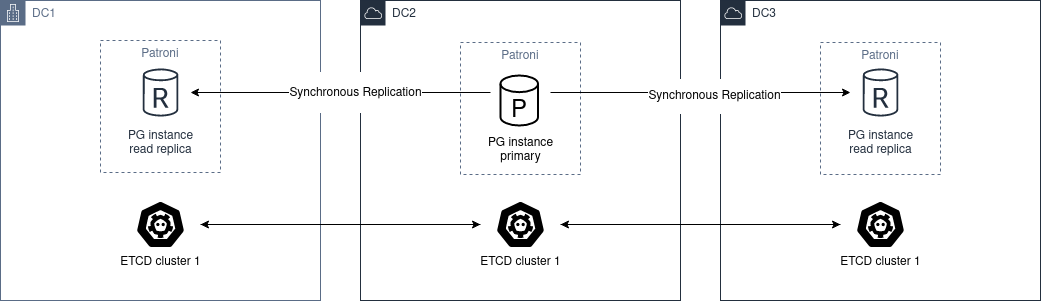
We must deploy a cluster of etcd, ZooKeeper or Consul through the different DC, with a minimum of 3 nodes, one in each zone.
Regarding postgres, we must deploy at least 2 nodes, in different DC. Then you have to set synchronous_mode: true in the global dynamic configuration.
This enables sync replication and the primary node will choose one of the nodes as synchronous.
Asynchronous Replication
With only two data centers, it is better to have two independent etcd clusters and run a Patroni standby cluster in the second data center. If the first site goes down, you can MANUALLY promote the standby_cluster.
The architecture diagram would be the following:
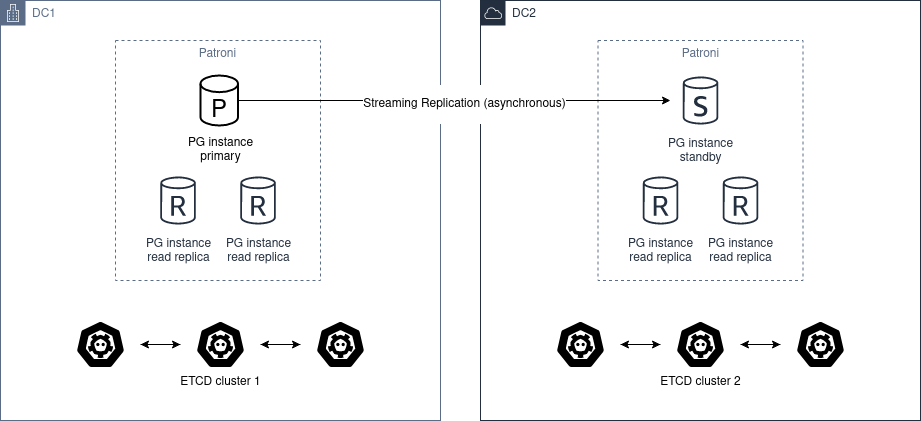
Automatic promotion is not possible, because DC2 will never able to figure out the state of DC1.
You should not use pg_ctl promote in this scenario, you need “manually promote” the healthy cluster by removing standby_cluster section from the dynamic configuration.
If the source cluster is still up and running and you promote the standby cluster you create a split-brain.
In case you want to return to the “initial” state, there are only two ways of resolving it:
- Add the standby_cluster section back and it will trigger
pg_rewind; however, forpg_rewindto function properly, either the cluster must be initialized withdata page checksums(--data-checksumsoption forinitdb) and/orwal_log_hintsmust be set toon, but there are still chances thatpg_rewindmight fail due to other factors. - Rebuild the standby cluster from scratch.
Before promoting standby cluster one have to manually ensure that the source cluster is down (STONITH). When DC1 recovers, the cluster has to be converted to a standby cluster.
Before doing that you may manually examine the database and extract all changes that happened between the time when network between DC1 and DC2 has stopped working and the time when you manually stopped the cluster in DC1.
Once extracted, you may also manually apply these changes to the cluster in DC2.
1.18 - FAQ
In this section you will find answers for the most frequently asked questions about Patroni. Each sub-section attempts to focus on different kinds of questions.
We hope that this helps you to clarify most of your questions. If you still have further concerns or find yourself facing an unexpected issue, please refer to chatting and reporting_bugs for instructions on how to get help or report issues.
Comparison with other HA solutions
Why does Patroni require a separate cluster of DCS nodes while other solutions like repmgr do not?
There are different ways of implementing HA solutions, each of them with their pros and cons.
Software like repmgr performs communication among the nodes to decide when actions should be taken.
Patroni on the other hand relies on the state stored in the DCS. The DCS acts as a source of truth for Patroni to decide what it should do.
While having a separate DCS cluster can make you bloat your architecture, this approach also makes it less likely for split-brain scenarios to happen in your Postgres cluster.
What is the difference between Patroni and other HA solutions in regards to Postgres management?
Patroni does not just manage the high availability of the Postgres cluster but also manages Postgres itself.
If Postgres nodes do not exist yet, it takes care of bootstrapping the primary and the standby nodes, and also manages Postgres configuration of the nodes. If the Postgres nodes already exist, Patroni will take over management of the cluster.
Besides the above, Patroni also has self-healing capabilities. In other words, if a primary node fails, Patroni will not only fail over to a replica, but also attempt to rejoin the former primary as a replica of the new primary. Similarly, if a replica fails, Patroni will attempt to rejoin that replica.
That is way we call Patroni as a “template for HA solutions”. It goes further than just managing physical replication: it manages Postgres as a whole.
DCS
Can I use the same etcd cluster to store data from two or more Patroni clusters?
Yes, you can!
Information about a Patroni cluster is stored in the DCS under a path prefixed with the namespace and scope Patroni settings.
As long as you do not have conflicting namespace and scope across different Patroni clusters, you should be able to use the same DCS cluster to store information from multiple Patroni clusters.
What occurs if I attempt to use the same combination of namespace and scope for different Patroni clusters that point to the same DCS cluster?
The second Patroni cluster that attempts to use the same namespace and scope will not be able to manage Postgres because it will find information related with that same combination in the DCS, but with an incompatible Postgres system identifier. The mismatch on the system identifier causes Patroni to abort the management of the second cluster, as it assumes that refers to a different cluster and that the user has misconfigured Patroni.
Make sure to use different namespace / scope when dealing with different Patroni clusters that share the same DCS cluster.
What occurs if I lose my DCS cluster?
The DCS is used to store basically status and the dynamic configuration of the Patroni cluster.
They very first consequence is that all the Patroni clusters that rely on that DCS will go to read-only mode – unless dcs_failsafe_mode is enabled.
What should I do if I lose my DCS cluster?
There are three possible outcomes upon losing your DCS cluster:
- The DCS cluster is fully recovered: this requires no action from the Patroni side. Once the DCS cluster is recovered, Patroni should be able to recover too;
- The DCS cluster is re-created in place, and the endpoints remain the same. No changes are required on the Patroni side;
- A new DCS cluster is created with different endpoints. You will need to update the DCS endpoints in the Patroni configuration of each Patroni node.
If you face scenario 2. or 3. Patroni will take care of creating the status information again based on the current status of the cluster, and recreate the dynamic configuration on the DCS based on a backup file named patroni.dynamic.json which is stored inside the Postgres data directory of each member of the Patroni cluster.
What occurs if I lose majority in my DCS cluster?
The DCS will become unresponsive, which will cause Patroni to demote the current read/write Postgres node.
Remember: Patroni relies on the state of the DCS to take actions on the cluster.
You can use the dcs_failsafe_mode to alleviate that situation.
patronictl
Do I need to run patronictl in the Patroni host?
No, you do not need to do that.
Running patronictl in the Patroni host is handy if you have access to the Patroni host because you can use the very same configuration file from the patroni agent for the patronictl application.
However, patronictl is basically a client and it can be executed from remote machines. You just need to provide it with enough configuration so it can reach the DCS and the REST API of the Patroni member(s).
Why did the information from one of my Patroni members disappear from the output of patronictl_list command?
Information shown by patronictl_list is based on the contents of the DCS.
If information about a member disappeared from the DCS it is very likely that the Patroni agent on that node is not running anymore, or it is not able to communicate with the DCS.
As the member is not able to update the information, the information eventually expires from the DCS, and consequently the member is not shown anymore in the output of patronictl_list.
Why is the information about one of my Patroni members not up-to-date in the output of patronictl_list command?
Information shown by patronictl_list is based on the contents of the DCS.
By default, that information is updated by Patroni roughly every loop_wait seconds. In other words, even if everything is normally functional you may still see a “delay” of up to loop_wait seconds in the information stored in the DCS.
Be aware that this is not a rule, though. Some operations performed by Patroni cause it to immediately update the DCS information.
Configuration
What is the difference between dynamic configuration and local configuration?
Dynamic configuration (or global configuration) is the configuration stored in the DCS, and which is applied to all members of the Patroni cluster. This is primarily where you should store your configuration.
Settings that are specific to a node, or settings that you would like to overwrite the global configuration with, you should set only on the desired Patroni member as a local configuration. That local configuration can be specified either through the configuration file or through environment variables.
See more in config.
What are the types of configuration in Patroni, and what is the precedence?
The types are:
- Dynamic configuration: applied to all members;
- Local configuration: applied to the local member, overrides dynamic configuration;
- Environment configuration: applied to the local member, overrides both dynamic and local configuration.
Note: some Postgres GUCs can only be set globally, i.e., through dynamic configuration. Besides that, there are GUCs which Patroni enforces a hard-coded value.
See more in config.
Is there any facility to help me create my Patroni configuration file?
Yes, there is.
You can use patroni --generate-sample-config or patroni --generate-config commands to generate a sample Patroni configuration or a Patroni configuration based on an existing Postgres instance, respectively.
Please refer to generate_sample_config and generate_config for more details.
I changed my parameters under bootstrap.dcs configuration but Patroni is not applying the changes to the cluster members. What is wrong?
The values configured under bootstrap.dcs are only used when bootstrapping a fresh cluster. Those values will be written to the DCS during the bootstrap.
After the bootstrap phase finishes, you will only be able to change the dynamic configuration through the DCS.
Refer to the next question for more details.
How can I change my dynamic configuration?
You need to change the configuration in the DCS. That is accomplished either through:
- patronictl_edit_config; or
- A
PATCHrequest to config_endpoint.
How can I change my local configuration?
You need to change the configuration file of the corresponding Patroni member and signal the Patroni agent with SIHGUP. You can do that using either of these approaches:
-
Send a
POSTrequest to the REST API reload_endpoint; or -
Run patronictl_reload; or
-
Locally signal the Patroni process with
SIGHUP:- If you started Patroni through systemd, you can use the command
systemctl reload PATRONI_UNIT.service,PATRONI_UNITbeing the name of the Patroni service; or - If you started Patroni through other means, you will need to identify the
patroniprocess and runkill -s HUP PID,PIDbeing the process ID of thepatroniprocess.
- If you started Patroni through systemd, you can use the command
Note: there are cases where a reload through the patronictl_reload may not work:
- Expired REST API certificates: you can mitigate that by using the
-koption of the patronictl; - Wrong credentials: for example when changing
restapiorctlcredentials in the configuration file, and using that same configuration file for Patroni and patronictl.
How can I change my environment configuration?
The environment configuration is only read by Patroni during startup.
With that in mind, if you change the environment configuration you will need to restart the corresponding Patroni agent.
Take care to not cause a failover in the cluster! You might be interested in checking patronictl_pause.
How can I reduce repetitive heartbeat log lines during normal operation?
If your logs are too noisy because of repeated lines like Lock owner: ... and no action. I am ..., configure log.deduplicate_heartbeat_logs: true.
You can set it either in the Patroni YAML file (log settings) or with PATRONI_LOG_DEDUPLICATE_HEARTBEAT_LOGS=true.
Keep in mind this reduces log volume by suppressing repeated heartbeat messages, but you also lose per-loop heartbeat visibility that can help during failover diagnostics.
What occurs if I change a Postgres GUC that requires a reload?
When you change the dynamic or the local configuration as explained in the previous questions, Patroni will take care of reloading the Postgres configuration for you.
What occurs if I change a Postgres GUC that requires a restart?
Patroni will mark the affected members with a flag of pending restart.
It is up to you to determine when and how to restart the members. That can be accomplished either through:
- patronictl_restart; or
- A
POSTrequest to restart_endpoint.
Note: some Postgres GUCs require a special management in terms of the order for restarting the Postgres nodes. Refer to shared_memory_gucs for more details.
What is the difference between etcd and etcd3 in Patroni configuration?
etcd uses the API version 2 of etcd, while etcd3 uses the API version 3 of etcd.
Be aware that information stored by the API version 2 is not manageable by API version 3 and vice-versa.
We recommend that you configure etcd3 instead of etcd because:
- API version 2 is disabled by default from Etcd v3.4 onward;
- API version 2 will be completely removed on Etcd v3.6.
I have use_slots enabled in my Patroni configuration, but when a cluster member goes offline for some time, the replication slot used by that member is dropped on the upstream node. What can I do to avoid that issue?
There are two options:
- You can tune
member_slots_ttl(default value30min, available since Patroni4.0.0and PostgreSQL 11 onwards) and replication slots for absent members will not be removed when the members downtime is shorter than the configured threshold. - You can configure permanent physical replication slots for the members.
Since Patroni 3.2.0 it is now possible to have member slots as permanent slots managed by Patroni.
Patroni will create the permanent physical slots on all nodes, and make sure to not remove the slots, as well as to advance the slots’ LSN on all nodes according to the LSN that has been consumed by the member.
Later, if you decide to remove the corresponding member, it’s your responsibility to adjust the permanent slots configuration, otherwise Patroni will keep the slots around forever.
Note: on Patroni older than 3.2.0 you could still have member slots configured as permanent physical slots, however they would be managed only on the current leader. That is, in case of failover/switchover these slots would be created on the new leader, but that wouldn’t guarantee that it had all WAL segments for the absent node.
Note: even with Patroni 3.2.0 there might be a small race condition. In the very beginning, when the slot is created on the replica it could be ahead of the same slot on the leader and in case if nobody is consuming the slot there is still a chance that some files could be missing after failover. With that in mind, it is recommended that you configure continuous archiving, which makes it possible to restore required WALs or perform PITR.
What is the difference between loop_wait, retry_timeout and ttl?
Patroni performs what we call a HA cycle from time to time. On each HA cycle it takes care of performing a series of checks on the cluster to determine its healthiness, and depending on the status it may take actions, like failing over to a standby.
loop_wait determines for how long, in seconds, Patroni should sleep before performing a new cycle of HA checks.
retry_timeout sets the timeout for retry operations on the DCS and on Postgres. For example: if the DCS is unresponsive for more than retry_timeout seconds, Patroni might demote the primary node as a security action.
ttl sets the lease time on the leader lock in the DCS. If the current leader of the cluster is not able to renew the lease during its HA cycles for longer than ttl, then the lease will expire and that will trigger a leader race in the cluster.
Note: when modifying these settings, please keep in mind that Patroni enforces the rule and minimal values described in dynamic section of the docs.
Postgres management
Can I change Postgres GUCs directly in Postgres configuration?
You can, but you should avoid that.
Postgres configuration is managed by Patroni, and attempts to edit the configuration files may end up being frustrated by Patroni as it may eventually overwrite them.
There are a few options available to overcome the management performed by Patroni:
- Change Postgres GUCs through
$PGDATA/postgresql.base.conf; or - Define a
postgresql.custom_confwhich will be used instead ofpostgresql.base.confso you can manage that externally; or - Change GUCs using
ALTER SYSTEM/ALTER DATABASE/ALTER USER.
You can find more information about that in the section important_configuration_rules.
In any case we recommend that you manage all the Postgres configuration through Patroni. That will centralize the management and make it easier to debug Patroni when needed.
Can I restart Postgres nodes directly?
No, you should not attempt to manage Postgres directly!
Any attempt of bouncing the Postgres server without Patroni can lead your cluster to face failovers.
If you need to manage the Postgres server, do that through the ways exposed by Patroni.
Is Patroni able to take over management of an already existing Postgres cluster?
Yes, it can!
Please refer to existing_data for detailed instructions.
How does Patroni manage Postgres?
Patroni takes care of bringing Postgres up and down by running the Postgres binaries, like pg_ctl and postgres.
With that in mind you MUST disable any other sources that could manage the Postgres clusters, like the systemd units, e.g. postgresql.service. Only Patroni should be able to start, stop and promote Postgres instances in the cluster. Not doing so may result in split-brain scenarios. For example: if the node running as a primary failed and the unit postgresql.service is enabled, it may bring Postgres back up and cause a split-brain.
Concepts and requirements
Which are the applications that make part of Patroni?
Patroni basically ships a couple applications:
patroni: This is the Patroni agent, which takes care of managing a Postgres node;- patronictl: This is a command-line utility used to interact with a Patroni cluster (perform switchovers, restarts, changes in the configuration, etc.). Please find more information in patronictl.
What is a standby cluster in Patroni?
It is a cluster that does not have any primary Postgres node running, i.e., there is no read/write member in the cluster.
These kinds of clusters exist to replicate data from another cluster and are usually useful when you want to replicate data across data centers.
There will be a leader in the cluster which will be a standby in charge of replicating changes from a remote Postgres node. Then, there will be a set of standbys configured with cascading replication from such leader member.
Note: the standby cluster doesn’t know anything about the source cluster which it is replicating from – it can even use restore_command instead of WAL streaming, and may use an absolutely independent DCS cluster.
Refer to standby_cluster for more details.
What is a leader in Patroni?
A leader in Patroni is like a coordinator of the cluster.
In a regular Patroni cluster, the leader will be the read/write node.
In a standby Patroni cluster, the leader (AKA standby leader) will be in charge of replicating from a remote Postgres node, and cascading those changes to the other members of the standby cluster.
Does Patroni require a minimum number of Postgres nodes in the cluster?
No, you can run Patroni with any number of Postgres nodes.
Remember: Patroni is decoupled from the DCS.
What does pause mean in Patroni?
Pause is an operation exposed by Patroni so the user can ask Patroni to step back in regards to Postgres management.
That is mainly useful when you want to perform maintenance on the cluster, and would like to avoid that Patroni takes decisions related with HA, like failing over to a standby when you stop the primary.
You can find more information about that in pause.
Automatic failover
How does the automatic failover mechanism of Patroni work?
Patroni automatic failover is based on what we call leader race.
Patroni stores the cluster’s status in the DCS, among them a leader lock which holds the name of the Patroni member which is the current leader of the cluster.
That leader lock has a time-to-live associated with it. If the leader node fails to update the lease of the leader lock in time, the key will eventually expire from the DCS.
When the leader lock expires, it triggers what Patroni calls a leader race: all nodes start performing checks to determine if they are the best candidates for taking over the leader role. Some of these checks include calls to the REST API of all other Patroni members.
All Patroni members that find themselves as the best candidate for taking over the leader lock will attempt to do so. The first Patroni member that is able to take the leader lock will promote itself to a read/write node (or standby leader), and the others will be configured to follow it.
Can I temporarily disable automatic failover in the Patroni cluster?
Yes, you can!
You can achieve that by temporarily pausing the cluster. This is typically useful for performing maintenance.
When you want to resume the automatic failover of the cluster, you just need to unpause it.
You can find more information about that in pause.
Bootstrapping and standbys creation
How does Patroni create a primary Postgres node? What about a standby Postgres node?
By default Patroni will use initdb to bootstrap a fresh cluster, and pg_basebackup to create standby nodes from a copy of the leader member.
You can customize that behavior by writing your custom bootstrap methods, and your custom replica creation methods.
Custom methods are usually useful when you want to restore backups created by backup tools like pgBackRest or Barman, for example.
For detailed information please refer to custom_bootstrap and custom_replica_creation.
Monitoring
How can I monitor my Patroni cluster?
Patroni exposes a couple handy endpoints in its rest_api:
/metrics: exposes monitoring metrics in a format that can be consumed by Prometheus;/patroni: exposes the status of the cluster in a JSON format. The information shown here is very similar to what is shown by the/metricsendpoint.
You can use those endpoints to implement monitoring checks.
1.19 - Release notes
Source: https://patroni.readthedocs.io/en/latest/releases.html
Version 4.1.5
Released 2026-08-12
Compatibility improvements
-
Compatibility with PostgreSQL 14.24, 15.19, 16.15, 17.11, 18.6 (Alexander Kukushkin)
Add the new
output_plugin_librariesGUC, which restricts logical decoding output plugins.
Improvements
-
Log REST API connection resets at
DEBUGinstead ofWARNING(Kyle McLaren)Ensure the common “client went away mid-write” variants are silenced without affecting the handling of genuine (non-connection) errors.
Bugfixes
-
Fix
thread_stack_sizevalidation alignment (Sundong Kim)Correct the
alignedvalue from65535to65536in thethread_stack_sizeschema entry. Previously,patroni --validate-configrejected almost every realistic value, including the524288default applied by the daemon itself. -
Allow validation of
synchronous_modeto accept'quorum'and boolean-like strings (Eray Araz)patroni --validate-configpreviously rejectedsynchronous_modevalues such asquorumand the PostgreSQL-style boolean strings that are accepted at runtime.
Version 4.1.4
Released 2026-07-07
Bugfixes
-
Check
NOTIFY_SOCKETenvironment variable before usingsystemdpackage (Polina Bungina)Only try to import and use the package when the
NOTIFY_SOCKETenvironment variable is set to avoidFileNotFoundError: [Errno 2] No such file or directoryexception. -
Unify
pg_replication_slotsquery (Polina Bungina)Incorrect handling of the
failoverandsyncedvalues was resulting inKeyErrorexceptions during removal of the incorrect logical replication slots. -
Consider version-specific authentication parameters in configuration generation (Polina Bungina)
In the
patroni --generate-configcommand, remove all inapplicable authentication parameters that were accidentally picked up from the environment, based on the version retrieved from a PostgreSQL connection. -
Handle
pg_rewindwhile a PostgreSQL instance is starting as a standby (Alexander Kukushkin)Fallback to
pg_controldatainformation when a PostgreSQL instance is running but is not yet accepting connections. -
Fix Prometheus metric type for
patroni_postgres_timeline(Huseyin Demir)Declare the
patroni_postgres_timelinemetric asgaugeinstead ofcounter, as it is not always monotonically increasing (e.g., it can be reset to 0 if a PostgreSQL instance is not running). -
Don’t stop watchdog until client backends are fully stopped (Alexander Kukushkin)
Previously, if
primary_stop_timeoutwas shorter than the minimum watchdog timeout, and the stop timeout actually expired, Patroni disabled the watchdog before all client backends had exited. -
Handle statement timeout error for monitoring query (Alexander Kukushkin)
In case of a statement timeout error, use the cached role as a fallback to avoid demoting the primary. Additionally, forcibly set
pg_stat_statements.tracktononefor the monitoring query to avoid expensivepg_stat_statementsGC calls. -
Drop Patroni-managed replication slots with
wal_status=lost(Alexander Kukushkin)Replication slots with
wal_status=lostare no longer usable. Patroni will now drop such slots and recreate them if needed. -
Fix role representation in patronictl member validation error (Polina Bungina)
Ensures the correct string representation is used within the exception message, preventing errors from being formatted like
Error: No CtlPostgresqlRole.REPLICA among provided members.
Version 4.1.3
Released 2026-05-05
Stability improvements
-
Properly handle mislabeled Etcd error (Ants Aasma)
Current Etcd versions raise
Unknownerror when Etcd leader is lost while updating the lease. Patroni will now override the reported error code toUnavailable.
Bugfixes
-
Use binary version when
PG_VERSIONfile does not exist (Polina Bungina)In some cases, for example when using custom bootstrap, the
PG_VERSIONfile may not be present in the data directory. In this case, Patroni was treating the version as 0.0, which was causing issues with some of the version-specific logic. With this fix, Patroni will try to get the version from the binary in such cases. -
Refactor logger initialization to avoid missing early log messages (Alexander Kukushkin)
Create
PatroniLoggerbefore loadingConfigto capture early log messages. -
Include
MONOTONIC_USECinRELOADING=1systemd notification (Alexander Kukushkin)systemd 257+ requires
MONOTONIC_USECalongsideRELOADING=1forType=notify-reloadservices. Without it,systemctl reloadhangs indefinitely.
Improvements
-
Skip single-user crash recovery when
backup_labelexists (Vadim Ponomarev)Skip single-user crash recovery and let PostgreSQL handle it during normal startup when starting a replica restored from an external backup (not using a custom bootstrap method).
-
Warn when running under
systemdwithoutpython-systemdpackage (Alexander Kukushkin)Instead of logging “systemd integration is not supported” at startup, check for
NOTIFY_SOCKETand warn only when actually running undersystemdwithout thepython-systemdpackage installed.
Version 4.1.2
Released 2026-04-21
Systemd support improvements
-
Add support for
notify-reloadsystemd unit type (Ronan Dunklau)Allows
systemctl reloadto wait until Patroni has actually processed the configuration reload by sendingRELOADING=1andREADY=1notifications to systemd. -
Send
STOPPING=1notification to systemd on shutdown (Alexander Kukushkin)Patroni now properly notifies systemd that it is shutting down, following the systemd notify protocol.
-
Do not let PostgreSQL to notify systemd (Alexander Kukushkin)
Remove
NotifyAccess=allfrom the example systemd unit file. FilterNOTIFY_SOCKETfrom the environment when starting PostgreSQL so it doesn’t sendREADY=1orSTOPPING=1to systemd. When taking over a PostgreSQL that was started before Patroni and already hasNOTIFY_SOCKET, re-assertREADY=1during PostgreSQL shutdown to counteract itsSTOPPING=1.
Version 4.1.1
Released 2026-04-08
Stability improvements
-
Compatibility with threading changes in python 3.11+ (Alexander Kukushkin)
Avoid starting/stopping threads at runtime. Introduce thread pools for REST API and for executing async tasks. Allow configuring global
thread_pool_sizeandrestapi.thread_pool_size. -
Compatibility with python 3.14 (Alexander Kukushkin)
Run tests against python 3.14 and fix compatibility issues.
-
Compatibility with Etcd security fixes in v3.6.9, v3.5.28, and v3.4.42 (Alexander Kukushkin)
These Etcd releases addressed CVEs and changed behavior so cluster topology reads and lease keepalive are no longer allowed without authentication. Patroni now handles this by authenticating in member-discovery and lease-keepalive paths, re-authenticating on auth failures, and retrying requests accordingly.
-
Improvements for Etcd3 error handling (Alexander Kukushkin)
Handle broken JSON responses, be flexible in how JSON error is parsed, and improve reporting for etcd internal errors.
Bugfixes
-
Retry leader update on temporary Kubernetes
403error (Sophia Ruan, Alexander Kukushkin)When the Kubernetes API temporarily returns
403 Permission Denied(for example during transient RBAC issues), Patroni now verifies whether the current node still holds leadership and retries the leader update withinretry_timeoutinstead of immediately demoting. -
Fix issue with renaming leader node in sync mode and pause (Alexander Kukushkin)
/synckey wasn’t updated after renaming the leader node with Patroni restart in pause (without Postgres restart). It prevented Patroni from promoting after the next restart without pause. -
Trigger
pg_rewindcheck when the same primary increased timeline (Alexander Kukushkin)Such timeline increase may happen as a result of crash recovery in a single-user mode plus promote after taking a leader key while other replica nodes are isolated from DCS. In this case replica nodes didn’t trigger
pg_rewindstate machine because the leader and thereforeprimary_conninfodidn’t change. -
Only write superuser password during
initdbbootstrap if it is non-empty (Michael Banck)Writing an empty password during
initdbbootstrap was causing issues. -
Fix bug with
failover_prioritywithsynchronous_mode=on(Alexander Kukushkin)tag.failover_priorityvalues were ignored whensynchronous_node_count > 1. -
Fix bug with
primary_conninfopassword comparison (Alexander Kukushkin)Starting from PostgreSQL 10, Patroni uses passfile in
primary_conninfoand failed to update the passfile after the replication password was updated in yaml-file configuration with reload. -
Don’t restart replica with
nofailovertag in pause mode (Alexander Kukushkin)Patroni used to start a manually shut down PostgreSQL replica in pause mode when it had
nofailovertag set totrue. -
Fix
check_recovery_conf()when PostgreSQL is in the starting state (Alexander Kukushkin)For PostgreSQL v12 and newer,
pg_settingscannot be queried while the server is still starting and not yet accepting connections. Missing recovery parameters are now added to the internal state when writingpostgresql.conf. Additionally, restore thePostgresql.is_starting()check inHa.is_healthiest_node(). -
Validate user options in dictionary format for
initdb/basebackup(m4rrypro)When
initdborbasebackupoptions were provided as a dictionary (instead of a list), theoption_is_allowed()validation was bypassed, allowing blocked options to be used. -
Allow server-side compression for
basebackupoption (m4rrypro)The
compressoption was completely blocked forbasebackup, but since PostgreSQL 15, server-side compression is useful and works transparently with plain format. Client-side compression is still rejected. -
Don’t reload PostgreSQL config while running custom bootstrap (Alexander Kukushkin)
Custom bootstrap could be complex and involve PostgreSQL starting and stopping multiple times. Reloads of PostgreSQL config during this process could lead to unexpected behavior.
-
Check that
postgresql.parametersis a dictionary (Alexander Kukushkin)Discard new config if
postgresql.parametersis not a dictionary.
Version 4.1.0
Released 2025-09-23
New features
-
Add support for systemd “notify” unit type (Ronan Dunklau)
Without a notify unit type, it is possible to start Patroni and immediately send it a SIGHUP signal using systemd, effectively killing it before it had time to set up its signal handlers.
-
Provide receive and replay LSN/lag information in API and ctl (Polina Bungina)
Patroni REST API
/clusterendpoint andpatronictl listcommand now provide receive LSN, replay LSN, receive lag, and replay lag information for each replica member. -
Ensure clean demotion to standby cluster (Polina Bungina)
Make sure the introduction of the standby_cluster section in the dynamic configuration leads to a clean cluster demotion.
-
Implement
patronictl demote-clusterandpromote-clustercommands (Polina Bungina)New commands for cluster demotion and promotion handle both the dynamic configuration editing and checking the result status.
-
Implement
sync_prioritytag (Polina Bungina)This parameter controls the priority a member should have during synchronous replica selection when synchronous_mode is set to
on. -
Implement
--printoption for--validate-config(Polina Bungina)Print out local configuration (including environment configuration overrides) after it has been successfully validated.
-
Implement
kubernetes.bootstrap_labels(Polina Bungina)This feature allows you to define labels that will be assigned to a member pod when in
initializing new cluster,running custom bootstrap script,starting after custom bootstrap, orcreating replicastate. -
Add configuration option to suppress duplicate heartbeat logs (Michael Morris)
If set to
true, successive heartbeat logs that are identical shall not be output. -
Add optional
cluster_typeattribute to permanent replication slots (Michael Banck)This allows you to set whether a particular permanent replication slot should always be created, or just on a primary or standby cluster.
-
Make HTTP Server header configurable (David Grierson)
Introduce the
restapi.server_tokensconfiguration parameter that allows you to restrict information disclosed in the HTTP Server header. -
Implement readiness API checks for replication on replica members (Ants Aasma)
The previous implementation considered replicas ready as soon as PostgreSQL was started. With this change, a replica pod is only considered ready when PostgreSQL is replicating and is not too far behind the leader.
Improvements
-
Reduce log level of watchdog configuration failure (Ants Aasma)
Show the
Could not activate Linux watchdog devicelog line on debug logging level, unless the watchdog is configured withrequiredmode. It was previously shown on info level. -
Take advantage of
written_lsnandlatest_end_lsnfrompg_stat_wal_receiver(Alexander Kukushkin)written_lsn, the actual write LSN, is now preferred over the one returned bypg_last_wal_receive_lsn(), which is in fact the flush LSN.latest_end_lsnpoints to WAL flush on the source host. In case of a primary, it allows better calculation of the replay lag, because values stored in DCS are updated only everyloop_waitseconds. -
Avoid interactions with slots created with the
failover=trueoption (Alexander Kukushkin)This change is required to make the logical failover slots feature fully functional.
-
Add PostgreSQL state to
/metricsREST API endpoint (Ivan Filianin)PostgreSQL instance state information is now available in the Prometheus format output of the
/metricsREST API endpoint.
Version 4.0.7
Released 2025-09-22
New features
-
Add support for PostgreSQL 18 RC1 (Alexander Kukushkin)
GUC’s validator rules were extended. Patroni now properly handles the new background I/O worker.
Bugfixes
-
Fix potential issue around resolving localhost to IPv6 on Windows (András Váczi)
When configuring
listen_addressesin PostgreSQL, using0.0.0.0or127.0.0.1will restrict listening to IPv4 only, excluding IPv6. On typical Windows systems, however,localhostoften resolves to the IPv6 address::1by default. To ensure compatibility, Patroni now configures PostgreSQL to listen on127.0.0.1, instead oflocalhost, on Windows systems. -
Return global config only when
/configkey exists in DCS (Alexander Kukushkin)Patroni REST API was returning an empty configuration instead of raising an error if the
/configkey was missing in DCS. -
Fix the issue of failsafe mode not being triggered in case of Etcd unavailability (Alexander Kukushkin)
Patroni was not always properly handling
etcd3exceptions, which resulted in failsafe mode not being triggered. -
Fix signal handler reentrancy deadlock (Waynerv)
Patroni running in a Docker container with
PID=1in some special cases was experiencing deadlock after receivingSIGCHLD. -
Recreate (permanent) physical slot when it doesn’t reserve WAL (Israel Barth Rubio)
Permanent physical replication slots created outside of Patroni scope without reserving WALs were causing a
replication slot cannot be advancederror. To avoid this, Patroni now recreates such slots. -
Handle watch cancellation messages in
etcd3properly (Alexander Kukushkin)When
etcd3sends a cancellation message to the watch channel, it doesn’t close the connection. This results in Patroni using stale data. Patroni now solves it by breaking a loop of reading chunked response and closing the connection on the Patroni side. -
Handle case when
HTTPConnectionsocket is wrapped withpyopenssl(Alexander Kukushkin)Patroni was not correctly using
pyopensslinterfaces, enforced inpython-etcd.
Documentation improvements
-
Improve 2-node cluster guidance (Nikolay Samokhvalov)
Clarify behaviour during failover and DCS requirements.
Version 4.0.6
Released 2025-06-06
Bugfixes
-
Fix bug in failover from a leader with a higher priority (Alexander Kukushkin)
Make sure Patroni ignores the former leader with higher priority when it reports the same
LSNas the current node. -
Fix permissions for the
postgresql.conffile created outside ofPGDATA(Michael Banck)Respect the system-wide umask value when creating the
postgresql.conffile outside of thePGDATAdirectory. -
Fix bug with switchover in
synchronous_mode=quorum(Alexander Kukushkin)Do not check quorum requirements when a candidate is specified.
-
Ignore stale Etcd nodes by comparing cluster term (Alexander Kukushkin)
Memorize the last known “raft_term” of the Etcd cluster, and when executing client requests, compare it with the “raft_term” reported by an Etcd node.
-
Update PostgreSQL configuration files on
SIGHUP(Alexander Kukushkin)Previously, Patroni was only replacing PostgreSQL configuration files if a change in global or local configuration was detected.
-
Properly handle
Unavailableexception raised byetcd3(Alexander Kukushkin)Patroni used to retry such requests on the same
etcd3node, while switching to another node is a better strategy. -
Improve
etcd3lease handling (Alexander Kukushkin)Make sure Patroni refreshes the
etcd3lease at least once per HA loop. -
Recheck annotations on 409 status code when attempting to acquire leader lock (Alexander Kukushkin)
Implement the same behavior as was done for the leader object read in Patroni version 4.0.3.
-
Consider
replay_lsnwhen advancing slots (Polina Bungina)Do not try to advance slots on replicas past the
replay_lsn. Additionally, advance the slot to thereplay_lsnposition if it is already past theconfirmed_flush_lsnof this slot on the replica but the replica has still not replayed the actualLSNat which this slot is on the primary. -
Make sure
CHECKPOINTis executed after promote (Alexander Kukushkin)It was possible that checkpoint task wasn’t reset on demote because
CHECKPOINTwasn’t yet finished. This resulted in using a staleresultwhen the next promote is triggered. -
Avoid running “offline” demotion concurrently (Alexander Kukushkin)
In case of a slow shutdown, it might happen that the next heartbeat loop hits the DCS error handling method again, resulting in
AsyncExecutor is busy, demoting from the main threadwarning and starting offline demotion again. -
Normalize the
data_dirvalue before renaming the data directory on initialization failure (Waynerv)Prevent a trailing slash in the
data_dirparameter value from breaking the renaming process after an initialization failure. -
Check that
synchronous_standby_namescontains the expected value (Alexander Kukushkin)Previously, the mechanism implementing the state machine for non-quorum synchronous replication didn’t check the actual value of
synchronous_standby_names, what resulted in a stale value ofsynchronous_standby_namesbeing used whenpg_stat_replicationis a subset ofsynchronous_standby_names.
Version 4.0.5
Released 2025-02-20
Stability improvements
-
Compatibility with
python-json-logger>=3.1(Alexander Kukushkin)Get rid of the warnings produced by the old API usage.
-
Compatibility with Python 3.13 (Alexander Kukushkin)
Run tests against Python 3.13.
-
Compatibility with
pyinstaller>=4.4(Joe Jensen)Fall back to the default
iter_modulesifpyinstallertocattribute is not present. -
Fix issues with PostgreSQL 9.5 support (Alexander Kukushkin)
- Properly handle
pg_rewindoutput format. - Consider
synchronous_standby_namesformat not supporting “num” specification.
- Properly handle
-
Compatibility with the latest changes in
urlparse(Alexander Kukushkin)urlparsedoesn’t accept multiple hosts with[]character in URL anymore. To mitigate the problem, switch to the native wrappers ofPQconninfoParse()fromlibpq, when it is possible, and use our implementation only for olderpsycopg2versions that are linked with an outdated version oflibpq.
Bugfixes
-
Show only the members to be restarted upon restart confirmation (András Váczi)
Previously, when doing
patronictl restart <clustername> --pending, the confirmation listed all members, regardless of whether their restart is pending. -
Cancel long-running jobs on Patroni stop and remove data directory on replica bootstrap failure (Alexander Kukushkin)
Previously, Patroni could be doing replica bootstrap, while
pg_basebackup/wal-g/pgBackRest/barmanor similar keep running. -
Properly handle cluster names with a slash in
patronictl edit-config(Antoni Mur)Replace a forward slash in
cluster_namewith an underscore. -
Avoid dropping physical slots too early (Alexander Kukushkin)
Postpone removal of physical replication slots containing
xminafter a failover: on the new primary – until this member is promoted, on replicas – until there is a leader in the cluster. -
Handle all exceptions raised by subprocess in
controldata()(Alexander Kukushkin)Patroni was not properly handling all exceptions possibly raised when calling
pg_controldatautility. -
Fix bug with a slot for a former leader not retained on failover (Alexander Kukushkin)
Avoid falsely relying on members being present in DCS, while on failover
/memberkey for the former leader is expiring exactly at the same time. -
Fix a couple of bugs in the quorum state machine (Alexander Kukushkin)
- When evaluating whether there are healthy nodes for a leader race, before demoting we need to take into account quorum requirements. Without it, the former leader may end up in recovery surrounded by asynchronous nodes.
QuorumStateResolverwasn’t correctly handling the case when a replica node quickly joined and disconnected.
Improvements
-
Improve error on am empty or non-dictionary configuration file (Julian)
Throw a more explicit exception when validating if Patroni configuration file contains a valid
Mappingobject.
Version 4.0.4
Released 2024-11-22
Stability improvements
-
Add compatibility with the
py-consulmodule (Alexander Kukushkin)python-consulmodule is unmaintained for a long time, whilepy-consulis the official replacement. Backward compatibility with python-consul is retained. -
Add compatibility with the
prettytable>=3.12.0module (Alexander Kukushkin)Address deprecation warnings.
-
Compatibility with the
ydiff==1.4.2module (Alexander Kukushkin)Fix compatibility issues for the latest version, constrain version in
requirements.txt, and introduce latest version compatibility test.
Bugfixes
-
Run
on_role_changecallback after a failed primary recovery (Polina Bungina, Alexander Kukushkin)Additionally run
on_role_changecallback for a primary that failed to start after a crash to increase chances the callback is executed, even if the further start as a replica fails. -
Fix a thread leak in
patronictl list -W(Alexander Kukushkin)Cache DCS instance object to avoid thread leak.
-
Ensure only supported parameters are written to the connection string (Alexander Kukushkin)
Patroni used to pass parameters introduced in newer versions to the connection string, which had been leading to connection errors.
Version 4.0.3
Released 2024-10-18
Bugfixes
-
Disable
pgauditwhen creating users not to expose password (kviset)Patroni was logging
superuser,replication, andrewindpasswords on their creation whenpgauditextension was enabled. -
Fix issue with mixed setups: primary on pre-Patroni v4 and replicas on v4+ (Alexander Kukushkin)
Use
xlog_locationextracted from/memberskey instead of trying to get a member’s slot position from/statuskey if Patroni version running on the leader is pre-4.0.0. Not doing so has been causing WALs accumulation on replicas. -
Do not ignore valid PostgreSQL GUCs that don’t have Patroni validator (Polina Bungina)
Still check against
postgres --describe-configif a GUC does not have a Patroni validator but is, in fact, a valid GUC.
Improvements
-
Recheck annotations on 409 status code when reading leader object in K8s (Alexander Kukushkin)
Avoid an additional update if
PATCHrequest was canceled by Patroni, while the request successfully updated the target. -
Add support of
sslnegotiationclient-side connection option (Alexander Kukushkin)sslnegotiationwas added to the final PostgreSQL 17 release.
Version 4.0.2
Released 2024-09-17
Bugfixes
-
Handle exceptions while discovering configuration validation files (Alexander Kukushkin)
Skip directories for which Patroni does not have sufficient permissions to perform list operations.
-
Make sure inactive hot physical replication slots don’t hold
xmin(Alexander Kukushkin, Polina Bungina)Since version 3.2.0 Patroni creates physical replication slots for all members on replicas and periodically moves them forward using
pg_replication_slot_advance()function. However if for any reasonhot_standby_feedbackis enabled and the primary is demoted to replica, the now inactive slots haveNOT NULLxminvalue propagated back to the new primary. This results inxminhorizon not being moved forward and vacuum not being able to clean up dead tuples. With this fix, Patroni recreates the physical replication slots that are supposed to be inactive but haveNOT NULLxminvalue. -
Fix unhandled
DCSErrorduring the startup phase (Waynerv)Ensure DCS connectivity before trying to check the uniqueness of the node name.
-
Explicitly include
CMDLINE_OPTIONSGUCs when queryingpg_settings(Alexander Kukushkin)Make sure all GUCs that are passed to postmaster as command line parameters are restored when Patroni is joining a running standby. This is a follow-up for the bug fixed in Patroni 3.2.2.
-
Fix bug in
synchronous_standby_namesquoting logic (Alexander Kukushkin)According to PostgreSQL documentation,
ANYandFIRSTkeywords are supposed to be double-quoted, which Patroni did not do before. -
Fix keepalive connection out-of-range issue (hadizamani021)
Ensure that
keepaliveoption value calculated based on thettlset does not exceed the maximum allowed value for the current platform.
Version 4.0.1
Released 2024-08-30
Bugfix
-
Patroni was creating unnecessary replication slots for itself (Alexander Kukushkin)
It was happening if
namecontains upper-case or special characters.
Version 4.0.0
Released 2024-08-29
- This version completes work on getting rid of the “master” term, in favor of “primary”. This means a couple of breaking changes, please read the release notes carefully. Upgrading to the Patroni 4+ will work reliably only if you run Patroni 3.1.0 or newer. Upgrading from an older version directly to 4+ is possible but may lead to unexpected behavior if the primary fails while the rest of the nodes are running on other Patroni versions.
Breaking changes
- The following breaking changes were introduced when getting rid of the non-inclusive “master” term in the Patroni code:
- On Kubernetes, Patroni by default will set
rolelabel toprimary. In case if you want to keep the old behavior and avoid downtime or lengthy complex migrations, you can configure parameterskubernetes.leader_label_valueandkubernetes.standby_leader_label_valuetomaster. Read more here. - Patroni role is written to DCS as
primaryinstead ofmaster. - Patroni role returned by Patroni REST API has been changed from
mastertoprimary. - Patroni REST API no longer accepts
role=masterin requests to/switchover,/failover,/restartendpoints. /metricsREST API endpoint will no longer reportpatroni_mastermetric.- patronictl no longer accepts
--masteroption for any command.--leaderor--primaryoptions should be used instead. no_masteroption in the declarative configuration of custom replica creation methods is no longer treated as a special option, please useno_leaderinstead.patroni_wale_restorescript doesn’t accept--no_masteroption anymore.patroni_barmanscript doesn’t accept--role=masteroption anymore.- All callback scripts are executed with
role=primaryoption passed instead ofrole=master.
- On Kubernetes, Patroni by default will set
patronictl failoverdoes not accept--leaderoption that was deprecated since Patroni 3.2.0.- User creation functionality (
bootstrap.usersconfiguration section) deprecated since Patroni 3.2.0 has been removed.
New features
-
Quorum-based failover (Ants Aasma, Alexander Kukushkin)
The feature implements quorum-based synchronous replication (available from PostgreSQL v10) which helps to reduce worst-case latencies, even during normal operation, as a higher latency of replicating to one standby can be compensated by other standbys. Patroni implements additional safeguards to prevent any user-visible data loss by choosing a failover candidate based on the latest transaction received.
-
Register Citus secondaries in
pg_dist_node(Alexander Kukushkin)Patroni now maintains the list of nodes with
role==replica,state==runningand withoutnoloadbalancetag inpg_dist_node. -
Configurable retention of members’ replication slots (Alexander Kukushkin)
Implements support of
member_slots_ttlglobal configuration parameter that controls for how long member replication slots should be kept around when the member key is absent. -
Make permissions of log files created by Patroni configurable (Alexander Kukushkin)
Allows to set specific permissions for log files created by Patroni. If not specified, permissions are set based on the current
umaskvalue. -
Compatibility with PostgreSQL 17 beta3 (Alexander Kukushkin)
GUC’s validator rules were extended. Patroni handles all the new auxiliary backends during shutdown and sets
dbnameinprimary_conninfo, as it is required for logical replication slots synchronization. -
Implement
--ignore-listen-portoption for Patroni config validation (Sahil Naphade)Make it possible to ignore already bound ports when running
patroni --validate-config.
Improvements
-
Make
wal_log_hintsconfigurable (Paul_Kim)Allows to avoid the overhead of
wal_log_hintsconfiguration being enabled in caseuse_pg_rewindis set tooff. -
Log
pg_basebackupcommand inDEBUGlevel (Waynerv)Facilitates failed initialization debugging.
Bugfixes
-
Advance permanent slots for cascading nodes while in failsafe (Alexander Kukushkin)
Ensure that slots for cascading replicas are properly advanced on the primary when failsafe mode is activated. It is done by extending replicas response on
POST /failsafeREST API request with theirxlog_location. -
Don’t let the current node be chosen as synchronous (Alexander Kukushkin)
There may be “something” streaming from the current primary node with
application_namethat matches the name of the current primary. Patroni was not properly handling this situation, which could end up in the primary being declared as a synchronous node and consequently was blocking switchovers. -
Ignore
restapi.allowlist_include_membersfor POST /failsafe (Alexander Kukushkin) -
Improve GUCs validation (Polina Bungina)
Due to additional validation through running
postgres --describe-configcommand, it was previously not possible to set GUCs not listed there through Patroni configuration. This limitation is now removed. -
Add line with
localhostto.pgpassfile when unix sockets are detected (Alexander Kukushkin)Patroni will add an additional line to
.pgpassfile ifhostparameter specified starts with/character. This allows to cover a corner case whenhostmatches the default socket directory path. -
Fix logging issues (Waynerv)
Defined proper request URL in failsafe handling logs and fixed the order of timestamps in postmaster check log.
Version 3.3.2
Released 2024-07-11
Bugfixes
-
Fix plain Postgres synchronous replication mode (Israel Barth Rubio)
Since synchronous_mode was introduced to Patroni, the plain Postgres synchronous replication was not working. With this bugfix, Patroni sets the value of
synchronous_standby_namesas configured by the user, if that is the case, when synchronous_mode is disabled. -
Handle logical slots invalidation on a standby (Polina Bungina)
Since PG16 logical replication slots on a standby can be invalidated due to horizon: from now on, Patroni forces copy (i.e., recreation) of invalidated slots.
-
Fix race condition with logical slot advance and copy (Alexander Kukushkin)
Due to this bug, it was a possible situation when an invalidated logical replication slot was copied with PostgreSQL restart more than once.
Version 3.3.1
Released 2024-06-17
Stability improvements
-
Compatibility with Python 3.12 (Alexander Kukushkin)
Handle a new attribute added to
logging.LogRecord.
Bugfixes
-
Fix infinite recursion in
replicatefromtags handling (Alexander Kukushkin)As a part of this fix, also improve
is_physical_slot()check and adjust documentation. -
Fix wrong role reporting in standby clusters (Alexander Kukushkin)
synchronous_standby_namesand synchronous replication only work on a real primary node and in the case of cascading replication are simply ignored by Postgres. Before this fix,patronictl listandGET /clusterwere falsely reporting some nodes as synchronous. -
Fix availability of the
allow_in_place_tablespacesGUC (Polina Bungina)allow_in_place_tablespaceswas not only added to PostgreSQL 15 but also backpatched to PostgreSQL 10-14.
Version 3.3.0
Released 2024-04-04
All older Partoni versions are not compatible with ydiff>=1.3.
There are the following options available to “fix” the problem:
- upgrade Patroni to the latest version
- install
ydiff<1.3after installing Patroni - install
cdiffmodule
New features
-
Add ability to pass
auth_datato Zookeeper client (Aras Mumcuyan)It allows to specify the authentication credentials to use for the connection.
-
Add a contrib script for
Barmanintegration (Israel Barth Rubio)Provide an application
patroni_barmanthat allows to performBarmanoperations remotely and can be used as a custom bootstrap/custom replica method or as anon_role_changecallback. Please check here for more information. -
Support
JSONlog format (alisalemmi)Apart from
plain(default), Patroni now also supportsjsonlog format. Requirespython-json-logger>=2.0.2library to be installed. -
Show
pending_restart_reasoninformation (Polina Bungina)Provide extended information about the PostgreSQL parameters that caused
pending_restartflag to be set. Bothpatronictl listand/patroniREST API endpoint now show the parameters names and their “diff” aspending_restart_reason. -
Implement
nostreamtag (Grigory Smolkin)If
nostreamtag is set totrue, the node will not use replication protocol to stream WAL but instead rely on archive recovery (ifrestore_commandis configured). It also disables copying and synchronization of permanent logical replication slots on the node itself and all its cascading replicas.
Improvements
-
Implement validation of the
logsection (Alexander Kukushkin)Until now validator was not checking the correctness of the logging configuration provided.
-
Improve logging for PostgreSQL parameters change (Polina Bungina)
Convert old values to a human-readable format and log information about the
pg_controldatavs Patroni global configuration mismatch.
Bugfixes
-
Properly filter out not allowed
pg_basebackupoptions (Israel Barth Rubio)Due to a bug, Patroni was not properly filtering out the not allowed options configured for the
basebackupreplica bootstrap method, when provided in the- setting: valueformat. -
Fix
etcd3authentication error handling (Alexander Kukushkin)Always retry one time on
etcd3authentication error if authentication was not done right before executing the request. Also, do not restart watchers on reauthentication. -
Improve logic of the validator files discovery (Waynerv)
Use
importliblibrary to discover the files with available configuration parameters when possible (for Python 3.9+). This implementation is more stable and doesn’t break the Patroni distributions based onziparchives. -
Use
target_session_attrsonly when multiple hosts are specified in the standby_cluster section (Alexander Kukushkin)target_session_attrs=read-writeis now added to theprimary_conninfoon the standby leader node only whenstandby_cluster.hostsection contains multiple hosts separated by commas. -
Add compatibility code for
ydifflibrary version 1.3+ (Alexander Kukushkin)Patroni is relying on some API from
ydiffthat is not public because it is supposed to be just a terminal tool rather than a python module. Unfortunately, the API change in 1.3 broke old Patroni versions.
Version 3.2.2
Released 2024-01-17
Bugfixes
-
Don’t let replica restore initialize key when DCS was wiped (Alexander Kukushkin)
It was happening in the method where Patroni was supposed to take over a standalone PG cluster.
-
Use consistent read when fetching just updated sync key from Consul (Alexander Kukushkin)
Consul doesn’t provide any interface to immediately get
ModifyIndexfor the key that we just updated, therefore we have to perform an explicit read operation. Since stale reads are allowed by default, we sometimes used to get an outdated version of the key. -
Reload Postgres config if a parameter that requires restart was reset to the original value (Polina Bungina)
Previously Patroni wasn’t updating the config, but only resetting the
pending_restart. -
Fix erroneous inverted logic of the confirmation prompt message when doing a failover to an async candidate in synchronous mode (Polina Bungina)
The problem existed only in patronictl.
-
Exclude leader from failover candidates in patronictl (Polina Bungina)
If the cluster is healthy, failing over to an existing leader is no-op.
-
Create Citus database and extension idempotently (Alexander Kukushkin, Zhao Junwang)
It will allow to create them in the
post_bootstrapscript in case if there is a need to add some more dependencies to the Citus database. -
Don’t filter our contradictory
nofailovertag (Polina Bungina)The configuration
{nofailover: false, failover_priority: 0}set on a node didn’t allow it to participate in the race, while it should, becausenofailovertag should take precedence. -
Fixed PyInstaller frozen issue (Sophia Ruan)
The
freeze_support()was called afterargparseand as a result, Patroni wasn’t able to start Postgres. -
Fixed bug in the config generator for patronictl and Citus configuration (Israel Barth Rubio)
It prevented patronictl and Citus configuration parameters set via environment variables from being written into the generated config.
-
Restore recovery GUCs and some Patroni-managed parameters when joining a running standby (Alexander Kukushkin)
Patroni was failing to restart Postgres v12 onwards with an error about missing
portin one of the internal structures. -
Fixes around
pending_restartflag (Polina Bungina)Don’t expose
pending_restartwhen in custom bootstrap withrecovery_target_action = promoteor when someone changedhot_standbyorwal_log_hintsusing for exampleALTER SYSTEM.
Version 3.2.1
Released 2023-11-30
Bugfixes
-
Limit accepted values for
--formatargument in patronictl (Alexander Kukushkin)It used to accept any arbitrary string and produce no output if the value wasn’t recognized.
-
Verify that replica nodes received checkpoint LSN on shutdown before releasing the leader key (Alexander Kukushkin)
Previously in some cases, we were using LSN of the SWITCH record that is followed by CHECKPOINT (if archiving mode is enabled). As a result the former primary sometimes had to do
pg_rewind, but there would be no data loss involved. -
Do a real HTTP request when performing node name uniqueness check (Alexander Kukushkin)
When running Patroni in containers it is possible that the traffic is routed using
docker-proxy, which listens on the port and accepts incoming connections. It was causing false positives. -
Fixed Citus support with Etcd v2 (Alexander Kukushkin)
Patroni was failing to deploy a new Citus cluster with Etcd v2.
-
Fixed
pg_rewindbehavior with Postgres v16+ (Alexander Kukushkin)The error message format of
pg_waldumpchanged in v16 which causedpg_rewindto be called by Patroni even when it was not necessary. -
Fixed bug with custom bootstrap (Alexander Kukushkin)
Patroni was falsely applying
--commandargument, which is a bootstrap command itself. -
Fixed the issue with REST API health check endpoints (Sophia Ruan)
There were chances that after Postgres restart it could return
unknownstate for Postgres because connections were not properly closed. -
Cache
postgres --describe-configoutput results (Waynerv)They are used to figure out which GUCs are available to validate PostgreSQL configuration and we don’t expect this list to change while Patroni is running.
Version 3.2.0
Released 2023-10-25
Deprecation notice
- The
bootstrap.userssupport will be removed in version 4.0.0. If you need to create users after deploying a new cluster please use thebootstrap.post_bootstraphook for that.
Breaking changes
-
Enforce
loop_wait + 2*retry_timeout <= ttlrule and hard-code minimal possible values (Alexander Kukushkin)Minimal values:
loop_wait=2,retry_timeout=3,ttl=20. In case values are smaller or violate the rule they are adjusted and a warning is written to Patroni logs.
New features
-
Failover priority (Mark Pekala)
With the help of
tags.failover_priorityit’s now possible to make a node more preferred during the leader race. More details in the documentation (ref tags). -
Implemented
patroni --generate-config [--dsn DSN]andpatroni --generate-sample-config(Polina Bungina)It allows to generate a config file for the running PostgreSQL cluster or a sample config file for the new Patroni cluster.
-
Use a dedicated connection to Postgres for Patroni REST API (Alexander Kukushkin)
It helps to avoid blocking the main heartbeat loop if the system is under stress.
-
Enrich some endpoints with the
nameof the node (sskserk)For the monitoring endpoint
nameis added next to thescopeand for metrics endpoint thenameis added to tags. -
Ensure strict failover/switchover difference (Polina Bungina)
Be more precise in log messages and allow failing over to an asynchronous node in a healthy synchronous cluster.
-
Make permanent physical replication slots behave similarly to permanent logical slots (Alexander Kukushkin)
Create permanent physical replication slots on all nodes that are allowed to become the leader and use
pg_replication_slot_advance()function to advancerestart_lsnfor slots on standby nodes. -
Add capability of specifying namespace through
--dcsargument in patronictl (Israel Barth Rubio)It could be handy if patronictl is used without a configuration file.
-
Add support for additional parameters in custom bootstrap configuration (Israel Barth Rubio)
Previously it was only possible to add custom arguments to the
commandand now one could list them as a mapping.
Improvements
-
Set
citus.local_hostnameGUC to the same value which is used by Patroni to connect to the Postgres (Alexander Kukushkin)There are cases when Citus wants to have a connection to the local Postgres. By default it uses
localhost, which is not always available.
Bugfixes
-
Ignore synchronous_mode setting in a standby cluster (Polina Bungina)
Postgres doesn’t support cascading synchronous replication and not ignoring synchronous_mode was breaking a switchover in a standby cluster.
-
Handle SIGCHLD for
on_reloadcallback (Alexander Kukushkin)Not doing so results in a zombie process, which is reaped only when the next
on_reloadis executed. -
Handle
AuthOldRevisionerror when working with Etcd v3 (Alexander Kukushkin, Kenny Do)The error is raised if Etcd is configured to use JWT and when the user database in Etcd is updated.
Version 3.1.2
Released 2023-09-26
Bugfixes
-
Fixed bug with
wal_keep_sizechecks (Alexander Kukushkin)The
wal_keep_sizeis a GUC that normally has a unit and Patroni was failing to cast its value toint. As a result the value ofbootstrap.dcswas not written to the/configkey afterwards. -
Detect and resolve inconsistencies between
/synckey andsynchronous_standby_names(Alexander Kukushkin)Normally, Patroni updates
/syncandsynchronous_standby_namesin a very specific order, but in case of a bug or when someone manually resetsynchronous_standby_names, Patroni was getting into an inconsistent state. As a result it was possible that the failover happens to an asynchronous node. -
Read GUC’s values when joining running Postgres (Alexander Kukushkin)
When restarted in pause, Patroni was discarding the
synchronous_standby_namesGUC from thepostgresql.conf. To solve it and avoid similar issues, Patroni will read GUC’s value if it is joining an already running Postgres. -
Silenced annoying warnings when checking for node uniqueness (Alexander Kukushkin)
WARNINGmessages are produced byurllib3if Patroni is quickly restarted.
Version 3.1.1
Released 2023-09-20
Bugfixes
-
Reset failsafe state on promote (ChenChangAo)
If switchover/failover happened shortly after failsafe mode had been activated, the newly promoted primary was demoting itself after failsafe becomes inactive.
-
Silence useless warnings in patronictl (Alexander Kukushkin)
If patronictl uses the same patroni.yaml file as Patroni and can access
PGDATAdirectory it might have been showing annoying warnings about incorrect values in the global configuration. -
Explicitly enable synchronous mode for a corner case (Alexander Kukushkin)
Synchronous mode effectively was never activated if there are no replicas streaming from the primary.
-
Fixed bug with
0integer values validation (Israel Barth Rubio)In most cases, it didn’t cause any issues, just warnings.
-
Don’t return logical slots for standby cluster (Alexander Kukushkin)
Patroni can’t create logical replication slots in the standby cluster, thus they should be ignored if they are defined in the global configuration.
-
Avoid showing docstring in
patronictl --helpoutput (Israel Barth Rubio)The
clickmodule needs to get a special hint for that. -
Fixed bug with
kubernetes.standby_leader_label_value(Alexander Kukushkin)This feature effectively never worked.
-
Returned cluster system identifier to the
patronictl listoutput (Polina Bungina)The problem was introduced while implementing the support for Citus, where we need to hide the identifier because it is different for coordinator and all workers.
-
Override
write_leader_optimemethod in Kubernetes implementation (Alexander Kukushkin)The method is supposed to write shutdown LSN to the leader Endpoint/ConfigMap when there are no healthy replicas available to become the new primary.
-
Don’t start stopped postgres in pause (Alexander Kukushkin)
Due to a race condition, Patroni was falsely assuming that the standby should be restarted because some recovery parameters (
primary_conninfoor similar) were changed. -
Fixed bug in
patronictl querycommand (Israel Barth Rubio)It didn’t work when only
-margument was provided or when none of-ror-mwere provided. -
Properly treat integer parameters that are used in the command line to start postgres (Polina Bungina)
If values are supplied as strings and not casted to integer it was resulting in an incorrect calculation of
max_prepared_transactionsbased onmax_connectionsfor Citus clusters. -
Don’t rely on
pg_stat_wal_receiverwhen deciding onpg_rewind(Alexander Kukushkin)It could happen that
received_tlireported bypg_stat_wal_receiveris ahead of the actual replayed timeline, while the timeline reported byDENTIFY_SYSTEMvia replication connection is always correct.
Version 3.1.0
Released 2023-08-03
Breaking changes
-
Changed semantic of
restapi.keyfileandrestapi.certfile(Alexander Kukushkin)Previously Patroni was using
restapi.keyfileandrestapi.certfileas client certificates as a fallback if there were no respective configuration parameters in thectlsection.
If you enabled client certificates validation (restapi.verify_client is set to required), you also must provide valid client certificates in the ctl.certfile, ctl.keyfile, ctl.keyfile_password. If not provided, Patroni will not work correctly.
New features
-
Make Pod role label configurable (Waynerv)
Values could be customized using
kubernetes.leader_label_value,kubernetes.follower_label_valueandkubernetes.standby_leader_label_valueparameters. This feature will be very useful when we change themasterrole to theprimary. You can read more about the feature and migration steps here.
Improvements
-
Various improvements of
patroni --validate-config(Alexander Kukushkin)Improved parameter validation for different DCS,
bootstrap.dcs,ctl,restapi, and watchdog sections. -
Start Postgres not in recovery if it crashed during recovery while Patroni is running (Alexander Kukushkin)
It may reduce recovery time and will help to prevent unnecessary timeline increments.
-
Avoid unnecessary updates of
/statuskey (Alexander Kukushkin)When there are no permanent logical slots Patroni was updating the
/statuson every heartbeat loop even when LSN on the primary didn’t move forward. -
Don’t allow stale primary to win the leader race (Alexander Kukushkin)
If Patroni was hanging during a significant time due to lack of resources it will additionally check that no other nodes promoted Postgres before acquiring the leader lock.
-
Implemented visibility of certain PostgreSQL parameters validation (Alexander Kukushkin, Feike Steenbergen)
If validation of
max_connections,max_wal_senders,max_prepared_transactions,max_locks_per_transaction,max_replication_slots, ormax_worker_processesfailed Patroni was using some sane default value. Now in addition to that it will also show a warning. -
Set permissions for files and directories created in
PGDATA(Alexander Kukushkin)All files created by Patroni had only owner read/write permissions. This behaviour was breaking backup tools that run under a different user and relying on group read permissions. Now Patroni honors permissions on
PGDATAand correctly sets permissions on all directories and files it creates insidePGDATA.
Bugfixes
-
Run
archive_commandthrough shell (Waynerv)Patroni might archive some WAL segments before doing crash recovery in a single-user mode or before
pg_rewind. If the archive_command contains some shell operators, like&&it didn’t work with Patroni. -
Fixed “on switchover” shutdown checks (Polina Bungina)
It was possible that specified candidate is still streaming and didn’t received shut down checking but the leader key was removed because some other nodes were healthy.
-
Fixed “is primary” check (Alexander Kukushkin)
During the leader race replicas were not able to recognize that Postgres on the old leader is still running as a primary.
-
Fixed
patronictl list(Alexander Kukushkin)The Cluster name field was missing in
tsv,json, andyamloutput formats. -
Fixed
pg_rewindbehaviour after pause (Alexander Kukushkin)Under certain conditions, Patroni wasn’t able to join the false primary back to the cluster with
pg_rewindafter coming out of maintenance mode. -
Fixed bug in Etcd v3 implementation (Alexander Kukushkin)
Invalidate internal KV cache if key update performed using
create_revision/mod_revisionfield due to revision mismatch. -
Fixed behaviour of replicas in standby cluster in pause (Alexander Kukushkin)
When the leader key expires replicas in standby cluster will not follow the remote node but keep
primary_conninfoas it is.
Version 3.0.4
Released 2023-07-13
New features
-
Make the replication status of standby nodes visible (Alexander Kukushkin)
For PostgreSQL 9.6+ Patroni will report the replication state as
streamingwhen the standby is streaming from the other node orin archive recoverywhen there is no replication connection andrestore_commandis set. The state is visible inmemberkeys in DCS, in the REST API, and inpatronictl listoutput.
Improvements
-
Improved error messages with Etcd v3 (Alexander Kukushkin)
When Etcd v3 cluster isn’t accessible Patroni was reporting that it can’t access
/v2endpoints. -
Use quorum read in patronictl if it is possible (Alexander Kukushkin)
Etcd or Consul clusters could be degraded to read-only, but from the patronictl view everything was fine. Now it will fail with the error.
-
Prevent splitbrain from duplicate names in configuration (Mark Pekala)
When starting Patroni will check if node with the same name is registered in DCS, and try to query its REST API. If REST API is accessible Patroni exits with an error. It will help to protect from the human error.
-
Start Postgres not in recovery if it crashed while Patroni is running (Alexander Kukushkin)
It may reduce recovery time and will help from unnecessary timeline increments.
Bugfixes
-
REST API SSL certificate were not reloaded upon receiving a SIGHUP (Israel Barth Rubio)
Regression was introduced in 3.0.3.
-
Fixed integer GUCs validation for parameters like
max_connections(Feike Steenbergen)Patroni didn’t like quoted numeric values. Regression was introduced in 3.0.3.
-
Fix issue with synchronous_mode (Alexander Kukushkin)
Execute
txid_current()withsynchronous_commit=offso it doesn’t accidentally wait for absent synchronous standbys whensynchronous_mode_strictis enabled.
Version 3.0.3
Released 2023-06-22
New features
-
Compatibility with PostgreSQL 16 beta1 (Alexander Kukushkin)
Extended GUC’s validator rules.
-
Make PostgreSQL GUC’s validator extensible (Israel Barth Rubio)
Validator rules are loaded from YAML files located in
patroni/postgresql/available_parameters/directory. Files are ordered in alphabetical order and applied one after another. It makes possible to have custom validators for non-standard Postgres distributions. -
Added
restapi.request_queue_sizeoption (Andrey Zhidenkov, Aleksei Sukhov)Sets request queue size for TCP socket used by Patroni REST API. Once the queue is full, further requests get a “Connection denied” error. The default value is 5.
-
Call
initdbdirectly when initializing a new cluster (Matt Baker)Previously it was called via
pg_ctl, what required a special quoting of parameters passed toinitdb. -
Added before stop hook (Le Duane)
The hook could be configured via
postgresql.before_stopand is executed right beforepg_ctl stop. The exit code doesn’t impact shutdown process. -
Added support for custom Postgres binary names (Israel Barth Rubio, Polina Bungina)
When using a custom Postgres distribution it may be the case that the Postgres binaries are compiled with different names other than the ones used by the community Postgres distribution. Custom binary names could be configured using
postgresql.bin_name.*andPATRONI_POSTGRESQL_BIN_*environment variables.
Improvements
-
Various improvements of
patroni --validate-config(Polina Bungina)- Make
bootstrap.initdboptional. It is only required for new clusters, butpatroni --validate-configwas complaining if it was missing in the config. - Don’t error out when
postgresql.bin_diris empty or not set. Try to first find Postgres binaries in the default PATH instead. - Make
postgresql.authentication.rewindsection optional. If it is missing, Patroni is using the superuser.
- Make
-
Improved error reporting in patronictl (Israel Barth Rubio)
The
\nsymbol was rendered as it is, instead of the actual newline symbol.
Bugfixes
-
Fixed issue in Citus support (Alexander Kukushkin)
If the REST API call from the promoted worker to the coordinator failed during switchover it was leaving the given Citus group blocked during indefinite time.
-
Allow
etcd3URL in--dcs-urloption of patronictl (Israel Barth Rubio)If users attempted to pass a
etcd3URL through--dcs-urloption of patronictl they would face an exception.
Version 3.0.2
Released 2023-03-24
Version 3.0.2 dropped support of Python older than 3.6.
New features
-
Added sync standby replica status to
/metricsendpoint (Thomas von Dein, Alexander Kukushkin)Before were only reporting
primary/standby_leader/replica. -
User-friendly handling of
PAGERin patronictl (Israel Barth Rubio)It makes pager configurable via
PAGERenvironment variable, which overrides defaultlessandmore. -
Make K8s retriable HTTP status code configurable (Alexander Kukushkin)
On some managed platforms it is possible to get status code
401 Unauthorized, which sometimes gets resolved after a few retries.
Improvements
-
Set
hot_standbytooffduring custom bootstrap only ifrecovery_target_actionis set topromote(Alexander Kukushkin)It was necessary to make
recovery_target_action=pausework correctly. -
Don’t allow
on_reloadcallback to kill other callbacks (Alexander Kukushkin)on_start/on_stop/on_role_changeare usually used to add/remove Virtual IP andon_reloadshould not interfere with them. -
Switched to
IMDSFetcherin aws callback example script (Polina Bungina)The
IMDSv2requires a token to work with and theIMDSFetcherhandles it transparently.
Bugfixes
-
Fixed
patronictl switchoveron Citus cluster running on Kubernetes (Lukáš Lalinský)It didn’t work for namespaces different from
default. -
Don’t write to
PGDATAif major version is not known (Alexander Kukushkin)If right after the start
PGDATAwas empty (maybe wasn’t yet mounted), Patroni was making a false assumption about PostgreSQL version and falsely creatingrecovery.conffile even if the actual major version is v10+. -
Fixed bug with Citus metadata after coordinator failover (Alexander Kukushkin)
The
citus_set_coordinator_host()call doesn’t cause metadata sync and the change was invisible on worker nodes. The issue is solved by switching tocitus_update_node(). -
Use etcd hosts listed in the config file as a fallback when all etcd nodes “failed” (Alexander Kukushkin)
The etcd cluster may change topology over time and Patroni tries to follow it. If at some point all nodes became unreachable Patroni will use a combination of nodes from the config plus the last known topology when trying to reconnect.
Version 3.0.1
Released 2023-02-16
Bugfixes
-
Pass proper role name to an
on_role_changecallback script’. (Alexander Kukushkin, Polina Bungina)Patroni used to erroneously pass
promotedrole to anon_role_changecallback script on promotion. The passed role name changed back tomaster. This regression was introduced in 3.0.0.
Version 3.0.0
Released 2023-01-30
This version adds integration with Citus and makes it possible to survive temporary DCS outages without demoting primary.
-
Version 3.0.0 is the last release supporting Python 2.7. Upcoming release will drop support of Python versions older than 3.7.
-
The RAFT support is deprecated. We will do our best to maintain it, but take neither guarantee nor responsibility for possible issues.
-
This version is the first step in getting rid of the “master”, in favor of “primary”. Upgrading to the next major release will work reliably only if you run at least 3.0.0.
New features
-
DCS failsafe mode (Alexander Kukushkin, Polina Bungina)
If the feature is enabled it will allow Patroni cluster to survive temporary DCS outages. You can find more details in the documentation.
-
Citus support (Alexander Kukushkin, Polina Bungina, Jelte Fennema)
Patroni enables easy deployment and management of Citus clusters with HA. Please check here page for more information.
Improvements
-
Suppress recurring errors when dropping unknown but active replication slots (Michael Banck)
Patroni will still write these logs, but only in DEBUG.
-
Run only one monitoring query per HA loop (Alexander Kukushkin)
It wasn’t the case if synchronous replication is enabled.
-
Keep only latest failed data directory (William Albertus Dembo)
If bootstrap failed Patroni used to rename $PGDATA folder with timestamp suffix. From now on the suffix will be
.failedand if such folder exists it is removed before renaming. -
Improved check of synchronous replication connections (Alexander Kukushkin)
When the new host is added to the
synchronous_standby_namesit will be set as synchronous in DCS only when it managed to catch up with the primary in addition topg_stat_replication.sync_state = 'sync'.
Removed functionality
-
Remove
patronictl scaffold(Alexander Kukushkin)The only reason for having it was a hacky way of running standby clusters.
Version 2.1.7
Released 2023-01-04
Bugfixes
-
Fixed little incompatibilities with legacy python modules (Alexander Kukushkin)
They prevented from building/running Patroni on Debian buster/Ubuntu bionic.
Version 2.1.6
Released 2022-12-30
Improvements
-
Fix annoying exceptions on ssl socket shutdown (Alexander Kukushkin)
The HAProxy is closing connections as soon as it got the HTTP Status code leaving no time for Patroni to properly shutdown SSL connection.
-
Adjust example Dockerfile for arm64 (Polina Bungina)
Remove explicit
amd64andx86_64, don’t removelibnss_files.so.*.
Security improvements
-
Enforce
search_path=pg_catalogfor non-replication connections (Alexander Kukushkin)Since Patroni is heavily relying on superuser connections, we want to protect it from the possible attacks carried out using user-defined functions and/or operators in
publicschema with the same name and signature as the corresponding objects inpg_catalog. For that,search_path=pg_catalogis enforced for all connections created by Patroni (except replication connections). -
Prevent passwords from being recorded in
pg_stat_statements(Feike Steenbergen)It is achieved by setting
pg_stat_statements.track_utility=offwhen creating users.
Bugfixes
-
Declare
proxy_addressas optional (Denis Laxalde)As it is effectively a non-required option.
-
Improve behaviour of the insecure option (Alexander Kukushkin)
Ctl’s
insecureoption didn’t work properly when client certificates were used for REST API requests. -
Take watchdog configuration from
bootstrap.dcswhen the new cluster is bootstrapped (Matt Baker)Patroni used to initially configure watchdog with defaults when bootstrapping a new cluster rather than taking configuration used to bootstrap the DCS.
-
Fix the way file extensions are treated while finding executables in WIN32 (Martín Marqués)
Only add
.exeto a file name if it has no extension yet. -
Fix Consul TTL setup (Alexander Kukushkin)
We used
ttl/2.0when setting the value on the HTTPClient, but forgot to multiply the current value by 2 in the class’ property. It was resulting in Consul TTL off by twice.
Removed functionality
-
Remove
patronictl configure(Polina Bungina)There is no more need for a separate patronictl config creation.
Version 2.1.5
Released 2022-11-28
This version enhances compatibility with PostgreSQL 15 and declares Etcd v3 support as production ready. The Patroni on Raft remains in Beta.
New features
-
Improve
patroni --validate-config(Denis Laxalde)Exit with code 1 if config is invalid and print errors to stderr.
-
Don’t drop replication slots in pause (Alexander Kukushkin)
Patroni is automatically creating/removing physical replication slots when members are joining/leaving the cluster. In pause slots will no longer be removed.
-
Support the
HEADrequest method for monitoring endpoints (Robert Cutajar)If used instead of
GETPatroni will return only the HTTP Status Code. -
Support behave tests on Windows (Alexander Kukushkin)
Emulate graceful Patroni shutdown (
SIGTERM) on Windows by introduce the new REST API endpointPOST /sigterm. -
Introduce
postgresql.proxy_address(Alexander Kukushkin)It will be written to the member key in DCS as the
proxy_urland could be used/useful for service discovery.
Stability improvements
-
Call
pg_replication_slot_advance()from a thread (Alexander Kukushkin)On busy clusters with many logical replication slots the
pg_replication_slot_advance()call was affecting the main HA loop and could result in the member key expiration. -
Archive possibly missing WALs before calling
pg_rewindon the old primary (Polina Bungina)If the primary crashed and was down during considerable time, some WAL files could be missing from archive and from the new primary. There is a chance that
pg_rewindcould remove these WAL files from the old primary making it impossible to start it as a standby. By archivingreadyWAL files we not only mitigate this problem but in general improving continues archiving experience. -
Ignore
403errors when trying to create Kubernetes Service (Nick Hudson, Polina Bungina)Patroni was spamming logs by unsuccessful attempts to create the service, which in fact could already exist.
-
Improve liveness probe (Alexander Kukushkin)
The liveness problem will start failing if the heartbeat loop is running longer than
ttlon the primary or2\*ttlon the replica. That will allow us to use it as an alternative for watchdog on Kubernetes. -
Make sure only sync node tries to grab the lock when switchover (Alexander Kukushkin, Polina Bungina)
Previously there was a slim chance that up-to-date async member could become the leader if the manual switchover was performed without specifying the target.
-
Avoid cloning while bootstrap is running (Ants Aasma)
Do not allow a create replica method that does not require a leader to be triggered while the cluster bootstrap is running.
-
Compatibility with kazoo-2.9.0 (Alexander Kukushkin)
Depending on python version the
SequentialThreadingHandler.select()method may raiseTypeErrorandIOErrorexceptions ifselect()is called on the closed socket. -
Explicitly shut down SSL connection before socket shutdown (Alexander Kukushkin)
Not doing it resulted in
unexpected eof while readingerrors with OpenSSL 3.0. -
Compatibility with
prettytable\>=2.2.0(Alexander Kukushkin)Due to the internal API changes the cluster name header was shown on the incorrect line.
Bugfixes
-
Handle expired token for Etcd lease_grant (monsterxx03)
In case of error get the new token and retry request.
-
Fix bug in the
GET /read-only-syncendpoint (Alexander Kukushkin)It was introduced in previous release and effectively never worked.
-
Handle the case when data dir storage disappeared (Alexander Kukushkin)
Patroni is periodically checking that the PGDATA is there and not empty, but in case of issues with storage the
os.listdir()is raising theOSErrorexception, breaking the heart-beat loop. -
Apply
master_stop_timeoutwhen waiting for user backends to close (Alexander Kukushkin)Something that looks like user backend could be in fact a background worker (e.g., Citus Maintenance Daemon) that is failing to stop.
-
Accept
*:<port>forpostgresql.listen(Denis Laxalde)The
patroni --validate-configwas complaining about it being invalid. -
Timeouts fixes in Raft (Alexander Kukushkin)
When Patroni or patronictl are starting they try to get Raft cluster topology from known members. These calls were made without proper timeouts.
-
Forcefully update consul service if token was changed (John A. Lotoski)
Not doing so results in errors “rpc error making call: rpc error making call: ACL not found”.
Version 2.1.4
Released 2022-06-01
New features
-
Improve
pg_rewindbehavior on typical Debian/Ubuntu systems (Gunnar “Nick” Bluth)On Postgres setups that keep
postgresql.confoutside of the data directory (e.g. Ubuntu/Debian packages),pg_rewind --restore-target-walfails to figure out the value of therestore_command. -
Allow setting
TLSServerNameon Consul service checks (Michael Gmelin)Useful when checks are performed by IP and the Consul
node_nameis not a FQDN. -
Added
ppc64lesupport in watchdog (Jean-Michel Scheiwiler)And fixed watchdog support on some non-x86 platforms.
-
Switched aws.py callback from
bototoboto3(Alexander Kukushkin)
boto2.x is abandoned since 2018 and fails with python 3.9.
-
Periodically refresh service account token on K8s (Haitao Li)
Since Kubernetes v1.21 service account tokens expire in 1 hour.
-
Added
/read-only-syncmonitoring endpoint (Dennis4b)It is similar to the
/read-onlybut includes only synchronous replicas.
Stability improvements
-
Don’t copy the logical replication slot to a replica if there is a configuration mismatch in the logical decoding setup with the primary (Alexander Kukushkin)
A replica won’t copy a logical replication slot from the primary anymore if the slot doesn’t match the
pluginordatabaseconfiguration options. Previously, the check for whether the slot matches those configuration options was not performed until after the replica copied the slot and started with it, resulting in unnecessary and repeated restarts. -
Special handling of recovery configuration parameters for PostgreSQL v12+ (Alexander Kukushkin)
While starting as replica Patroni should be able to update
postgresql.confand restart/reload if the leader address has changed by caching current parameters values instead of querying them frompg_settings. -
Better handling of IPv6 addresses in the
postgresql.listenparameters (Alexander Kukushkin)Since the
listenparameter has a port, people try to put IPv6 addresses into square brackets, which were not correctly stripped when there is more than one IP in the list. -
Use
replicationcredentials when performing divergence check only on PostgreSQL v10 and older (Alexander Kukushkin)If
rewindis enabled, Patroni will again use eithersuperuserorrewindcredentials on newer Postgres versions.
Bugfixes
-
Fixed missing import of
dateutil.parser(Wesley Mendes)Tests weren’t failing only because it was also imported from other modules.
-
Ensure that
optimeannotation is a string (Sebastian Hasler)In certain cases Patroni was trying to pass it as numeric.
-
Better handling of failed
pg_rewindattempt (Alexander Kukushkin)If the primary becomes unavailable during
pg_rewind,$PGDATAwill be left in a broken state. Following that, Patroni will remove the data directory even if this is not allowed by the configuration. -
Don’t remove
slotsannotations from the leaderConfigMap/Endpointwhen PostgreSQL isn’t ready (Alexander Kukushkin)If
slotsvalue isn’t passed the annotation will keep the current value. -
Handle concurrency problem with K8s API watchers (Alexander Kukushkin)
Under certain (unknown) conditions watchers might become stale; as a result,
attempt_to_acquire_leader()method could fail due to the HTTP status code 409. In that case we reset watchers connections and restart from scratch.
Version 2.1.3
Released 2022-02-18
New features
-
Added support for encrypted TLS keys for patronictl (Alexander Kukushkin)
It could be configured via
ctl.keyfile_passwordor thePATRONI_CTL_KEYFILE_PASSWORDenvironment variable. -
Added more metrics to the /metrics endpoint (Alexandre Pereira)
Specifically,
patroni_pending_restartandpatroni_is_paused. -
Make it possible to specify multiple hosts in the standby cluster configuration (Michael Banck)
If the standby cluster is replicating from the Patroni cluster it might be nice to rely on client-side failover which is available in
libpqsince PostgreSQL v10. That is, theprimary_conninfoon the standby leader andpg_rewindsettingtarget_session_attrs=read-writein the connection string. Thepgpassfile will be generated with multiple lines (one line per host), and instead of callingCHECKPOINTon the primary cluster nodes the standby cluster will wait forpg_controlto be updated.
Stability improvements
-
Compatibility with legacy
psycopg2(Alexander Kukushkin)For example, the
psycopg2installed from Ubuntu 18.04 packages doesn’t have theUndefinedFileexception yet. -
Restart
etcd3watcher if all Etcd nodes don’t respond (Alexander Kukushkin)If the watcher is alive the
get_cluster()method continues returning stale information even if all Etcd nodes are failing. -
Don’t remove the leader lock in the standby cluster while paused (Alexander Kukushkin)
Previously the lock was maintained only by the node that was running as a primary and not a standby leader.
Bugfixes
-
Fixed bug in the standby-leader bootstrap (Alexander Kukushkin)
Patroni was considering bootstrap as failed if Postgres didn’t start accepting connections after 60 seconds. The bug was introduced in the 2.1.2 release.
-
Fixed bug with failover to a cascading standby (Alexander Kukushkin)
When figuring out which slots should be created on cascading standby we forgot to take into account that the leader might be absent.
-
Fixed small issues in Postgres config validator (Alexander Kukushkin)
Integer parameters introduced in PostgreSQL v14 were failing to validate because min and max values were quoted in the validator.py
-
Use replication credentials when checking leader status (Alexander Kukushkin)
It could be that the
remove_data_directory_on_diverged_timelinesis set, but there is norewind_credentialsdefined and superuser access between nodes is not allowed. -
Fixed “port in use” error on REST API certificate replacement (Ants Aasma)
When switching certificates there was a race condition with a concurrent API request. If there is one active during the replacement period then the replacement will error out with a port in use error and Patroni gets stuck in a state without an active API server.
-
Fixed a bug in cluster bootstrap if passwords contain
%characters (Bastien Wirtz)The bootstrap method executes the
DOblock, with all parameters properly quoted, but thecursor.execute()method didn’t like an empty list with parameters passed. -
Fixed the “AttributeError: no attribute ’leader’” exception (Hrvoje Milković)
It could happen if the synchronous mode is enabled and the DCS content was wiped out.
-
Fix bug in divergence timeline check (Alexander Kukushkin)
Patroni was falsely assuming that timelines have diverged. For pg_rewind it didn’t create any problem, but if pg_rewind is not allowed and the
remove_data_directory_on_diverged_timelinesis set, it resulted in reinitializing the former leader.
Version 2.1.2
Released 2021-12-03
New features
-
Compatibility with
psycopg>=3.0(Alexander Kukushkin)By default
psycopg2is preferred.psycopg\>=3.0will be used only ifpsycopg2is not available or its version is too old. -
Add
dcs_last_seenfield to the REST API (Michael Banck)This field notes the last time (as unix epoch) a cluster member has successfully communicated with the DCS. This is useful to identify and/or analyze network partitions.
-
Release the leader lock when
pg_controldatareports “shut down” (Alexander Kukushkin)To solve the problem of slow switchover/shutdown in case
archive_commandis slow/failing, Patroni will remove the leader key immediately afterpg_controldatastarted reporting PGDATA asshut downcleanly and it verified that there is at least one replica that received all changes. If there are no replicas that fulfill this condition the leader key is not removed and the old behavior is retained, i.e. Patroni will keep updating the lock. -
Add
sslcrldirconnection parameter support (Kostiantyn Nemchenko)The new connection parameter was introduced in the PostgreSQL v14.
-
Allow setting ACLs for ZNodes in Zookeeper (Alwyn Davis)
Introduce a new configuration option
zookeeper.set_aclsso that Kazoo will apply a default ACL for each ZNode that it creates.
Stability improvements
-
Delay the next attempt of recovery till next HA loop (Alexander Kukushkin)
If Postgres crashed due to out of disk space (for example) and fails to start because of that Patroni is too eagerly trying to recover it flooding logs.
-
Add log before demoting, which can take some time (Michael Banck)
It can take some time for the demote to finish and it might not be obvious from looking at the logs what exactly is going on.
-
Improve “I am” status messages (Michael Banck)
no action. I am a secondary ({0})vsno action. I am ({0}), a secondary -
Cast to int
wal_keep_segmentswhen converting towal_keep_size(Jorge Solórzano)It is possible to specify
wal_keep_segmentsas a string in the global dynamic configuration and due to Python being a dynamically typed language the string was simply multiplied. Example:wal_keep_segments: "100"was converted to100100100100100100100100100100100100100100100100MB. -
Allow switchover only to sync nodes when synchronous replication is enabled (Alexander Kukushkin)
In addition to that do the leader race only against known synchronous nodes.
-
Use cached role as a fallback when Postgres is slow (Alexander Kukushkin)
In some extreme cases Postgres could be so slow that the normal monitoring query does not finish in a few seconds. The
statement_timeoutexception not being properly handled could lead to the situation where Postgres was not demoted on time when the leader key expired or the update failed. In case of such exception Patroni will use the cachedroleto determine whether Postgres is running as a primary. -
Avoid unnecessary updates of the member ZNode (Alexander Kukushkin)
If no values have changed in the members data, the update should not happen.
-
Optimize checkpoint after promote (Alexander Kukushkin)
Avoid doing
CHECKPOINTif the latest timeline is already stored inpg_control. It helps to avoid unnecessaryCHECKPOINTright after initializing the new cluster withinitdb. -
Prefer members without
nofailoverwhen picking sync nodes (Alexander Kukushkin)Previously sync nodes were selected only based on the replication lag, hence the node with
nofailovertag had the same chances to become synchronous as any other node. That behavior was confusing and dangerous at the same time because in case of a failed primary the failover could not happen automatically. -
Remove duplicate hosts from the etcd machine cache (Michael Banck)
Advertised client URLs in the etcd cluster could be misconfigured. Removing duplicates in Patroni in this case is a low-hanging fruit.
Bugfixes
-
Skip temporary replication slots while doing slot management (Alexander Kukushkin)
Starting from v10
pg_basebackupcreates a temporary replication slot for WAL streaming and Patroni was trying to drop it because the slot name looks unknown. In order to fix it, we skip all temporary slots when queryingpg_stat_replication_slotsview. -
Ensure
pg_replication_slot_advance()doesn’t timeout (Alexander Kukushkin)Patroni was using the default
statement_timeoutin this case and once the call failed there are very high chances that it will never recover, resulting in increased size ofpg_walandpg_catalogbloat. -
The
/statuswasn’t updated on demote (Alexander Kukushkin)After demoting PostgreSQL the old leader updates the last LSN in DCS. Starting from
2.1.0the new/statuskey was introduced, but the optime was still written to the/optime/leader. -
Handle DCS exceptions when demoting (Alexander Kukushkin)
While demoting the master due to failure to update the leader lock it could happen that DCS goes completely down and the
get_cluster()call raises an exception. Not being handled properly it results in Postgres remaining stopped until DCS recovers. -
The
use_unix_socket_repldidn’t work is some cases (Alexander Kukushkin)Specifically, if
postgresql.unix_socket_directoriesis not set. In this case Patroni is supposed to use the default value fromlibpq. -
Fix a few issues with Patroni REST API (Alexander Kukushkin)
The
clusters_unlockedsometimes could be not defined, what resulted in exceptions in theGET /metricsendpoint. In addition to that the error handling method was assuming that theconnect_addresstuple always has two elements, while in fact there could be more in case of IPv6. -
Wait for newly promoted node to finish recovery before deciding to rewind (Alexander Kukushkin)
It could take some time before the actual promote happens and the new timeline is created. Without waiting replicas could come to the conclusion that rewind isn’t required.
-
Handle missing timelines in a history file when deciding to rewind (Alexander Kukushkin)
If the current replica timeline is missing in the history file on the primary the replica was falsely assuming that rewind isn’t required.
Version 2.1.1
Released 2021-08-19
New features
-
Support for ETCD SRV name suffix (David Pavlicek)
Etcd allows to differentiate between multiple Etcd clusters under the same domain and from now on Patroni also supports it.
-
Enrich history with the new leader (huiyalin525)
It adds the new column to the
patronictl historyoutput. -
Make the CA bundle configurable for in-cluster Kubernetes config (Aron Parsons)
By default Patroni is using
/var/run/secrets/kubernetes.io/serviceaccount/ca.crtand this new feature allows specifying the customkubernetes.cacert. -
Support dynamically registering/deregistering as a Consul service and changing tags (Tommy Li)
Previously it required Patroni restart.
Bugfixes
-
Avoid unnecessary reload of REST API (Alexander Kukushkin)
The previous release added a feature of reloading REST API certificates if changed on disk. Unfortunately, the reload was happening unconditionally right after the start.
-
Don’t resolve cluster members when
etcd.use_proxiesis set (Alexander Kukushkin)When starting up Patroni checks the healthiness of Etcd cluster by querying the list of members. In addition to that, it also tried to resolve their hostnames, which is not necessary when working with Etcd via proxy and was causing unnecessary warnings.
-
Skip rows with NULL values in the
pg_stat_replication(Alexander Kukushkin)It seems that the
pg_stat_replicationview could contain NULL values in thereplay_lsn,flush_lsn, orwrite_lsnfields even whenstate = 'streaming'.
Version 2.1.0
Released 2021-07-06
This version adds compatibility with PostgreSQL v14, makes logical replication slots to survive failover/switchover, implements support of allowlist for REST API, and also reducing the number of logs to one line per heart-beat.
New features
-
Compatibility with PostgreSQL v14 (Alexander Kukushkin)
Unpause WAL replay if Patroni is not in a “pause” mode itself. It could be “paused” due to the change of certain parameters like for example
max_connectionson the primary. -
Failover logical slots (Alexander Kukushkin)
Make logical replication slots survive failover/switchover on PostgreSQL v11+. The replication slot if copied from the primary to the replica with restart and later the pg_replication_slot_advance() function is used to move it forward. As a result, the slot will already exist before the failover and no events should be lost, but, there is a chance that some events could be delivered more than once.
-
Implemented allowlist for Patroni REST API (Alexander Kukushkin)
If configured, only IP’s that matching rules would be allowed to call unsafe endpoints. In addition to that, it is possible to automatically include IP’s of members of the cluster to the list.
-
Added support of replication connections via unix socket (Mohamad El-Rifai)
Previously Patroni was always using TCP for replication connection what could cause some issues with SSL verification. Using unix sockets allows exempt replication user from SSL verification.
-
Health check on user-defined tags (Arman Jafari Tehrani)
Along with predefined tags: it is possible to specify any number of custom tags that become visible in the
patronictl listoutput and in the REST API. From now on it is possible to use custom tags in health checks. -
Added Prometheus
/metricsendpoint (Mark Mercado, Michael Banck)The endpoint exposing the same metrics as
/patroni. -
Reduced chattiness of Patroni logs (Alexander Kukushkin)
When everything goes normal, only one line will be written for every run of HA loop.
Breaking changes
-
The old
permanent logical replication slotsfeature will no longer work with PostgreSQL v10 and older (Alexander Kukushkin)The strategy of creating the logical slots after performing a promotion can’t guaranty that no logical events are lost and therefore disabled.
-
The
/leaderendpoint always returns 200 if the node holds the lock (Alexander Kukushkin)Promoting the standby cluster requires updating load-balancer health checks, which is not very convenient and easy to forget. To solve it, we change the behavior of the
/leaderhealth check endpoint. It will return 200 without taking into account whether the cluster is normal or the standby_cluster.
Improvements in Raft support
-
Reliable support of Raft traffic encryption (Alexander Kukushkin)
Due to the different issues in the
PySyncObjthe encryption support was very unstable -
Handle DNS issues in Raft implementation (Alexander Kukushkin)
If
self_addrand/orpartner_addrsare configured using the DNS name instead of IP’s thePySyncObjwas effectively doing resolve only once when the object is created. It was causing problems when the same node was coming back online with a different IP.
Stability improvements
-
Compatibility with
psycopg2-2.9+(Alexander Kukushkin)In
psycopg2theautocommit = Trueis ignored in thewith connectionblock, which breaks replication protocol connections. -
Fix excessive HA loop runs with Zookeeper (Alexander Kukushkin)
Update of member ZNodes was causing a chain reaction and resulted in running the HA loops multiple times in a row.
-
Reload if REST API certificate is changed on disk (Michael Todorovic)
If the REST API certificate file was updated in place Patroni didn’t perform a reload.
-
Don’t create pgpass dir if kerberos auth is used (Kostiantyn Nemchenko)
Kerberos and password authentication are mutually exclusive.
-
Fixed little issues with custom bootstrap (Alexander Kukushkin)
Start Postgres with
hot_standby=offonly when we do a PITR and restart it after PITR is done.
Bugfixes
-
Compatibility with
kazoo-2.7+(Alexander Kukushkin)Since Patroni is handling retries on its own, it is relying on the old behavior of
kazoothat requests to a Zookeeper cluster are immediately discarded when there are no connections available. -
Explicitly request the version of Etcd v3 cluster when it is known that we are connecting via proxy (Alexander Kukushkin)
Patroni is working with Etcd v3 cluster via gPRC-gateway and it depending on the cluster version different endpoints (
/v3,/v3beta, or/v3alpha) must be used. The version was resolved only together with the cluster topology, but since the latter was never done when connecting via proxy.
Version 2.0.2
Released 2021-02-22
New features
-
Ability to ignore externally managed replication slots (James Coleman)
Patroni is trying to remove any replication slot which is unknown to it, but there are certainly cases when replication slots should be managed externally. From now on it is possible to configure slots that should not be removed.
-
Added support for cipher suite limitation for REST API (Gunnar “Nick” Bluth)
It could be configured via
restapi.ciphersor thePATRONI_RESTAPI_CIPHERSenvironment variable. -
Added support for encrypted TLS keys for REST API (Jonathan S. Katz)
It could be configured via
restapi.keyfile_passwordor thePATRONI_RESTAPI_KEYFILE_PASSWORDenvironment variable. -
Constant time comparison of REST API authentication credentials (Alex Brasetvik)
Use
hmac.compare_digest()instead of==, which is vulnerable to timing attack. -
Choose synchronous nodes based on replication lag (Krishna Sarabu)
If the replication lag on the synchronous node starts exceeding the configured threshold it could be demoted to asynchronous and/or replaced by the other node. Behaviour is controlled with
maximum_lag_on_syncnode.
Stability improvements
-
Start postgres with
hot_standby = offwhen doing custom bootstrap (Igor Yanchenko)During custom bootstrap Patroni is restoring the basebackup, starting Postgres up, and waiting until recovery finishes. Some PostgreSQL parameters on the standby can’t be smaller than on the primary and if the new value (restored from WAL) is higher than the configured one, Postgres panics and stops. In order to avoid such behavior we will do custom bootstrap without
hot_standbymode. -
Warn the user if the required watchdog is not healthy (Nicolas Thauvin)
When the watchdog device is not writable or missing in required mode, the member cannot be promoted. Added a warning to show the user where to search for this misconfiguration.
-
Better verbosity for single-user mode recovery (Alexander Kukushkin)
If Patroni notices that PostgreSQL wasn’t shutdown clearly, in certain cases the crash-recovery is executed by starting Postgres in single-user mode. It could happen that the recovery failed (for example due to the lack of space on disk) but errors were swallowed.
-
Added compatibility with
python-consul2module (Alexander Kukushkin, Wilfried Roset)The good old
python-consulis not maintained since a few years, therefore someone created a fork with new features and bug-fixes. -
Don’t use
bypass_api_servicewhen running patronictl (Alexander Kukushkin)When a K8s pod is running in a non-
defaultnamespace it does not necessarily have enough permissions to query the kubernetes endpoint. In this case Patroni shows the warning and ignores thebypass_api_servicesetting. In case of patronictl the warning was a bit annoying. -
Create
raft.data_dirif it doesn’t exists or make sure that it is writable (Mark Mercado)Improves user-friendliness and usability.
Bugfixes
-
Don’t interrupt restart or promote if lost leader lock in pause (Alexander Kukushkin)
In pause it is allowed to run postgres as primary without lock.
-
Fixed issue with
shutdown_request()in the REST API (Nicolas Limage)In order to improve handling of SSL connections and delay the handshake until thread is started Patroni overrides a few methods in the
HTTPServer. Theshutdown_request()method was forgotten. -
Fixed issue with sleep time when using Zookeeper (Alexander Kukushkin)
There were chances that Patroni was sleeping up to twice longer between running HA code.
-
Fixed invalid
os.symlink()calls when moving data directory after failed bootstrap (Andrew L’Ecuyer)If the bootstrap failed Patroni is renaming data directory, pg_wal, and all tablespaces. After that it updates symlinks so filesystem remains consistent. The symlink creation was failing due to the
srcanddstarguments being swapped. -
Fixed bug in the post_bootstrap() method (Alexander Kukushkin)
If the superuser password wasn’t configured Patroni was failing to call the
post_initscript and therefore the whole bootstrap was failing. -
Fixed an issues with pg_rewind in the standby cluster (Alexander Kukushkin)
If the superuser name is different from Postgres, the
pg_rewindin the standby cluster was failing because the connection string didn’t contain the database name. -
Exit only if authentication with Etcd v3 explicitly failed (Alexander Kukushkin)
On start Patroni performs discovery of Etcd cluster topology and authenticates if it is necessarily. It could happen that one of etcd servers is not accessible, Patroni was trying to perform authentication on this server and failing instead of retrying with the next node.
-
Handle case with psutil cmdline() returning empty list (Alexander Kukushkin)
Zombie processes are still postmasters children, but they don’t have cmdline()
-
Treat
PATRONI_KUBERNETES_USE_ENDPOINTSenvironment variable as boolean (Alexander Kukushkin)Not doing so was making impossible disabling
kubernetes.use_endpointsvia environment. -
Improve handling of concurrent endpoint update errors (Alexander Kukushkin)
Patroni will explicitly query the current endpoint object, verify that the current pod still holds the leader lock and repeat the update.
Version 2.0.1
Released 2020-10-01
New features
-
Use
moreas pager inpatronictl edit-configiflessis not available (Pavel Golub)On Windows it would be the
more.com. In addition to that,cdiffwas changed toydiffinrequirements.txt, but patronictl still supports both for compatibility. -
Added support of
raftbind_addrandpassword(Alexander Kukushkin)raft.bind_addrmight be useful when running behind NAT.raft.passwordenables traffic encryption (requires thecryptographymodule). -
Added
sslpasswordconnection parameter support (Kostiantyn Nemchenko)The connection parameter was introduced in PostgreSQL 13.
Stability improvements
-
Changed the behavior in pause (Alexander Kukushkin)
- Patroni will not call the
bootstrapmethod if thePGDATAdirectory is missing/empty. - Patroni will not exit on sysid mismatch in pause, only log a warning.
- The node will not try to grab the leader key in pause mode if Postgres is running not in recovery (accepting writes) but the sysid doesn’t match with the initialize key.
- Patroni will not call the
-
Apply
master_start_timeoutwhen executing crash recovery (Alexander Kukushkin)If Postgres crashed on the leader node, Patroni does a crash-recovery by starting Postgres in single-user mode. During the crash-recovery the leader lock is being updated. If the crash-recovery didn’t finish in
master_start_timeoutseconds, Patroni will stop it forcefully and release the leader lock. -
Removed the
secureextra from theurllib3requirements (Alexander Kukushkin)The only reason for adding it there was the
ipaddressdependency for python 2.7.
Bugfixes
-
Fixed a bug in the
Kubernetes.update_leader()(Alexander Kukushkin)An unhandled exception was preventing demoting the primary when the update of the leader object failed.
-
Fixed hanging patronictl when RAFT is being used (Alexander Kukushkin)
When using patronictl with Patroni config,
self_addrshould be added to thepartner_addrs. -
Fixed bug in
get_guc_value()(Alexander Kukushkin)Patroni was failing to get the value of
restore_commandon PostgreSQL 12, therefore fetching missing WALs forpg_rewinddidn’t work.
Version 2.0.0
Released 2020-09-02
This version enhances compatibility with PostgreSQL 13, adds support of multiple synchronous standbys, has significant improvements in handling of pg_rewind, adds support of Etcd v3 and Patroni on pure RAFT (without Etcd, Consul, or Zookeeper), and makes it possible to optionally call the pre_promote (fencing) script.
PostgreSQL 13 support
-
Don’t fire
on_reloadwhen promoting tostandby_leaderon PostgreSQL 13+ (Alexander Kukushkin)When promoting to
standby_leaderwe changeprimary_conninfo, update the role and reload Postgres. Sinceon_role_changeandon_reloadeffectively duplicate each other, Patroni will call onlyon_role_change. -
Added support for
gssencmodeandchannel_bindingconnection parameters (Alexander Kukushkin)PostgreSQL 12 introduced
gssencmodeand 13channel_bindingconnection parameters and now they can be used if defined in thepostgresql.authenticationsection. -
Handle renaming of
wal_keep_segmentstowal_keep_size(Alexander Kukushkin)In case of misconfiguration (
wal_keep_segmentson 13 andwal_keep_sizeon older versions) Patroni will automatically adjust the configuration. -
Use
pg_rewindwith--restore-target-walon 13 if possible (Alexander Kukushkin)On PostgreSQL 13 Patroni checks if
restore_commandis configured and tellspg_rewindto use it.
New features
-
Implemented support of Patroni on pure RAFT (Alexander Kukushkin)
This makes it possible to run Patroni without 3rd party dependencies, like Etcd, Consul, or Zookeeper. For HA you will have to run either three Patroni nodes or two nodes with Patroni and one node with
patroni_raft_controller. For more information please check the documentation. -
Implemented support for Etcd v3 protocol via gPRC-gateway (Alexander Kukushkin)
Etcd 3.0 was released more than four years ago and Etcd 3.4 has v2 disabled by default. There are also chances that v2 will be completely removed from Etcd, therefore we implemented support of Etcd v3 in Patroni. In order to start using it you have to explicitly create the
etcd3section is the Patroni configuration file. -
Supporting multiple synchronous standbys (Krishna Sarabu)
It allows running a cluster with more than one synchronous replicas. The maximum number of synchronous replicas is controlled by the new parameter
synchronous_node_count. It is set to 1 by default and has no effect when the synchronous_mode is set tooff. -
Added possibility to call the
pre_promotescript (Sergey Dudoladov)Unlike callbacks, the
pre_promotescript is called synchronously after acquiring the leader lock, but before promoting Postgres. If the script fails or exits with a non-zero exitcode, the current node will release the leader lock. -
Added support for configuration directories (Floris van Nee)
YAML files in the directory loaded and applied in alphabetical order.
-
Advanced validation of PostgreSQL parameters (Alexander Kukushkin)
In case the specific parameter is not supported by the current PostgreSQL version or when its value is incorrect, Patroni will remove the parameter completely or try to fix the value.
-
Wake up the main thread when the forced checkpoint after promote completed (Alexander Kukushkin)
Replicas are waiting for checkpoint indication via member key of the leader in DCS. The key is normally updated only once per HA loop. Without waking the main thread up, replicas will have to wait up to
loop_waitseconds longer than necessary. -
Use of
pg_stat_wal_receiverview on 9.6+ (Alexander Kukushkin)The view contains up-to-date values of
primary_conninfoandprimary_slot_name, while the contents ofrecovery.confcould be stale. -
Improved handing of IPv6 addresses in the Patroni config file (Mateusz Kowalski)
The IPv6 address is supposed to be enclosed into square brackets, but Patroni was expecting to get it plain. Now both formats are supported.
-
Added Consul
service_tagsconfiguration parameter (Robert Edström)They are useful for dynamic service discovery, for example by load balancers.
-
Implemented SSL support for Zookeeper (Kostiantyn Nemchenko)
It requires
kazoo>=2.6.0. -
Implemented
no_paramsoption for custom bootstrap method (Kostiantyn Nemchenko)It allows calling
wal-g,pgBackRestand other backup tools without wrapping them into shell scripts. -
Move WAL and tablespaces after a failed init (Feike Steenbergen)
When doing
reinit, Patroni was already removing not onlyPGDATAbut also the symlinked WAL directory and tablespaces. Now themove_data_directory()method will do a similar job, i.e. rename WAL directory and tablespaces and update symlinks in PGDATA.
Improved in pg_rewind support
-
Improved timeline divergence check (Alexander Kukushkin)
We don’t need to rewind when the replayed location on the replica is not ahead of the switchpoint or the end of the checkpoint record on the former primary is the same as the switchpoint. In order to get the end of the checkpoint record we use
pg_waldumpand parse its output. -
Try to fetch missing WAL if
pg_rewindcomplains about it (Alexander Kukushkin)It could happen that the WAL segment required for
pg_rewinddoesn’t exist in thepg_waldirectory anymore and thereforepg_rewindcan’t find the checkpoint location before the divergence point. Starting from PostgreSQL 13pg_rewindcould userestore_commandfor fetching missing WALs. For older PostgreSQL versions Patroni parses the errors of a failed rewind attempt and tries to fetch the missing WAL by calling therestore_commandon its own. -
Detect a new timeline in the standby cluster and trigger rewind/reinitialize if necessary (Alexander Kukushkin)
The standby_cluster is decoupled from the primary cluster and therefore doesn’t immediately know about leader elections and timeline switches. In order to detect the fact, the
standby_leaderperiodically checks for new history files inpg_wal. -
Shorten and beautify history log output (Alexander Kukushkin)
When Patroni is trying to figure out the necessity of
pg_rewind, it could write the content of the history file from the primary into the log. The history file is growing with every failover/switchover and eventually starts taking up too many lines, most of which are not so useful. Instead of showing the raw data, Patroni will show only 3 lines before the current replica timeline and 2 lines after.
Improvements on K8s
-
Get rid of kubernetes python module (Alexander Kukushkin)
The official python kubernetes client contains a lot of auto-generated code and therefore very heavy. Patroni uses only a small fraction of K8s API endpoints and implementing support for them wasn’t hard.
-
Make it possible to bypass the kubernetes service (Alexander Kukushkin)
When running on K8s, Patroni is usually communicating with the K8s API via the kubernetes service, the address of which is exposed in the
KUBERNETES_SERVICE_HOSTenvironment variable. Like any other service, the kubernetes service is handled bykube-proxy, which in turn, depending on the configuration, is either relying on a userspace program oriptablesfor traffic routing. Skipping the intermediate component and connecting directly to the K8s master nodes allows us to implement a better retry strategy and mitigate risks of demoting Postgres when K8s master nodes are upgraded. -
Sync HA loops of all pods of a Patroni cluster (Alexander Kukushkin)
Not doing so was increasing failure detection time from
ttltottl + loop_wait. -
Populate
referencesandnodenamein the subsets addresses on K8s (Alexander Kukushkin)Some load-balancers are relying on this information.
-
Fix possible race conditions in the
update_leader()(Alexander Kukushkin)The concurrent update of the leader configmap or endpoint happening outside of Patroni might cause the
update_leader()call to fail. In this case Patroni rechecks that the current node is still owning the leader lock and repeats the update. -
Explicitly disallow patching non-existent config (Alexander Kukushkin)
For DCS other than kubernetes the PATCH call is failing with an exception due to
cluster.configbeingNone, but on Kubernetes it was happily creating the config annotation and preventing writing bootstrap configuration after the bootstrap finished. -
Fix bug in pause (Alexander Kukushkin)
Replicas were removing
primary_conninfoand restarting Postgres when the leader key was absent, but they should do nothing.
Improvements in REST API
-
Defer TLS handshake until worker thread has started (Alexander Kukushkin, Ben Harris)
If the TLS handshake was done in the API thread and the client-side didn’t send any data, the API thread was blocked (risking DoS).
-
Check
basic-authindependently from client certificate in REST API (Alexander Kukushkin)Previously only the client certificate was validated. Doing two checks independently is an absolutely valid use-case.
-
Write double
CRLFafter HTTP headers of theOPTIONSrequest (Sergey Burladyan)HAProxy was happy with a single
CRLF, while Consul health-check complained about broken connection and unexpected EOF. -
GET /clusterwas showing stale members info for Zookeeper (Alexander Kukushkin)The endpoint was using the Patroni internal cluster view. For Patroni itself it didn’t cause any issues, but when exposed to the outside world we need to show up-to-date information, especially replication lag.
-
Fixed health-checks for standby cluster (Alexander Kukushkin)
The
GET /standby-leaderfor a master andGET /masterfor astandby_leaderwere incorrectly responding with 200. -
Implemented
DELETE /switchover(Alexander Kukushkin)The REST API call deletes the scheduled switchover.
-
Created
/readinessand/livenessendpoints (Alexander Kukushkin)They could be useful to eliminate “unhealthy” pods from subsets addresses when the K8s service is used with label selectors.
-
Enhanced
GET /replicaandGET /asyncREST API health-checks (Krishna Sarabu, Alexander Kukushkin)Checks now support optional keyword
?lag=<max-lag>and will respond with 200 only if the lag is smaller than the supplied value. If relying on this feature please keep in mind that information about WAL position on the leader is updated only everyloop_waitseconds! -
Added support for user defined HTTP headers in the REST API response (Yogesh Sharma)
This feature might be useful if requests are made from a browser.
Improvements in patronictl
-
Don’t try to call non-existing leader in
patronictl pause(Alexander Kukushkin)While pausing a cluster without a leader on K8s, patronictl was showing warnings that member “None” could not be accessed.
-
Handle the case when member
conn_urlis missing (Alexander Kukushkin)On K8s it is possible that the pod doesn’t have the necessary annotations because Patroni is not yet running. It was making patronictl to fail.
-
Added ability to print ASCII cluster topology (Maxim Fedotov, Alexander Kukushkin)
It is very useful to get overview of the cluster with cascading replication.
-
Implement
patronictl flush switchover(Alexander Kukushkin)Before that
patronictl flushonly supported cancelling scheduled restarts.
Bugfixes
-
Attribute error during bootstrap of the cluster with existing PGDATA (Krishna Sarabu)
When trying to create/update the
/historykey, Patroni was accessing theClusterConfigobject which wasn’t created in DCS yet. -
Improved exception handling in Consul (Alexander Kukushkin)
Unhandled exception in the
touch_member()method caused the whole Patroni process to crash. -
Enforce
synchronous_commit=localfor thepost_initscript (Alexander Kukushkin)Patroni was already doing that when creating users (
replication,rewind), but missing it in the case ofpost_initwas an oversight. As a result, if the script wasn’t doing it internally on it’s own the bootstrap in synchronous_mode wasn’t able to finish. -
Increased
maxsizein the Consul pool manager (ponvenkates)With the default
size=1some warnings were generated. -
Patroni was wrongly reporting Postgres as running (Alexander Kukushkin)
The state wasn’t updated when for example Postgres crashed due to an out-of-disk error.
-
Put
*intopgpassinstead of missing or empty values (Alexander Kukushkin)If for example the
standby_cluster.portis not specified, thepgpassfile was incorrectly generated. -
Skip physical replication slot creation on the leader node with special characters (Krishna Sarabu)
Patroni appeared to be creating a dormant slot (when
slotsdefined) for the leader node when the name contained special chars such as ‘-’ (for e.g. “abc-us-1”). -
Avoid removing non-existent
pg_hba.confin the custom bootstrap (Krishna Sarabu)Patroni was failing if
pg_hba.confhappened to be located outside of thepgdatadir after custom bootstrap.
Version 1.6.5
Released 2020-08-23
New features
-
Master stop timeout (Krishna Sarabu)
The number of seconds Patroni is allowed to wait when stopping Postgres. Effective only when synchronous_mode is enabled. When set to value greater than 0 and the synchronous_mode is enabled, Patroni sends
SIGKILLto the postmaster if the stop operation is running for more than the value set bymaster_stop_timeout. Set the value according to your durability/availability tradeoff. If the parameter is not set or set to non-positive value,master_stop_timeoutdoes not have an effect. -
Don’t create permanent physical slot with name of the primary (Alexander Kukushkin)
It is a common problem that the primary recycles WAL segments while the replica is down. Now we have a good solution for static clusters, with a fixed number of nodes and names that never change. You just need to list the names of all nodes in the
slotsso the primary will not remove the slot when the node is down (not registered in DCS). -
First draft of Config Validator (Igor Yanchenko)
Use
patroni --validate-config patroni.yamlin order to validate Patroni configuration. -
Possibility to configure max length of timelines history (Krishna Sarabu)
Patroni writes the history of failovers/switchovers into the
/historykey in DCS. Over time the size of this key becomes big, but in most cases only the last few lines are interesting. Themax_timelines_historyparameter allows to specify the maximum number of timeline history items to be kept in DCS. -
Kazoo 2.7.0 compatibility (Danyal Prout)
Some non-public methods in Kazoo changed their signatures, but Patroni was relying on them.
Improvements in patronictl
-
Show member tags (Kostiantyn Nemchenko, Alexander Kukushkin)
Tags are configured individually for every node and there was no easy way to get an overview of them
-
Improve members output (Alexander Kukushkin)
The redundant cluster name won’t be shown anymore on every line, only in the table header.
-
Fail if a config file is specified explicitly but not found (Kaarel Moppel)
Previously patronictl was only reporting a
DEBUGmessage. -
Solved the problem of not initialized K8s pod breaking patronictl (Alexander Kukushkin)
Patroni is relying on certain pod annotations on K8s. When one of the Patroni pods is stopping or starting there is no valid annotation yet and patronictl was failing with an exception.
Stability improvements
-
Apply 1 second backoff if LIST call to K8s API server failed (Alexander Kukushkin)
It is mostly necessary to avoid flooding logs, but also helps to prevent starvation of the main thread.
-
Retry if the
retry-afterHTTP header is returned by K8s API (Alexander Kukushkin)If the K8s API server is overwhelmed with requests it might ask to retry.
-
Scrub
KUBERNETES_environment from the postmaster (Feike Steenbergen)The
KUBERNETES_environment variables are not required for PostgreSQL, yet having them exposed to the postmaster will also expose them to backends and to regular database users (using pl/perl for example). -
Clean up tablespaces on reinitialize (Krishna Sarabu)
During reinit, Patroni was removing only
PGDATAand leaving user-defined tablespace directories. This is causing Patroni to loop in reinit. The previous workaround for the problem was implementing the custom bootstrap script. -
Explicitly execute
CHECKPOINTafter promote happened (Alexander Kukushkin)It helps to reduce the time before the new primary is usable for
pg_rewind. -
Smart refresh of Etcd members (Alexander Kukushkin)
In case Patroni failed to execute a request on all members of the Etcd cluster, Patroni will re-check
AorSRVrecords for changes of IPs/hosts before retrying the next time. -
Skip missing values from
pg_controldata(Feike Steenbergen)Values are missing when trying to use binaries of a version that doesn’t match PGDATA. Patroni will try to start Postgres anyway, and Postgres will complain that the major version doesn’t match and abort with an error.
Bugfixes
-
Disable SSL verification for Consul when required (Julien Riou)
Starting from a certain version of
urllib3, thecert_reqsmust be explicitly set tossl.CERT_NONEin order to effectively disable SSL verification. -
Avoid opening replication connection on every cycle of HA loop (Alexander Kukushkin)
Regression was introduced in 1.6.4.
-
Call
on_role_changecallback on failed primary (Alexander Kukushkin)In certain cases it could lead to the virtual IP remaining attached to the old primary. Regression was introduced in 1.4.5.
-
Reset rewind state if postgres started after successful pg_rewind (Alexander Kukushkin)
As a result of this bug Patroni was starting up manually shut down postgres in the pause mode.
-
Convert
recovery_min_apply_delaytomswhen checkingrecovery.confPatroni was indefinitely restarting replica if
recovery_min_apply_delaywas configured on PostgreSQL older than 12. -
PyInstaller compatibility (Alexander Kukushkin)
PyInstaller freezes (packages) Python applications into stand-alone executables. The compatibility was broken when we switched to the
spawnmethod instead offorkformultiprocessing.
Version 1.6.4
Released 2020-01-27
New features
-
Implemented
--waitoption forpatronictl reinit(Igor Yanchenko)Patronictl will wait for
reinitto finish is the--waitoption is used. -
Further improvements of Windows support (Igor Yanchenko, Alexander Kukushkin)
- All shell scripts which are used for integration testing are rewritten in python
- The
pg_ctl killwill be used to stop postgres on non posix systems - Don’t try to use unix-domain sockets
Stability improvements
-
Make sure
unix_socket_directoriesandstats_temp_directoryexist (Igor Yanchenko)Upon the start of Patroni and Postgres make sure that
unix_socket_directoriesandstats_temp_directoryexist or try to create them. Patroni will exit if failed to create them. -
Make sure
postgresql.pgpassis located in the place where Patroni has write access (Igor Yanchenko)In case if it doesn’t have a write access Patroni will exit with exception.
-
Disable Consul
serfHealthcheck by default (Kostiantyn Nemchenko)Even in case of little network problems the failing
serfHealthleads to invalidation of all sessions associated with the node. Therefore, the leader key is lost much earlier thanttlwhich causes unwanted restarts of replicas and maybe demotion of the primary. -
Configure tcp keepalives for connections to K8s API (Alexander Kukushkin)
In case if we get nothing from the socket after TTL seconds it can be considered dead.
-
Avoid logging of passwords on user creation (Alexander Kukushkin)
If the password is rejected or logging is configured to verbose or not configured at all it might happen that the password is written into postgres logs. In order to avoid it Patroni will change
log_statement,log_min_duration_statement, andlog_min_error_statementto some safe values before doing the attempt to create/update user.
Bugfixes
-
Use
restore_commandfrom the standby_cluster config on cascading replicas (Alexander Kukushkin)The
standby_leaderwas already doing it from the beginning the feature existed. Not doing the same on replicas might prevent them from catching up with standby leader. -
Update timeline reported by the standby cluster (Alexander Kukushkin)
In case of timeline switch the standby cluster was correctly replicating from the primary but patronictl was reporting the old timeline.
-
Allow certain recovery parameters be defined in the custom_conf (Alexander Kukushkin)
When doing validation of recovery parameters on replica Patroni will skip
archive_cleanup_command,promote_trigger_file,recovery_end_command,recovery_min_apply_delay, andrestore_commandif they are not defined in the patroni config but in files other thanpostgresql.auto.conforpostgresql.conf. -
Improve handling of postgresql parameters with period in its name (Alexander Kukushkin)
Such parameters could be defined by extensions where the unit is not necessarily a string. Changing the value might require a restart (for example
pg_stat_statements.max). -
Improve exception handling during shutdown (Alexander Kukushkin)
During shutdown Patroni is trying to update its status in the DCS. If the DCS is inaccessible an exception might be raised. Lack of exception handling was preventing logger thread from stopping.
Version 1.6.3
Released 2019-12-05
Bugfixes
-
Don’t expose password when running
pg_rewind(Alexander Kukushkin)Bug was introduced in the #1301
-
Apply connection parameters specified in the
postgresql.authenticationtopg_basebackupand custom replica creation methods (Alexander Kukushkin)They were relying on url-like connection string and therefore parameters never applied.
Version 1.6.2
Released 2019-12-05
New features
-
Implemented
patroni --version(Igor Yanchenko)It prints the current version of Patroni and exits.
-
Set the
user-agenthttp header for all http requests (Alexander Kukushkin)Patroni is communicating with Consul, Etcd, and Kubernetes API via the http protocol. Having a specifically crafted
user-agent(example:Patroni/1.6.2 Python/3.6.8 Linux) might be useful for debugging and monitoring. -
Make it possible to configure log level for exception tracebacks (Igor Yanchenko)
If you set
log.traceback_level=DEBUGthe tracebacks will be visible only whenlog.level=DEBUG. The default behavior remains the same.
Stability improvements
-
Avoid importing all DCS modules when searching for the module required by the config file (Alexander Kukushkin)
There is no need to import modules for Etcd, Consul, and Kubernetes if we need only e.g. Zookeeper. It helps to reduce memory usage and solves the problem of having INFO messages
Failed to import smth. -
Removed python
requestsmodule from explicit requirements (Alexander Kukushkin)It wasn’t used for anything critical, but causing a lot of problems when the new version of
urllib3is released. -
Improve handling of
etcd.hostswritten as a comma-separated string instead of YAML array (Igor Yanchenko)Previously it was failing when written in format
host1:port1, host2:port2(the space character after the comma).
Usability improvements
-
Don’t force users to choose members from an empty list in patronictl (Igor Yanchenko)
If the user provides a wrong cluster name, we will raise an exception rather than ask to choose a member from an empty list.
-
Make the error message more helpful if the REST API cannot bind (Igor Yanchenko)
For an inexperienced user it might be hard to figure out what is wrong from the Python stacktrace.
Bugfixes
-
Fix calculation of
wal_buffers(Alexander Kukushkin)The base unit has been changed from 8 kB blocks to bytes in PostgreSQL 11.
-
Use
passfileinprimary_conninfoonly on PostgreSQL 10+ (Alexander Kukushkin)On older versions there is no guarantee that
passfilewill work, unless the latest version oflibpqis installed.
Version 1.6.1
Released 2019-11-15
New features
-
Added
PATRONICTL_CONFIG_FILEenvironment variable (msvechla)It allows configuring the
--config-fileargument for patronictl from the environment. -
Implement
patronictl history(Alexander Kukushkin)It shows the history of failovers/switchovers.
-
Pass
-c statement_timeout=0inPGOPTIONSwhen doingpg_rewind(Alexander Kukushkin)It protects from the case when
statement_timeouton the server is set to some small value and one of the statements executed by pg_rewind is canceled. -
Allow lower values for PostgreSQL configuration (Soulou)
Patroni didn’t allow some of the PostgreSQL configuration parameters be set smaller than some hardcoded values. Now the minimal allowed values are smaller, default values have not been changed.
-
Allow for certificate-based authentication (Jonathan S. Katz)
This feature enables certificate-based authentication for superuser, replication, rewind accounts and allows the user to specify the
sslmodethey wish to connect with. -
Use the
passfilein theprimary_conninfoinstead of password (Alexander Kukushkin)It allows to avoid setting
600permissions on postgresql.conf -
Perform
pg_ctl reloadregardless of config changes (Alexander Kukushkin)It is possible that some config files are not controlled by Patroni. When somebody is doing a reload via the REST API or by sending SIGHUP to the Patroni process, the usual expectation is that Postgres will also be reloaded. Previously it didn’t happen when there were no changes in the
postgresqlsection of Patroni config. -
Compare all recovery parameters, not only
primary_conninfo(Alexander Kukushkin)Previously the
check_recovery_conf()method was only checking whetherprimary_conninfohas changed, never taking into account all other recovery parameters. -
Make it possible to apply some recovery parameters without restart (Alexander Kukushkin)
Starting from PostgreSQL 12 the following recovery parameters could be changed without restart:
archive_cleanup_command,promote_trigger_file,recovery_end_command, andrecovery_min_apply_delay. In future Postgres releases this list will be extended and Patroni will support it automatically. -
Make it possible to change
use_slotsonline (Alexander Kukushkin)Previously it required restarting Patroni and removing slots manually.
-
Remove only
PATRONI_prefixed environment variables when starting up Postgres (Cody Coons)It will solve a lot of problems with running different Foreign Data Wrappers.
Stability improvements
-
Use LIST + WATCH when working with K8s API (Alexander Kukushkin)
It allows to efficiently receive object changes (pods, endpoints/configmaps) and makes less stress on K8s master nodes.
-
Improve the workflow when PGDATA is not empty during bootstrap (Alexander Kukushkin)
According to the
initdbsource code it might consider a PGDATA empty when there are onlylost+foundand.dotfilesin it. Now Patroni does the same. IfPGDATAhappens to be non-empty, and at the same time not valid from thepg_controldatapoint of view, Patroni will complain and exit. -
Avoid calling expensive
os.listdir()on every HA loop (Alexander Kukushkin)When the system is under IO stress,
os.listdir()could take a few seconds (or even minutes) to execute, badly affecting the HA loop of Patroni. This could even cause the leader key to disappear from DCS due to the lack of updates. There is a better and less expensive way to check that the PGDATA is not empty. Now we check the presence of theglobal/pg_controlfile in the PGDATA. -
Some improvements in logging infrastructure (Alexander Kukushkin)
Previously there was a possibility to loose the last few log lines on shutdown because the logging thread was a
daemonthread. -
Use
spawnmultiprocessing start method on python 3.4+ (Maciej Kowalczyk)It is a known issue in Python that threading and multiprocessing do not mix well. Switching from the default method
forkto thespawnis a recommended workaround. Not doing so might result in the Postmaster starting process hanging and Patroni indefinitely reportingINFO: restarting after failure in progress, while Postgres is actually up and running.
Improvements in REST API
-
Make it possible to check client certificates in the REST API (Alexander Kukushkin)
If the
verify_clientis set torequired, Patroni will check client certificates for all REST API calls. When it is set tooptional, client certificates are checked for all unsafe REST API endpoints. -
Return the response code 503 for the
GET /replicahealth check request if Postgres is not running (Alexander Anikin)Postgres might spend significant time in recovery before it starts accepting client connections.
-
Implement
/historyand/clusterendpoints (Alexander Kukushkin)The
/historyendpoint shows the content of thehistorykey in DCS. The/clusterendpoint shows all cluster members and some service info like pending and scheduled restarts or switchovers.
Improvements in Etcd support
-
Retry on Etcd RAFT internal error (Alexander Kukushkin)
When the Etcd node is being shut down, it sends
response code=300, data='etcdserver: server stopped', which was causing Patroni to demote the primary. -
Don’t give up on Etcd request retry too early (Alexander Kukushkin)
When there were some network problems, Patroni was quickly exhausting the list of Etcd nodes and giving up without using the whole
retry_timeout, potentially resulting in demoting the primary.
Bugfixes
-
Disable
synchronous_commitwhen granting execute permissions to thepg_rewinduser (kremius)If the bootstrap is done with
synchronous_mode_strict: truetheGRANT EXECUTEstatement was waiting indefinitely due to the non-synchronous nodes being available. -
Fix memory leak on python 3.7 (Alexander Kukushkin)
Patroni is using
ThreadingMixInto process REST API requests and python 3.7 made threads spawn for every request non-daemon by default. -
Fix race conditions in asynchronous actions (Alexander Kukushkin)
There was a chance that
patronictl reinit --forcecould be overwritten by the attempt to recover stopped Postgres. This ended up in a situation when Patroni was trying to start Postgres while basebackup was running. -
Fix race condition in
postmaster_start_time()method (Alexander Kukushkin)If the method is executed from the REST API thread, it requires a separate cursor object to be created.
-
Fix the problem of not promoting the sync standby that had a name containing upper case letters (Alexander Kukushkin)
We converted the name to the lower case because Postgres was doing the same while comparing the
application_namewith the value insynchronous_standby_names. -
Kill all children along with the callback process before starting the new one (Alexander Kukushkin)
Not doing so makes it hard to implement callbacks in bash and eventually can lead to the situation when two callbacks are running at the same time.
-
Fix ‘start failed’ issue (Alexander Kukushkin)
Under certain conditions the Postgres state might be set to ‘start failed’ despite Postgres being up and running.
Version 1.6.0
Released 2019-08-05
This version adds compatibility with PostgreSQL 12, makes is possible to run pg_rewind without superuser on PostgreSQL 11 and newer, and enables IPv6 support.
New features
-
Psycopg2 was removed from requirements and must be installed independently (Alexander Kukushkin)
Starting from 2.8.0
psycopg2was split into two different packages,psycopg2, andpsycopg2-binary, which could be installed at the same time into the same place on the filesystem. In order to decrease dependency hell problem, we let a user choose how to install it. There are a few options available, please consult the documentation. -
Compatibility with PostgreSQL 12 (Alexander Kukushkin)
Starting from PostgreSQL 12 there is no
recovery.confanymore and all former recovery parameters are converted into GUC. In order to protect fromALTER SYSTEM SET primary_conninfoor similar, Patroni will parsepostgresql.auto.confand remove all standby and recovery parameters from there. Patroni config remains backward compatible. For example despiterestore_commandbeing a GUC, one can still specify it in thepostgresql.recovery_conf.restore_commandsection and Patroni will write it intopostgresql.conffor PostgreSQL 12. -
Make it possible to use
pg_rewindwithout superuser on PostgreSQL 11 and newer (Alexander Kukushkin)If you want to use this feature please define
usernameandpasswordin thepostgresql.authentication.rewindsection of Patroni configuration file. For an already existing cluster you will have to create the user manually andGRANT EXECUTEpermission on a few functions. You can find more details in the PostgreSQL documentation. -
Do a smart comparison of actual and desired
primary_conninfovalues on replicas (Alexander Kukushkin)It might help to avoid replica restart when you are converting an already existing primary-standby cluster to one managed by Patroni
-
IPv6 support (Alexander Kukushkin)
There were two major issues. Patroni REST API service was listening only on
0.0.0.0and IPv6 IP addresses used in theapi_urlandconn_urlwere not properly quoted. -
Kerberos support (Ajith Vilas, Alexander Kukushkin)
It makes possible using Kerberos authentication between Postgres nodes instead of defining passwords in Patroni configuration file
-
Manage
pg_ident.conf(Alexander Kukushkin)This functionality works similarly to
pg_hba.conf: if thepostgresql.pg_identis defined in the config file or DCS, Patroni will write its value topg_ident.conf, however, ifpostgresql.parameters.ident_fileis defined, Patroni will assume thatpg_identis managed from outside and not update the file.
Improvements in REST API
-
Added
/healthendpoint (Wilfried Roset)It will return an HTTP status code only if PostgreSQL is running
-
Added
/read-onlyand/read-writeendpoints (Julien Riou)The
/read-onlyendpoint enables reads balanced across replicas and the primary. The/read-writeendpoint is an alias for/primary,/leaderand/master. -
Use
SSLContextto wrap the REST API socket (Julien Riou)Usage of
ssl.wrap_socket()is deprecated and was still allowing soon-to-be-deprecated protocols like TLS 1.1.
Logging improvements
-
Two-step logging (Alexander Kukushkin)
All log messages are first written into the in-memory queue and later they are asynchronously flushed into the stderr or file from a separate thread. The maximum queue size is limited (configurable). If the limit is reached, Patroni will start losing logs, which is still better than blocking the HA loop.
-
Enable debug logging for GET/OPTIONS API calls together with latency (Jan Tomsa)
It will help with debugging of health-checks performed by HAProxy, Consul or other tooling that decides which node is the primary/replica.
-
Log exceptions caught in Retry (Daniel Kucera)
Log the final exception when either the number of attempts or the timeout were reached. It will hopefully help to debug some issues when communication to DCS fails.
Improvements in patronictl
-
Enhance dialogues for scheduled switchover and restart (Rafia Sabih)
Previously dialogues did not take into account scheduled actions and therefore were misleading.
-
Check if config file exists (Wilfried Roset)
Be verbose about configuration file when the given filename does not exists, instead of ignoring silently (which can lead to misunderstanding).
-
Add fallback value for
EDITOR(Wilfried Roset)When the
EDITORenvironment variable was not defined,patronictl edit-configwas failing withPatroniCtlException. The new strategy is to tryeditorand thanvi, which should be available on most systems.
Improvements in Consul support
-
Allow to specify Consul consistency mode (Jan Tomsa)
You can read more about consistency mode here.
-
Reload Consul config on SIGHUP (Cameron Daniel Kucera, Alexander Kukushkin)
It is especially useful when somebody is changing the value of
token.
Bugfixes
-
Fix corner case in switchover/failover (Sharoon Thomas)
The variable
scheduled_atmay be undefined if REST API is not accessible and we are using DCS as a fallback. -
Open trust to localhost in
pg_hba.confduring custom bootstrap (Alexander Kukushkin)Previously it was open only to unix_socket, which was causing a lot of errors:
FATAL: no pg_hba.conf entry for replication connection from host "127.0.0.1", user "replicator" -
Consider synchronous node as healthy even when the former leader is ahead (Alexander Kukushkin)
If the primary loses access to the DCS, it restarts Postgres in read-only, but it might happen that other nodes can still access the old primary via the REST API. Such a situation was causing the synchronous standby not to promote because the old primary was reporting WAL position ahead of the synchronous standby.
-
Standby cluster bugfixes (Alexander Kukushkin)
Make it possible to bootstrap a replica in a standby cluster when the standby_leader is not accessible and a few other minor fixes.
Version 1.5.6
Released 2019-08-03
New features
-
Support work with etcd cluster via set of proxies (Alexander Kukushkin)
It might happen that etcd cluster is not accessible directly but via set of proxies. In this case Patroni will not perform etcd topology discovery but just round-robin via proxy hosts. Behavior is controlled by
etcd.use_proxies. -
Changed callbacks behavior when role on the node is changed (Alexander Kukushkin)
If the role was changed from
masterorstandby_leadertoreplicaor fromreplicatostandby_leader,on_restartcallback will not be called anymore in favor ofon_role_changecallback. -
Change the way how we start postgres (Alexander Kukushkin)
Use
multiprocessing.Processinstead of executing itself andmultiprocessing.Pipeto transmit the postmaster pid to the Patroni process. Before that we were using pipes, what was leaving postmaster process with stdin closed.
Bug fixes
-
Fix role returned by REST API for the standby leader (Alexander Kukushkin)
It was incorrectly returning
replicainstead ofstandby_leader -
Wait for callback end if it could not be killed (Julien Tachoires)
Patroni doesn’t have enough privileges to terminate the callback script running under
sudowhat was cancelling the new callback. If the running script could not be killed, Patroni will wait until it finishes and then run the next callback. -
Reduce lock time taken by dcs.get_cluster method (Alexander Kukushkin)
Due to the lock being held DCS slowness was affecting the REST API health checks causing false positives.
-
Improve cleaning of PGDATA when
pg_wal/`pg_xlog` is a symlink (Julien Tachoires)In this case Patroni will explicitly remove files from the target directory.
-
Remove unnecessary usage of os.path.relpath (Ants Aasma)
It depends on being able to resolve the working directory, what will fail if Patroni is started in a directory that is later unlinked from the filesystem.
-
Do not enforce ssl version when communicating with Etcd (Alexander Kukushkin)
For some unknown reason python3-etcd on debian and ubuntu are not based on the latest version of the package and therefore it enforces TLSv1 which is not supported by Etcd v3. We solved this problem on Patroni side.
Version 1.5.5
Released 2019-02-15
This version introduces the possibility of automatic reinit of the former master, improves patronictl list output and fixes a number of bugs.
New features
-
Add support of
PATRONI_ETCD_PROTOCOL,PATRONI_ETCD_USERNAMEandPATRONI_ETCD_PASSWORDenvironment variables (Étienne M)Before it was possible to configure them only in the config file or as a part of
PATRONI_ETCD_URL, which is not always convenient. -
Make it possible to automatically reinit the former master (Alexander Kukushkin)
If the pg_rewind is disabled or can’t be used, the former master could fail to start as a new replica due to diverged timelines. In this case, the only way to fix it is wiping the data directory and reinitializing. This behavior could be changed by setting
postgresql.remove_data_directory_on_diverged_timelines. When it is set, Patroni will wipe the data directory and reinitialize the former master automatically. -
Show information about timelines in patronictl list (Alexander Kukushkin)
It helps to detect stale replicas. In addition to that,
Hostwill include ‘:{port}’ if the port value isn’t default or there is more than one member running on the same host. -
Create a headless service associated with the $SCOPE-config endpoint (Alexander Kukushkin)
The “config” endpoint keeps information about the cluster-wide Patroni and Postgres configuration, history file, and last but the most important, it holds the
initializekey. When the Kubernetes master node is restarted or upgraded, it removes endpoints without services. The headless service will prevent it from being removed.
Bug fixes
-
Adjust the read timeout for the leader watch blocking query (Alexander Kukushkin)
According to the Consul documentation, the actual response timeout is increased by a small random amount of additional wait time added to the supplied maximum wait time to spread out the wake up time of any concurrent requests. It adds up to
wait / 16additional time to the maximum duration. In our case we are addingwait / 15or 1 second depending on what is bigger. -
Always use replication=1 when connecting via replication protocol to the postgres (Alexander Kukushkin)
Starting from Postgres 10 the line in the pg_hba.conf with database=replication doesn’t accept connections with the parameter replication=database.
-
Don’t write primary_conninfo into recovery.conf for wal-only standby cluster (Alexander Kukushkin)
Despite not having neither
hostnorportdefined in the standby_cluster config, Patroni was putting theprimary_conninfointo therecovery.conf, which is useless and generating a lot of errors.
Version 1.5.4
Released 2019-01-15
This version implements flexible logging and fixes a number of bugs.
New features
-
Improvements in logging infrastructure (Alexander Kukushkin, Lucas Capistrant, Alexander Anikin)
Logging configuration could be configured not only from environment variables but also from Patroni config file. It makes it possible to change logging configuration in runtime by updating config and doing reload or sending SIGHUP to the Patroni process. By default Patroni writes logs to stderr, but now it becomes possible to write logs directly into the file and rotate when it reaches a certain size. In addition to that added support of custom dateformat and the possibility to fine-tune log level for each python module.
-
Make it possible to take into account the current timeline during leader elections (Alexander Kukushkin)
It could happen that the node is considering itself as a healthiest one although it is currently not on the latest known timeline. In some cases we want to avoid promoting of such node, which could be achieved by setting
check_timelineparameter totrue(default behavior remains unchanged). -
Relaxed requirements on superuser credentials
Libpq allows opening connections without explicitly specifying neither username nor password. Depending on situation it relies either on pgpass file or trust authentication method in pg_hba.conf. Since pg_rewind is also using libpq, it will work the same way.
-
Implemented possibility to configure Consul Service registration and check interval via environment variables (Alexander Kukushkin)
Registration of service in Consul was added in the 1.5.0, but so far it was only possible to turn it on via patroni.yaml.
Stability Improvements
-
Set archive_mode to off during the custom bootstrap (Alexander Kukushkin)
We want to avoid archiving wals and history files until the cluster is fully functional. It really helps if the custom bootstrap involves pg_upgrade.
-
Apply five seconds backoff when loading global config on start (Alexander Kukushkin)
It helps to avoid hammering DCS when Patroni just starting up.
-
Reduce amount of error messages generated on shutdown (Alexander Kukushkin)
They were harmless but rather annoying and sometimes scary.
-
Explicitly secure rw perms for recovery.conf at creation time (Lucas Capistrant)
We don’t want anybody except patroni/postgres user reading this file, because it contains replication user and password.
-
Redirect HTTPServer exceptions to logger (Julien Riou)
By default, such exceptions were logged on standard output messing with regular logs.
Bug fixes
-
Removed stderr pipe to stdout on pg_ctl process (Cody Coons)
Inheriting stderr from the main Patroni process allows all Postgres logs to be seen along with all patroni logs. This is very useful in a container environment as Patroni and Postgres logs may be consumed using standard tools (docker logs, kubectl, etc). In addition to that, this change fixes a bug with Patroni not being able to catch postmaster pid when postgres writing some warnings into stderr.
-
Set Consul service check deregister timeout in Go time format (Pavel Kirillov)
Without explicitly mentioned time unit registration was failing.
-
Relax checks of standby_cluster cluster configuration (Dmitry Dolgov, Alexander Kukushkin)
It was accepting only strings as valid values and therefore it was not possible to specify the port as integer and create_replica_methods as a list.
Version 1.5.3
Released 2018-12-03
Compatibility and bugfix release.
-
Improve stability when running with python3 against zookeeper (Alexander Kukushkin)
Change of
loop_waitwas causing Patroni to disconnect from zookeeper and never reconnect back. -
Fix broken compatibility with postgres 9.3 (Alexander Kukushkin)
When opening a replication connection we should specify replication=1, because 9.3 does not understand replication=‘database’
-
Make sure we refresh Consul session at least once per HA loop and improve handling of consul sessions exceptions (Alexander Kukushkin)
Restart of local consul agent invalidates all sessions related to the node. Not calling session refresh on time and not doing proper handling of session errors was causing demote of the primary.
Version 1.5.2
Released 2018-11-26
Compatibility and bugfix release.
-
Compatibility with kazoo-2.6.0 (Alexander Kukushkin)
In order to make sure that requests are performed with an appropriate timeout, Patroni redefines create_connection method from python-kazoo module. The last release of kazoo slightly changed the way how create_connection method is called.
-
Fix Patroni crash when Consul cluster loses the leader (Alexander Kukushkin)
The crash was happening due to incorrect implementation of touch_member method, it should return boolean and not raise any exceptions.
Version 1.5.1
Released 2018-11-01
This version implements support of permanent replication slots, adds support of pgBackRest and fixes number of bugs.
New features
-
Permanent replication slots (Alexander Kukushkin)
Permanent replication slots are preserved on failover/switchover, that is, Patroni on the new primary will create configured replication slots right after doing promote. Slots could be configured with the help of
patronictl edit-config. The initial configuration could be also done in the bootstrap.dcs. -
Add pgbackrest support (Yogesh Sharma)
pgBackrest can restore in existing $PGDATA folder, this allows speedy restore as files which have not changed since last backup are skipped, to support this feature new parameter
keep_datahas been introduced. See replica creation method section for additional examples.
Bug fixes
-
A few bugfixes in the “standby cluster” workflow (Alexander Kukushkin)
Please see https://github.com/patroni/patroni/pull/823 for more details.
-
Fix REST API health check when cluster management is paused and DCS is not accessible (Alexander Kukushkin)
Regression was introduced in https://github.com/patroni/patroni/commit/90cf930036a9d5249265af15d2b787ec7517cf57
Version 1.5.0
Released 2018-09-20
This version enables Patroni HA cluster to operate in a standby mode, introduces experimental support for running on Windows, and provides a new configuration parameter to register PostgreSQL service in Consul.
New features
-
Standby cluster (Dmitry Dolgov)
One or more Patroni nodes can form a standby cluster that runs alongside the primary one (i.e. in another datacenter) and consists of standby nodes that replicate from the master in the primary cluster. All PostgreSQL nodes in the standby cluster are replicas; one of those replicas elects itself to replicate directly from the remote master, while the others replicate from it in a cascading manner. More detailed description of this feature and some configuration examples can be found at here.
-
Register Services in Consul (Pavel Kirillov, Alexander Kukushkin)
If
register_serviceparameter in the consul configuration is enabled, the node will register a service with the namescopeand the tagmaster,replicaorstandby-leader. -
Experimental Windows support (Pavel Golub)
From now on it is possible to run Patroni on Windows, although Windows support is brand-new and hasn’t received as much real-world testing as its Linux counterpart. We welcome your feedback!
Improvements in patronictl
-
Add patronictl -k/–insecure flag and support for restapi cert (Wilfried Roset)
In the past if the REST API was protected by the self-signed certificates patronictl would fail to verify them. There was no way to disable that verification. It is now possible to configure patronictl to skip the certificate verification altogether or provide CA and client certificates in the ctl: section of configuration.
-
Exclude members with nofailover tag from patronictl switchover/failover output (Alexander Anikin)
Previously, those members were incorrectly proposed as candidates when performing interactive switchover or failover via patronictl.
Stability improvements
-
Avoid parsing non-key-value output lines of pg_controldata (Alexander Anikin)
Under certain circuimstances pg_controldata outputs lines without a colon character. That would trigger an error in Patroni code that parsed pg_controldata output, hiding the actual problem; often such lines are emitted in a warning shown by pg_controldata before the regular output, i.e. when the binary major version does not match the one of the PostgreSQL data directory.
-
Add member name to the error message during the leader election (Jan Mussler)
During the leader election, Patroni connects to all known members of the cluster and requests their status. Such status is written to the Patroni log and includes the name of the member. Previously, if the member was not accessible, the error message did not indicate its name, containing only the URL.
-
Immediately reserve the WAL position upon creation of the replication slot (Alexander Kukushkin)
Starting from 9.6,
pg_create_physical_replication_slotfunction provides an additional boolean parameterimmediately_reserve. When it is set tofalse, which is also the default, the slot doesn’t reserve the WAL position until it receives the first client connection, potentially losing some segments required by the client in a time window between the slot creation and the initial client connection. -
Fix bug in strict synchronous replication (Alexander Kukushkin)
When running with
synchronous_mode_strict: true, in some cases Patroni puts\*into thesynchronous_standby_names, changing the sync state for most of the replication connections topotential. Previously, Patroni couldn’t pick a synchronous candidate under such curcuimstances, as it only considered those with the stateasync.
Version 1.4.6
Released 2018-08-14
Bug fixes and stability improvements
This release fixes a critical issue with Patroni API /master endpoint returning 200 for the non-master node. This is a reporting issue, no actual split-brain, but under certain circumstances clients might be directed to the read-only node.
-
Reset is_leader status on demote (Alexander Kukushkin, Oleksii Kliukin)
Make sure demoted cluster member stops responding with code 200 on the /master API call.
-
Add new “cluster_unlocked” field to the API output (Dmitry Dolgov)
This field indicates whether the cluster has the master running. It can be used when it is not possible to query any other node but one of the replicas.
Version 1.4.5
Released 2018-08-03
New features
-
Improve logging when applying new postgres configuration (Don Seiler)
Patroni logs changed parameter names and values.
-
Python 3.7 compatibility (Christoph Berg)
async is a reserved keyword in python3.7
-
Set state to “stopped” in the DCS when a member is shut down (Tony Sorrentino)
This shows the member state as “stopped” in “patronictl list” command.
-
Improve the message logged when stale postmaster.pid matches a running process (Ants Aasma)
The previous one was beyond confusing.
-
Implement patronictl reload functionality (Don Seiler)
Before that it was only possible to reload configuration by either calling REST API or by sending SIGHUP signal to the Patroni process.
-
Take and apply some parameters from controldata when starting as a replica (Alexander Kukushkin)
The value of
max_connectionsand some other parameters set in the global configuration may be lower than the one actually used by the primary; when this happens, the replica cannot start and should be fixed manually. Patroni takes care of that now by reading and applying the value frompg_controldata, starting postgres and settingpending_restartflag. -
If set, use LD_LIBRARY_PATH when starting postgres (Chris Fraser)
When starting up Postgres, Patroni was passing along PATH, LC_ALL and LANG env vars if they are set. Now it is doing the same with LD_LIBRARY_PATH. It should help if somebody installed PostgreSQL to non-standard place.
-
Rename create_replica_method to create_replica_methods (Dmitry Dolgov)
To make it clear that it’s actually an array. The old name is still supported for backward compatibility.
Bug fixes and stability improvements
-
Fix condition for the replica start due to pg_rewind in paused state (Oleksii Kliukin)
Avoid starting the replica that had already executed pg_rewind before.
-
Respond 200 to the master health-check only if update_lock has been successful (Alexander Kukushkin)
Prevent Patroni from reporting itself a master on the former (demoted) master if DCS is partitioned.
-
Fix compatibility with the new consul module (Alexander Kukushkin)
Starting from v1.1.0 python-consul changed internal API and started using
listinstead ofdictto pass query parameters. -
Catch exceptions from Patroni REST API thread during shutdown (Alexander Kukushkin)
Those uncaught exceptions kept PostgreSQL running at shutdown.
-
Do crash recovery only when Postgres runs as the master (Alexander Kukushkin)
Require
pg_controldatato report ‘in production’ or ‘shutting down’ or ‘in crash recovery’. In all other cases no crash recovery is necessary. -
Improve handling of configuration errors (Henning Jacobs, Alexander Kukushkin)
It is possible to change a lot of parameters in runtime (including
restapi.listen) by updating Patroni config file and sending SIGHUP to Patroni process. This fix eliminates obscure exceptions from the ‘restapi’ thread when some of the parameters receive invalid values.
Version 1.4.4
Released 2018-05-22
Stability improvements
-
Fix race condition in poll_failover_result (Alexander Kukushkin)
It didn’t affect directly neither failover nor switchover, but in some rare cases it was reporting success too early, when the former leader released the lock, producing a ‘Failed over to “None”’ instead of ‘Failed over to “desired-node”’ message.
-
Treat Postgres parameter names as case insensitive (Alexander Kukushkin)
Most of the Postgres parameters have snake_case names, but there are three exceptions from this rule: DateStyle, IntervalStyle and TimeZone. Postgres accepts those parameters when written in a different case (e.g. timezone = ‘some/tzn’); however, Patroni was unable to find case-insensitive matches of those parameter names in pg_settings and ignored such parameters as a result.
-
Abort start if attaching to running postgres and cluster not initialized (Alexander Kukushkin)
Patroni can attach itself to an already running Postgres instance. It is imperative to start running Patroni on the master node before getting to the replicas.
-
Fix behavior of patronictl scaffold (Alexander Kukushkin)
Pass a dict object to
touch_memberinstead of a JSON-encoded string; the DCS implementation will take care of encoding it. -
Don’t demote master if failed to update leader key in pause (Alexander Kukushkin)
During maintenance a DCS may start failing write requests while continuing to responds to read ones. In that case, Patroni used to put the Postgres master node to a read-only mode after failing to update the leader lock in DCS.
-
Sync replication slots when Patroni notices a new postmaster process (Alexander Kukushkin)
If Postgres has been restarted, Patroni has to make sure that list of replication slots matches its expectations.
-
Verify sysid and sync replication slots after coming out of pause (Alexander Kukushkin)
During the
maintenancemode it may happen that data directory was completely rewritten and therefore we have to make sure thatDatabase system identifierstill belongs to our cluster and replication slots are in sync with Patroni expectations. -
Fix a possible failure to start not running Postgres on a data directory with postmaster lock file present (Alexander Kukushkin)
Detect reuse of PID from the postmaster lock file. More likely to hit such problem if you run Patroni and Postgres in the docker container.
-
Improve protection of DCS being accidentally wiped (Alexander Kukushkin)
Patroni has a lot of logic in place to prevent failover in such case; it can also restore all keys back; however, until this change an accidental removal of /config key was switching off pause mode for 1 cycle of HA loop.
-
Do not exit when encountering invalid system ID (Oleksii Kliukin)
Do not exit when the cluster system ID is empty or the one that doesn’t pass the validation check. In that case, the cluster most likely needs a reinit; mention it in the result message. Avoid terminating Patroni, as otherwise reinit cannot happen.
Compatibility with Kubernetes 1.10+
-
Added check for empty subsets (Cody Coons)
Kubernetes 1.10.0+ started returning
Endpoints.subsetsset toNoneinstead of\[\].
Bootstrap improvements
-
Make deleting recovery.conf optional (Brad Nicholson)
If bootstrap.<custom_bootstrap_method_name>.keep_existing_recovery_conf is defined and set to
True, Patroni will not remove the existingrecovery.conffile. This is useful when bootstrapping from a backup with tools like pgBackRest that generate the appropriaterecovery.conffor you. -
Allow options to the basebackup built-in method (Oleksii Kliukin)
It is now possible to supply options to the built-in basebackup method by defining the
basebackupsection in the configuration, similar to how those are defined for custom replica creation methods. The difference is in the format accepted by thebasebackupsection: since pg_basebackup accepts both--key=valueand--keyoptions, the contents of the section could be either a dictionary of key-value pairs, or a list of either one-element dictionaries or just keys (for the options that don’t accept values). See replica creation method section for additional examples.
Version 1.4.3
Released 2018-03-05
Improvements in logging
-
Make log level configurable from environment variables (Andy Newton, Keyvan Hedayati)
PATRONI_LOGLEVEL- sets the general logging levelPATRONI_REQUESTS_LOGLEVEL- sets the logging level for all HTTP requests e.g. Kubernetes API calls See the docs for Python logging <https://docs.python.org/3.6/library/logging.html#levels> to get the names of possible log levels
Stability improvements and bug fixes
-
Don’t rediscover etcd cluster topology when watch timed out (Alexander Kukushkin)
If we have only one host in etcd configuration and exactly this host is not accessible, Patroni was starting discovery of cluster topology and never succeeding. Instead it should just switch to the next available node.
-
Write content of bootstrap.pg_hba into a pg_hba.conf after custom bootstrap (Alexander Kukushkin)
Now it behaves similarly to the usual bootstrap with
initdb -
Single user mode was waiting for user input and never finish (Alexander Kukushkin)
Regression was introduced in https://github.com/patroni/patroni/pull/576
Version 1.4.2
Released 2018-01-30
Improvements in patronictl
-
Rename scheduled failover to scheduled switchover (Alexander Kukushkin)
Failover and switchover functions were separated in version 1.4, but
patronictl listwas still reportingScheduled failoverinstead ofScheduled switchover. -
Show information about pending restarts (Alexander Kukushkin)
In order to apply some configuration changes sometimes it is necessary to restart postgres. Patroni was already giving a hint about that in the REST API and when writing node status into DCS, but there were no easy way to display it.
-
Make show-config to work with cluster_name from config file (Alexander Kukushkin)
It works similar to the
patronictl edit-config
Stability improvements
-
Avoid calling pg_controldata during bootstrap (Alexander Kukushkin)
During initdb or custom bootstrap there is a time window when pgdata is not empty but pg_controldata has not been written yet. In such case pg_controldata call was failing with error messages.
-
Handle exceptions raised from psutil (Alexander Kukushkin)
cmdline is read and parsed every time when
cmdline()method is called. It could happen that the process being examined has already disappeared, in that caseNoSuchProcessis raised.
Kubernetes support improvements
-
Don’t swallow errors from k8s API (Alexander Kukushkin)
A call to Kubernetes API could fail for a different number of reasons. In some cases such call should be retried, in some other cases we should log the error message and the exception stack trace. The change here will help debug Kubernetes permission issues.
-
Update Kubernetes example Dockerfile to install Patroni from the master branch (Maciej Szulik)
Before that it was using
feature/k8s, which became outdated. -
Add proper RBAC to run patroni on k8s (Maciej Szulik)
Add the Service account that is assigned to the pods of the cluster, the role that holds only the necessary permissions, and the rolebinding that connects the Service account and the Role.
Version 1.4.1
Released 2018-01-17
Fixes in patronictl
-
Don’t show current leader in suggested list of members to failover to. (Alexander Kukushkin)
patronictl failover could still work when there is leader in the cluster and it should be excluded from the list of member where it is possible to failover to.
-
Make patronictl switchover compatible with the old Patroni api (Alexander Kukushkin)
In case if POST /switchover REST API call has failed with status code 501 it will do it once again, but to /failover endpoint.
Version 1.4
Released 2018-01-10
This version adds support for using Kubernetes as a DCS, allowing to run Patroni as a cloud-native agent in Kubernetes without any additional deployments of Etcd, Zookeeper or Consul.
Upgrade notice
Installing Patroni via pip will no longer bring in dependencies for (such as libraries for Etcd, Zookeper, Consul or Kubernetes, or support for AWS). In order to enable them one need to list them in pip install command explicitly, for instance pip install patroni\[etcd,kubernetes\].
Kubernetes support
Implement Kubernetes-based DCS. The endpoints meta-data is used in order to store the configuration and the leader key. The meta-data field inside the pods definition is used to store the member-related data. In addition to using Endpoints, Patroni supports ConfigMaps. You can find more information about this feature in the Kubernetes chapter of the documentation
Stability improvements
-
Factor out postmaster process into a separate object (Ants Aasma)
This object identifies a running postmaster process via pid and start time and simplifies detection (and resolution) of situations when the postmaster was restarted behind our back or when postgres directory disappeared from the file system.
-
Minimize the amount of SELECT’s issued by Patroni on every loop of HA cycle (Alexander Kukushkin)
On every iteration of HA loop Patroni needs to know recovery status and absolute wal position. From now on Patroni will run only single SELECT to get this information instead of two on the replica and three on the master.
-
Remove leader key on shutdown only when we have the lock (Ants Aasma)
Unconditional removal was generating unnecessary and misleading exceptions.
Improvements in patronictl
-
Add version command to patronictl (Ants Aasma)
It will show the version of installed Patroni and versions of running Patroni instances (if the cluster name is specified).
-
Make optional specifying cluster_name argument for some of patronictl commands (Alexander Kukushkin, Ants Aasma)
It will work if patronictl is using usual Patroni configuration file with the
scopedefined. -
Show information about scheduled switchover and maintenance mode (Alexander Kukushkin)
Before that it was possible to get this information only from Patroni logs or directly from DCS.
-
Improve
patronictl reinit(Alexander Kukushkin)Sometimes
patronictl reinitrefused to proceed when Patroni was busy with other actions, namely trying to start postgres. patronictl didn’t provide any commands to cancel such long-running actions, and the only (dangerous) workaround was removing a data directory manually. The new implementation ofreinitforcefully cancels other long-running actions before proceeding with reinit. -
Implement
--waitflag inpatronictl pauseandpatronictl resume(Alexander Kukushkin)It will make patronictl wait until the requested action is acknowledged by all nodes in the cluster. Such behaviour is achieved by exposing the pause flag for every node in DCS and via the REST API.
-
Rename
patronictl failoverintopatronictl switchover(Alexander Kukushkin)The previous
failoverwas actually only capable of doing a switchover; it refused to proceed in a cluster without the leader. -
Alter the behavior of
patronictl failover(Alexander Kukushkin)It will work even if there is no leader, but in that case you will have to explicitly specify a node which should become the new leader.
Expose information about timeline and history
-
Expose current timeline in DCS and via API (Alexander Kukushkin)
Store information about the current timeline for each member of the cluster. This information is accessible via the API and is stored in the DCS
-
Store promotion history in the /history key in DCS (Alexander Kukushkin)
In addition, store the timeline history enriched with the timestamp of the corresponding promotion in the /history key in DCS and update it with each promote.
Add endpoints for getting synchronous and asynchronous replicas
- Add new /sync and /async endpoints (Alexander Kukushkin, Oleksii Kliukin)
Those endpoints (also accessible as /synchronous and /asynchronous) return 200 only for synchronous and asynchronous replicas correspondingly (excluding those marked as
noloadbalance).
Allow multiple hosts for Etcd
-
Add a new
hostsparameter to Etcd configuration (Alexander Kukushkin)This parameter should contain the initial list of hosts that will be used to discover and populate the list of the running etcd cluster members. If for some reason during work this list of discovered hosts is exhausted (no available hosts from that list), Patroni will return to the initial list from the
hostsparameter.
Version 1.3.6
Released 2017-11-10
Stability improvements
-
Verify process start time when checking if postgres is running. (Ants Aasma)
After a crash that doesn’t clean up postmaster.pid there could be a new process with the same pid, resulting in a false positive for is_running(), which will lead to all kinds of bad behavior.
-
Shutdown postgresql before bootstrap when we lost data directory (ainlolcat)
When data directory on the master is forcefully removed, postgres process can still stay alive for some time and prevent the replica created in place of that former master from starting or replicating. The fix makes Patroni cache the postmaster pid and its start time and let it terminate the old postmaster in case it is still running after the corresponding data directory has been removed.
-
Perform crash recovery in a single user mode if postgres master dies (Alexander Kukushkin)
It is unsafe to start immediately as a standby and not possible to run
pg_rewindif postgres hasn’t been shut down cleanly. The single user crash recovery only kicks in ifpg_rewindis enabled or there is no master at the moment.
Consul improvements
-
Make it possible to provide datacenter configuration for Consul (Vilius Okockis, Alexander Kukushkin)
Before that Patroni was always communicating with datacenter of the host it runs on.
-
Always send a token in X-Consul-Token http header (Alexander Kukushkin)
If
consul.tokenis defined in Patroni configuration, we will always send it in the ‘X-Consul-Token’ http header. python-consul module tries to be “consistent” with Consul REST API, which doesn’t accept token as a query parameter for session API, but it still works with ‘X-Consul-Token’ header. -
Adjust session TTL if supplied value is smaller than the minimum possible (Stas Fomin, Alexander Kukushkin)
It could happen that the TTL provided in the Patroni configuration is smaller than the minimum one supported by Consul. In that case, Consul agent fails to create a new session. Without a session Patroni cannot create member and leader keys in the Consul KV store, resulting in an unhealthy cluster.
Other improvements
-
Define custom log format via environment variable
PATRONI_LOGFORMAT(Stas Fomin)Allow disabling timestamps and other similar fields in Patroni logs if they are already added by the system logger (usually when Patroni runs as a service).
Version 1.3.5
Released 2017-10-12
Bugfix
-
Set role to ‘uninitialized’ if data directory was removed (Alexander Kukushkin)
If the node was running as a master it was preventing from failover.
Stability improvement
-
Try to run postmaster in a single-user mode if we tried and failed to start postgres (Alexander Kukushkin)
Usually such problem happens when node running as a master was terminated and timelines were diverged. If
recovery.confhasrestore_commanddefined, there are really high chances that postgres will abort startup and leave controldata unchanged. It makes impossible to usepg_rewind, which requires a clean shutdown.
Consul improvements
-
Make it possible to specify health checks when creating session (Alexander Kukushkin)
If not specified, Consul will use “serfHealth”. On the one hand, this allows fast detection of an isolated master; on the other hand, it makes it impossible for Patroni to tolerate short network lags.
Bugfix
-
Fix watchdog on Python 3 (Ants Aasma)
A misunderstanding of the ioctl() call interface. If mutable=False then fcntl.ioctl() actually returns the arg buffer back. This accidentally worked on Python2 because int and str comparison did not return an error. Error reporting is actually done by raising IOError on Python2 and OSError on Python3.
Version 1.3.4
Released 2017-09-08
Different Consul improvements
-
Pass the consul token as a header (Andrew Colin Kissa)
Headers are now the preferred way to pass the token to the consul API.
-
Advanced configuration for Consul (Alexander Kukushkin)
possibility to specify
scheme,token, client and ca certificates details. -
compatibility with python-consul-0.7.1 and above (Alexander Kukushkin)
new python-consul module has changed signature of some methods
-
“Could not take out TTL lock” message was never logged (Alexander Kukushkin)
Not a critical bug, but lack of proper logging complicates investigation in case of problems.
Quote synchronous_standby_names using quote_ident
-
When writing
synchronous_standby_namesinto thepostgresql.confits value must be quoted (Alexander Kukushkin)If it is not quoted properly, PostgreSQL will effectively disable synchronous replication and continue to work.
Different bugfixes around pause state, mostly related to watchdog (Alexander Kukushkin)
- Do not send keepalives if watchdog is not active
- Avoid activating watchdog in a pause mode
- Set correct postgres state in pause mode
- Do not try to run queries from API if postgres is stopped
Version 1.3.3
Released 2017-08-04
Bugfixes
- synchronous replication was disabled shortly after promotion even when synchronous_mode_strict was turned on (Alexander Kukushkin)
- create empty
pg_ident.conffile if it is missing after restoring from the backup (Alexander Kukushkin) - open access in
pg_hba.confto all databases, not only postgres (Franco Bellagamba)
Version 1.3.2
Released 2017-07-31
Bugfix
- patronictl edit-config didn’t work with ZooKeeper (Alexander Kukushkin)
Version 1.3.1
Released 2017-07-28
Bugfix
- failover via API was broken due to change in
_MemberStatus(Alexander Kukushkin)
Version 1.3
Released 2017-07-27
Version 1.3 adds custom bootstrap possibility, significantly improves support for pg_rewind, enhances the synchronous mode support, adds configuration editing to patronictl and implements watchdog support on Linux. In addition, this is the first version to work correctly with PostgreSQL 10.
Upgrade notice
There are no known compatibility issues with the new version of Patroni. Configuration from version 1.2 should work without any changes. It is possible to upgrade by installing new packages and either restarting Patroni (will cause PostgreSQL restart), or by putting Patroni into a pause mode first and then restarting Patroni on all nodes in the cluster (Patroni in a pause mode will not attempt to stop/start PostgreSQL), resuming from the pause mode at the end.
Custom bootstrap
-
Make the process of bootstrapping the cluster configurable (Alexander Kukushkin)
Allow custom bootstrap scripts instead of
initdbwhen initializing the very first node in the cluster. The bootstrap command receives the name of the cluster and the path to the data directory. The resulting cluster can be configured to perform recovery, making it possible to bootstrap from a backup and do point in time recovery. Refer to the documentation page for more detailed description of this feature.
Smarter pg_rewind support
-
Decide on whether to run pg_rewind by looking at the timeline differences from the current master (Alexander Kukushkin)
Previously, Patroni had a fixed set of conditions to trigger pg_rewind, namely when starting a former master, when doing a switchover to the designated node for every other node in the cluster or when there is a replica with the nofailover tag. All those cases have in common a chance that some replica may be ahead of the new master. In some cases, pg_rewind did nothing, in some other ones it was not running when necessary. Instead of relying on this limited list of rules make Patroni compare the master and the replica WAL positions (using the streaming replication protocol) in order to reliably decide if rewind is necessary for the replica.
Synchronous replication mode strict
-
Enhance synchronous replication support by adding the strict mode (James Sewell, Alexander Kukushkin)
Normally, when synchronous_mode is enabled and there are no replicas attached to the master, Patroni will disable synchronous replication in order to keep the master available for writes. The
synchronous_mode_strictoption changes that, when it is set Patroni will not disable the synchronous replication in a lack of replicas, effectively blocking all clients writing data to the master. In addition to the synchronous mode guarantee of preventing any data loss due to automatic failover, the strict mode ensures that each write is either durably stored on two nodes or not happening altogether if there is only one node in the cluster.
Configuration editing with patronictl
-
Add configuration editing to patronictl (Ants Aasma, Alexander Kukushkin)
Add the ability to patronictl of editing dynamic cluster configuration stored in DCS. Support either specifying the parameter/values from the command-line, invoking the $EDITOR, or applying configuration from the yaml file.
Linux watchdog support
-
Implement watchdog support for Linux (Ants Aasma)
Support Linux software watchdog in order to reboot the node where Patroni is not running or not responding (e.g because of the high load) The Linux software watchdog reboots the non-responsive node. It is possible to configure the watchdog device to use (
/dev/watchdogby default) and the mode (on, automatic, off) from the watchdog section of the Patroni configuration. You can get more information from the watchdog documentation.
Add support for PostgreSQL 10
- Patroni is compatible with all beta versions of PostgreSQL 10 released so far and we expect it to be compatible with the PostgreSQL 10 when it will be released.
PostgreSQL-related minor improvements
-
Define pg_hba.conf via the Patroni configuration file or the dynamic configuration in DCS (Alexander Kukushkin)
Allow to define the contents of
pg_hba.confin thepg_hbasub-section of thepostgresqlsection of the configuration. This simplifies managingpg_hba.confon multiple nodes, as one needs to define it only ones in DCS instead of logging to every node, changing it manually and reload the configuration.When defined, the contents of this section will replace the current
pg_hba.confcompletely. Patroni ignores it ifhba_filePostgreSQL parameter is set. -
Support connecting via a UNIX socket to the local PostgreSQL cluster (Alexander Kukushkin)
Add the
use_unix_socketoption to thepostgresqlsection of Patroni configuration. When set to true and the PostgreSQLunix_socket_directoriesoption is not empty, enables Patroni to use the first value from it to connect to the local PostgreSQL cluster. Ifunix_socket_directoriesis not defined, Patroni will assume its default value and omit thehostparameter in the PostgreSQL connection string altogether. -
Support change of superuser and replication credentials on reload (Alexander Kukushkin)
-
Support storing of configuration files outside of PostgreSQL data directory (@jouir)
Add the new configuration
postgresqlconfiguration directiveconfig_dir. It defaults to the data directory and must be writable by Patroni.
Bug fixes and stability improvements
-
Handle EtcdEventIndexCleared and EtcdWatcherCleared exceptions (Alexander Kukushkin)
Faster recovery when the watch operation is ended by Etcd by avoiding useless retries.
-
Remove error spinning on Etcd failure and reduce log spam (Ants Aasma)
Avoid immediate retrying and emitting stack traces in the log on the second and subsequent Etcd connection failures.
-
Export locale variables when forking PostgreSQL processes (Oleksii Kliukin)
Avoid the
postmaster became multithreaded during startupfatal error on non-English locales for PostgreSQL built with NLS. -
Extra checks when dropping the replication slot (Alexander Kukushkin)
In some cases Patroni is prevented from dropping the replication slot by the WAL sender.
-
Truncate the replication slot name to 63 (NAMEDATALEN - 1) characters to comply with PostgreSQL naming rules (Nick Scott)
-
Fix a race condition resulting in extra connections being opened to the PostgreSQL cluster from Patroni (Alexander Kukushkin)
-
Release the leader key when the node restarts with an empty data directory (Alex Kerney)
-
Set asynchronous executor busy when running bootstrap without a leader (Alexander Kukushkin)
Failure to do so could have resulted in errors stating the node belonged to a different cluster, as Patroni proceeded with the normal business while being bootstrapped by a bootstrap method that doesn’t require a leader to be present in the cluster.
-
Improve WAL-E replica creation method (Joar Wandborg, Alexander Kukushkin).
- Use csv.DictReader when parsing WAL-E base backup, accepting ISO dates with space-delimited date and time.
- Support fetching current WAL position from the replica to estimate the amount of WAL to restore. Previously, the code used to call system information functions that were available only on the master node.
Version 1.2
Released 2016-12-13
This version introduces significant improvements over the handling of synchronous replication, makes the startup process and failover more reliable, adds PostgreSQL 9.6 support and fixes plenty of bugs. In addition, the documentation, including these release notes, has been moved to </docs/patroni>.
Synchronous replication
-
Add synchronous replication support. (Ants Aasma)
Adds a new configuration variable synchronous_mode. When enabled, Patroni will manage
synchronous_standby_namesto enable synchronous replication whenever there are healthy standbys available. When synchronous mode is enabled, Patroni will automatically fail over only to a standby that was synchronously replicating at the time of the master failure. This effectively means that no user visible transaction gets lost in such a case. See the feature documentation for the detailed description and implementation details.
Reliability improvements
-
Do not try to update the leader position stored in the
leader optimekey when PostgreSQL is not 100% healthy. Demote immediately when the update of the leader key failed. (Alexander Kukushkin) -
Exclude unhealthy nodes from the list of targets to clone the new replica from. (Alexander Kukushkin)
-
Implement retry and timeout strategy for Consul similar to how it is done for Etcd. (Alexander Kukushkin)
-
Make
--dcsand--config-fileapply to all options in patronictl. (Alexander Kukushkin) -
Write all postgres parameters into postgresql.conf. (Alexander Kukushkin)
It allows starting PostgreSQL configured by Patroni with just
pg_ctl. -
Avoid exceptions when there are no users in the config. (Kirill Pushkin)
-
Allow pausing an unhealthy cluster. Before this fix, patronictl would bail out if the node it tries to execute pause on is unhealthy. (Alexander Kukushkin)
-
Improve the leader watch functionality. (Alexander Kukushkin)
Previously the replicas were always watching the leader key (sleeping until the timeout or the leader key changes). With this change, they only watch when the replica’s PostgreSQL is in the
runningstate and not when it is stopped/starting or restarting PostgreSQL. -
Avoid running into race conditions when handling SIGCHILD as a PID 1. (Alexander Kukushkin)
Previously a race condition could occur when running inside the Docker containers, since the same process inside Patroni both spawned new processes and handled SIGCHILD from them. This change uses fork/execs for Patroni and leaves the original PID 1 process responsible for handling signals from children.
-
Fix WAL-E restore. (Oleksii Kliukin)
Previously WAL-E restore used the
no_masterflag to avoid consulting with the master altogether, making Patroni always choose restoring from WAL over thepg_basebackup. This change reverts it to the original meaning ofno_master, namely Patroni WAL-E restore may be selected as a replication method if the master is not running. The latter is checked by examining the connection string passed to the method. In addition, it makes the retry mechanism more robust and handles other minutia. -
Implement asynchronous DNS resolver cache. (Alexander Kukushkin)
Avoid failing when DNS is temporary unavailable (for instance, due to an excessive traffic received by the node).
-
Implement starting state and master start timeout. (Ants Aasma, Alexander Kukushkin)
Previously
pg_ctlwaited for a timeout and then happily trodded on considering PostgreSQL to be running. This caused PostgreSQL to show up in listings as running when it was actually not and caused a race condition that resulted in either a failover, or a crash recovery, or a crash recovery interrupted by failover and a missed rewind. This change adds amaster_start_timeoutparameter and introduces a new state for the main HA loop:starting. Whenmaster_start_timeoutis 0 we will failover immediately when the master crashes as soon as there is a failover candidate. Otherwise, Patroni will wait after attempting to start PostgreSQL on the master for the duration of the timeout; when it expires, it will failover if possible. Manual failover requests will be honored during the crash of the master even before the timeout expiration.Introduce the
timeoutparameter to therestartAPI endpoint and patronictl. When it is set and restart takes longer than the timeout, PostgreSQL is considered unhealthy and the other nodes becomes eligible to take the leader lock. -
Fix
pg_rewindbehavior in a pause mode. (Ants Aasma)Avoid unnecessary restart in a pause mode when Patroni thinks it needs to rewind but rewind is not possible (i.e.
pg_rewindis not present). Fallback to defaultlibpqvalues for thesuperuser(default OS user) ifsuperuserauthentication is missing from thepg_rewindrelated Patroni configuration section. -
Serialize callback execution. Kill the previous callback of the same type when the new one is about to run. Fix the issue of spawning zombie processes when running callbacks. (Alexander Kukushkin)
-
Avoid promoting a former master when the leader key is set in DCS but update to this leader key fails. (Alexander Kukushkin)
This avoids the issue of a current master continuing to keep its role when it is partitioned together with the minority of nodes in Etcd and other DCSs that allow “inconsistent reads”.
Miscellaneous
-
Add
post_initconfiguration option on bootstrap. (Alejandro Martínez)Patroni will call the script argument of this option right after running
initdband starting up PostgreSQL for a new cluster. The script receives a connection URL withsuperuserand setsPGPASSFILEto point to the.pgpassfile containing the password. If the script fails, Patroni initialization fails as well. It is useful for adding new users or creating extensions in the new cluster. -
Implement PostgreSQL 9.6 support. (Alexander Kukushkin)
Use
wal_level = replicaas a synonym forhot_standby, avoiding pending_restart flag when it changes from one to another. (Alexander Kukushkin)
Documentation improvements
-
Add a Patroni main loop workflow diagram. (Alejandro Martínez, Alexander Kukushkin)
-
Improve README, adding the Helm chart and links to release notes. (Lauri Apple)
-
Move Patroni documentation to
Read the Docs. The up-to-date documentation is available at </docs/patroni>. (Oleksii Kliukin)Makes the documentation easily viewable from different devices (including smartphones) and searchable.
-
Move the package to the semantic versioning. (Oleksii Kliukin)
Patroni will follow the major.minor.patch version schema to avoid releasing the new minor version on small but critical bugfixes. We will only publish the release notes for the minor version, which will include all patches.

Version 1.1
Released 2016-09-07
This release improves management of Patroni cluster by bring in pause mode, improves maintenance with scheduled and conditional restarts, makes Patroni interaction with Etcd or Zookeeper more resilient and greatly enhances patronictl.
Upgrade notice
When upgrading from releases below 1.0 read about changing of credentials and configuration format at 1.0 release notes.
Pause mode
-
Introduce pause mode to temporary detach Patroni from managing PostgreSQL instance (Murat Kabilov, Alexander Kukushkin, Oleksii Kliukin).
Previously, one had to send SIGKILL signal to Patroni to stop it without terminating PostgreSQL. The new pause mode detaches Patroni from PostgreSQL cluster-wide without terminating Patroni. It is similar to the maintenance mode in Pacemaker. Patroni is still responsible for updating member and leader keys in DCS, but it will not start, stop or restart PostgreSQL server in the process. There are a few exceptions, for instance, manual failovers, reinitializes and restarts are still allowed. You can read a detailed description of this feature.
In addition, patronictl supports new pause and resume commands to toggle the pause mode.
Scheduled and conditional restarts
-
Add conditions to the restart API command (Oleksii Kliukin)
This change enhances Patroni restarts by adding a couple of conditions that can be verified in order to do the restart. Among the conditions are restarting when PostgreSQL role is either a master or a replica, checking the PostgreSQL version number or restarting only when restart is necessary in order to apply configuration changes.
-
Add scheduled restarts (Oleksii Kliukin)
It is now possible to schedule a restart in the future. Only one scheduled restart per node is supported. It is possible to clear the scheduled restart if it is not needed anymore. A combination of scheduled and conditional restarts is supported, making it possible, for instance, to scheduled minor PostgreSQL upgrades in the night, restarting only the instances that are running the outdated minor version without adding postgres-specific logic to administration scripts.
-
Add support for conditional and scheduled restarts to patronictl (Murat Kabilov).
patronictl restart supports several new options. There is also patronictl flush command to clean the scheduled actions.
Robust DCS interaction
-
Set Kazoo timeouts depending on the loop_wait (Alexander Kukushkin)
Originally, ping_timeout and connect_timeout values were calculated from the negotiated session timeout. Patroni loop_wait was not taken into account. As a result, a single retry could take more time than the session timeout, forcing Patroni to release the lock and demote.
This change set ping and connect timeout to half of the value of loop_wait, speeding up detection of connection issues and leaving enough time to retry the connection attempt before losing the lock.
-
Update Etcd topology only after original request succeed (Alexander Kukushkin)
Postpone updating the Etcd topology known to the client until after the original request. When retrieving the cluster topology, implement the retry timeouts depending on the known number of nodes in the Etcd cluster. This makes our client prefer to get the results of the request to having the up-to-date list of nodes.
Both changes make Patroni connections to DCS more robust in the face of network issues.
Patronictl, monitoring and configuration
- Return information about streaming replicas via the API (Feike Steenbergen)
Previously, there was no reliable way to query Patroni about PostgreSQL instances that fail to stream changes (for instance, due to connection issues). This change exposes the contents of pg_stat_replication via the /patroni endpoint.
-
Add patronictl scaffold command (Oleksii Kliukin)
Add a command to create cluster structure in Etcd. The cluster is created with user-specified sysid and leader, and both leader and member keys are made persistent. This command is useful to create so-called master-less configurations, where Patroni cluster consisting of only replicas replicate from the external master node that is unaware of Patroni. Subsequently, one may remove the leader key, promoting one of the Patroni nodes and replacing the original master with the Patroni-based HA cluster.
-
Add configuration option
bin_dirto locate PostgreSQL binaries (Ants Aasma)It is useful to be able to specify the location of PostgreSQL binaries explicitly when Linux distros that support installing multiple PostgreSQL versions at the same time.
-
Allow configuration file path to be overridden using
custom_confof (Alejandro Martínez)Allows for custom configuration file paths, which will be unmanaged by Patroni, details.
Bug fixes and code improvements
-
Make Patroni compatible with new version schema in PostgreSQL 10 and above (Feike Steenbergen)
Make sure that Patroni understand 2-digits version numbers when doing conditional restarts based on the PostgreSQL version.
-
Use pkgutil to find DCS modules (Alexander Kukushkin)
Use the dedicated python module instead of traversing directories manually in order to find DCS modules.
-
Always call on_start callback when starting Patroni (Alexander Kukushkin)
Previously, Patroni did not call any callbacks when attaching to the already running node with the correct role. Since callbacks are often used to route client connections that could result in the failure to register the running node in the connection routing scheme. With this fix, Patroni calls on_start callback even when attaching to the already running node.
-
Do not drop active replication slots (Murat Kabilov, Oleksii Kliukin)
Avoid dropping active physical replication slots on master. PostgreSQL cannot drop such slots anyway. This change makes possible to run non-Patroni managed replicas/consumers on the master.
-
Close Patroni connections during start of the PostgreSQL instance (Alexander Kukushkin)
Forces Patroni to close all former connections when PostgreSQL node is started. Avoids the trap of reusing former connections if postmaster was killed with SIGKILL.
-
Replace invalid characters when constructing slot names from member names (Ants Aasma)
Make sure that standby names that do not comply with the slot naming rules don’t cause the slot creation and standby startup to fail. Replace the dashes in the slot names with underscores and all other characters not allowed in slot names with their unicode codepoints.
Version 1.0
Released 2016-07-05
This release introduces the global dynamic configuration that allows dynamic changes of the PostgreSQL and Patroni configuration parameters for the entire HA cluster. It also delivers numerous bugfixes.
Upgrade notice
When upgrading from v0.90 or below, always upgrade all replicas before the master. Since we don’t store replication credentials in DCS anymore, an old replica won’t be able to connect to the new master.
Dynamic Configuration
-
Implement the dynamic global configuration (Alexander Kukushkin)
Introduce new REST API endpoint /config to provide PostgreSQL and Patroni configuration parameters that should be set globally for the entire HA cluster (master and all the replicas). Those parameters are set in DCS and in many cases can be applied without disrupting PostgreSQL or Patroni. Patroni sets a special flag called “pending restart” visible via the API when some of the values require the PostgreSQL restart. In that case, restart should be issued manually via the API.
Patroni SIGHUP or POST to /reload will make it re-read the configuration file.
See the Patroni configuration for the details on which parameters can be changed and the order of processing difference configuration sources.
The configuration file format has changed since the v0.90. Patroni is still compatible with the old configuration files, but in order to take advantage of the bootstrap parameters one needs to change it. Users are encourage to update them by referring to the dynamic configuration documentation page.
More flexible configuration*
-
Make postgresql configuration and database name Patroni connects to configurable (Misja Hoebe)
Introduce
databaseandconfig_base_nameconfiguration parameters. Among others, it makes possible to run Patroni with PipelineDB and other PostgreSQL forks. -
Implement possibility to configure some Patroni configuration parameters via environment (Alexander Kukushkin)
Those include the scope, the node name and the namespace, as well as the secrets and makes it easier to run Patroni in a dynamic environment, i.e. Kubernetes Please, refer to the supported environment variables for further details.
-
Update the built-in Patroni docker container to take advantage of environment-based configuration (Feike Steenbergen).
-
Add Zookeeper support to Patroni docker image (Alexander Kukushkin)
-
Split the Zookeeper and Exhibitor configuration options (Alexander Kukushkin)
-
Make patronictl reuse the code from Patroni to read configuration (Alexander Kukushkin)
This allows patronictl to take advantage of environment-based configuration.
-
Set application name to node name in primary_conninfo (Alexander Kukushkin)
This simplifies identification and configuration of synchronous replication for a given node.
Stability, security and usability improvements
-
Reset sysid and do not call pg_controldata when restore of backup in progress (Alexander Kukushkin)
This change reduces the amount of noise generated by Patroni API health checks during the lengthy initialization of this node from the backup.
-
Fix a bunch of pg_rewind corner-cases (Alexander Kukushkin)
Avoid running pg_rewind if the source cluster is not the master.
In addition, avoid removing the data directory on an unsuccessful rewind, unless the new parameter remove_data_directory_on_rewind_failure is set to true. By default it is false.
-
Remove passwords from the replication connection string in DCS (Alexander Kukushkin)
Previously, Patroni always used the replication credentials from the Postgres URL in DCS. That is now changed to take the credentials from the patroni configuration. The secrets (replication username and password) and no longer exposed in DCS.
-
Fix the asynchronous machinery around the demote call (Alexander Kukushkin)
Demote now runs totally asynchronously without blocking the DCS interactions.
-
Make patronictl always send the authorization header if it is configured (Alexander Kukushkin)
This allows patronictl to issue “protected” requests, i.e. restart or reinitialize, when Patroni is configured to require authorization on those.
-
Handle the SystemExit exception correctly (Alexander Kukushkin)
Avoids the issues of Patroni not stopping properly when receiving the SIGTERM
-
Sample haproxy templates for confd (Alexander Kukushkin)
Generates and dynamically changes haproxy configuration from the patroni state in the DCS using confide
-
Improve and restructure the documentation to make it more friendly to the new users (Lauri Apple)
-
API must report role=master during pg_ctl stop (Alexander Kukushkin)
Makes the callback calls more reliable, particularly in the cluster stop case. In addition, introduce the
pg_ctl_timeoutoption to set the timeout for the start, stop and restart calls via thepg_ctl. -
Fix the retry logic in etcd (Alexander Kukushkin)
Make retries more predictable and robust.
-
Make Zookeeper code more resilient against short network hiccups (Alexander Kukushkin)
Reduce the connection timeouts to make Zookeeper connection attempts more frequent.
Version 0.90
Released 2016-04-27
This releases adds support for Consul, includes a new noloadbalance tag, changes the behavior of the clonefrom tag, improves pg_rewind handling and improves patronictl control program.
Consul support
-
Implement Consul support (Alexander Kukushkin)
Patroni runs against Consul, in addition to Etcd and Zookeeper. the connection parameters can be configured in the YAML file.
New and improved tags
-
Implement noloadbalance tag (Alexander Kukushkin)
This tag makes Patroni always return that the replica is not available to the load balancer.
-
Change the implementation of the clonefrom tag (Alexander Kukushkin)
Previously, a node name had to be supplied to the clonefrom, forcing a tagged replica to clone from the specific node. The new implementation makes clonefrom a boolean tag: if it is set to true, the replica becomes a candidate for other replicas to clone from it. When multiple candidates are present, the replicas picks one randomly.
Stability and security improvements
-
Numerous reliability improvements (Alexander Kukushkin)
Removes some spurious error messages, improves the stability of the failover, addresses some corner cases with reading data from DCS, shutdown, demote and reattaching of the former leader.
-
Improve systems script to avoid killing Patroni children on stop (Jan Keirse, Alexander Kukushkin)
Previously, when stopping Patroni, systemd also sent a signal to PostgreSQL. Since Patroni also tried to stop PostgreSQL by itself, it resulted in sending to different shutdown requests (the smart shutdown, followed by the fast shutdown). That resulted in replicas disconnecting too early and a former master not being able to rejoin after demote. Fix by Jan with prior research by Alexander.
-
Eliminate some cases where the former master was unable to call pg_rewind before rejoining as a replica (Oleksii Kliukin)
Previously, we only called pg_rewind if the former master had crashed. Change this to always run pg_rewind for the former master as long as pg_rewind is present in the system. This fixes the case when the master is shut down before the replicas managed to get the latest changes (i.e. during the “smart” shutdown).
-
Numerous improvements to unit- and acceptance- tests, in particular, enable support for Zookeeper and Consul (Alexander Kukushkin).
-
Make Travis CI faster and implement support for running tests against Zookeeper (Exhibitor) and Consul (Alexander Kukushkin)
Both unit and acceptance tests run automatically against Etcd, Zookeeper and Consul on each commit or pull-request.
-
Clear environment variables before calling PostgreSQL commands from Patroni (Feike Steenbergen)
This prevents a possibility of reading system environment variables by connecting to the PostgreSQL cluster managed by Patroni.
Configuration and control changes
-
Unify patronictl and Patroni configuration (Feike Steenbergen)
patronictl can use the same configuration file as Patroni itself.
-
Enable Patroni to read the configuration from the environment variables (Oleksii Kliukin)
This simplifies generating configuration for Patroni automatically, or merging a single configuration from different sources.
-
Include database system identifier in the information returned by the API (Feike Steenbergen)
-
Implement delete_cluster for all available DCSs (Alexander Kukushkin)
Enables support for DCSs other than Etcd in patronictl.
Version 0.80
Released 2016-03-14
This release adds support for cascading replication and simplifies Patroni management by providing scheduled failovers. One may use older versions of Patroni (in particular, 0.78) combined with this one in order to migrate to the new release. Note that the scheduled failover and cascading replication related features will only work with Patroni 0.80 and above.
Cascading replication
- Add support for the replicatefrom and clonefrom tags for the patroni node (Oleksii Kliukin).
The tag replicatefrom allows a replica to use an arbitrary node a source, not necessary the master. The clonefrom does the same for the initial backup. Together, they enable Patroni to fully support cascading replication.
- Add support for running replication methods to initialize the replica even without a running replication connection (Oleksii Kliukin).
This is useful in order to create replicas from the snapshots stored on S3 or FTP. A replication method that does not require a running replication connection should supply no_master: true in the yaml configuration. Those scripts will still be called in order if the replication connection is present.
Patronictl, API and DCS improvements
-
Implement scheduled failovers (Feike Steenbergen).
Failovers can be scheduled to happen at a certain time in the future, using either patronictl, or API calls.
-
Add support for dbuser and password parameters in patronictl (Feike Steenbergen).
-
Add PostgreSQL version to the health check output (Feike Steenbergen).
-
Improve Zookeeper support in patronictl (Oleksandr Shulgin)
-
Migrate to python-etcd 0.43 (Alexander Kukushkin)
Configuration
- Add a sample systems configuration script for Patroni (Jan Keirse).
- Fix the problem of Patroni ignoring the superuser name specified in the configuration file for DB connections (Alexander Kukushkin).
- Fix the handling of CTRL-C by creating a separate session ID and process group for the postmaster launched by Patroni (Alexander Kukushkin).
Tests
-
Add acceptance tests with behave in order to check real-world scenarios of running Patroni (Alexander Kukushkin, Oleksii Kliukin).
The tests can be launched manually using the behave command. They are also launched automatically for pull requests and after commits.
Release notes for some older versions can be found on project’s github page.
1.20 - Contributing guidelines
Source: https://patroni.readthedocs.io/en/latest/contributing_guidelines.html
Chatting
If you have a question, looking for an interactive troubleshooting help or want to chat with other Patroni users, join us on channel #patroni in the PostgreSQL Slack.
Reporting bugs
Before reporting a bug please make sure to reproduce it with the latest Patroni version! Also please double check if the issue already exists in our Issues Tracker.
Running tests
Requirements for running behave tests:
- PostgreSQL packages including contrib modules need to be installed.
- PostgreSQL binaries must be available in your
PATH. You may need to add them to the path with something likePATH=/usr/lib/postgresql/11/bin:\$PATH python -m behave. - If you’d like to test with external DCSs (e.g., Etcd, Consul, and Zookeeper) you’ll need the packages installed and respective services running and accepting unencrypted/unprotected connections on localhost and default port. In the case of Etcd or Consul, the behave test suite could start them up if binaries are available in the
PATH.
Install dependencies:
After you have all dependencies installed, you can run the various test suites:
Testing with tox
To run tox tests you only need to install one dependency (other than Python)
If you wish to run behave tests then you also need docker installed.
Tox configuration in tox.ini has “environments” to run the following tasks:
- lint: Python code lint with
flake8 - test: unit tests for all available python interpreters with
pytest, generates XML reports or HTML reports if a TTY is detected - dep: detect package dependency conflicts using
pipdeptree - type: static type checking with
pyright - black: code formatting with
black - docker-build: build docker image used for the
behaveenv - docker-cmd: run arbitrary command with the above image
- docker-behave-etcd: run tox for behave tests with above image
- py*behave: run behave with available python interpreters (without docker, although this is what is called inside docker containers)
- docs: build docs with
sphinx
Running tox
To run the default env list; dep, lint, test, and docs, just run:
The test envs can be run with the label `test`:
The behave docker tests can be run with the label `behave`:
Similarly, docs has the label docs.
All other envs can be run with their respective env names:
It is also possible to select partial env lists using factors. For example, if you want to run all envs for python 3.10:
This is equivalent to running all the envs listed below:
You can list all configured combinations of environments with tox (>=v4) like so
The envs test and docs will attempt to open the HTML output files when the job completes, if tox is run with an active terminal. This is intended to be for benefit of the developer running this env locally. It will attempt to run open on a mac and xdg-open on Linux. To use a different command set the env var OPEN_CMD to the name or path of the command. If this step fails it will not fail the run overall. If you want to disable this facility set the env var OPEN_CMD to the : no-op command.
Behave tests
Behave tests with -m behave will build docker images based on PG_MAJOR version 11 through 16 and then run all behave tests. This can take quite a long time to run so you might want to limit the scope to a select version of Postgres or to a specific feature set or steps.
To specify the version of postgres include the full name of the dependent image build env that you want and then the behave env name. For instance if you want Postgres 14 use:
If on the other hand you want to test a specific feature you can pass positional arguments to behave. This will run the watchdog behave feature test scenario with all versions of Postgres.
Of course you can combine the two.
Contributing a pull request
- Fork the repository, develop and test your code changes.
- Reflect changes in the user documentation.
- Submit a pull request with a clear description of the changes objective. Link an existing issue if necessary.
You’ll get feedback about your pull request as soon as possible.
Happy Patroni hacking ;-)
2 - pgBackRest 2.59.0 Documentation
snapshot of pgBackRest 2.59.0 documentation: https://pgbackrest.org/
Introduction
pgBackRest is a reliable backup and restore solution for PostgreSQL that seamlessly scales up to the largest databases and workloads.
pgBackRest v2.59.0 is the current stable release. Release notes are on the Releases page.
Please give us a star on GitHub if you like pgBackRest!
News
July 20, 2026 - New Distribution Tarball
July 20, 2026 - pgBackRest 2.59.0 Released
May 18, 2026 - pgBackRest Will Continue!
Sponsors
pgBackRest would not exist without sponsorship. Writing new features, fixing bugs, reviewing contributions, answering questions from the community, and maintenance all take a considerable amount of time. Please consider a sponsorship if you use pgBackRest in your enterprise.
Our sponsors: AWS, Supabase, pgEdge, Tiger Data, Percona, Eon, Xata, Dalibo, and Data Egret.
We are grateful to our sponsors for investing in open-source infrastructure that benefits the entire PostgreSQL community.
Past sponsors: Crunchy Data, Resonate.
Features
Parallel Backup & Restore
Compression is usually the bottleneck during backup operations so pgBackRest solves this problem with parallel processing and more efficient compression algorithms such as lz4 and zstd.
Local or Remote Operation
A custom protocol allows pgBackRest to backup, restore, and archive locally or remotely via TLS/SSH with minimal configuration. An interface to query PostgreSQL is also provided via the protocol layer so that remote access to PostgreSQL is never required, which enhances security.
Multiple Repositories
Multiple repositories allow, for example, a local repository with minimal retention for fast restores and a remote repository with a longer retention for redundancy and access across the enterprise.
Full, Differential, & Incremental Backups (at File or Block Level)
Full, differential, and incremental backups are supported. pgBackRest is not susceptible to the time resolution issues of rsync, making differential and incremental backups safe without the requirement to checksum each file. Block-level backups save space by only copying the parts of files that have changed.
Backup Rotation & Archive Expiration
Retention policies can be set for full and differential backups to create coverage for any time frame. The WAL archive can be maintained for all backups or strictly for the most recent backups. In the latter case WAL required to make older backups consistent will be maintained in the archive.
Backup Integrity
Checksums are calculated for every file in the backup and rechecked during a restore or verify. After a backup finishes copying files, it waits until every WAL segment required to make the backup consistent reaches the repository.
Backups in the repository may be stored in the same format as a standard PostgreSQL cluster (including tablespaces). If compression is disabled and hard links are enabled it is possible to snapshot a backup in the repository and bring up a PostgreSQL cluster directly on the snapshot. This is advantageous for terabyte-scale databases that are time consuming to restore in the traditional way.
All operations utilize file and directory level fsync to ensure durability.
Page Checksums
If page checksums are enabled pgBackRest will validate the checksums for every file that is copied during a backup. All page checksums are validated during a full backup and checksums in files that have changed are validated during differential and incremental backups.
Validation failures do not stop the backup process, but warnings with details of exactly which pages have failed validation are output to the console and file log.
This feature allows page-level corruption to be detected early, before backups that contain valid copies of the data have expired.
Backup Resume
An interrupted backup can be resumed from the point where it was stopped. Files that were already copied are compared with the checksums in the manifest to ensure integrity. Since this operation can take place entirely on the repository host, it reduces load on the PostgreSQL host and saves time since checksum calculation is faster than compressing and retransmitting data.
Streaming Compression & Checksums
Compression and checksum calculations are performed in stream while files are being copied to the repository, whether the repository is located locally or remotely.
If the repository is on a repository host, compression is performed on the PostgreSQL host and files are transmitted in a compressed format and simply stored on the repository host. When compression is disabled a lower level of compression is utilized to make efficient use of available bandwidth while keeping CPU cost to a minimum.
Delta Restore
The manifest contains checksums for every file in the backup so that during a restore it is possible to use these checksums to speed processing enormously. On a delta restore any files not present in the backup are first removed and then checksums are generated for the remaining files. Files that match the backup are left in place and the rest of the files are restored as usual. Parallel processing can lead to a dramatic reduction in restore times.
Parallel, Asynchronous WAL Push & Get
Dedicated commands are included for pushing WAL to the archive and getting WAL from the archive. Both commands support parallelism to accelerate processing and run asynchronously to provide the fastest possible response time to PostgreSQL.
WAL push automatically detects WAL segments that are pushed multiple times and de-duplicates when the segment is identical, otherwise an error is raised. Asynchronous WAL push allows transfer to be offloaded to another process which compresses WAL segments in parallel for maximum throughput. This can be a critical feature for databases with extremely high write volume.
Asynchronous WAL get maintains a local queue of WAL segments that are decompressed and ready for replay. This reduces the time needed to provide WAL to PostgreSQL which maximizes replay speed. Higher-latency connections and storage (such as S3) benefit the most.
The push and get commands both ensure that the database and repository match by comparing PostgreSQL versions and system identifiers. This virtually eliminates the possibility of misconfiguring the WAL archive location.
Tablespace & Link Support
Tablespaces are fully supported and on restore tablespaces can be remapped to any location. It is also possible to remap all tablespaces to one location with a single command which is useful for development restores.
File and directory links are supported for any file or directory in the PostgreSQL cluster. When restoring it is possible to restore all links to their original locations, remap some or all links, or restore some or all links as normal files or directories within the cluster directory.
S3, Azure, and GCS Compatible Object Store Support
pgBackRest repositories can be located in S3, Azure, and GCS compatible object stores to allow for virtually unlimited capacity and retention.
Encryption
pgBackRest can encrypt the repository to secure backups wherever they are stored.
Ransomware & Malware Protection
When the repository is stored on versioned object storage, pgBackRest can read the repository as it was at a point-in-time. If backups are deleted or corrupted by accident, malware, or ransomware, a target time can be used to recover data from before the damage occurred.
Versioning is supported by S3, Azure, and GCS compatible object stores. Object locking for S3 and soft delete for GCS or Azure can provide additional protection against tampering.
Compatibility with ten versions of PostgreSQL
pgBackRest includes support for ten versions of PostgreSQL, the five supported versions and the last five EOL versions. This allows ample time to upgrade to a supported version.
Getting Started
pgBackRest strives to be easy to configure and operate:
- User guides for various operating systems and PostgreSQL versions.
- Command pages for command-line operations: backup, restore, check, and info.
- Configuration reference for creating pgBackRest configurations.
Contributions
Contributions to pgBackRest are always welcome! Please see our Contributing Guidelines for details on how to contribute features, improvements or issues.
Support
pgBackRest is completely free and open source under the MIT license. You may use it for personal or commercial purposes without any restrictions whatsoever. Bug reports are taken very seriously and will be addressed as quickly as possible. Please report bugs here.
Creating a robust disaster recovery policy with proper replication and backup strategies can be a very complex and daunting task. You may find that you need help during the architecture phase and ongoing support to ensure that your enterprise continues running smoothly.
Our sponsors offer products and services that include pgBackRest support and can help with your disaster recovery needs.
2.1 - News
Source: https://pgbackrest.org/news.html
New Distribution Tarball
July 20, 2026
Starting with pgBackRest 2.59.0, every release includes a distribution tarball that makes building from source simpler. Unlike a checkout of the git repository, the tarball ships the generated source and the rendered documentation pre-built, so pgBackRest builds and installs without the code generation or documentation tooling that a repository checkout requires.
The tarball contains the pgBackRest source with the pre-generated code, the command reference man page, the HTML documentation, and a smoke test to verify the build. It builds with meson and ninja using only the usual pgBackRest libraries.
The tarball is attached to each release as an asset named pgbackrest-{version}.tar.gz, along with a matching .sha256sum checksum. Download it from the releases page on GitHub, then see the README.md in the tarball for build and test instructions.
Packagers are encouraged to build from the distribution tarball to avoid the extra build tooling that generating code and documentation will require in future releases.
pgBackRest 2.59.0 Released
July 20, 2026
The pgBackRest community is pleased to announce the release of pgBackRest 2.59.0, the latest version of the reliable, easy-to-use backup and restore solution that can seamlessly scale up to the largest databases and workloads.
pgBackRest supports a robust set of features for managing your backup and recovery infrastructure, including: parallel backup/restore, full/differential/incremental backups, block incremental backup, multiple repositories, delta restore, parallel asynchronous archiving, malware/ransomware protection, per-file checksums, page checksums (when enabled) validated during backup, multiple compression types, encryption, partial/failed backup resume, backup from standby, tablespace and link support, S3/Azure/GCS/SFTP support, backup expiration, local/remote operation via SSH or TLS, flexible configuration, and more.
pgBackRest can be installed from the PostgreSQL Yum Repository or the PostgreSQL APT Repository and packages are also available for many other distributions. Source code can be downloaded from releases.
Significant New Features and Improvements
- PostgreSQL 19 support (David Steele)
- Add
archive-expire-beforeoption to clean up WAL archive (Stefan Fercot) - Add support for S3 Outposts (Shiva Kumar Ambigi)
- Add S3 process authentication (David Steele)
- Add user/group caching for faster manifest build (Gunnar Lindholm)
- Reconnect SFTP storage after the server drops an idle connection (David Steele)
- Add per-repo backup progress to
infocommand output (Will Morland) - Add batch delete for Azure storage (David Steele)
- Add
backup.infochecks toverifycommand (Denis Garsh) - Allow the S3 STS endpoint to be configured (Simon Gratton)
- Add systemd notify integration (Andrew Jackson)
- Error when running as root unless
allow-rootis enabled (David Steele) - Exit async
archive-pushon first error (David Steele)
See the 2.59.0 Release Notes for additional features and improvements.
Important Notes
- Only the
restorecommand may be run as root by default. Useallow-rootto run other commands as root (though this is not recommended). - A new distribution tarball with pregenerated documentation, man page, and code is attached to each release to simplify packaging. See New Distribution Tarball for more information.
- There is a new optional dependency on
libsystemd.
Links
Sponsorship
This release was made possible by the generous sponsorship of AWS, Supabase, pgEdge, Tiger Data, Percona, Eon, Xata, Dalibo, and Data Egret.
pgBackRest Will Continue!
May 18, 2026
I am pleased to announce that pgBackRest will continue! Over the last few weeks, a coalition of sponsors has come together to fund ongoing development. Their support means the project is no longer reliant on a single sponsor, giving pgBackRest the stability it needs for the long term.
I’d like to thank each of our sponsors:
Amazon Web Services provides on-demand cloud computing resources to individuals, companies, and governments. Access computing power, storage, databases, machine learning, and over 200 services, paying only for what you use. Built to grow with you, investing in the communities we share.
Supabase, a complete backend platform built on PostgreSQL, enables developers to build and scale applications quickly without managing infrastructure. It includes a Postgres database, user authentication, real-time subscriptions, file storage, edge functions, and serverless functions, all backed by an active open-source community.
pgEdge is an enterprise-class open source Postgres platform for AI, high availability and more, with Agentic AI native tooling and DBA workbench, monitoring and incident response, flexible deployment, and zero downtime maintenance. It scales from a single node to active-active multi-master within the cloud, on-premises, or air-gapped environments.
Tiger Data, the creators of TimescaleDB, develops the open-source time-series database built on PostgreSQL and operates Tiger Cloud, a managed platform for time-series, analytics, and AI workloads. Both self-managed and cloud options enable organizations to capture, store, and analyze time-series data at scale, from edge to centralized cloud deployments.
Percona is an open source database software, support, and services company focused on helping organizations maintain full control over their data infrastructure. They help businesses run MySQL, PostgreSQL, MongoDB, Valkey, and Redis securely and efficiently through freely available open source software, 24/7 expert support, and hands-on database expertise.
Eon.io is an intelligent cloud infrastructure for backup, recovery, and data management that helps teams store and access backups more efficiently, making data accessible for analytics and AI workflows. It offers fast, granular recovery and significantly lower storage costs for Postgres and data-intensive workloads across all clouds, including recovery from accidental data loss and AI agent regressions.
These organizations rely on pgBackRest to provide reliable disaster recovery for their products and customers. Their investment reflects the critical role that pgBackRest plays in the PostgreSQL ecosystem, and their collective support ensures the project’s long-term sustainability.
I’m looking forward to getting back to work. There are features and optimizations in the pipeline that I’m excited to share in upcoming releases. Thank you to our sponsors for making this possible, and thank you to the community for your patience and support during this transition.
Maintenance Update
May 4, 2026
After I announced that I am no longer maintaining pgBackRest my inbox blew up. It took a while to sort through the messages — many of them were well wishes and thank-yous for my work over the years.
But a pattern soon emerged. It is clear that many pgBackRest users, especially those with pgBackRest users of their own to support, would prefer the project to continue with me as the primary maintainer. I would like nothing more, but after months of fundraising I had just decided it wasn’t going to happen.
Now the situation has changed, and it appears all but certain that I will be able to secure enough funding to continue the project. This time pgBackRest will be funded by a coalition of sponsors so that a single acquisition will no longer affect my ability to continue work on the project. We should also be able to bring on another maintainer to distribute the workload and provide continuity in the future.
I know this has been a shock and there is a lot of uncertainty. Please be patient — the current version of pgBackRest works, and there are no critical outstanding bugs or security issues so there is no need to immediately fork the project.
I expect to make a more definitive announcement by the end of the week. Until then, please hold tight and know that we are actively working to revive pgBackRest.
pgBackRest Is No Longer Being Maintained
April 27, 2026
TL;DR: pgBackRest is no longer being maintained. If you fork pgBackRest, please select a new name for your project.
After a lot of thought, I have decided to stop working on pgBackRest. I did not come to this decision lightly. pgBackRest has been my passion project for the last thirteen years, and I was fortunate to have corporate sponsorship for much of this time, but there were also many late nights and weekends as I worked to make pgBackRest the project it is today, aided by numerous contributors. Every open-source developer knows exactly what I mean and how much of your life gets devoted to a special project.
Since Crunchy Data was sold, I have been maintaining pgBackRest and looking for a position that would allow me to continue the work, but so far I have not been successful. Likewise, my efforts to secure sponsorship have also fallen far short of what I need to make the project viable.
Like everyone else, I need to make a living, and the range of pgBackRest-related roles is very limited. I can now consider a wider variety of opportunities, but those will not leave me time to work on pgBackRest, which requires a fair amount of time for maintenance, bug fixes, PR reviews, answering issues, etc. That does not even include time to write new features, which is what I really love to do. Rather than do the work poorly and/or sporadically, I think it makes more sense to have a hard stop.
I imagine at some point pgBackRest will be forked, but that will be a new project with new maintainers, and they will need to build trust the same way we did.
Again, many thanks to all the pgBackRest contributors over the years. It was a pleasure working with you!
2.2 - User Guide (Debian/Ubuntu)
Introduction
This user guide is intended to be followed sequentially from beginning to end — each section depends on the last. For example, the Restore section relies on setup that is performed in the Quick Start section. Once pgBackRest is up and running then skipping around is possible but following the user guide in order is recommended the first time through.
Although the examples in this guide are targeted at Debian/Ubuntu and PostgreSQL 17, it should be fairly easy to apply the examples to any Unix distribution and PostgreSQL version. The only OS-specific commands are those to create, start, stop, and drop PostgreSQL clusters. The pgBackRest commands will be the same on any Unix system though the location of the executable may vary. While pgBackRest strives to operate consistently across versions of PostgreSQL, there are subtle differences between versions of PostgreSQL that may show up in this guide when illustrating certain examples, e.g. PostgreSQL path/file names and settings.
Configuration information and documentation for PostgreSQL can be found in the PostgreSQL Manual.
A somewhat novel approach is taken to documentation in this user guide. Each command is run on a virtual machine when the documentation is built from the XML source. This means you can have a high confidence that the commands work correctly in the order presented. Output is captured and displayed below the command when appropriate. If the output is not included it is because it was deemed not relevant or was considered a distraction from the narrative.
All commands are intended to be run as an unprivileged user that has sudo privileges for both the root and postgres users. It’s also possible to run the commands directly as their respective users without modification and in that case the sudo commands can be stripped off.
Concepts
The following concepts are defined as they are relevant to pgBackRest, PostgreSQL, and this user guide.
Backup
A backup is a consistent copy of a database cluster that can be restored to recover from a hardware failure, to perform Point-In-Time Recovery, or to bring up a new standby.
Full Backup: pgBackRest copies the entire contents of the database cluster to the backup. The first backup of the database cluster is always a Full Backup. pgBackRest is always able to restore a full backup directly. The full backup does not depend on any files outside of the full backup for consistency.
Differential Backup: pgBackRest copies only those database cluster files that have changed since the last full backup. pgBackRest restores a differential backup by copying all of the files in the chosen differential backup and the appropriate unchanged files from the previous full backup. The advantage of a differential backup is that it requires less disk space than a full backup, however, the differential backup and the full backup must both be valid to restore the differential backup.
Incremental Backup: pgBackRest copies only those database cluster files that have changed since the last backup (which can be another incremental backup, a differential backup, or a full backup). As an incremental backup only includes those files changed since the prior backup, they are generally much smaller than full or differential backups. As with the differential backup, the incremental backup depends on other backups to be valid to restore the incremental backup. Since the incremental backup includes only those files since the last backup, all prior incremental backups back to the prior differential, the prior differential backup, and the prior full backup must all be valid to perform a restore of the incremental backup. If no differential backup exists then all prior incremental backups back to the prior full backup, which must exist, and the full backup itself must be valid to restore the incremental backup.
Restore
A restore is the act of copying a backup to a system where it will be started as a live database cluster. A restore requires the backup files and one or more WAL segments in order to work correctly.
Write Ahead Log (WAL)
WAL is the mechanism that PostgreSQL uses to ensure that no committed changes are lost. Transactions are written sequentially to the WAL and a transaction is considered to be committed when those writes are flushed to disk. Afterwards, a background process writes the changes into the main database cluster files (also known as the heap). In the event of a crash, the WAL is replayed to make the database consistent.
WAL is conceptually infinite but in practice is broken up into individual 16MB files called segments. WAL segments follow the naming convention 0000000100000A1E000000FE where the first 8 hexadecimal digits represent the timeline and the next 16 digits are the logical sequence number (LSN).
Encryption
Encryption is the process of converting data into a format that is unrecognizable unless the appropriate password (also referred to as passphrase) is provided.
pgBackRest will encrypt the repository based on a user-provided password, thereby preventing unauthorized access to data stored within the repository.
Upgrading pgBackRest
Upgrading pgBackRest from v2.x to v2.y
Upgrading from v2.x to v2.y is straight-forward. The repository format has not changed, so for most installations it is simply a matter of installing binaries for the new version. It is also possible to downgrade if you have not used new features that are unsupported by the older version.
IMPORTANT:
The local and remote pgBackRest versions must match exactly so they should be upgraded together. If there is a mismatch, WAL archiving and backups will not function until the versions match. In such a case, the following error will be reported: [ProtocolError] expected value '2.x' for greeting key 'version' but got '2.y'.
Build
Installing pgBackRest from a package is preferable to building from source. See Installation for more information about packages.
When building from source it is best to use a build host rather than building on production. Many of the tools required for the build should generally not be installed in production. pgBackRest consists of a single executable so it is easy to copy to a new host once it is built.
build ⇒ Download version 2.59.0 of pgBackRest to /build path
build ⇒ Install build dependencies
build ⇒ Configure and compile pgBackRest
build ⇒ Optionally run smoke tests to verify pgBackRest was built correctly
Installation
A new host named pg-primary is created to contain the demo cluster and run pgBackRest examples.
Installing pgBackRest from a package is preferable to building from source. When installing from a package the rest of the instructions in this section are generally not required, but it is possible that a package will skip creating one of the directories or apply incorrect permissions. In that case it may be necessary to manually create directories or update permissions.
Debian/Ubuntu packages for pgBackRest are available at apt.postgresql.org.
If packages are not provided for your distribution/version you can build from source and then install manually as shown here.
pg-primary ⇒ Install dependencies
pg-primary ⇒ Copy pgBackRest binary from build host
pgBackRest requires log and configuration directories and a configuration file.
pg-primary ⇒ Create pgBackRest configuration file and directories
pgBackRest should now be properly installed but it is best to check. If any dependencies were missed then you will get an error when running pgBackRest from the command line.
pg-primary ⇒ Make sure the installation worked
Quick Start
The Quick Start section will cover basic configuration of pgBackRest and PostgreSQL and introduce the backup, restore, and info commands.
Setup Demo Cluster
Creating the demo cluster is optional but is strongly recommended, especially for new users, since the example commands in the user guide reference the demo cluster; the examples assume the demo cluster is running on the default port (i.e. 5432). The cluster will not be started until a later section because there is still some configuration to do.
pg-primary ⇒ Create the demo cluster
Configure Cluster Stanza
A stanza is the configuration for a PostgreSQL database cluster that defines where it is located, how it will be backed up, archiving options, etc. Most db servers will only have one PostgreSQL database cluster and therefore one stanza, whereas backup servers will have a stanza for every database cluster that needs to be backed up.
It is tempting to name the stanza after the primary cluster but a better name describes the databases contained in the cluster. Because the stanza name will be used for the primary and all replicas it is more appropriate to choose a name that describes the actual function of the cluster, such as app or dw, rather than the local cluster name, such as main or prod.
The name ‘demo’ describes the purpose of this cluster accurately so that will also make a good stanza name.
pgBackRest needs to know where the base data directory for the PostgreSQL cluster is located. The path can be requested from PostgreSQL directly but in a recovery scenario the PostgreSQL process will not be available. During backups the value supplied to pgBackRest will be compared against the path that PostgreSQL is running on and they must be equal or the backup will return an error. Make sure that pg-path is exactly equal to data_directory as reported by PostgreSQL.
By default Debian/Ubuntu stores clusters in /var/lib/postgresql/[version]/[cluster] so it is easy to determine the correct path for the data directory.
When creating the /etc/pgbackrest/pgbackrest.conf file, the database owner (usually postgres) must be granted read privileges.
pg-primary:/etc/pgbackrest/pgbackrest.conf ⇒ Configure the PostgreSQL cluster data directory
pgBackRest configuration files follow a Windows INI-like convention. Sections are denoted by text in brackets and key/value pairs are contained in each section. Lines beginning with # are ignored and can be used as comments, but end-of-line comments following a value on the same line are not supported. Quoting is not supported and whitespace is trimmed from keys and values. Sections will be merged if they appear more than once.
There are multiple ways the pgBackRest configuration files can be loaded:
configandconfig-include-pathare default: the default config file will be loaded, if it exists, and*.conffiles in the default config include path will be appended, if they exist.configoption is specified: only the specified config file will be loaded and is expected to exist.config-include-pathis specified:*.conffiles in the config include path will be loaded and the path is required to exist. The default config file will be loaded if it exists. If it is desirable to load only the files in the specified config include path, then the--no-configoption can also be passed.configandconfig-include-pathare specified: using the user-specified values, the config file will be loaded and*.conffiles in the config include path will be appended. The files are expected to exist.config-pathis specified: this setting will override the base path for the default location of the config file and/or the base path of the default config-include-path setting unless the config and/or config-include-path option is explicitly set.
Files are concatenated as if they were one big file and each file must be valid individually. This means sections must be specified in each file where they are needed to store a key/value. Order doesn’t matter but there is precedence based on sections. The precedence (highest to lowest) is:
- [stanza:command]
- [stanza]
- [global:command]
- [global]
NOTE:
--config, --config-include-path and --config-path are command-line only options.
pgBackRest can also be configured using environment variables (example below); these variables apply to commands such as backup, restore, and archive-push.
pg-primary ⇒ Configure log-path using the environment
Create the Repository
The repository is where pgBackRest stores backups and archives WAL segments.
It may be difficult to estimate in advance how much space you’ll need. The best thing to do is take some backups then record the size of different types of backups (full/incr/diff) and measure the amount of WAL generated per day. This will give you a general idea of how much space you’ll need, though of course requirements will likely change over time as your database evolves.
For this demonstration the repository will be stored on the same host as the PostgreSQL server. This is the simplest configuration and is useful in cases where traditional backup software is employed to backup the database host.
pg-primary ⇒ Create the pgBackRest repository
The repository path must be configured so pgBackRest knows where to find it.
pg-primary:/etc/pgbackrest/pgbackrest.conf ⇒ Configure the pgBackRest repository path
Multiple repositories may also be configured. See Multiple Repositories for details.
Configure Archiving
Backing up a running PostgreSQL cluster requires WAL archiving to be enabled. %p is how PostgreSQL specifies the location of the WAL segment to be archived. Note that at least one WAL segment will be created during the backup process even if no explicit writes are made to the cluster.
pg-primary:/etc/postgresql/17/demo/postgresql.conf ⇒ Configure archive settings
The PostgreSQL cluster must be restarted after making these changes and before performing a backup.
pg-primary ⇒ Restart the demo cluster
When archiving a WAL segment is expected to take more than 60 seconds (the default) to reach the pgBackRest repository, then the pgBackRest archive-timeout option should be increased. Note that this option is not the same as the PostgreSQL archive_timeout option which is used to force a WAL segment switch; useful for databases where there are long periods of inactivity. For more information on the PostgreSQL archive_timeout option, see PostgreSQL Write Ahead Log.
The archive-push command can be configured with its own options. For example, a lower compression level may be set to speed archiving without affecting the compression used for backups.
pg-primary:/etc/pgbackrest/pgbackrest.conf ⇒ Config archive-push to use a lower compression level
This configuration technique can be used for any command and can even target a specific stanza, e.g. demo:archive-push.
Configure Retention
pgBackRest expires backups based on retention options.
pg-primary:/etc/pgbackrest/pgbackrest.conf ⇒ Configure retention to 2 full backups
More information about retention can be found in the Retention section.
Configure Repository Encryption
The repository will be configured with a cipher type and key to demonstrate encryption. Encryption is always performed client-side even if the repository type (e.g. S3 or other object store) supports encryption.
It is important to use a long, random passphrase for the cipher key. A good way to generate one is to run: openssl rand -base64 48.
pg-primary:/etc/pgbackrest/pgbackrest.conf ⇒ Configure pgBackRest repository encryption
NOTE:
Encryption settings are placed in the [global] section, above, so the info command can read all stanzas. Without the stanza option the info command reads encryption settings only from the [global] section, so encryption settings configured per stanza require the stanza option to read an encrypted stanza.
Once the repository has been configured and the stanza created and checked, the repository encryption settings cannot be changed.
Create the Stanza
The stanza-create command must be run to initialize the stanza. It is recommended that the check command be run after stanza-create to ensure archiving and backups are properly configured.
pg-primary ⇒ Create the stanza and check the configuration
Check the Configuration
The check command validates that pgBackRest and the archive_command setting are configured correctly for archiving and backups for the specified stanza. It will attempt to check all repositories and databases that are configured for the host on which the command is run. It detects misconfigurations, particularly in archiving, that result in incomplete backups because required WAL segments did not reach the archive. The command can be run on the PostgreSQL or repository host. The command may also be run on the standby host, however, since pg_switch_xlog()/pg_switch_wal() cannot be performed on the standby, the command will only test the repository configuration.
Note that pg_create_restore_point('pgBackRest Archive Check') and pg_switch_xlog()/pg_switch_wal() are called to force PostgreSQL to archive a WAL segment.
pg-primary ⇒ Check the configuration
Performance Tuning
pgBackRest has a number of performance options that are not enabled by default to maintain backward compatibility in the repository. However, when creating a new repository the following options are recommended. They can also be used on an existing repository with the caveat that older versions of pgBackRest will not be able to read the repository. This incompatibility depends on when the feature was introduced, as noted in the list below.
compress-type- determines the compression algorithm used by thebackupandarchive-pushcommands. The default isgz(Gzip) butzst(Zstandard) is recommended because it is much faster and provides compression similar togz.zsthas been supported by thecompress-typeoption since v2.27. See Compress Type for more details.repo-bundle- combines small files during backup to save space and improve the speed of both thebackupandrestorecommands, especially on object stores such as S3. Therepo-bundleoption was introduced in v2.39. See File Bundling for more details.repo-block- stores only the portions of files that have changed rather than the entire file duringdiff/incrbackup. This saves space and increases the speed of thebackup. Therepo-blockoption was introduced in v2.46 but at least v2.52.1 is recommended. See Block Incremental for more details.
There are other performance options that are not enabled by default because they require additional configuration or because the default is safe (but not optimal). These options are available in all v2 versions of pgBackRest.
process-max- determines how many processes will be used for commands. The default is 1, which is almost never the appropriate value. Each command usesprocess-maxdifferently so refer to each command’s documentation for details on usage.archive-async- archives WAL files to the repository in batch which greatly increases archiving speed. It is not enabled by default because it requires a spool path to be created. See Asynchronous Archiving for more details.backup-standby- performs the backup on a standby rather than the primary to reduce load on the primary. It is not enabled by default because it requires additional configuration and the presence of one or more standby hosts. See Backup from a Standby for more details.
Perform a Backup
By default pgBackRest will wait for the next regularly scheduled checkpoint before starting a backup. Depending on the checkpoint_timeout and checkpoint_segments settings in PostgreSQL it may be quite some time before a checkpoint completes and the backup can begin. Generally, it is best to set start-fast=y so that the backup starts immediately. This forces a checkpoint, but since backups are usually run once a day an additional checkpoint should not have a noticeable impact on performance. However, on very busy clusters it may be best to pass --start-fast on the command-line as needed.
pg-primary:/etc/pgbackrest/pgbackrest.conf ⇒ Configure backup fast start
To perform a backup of the PostgreSQL cluster run pgBackRest with the backup command.
pg-primary ⇒ Backup the demo cluster
By default pgBackRest will attempt to perform an incremental backup. However, an incremental backup must be based on a full backup and since no full backup existed pgBackRest ran a full backup instead.
The type option can be used to specify a full or differential backup.
pg-primary ⇒ Differential backup of the demo cluster
This time there was no warning because a full backup already existed. While incremental backups can be based on a full or differential backup, differential backups must be based on a full backup. A full backup can be performed by running the backup command with --type=full.
During an online backup pgBackRest waits for WAL segments that are required for backup consistency to be archived. This wait time is governed by the pgBackRest archive-timeout option which defaults to 60 seconds. If archiving an individual segment is known to take longer then this option should be increased.
Schedule a Backup
Backups can be scheduled with utilities such as cron.
In the following example, two cron jobs are configured to run; full backups are scheduled for 6:30 AM every Sunday with differential backups scheduled for 6:30 AM Monday through Saturday. If this crontab is installed for the first time mid-week, then pgBackRest will run a full backup the first time the differential job is executed, followed the next day by a differential backup.
Once backups are scheduled it’s important to configure retention so backups are expired on a regular schedule, see Retention.
Backup Information
Use the info command to get information about backups.
pg-primary ⇒ Get info for the demo cluster
The info command operates on a single stanza or all stanzas. Text output is the default and gives a human-readable summary of backups for the stanza(s) requested. This format is subject to change with any release.
For machine-readable output use --output=json. The JSON output contains far more information than the text output and is kept stable unless a bug is found.
To speed up execution, limit the output to only progress information by specifying --detail-level=progress. Note that this skips all checks except for availability of the stanza.
Each stanza has a separate section and it is possible to limit output to a single stanza with the --stanza option. The stanza ‘status’ gives a brief indication of the stanza’s health. If this is ‘ok’ then pgBackRest is functioning normally. If there are multiple repositories, then a status of ‘mixed’ indicates that the stanza is not in a healthy state on one or more of the repositories; in this case the state of the stanza will be detailed per repository. For cases in which an error on a repository occurred that is not one of the known error codes, then an error code of ‘other’ will be used and the full error details will be provided. The ‘wal archive min/max’ shows the minimum and maximum WAL currently stored in the archive and, in the case of multiple repositories, will be reported across all repositories unless the --repo option is set. Note that there may be gaps due to archive retention policies or other reasons.
The ‘backup/expire running’ and/or ‘restore running’ messages will appear beside the ‘status’ information if any of those commands are currently running on the host. Per-repo progress will also be reported in text output and a ‘repo’ array will be included in JSON output.
The backups are displayed oldest to newest. The oldest backup will always be a full backup (indicated by an F at the end of the label) but the newest backup can be full, differential (ends with D), or incremental (ends with I).
The ‘timestamp start/stop’ defines the time period when the backup ran. The ‘timestamp stop’ can be used to determine the backup to use when performing Point-In-Time Recovery. More information about Point-In-Time Recovery can be found in the Point-In-Time Recovery section.
The ‘wal start/stop’ defines the WAL range that is required to make the database consistent when restoring. The backup command will ensure that this WAL range is in the archive before completing.
The ‘database size’ is the full uncompressed size of the database while ‘database backup size’ is the amount of data in the database to actually back up (these will be the same for full backups).
The ‘repo’ indicates in which repository this backup resides. The ‘backup set size’ includes all the files from this backup and any referenced backups in the repository that are required to restore the database from this backup while ‘backup size’ includes only the files in this backup (these will also be the same for full backups). Repository sizes reflect compressed file sizes if compression is enabled in pgBackRest.
The ‘backup reference total’ summarizes the list of additional backups that are required to restore this backup. Use the --set option to display the complete reference list.
Restore a Backup
Backups can protect you from a number of disaster scenarios, the most common of which are hardware failure and data corruption. The easiest way to simulate data corruption is to remove an important PostgreSQL cluster file.
pg-primary ⇒ Stop the demo cluster and delete the pg_control file
Starting the cluster without this important file will result in an error.
pg-primary ⇒ Attempt to start the corrupted demo cluster
To restore a backup of the PostgreSQL cluster run pgBackRest with the restore command. The cluster needs to be stopped (in this case it is already stopped) and all files must be removed from the PostgreSQL data directory.
pg-primary ⇒ Remove old files from demo cluster
pg-primary ⇒ Restore the demo cluster and start PostgreSQL
This time the cluster started successfully since the restore replaced the missing pg_control file.
More information about the restore command can be found in the Restore section.
Monitoring
Monitoring is an important part of any production system. There are many tools available and pgBackRest can be monitored on any of them with a little work.
pgBackRest can output information about the repository in JSON format which includes a list of all backups for each stanza and WAL archive info.
In PostgreSQL
The PostgreSQL COPY command allows pgBackRest info to be loaded into a table. The following example wraps that logic in a function that can be used to perform real-time queries.
pg-primary ⇒ Load pgBackRest info function for PostgreSQL
Now the monitor.pgbackrest_info() function can be used to determine the last successful backup time and archived WAL for a stanza.
pg-primary ⇒ Query last successful backup time and archived WAL
Using jq
jq is a command-line utility that can easily extract data from JSON.
pg-primary ⇒ Install jq utility
Now jq can be used to query the last successful backup time for a stanza.
pg-primary ⇒ Query last successful backup time
Or the last archived WAL.
pg-primary ⇒ Query last archived WAL
NOTE:
This syntax requires jq v1.5.
NOTE:
jq may round large numbers such as system identifiers. Test your queries carefully.
Backup
When multiple repositories are configured, pgBackRest will backup to the highest priority repository (e.g. repo1) unless the --repo option is specified.
pgBackRest does not have a built-in scheduler so it’s best to run it from cron or some other scheduling mechanism.
See Perform a Backup for more details and examples.
File Bundling
Bundling files together in the repository saves time during the backup and some space in the repository. This is especially pronounced when the repository is stored on an object store such as S3 or file systems with large block sizes. Per-file creation time on object stores is higher and very small files might cost as much to store as larger files.
The file bundling feature is enabled with the repo-bundle option.
pg-primary:/etc/pgbackrest/pgbackrest.conf ⇒ Configure repo1-bundle
A full backup without file bundling will have 1000+ files in the backup path, but with bundling the total number of files is greatly reduced. An additional benefit is that zero-length files are not stored (except in the manifest), whereas in a normal backup each zero-length file is stored individually.
pg-primary ⇒ Perform a full backup
pg-primary ⇒ Check file total
The repo-bundle-size and repo-bundle-limit options can be used for tuning, though the defaults should be optimal in most cases.
While file bundling is generally more efficient, the downside is that it is more difficult to manually retrieve files from the repository. It may not be ideal for deduplicated storage since each full backup will arrange files in the bundles differently. Lastly, file bundles cannot be resumed, so be careful not to set repo-bundle-limit too high.
Block Incremental
Block incremental backups save space by only storing the parts of a file that have changed since the prior backup rather than storing the entire file.
The block incremental feature is enabled with the repo-block option and it works best when enabled for all backup types. File bundling must also be enabled.
pg-primary:/etc/pgbackrest/pgbackrest.conf ⇒ Configure repo1-block
Backup Annotations
Users can attach informative key/value pairs to the backup. This option may be used multiple times to attach multiple annotations.
pg-primary ⇒ Perform a full backup with annotations
Annotations are output by the info command text output when a backup is specified with --set and always appear in the JSON output.
pg-primary ⇒ Get info for the demo cluster
Annotations included with the backup command can be added, modified, or removed afterwards using the annotate command.
pg-primary ⇒ Change backup annotations
Retention
Generally it is best to retain as many backups as possible to provide a greater window for Point-in-Time Recovery, but practical concerns such as disk space must also be considered. Retention options remove older backups once they are no longer needed.
pgBackRest does full backup rotation based on the retention type which can be a count or a time period. When a count is specified, then expiration is not concerned with when the backups were created but with how many must be retained. Differential backups are count-based but will always be expired when the full backup they depend on is expired. Incremental backups are not expired by retention independently — they are always expired with their related full or differential backup. See sections Full Backup Retention and Differential Backup Retention for details and examples.
Archived WAL is retained by default for backups that have not expired, however, although not recommended, this schedule can be modified per repository with the retention-archive options. See section Archive Retention for details and examples.
The expire command is run automatically after each successful backup and can also be run by the user. When run by the user, expiration will occur as defined by the retention settings for each configured repository. If the --repo option is provided, expiration will occur only on the specified repository. Expiration can also be limited by the user to a specific backup set with the --set option and, unless the --repo option is specified, all repositories will be searched and any matching the set criteria will be expired. It should be noted that the archive retention schedule will be checked and performed any time the expire command is run.
Full Backup Retention
The repo1-retention-full-type determines how the option repo1-retention-full is interpreted; either as the count of full backups to be retained or how many days to retain full backups. New backups must be completed before expiration will occur — that means if repo1-retention-full-type=count and repo1-retention-full=2 then there will be three full backups stored before the oldest one is expired, or if repo1-retention-full-type=time and repo1-retention-full=20 then there must be one full backup that is at least 20 days old before expiration can occur.
pg-primary:/etc/pgbackrest/pgbackrest.conf ⇒ Configure repo1-retention-full
Backup repo1-retention-full=2 but currently there is only one full backup so the next full backup to run will not expire any full backups.
pg-primary ⇒ Perform a full backup
Archive is expired because WAL segments were generated before the oldest backup. These are not useful for recovery — only WAL segments generated after a backup can be used to recover that backup.
pg-primary ⇒ Perform a full backup
The 20260720-005040F full backup is expired and archive retention is based on the 20260720-005103F which is now the oldest full backup.
Differential Backup Retention
Set repo1-retention-diff to the number of differential backups required. Differentials only rely on the prior full backup so it is possible to create a “rolling” set of differentials for the last day or more. This allows quick restores to recent points-in-time but reduces overall space consumption.
pg-primary:/etc/pgbackrest/pgbackrest.conf ⇒ Configure repo1-retention-diff
Backup repo1-retention-diff=1 so two differentials will need to be performed before one is expired. An incremental backup is added to demonstrate incremental expiration, which in this case depends on the differential expiration.
pg-primary ⇒ Perform differential and incremental backups
Now performing a differential backup will expire the previous differential and incremental backups leaving only one differential backup.
pg-primary ⇒ Perform a differential backup
Archive Retention
Although pgBackRest automatically removes archived WAL segments when expiring backups (the default expires WAL for full backups based on the repo1-retention-full option), it may be useful to expire archive more aggressively to save disk space. Note that full backups are treated as differential backups for the purpose of differential archive retention.
Expiring archive will never remove WAL segments that are required to make a backup consistent. However, since Point-in-Time-Recovery (PITR) only works on a continuous WAL stream, care should be taken when aggressively expiring archive outside of the normal backup expiration process. To determine what will be expired without actually expiring anything, the dry-run option can be provided on the command line with the expire command.
pg-primary:/etc/pgbackrest/pgbackrest.conf ⇒ Configure repo1-retention-diff
pg-primary ⇒ Perform differential backup
pg-primary ⇒ Expire archive
The 20260720-005106F_20260720-005110D differential backup has archived WAL segments that must be retained to make the older backups consistent even though they cannot be played any further forward with PITR. WAL segments generated after 20260720-005106F_20260720-005110D but before 20260720-005106F_20260720-005112D are removed. WAL segments generated after the new backup 20260720-005106F_20260720-005112D remain and can be used for PITR.
Since full backups are considered differential backups for the purpose of differential archive retention, if a full backup is now performed with the same settings, only the archive for that full backup is retained for PITR.
Restore
The restore command automatically defaults to selecting the latest backup from the first repository where backups exist (see Quick Start - Restore a Backup). The order in which the repositories are checked is dictated by the pgbackrest.conf (e.g. repo1 will be checked before repo2). To select from a specific repository, the --repo option can be passed (e.g. --repo=1). The --set option can be passed if a backup other than the latest is desired.
When PITR of --type=time or --type=lsn is specified, then the target time or target lsn must be specified with the --target option. If a backup is not specified via the --set option, then the configured repositories will be checked, in order, for a backup that contains the requested time or lsn. If no matching backup is found, the latest backup from the first repository containing backups will be used for --type=time while no backup will be selected for --type=lsn. For other types of PITR, e.g. xid, the --set option must be provided if the target is prior to the latest backup. See Point-in-Time Recovery for more details and examples.
Replication slots are not included per recommendation of PostgreSQL. See Backing Up The Data Directory in the PostgreSQL documentation for more information.
The following sections introduce additional restore command features.
File Ownership
If a restore is run as a non-root user (the typical scenario) then all files restored will belong to the user/group executing pgBackRest. If existing files are not owned by the executing user/group then an error will result if the ownership cannot be updated to the executing user/group. In that case the file ownership will need to be updated by a privileged user before the restore can be retried.
If a restore is run as the root user then pgBackRest will attempt to recreate the ownership recorded in the manifest when the backup was made. Only user/group names are stored in the manifest so the same names must exist on the restore host for this to work. If the user/group name cannot be found locally then the user/group of the PostgreSQL data directory will be used and finally root if the data directory user/group cannot be mapped to a name.
Delta Option
Restore a Backup in Quick Start required the database cluster directory to be cleaned before the restore could be performed. The delta option allows pgBackRest to automatically determine which files in the database cluster directory can be preserved and which ones need to be restored from the backup — it also removes files not present in the backup manifest so it will dispose of divergent changes. This is accomplished by calculating a SHA-1 cryptographic hash for each file in the database cluster directory. If the SHA-1 hash does not match the hash stored in the backup then that file will be restored. This operation is very efficient when combined with the process-max option. Since the PostgreSQL server is shut down during the restore, a larger number of processes can be used than might be desirable during a backup when the PostgreSQL server is running.
pg-primary ⇒ Stop the demo cluster, perform delta restore
pg-primary ⇒ Restart PostgreSQL
Restore Selected Databases
There may be cases where it is desirable to selectively restore specific databases from a cluster backup. This could be done for performance reasons or to move selected databases to a machine that does not have enough space to restore the entire cluster backup.
To demonstrate this feature two databases are created: test1 and test2.
pg-primary ⇒ Create two test databases
Each test database will be seeded with tables and data to demonstrate that recovery works with selective restore.
pg-primary ⇒ Create a test table in each database
A fresh backup is run so pgBackRest is aware of the new databases.
pg-primary ⇒ Perform a backup
One of the main reasons to use selective restore is to save space. The size of the test1 database is shown here so it can be compared with the disk utilization after a selective restore.
pg-primary ⇒ Show space used by test1 database
If the database to restore is not known, use the info command set option to discover databases that are part of the backup set.
pg-primary ⇒ Show database list for backup
Stop the cluster and restore only the test2 database. Built-in databases (template0, template1, and postgres) are always restored.
WARNING:
Recovery may error unless --type=immediate is specified. This is because after consistency is reached PostgreSQL will flag zeroed pages as errors even for a full-page write. For PostgreSQL ≥ 13 the ignore_invalid_pages setting may be used to ignore invalid pages. In this case it is important to check the logs after recovery to ensure that no invalid pages were reported in the selected databases.
pg-primary ⇒ Restore from last backup including only the test2 database
Once recovery is complete the test2 database will contain all previously created tables and data.
pg-primary ⇒ Demonstrate that the test2 database was recovered
The test1 database, despite successful recovery, is not accessible. This is because the entire database was restored as sparse, zeroed files. PostgreSQL can successfully apply WAL on the zeroed files but the database as a whole will not be valid because key files contain no data. This is purposeful to prevent the database from being accidentally used when it might contain partial data that was applied during WAL replay.
pg-primary ⇒ Attempting to connect to the test1 database will produce an error
Since the test1 database is restored with sparse, zeroed files it will only require as much space as the amount of WAL that is written during recovery. While the amount of WAL generated during a backup and applied during recovery can be significant it will generally be a small fraction of the total database size, especially for large databases where this feature is most likely to be useful.
It is clear that the test1 database uses far less disk space during the selective restore than it would have if the entire database had been restored.
pg-primary ⇒ Show space used by test1 database after recovery
At this point the only action that can be taken on the invalid test1 database is drop database. pgBackRest does not automatically drop the database since this cannot be done until recovery is complete and the cluster is accessible.
pg-primary ⇒ Drop the test1 database
Now that the invalid test1 database has been dropped only the test2 and built-in databases remain.
pg-primary ⇒ List remaining databases
Point-in-Time Recovery
Restore a Backup in Quick Start performed default recovery, which is to play all the way to the end of the WAL stream. In the case of a hardware failure this is usually the best choice but for data corruption scenarios (whether machine or human in origin) Point-in-Time Recovery (PITR) is often more appropriate.
Point-in-Time Recovery (PITR) allows the WAL to be played from a backup to a specified lsn, time, transaction id, or recovery point. For common recovery scenarios time-based recovery is arguably the most useful. A typical recovery scenario is to restore a table that was accidentally dropped or data that was accidentally deleted. Recovering a dropped table is more dramatic so that’s the example given here but deleted data would be recovered in exactly the same way.
pg-primary ⇒ Create a table with very important data
It is important to represent the time as reckoned by PostgreSQL and to include timezone offsets. This reduces the possibility of unintended timezone conversions and an unexpected recovery result.
pg-primary ⇒ Get the time from PostgreSQL
Now that the time has been recorded the table is dropped. In practice finding the exact time that the table was dropped is a lot harder than in this example. It may not be possible to find the exact time, but some forensic work should be able to get you close.
pg-primary ⇒ Drop the important table
If the wrong backup is selected for restore then recovery to the required time target will fail. To demonstrate this a new incremental backup is performed where important_table does not exist.
pg-primary ⇒ Perform an incremental backup
It will not be possible to recover the lost table from this backup since PostgreSQL can only play forward, not backward.
pg-primary ⇒ Attempt recovery from an incorrect backup
A reliable method is to allow pgBackRest to automatically select a backup capable of recovery to the time target, i.e. a backup that ended before the specified time.
NOTE:
pgBackRest cannot automatically select a backup when the restore type is xid or name.
pg-primary ⇒ Restore the demo cluster to 2026-07-20 00:51:32.323409+00
pgBackRest has generated the recovery settings in postgresql.auto.conf so PostgreSQL can be started immediately. %f is how PostgreSQL specifies the WAL segment it needs and %p is the location where it should be copied. Once PostgreSQL has finished recovery the table will exist again and can be queried.
pg-primary ⇒ Start PostgreSQL and check that the important table exists
The PostgreSQL log also contains valuable information. It will indicate the time and transaction where the recovery stopped and also give the time of the last transaction to be applied.
pg-primary ⇒ Examine the PostgreSQL log output
Delete a Stanza
The stanza-delete command removes data in the repository associated with a stanza.
WARNING:
Use this command with caution — it will permanently remove all backups and archives from the pgBackRest repository for the specified stanza.
To delete a stanza:
- Shut down the PostgreSQL cluster associated with the stanza (or use –force to override).
- Run the
stopcommand on the host where thestanza-deletecommand will be run. - Run the
stanza-deletecommand.
Once the command successfully completes, it is the responsibility of the user to remove the stanza from all pgBackRest configuration files and/or environment variables.
A stanza may only be deleted from one repository at a time. To delete the stanza from multiple repositories, repeat the stanza-delete command for each repository while specifying the --repo option.
pg-primary ⇒ Stop PostgreSQL cluster to be removed
pg-primary ⇒ Stop pgBackRest for the stanza
pg-primary ⇒ Delete the stanza from one repository
Multiple Repositories
Multiple repositories may be configured as demonstrated in S3 Support. A potential benefit is the ability to have a local repository for fast restores and a remote repository for redundancy.
Some commands, e.g. stanza-create/stanza-upgrade, will automatically work with all configured repositories while others, e.g. stanza-delete, will require a repository to be specified using the repo option.
Note that the repo option is not required when only repo1 is configured in order to maintain backward compatibility. However, the repo option is required when a single repo is configured as, e.g. repo2. This is to prevent command breakage if a new repository is added later.
The archive-push command will always push WAL to the archive in all configured repositories. When a repository cannot be reached, WAL will still be pushed to other repositories. However, for this to work effectively, archive-async=y must be enabled; otherwise, the other repositories can only get one WAL segment ahead of the unreachable repository. Also, note that if WAL cannot be pushed to any repository, then PostgreSQL will not remove it from the pg_wal directory, which may cause the volume to run out of space.
Backups need to be scheduled individually for each repository. In many cases this is desirable since backup types and retention will vary by repository. Likewise, restores must specify a repository. It is generally better to specify a repository for restores that has low latency/cost even if that means more recovery time. Only restore testing can determine which repository will be most efficient.
Azure-Compatible Object Store Support
pgBackRest supports locating repositories in Azure-compatible object stores. The container used to store the repository must be created in advance — pgBackRest will not do it automatically. The repository can be located in the container root (/) but it’s usually best to place it in a subpath so object store logs or other data can also be stored in the container without conflicts.
WARNING:
Do not enable “hierarchical namespace” as this will cause errors during expire.
pg-primary:/etc/pgbackrest/pgbackrest.conf ⇒ Configure Azure
Shared access signatures may be used by setting the repo2-azure-key-type option to sas and the repo2-azure-key option to the shared access signature token.
Commands are run exactly as if the repository were stored on a local disk.
pg-primary ⇒ Create the stanza
File creation time in Azure is relatively slow so backup/restore performance is improved by enabling file bundling.
pg-primary ⇒ Backup the demo cluster
S3-Compatible Object Store Support
pgBackRest supports locating repositories in S3-compatible object stores. The bucket used to store the repository must be created in advance — pgBackRest will not do it automatically. The repository can be located in the bucket root (/) but it’s usually best to place it in a subpath so object store logs or other data can also be stored in the bucket without conflicts.
pg-primary:/etc/pgbackrest/pgbackrest.conf ⇒ Configure S3
NOTE:
The region and endpoint will need to be configured to where the bucket is located. The values given here are for the us-east-1 region.
A role should be created to run pgBackRest and the bucket permissions should be set as restrictively as possible. If the role is associated with an instance in AWS then pgBackRest will automatically retrieve temporary credentials when repo3-s3-key-type=auto, which means that keys do not need to be explicitly set in /etc/pgbackrest/pgbackrest.conf.
This sample Amazon S3 policy will restrict all reads and writes to the bucket and repository path.
Commands are run exactly as if the repository were stored on a local disk.
pg-primary ⇒ Create the stanza
File creation time in S3 is relatively slow so backup/restore performance is improved by enabling file bundling.
pg-primary ⇒ Backup the demo cluster
SFTP Support
pgBackRest supports locating repositories on SFTP hosts. SFTP file transfer is relatively slow so commands benefit by increasing process-max to parallelize file transfer.
pg-primary:/etc/pgbackrest/pgbackrest.conf ⇒ Configure SFTP
When utilizing SFTP, if libssh2 is compiled against OpenSSH then repo4-sftp-public-key-file is optional.
pg-primary ⇒ Generate SSH keypair for SFTP backup
sftp-server ⇒ Copy pg-primary SFTP backup public key to sftp-server
Commands are run exactly as if the repository were stored on a local disk.
pg-primary ⇒ Add sftp-server fingerprint to known_hosts file since repo4-sftp-host-key-check-type defaults to “strict”
pg-primary ⇒ Create the stanza
pg-primary ⇒ Backup the demo cluster
GCS-Compatible Object Store Support
pgBackRest supports locating repositories in GCS-compatible object stores. The bucket used to store the repository must be created in advance — pgBackRest will not do it automatically. The repository can be located in the bucket root (/) but it’s usually best to place it in a subpath so object store logs or other data can also be stored in the bucket without conflicts.
pg-primary:/etc/pgbackrest/pgbackrest.conf ⇒ Configure GCS
When running in GCE set repo5-gcs-key-type=auto to automatically authenticate using the instance service account.
Commands are run exactly as if the repository were stored on a local disk.
File creation time in GCS is relatively slow so backup/restore performance is improved by enabling file bundling.
Target Time for Repository
The target time defines the time that commands use to read a repository on versioned storage. This allows the command to read the repository as it was at a point-in-time in order to recover data that has been deleted or corrupted by user accident or malware.
Versioned storage is supported by S3, GCS, and Azure but is generally not enabled by default. In addition to enabling versioning, it may be useful to enable object locking for S3 and soft delete for GCS or Azure.
When the repo-target-time option is specified then the repo option must also be provided. It is likely that not all repository types will support versioning and in general it makes sense to target a single repository for recovery.
Note that comparisons to the storage timestamp are <= the timestamp provided and milliseconds are truncated from the timestamp when provided.
To demonstrate this feature the demo stanza in the S3 repo is deleted.
pg-primary ⇒ Delete stanza in S3 repository
Once the stanza is deleted the info command will show the repository in an error state.
pg-primary ⇒ Error on info
However, since the storage is versioned, it is possible to look at the repository at a time before the stanza was deleted. Finding the target time can be tricky depending on the situation, but in this case the time when the stanza was deleted can be determined by checking when backup.info was deleted.
pg-primary ⇒ List versions of backup.info in the bucket
Now the info command can be run with a target time that will show the repository before it was deleted.
pg-primary ⇒ Info with target time
If the required backup is shown by the info command then it can be restored using the same target time.
pg-primary ⇒ Restore with target time
Dedicated Repository Host
The configuration described in Quickstart is suitable for simple installations but for enterprise configurations it is more typical to have a dedicated repository host where the backups and WAL archive files are stored. This separates the backups and WAL archive from the database server so database host failures have less impact. It is still a good idea to employ traditional backup software to backup the repository host.
On PostgreSQL hosts, pg1-path is required to be the path of the local PostgreSQL cluster and no pg1-host should be configured. When configuring a repository host, the pgbackrest configuration file must have the pg-host option configured to connect to the primary and standby (if any) hosts. The repository host has the only pgbackrest configuration that should be aware of more than one PostgreSQL host. Order does not matter, e.g. pg1-path/pg1-host, pg2-path/pg2-host can be primary or standby.
Installation
A new host named repository is created to store the cluster backups.
NOTE:
The pgBackRest version installed on the repository host must exactly match the version installed on the PostgreSQL host.
The pgbackrest user is created to own the pgBackRest repository. Any user can own the repository but it is best not to use postgres (if it exists) to avoid confusion.
NOTE:
When pgBackRest is installed from a package, a logrotate configuration such as /etc/logrotate.d/pgbackrest may be provided that rotates the logs as a specific user via the su directive (e.g. su postgres postgres). Since the files in /var/log/pgbackrest are owned by the user that runs pgBackRest (here pgbackrest), the su directive must be updated to match this user or logrotate will fail with a permission error.
repository ⇒ Create pgbackrest user
Installing pgBackRest from a package is preferable to building from source. When installing from a package the rest of the instructions in this section are generally not required, but it is possible that a package will skip creating one of the directories or apply incorrect permissions. In that case it may be necessary to manually create directories or update permissions.
Debian/Ubuntu packages for pgBackRest are available at apt.postgresql.org.
If packages are not provided for your distribution/version you can build from source and then install manually as shown here.
repository ⇒ Install dependencies
repository ⇒ Copy pgBackRest binary from build host
pgBackRest requires log and configuration directories and a configuration file.
repository ⇒ Create pgBackRest configuration file and directories
repository ⇒ Create the pgBackRest repository
Setup Passwordless SSH
pgBackRest can use passwordless SSH to enable communication between the hosts. It is also possible to use TLS, see Setup TLS.
repository ⇒ Create repository host key pair
pg-primary ⇒ Create pg-primary host key pair
Exchange keys between repository and pg-primary.
repository ⇒ Copy pg-primary public key to repository
pg-primary ⇒ Copy repository public key to pg-primary
Test that connections can be made from repository to pg-primary and vice versa.
repository ⇒ Test connection from repository to pg-primary
pg-primary ⇒ Test connection from pg-primary to repository
NOTE:
ssh has been configured to only allow pgBackRest to be run via passwordless ssh. This enhances security in the event that one of the service accounts is hijacked.
Configuration
The repository host must be configured with the pg-primary host/user and database path. The primary will be configured as pg1 to allow a standby to be added later.
repository:/etc/pgbackrest/pgbackrest.conf ⇒ Configure pg1-host/pg1-host-user and pg1-path
The database host must be configured with the repository host/user. The default for the repo1-host-user option is pgbackrest. If the postgres user does restores on the repository host it is best not to also allow the postgres user to perform backups. However, the postgres user can read the repository directly if it is in the same group as the pgbackrest user.
pg-primary:/etc/pgbackrest/pgbackrest.conf ⇒ Configure repo1-host/repo1-host-user
PostgreSQL configuration may be found in the Configure Archiving section.
Commands are run the same as on a single host configuration except that some commands such as backup and expire are run from the repository host instead of the database host.
Create and Check Stanza
Create the stanza in the new repository.
repository ⇒ Create the stanza
Check that the configuration is correct on both the database and repository hosts. More information about the check command can be found in Check the Configuration.
pg-primary ⇒ Check the configuration
repository ⇒ Check the configuration
Perform a Backup
To perform a backup of the PostgreSQL cluster run pgBackRest with the backup command on the repository host.
repository ⇒ Backup the demo cluster
Since a new repository was created on the repository host the warning about the incremental backup changing to a full backup was emitted.
Restore a Backup
To perform a restore of the PostgreSQL cluster run pgBackRest with the restore command on the database host.
pg-primary ⇒ Stop the demo cluster, restore, and restart PostgreSQL
Parallel Backup / Restore
pgBackRest offers parallel processing to improve performance of compression and transfer. The number of processes to be used for this feature is set using the --process-max option.
It is usually best not to use more than 25% of available CPUs for the backup command. Backups don’t have to run that fast as long as they are performed regularly and the backup process should not impact database performance, if at all possible.
The restore command can and should use all available CPUs because during a restore the PostgreSQL cluster is shut down and there is generally no other important work being done on the host. If the host contains multiple clusters then that should be considered when setting restore parallelism.
repository ⇒ Perform a backup with single process
repository:/etc/pgbackrest/pgbackrest.conf ⇒ Configure pgBackRest to use multiple backup processes
repository ⇒ Perform a backup with multiple processes
repository ⇒ Get backup info for the demo cluster
The performance of the last backup should be improved by using multiple processes. For very small backups the difference may not be very apparent, but as the size of the database increases so will time savings.
Starting and Stopping
If a standby is promoted for testing, or a test cluster is restored from a production backup, then it is a good idea to prevent those clusters from writing to pgBackRest repositories. This can be accomplished with the stop command.
The commands that write and are blocked by stop are: archive-push, backup, expire, stanza-create, and stanza-upgrade. Note that stanza-delete is an exception to this rule (see Delete a Stanza for more details).
pg-primary ⇒ Stop pgBackRest write commands
New pgBackRest write commands will no longer run.
repository ⇒ Attempt a backup
Specify the --force option to terminate any pgBackRest write commands that are currently running. This includes asynchronous archive-get (though it will run again if PostgreSQL requires it). If pgBackRest is already stopped then stopping again will generate a warning.
pg-primary ⇒ Stop the pgBackRest services again
Start pgBackRest write commands again with the start command. Write commands that were in progress before the stop will not automatically start again, but they are now allowed to start.
pg-primary ⇒ Start pgBackRest write commands
It is also possible to stop pgBackRest for a single stanza.
pg-primary ⇒ Stop pgBackRest write commands for the demo stanza
New pgBackRest write commands for the specified stanza will no longer run.
repository ⇒ Attempt a backup
The stanza must also be specified when starting pgBackRest write commands for a single stanza.
pg-primary ⇒ Start pgBackRest write commands for the demo stanza
Replication
Replication allows multiple copies of a PostgreSQL cluster (called standbys) to be created from a single primary. The standbys are useful for balancing reads and to provide redundancy in case the primary host fails.
Installation
A new host named pg-standby is created to run the standby.
Installing pgBackRest from a package is preferable to building from source. When installing from a package the rest of the instructions in this section are generally not required, but it is possible that a package will skip creating one of the directories or apply incorrect permissions. In that case it may be necessary to manually create directories or update permissions.
Debian/Ubuntu packages for pgBackRest are available at apt.postgresql.org.
If packages are not provided for your distribution/version you can build from source and then install manually as shown here.
pg-standby ⇒ Install dependencies
pg-standby ⇒ Copy pgBackRest binary from build host
pgBackRest requires log and configuration directories and a configuration file.
pg-standby ⇒ Create pgBackRest configuration file and directories
Setup Passwordless SSH
pgBackRest can use passwordless SSH to enable communication between the hosts. It is also possible to use TLS, see Setup TLS.
pg-standby ⇒ Create pg-standby host key pair
Exchange keys between repository and pg-standby.
repository ⇒ Copy pg-standby public key to repository
pg-standby ⇒ Copy repository public key to pg-standby
Test that connections can be made from repository to pg-standby and vice versa.
repository ⇒ Test connection from repository to pg-standby
pg-standby ⇒ Test connection from pg-standby to repository
Hot Standby
A hot standby performs replication using the WAL archive and allows read-only queries.
pgBackRest configuration is very similar to pg-primary except that the standby recovery type will be used to keep the cluster in recovery mode when the end of the WAL stream has been reached.
pg-standby:/etc/pgbackrest/pgbackrest.conf ⇒ Configure pgBackRest on the standby
The demo cluster must be created (even though it will be overwritten on restore) in order to create the PostgreSQL configuration files.
pg-standby ⇒ Create demo cluster
Now the standby can be created with the restore command.
IMPORTANT:
If the cluster is intended to be promoted without becoming the new primary (e.g. for reporting or testing), use --archive-mode=off or set archive_mode=off in postgresql.conf to disable archiving. If archiving is not disabled then the repository may be polluted with WAL that can make restores more difficult.
pg-standby ⇒ Restore the demo standby cluster
The hot_standby setting must be enabled before starting PostgreSQL to allow read-only connections on pg-standby. Otherwise, connection attempts will be refused. The rest of the configuration is in case the standby is promoted to a primary.
pg-standby:/etc/postgresql/17/demo/postgresql.conf ⇒ Configure PostgreSQL
pg-standby ⇒ Start PostgreSQL
The PostgreSQL log gives valuable information about the recovery. Note especially that the cluster has entered standby mode and is ready to accept read-only connections.
pg-standby ⇒ Examine the PostgreSQL log output for log messages indicating success
An easy way to test that replication is properly configured is to create a table on pg-primary.
pg-primary ⇒ Create a new table on the primary
And then query the same table on pg-standby.
pg-standby ⇒ Query new table on the standby
So, what went wrong? Since PostgreSQL is pulling WAL segments from the archive to perform replication, changes won’t be seen on the standby until the WAL segment that contains those changes is pushed from pg-primary.
This can be done manually by calling pg_switch_wal() which pushes the current WAL segment to the archive (a new WAL segment is created to contain further changes).
pg-primary ⇒ Call pg_switch_wal()
Now after a short delay the table will appear on pg-standby.
pg-standby ⇒ Now the new table exists on the standby (may require a few retries)
Check the standby configuration for access to the repository.
pg-standby ⇒ Check the configuration
Streaming Replication
Instead of relying solely on the WAL archive, streaming replication makes a direct connection to the primary and applies changes as soon as they are made on the primary. This results in much less lag between the primary and standby.
Streaming replication requires a user with the replication privilege.
pg-primary ⇒ Create replication user
The pg_hba.conf file must be updated to allow the standby to connect as the replication user. Be sure to replace the IP address below with the actual IP address of your pg-standby. A reload will be required after modifying the pg_hba.conf file.
pg-primary ⇒ Create pg_hba.conf entry for replication user
The standby needs to know how to contact the primary so the primary_conninfo setting will be configured in pgBackRest.
pg-standby:/etc/pgbackrest/pgbackrest.conf ⇒ Set primary_conninfo
It is possible to configure a password in the primary_conninfo setting but using a .pgpass file is more flexible and secure.
pg-standby ⇒ Configure the replication password in the .pgpass file.
Now the standby can be created with the restore command.
pg-standby ⇒ Stop PostgreSQL and restore the demo standby cluster
NOTE:
The primary_conninfo setting has been written into the postgresql.auto.conf file because it was configured as a recovery-option in pgbackrest.conf. The --type=preserve option can be used with the restore to leave the existing postgresql.auto.conf file in place if that behavior is preferred.
pg-standby ⇒ Start PostgreSQL
The PostgreSQL log will confirm that streaming replication has started.
pg-standby ⇒ Examine the PostgreSQL log output for log messages indicating success
Now when a table is created on pg-primary it will appear on pg-standby quickly and without the need to call pg_switch_wal().
pg-primary ⇒ Create a new table on the primary
pg-standby ⇒ Query table on the standby
Multiple Stanzas
pgBackRest supports multiple stanzas. The most common usage is sharing a repository host among multiple stanzas.
Installation
A new host named pg-alt is created to run the new primary.
Installing pgBackRest from a package is preferable to building from source. When installing from a package the rest of the instructions in this section are generally not required, but it is possible that a package will skip creating one of the directories or apply incorrect permissions. In that case it may be necessary to manually create directories or update permissions.
Debian/Ubuntu packages for pgBackRest are available at apt.postgresql.org.
If packages are not provided for your distribution/version you can build from source and then install manually as shown here.
pg-alt ⇒ Install dependencies
pg-alt ⇒ Copy pgBackRest binary from build host
pgBackRest requires log and configuration directories and a configuration file.
pg-alt ⇒ Create pgBackRest configuration file and directories
Setup Passwordless SSH
pgBackRest can use passwordless SSH to enable communication between the hosts. It is also possible to use TLS, see Setup TLS.
pg-alt ⇒ Create pg-alt host key pair
Exchange keys between repository and pg-alt.
repository ⇒ Copy pg-alt public key to repository
pg-alt ⇒ Copy repository public key to pg-alt
Test that connections can be made from repository to pg-alt and vice versa.
repository ⇒ Test connection from repository to pg-alt
pg-alt ⇒ Test connection from pg-alt to repository
Configuration
pgBackRest configuration is nearly identical to pg-primary except that the demo-alt stanza will be used so backups and archive will be stored in a separate location.
pg-alt:/etc/pgbackrest/pgbackrest.conf ⇒ Configure pgBackRest on the new primary
repository:/etc/pgbackrest/pgbackrest.conf ⇒ Configure pg1-host/pg1-host-user and pg1-path
Setup Demo Cluster
pg-alt ⇒ Create the demo cluster
pg-alt:/etc/postgresql/17/demo/postgresql.conf ⇒ Configure PostgreSQL settings
pg-alt ⇒ Start the demo cluster
Create the Stanza and Check Configuration
The stanza-create command must be run to initialize the stanza. It is recommended that the check command be run after stanza-create to ensure archiving and backups are properly configured.
pg-alt ⇒ Create the stanza and check the configuration
If the check command is run from the repository host then all stanzas will be checked.
repository ⇒ Check the configuration for all stanzas
Asynchronous Archiving
Asynchronous archiving is enabled with the archive-async option. This option enables asynchronous operation for both the archive-push and archive-get commands.
A spool path is required. The commands will store transient data here but each command works quite a bit differently so spool path usage is described in detail in each section.
pg-primary ⇒ Create the spool directory
pg-standby ⇒ Create the spool directory
The spool path must be configured and asynchronous archiving enabled. Asynchronous archiving automatically confers some benefit by reducing the number of connections made to remote storage, but setting process-max can drastically improve performance by parallelizing operations. Be sure not to set process-max so high that it affects normal database operations.
pg-primary:/etc/pgbackrest/pgbackrest.conf ⇒ Configure the spool path and asynchronous archiving
pg-standby:/etc/pgbackrest/pgbackrest.conf ⇒ Configure the spool path and asynchronous archiving
NOTE:
process-max is configured using command sections so that the option is not used by backup and restore. This also allows different values for archive-push and archive-get.
For demonstration purposes streaming replication will be broken to force PostgreSQL to get WAL using the restore_command.
pg-primary ⇒ Break streaming replication by changing the replication password
pg-standby ⇒ Restart standby to break connection
Archive Push
The asynchronous archive-push command offloads WAL archiving to a separate process (or processes) to improve throughput. It works by “looking ahead” to see which WAL segments are ready to be archived beyond the request that PostgreSQL is currently making via the archive_command. WAL segments are transferred to the archive directly from the pg_xlog/pg_wal directory and success is only returned by the archive_command when the WAL segment has been safely stored in the archive.
The spool path holds the current status of WAL archiving. Status files written into the spool directory are typically zero length and should consume a minimal amount of space (a few MB at most) and very little IO. All the information in this directory can be recreated so it is not necessary to preserve the spool directory if the cluster is moved to new hardware.
IMPORTANT:
In the original implementation of asynchronous archiving, WAL segments were copied to the spool directory before compression and transfer. The new implementation copies WAL directly from the pg_xlog directory. If asynchronous archiving was utilized in v1.12 or prior, read the v1.13 release notes carefully before upgrading.
The [stanza]-archive-push-async.log file can be used to monitor the activity of the asynchronous process. A good way to test this is to quickly push a number of WAL segments.
pg-primary ⇒ Test parallel asynchronous archiving
Now the log file will contain parallel, asynchronous activity.
pg-primary ⇒ Check results in the log
Archive Get
The asynchronous archive-get command maintains a local queue of WAL to improve throughput. If a WAL segment is not found in the queue it is fetched from the repository along with enough consecutive WAL to fill the queue. The maximum size of the queue is defined by archive-get-queue-max. Whenever the queue is less than half full more WAL will be fetched to fill it.
Asynchronous operation is most useful in environments that generate a lot of WAL or have a high latency connection to the repository storage (i.e., S3 or other object stores). In the case of a high latency connection it may be a good idea to increase process-max.
The [stanza]-archive-get-async.log file can be used to monitor the activity of the asynchronous process.
pg-standby ⇒ Check results in the log
pg-primary ⇒ Fix streaming replication by changing the replication password
Backup from a Standby
pgBackRest can perform backups on a standby instead of the primary. Standby backups require the pg-standby host to be configured and the backup-standby option enabled. If more than one standby is configured then the first running standby found will be used for the backup.
repository:/etc/pgbackrest/pgbackrest.conf ⇒ Configure pg2-host/pg2-host-user and pg2-path
Both the primary and standby databases are required to perform the backup, though the vast majority of the files will be copied from the standby to reduce load on the primary. The database hosts can be configured in any order. pgBackRest will automatically determine which is the primary and which is the standby.
repository ⇒ Backup the demo cluster from pg2
This incremental backup shows that most of the files are copied from the pg-standby host and only a few are copied from the pg-primary host.
pgBackRest creates a standby backup that is identical to a backup performed on the primary. It does this by starting/stopping the backup on the pg-primary host, copying only files that are replicated from the pg-standby host, then copying the remaining few files from the pg-primary host. This means that logs and statistics from the primary database will be included in the backup.
Upgrading PostgreSQL
Immediately after upgrading PostgreSQL to a newer major version, the pg-path for all pgBackRest configurations must be set to the new database location and the stanza-upgrade command run. If there is more than one repository configured on the host, the stanza will be upgraded on each. If the database is offline use the --no-online option.
The following instructions are not meant to be a comprehensive guide for upgrading PostgreSQL, rather they outline the general process for upgrading a primary and standby with the intent of demonstrating the steps required to reconfigure pgBackRest. It is recommended that a backup be taken prior to upgrading.
pg-primary ⇒ Stop old cluster
Stop the old cluster on the standby since it will be restored from the newly upgraded cluster.
pg-standby ⇒ Stop old cluster
Create the new cluster and perform upgrade.
pg-primary ⇒ Create new cluster and perform the upgrade
Configure the new cluster settings and port.
pg-primary:/etc/postgresql/18/demo/postgresql.conf ⇒ Configure PostgreSQL
Update the pgBackRest configuration on all systems to point to the new cluster.
pg-primary:/etc/pgbackrest/pgbackrest.conf ⇒ Upgrade the pg1-path
pg-standby:/etc/pgbackrest/pgbackrest.conf ⇒ Upgrade the pg-path
repository:/etc/pgbackrest/pgbackrest.conf ⇒ Upgrade pg1-path and pg2-path, disable backup from standby
pg-primary ⇒ Copy hba configuration
Before starting the new cluster, the stanza-upgrade command must be run.
pg-primary ⇒ Upgrade the stanza
Start the new cluster and confirm it is successfully installed.
pg-primary ⇒ Start new cluster
Test configuration using the check command.
pg-primary ⇒ Check configuration
Remove the old cluster.
pg-primary ⇒ Remove old cluster
Install the new PostgreSQL binaries on the standby and create the cluster.
pg-standby ⇒ Remove old cluster and create the new cluster
Run the check on the repository host. The warning regarding the standby being down is expected since the standby cluster is down. Running this command demonstrates that the repository server is aware of the standby and is configured properly for the primary server.
repository ⇒ Check configuration
Run a full backup on the new cluster and then restore the standby from the backup. The backup type will automatically be changed to full if incr or diff is requested.
repository ⇒ Run a full backup
pg-standby ⇒ Restore the demo standby cluster
pg-standby:/etc/postgresql/18/demo/postgresql.conf ⇒ Configure PostgreSQL
pg-standby ⇒ Start PostgreSQL and check the pgBackRest configuration
Backup from standby can be enabled now that the standby is restored.
repository:/etc/pgbackrest/pgbackrest.conf ⇒ Re-enable backup from standby
2.3 - User Guide (RHEL)
Introduction
This user guide is intended to be followed sequentially from beginning to end — each section depends on the last. For example, the Restore section relies on setup that is performed in the Quick Start section. Once pgBackRest is up and running then skipping around is possible but following the user guide in order is recommended the first time through.
Although the examples in this guide are targeted at RHEL and PostgreSQL 14, it should be fairly easy to apply the examples to any Unix distribution and PostgreSQL version. The only OS-specific commands are those to create, start, stop, and drop PostgreSQL clusters. The pgBackRest commands will be the same on any Unix system though the location of the executable may vary. While pgBackRest strives to operate consistently across versions of PostgreSQL, there are subtle differences between versions of PostgreSQL that may show up in this guide when illustrating certain examples, e.g. PostgreSQL path/file names and settings.
Configuration information and documentation for PostgreSQL can be found in the PostgreSQL Manual.
A somewhat novel approach is taken to documentation in this user guide. Each command is run on a virtual machine when the documentation is built from the XML source. This means you can have a high confidence that the commands work correctly in the order presented. Output is captured and displayed below the command when appropriate. If the output is not included it is because it was deemed not relevant or was considered a distraction from the narrative.
All commands are intended to be run as an unprivileged user that has sudo privileges for both the root and postgres users. It’s also possible to run the commands directly as their respective users without modification and in that case the sudo commands can be stripped off.
Concepts
The following concepts are defined as they are relevant to pgBackRest, PostgreSQL, and this user guide.
Backup
A backup is a consistent copy of a database cluster that can be restored to recover from a hardware failure, to perform Point-In-Time Recovery, or to bring up a new standby.
Full Backup: pgBackRest copies the entire contents of the database cluster to the backup. The first backup of the database cluster is always a Full Backup. pgBackRest is always able to restore a full backup directly. The full backup does not depend on any files outside of the full backup for consistency.
Differential Backup: pgBackRest copies only those database cluster files that have changed since the last full backup. pgBackRest restores a differential backup by copying all of the files in the chosen differential backup and the appropriate unchanged files from the previous full backup. The advantage of a differential backup is that it requires less disk space than a full backup, however, the differential backup and the full backup must both be valid to restore the differential backup.
Incremental Backup: pgBackRest copies only those database cluster files that have changed since the last backup (which can be another incremental backup, a differential backup, or a full backup). As an incremental backup only includes those files changed since the prior backup, they are generally much smaller than full or differential backups. As with the differential backup, the incremental backup depends on other backups to be valid to restore the incremental backup. Since the incremental backup includes only those files since the last backup, all prior incremental backups back to the prior differential, the prior differential backup, and the prior full backup must all be valid to perform a restore of the incremental backup. If no differential backup exists then all prior incremental backups back to the prior full backup, which must exist, and the full backup itself must be valid to restore the incremental backup.
Restore
A restore is the act of copying a backup to a system where it will be started as a live database cluster. A restore requires the backup files and one or more WAL segments in order to work correctly.
Write Ahead Log (WAL)
WAL is the mechanism that PostgreSQL uses to ensure that no committed changes are lost. Transactions are written sequentially to the WAL and a transaction is considered to be committed when those writes are flushed to disk. Afterwards, a background process writes the changes into the main database cluster files (also known as the heap). In the event of a crash, the WAL is replayed to make the database consistent.
WAL is conceptually infinite but in practice is broken up into individual 16MB files called segments. WAL segments follow the naming convention 0000000100000A1E000000FE where the first 8 hexadecimal digits represent the timeline and the next 16 digits are the logical sequence number (LSN).
Encryption
Encryption is the process of converting data into a format that is unrecognizable unless the appropriate password (also referred to as passphrase) is provided.
pgBackRest will encrypt the repository based on a user-provided password, thereby preventing unauthorized access to data stored within the repository.
Upgrading pgBackRest
Upgrading pgBackRest from v2.x to v2.y
Upgrading from v2.x to v2.y is straight-forward. The repository format has not changed, so for most installations it is simply a matter of installing binaries for the new version. It is also possible to downgrade if you have not used new features that are unsupported by the older version.
IMPORTANT:
The local and remote pgBackRest versions must match exactly so they should be upgraded together. If there is a mismatch, WAL archiving and backups will not function until the versions match. In such a case, the following error will be reported: [ProtocolError] expected value '2.x' for greeting key 'version' but got '2.y'.
Build
Installing pgBackRest from a package is preferable to building from source. See Installation for more information about packages.
When building from source it is best to use a build host rather than building on production. Many of the tools required for the build should generally not be installed in production. pgBackRest consists of a single executable so it is easy to copy to a new host once it is built.
build ⇒ Download version 2.59.0 of pgBackRest to /build path
build ⇒ Install build dependencies
build ⇒ Configure and compile pgBackRest
build ⇒ Optionally run smoke tests to verify pgBackRest was built correctly
Installation
A new host named pg-primary is created to contain the demo cluster and run pgBackRest examples.
Installing pgBackRest from a package is preferable to building from source. When installing from a package the rest of the instructions in this section are generally not required, but it is possible that a package will skip creating one of the directories or apply incorrect permissions. In that case it may be necessary to manually create directories or update permissions.
RHEL packages for pgBackRest are available at yum.postgresql.org.
If packages are not provided for your distribution/version you can build from source and then install manually as shown here.
pg-primary ⇒ Install dependencies
pg-primary ⇒ Copy pgBackRest binary from build host
pgBackRest requires log and configuration directories and a configuration file.
pg-primary ⇒ Create pgBackRest configuration file and directories
pgBackRest should now be properly installed but it is best to check. If any dependencies were missed then you will get an error when running pgBackRest from the command line.
pg-primary ⇒ Make sure the installation worked
Quick Start
The Quick Start section will cover basic configuration of pgBackRest and PostgreSQL and introduce the backup, restore, and info commands.
Setup Demo Cluster
Creating the demo cluster is optional but is strongly recommended, especially for new users, since the example commands in the user guide reference the demo cluster; the examples assume the demo cluster is running on the default port (i.e. 5432). The cluster will not be started until a later section because there is still some configuration to do.
pg-primary ⇒ Create the demo cluster
By default RHEL includes the day of the week in the log filename. This makes the user guide a bit more complicated so the log_filename is set to a constant.
pg-primary:/var/lib/pgsql/14/data/postgresql.conf ⇒ Set log_filename
Configure Cluster Stanza
A stanza is the configuration for a PostgreSQL database cluster that defines where it is located, how it will be backed up, archiving options, etc. Most db servers will only have one PostgreSQL database cluster and therefore one stanza, whereas backup servers will have a stanza for every database cluster that needs to be backed up.
It is tempting to name the stanza after the primary cluster but a better name describes the databases contained in the cluster. Because the stanza name will be used for the primary and all replicas it is more appropriate to choose a name that describes the actual function of the cluster, such as app or dw, rather than the local cluster name, such as main or prod.
The name ‘demo’ describes the purpose of this cluster accurately so that will also make a good stanza name.
pgBackRest needs to know where the base data directory for the PostgreSQL cluster is located. The path can be requested from PostgreSQL directly but in a recovery scenario the PostgreSQL process will not be available. During backups the value supplied to pgBackRest will be compared against the path that PostgreSQL is running on and they must be equal or the backup will return an error. Make sure that pg-path is exactly equal to data_directory as reported by PostgreSQL.
By default RHEL stores clusters in /var/lib/pgsql/[version]/data so it is easy to determine the correct path for the data directory.
When creating the /etc/pgbackrest/pgbackrest.conf file, the database owner (usually postgres) must be granted read privileges.
pg-primary:/etc/pgbackrest/pgbackrest.conf ⇒ Configure the PostgreSQL cluster data directory
pgBackRest configuration files follow a Windows INI-like convention. Sections are denoted by text in brackets and key/value pairs are contained in each section. Lines beginning with # are ignored and can be used as comments, but end-of-line comments following a value on the same line are not supported. Quoting is not supported and whitespace is trimmed from keys and values. Sections will be merged if they appear more than once.
There are multiple ways the pgBackRest configuration files can be loaded:
configandconfig-include-pathare default: the default config file will be loaded, if it exists, and*.conffiles in the default config include path will be appended, if they exist.configoption is specified: only the specified config file will be loaded and is expected to exist.config-include-pathis specified:*.conffiles in the config include path will be loaded and the path is required to exist. The default config file will be loaded if it exists. If it is desirable to load only the files in the specified config include path, then the--no-configoption can also be passed.configandconfig-include-pathare specified: using the user-specified values, the config file will be loaded and*.conffiles in the config include path will be appended. The files are expected to exist.config-pathis specified: this setting will override the base path for the default location of the config file and/or the base path of the default config-include-path setting unless the config and/or config-include-path option is explicitly set.
Files are concatenated as if they were one big file and each file must be valid individually. This means sections must be specified in each file where they are needed to store a key/value. Order doesn’t matter but there is precedence based on sections. The precedence (highest to lowest) is:
- [stanza:command]
- [stanza]
- [global:command]
- [global]
NOTE:
--config, --config-include-path and --config-path are command-line only options.
pgBackRest can also be configured using environment variables (example below); these variables apply to commands such as backup, restore, and archive-push.
pg-primary ⇒ Configure log-path using the environment
Create the Repository
The repository is where pgBackRest stores backups and archives WAL segments.
It may be difficult to estimate in advance how much space you’ll need. The best thing to do is take some backups then record the size of different types of backups (full/incr/diff) and measure the amount of WAL generated per day. This will give you a general idea of how much space you’ll need, though of course requirements will likely change over time as your database evolves.
For this demonstration the repository will be stored on the same host as the PostgreSQL server. This is the simplest configuration and is useful in cases where traditional backup software is employed to backup the database host.
pg-primary ⇒ Create the pgBackRest repository
The repository path must be configured so pgBackRest knows where to find it.
pg-primary:/etc/pgbackrest/pgbackrest.conf ⇒ Configure the pgBackRest repository path
Multiple repositories may also be configured. See Multiple Repositories for details.
Configure Archiving
Backing up a running PostgreSQL cluster requires WAL archiving to be enabled. %p is how PostgreSQL specifies the location of the WAL segment to be archived. Note that at least one WAL segment will be created during the backup process even if no explicit writes are made to the cluster.
pg-primary:/var/lib/pgsql/14/data/postgresql.conf ⇒ Configure archive settings
The PostgreSQL cluster must be restarted after making these changes and before performing a backup.
pg-primary ⇒ Restart the demo cluster
When archiving a WAL segment is expected to take more than 60 seconds (the default) to reach the pgBackRest repository, then the pgBackRest archive-timeout option should be increased. Note that this option is not the same as the PostgreSQL archive_timeout option which is used to force a WAL segment switch; useful for databases where there are long periods of inactivity. For more information on the PostgreSQL archive_timeout option, see PostgreSQL Write Ahead Log.
The archive-push command can be configured with its own options. For example, a lower compression level may be set to speed archiving without affecting the compression used for backups.
pg-primary:/etc/pgbackrest/pgbackrest.conf ⇒ Config archive-push to use a lower compression level
This configuration technique can be used for any command and can even target a specific stanza, e.g. demo:archive-push.
Configure Retention
pgBackRest expires backups based on retention options.
pg-primary:/etc/pgbackrest/pgbackrest.conf ⇒ Configure retention to 2 full backups
More information about retention can be found in the Retention section.
Configure Repository Encryption
The repository will be configured with a cipher type and key to demonstrate encryption. Encryption is always performed client-side even if the repository type (e.g. S3 or other object store) supports encryption.
It is important to use a long, random passphrase for the cipher key. A good way to generate one is to run: openssl rand -base64 48.
pg-primary:/etc/pgbackrest/pgbackrest.conf ⇒ Configure pgBackRest repository encryption
NOTE:
Encryption settings are placed in the [global] section, above, so the info command can read all stanzas. Without the stanza option the info command reads encryption settings only from the [global] section, so encryption settings configured per stanza require the stanza option to read an encrypted stanza.
Once the repository has been configured and the stanza created and checked, the repository encryption settings cannot be changed.
Create the Stanza
The stanza-create command must be run to initialize the stanza. It is recommended that the check command be run after stanza-create to ensure archiving and backups are properly configured.
pg-primary ⇒ Create the stanza and check the configuration
Check the Configuration
The check command validates that pgBackRest and the archive_command setting are configured correctly for archiving and backups for the specified stanza. It will attempt to check all repositories and databases that are configured for the host on which the command is run. It detects misconfigurations, particularly in archiving, that result in incomplete backups because required WAL segments did not reach the archive. The command can be run on the PostgreSQL or repository host. The command may also be run on the standby host, however, since pg_switch_xlog()/pg_switch_wal() cannot be performed on the standby, the command will only test the repository configuration.
Note that pg_create_restore_point('pgBackRest Archive Check') and pg_switch_xlog()/pg_switch_wal() are called to force PostgreSQL to archive a WAL segment.
pg-primary ⇒ Check the configuration
Performance Tuning
pgBackRest has a number of performance options that are not enabled by default to maintain backward compatibility in the repository. However, when creating a new repository the following options are recommended. They can also be used on an existing repository with the caveat that older versions of pgBackRest will not be able to read the repository. This incompatibility depends on when the feature was introduced, as noted in the list below.
compress-type- determines the compression algorithm used by thebackupandarchive-pushcommands. The default isgz(Gzip) butzst(Zstandard) is recommended because it is much faster and provides compression similar togz.zsthas been supported by thecompress-typeoption since v2.27. See Compress Type for more details.repo-bundle- combines small files during backup to save space and improve the speed of both thebackupandrestorecommands, especially on object stores such as S3. Therepo-bundleoption was introduced in v2.39. See File Bundling for more details.repo-block- stores only the portions of files that have changed rather than the entire file duringdiff/incrbackup. This saves space and increases the speed of thebackup. Therepo-blockoption was introduced in v2.46 but at least v2.52.1 is recommended. See Block Incremental for more details.
There are other performance options that are not enabled by default because they require additional configuration or because the default is safe (but not optimal). These options are available in all v2 versions of pgBackRest.
process-max- determines how many processes will be used for commands. The default is 1, which is almost never the appropriate value. Each command usesprocess-maxdifferently so refer to each command’s documentation for details on usage.archive-async- archives WAL files to the repository in batch which greatly increases archiving speed. It is not enabled by default because it requires a spool path to be created. See Asynchronous Archiving for more details.backup-standby- performs the backup on a standby rather than the primary to reduce load on the primary. It is not enabled by default because it requires additional configuration and the presence of one or more standby hosts. See Backup from a Standby for more details.
Perform a Backup
By default pgBackRest will wait for the next regularly scheduled checkpoint before starting a backup. Depending on the checkpoint_timeout and checkpoint_segments settings in PostgreSQL it may be quite some time before a checkpoint completes and the backup can begin. Generally, it is best to set start-fast=y so that the backup starts immediately. This forces a checkpoint, but since backups are usually run once a day an additional checkpoint should not have a noticeable impact on performance. However, on very busy clusters it may be best to pass --start-fast on the command-line as needed.
pg-primary:/etc/pgbackrest/pgbackrest.conf ⇒ Configure backup fast start
To perform a backup of the PostgreSQL cluster run pgBackRest with the backup command.
pg-primary ⇒ Backup the demo cluster
By default pgBackRest will attempt to perform an incremental backup. However, an incremental backup must be based on a full backup and since no full backup existed pgBackRest ran a full backup instead.
The type option can be used to specify a full or differential backup.
pg-primary ⇒ Differential backup of the demo cluster
This time there was no warning because a full backup already existed. While incremental backups can be based on a full or differential backup, differential backups must be based on a full backup. A full backup can be performed by running the backup command with --type=full.
During an online backup pgBackRest waits for WAL segments that are required for backup consistency to be archived. This wait time is governed by the pgBackRest archive-timeout option which defaults to 60 seconds. If archiving an individual segment is known to take longer then this option should be increased.
Schedule a Backup
Backups can be scheduled with utilities such as cron.
In the following example, two cron jobs are configured to run; full backups are scheduled for 6:30 AM every Sunday with differential backups scheduled for 6:30 AM Monday through Saturday. If this crontab is installed for the first time mid-week, then pgBackRest will run a full backup the first time the differential job is executed, followed the next day by a differential backup.
Once backups are scheduled it’s important to configure retention so backups are expired on a regular schedule, see Retention.
Backup Information
Use the info command to get information about backups.
pg-primary ⇒ Get info for the demo cluster
The info command operates on a single stanza or all stanzas. Text output is the default and gives a human-readable summary of backups for the stanza(s) requested. This format is subject to change with any release.
For machine-readable output use --output=json. The JSON output contains far more information than the text output and is kept stable unless a bug is found.
To speed up execution, limit the output to only progress information by specifying --detail-level=progress. Note that this skips all checks except for availability of the stanza.
Each stanza has a separate section and it is possible to limit output to a single stanza with the --stanza option. The stanza ‘status’ gives a brief indication of the stanza’s health. If this is ‘ok’ then pgBackRest is functioning normally. If there are multiple repositories, then a status of ‘mixed’ indicates that the stanza is not in a healthy state on one or more of the repositories; in this case the state of the stanza will be detailed per repository. For cases in which an error on a repository occurred that is not one of the known error codes, then an error code of ‘other’ will be used and the full error details will be provided. The ‘wal archive min/max’ shows the minimum and maximum WAL currently stored in the archive and, in the case of multiple repositories, will be reported across all repositories unless the --repo option is set. Note that there may be gaps due to archive retention policies or other reasons.
The ‘backup/expire running’ and/or ‘restore running’ messages will appear beside the ‘status’ information if any of those commands are currently running on the host. Per-repo progress will also be reported in text output and a ‘repo’ array will be included in JSON output.
The backups are displayed oldest to newest. The oldest backup will always be a full backup (indicated by an F at the end of the label) but the newest backup can be full, differential (ends with D), or incremental (ends with I).
The ‘timestamp start/stop’ defines the time period when the backup ran. The ‘timestamp stop’ can be used to determine the backup to use when performing Point-In-Time Recovery. More information about Point-In-Time Recovery can be found in the Point-In-Time Recovery section.
The ‘wal start/stop’ defines the WAL range that is required to make the database consistent when restoring. The backup command will ensure that this WAL range is in the archive before completing.
The ‘database size’ is the full uncompressed size of the database while ‘database backup size’ is the amount of data in the database to actually back up (these will be the same for full backups).
The ‘repo’ indicates in which repository this backup resides. The ‘backup set size’ includes all the files from this backup and any referenced backups in the repository that are required to restore the database from this backup while ‘backup size’ includes only the files in this backup (these will also be the same for full backups). Repository sizes reflect compressed file sizes if compression is enabled in pgBackRest.
The ‘backup reference total’ summarizes the list of additional backups that are required to restore this backup. Use the --set option to display the complete reference list.
Restore a Backup
Backups can protect you from a number of disaster scenarios, the most common of which are hardware failure and data corruption. The easiest way to simulate data corruption is to remove an important PostgreSQL cluster file.
pg-primary ⇒ Stop the demo cluster and delete the pg_control file
Starting the cluster without this important file will result in an error.
pg-primary ⇒ Attempt to start the corrupted demo cluster
To restore a backup of the PostgreSQL cluster run pgBackRest with the restore command. The cluster needs to be stopped (in this case it is already stopped) and all files must be removed from the PostgreSQL data directory.
pg-primary ⇒ Remove old files from demo cluster
pg-primary ⇒ Restore the demo cluster and start PostgreSQL
This time the cluster started successfully since the restore replaced the missing pg_control file.
More information about the restore command can be found in the Restore section.
Monitoring
Monitoring is an important part of any production system. There are many tools available and pgBackRest can be monitored on any of them with a little work.
pgBackRest can output information about the repository in JSON format which includes a list of all backups for each stanza and WAL archive info.
In PostgreSQL
The PostgreSQL COPY command allows pgBackRest info to be loaded into a table. The following example wraps that logic in a function that can be used to perform real-time queries.
pg-primary ⇒ Load pgBackRest info function for PostgreSQL
Now the monitor.pgbackrest_info() function can be used to determine the last successful backup time and archived WAL for a stanza.
pg-primary ⇒ Query last successful backup time and archived WAL
Backup
When multiple repositories are configured, pgBackRest will backup to the highest priority repository (e.g. repo1) unless the --repo option is specified.
pgBackRest does not have a built-in scheduler so it’s best to run it from cron or some other scheduling mechanism.
See Perform a Backup for more details and examples.
File Bundling
Bundling files together in the repository saves time during the backup and some space in the repository. This is especially pronounced when the repository is stored on an object store such as S3 or file systems with large block sizes. Per-file creation time on object stores is higher and very small files might cost as much to store as larger files.
The file bundling feature is enabled with the repo-bundle option.
pg-primary:/etc/pgbackrest/pgbackrest.conf ⇒ Configure repo1-bundle
A full backup without file bundling will have 1000+ files in the backup path, but with bundling the total number of files is greatly reduced. An additional benefit is that zero-length files are not stored (except in the manifest), whereas in a normal backup each zero-length file is stored individually.
pg-primary ⇒ Perform a full backup
pg-primary ⇒ Check file total
The repo-bundle-size and repo-bundle-limit options can be used for tuning, though the defaults should be optimal in most cases.
While file bundling is generally more efficient, the downside is that it is more difficult to manually retrieve files from the repository. It may not be ideal for deduplicated storage since each full backup will arrange files in the bundles differently. Lastly, file bundles cannot be resumed, so be careful not to set repo-bundle-limit too high.
Block Incremental
Block incremental backups save space by only storing the parts of a file that have changed since the prior backup rather than storing the entire file.
The block incremental feature is enabled with the repo-block option and it works best when enabled for all backup types. File bundling must also be enabled.
pg-primary:/etc/pgbackrest/pgbackrest.conf ⇒ Configure repo1-block
Backup Annotations
Users can attach informative key/value pairs to the backup. This option may be used multiple times to attach multiple annotations.
pg-primary ⇒ Perform a full backup with annotations
Annotations are output by the info command text output when a backup is specified with --set and always appear in the JSON output.
pg-primary ⇒ Get info for the demo cluster
Annotations included with the backup command can be added, modified, or removed afterwards using the annotate command.
pg-primary ⇒ Change backup annotations
Retention
Generally it is best to retain as many backups as possible to provide a greater window for Point-in-Time Recovery, but practical concerns such as disk space must also be considered. Retention options remove older backups once they are no longer needed.
pgBackRest does full backup rotation based on the retention type which can be a count or a time period. When a count is specified, then expiration is not concerned with when the backups were created but with how many must be retained. Differential backups are count-based but will always be expired when the full backup they depend on is expired. Incremental backups are not expired by retention independently — they are always expired with their related full or differential backup. See sections Full Backup Retention and Differential Backup Retention for details and examples.
Archived WAL is retained by default for backups that have not expired, however, although not recommended, this schedule can be modified per repository with the retention-archive options. See section Archive Retention for details and examples.
The expire command is run automatically after each successful backup and can also be run by the user. When run by the user, expiration will occur as defined by the retention settings for each configured repository. If the --repo option is provided, expiration will occur only on the specified repository. Expiration can also be limited by the user to a specific backup set with the --set option and, unless the --repo option is specified, all repositories will be searched and any matching the set criteria will be expired. It should be noted that the archive retention schedule will be checked and performed any time the expire command is run.
Full Backup Retention
The repo1-retention-full-type determines how the option repo1-retention-full is interpreted; either as the count of full backups to be retained or how many days to retain full backups. New backups must be completed before expiration will occur — that means if repo1-retention-full-type=count and repo1-retention-full=2 then there will be three full backups stored before the oldest one is expired, or if repo1-retention-full-type=time and repo1-retention-full=20 then there must be one full backup that is at least 20 days old before expiration can occur.
pg-primary:/etc/pgbackrest/pgbackrest.conf ⇒ Configure repo1-retention-full
Backup repo1-retention-full=2 but currently there is only one full backup so the next full backup to run will not expire any full backups.
pg-primary ⇒ Perform a full backup
Archive is expired because WAL segments were generated before the oldest backup. These are not useful for recovery — only WAL segments generated after a backup can be used to recover that backup.
pg-primary ⇒ Perform a full backup
The 20260720-004140F full backup is expired and archive retention is based on the 20260720-004204F which is now the oldest full backup.
Differential Backup Retention
Set repo1-retention-diff to the number of differential backups required. Differentials only rely on the prior full backup so it is possible to create a “rolling” set of differentials for the last day or more. This allows quick restores to recent points-in-time but reduces overall space consumption.
pg-primary:/etc/pgbackrest/pgbackrest.conf ⇒ Configure repo1-retention-diff
Backup repo1-retention-diff=1 so two differentials will need to be performed before one is expired. An incremental backup is added to demonstrate incremental expiration, which in this case depends on the differential expiration.
pg-primary ⇒ Perform differential and incremental backups
Now performing a differential backup will expire the previous differential and incremental backups leaving only one differential backup.
pg-primary ⇒ Perform a differential backup
Archive Retention
Although pgBackRest automatically removes archived WAL segments when expiring backups (the default expires WAL for full backups based on the repo1-retention-full option), it may be useful to expire archive more aggressively to save disk space. Note that full backups are treated as differential backups for the purpose of differential archive retention.
Expiring archive will never remove WAL segments that are required to make a backup consistent. However, since Point-in-Time-Recovery (PITR) only works on a continuous WAL stream, care should be taken when aggressively expiring archive outside of the normal backup expiration process. To determine what will be expired without actually expiring anything, the dry-run option can be provided on the command line with the expire command.
pg-primary:/etc/pgbackrest/pgbackrest.conf ⇒ Configure repo1-retention-diff
pg-primary ⇒ Perform differential backup
pg-primary ⇒ Expire archive
The 20260720-004206F_20260720-004212D differential backup has archived WAL segments that must be retained to make the older backups consistent even though they cannot be played any further forward with PITR. WAL segments generated after 20260720-004206F_20260720-004212D but before 20260720-004206F_20260720-004214D are removed. WAL segments generated after the new backup 20260720-004206F_20260720-004214D remain and can be used for PITR.
Since full backups are considered differential backups for the purpose of differential archive retention, if a full backup is now performed with the same settings, only the archive for that full backup is retained for PITR.
Restore
The restore command automatically defaults to selecting the latest backup from the first repository where backups exist (see Quick Start - Restore a Backup). The order in which the repositories are checked is dictated by the pgbackrest.conf (e.g. repo1 will be checked before repo2). To select from a specific repository, the --repo option can be passed (e.g. --repo=1). The --set option can be passed if a backup other than the latest is desired.
When PITR of --type=time or --type=lsn is specified, then the target time or target lsn must be specified with the --target option. If a backup is not specified via the --set option, then the configured repositories will be checked, in order, for a backup that contains the requested time or lsn. If no matching backup is found, the latest backup from the first repository containing backups will be used for --type=time while no backup will be selected for --type=lsn. For other types of PITR, e.g. xid, the --set option must be provided if the target is prior to the latest backup. See Point-in-Time Recovery for more details and examples.
Replication slots are not included per recommendation of PostgreSQL. See Backing Up The Data Directory in the PostgreSQL documentation for more information.
The following sections introduce additional restore command features.
File Ownership
If a restore is run as a non-root user (the typical scenario) then all files restored will belong to the user/group executing pgBackRest. If existing files are not owned by the executing user/group then an error will result if the ownership cannot be updated to the executing user/group. In that case the file ownership will need to be updated by a privileged user before the restore can be retried.
If a restore is run as the root user then pgBackRest will attempt to recreate the ownership recorded in the manifest when the backup was made. Only user/group names are stored in the manifest so the same names must exist on the restore host for this to work. If the user/group name cannot be found locally then the user/group of the PostgreSQL data directory will be used and finally root if the data directory user/group cannot be mapped to a name.
Delta Option
Restore a Backup in Quick Start required the database cluster directory to be cleaned before the restore could be performed. The delta option allows pgBackRest to automatically determine which files in the database cluster directory can be preserved and which ones need to be restored from the backup — it also removes files not present in the backup manifest so it will dispose of divergent changes. This is accomplished by calculating a SHA-1 cryptographic hash for each file in the database cluster directory. If the SHA-1 hash does not match the hash stored in the backup then that file will be restored. This operation is very efficient when combined with the process-max option. Since the PostgreSQL server is shut down during the restore, a larger number of processes can be used than might be desirable during a backup when the PostgreSQL server is running.
pg-primary ⇒ Stop the demo cluster, perform delta restore
pg-primary ⇒ Restart PostgreSQL
Restore Selected Databases
There may be cases where it is desirable to selectively restore specific databases from a cluster backup. This could be done for performance reasons or to move selected databases to a machine that does not have enough space to restore the entire cluster backup.
To demonstrate this feature two databases are created: test1 and test2.
pg-primary ⇒ Create two test databases
Each test database will be seeded with tables and data to demonstrate that recovery works with selective restore.
pg-primary ⇒ Create a test table in each database
A fresh backup is run so pgBackRest is aware of the new databases.
pg-primary ⇒ Perform a backup
One of the main reasons to use selective restore is to save space. The size of the test1 database is shown here so it can be compared with the disk utilization after a selective restore.
pg-primary ⇒ Show space used by test1 database
If the database to restore is not known, use the info command set option to discover databases that are part of the backup set.
pg-primary ⇒ Show database list for backup
Stop the cluster and restore only the test2 database. Built-in databases (template0, template1, and postgres) are always restored.
WARNING:
Recovery may error unless --type=immediate is specified. This is because after consistency is reached PostgreSQL will flag zeroed pages as errors even for a full-page write. For PostgreSQL ≥ 13 the ignore_invalid_pages setting may be used to ignore invalid pages. In this case it is important to check the logs after recovery to ensure that no invalid pages were reported in the selected databases.
pg-primary ⇒ Restore from last backup including only the test2 database
Once recovery is complete the test2 database will contain all previously created tables and data.
pg-primary ⇒ Demonstrate that the test2 database was recovered
The test1 database, despite successful recovery, is not accessible. This is because the entire database was restored as sparse, zeroed files. PostgreSQL can successfully apply WAL on the zeroed files but the database as a whole will not be valid because key files contain no data. This is purposeful to prevent the database from being accidentally used when it might contain partial data that was applied during WAL replay.
pg-primary ⇒ Attempting to connect to the test1 database will produce an error
Since the test1 database is restored with sparse, zeroed files it will only require as much space as the amount of WAL that is written during recovery. While the amount of WAL generated during a backup and applied during recovery can be significant it will generally be a small fraction of the total database size, especially for large databases where this feature is most likely to be useful.
It is clear that the test1 database uses far less disk space during the selective restore than it would have if the entire database had been restored.
pg-primary ⇒ Show space used by test1 database after recovery
At this point the only action that can be taken on the invalid test1 database is drop database. pgBackRest does not automatically drop the database since this cannot be done until recovery is complete and the cluster is accessible.
pg-primary ⇒ Drop the test1 database
Now that the invalid test1 database has been dropped only the test2 and built-in databases remain.
pg-primary ⇒ List remaining databases
Point-in-Time Recovery
Restore a Backup in Quick Start performed default recovery, which is to play all the way to the end of the WAL stream. In the case of a hardware failure this is usually the best choice but for data corruption scenarios (whether machine or human in origin) Point-in-Time Recovery (PITR) is often more appropriate.
Point-in-Time Recovery (PITR) allows the WAL to be played from a backup to a specified lsn, time, transaction id, or recovery point. For common recovery scenarios time-based recovery is arguably the most useful. A typical recovery scenario is to restore a table that was accidentally dropped or data that was accidentally deleted. Recovering a dropped table is more dramatic so that’s the example given here but deleted data would be recovered in exactly the same way.
pg-primary ⇒ Create a table with very important data
It is important to represent the time as reckoned by PostgreSQL and to include timezone offsets. This reduces the possibility of unintended timezone conversions and an unexpected recovery result.
pg-primary ⇒ Get the time from PostgreSQL
Now that the time has been recorded the table is dropped. In practice finding the exact time that the table was dropped is a lot harder than in this example. It may not be possible to find the exact time, but some forensic work should be able to get you close.
pg-primary ⇒ Drop the important table
If the wrong backup is selected for restore then recovery to the required time target will fail. To demonstrate this a new incremental backup is performed where important_table does not exist.
pg-primary ⇒ Perform an incremental backup
It will not be possible to recover the lost table from this backup since PostgreSQL can only play forward, not backward.
pg-primary ⇒ Attempt recovery from an incorrect backup
A reliable method is to allow pgBackRest to automatically select a backup capable of recovery to the time target, i.e. a backup that ended before the specified time.
NOTE:
pgBackRest cannot automatically select a backup when the restore type is xid or name.
pg-primary ⇒ Restore the demo cluster to 2026-07-20 00:42:38.14485+00
pgBackRest has generated the recovery settings in postgresql.auto.conf so PostgreSQL can be started immediately. %f is how PostgreSQL specifies the WAL segment it needs and %p is the location where it should be copied. Once PostgreSQL has finished recovery the table will exist again and can be queried.
pg-primary ⇒ Start PostgreSQL and check that the important table exists
The PostgreSQL log also contains valuable information. It will indicate the time and transaction where the recovery stopped and also give the time of the last transaction to be applied.
pg-primary ⇒ Examine the PostgreSQL log output
Delete a Stanza
The stanza-delete command removes data in the repository associated with a stanza.
WARNING:
Use this command with caution — it will permanently remove all backups and archives from the pgBackRest repository for the specified stanza.
To delete a stanza:
- Shut down the PostgreSQL cluster associated with the stanza (or use –force to override).
- Run the
stopcommand on the host where thestanza-deletecommand will be run. - Run the
stanza-deletecommand.
Once the command successfully completes, it is the responsibility of the user to remove the stanza from all pgBackRest configuration files and/or environment variables.
A stanza may only be deleted from one repository at a time. To delete the stanza from multiple repositories, repeat the stanza-delete command for each repository while specifying the --repo option.
pg-primary ⇒ Stop PostgreSQL cluster to be removed
pg-primary ⇒ Stop pgBackRest for the stanza
pg-primary ⇒ Delete the stanza from one repository
Multiple Repositories
Multiple repositories may be configured as demonstrated in S3 Support. A potential benefit is the ability to have a local repository for fast restores and a remote repository for redundancy.
Some commands, e.g. stanza-create/stanza-upgrade, will automatically work with all configured repositories while others, e.g. stanza-delete, will require a repository to be specified using the repo option.
Note that the repo option is not required when only repo1 is configured in order to maintain backward compatibility. However, the repo option is required when a single repo is configured as, e.g. repo2. This is to prevent command breakage if a new repository is added later.
The archive-push command will always push WAL to the archive in all configured repositories. When a repository cannot be reached, WAL will still be pushed to other repositories. However, for this to work effectively, archive-async=y must be enabled; otherwise, the other repositories can only get one WAL segment ahead of the unreachable repository. Also, note that if WAL cannot be pushed to any repository, then PostgreSQL will not remove it from the pg_wal directory, which may cause the volume to run out of space.
Backups need to be scheduled individually for each repository. In many cases this is desirable since backup types and retention will vary by repository. Likewise, restores must specify a repository. It is generally better to specify a repository for restores that has low latency/cost even if that means more recovery time. Only restore testing can determine which repository will be most efficient.
Azure-Compatible Object Store Support
pgBackRest supports locating repositories in Azure-compatible object stores. The container used to store the repository must be created in advance — pgBackRest will not do it automatically. The repository can be located in the container root (/) but it’s usually best to place it in a subpath so object store logs or other data can also be stored in the container without conflicts.
WARNING:
Do not enable “hierarchical namespace” as this will cause errors during expire.
pg-primary:/etc/pgbackrest/pgbackrest.conf ⇒ Configure Azure
Shared access signatures may be used by setting the repo2-azure-key-type option to sas and the repo2-azure-key option to the shared access signature token.
Commands are run exactly as if the repository were stored on a local disk.
pg-primary ⇒ Create the stanza
File creation time in Azure is relatively slow so backup/restore performance is improved by enabling file bundling.
pg-primary ⇒ Backup the demo cluster
S3-Compatible Object Store Support
pgBackRest supports locating repositories in S3-compatible object stores. The bucket used to store the repository must be created in advance — pgBackRest will not do it automatically. The repository can be located in the bucket root (/) but it’s usually best to place it in a subpath so object store logs or other data can also be stored in the bucket without conflicts.
pg-primary:/etc/pgbackrest/pgbackrest.conf ⇒ Configure S3
NOTE:
The region and endpoint will need to be configured to where the bucket is located. The values given here are for the us-east-1 region.
A role should be created to run pgBackRest and the bucket permissions should be set as restrictively as possible. If the role is associated with an instance in AWS then pgBackRest will automatically retrieve temporary credentials when repo3-s3-key-type=auto, which means that keys do not need to be explicitly set in /etc/pgbackrest/pgbackrest.conf.
This sample Amazon S3 policy will restrict all reads and writes to the bucket and repository path.
Commands are run exactly as if the repository were stored on a local disk.
pg-primary ⇒ Create the stanza
File creation time in S3 is relatively slow so backup/restore performance is improved by enabling file bundling.
pg-primary ⇒ Backup the demo cluster
SFTP Support
pgBackRest supports locating repositories on SFTP hosts. SFTP file transfer is relatively slow so commands benefit by increasing process-max to parallelize file transfer.
pg-primary:/etc/pgbackrest/pgbackrest.conf ⇒ Configure SFTP
When utilizing SFTP, if libssh2 is compiled against OpenSSH then repo4-sftp-public-key-file is optional.
pg-primary ⇒ Generate SSH keypair for SFTP backup
sftp-server ⇒ Copy pg-primary SFTP backup public key to sftp-server
Commands are run exactly as if the repository were stored on a local disk.
pg-primary ⇒ Add sftp-server fingerprint to known_hosts file since repo4-sftp-host-key-check-type defaults to “strict”
pg-primary ⇒ Create the stanza
pg-primary ⇒ Backup the demo cluster
GCS-Compatible Object Store Support
pgBackRest supports locating repositories in GCS-compatible object stores. The bucket used to store the repository must be created in advance — pgBackRest will not do it automatically. The repository can be located in the bucket root (/) but it’s usually best to place it in a subpath so object store logs or other data can also be stored in the bucket without conflicts.
pg-primary:/etc/pgbackrest/pgbackrest.conf ⇒ Configure GCS
When running in GCE set repo5-gcs-key-type=auto to automatically authenticate using the instance service account.
Commands are run exactly as if the repository were stored on a local disk.
File creation time in GCS is relatively slow so backup/restore performance is improved by enabling file bundling.
Target Time for Repository
The target time defines the time that commands use to read a repository on versioned storage. This allows the command to read the repository as it was at a point-in-time in order to recover data that has been deleted or corrupted by user accident or malware.
Versioned storage is supported by S3, GCS, and Azure but is generally not enabled by default. In addition to enabling versioning, it may be useful to enable object locking for S3 and soft delete for GCS or Azure.
When the repo-target-time option is specified then the repo option must also be provided. It is likely that not all repository types will support versioning and in general it makes sense to target a single repository for recovery.
Note that comparisons to the storage timestamp are <= the timestamp provided and milliseconds are truncated from the timestamp when provided.
To demonstrate this feature the demo stanza in the S3 repo is deleted.
pg-primary ⇒ Delete stanza in S3 repository
Once the stanza is deleted the info command will show the repository in an error state.
pg-primary ⇒ Error on info
However, since the storage is versioned, it is possible to look at the repository at a time before the stanza was deleted. Finding the target time can be tricky depending on the situation, but in this case the time when the stanza was deleted can be determined by checking when backup.info was deleted.
pg-primary ⇒ List versions of backup.info in the bucket
Now the info command can be run with a target time that will show the repository before it was deleted.
pg-primary ⇒ Info with target time
If the required backup is shown by the info command then it can be restored using the same target time.
pg-primary ⇒ Restore with target time
Dedicated Repository Host
The configuration described in Quickstart is suitable for simple installations but for enterprise configurations it is more typical to have a dedicated repository host where the backups and WAL archive files are stored. This separates the backups and WAL archive from the database server so database host failures have less impact. It is still a good idea to employ traditional backup software to backup the repository host.
On PostgreSQL hosts, pg1-path is required to be the path of the local PostgreSQL cluster and no pg1-host should be configured. When configuring a repository host, the pgbackrest configuration file must have the pg-host option configured to connect to the primary and standby (if any) hosts. The repository host has the only pgbackrest configuration that should be aware of more than one PostgreSQL host. Order does not matter, e.g. pg1-path/pg1-host, pg2-path/pg2-host can be primary or standby.
Installation
A new host named repository is created to store the cluster backups.
NOTE:
The pgBackRest version installed on the repository host must exactly match the version installed on the PostgreSQL host.
The pgbackrest user is created to own the pgBackRest repository. Any user can own the repository but it is best not to use postgres (if it exists) to avoid confusion.
NOTE:
When pgBackRest is installed from a package, a logrotate configuration such as /etc/logrotate.d/pgbackrest may be provided that rotates the logs as a specific user via the su directive (e.g. su postgres postgres). Since the files in /var/log/pgbackrest are owned by the user that runs pgBackRest (here pgbackrest), the su directive must be updated to match this user or logrotate will fail with a permission error.
repository ⇒ Create pgbackrest user
Installing pgBackRest from a package is preferable to building from source. When installing from a package the rest of the instructions in this section are generally not required, but it is possible that a package will skip creating one of the directories or apply incorrect permissions. In that case it may be necessary to manually create directories or update permissions.
RHEL packages for pgBackRest are available at yum.postgresql.org.
If packages are not provided for your distribution/version you can build from source and then install manually as shown here.
repository ⇒ Install dependencies
repository ⇒ Copy pgBackRest binary from build host
pgBackRest requires log and configuration directories and a configuration file.
repository ⇒ Create pgBackRest configuration file and directories
repository ⇒ Create the pgBackRest repository
Configuration
pgBackRest can use TLS with client certificates to enable communication between the hosts. It is also possible to use SSH, see Setup SSH.
pgBackRest expects client/server certificates to be generated in the same way as PostgreSQL. See Secure TCP/IP Connections with TLS for detailed instructions on generating certificates.
The repository host must be configured with the pg-primary host/user and database path. The primary will be configured as pg1 to allow a standby to be added later.
repository:/etc/pgbackrest/pgbackrest.conf ⇒ Configure pg1-host/pg1-host-user and pg1-path
The database host must be configured with the repository host/user. The default for the repo1-host-user option is pgbackrest. If the postgres user does restores on the repository host it is best not to also allow the postgres user to perform backups. However, the postgres user can read the repository directly if it is in the same group as the pgbackrest user.
pg-primary:/etc/pgbackrest/pgbackrest.conf ⇒ Configure repo1-host/repo1-host-user
PostgreSQL configuration may be found in the Configure Archiving section.
Commands are run the same as on a single host configuration except that some commands such as backup and expire are run from the repository host instead of the database host.
Setup TLS Server
The pgBackRest TLS server must be configured and started on each host.
repository ⇒ Setup pgBackRest Server
pg-primary ⇒ Setup pgBackRest Server
Create and Check Stanza
Create the stanza in the new repository.
repository ⇒ Create the stanza
Check that the configuration is correct on both the database and repository hosts. More information about the check command can be found in Check the Configuration.
pg-primary ⇒ Check the configuration
repository ⇒ Check the configuration
Perform a Backup
To perform a backup of the PostgreSQL cluster run pgBackRest with the backup command on the repository host.
repository ⇒ Backup the demo cluster
Since a new repository was created on the repository host the warning about the incremental backup changing to a full backup was emitted.
Restore a Backup
To perform a restore of the PostgreSQL cluster run pgBackRest with the restore command on the database host.
pg-primary ⇒ Stop the demo cluster, restore, and restart PostgreSQL
Parallel Backup / Restore
pgBackRest offers parallel processing to improve performance of compression and transfer. The number of processes to be used for this feature is set using the --process-max option.
It is usually best not to use more than 25% of available CPUs for the backup command. Backups don’t have to run that fast as long as they are performed regularly and the backup process should not impact database performance, if at all possible.
The restore command can and should use all available CPUs because during a restore the PostgreSQL cluster is shut down and there is generally no other important work being done on the host. If the host contains multiple clusters then that should be considered when setting restore parallelism.
repository ⇒ Perform a backup with single process
repository:/etc/pgbackrest/pgbackrest.conf ⇒ Configure pgBackRest to use multiple backup processes
repository ⇒ Perform a backup with multiple processes
repository ⇒ Get backup info for the demo cluster
The performance of the last backup should be improved by using multiple processes. For very small backups the difference may not be very apparent, but as the size of the database increases so will time savings.
Starting and Stopping
If a standby is promoted for testing, or a test cluster is restored from a production backup, then it is a good idea to prevent those clusters from writing to pgBackRest repositories. This can be accomplished with the stop command.
The commands that write and are blocked by stop are: archive-push, backup, expire, stanza-create, and stanza-upgrade. Note that stanza-delete is an exception to this rule (see Delete a Stanza for more details).
pg-primary ⇒ Stop pgBackRest write commands
New pgBackRest write commands will no longer run.
repository ⇒ Attempt a backup
Specify the --force option to terminate any pgBackRest write commands that are currently running. This includes asynchronous archive-get (though it will run again if PostgreSQL requires it). If pgBackRest is already stopped then stopping again will generate a warning.
pg-primary ⇒ Stop the pgBackRest services again
Start pgBackRest write commands again with the start command. Write commands that were in progress before the stop will not automatically start again, but they are now allowed to start.
pg-primary ⇒ Start pgBackRest write commands
It is also possible to stop pgBackRest for a single stanza.
pg-primary ⇒ Stop pgBackRest write commands for the demo stanza
New pgBackRest write commands for the specified stanza will no longer run.
repository ⇒ Attempt a backup
The stanza must also be specified when starting pgBackRest write commands for a single stanza.
pg-primary ⇒ Start pgBackRest write commands for the demo stanza
Replication
Replication allows multiple copies of a PostgreSQL cluster (called standbys) to be created from a single primary. The standbys are useful for balancing reads and to provide redundancy in case the primary host fails.
Installation
A new host named pg-standby is created to run the standby.
Installing pgBackRest from a package is preferable to building from source. When installing from a package the rest of the instructions in this section are generally not required, but it is possible that a package will skip creating one of the directories or apply incorrect permissions. In that case it may be necessary to manually create directories or update permissions.
RHEL packages for pgBackRest are available at yum.postgresql.org.
If packages are not provided for your distribution/version you can build from source and then install manually as shown here.
pg-standby ⇒ Install dependencies
pg-standby ⇒ Copy pgBackRest binary from build host
pgBackRest requires log and configuration directories and a configuration file.
pg-standby ⇒ Create pgBackRest configuration file and directories
Hot Standby
A hot standby performs replication using the WAL archive and allows read-only queries.
pgBackRest configuration is very similar to pg-primary except that the standby recovery type will be used to keep the cluster in recovery mode when the end of the WAL stream has been reached.
pg-standby:/etc/pgbackrest/pgbackrest.conf ⇒ Configure pgBackRest on the standby
pg-standby ⇒ Setup pgBackRest Server
Create the path where PostgreSQL will be restored.
pg-standby ⇒ Create PostgreSQL path
Now the standby can be created with the restore command.
IMPORTANT:
If the cluster is intended to be promoted without becoming the new primary (e.g. for reporting or testing), use --archive-mode=off or set archive_mode=off in postgresql.conf to disable archiving. If archiving is not disabled then the repository may be polluted with WAL that can make restores more difficult.
pg-standby ⇒ Restore the demo standby cluster
The hot_standby setting must be enabled before starting PostgreSQL to allow read-only connections on pg-standby. Otherwise, connection attempts will be refused. The rest of the configuration is in case the standby is promoted to a primary.
pg-standby:/var/lib/pgsql/14/data/postgresql.conf ⇒ Configure PostgreSQL
pg-standby ⇒ Start PostgreSQL
The PostgreSQL log gives valuable information about the recovery. Note especially that the cluster has entered standby mode and is ready to accept read-only connections.
pg-standby ⇒ Examine the PostgreSQL log output for log messages indicating success
An easy way to test that replication is properly configured is to create a table on pg-primary.
pg-primary ⇒ Create a new table on the primary
And then query the same table on pg-standby.
pg-standby ⇒ Query new table on the standby
So, what went wrong? Since PostgreSQL is pulling WAL segments from the archive to perform replication, changes won’t be seen on the standby until the WAL segment that contains those changes is pushed from pg-primary.
This can be done manually by calling pg_switch_wal() which pushes the current WAL segment to the archive (a new WAL segment is created to contain further changes).
pg-primary ⇒ Call pg_switch_wal()
Now after a short delay the table will appear on pg-standby.
pg-standby ⇒ Now the new table exists on the standby (may require a few retries)
Check the standby configuration for access to the repository.
pg-standby ⇒ Check the configuration
Streaming Replication
Instead of relying solely on the WAL archive, streaming replication makes a direct connection to the primary and applies changes as soon as they are made on the primary. This results in much less lag between the primary and standby.
Streaming replication requires a user with the replication privilege.
pg-primary ⇒ Create replication user
The pg_hba.conf file must be updated to allow the standby to connect as the replication user. Be sure to replace the IP address below with the actual IP address of your pg-standby. A reload will be required after modifying the pg_hba.conf file.
pg-primary ⇒ Create pg_hba.conf entry for replication user
The standby needs to know how to contact the primary so the primary_conninfo setting will be configured in pgBackRest.
pg-standby:/etc/pgbackrest/pgbackrest.conf ⇒ Set primary_conninfo
It is possible to configure a password in the primary_conninfo setting but using a .pgpass file is more flexible and secure.
pg-standby ⇒ Configure the replication password in the .pgpass file.
Now the standby can be created with the restore command.
pg-standby ⇒ Stop PostgreSQL and restore the demo standby cluster
NOTE:
The primary_conninfo setting has been written into the postgresql.auto.conf file because it was configured as a recovery-option in pgbackrest.conf. The --type=preserve option can be used with the restore to leave the existing postgresql.auto.conf file in place if that behavior is preferred.
By default RHEL stores the postgresql.conf file in the PostgreSQL data directory. That means the change made to postgresql.conf was overwritten by the last restore and the hot_standby setting must be enabled again. Other solutions to this problem are to store the postgresql.conf file elsewhere or to enable the hot_standby setting on the pg-primary host where it will be ignored.
pg-standby:/var/lib/pgsql/14/data/postgresql.conf ⇒ Enable hot_standby
pg-standby ⇒ Start PostgreSQL
The PostgreSQL log will confirm that streaming replication has started.
pg-standby ⇒ Examine the PostgreSQL log output for log messages indicating success
Now when a table is created on pg-primary it will appear on pg-standby quickly and without the need to call pg_switch_wal().
pg-primary ⇒ Create a new table on the primary
pg-standby ⇒ Query table on the standby
Multiple Stanzas
pgBackRest supports multiple stanzas. The most common usage is sharing a repository host among multiple stanzas.
Installation
A new host named pg-alt is created to run the new primary.
Installing pgBackRest from a package is preferable to building from source. When installing from a package the rest of the instructions in this section are generally not required, but it is possible that a package will skip creating one of the directories or apply incorrect permissions. In that case it may be necessary to manually create directories or update permissions.
RHEL packages for pgBackRest are available at yum.postgresql.org.
If packages are not provided for your distribution/version you can build from source and then install manually as shown here.
pg-alt ⇒ Install dependencies
pg-alt ⇒ Copy pgBackRest binary from build host
pgBackRest requires log and configuration directories and a configuration file.
pg-alt ⇒ Create pgBackRest configuration file and directories
Configuration
pgBackRest configuration is nearly identical to pg-primary except that the demo-alt stanza will be used so backups and archive will be stored in a separate location.
pg-alt:/etc/pgbackrest/pgbackrest.conf ⇒ Configure pgBackRest on the new primary
repository:/etc/pgbackrest/pgbackrest.conf ⇒ Configure pg1-host/pg1-host-user and pg1-path
pg-alt ⇒ Setup pgBackRest Server
Setup Demo Cluster
pg-alt ⇒ Create the demo cluster
pg-alt:/var/lib/pgsql/14/data/postgresql.conf ⇒ Configure PostgreSQL settings
pg-alt ⇒ Start the demo cluster
Create the Stanza and Check Configuration
The stanza-create command must be run to initialize the stanza. It is recommended that the check command be run after stanza-create to ensure archiving and backups are properly configured.
pg-alt ⇒ Create the stanza and check the configuration
If the check command is run from the repository host then all stanzas will be checked.
repository ⇒ Check the configuration for all stanzas
Asynchronous Archiving
Asynchronous archiving is enabled with the archive-async option. This option enables asynchronous operation for both the archive-push and archive-get commands.
A spool path is required. The commands will store transient data here but each command works quite a bit differently so spool path usage is described in detail in each section.
pg-primary ⇒ Create the spool directory
pg-standby ⇒ Create the spool directory
The spool path must be configured and asynchronous archiving enabled. Asynchronous archiving automatically confers some benefit by reducing the number of connections made to remote storage, but setting process-max can drastically improve performance by parallelizing operations. Be sure not to set process-max so high that it affects normal database operations.
pg-primary:/etc/pgbackrest/pgbackrest.conf ⇒ Configure the spool path and asynchronous archiving
pg-standby:/etc/pgbackrest/pgbackrest.conf ⇒ Configure the spool path and asynchronous archiving
NOTE:
process-max is configured using command sections so that the option is not used by backup and restore. This also allows different values for archive-push and archive-get.
For demonstration purposes streaming replication will be broken to force PostgreSQL to get WAL using the restore_command.
pg-primary ⇒ Break streaming replication by changing the replication password
pg-standby ⇒ Restart standby to break connection
Archive Push
The asynchronous archive-push command offloads WAL archiving to a separate process (or processes) to improve throughput. It works by “looking ahead” to see which WAL segments are ready to be archived beyond the request that PostgreSQL is currently making via the archive_command. WAL segments are transferred to the archive directly from the pg_xlog/pg_wal directory and success is only returned by the archive_command when the WAL segment has been safely stored in the archive.
The spool path holds the current status of WAL archiving. Status files written into the spool directory are typically zero length and should consume a minimal amount of space (a few MB at most) and very little IO. All the information in this directory can be recreated so it is not necessary to preserve the spool directory if the cluster is moved to new hardware.
IMPORTANT:
In the original implementation of asynchronous archiving, WAL segments were copied to the spool directory before compression and transfer. The new implementation copies WAL directly from the pg_xlog directory. If asynchronous archiving was utilized in v1.12 or prior, read the v1.13 release notes carefully before upgrading.
The [stanza]-archive-push-async.log file can be used to monitor the activity of the asynchronous process. A good way to test this is to quickly push a number of WAL segments.
pg-primary ⇒ Test parallel asynchronous archiving
Now the log file will contain parallel, asynchronous activity.
pg-primary ⇒ Check results in the log
Archive Get
The asynchronous archive-get command maintains a local queue of WAL to improve throughput. If a WAL segment is not found in the queue it is fetched from the repository along with enough consecutive WAL to fill the queue. The maximum size of the queue is defined by archive-get-queue-max. Whenever the queue is less than half full more WAL will be fetched to fill it.
Asynchronous operation is most useful in environments that generate a lot of WAL or have a high latency connection to the repository storage (i.e., S3 or other object stores). In the case of a high latency connection it may be a good idea to increase process-max.
The [stanza]-archive-get-async.log file can be used to monitor the activity of the asynchronous process.
pg-standby ⇒ Check results in the log
pg-primary ⇒ Fix streaming replication by changing the replication password
Backup from a Standby
pgBackRest can perform backups on a standby instead of the primary. Standby backups require the pg-standby host to be configured and the backup-standby option enabled. If more than one standby is configured then the first running standby found will be used for the backup.
repository:/etc/pgbackrest/pgbackrest.conf ⇒ Configure pg2-host/pg2-host-user and pg2-path
Both the primary and standby databases are required to perform the backup, though the vast majority of the files will be copied from the standby to reduce load on the primary. The database hosts can be configured in any order. pgBackRest will automatically determine which is the primary and which is the standby.
repository ⇒ Backup the demo cluster from pg2
This incremental backup shows that most of the files are copied from the pg-standby host and only a few are copied from the pg-primary host.
pgBackRest creates a standby backup that is identical to a backup performed on the primary. It does this by starting/stopping the backup on the pg-primary host, copying only files that are replicated from the pg-standby host, then copying the remaining few files from the pg-primary host. This means that logs and statistics from the primary database will be included in the backup.
Upgrading PostgreSQL
Immediately after upgrading PostgreSQL to a newer major version, the pg-path for all pgBackRest configurations must be set to the new database location and the stanza-upgrade command run. If there is more than one repository configured on the host, the stanza will be upgraded on each. If the database is offline use the --no-online option.
The following instructions are not meant to be a comprehensive guide for upgrading PostgreSQL, rather they outline the general process for upgrading a primary and standby with the intent of demonstrating the steps required to reconfigure pgBackRest. It is recommended that a backup be taken prior to upgrading.
pg-primary ⇒ Stop old cluster
Stop the old cluster on the standby since it will be restored from the newly upgraded cluster.
pg-standby ⇒ Stop old cluster
Create the new cluster and perform upgrade.
pg-primary ⇒ Create new cluster and perform the upgrade
Configure the new cluster settings and port.
pg-primary:/var/lib/pgsql/15/data/postgresql.conf ⇒ Configure PostgreSQL
Update the pgBackRest configuration on all systems to point to the new cluster.
pg-primary:/etc/pgbackrest/pgbackrest.conf ⇒ Upgrade the pg1-path
pg-standby:/etc/pgbackrest/pgbackrest.conf ⇒ Upgrade the pg-path
repository:/etc/pgbackrest/pgbackrest.conf ⇒ Upgrade pg1-path and pg2-path, disable backup from standby
pg-primary ⇒ Copy hba configuration
Before starting the new cluster, the stanza-upgrade command must be run.
pg-primary ⇒ Upgrade the stanza
Start the new cluster and confirm it is successfully installed.
pg-primary ⇒ Start new cluster
Test configuration using the check command.
pg-primary ⇒ Check configuration
Remove the old cluster.
pg-primary ⇒ Remove old cluster
Install the new PostgreSQL binaries on the standby and create the cluster.
pg-standby ⇒ Remove old cluster and create the new cluster
Run the check on the repository host. The warning regarding the standby being down is expected since the standby cluster is down. Running this command demonstrates that the repository server is aware of the standby and is configured properly for the primary server.
repository ⇒ Check configuration
Run a full backup on the new cluster and then restore the standby from the backup. The backup type will automatically be changed to full if incr or diff is requested.
repository ⇒ Run a full backup
pg-standby ⇒ Restore the demo standby cluster
pg-standby:/var/lib/pgsql/15/data/postgresql.conf ⇒ Configure PostgreSQL
pg-standby ⇒ Start PostgreSQL and check the pgBackRest configuration
Backup from standby can be enabled now that the standby is restored.
repository:/etc/pgbackrest/pgbackrest.conf ⇒ Re-enable backup from standby
2.4 - Command Reference
Introduction
Commands are used to execute the various pgBackRest functions. Here the command options are listed exhaustively, that is, each option applicable to a command is listed with that command even if it applies to one or more other commands. This includes all the options that may also be configured in pgbackrest.conf.
Non-boolean options configured in pgbackrest.conf can be reset to default on the command-line by using the reset- prefix. This feature may be used to restore a backup directly on a repository host. Normally, pgBackRest will error because it can see that the database host is remote and restores cannot be done remotely. By adding --reset-pg1-host on the command-line, pgBackRest will ignore the remote database host and restore locally. It may be necessary to pass a new --pg1-path to force the restore to happen in a specific path, i.e. not the path used on the database host.
The no- prefix may be used to set a boolean option to false on the command-line.
Any option may be set in an environment variable using the PGBACKREST_ prefix and the option name in all caps replacing - with _, e.g. pg1-path becomes PGBACKREST_PG1_PATH and stanza becomes PGBACKREST_STANZA. Boolean options are represented as they would be in a configuration file, e.g. PGBACKREST_COMPRESS="n", and reset-* variants are not allowed. Options that can be specified multiple times on the command-line or in a config file can be represented by separating the values with colons, e.g. PGBACKREST_DB_INCLUDE="db1:db2".
Command-line options override environment options which override config file options.
See Configuration Introduction for information on option types
Commands
| Command | Summary |
|---|---|
annotate |
Add, modify, or remove backup annotations after the backup is created. |
archive-get |
Fetch archived WAL segments for restore, PITR, or replica recovery. |
archive-push |
Accept WAL segments from PostgreSQL and push them to configured repositories. |
backup |
Create backups to the target repository (defaults to highest priority repository). |
check |
Validate stanza backup/archive configuration and WAL archiving health. |
expire |
Expire backups and archived WAL based on configured retention policies. |
help |
Show command and option help at general, command, or option level. |
info |
Display stanza and backup status/metadata in text or JSON format. |
repo-get |
Read repository files (like cat) for administration, investigation, and testing. |
repo-ls |
List repository files/paths (like ls) for administration, investigation, and testing. |
restore |
Restore from backup (latest by default) with optional point-in-time recovery. |
server |
Run the pgBackRest TLS server for remote host access without SSH. |
server-ping |
Ping a pgBackRest TLS server to verify it is accepting connections. |
stanza-create |
Create stanza metadata in all configured repositories. |
stanza-delete |
Permanently remove all backups and archives for a stanza. |
stanza-upgrade |
Upgrade stanza metadata after a PostgreSQL major version upgrade. |
start |
Re-allow pgBackRest processes to run after a previous stop. |
stop |
Prevent new pgBackRest processes and optionally force-stop running ones. |
verify |
Verify that backup and archive data in the repository is valid. |
version |
Display the installed pgBackRest version. |
2.4.1 - Annotate Command (annotate)
annotate command options and behavior.Annotations included with the backup command can be added, modified, or removed afterwards using the annotate command.
Command Options
Backup Annotation Option (--annotation)
Annotate backup with user-defined key/value pairs.
Users can attach informative key/value pairs to the backup. This option may be used multiple times to attach multiple annotations.
Annotations are output by the info command text output when a backup is specified with --set and always appear in the JSON output.
Set Option (--set)
Backup set to annotate.
The backup set to annotate.
General Options
Allow Run as Root Option (--allow-root)
Allow the command to run as the root user.
By default only the restore command may be run as the root user since it is designed to carefully manage file ownership. Running other commands as root risks creating files (e.g. in the repository) that are owned by root and therefore inaccessible to the PostgreSQL user, causing later commands to fail.
Enable this option to run a command as root anyway. However, it is far better to run pgBackRest as the user that owns the repository and PostgreSQL cluster.
Buffer Size Option (--buffer-size)
Buffer size for I/O operations.
Buffer size used for copy, compress, encrypt, and other operations. The number of buffers used depends on options and each operation may use additional memory, e.g. gz compression may use an additional 256KiB of memory.
Allowed values are 16KiB, 32KiB, 64KiB, 128KiB, 256KiB, 512KiB, 1MiB, 2MiB, 4MiB, 8MiB, and 16MiB.
SSH Client Command Option (--cmd-ssh)
SSH client command.
Use a specific SSH client command when an alternate is desired or the ssh command is not in $PATH.
Network Compress Level Option (--compress-level-network)
Network compression level.
Sets the network compression level when compress-type=none and the command is not run on the same host as the repository. Compression is used to reduce network traffic. When compress-type does not equal none the compress-level-network setting is ignored and compress-level is used instead so that the file is only compressed once.
Config Option (--config)
pgBackRest configuration file.
Use this option to specify a different configuration file than the default.
Config Include Path Option (--config-include-path)
Path to additional pgBackRest configuration files.
Configuration files existing in the specified location with extension .conf will be concatenated with the pgBackRest configuration file, resulting in one configuration file.
Config Path Option (--config-path)
Base path of pgBackRest configuration files.
This setting is used to override the default base path setting for the --config and --config-include-path options unless they are explicitly set on the command-line.
For example, passing only --config-path=/conf/pgbackrest results in the --config default being set to /conf/pgbackrest/pgbackrest.conf and the --config-include-path default being set to /conf/pgbackrest/conf.d.
I/O Timeout Option (--io-timeout)
I/O timeout.
Timeout, in seconds, used for connections and read/write operations.
Note that the entire read/write operation does not need to complete within this timeout but some progress must be made, even if it is only a single byte.
Lock Path Option (--lock-path)
Path where lock files are stored.
The lock path provides a location for pgBackRest to create lock files to prevent conflicting operations from being run concurrently.
Neutral Umask Option (--neutral-umask)
Use a neutral umask.
Sets the umask to 0000 so modes in the repository are created in a sensible way. The default directory mode is 0750 and default file mode is 0640.
To use the executing user’s umask instead specify neutral-umask=n in the config file or --no-neutral-umask on the command line.
Set Process Priority Option (--priority)
Set process priority.
Defines how much priority (i.e. niceness) will be given to the process by the kernel scheduler. Positive values decrease priority and negative values increase priority. In most case processes do not have permission to increase their priority.
Protocol Timeout Option (--protocol-timeout)
Protocol timeout.
Sets the timeout, in seconds, that the local or remote process will wait for a new message to be received on the protocol layer. This prevents processes from waiting indefinitely for a message.
NOTE: The
protocol-timeoutoption must be greater than thedb-timeoutoption.
Keep Alive Option (--sck-keep-alive)
Keep-alive enable.
Enables keep-alive messages on socket connections.
Stanza Option (--stanza)
Defines the stanza.
A stanza is the configuration for a PostgreSQL database cluster that defines where it is located, how it will be backed up, archiving options, etc. Most db servers will only have one PostgreSQL database cluster and therefore one stanza, whereas backup servers will have a stanza for every database cluster that needs to be backed up.
It is tempting to name the stanza after the primary cluster but a better name describes the databases contained in the cluster. Because the stanza name will be used for the primary and all replicas it is more appropriate to choose a name that describes the actual function of the cluster, such as app or dw, rather than the local cluster name, such as main or prod.
Keep Alive Count Option (--tcp-keep-alive-count)
Keep-alive count.
Specifies the number of TCP keep-alive messages that can be lost before the connection is considered dead.
This option is available on systems that support the TCP_KEEPCNT socket option.
Keep Alive Idle Option (--tcp-keep-alive-idle)
Keep-alive idle time.
Specifies the amount of time (in seconds) with no network activity after which the operating system should send a TCP keep-alive message.
This option is available on systems that support the TCP_KEEPIDLE socket option.
Keep Alive Interval Option (--tcp-keep-alive-interval)
Keep-alive interval time.
Specifies the amount of time (in seconds) after which a TCP keep-alive message that has not been acknowledged should be retransmitted.
This option is available on systems that support the TCP_KEEPINTVL socket option.
TLSv1.2 cipher suites Option (--tls-cipher-12)
Allowed TLSv1.2 cipher suites.
All TLS connections between the pgBackRest client and server are encrypted. By default, connections to objects stores (e.g. S3) are also encrypted.
NOTE: The absolute minimum security level for any transport connection is TLSv1.2.
The accepted cipher suites can be adjusted if need arises. The example is reasonable choice unless you have specific security requirements. If unset (the default), the default of the underlying OpenSSL library applies.
TLSv1.3 cipher suites Option (--tls-cipher-13)
Allowed TLSv1.3 cipher suites.
All TLS connections between the pgBackRest client and server are encrypted. By default, connections to objects stores (e.g. S3) are also encrypted.
NOTE: The absolute minimum security level for any transport connection is TLSv1.2.
The accepted cipher suites can be adjusted if need arises. If unset (the default), the default of the underlying OpenSSL library applies.
Log Options
Console Log Level Option (--log-level-console)
Level for console logging.
The following log levels are supported:
off- No logging at all (not recommended)error- Log only errorswarn- Log warnings and errorsinfo- Log info, warnings, and errorsdetail- Log detail, info, warnings, and errorsdebug- Log debug, detail, info, warnings, and errorstrace- Log trace (very verbose debugging), debug, info, warnings, and errors
File Log Level Option (--log-level-file)
Level for file logging.
The following log levels are supported:
off- No logging at all (not recommended)error- Log only errorswarn- Log warnings and errorsinfo- Log info, warnings, and errorsdetail- Log detail, info, warnings, and errorsdebug- Log debug, detail, info, warnings, and errorstrace- Log trace (very verbose debugging), debug, info, warnings, and errors
Std Error Log Level Option (--log-level-stderr)
Level for stderr logging.
Specifies which log levels will output to stderr rather than stdout (specified by log-level-console). The timestamp and process will not be output to stderr.
The following log levels are supported:
off- No logging at all (not recommended)error- Log only errorswarn- Log warnings and errorsinfo- Log info, warnings, and errorsdetail- Log detail, info, warnings, and errorsdebug- Log debug, detail, info, warnings, and errorstrace- Log trace (very verbose debugging), debug, info, warnings, and errors
Log Path Option (--log-path)
Path where log files are stored.
The log path provides a location for pgBackRest to store log files. Note that if log-level-file=off then no log path is required.
Log Subprocesses Option (--log-subprocess)
Enable logging in subprocesses.
Enable file logging for any subprocesses created by this process using the log level specified by log-level-file.
Log Timestamp Option (--log-timestamp)
Enable timestamp in logging.
Enables the timestamp in console and file logging. This option is disabled in special situations such as generating documentation.
Repository Options
Set Repository Option (--repo)
Set repository.
Set the repository for a command to operate on.
For example, this option may be used to perform a restore from a specific repository, rather than letting pgBackRest choose.
Azure Repository Container Option (--repo-azure-container)
Azure repository container.
Azure container used to store the repository.
pgBackRest repositories can be stored in the container root by setting repo-path=/ but it is usually best to specify a prefix, such as /repo, so logs and other Azure-generated content can also be stored in the container.
Azure Repository Key Type Option (--repo-azure-key-type)
Azure repository key type.
The following types are supported for authorization:
shared- Shared keysas- Shared access signatureauto- Automatically authorize using Azure managed identities
Azure Repository URI Style Option (--repo-azure-uri-style)
Azure URI Style.
The following URI styles are supported:
host- Connect toaccount.endpointhost.path- Connect toendpointhost and prepend account to URIs.
Repository Cipher Type Option (--repo-cipher-type)
Cipher used to encrypt the repository.
The following cipher types are supported:
none- The repository is not encryptedaes-256-cbc- Advanced Encryption Standard with 256 bit key length
Note that encryption is always performed client-side even if the repository type (e.g. S3) supports encryption.
GCS Repository Bucket Option (--repo-gcs-bucket)
GCS repository bucket.
GCS bucket used to store the repository.
pgBackRest repositories can be stored in the bucket root by setting repo-path=/ but it is usually best to specify a prefix, such as /repo, so logs and other GCS-generated content can also be stored in the bucket.
GCS Repository Endpoint Option (--repo-gcs-endpoint)
GCS repository endpoint.
Endpoint used to connect to the storage service. May be updated to use a local GCS server or alternate endpoint.
GCS Repository Key Type Option (--repo-gcs-key-type)
GCS repository key type.
The following types are supported for authorization:
auto- Authorize using the instance service account.service- Service account from locally stored key.token- For local testing, e.g.fakegcs.
When repo-gcs-key-type=service the credentials will be reloaded when the authentication token is renewed.
GCS Repository Project ID Option (--repo-gcs-user-project)
GCS project ID.
GCS project ID used to determine request billing.
Repository Host Option (--repo-host)
Repository host when operating remotely.
When backing up and archiving to a locally mounted filesystem this setting is not required.
Deprecated Name: backup-host
Repository Host Certificate Authority File Option (--repo-host-ca-file)
Repository host certificate authority file.
Use a CA file other than the system default for connecting to the repository host.
Repository Host Certificate Authority Path Option (--repo-host-ca-path)
Repository host certificate authority path.
Use a CA path other than the system default for connecting to the repository host.
Repository Host Certificate File Option (--repo-host-cert-file)
Repository host certificate file.
Sent to repository host to prove client identity.
Repository Host Command Option (--repo-host-cmd)
Repository host pgBackRest command.
Required only if the path to the pgBackRest command is different on the local and repository hosts. If not defined, the repository host command will be set the same as the local command.
Deprecated Name: backup-cmd
Repository Host Configuration Option (--repo-host-config)
pgBackRest repository host configuration file.
Sets the location of the configuration file on the repository host. This is only required if the repository host configuration file is in a different location than the local configuration file.
Deprecated Name: backup-config
Repository Host Configuration Include Path Option (--repo-host-config-include-path)
pgBackRest repository host configuration include path.
Sets the location of the configuration include path on the repository host. This is only required if the repository host configuration include path is in a different location than the local configuration include path.
Repository Host Configuration Path Option (--repo-host-config-path)
pgBackRest repository host configuration path.
Sets the location of the configuration path on the repository host. This is only required if the repository host configuration path is in a different location than the local configuration path.
Repository Host Key File Option (--repo-host-key-file)
Repository host key file.
Proves client certificate was sent by owner.
Repository Host Port Option (--repo-host-port)
Repository host port when repo-host is set.
Use this option to specify a non-default port for the repository host protocol.
NOTE: When
repo-host-type=sshthere is no default forrepo-host-port. In this case the port will be whatever is configured for the command specified bycmd-ssh.
Deprecated Name: backup-ssh-port
Repository Host Protocol Type Option (--repo-host-type)
Repository host protocol type.
The following protocol types are supported:
ssh- Secure Shell.tls- pgBackRest TLS server.
Repository Host User Option (--repo-host-user)
Repository host user when repo-host is set.
Defines the user that will be used for operations on the repository host. Preferably this is not the postgres user but rather some other user like pgbackrest. If PostgreSQL runs on the repository host the postgres user can be placed in the pgbackrest group so it has read permissions on the repository without being able to damage the contents accidentally.
Deprecated Name: backup-user
Repository Path Option (--repo-path)
Path where backups and archive are stored.
The repository is where pgBackRest stores backups and archives WAL segments.
It may be difficult to estimate in advance how much space you’ll need. The best thing to do is take some backups then record the size of different types of backups (full/incr/diff) and measure the amount of WAL generated per day. This will give you a general idea of how much space you’ll need, though of course requirements will likely change over time as your database evolves.
S3 Repository Bucket Option (--repo-s3-bucket)
S3 repository bucket.
S3 bucket used to store the repository.
pgBackRest repositories can be stored in the bucket root by setting repo-path=/ but it is usually best to specify a prefix, such as /repo, so logs and other AWS generated content can also be stored in the bucket.
S3 Repository Endpoint Option (--repo-s3-endpoint)
S3 repository endpoint.
The AWS endpoint should be valid for the selected region.
For custom/test configurations the repo-storage-ca-file, repo-storage-ca-path, repo-storage-host, repo-storage-port, and repo-storage-verify-tls options may be useful.
S3 Repository Key Type Option (--repo-s3-key-type)
S3 repository key type.
The following types are supported:
shared- Shared keysauto- Automatically retrieve temporary credentialsweb-id- Automatically retrieve web identity credentialspod-id- Automatically retrieve EKS pod identity credentialsprocess- Retrieve credentials by executing a process
S3 Repository KMS Key ID Option (--repo-s3-kms-key-id)
S3 repository KMS key.
Enables S3 server-side encryption using the specified AWS key management service key.
S3 Authentication Process Command Option (--repo-s3-process-cmd)
S3 authentication process command.
Command (and optional arguments) to execute for retrieving temporary S3 credentials. The first list entry is the command and the remaining entries are passed as parameters.
The process must output JSON containing AccessKeyId, SecretAccessKey, SessionToken, and Expiration fields. Credentials will be automatically refreshed before the expiration time. See Process Credential Provider for format details.
S3 Repository Region Option (--repo-s3-region)
S3 repository region.
The AWS region where the bucket was created.
S3 Repository Requestor Pays Option (--repo-s3-requester-pays)
S3 repository requester pays.
Enables S3 requester pays.
S3 Repository Role Option (--repo-s3-role)
S3 repository role.
The AWS role name (not the full ARN) used to retrieve temporary credentials when repo-s3-key-type=auto.
S3 Repository Service Option (--repo-s3-service)
S3 signing service.
The S3 signing service used in SigV4 authentication. Defaults to s3 for standard S3 endpoints. Set to s3-outposts when using an S3 Outposts endpoint.
S3 Repository STS Endpoint Option (--repo-s3-sts-host)
S3 repository STS endpoint.
The STS endpoint used to retrieve temporary credentials when repo-s3-key-type=web-id is configured. Set to a regional endpoint (e.g. sts.us-east-1.amazonaws.com) to use regional STS, which may be required for GovCloud, China regions, or to reduce latency.
S3 Repository URI Style Option (--repo-s3-uri-style)
S3 URI Style.
The following URI styles are supported:
host- Connect tobucket.endpointhost.path- Connect toendpointhost and prepend bucket to URIs.
SFTP Repository Host Option (--repo-sftp-host)
SFTP repository host.
The SFTP host containing the repository.
SFTP Repository Host Fingerprint Option (--repo-sftp-host-fingerprint)
SFTP repository host fingerprint.
SFTP repository host fingerprint generation should match the repo-sftp-host-key-hash-type. Generate the fingerprint via awk '{print $2}' ssh_host_xxx_key.pub | base64 -d | (md5sum or sha1sum) -b. The ssh host keys are normally found in the /etc/ssh directory.
SFTP Host Key Check Type Option (--repo-sftp-host-key-check-type)
SFTP host key check type.
The following SFTP host key check types are supported:
strict- pgBackRest will never automatically add host keys to the ~/.ssh/known_hosts file, and refuses to connect to hosts whose host key has changed or is not found in the known hosts files. This option forces the user to manually add all new hosts.accept-new- pgBackRest will automatically add new host keys to the user’s known hosts file, but will not permit connections to hosts with changed host keys.fingerprint- pgBackRest will check the host key against the fingerprint specified by therepo-sftp-host-fingerprintoption.none- no host key checking will be performed.
SFTP Repository Host Key Hash Type Option (--repo-sftp-host-key-hash-type)
SFTP repository host key hash type.
SFTP repository host key hash type. Declares the hash type to be used to compute the digest of the remote system’s host key on SSH startup. Newer versions of libssh2 support sha256 in addition to md5 and sha1.
SFTP Repository Host Port Option (--repo-sftp-host-port)
SFTP repository host port.
SFTP repository host port.
SFTP Repository Host User Option (--repo-sftp-host-user)
SFTP repository host user.
User on the host used to store the repository.
SFTP Known Hosts File Option (--repo-sftp-known-host)
SFTP known hosts file.
A known hosts file to search for an SFTP host match during authentication. When unspecified, pgBackRest will default to searching ~/.ssh/known_hosts, ~/.ssh/known_hosts2, /etc/ssh/ssh_known_hosts, and /etc/ssh/ssh_known_hosts2. If configured with one or more file paths, pgBackRest will search those for a match. File paths must be full or leading tilde paths. The repo-sftp-known-host option can be passed multiple times to specify more than one known hosts file to search. To utilize known hosts file checking repo-sftp-host-fingerprint must not be specified. See also repo-sftp-host-check-type option.
SFTP Repository Private Key File Option (--repo-sftp-private-key-file)
SFTP private key file.
SFTP private key file used for authentication.
SFTP Repository Public Key File Option (--repo-sftp-public-key-file)
SFTP public key file.
SFTP public key file used for authentication. Optional if compiled against OpenSSL, required if compiled against a different library.
Repository Storage CA File Option (--repo-storage-ca-file)
Repository storage CA file.
Use a CA file other than the system default for storage (e.g. S3, Azure) certificates.
Deprecated Names: repo-azure-ca-file, repo-s3-ca-file
Repository Storage TLS CA Path Option (--repo-storage-ca-path)
Repository storage CA path.
Use a CA path other than the system default for storage (e.g. S3, Azure) certificates.
Deprecated Names: repo-azure-ca-path, repo-s3-ca-path
Repository Storage Host Option (--repo-storage-host)
Repository storage host.
Connect to a host other than the storage (e.g. S3, Azure) endpoint. This is typically used for testing.
Deprecated Names: repo-azure-host, repo-s3-host
Repository Storage Port Option (--repo-storage-port)
Repository storage port.
Port to use when connecting to the storage (e.g. S3, Azure) endpoint (or host if specified).
Deprecated Names: repo-azure-port, repo-s3-port
Repository Storage Tag Option (--repo-storage-tag)
Repository storage tag(s).
Specify tags that will be added to objects when the repository is an object store (e.g. S3). The option can be repeated to add multiple tags.
There is no provision in pgBackRest to modify these tags so be sure to set them correctly before running stanza-create to ensure uniform tags across the entire repository.
Repository Storage Upload Chunk Size Option (--repo-storage-upload-chunk-size)
Repository storage upload chunk size.
Object stores such as S3 allow files to be uploaded in chunks when the file is too large to be stored in memory. Even if the file can be stored in memory, it is more memory efficient to limit the amount of memory used for uploads.
A larger chunk size will generally lead to better performance because it will minimize upload requests and allow more files to be uploaded in a single request rather than in chunks. The disadvantage is that memory usage will be higher and because the chunk buffer must be allocated per process, larger process-max values will lead to more memory being consumed overall.
Note that valid chunk sizes vary by storage type and by platform. For example, AWS S3 has a minimum chunk size of 5MiB. Terminology for chunk size varies by storage type, so when searching min/max values use “part size” for AWS S3, “chunk size” for GCS, and “block size” for Azure.
If a file is larger than 1GiB (the maximum size PostgreSQL will create by default) then the chunk size will be increased incrementally up to the maximum allowed in order to complete the file upload.
Repository Storage Certificate Verify Option (--repo-storage-verify-tls)
Repository storage certificate verify.
This option provides the ability to enable/disable verification of the storage (e.g. S3, Azure) server TLS certificate. Disabling should only be used for testing or other scenarios where a certificate has been self-signed.
Deprecated Names: repo-azure-verify-tls, repo-s3-verify-ssl, repo-s3-verify-tls
Repository Type Option (--repo-type)
Type of storage used for the repository.
The following repository types are supported:
azure- Azure Blob Storage Servicecifs- Likeposix, but disables links and directory fsyncsgcs- Google Cloud Storageposix- Posix-compliant file systemss3- AWS Simple Storage Servicesftp- Secure File Transfer Protocol
When an NFS mount is used as a posix repository, the same rules apply to pgBackRest as described in the PostgreSQL documentation: Creating a Database Cluster - File Systems.
2.4.2 - Archive Get Command (archive-get)
archive-get command options and behavior.This command is used by PostgreSQL to restore a backup, perform PITR, or as an alternative to streaming for keeping a replica up to date. WAL segments are required for PostgreSQL recovery or to maintain a replica.
When multiple repositories are configured, WAL will be fetched from the repositories in priority order (e.g. repo1, repo2, etc.). In general it is better if faster/cheaper storage has higher priority. If a repository is specified with the --repo option then only that repository will be searched.
The archive-get command is configured and generated by pgBackRest during a restore for use by PostgreSQL. See Point-in-Time Recovery for an example.
Command Options
Asynchronous Archiving Option (--archive-async)
Push/get WAL segments asynchronously.
Enables asynchronous operation for the archive-push and archive-get commands.
Asynchronous operation is more efficient because it can reuse connections and take advantage of parallelism. See the spool-path, archive-get-queue-max, and archive-push-queue-max options for more information.
Maximum Archive Get Queue Size Option (--archive-get-queue-max)
Maximum size of the pgBackRest archive-get queue.
Specifies the maximum size of the archive-get queue when archive-async is enabled. The queue is stored in the spool-path and is used to speed providing WAL to PostgreSQL.
Retry Missing WAL Segment Option (--archive-missing-retry)
Retry missing WAL segment
Retry a WAL segment that was previously reported as missing by the archive-get command when in asynchronous mode. This prevents notifications in the spool path from a prior restore from being used and possibly causing a recovery failure if consistency has not been reached.
Disabling this option allows PostgreSQL to more reliably recognize when the end of the WAL in the archive has been reached, which permits it to switch over to streaming from the primary. With retries enabled, a steady stream of WAL being archived will cause PostgreSQL to continue getting WAL from the archive rather than switch to streaming.
When disabling this option it is important to ensure that the spool path for the stanza is empty. The restore command does this automatically if the spool path is configured at restore time. Otherwise, it is up to the user to ensure the spool path is empty.
Archive Timeout Option (--archive-timeout)
Archive timeout.
Set maximum time, in seconds, to wait for each WAL segment to reach the pgBackRest archive repository. The timeout applies to the check and backup commands when waiting for WAL segments required for backup consistency to be archived.
General Options
Allow Run as Root Option (--allow-root)
Allow the command to run as the root user.
By default only the restore command may be run as the root user since it is designed to carefully manage file ownership. Running other commands as root risks creating files (e.g. in the repository) that are owned by root and therefore inaccessible to the PostgreSQL user, causing later commands to fail.
Enable this option to run a command as root anyway. However, it is far better to run pgBackRest as the user that owns the repository and PostgreSQL cluster.
Buffer Size Option (--buffer-size)
Buffer size for I/O operations.
Buffer size used for copy, compress, encrypt, and other operations. The number of buffers used depends on options and each operation may use additional memory, e.g. gz compression may use an additional 256KiB of memory.
Allowed values are 16KiB, 32KiB, 64KiB, 128KiB, 256KiB, 512KiB, 1MiB, 2MiB, 4MiB, 8MiB, and 16MiB.
pgBackRest Command Option (--cmd)
pgBackRest command.
pgBackRest may generate a command string, e.g. when the restore command generates the restore_command setting. The command used to run the pgBackRest process will be used in this case unless the cmd option is provided.
CAUTION:
Wrapping the pgBackRest command may cause unpredictable behavior and is not recommended.
SSH Client Command Option (--cmd-ssh)
SSH client command.
Use a specific SSH client command when an alternate is desired or the ssh command is not in $PATH.
Network Compress Level Option (--compress-level-network)
Network compression level.
Sets the network compression level when compress-type=none and the command is not run on the same host as the repository. Compression is used to reduce network traffic. When compress-type does not equal none the compress-level-network setting is ignored and compress-level is used instead so that the file is only compressed once.
Config Option (--config)
pgBackRest configuration file.
Use this option to specify a different configuration file than the default.
Config Include Path Option (--config-include-path)
Path to additional pgBackRest configuration files.
Configuration files existing in the specified location with extension .conf will be concatenated with the pgBackRest configuration file, resulting in one configuration file.
Config Path Option (--config-path)
Base path of pgBackRest configuration files.
This setting is used to override the default base path setting for the --config and --config-include-path options unless they are explicitly set on the command-line.
For example, passing only --config-path=/conf/pgbackrest results in the --config default being set to /conf/pgbackrest/pgbackrest.conf and the --config-include-path default being set to /conf/pgbackrest/conf.d.
I/O Timeout Option (--io-timeout)
I/O timeout.
Timeout, in seconds, used for connections and read/write operations.
Note that the entire read/write operation does not need to complete within this timeout but some progress must be made, even if it is only a single byte.
Lock Path Option (--lock-path)
Path where lock files are stored.
The lock path provides a location for pgBackRest to create lock files to prevent conflicting operations from being run concurrently.
Neutral Umask Option (--neutral-umask)
Use a neutral umask.
Sets the umask to 0000 so modes in the repository are created in a sensible way. The default directory mode is 0750 and default file mode is 0640.
To use the executing user’s umask instead specify neutral-umask=n in the config file or --no-neutral-umask on the command line.
Set Process Priority Option (--priority)
Set process priority.
Defines how much priority (i.e. niceness) will be given to the process by the kernel scheduler. Positive values decrease priority and negative values increase priority. In most case processes do not have permission to increase their priority.
Process Maximum Option (--process-max)
Max processes to use for compress/transfer.
Each process will perform compression and transfer to make the command run faster, but don’t set process-max so high that it impacts database performance.
Protocol Timeout Option (--protocol-timeout)
Protocol timeout.
Sets the timeout, in seconds, that the local or remote process will wait for a new message to be received on the protocol layer. This prevents processes from waiting indefinitely for a message.
NOTE: The
protocol-timeoutoption must be greater than thedb-timeoutoption.
Keep Alive Option (--sck-keep-alive)
Keep-alive enable.
Enables keep-alive messages on socket connections.
Spool Path Option (--spool-path)
Path where transient data is stored.
This path is used to store data for the asynchronous archive-push and archive-get command.
The asynchronous archive-push command writes acknowledgements into the spool path when it has successfully stored WAL in the archive (and errors on failure) so the foreground process can quickly notify PostgreSQL. Acknowledgement files are very small (zero on success and a few hundred bytes on error).
The asynchronous archive-get command queues WAL in the spool path so it can be provided very quickly when PostgreSQL requests it. Moving files to PostgreSQL is most efficient when the spool path is on the same filesystem as pg_xlog/pg_wal. However, it is not recommended to place the spool path within the pg_xlog/pg_wal directory as this may cause issues for PostgreSQL utilities such as pg_rewind.
The data stored in the spool path is not strictly temporary since it can and should survive a reboot. However, loss of the data in the spool path is not a problem. pgBackRest will simply recheck each WAL segment to ensure it is safely archived for archive-push and rebuild the queue for archive-get.
The spool path is intended to be located on a local Posix-compatible filesystem, not a remote filesystem such as NFS or CIFS.
Stanza Option (--stanza)
Defines the stanza.
A stanza is the configuration for a PostgreSQL database cluster that defines where it is located, how it will be backed up, archiving options, etc. Most db servers will only have one PostgreSQL database cluster and therefore one stanza, whereas backup servers will have a stanza for every database cluster that needs to be backed up.
It is tempting to name the stanza after the primary cluster but a better name describes the databases contained in the cluster. Because the stanza name will be used for the primary and all replicas it is more appropriate to choose a name that describes the actual function of the cluster, such as app or dw, rather than the local cluster name, such as main or prod.
Keep Alive Count Option (--tcp-keep-alive-count)
Keep-alive count.
Specifies the number of TCP keep-alive messages that can be lost before the connection is considered dead.
This option is available on systems that support the TCP_KEEPCNT socket option.
Keep Alive Idle Option (--tcp-keep-alive-idle)
Keep-alive idle time.
Specifies the amount of time (in seconds) with no network activity after which the operating system should send a TCP keep-alive message.
This option is available on systems that support the TCP_KEEPIDLE socket option.
Keep Alive Interval Option (--tcp-keep-alive-interval)
Keep-alive interval time.
Specifies the amount of time (in seconds) after which a TCP keep-alive message that has not been acknowledged should be retransmitted.
This option is available on systems that support the TCP_KEEPINTVL socket option.
TLSv1.2 cipher suites Option (--tls-cipher-12)
Allowed TLSv1.2 cipher suites.
All TLS connections between the pgBackRest client and server are encrypted. By default, connections to objects stores (e.g. S3) are also encrypted.
NOTE: The absolute minimum security level for any transport connection is TLSv1.2.
The accepted cipher suites can be adjusted if need arises. The example is reasonable choice unless you have specific security requirements. If unset (the default), the default of the underlying OpenSSL library applies.
TLSv1.3 cipher suites Option (--tls-cipher-13)
Allowed TLSv1.3 cipher suites.
All TLS connections between the pgBackRest client and server are encrypted. By default, connections to objects stores (e.g. S3) are also encrypted.
NOTE: The absolute minimum security level for any transport connection is TLSv1.2.
The accepted cipher suites can be adjusted if need arises. If unset (the default), the default of the underlying OpenSSL library applies.
Log Options
Console Log Level Option (--log-level-console)
Level for console logging.
The following log levels are supported:
off- No logging at all (not recommended)error- Log only errorswarn- Log warnings and errorsinfo- Log info, warnings, and errorsdetail- Log detail, info, warnings, and errorsdebug- Log debug, detail, info, warnings, and errorstrace- Log trace (very verbose debugging), debug, info, warnings, and errors
File Log Level Option (--log-level-file)
Level for file logging.
The following log levels are supported:
off- No logging at all (not recommended)error- Log only errorswarn- Log warnings and errorsinfo- Log info, warnings, and errorsdetail- Log detail, info, warnings, and errorsdebug- Log debug, detail, info, warnings, and errorstrace- Log trace (very verbose debugging), debug, info, warnings, and errors
Std Error Log Level Option (--log-level-stderr)
Level for stderr logging.
Specifies which log levels will output to stderr rather than stdout (specified by log-level-console). The timestamp and process will not be output to stderr.
The following log levels are supported:
off- No logging at all (not recommended)error- Log only errorswarn- Log warnings and errorsinfo- Log info, warnings, and errorsdetail- Log detail, info, warnings, and errorsdebug- Log debug, detail, info, warnings, and errorstrace- Log trace (very verbose debugging), debug, info, warnings, and errors
Log Path Option (--log-path)
Path where log files are stored.
The log path provides a location for pgBackRest to store log files. Note that if log-level-file=off then no log path is required.
Log Subprocesses Option (--log-subprocess)
Enable logging in subprocesses.
Enable file logging for any subprocesses created by this process using the log level specified by log-level-file.
Log Timestamp Option (--log-timestamp)
Enable timestamp in logging.
Enables the timestamp in console and file logging. This option is disabled in special situations such as generating documentation.
Maintainer Options
Force PostgreSQL Version Option (--pg-version-force)
Force PostgreSQL version.
The specified PostgreSQL version will be used instead of the version automatically detected by reading pg_control or WAL headers. This is mainly useful for PostgreSQL forks or development versions where those values are different from the release version. The version reported by PostgreSQL via server_version_num must match the forced version.
WARNING:
Be cautious when using this option because pg_control and WAL headers will still be read with the expected format for the specified version, i.e. the format from the official open-source version of PostgreSQL. If the fork or development version changes the format of the fields that pgBackRest depends on it will lead to unexpected behavior. In general, this option will only work as expected if the fork adds all custom struct members after the standard PostgreSQL members.
Repository Options
Set Repository Option (--repo)
Set repository.
Set the repository for a command to operate on.
For example, this option may be used to perform a restore from a specific repository, rather than letting pgBackRest choose.
Azure Repository Container Option (--repo-azure-container)
Azure repository container.
Azure container used to store the repository.
pgBackRest repositories can be stored in the container root by setting repo-path=/ but it is usually best to specify a prefix, such as /repo, so logs and other Azure-generated content can also be stored in the container.
Azure Repository Key Type Option (--repo-azure-key-type)
Azure repository key type.
The following types are supported for authorization:
shared- Shared keysas- Shared access signatureauto- Automatically authorize using Azure managed identities
Azure Repository URI Style Option (--repo-azure-uri-style)
Azure URI Style.
The following URI styles are supported:
host- Connect toaccount.endpointhost.path- Connect toendpointhost and prepend account to URIs.
Repository Cipher Type Option (--repo-cipher-type)
Cipher used to encrypt the repository.
The following cipher types are supported:
none- The repository is not encryptedaes-256-cbc- Advanced Encryption Standard with 256 bit key length
Note that encryption is always performed client-side even if the repository type (e.g. S3) supports encryption.
GCS Repository Bucket Option (--repo-gcs-bucket)
GCS repository bucket.
GCS bucket used to store the repository.
pgBackRest repositories can be stored in the bucket root by setting repo-path=/ but it is usually best to specify a prefix, such as /repo, so logs and other GCS-generated content can also be stored in the bucket.
GCS Repository Endpoint Option (--repo-gcs-endpoint)
GCS repository endpoint.
Endpoint used to connect to the storage service. May be updated to use a local GCS server or alternate endpoint.
GCS Repository Key Type Option (--repo-gcs-key-type)
GCS repository key type.
The following types are supported for authorization:
auto- Authorize using the instance service account.service- Service account from locally stored key.token- For local testing, e.g.fakegcs.
When repo-gcs-key-type=service the credentials will be reloaded when the authentication token is renewed.
GCS Repository Project ID Option (--repo-gcs-user-project)
GCS project ID.
GCS project ID used to determine request billing.
Repository Host Option (--repo-host)
Repository host when operating remotely.
When backing up and archiving to a locally mounted filesystem this setting is not required.
Deprecated Name: backup-host
Repository Host Certificate Authority File Option (--repo-host-ca-file)
Repository host certificate authority file.
Use a CA file other than the system default for connecting to the repository host.
Repository Host Certificate Authority Path Option (--repo-host-ca-path)
Repository host certificate authority path.
Use a CA path other than the system default for connecting to the repository host.
Repository Host Certificate File Option (--repo-host-cert-file)
Repository host certificate file.
Sent to repository host to prove client identity.
Repository Host Command Option (--repo-host-cmd)
Repository host pgBackRest command.
Required only if the path to the pgBackRest command is different on the local and repository hosts. If not defined, the repository host command will be set the same as the local command.
Deprecated Name: backup-cmd
Repository Host Configuration Option (--repo-host-config)
pgBackRest repository host configuration file.
Sets the location of the configuration file on the repository host. This is only required if the repository host configuration file is in a different location than the local configuration file.
Deprecated Name: backup-config
Repository Host Configuration Include Path Option (--repo-host-config-include-path)
pgBackRest repository host configuration include path.
Sets the location of the configuration include path on the repository host. This is only required if the repository host configuration include path is in a different location than the local configuration include path.
Repository Host Configuration Path Option (--repo-host-config-path)
pgBackRest repository host configuration path.
Sets the location of the configuration path on the repository host. This is only required if the repository host configuration path is in a different location than the local configuration path.
Repository Host Key File Option (--repo-host-key-file)
Repository host key file.
Proves client certificate was sent by owner.
Repository Host Port Option (--repo-host-port)
Repository host port when repo-host is set.
Use this option to specify a non-default port for the repository host protocol.
NOTE: When
repo-host-type=sshthere is no default forrepo-host-port. In this case the port will be whatever is configured for the command specified bycmd-ssh.
Deprecated Name: backup-ssh-port
Repository Host Protocol Type Option (--repo-host-type)
Repository host protocol type.
The following protocol types are supported:
ssh- Secure Shell.tls- pgBackRest TLS server.
Repository Host User Option (--repo-host-user)
Repository host user when repo-host is set.
Defines the user that will be used for operations on the repository host. Preferably this is not the postgres user but rather some other user like pgbackrest. If PostgreSQL runs on the repository host the postgres user can be placed in the pgbackrest group so it has read permissions on the repository without being able to damage the contents accidentally.
Deprecated Name: backup-user
Repository Path Option (--repo-path)
Path where backups and archive are stored.
The repository is where pgBackRest stores backups and archives WAL segments.
It may be difficult to estimate in advance how much space you’ll need. The best thing to do is take some backups then record the size of different types of backups (full/incr/diff) and measure the amount of WAL generated per day. This will give you a general idea of how much space you’ll need, though of course requirements will likely change over time as your database evolves.
S3 Repository Bucket Option (--repo-s3-bucket)
S3 repository bucket.
S3 bucket used to store the repository.
pgBackRest repositories can be stored in the bucket root by setting repo-path=/ but it is usually best to specify a prefix, such as /repo, so logs and other AWS generated content can also be stored in the bucket.
S3 Repository Endpoint Option (--repo-s3-endpoint)
S3 repository endpoint.
The AWS endpoint should be valid for the selected region.
For custom/test configurations the repo-storage-ca-file, repo-storage-ca-path, repo-storage-host, repo-storage-port, and repo-storage-verify-tls options may be useful.
S3 Repository Key Type Option (--repo-s3-key-type)
S3 repository key type.
The following types are supported:
shared- Shared keysauto- Automatically retrieve temporary credentialsweb-id- Automatically retrieve web identity credentialspod-id- Automatically retrieve EKS pod identity credentialsprocess- Retrieve credentials by executing a process
S3 Repository KMS Key ID Option (--repo-s3-kms-key-id)
S3 repository KMS key.
Enables S3 server-side encryption using the specified AWS key management service key.
S3 Authentication Process Command Option (--repo-s3-process-cmd)
S3 authentication process command.
Command (and optional arguments) to execute for retrieving temporary S3 credentials. The first list entry is the command and the remaining entries are passed as parameters.
The process must output JSON containing AccessKeyId, SecretAccessKey, SessionToken, and Expiration fields. Credentials will be automatically refreshed before the expiration time. See Process Credential Provider for format details.
S3 Repository Region Option (--repo-s3-region)
S3 repository region.
The AWS region where the bucket was created.
S3 Repository Requestor Pays Option (--repo-s3-requester-pays)
S3 repository requester pays.
Enables S3 requester pays.
S3 Repository Role Option (--repo-s3-role)
S3 repository role.
The AWS role name (not the full ARN) used to retrieve temporary credentials when repo-s3-key-type=auto.
S3 Repository Service Option (--repo-s3-service)
S3 signing service.
The S3 signing service used in SigV4 authentication. Defaults to s3 for standard S3 endpoints. Set to s3-outposts when using an S3 Outposts endpoint.
S3 Repository STS Endpoint Option (--repo-s3-sts-host)
S3 repository STS endpoint.
The STS endpoint used to retrieve temporary credentials when repo-s3-key-type=web-id is configured. Set to a regional endpoint (e.g. sts.us-east-1.amazonaws.com) to use regional STS, which may be required for GovCloud, China regions, or to reduce latency.
S3 Repository URI Style Option (--repo-s3-uri-style)
S3 URI Style.
The following URI styles are supported:
host- Connect tobucket.endpointhost.path- Connect toendpointhost and prepend bucket to URIs.
SFTP Repository Host Option (--repo-sftp-host)
SFTP repository host.
The SFTP host containing the repository.
SFTP Repository Host Fingerprint Option (--repo-sftp-host-fingerprint)
SFTP repository host fingerprint.
SFTP repository host fingerprint generation should match the repo-sftp-host-key-hash-type. Generate the fingerprint via awk '{print $2}' ssh_host_xxx_key.pub | base64 -d | (md5sum or sha1sum) -b. The ssh host keys are normally found in the /etc/ssh directory.
SFTP Host Key Check Type Option (--repo-sftp-host-key-check-type)
SFTP host key check type.
The following SFTP host key check types are supported:
strict- pgBackRest will never automatically add host keys to the ~/.ssh/known_hosts file, and refuses to connect to hosts whose host key has changed or is not found in the known hosts files. This option forces the user to manually add all new hosts.accept-new- pgBackRest will automatically add new host keys to the user’s known hosts file, but will not permit connections to hosts with changed host keys.fingerprint- pgBackRest will check the host key against the fingerprint specified by therepo-sftp-host-fingerprintoption.none- no host key checking will be performed.
SFTP Repository Host Key Hash Type Option (--repo-sftp-host-key-hash-type)
SFTP repository host key hash type.
SFTP repository host key hash type. Declares the hash type to be used to compute the digest of the remote system’s host key on SSH startup. Newer versions of libssh2 support sha256 in addition to md5 and sha1.
SFTP Repository Host Port Option (--repo-sftp-host-port)
SFTP repository host port.
SFTP repository host port.
SFTP Repository Host User Option (--repo-sftp-host-user)
SFTP repository host user.
User on the host used to store the repository.
SFTP Known Hosts File Option (--repo-sftp-known-host)
SFTP known hosts file.
A known hosts file to search for an SFTP host match during authentication. When unspecified, pgBackRest will default to searching ~/.ssh/known_hosts, ~/.ssh/known_hosts2, /etc/ssh/ssh_known_hosts, and /etc/ssh/ssh_known_hosts2. If configured with one or more file paths, pgBackRest will search those for a match. File paths must be full or leading tilde paths. The repo-sftp-known-host option can be passed multiple times to specify more than one known hosts file to search. To utilize known hosts file checking repo-sftp-host-fingerprint must not be specified. See also repo-sftp-host-check-type option.
SFTP Repository Private Key File Option (--repo-sftp-private-key-file)
SFTP private key file.
SFTP private key file used for authentication.
SFTP Repository Public Key File Option (--repo-sftp-public-key-file)
SFTP public key file.
SFTP public key file used for authentication. Optional if compiled against OpenSSL, required if compiled against a different library.
Repository Storage CA File Option (--repo-storage-ca-file)
Repository storage CA file.
Use a CA file other than the system default for storage (e.g. S3, Azure) certificates.
Deprecated Names: repo-azure-ca-file, repo-s3-ca-file
Repository Storage TLS CA Path Option (--repo-storage-ca-path)
Repository storage CA path.
Use a CA path other than the system default for storage (e.g. S3, Azure) certificates.
Deprecated Names: repo-azure-ca-path, repo-s3-ca-path
Repository Storage Host Option (--repo-storage-host)
Repository storage host.
Connect to a host other than the storage (e.g. S3, Azure) endpoint. This is typically used for testing.
Deprecated Names: repo-azure-host, repo-s3-host
Repository Storage Port Option (--repo-storage-port)
Repository storage port.
Port to use when connecting to the storage (e.g. S3, Azure) endpoint (or host if specified).
Deprecated Names: repo-azure-port, repo-s3-port
Repository Storage Tag Option (--repo-storage-tag)
Repository storage tag(s).
Specify tags that will be added to objects when the repository is an object store (e.g. S3). The option can be repeated to add multiple tags.
There is no provision in pgBackRest to modify these tags so be sure to set them correctly before running stanza-create to ensure uniform tags across the entire repository.
Repository Storage Upload Chunk Size Option (--repo-storage-upload-chunk-size)
Repository storage upload chunk size.
Object stores such as S3 allow files to be uploaded in chunks when the file is too large to be stored in memory. Even if the file can be stored in memory, it is more memory efficient to limit the amount of memory used for uploads.
A larger chunk size will generally lead to better performance because it will minimize upload requests and allow more files to be uploaded in a single request rather than in chunks. The disadvantage is that memory usage will be higher and because the chunk buffer must be allocated per process, larger process-max values will lead to more memory being consumed overall.
Note that valid chunk sizes vary by storage type and by platform. For example, AWS S3 has a minimum chunk size of 5MiB. Terminology for chunk size varies by storage type, so when searching min/max values use “part size” for AWS S3, “chunk size” for GCS, and “block size” for Azure.
If a file is larger than 1GiB (the maximum size PostgreSQL will create by default) then the chunk size will be increased incrementally up to the maximum allowed in order to complete the file upload.
Repository Storage Certificate Verify Option (--repo-storage-verify-tls)
Repository storage certificate verify.
This option provides the ability to enable/disable verification of the storage (e.g. S3, Azure) server TLS certificate. Disabling should only be used for testing or other scenarios where a certificate has been self-signed.
Deprecated Names: repo-azure-verify-tls, repo-s3-verify-ssl, repo-s3-verify-tls
Target Time for Repository Option (--repo-target-time)
Target time for repository.
The target time defines the time that commands use to read a repository on versioned storage. This allows the command to read the repository as it was at a point-in-time in order to recover data that has been deleted or corrupted by user accident or malware.
Versioned storage is supported by S3, GCS, and Azure but is generally not enabled by default. In addition to enabling versioning, it may be useful to enable object locking for S3 and soft delete for GCS or Azure.
When the repo-target-time option is specified then the repo option must also be provided. It is likely that not all repository types will support versioning and in general it makes sense to target a single repository for recovery.
Note that comparisons to the storage timestamp are <= the timestamp provided and milliseconds are truncated from the timestamp when provided.
Repository Type Option (--repo-type)
Type of storage used for the repository.
The following repository types are supported:
azure- Azure Blob Storage Servicecifs- Likeposix, but disables links and directory fsyncsgcs- Google Cloud Storageposix- Posix-compliant file systemss3- AWS Simple Storage Servicesftp- Secure File Transfer Protocol
When an NFS mount is used as a posix repository, the same rules apply to pgBackRest as described in the PostgreSQL documentation: Creating a Database Cluster - File Systems.
Stanza Options
PostgreSQL Path Option (--pg-path)
PostgreSQL data directory.
This should be the same as the data_directory reported by PostgreSQL. Even though this value can be read from various places, it is prudent to set it in case those resources are not available during a restore or offline backup scenario.
The pg-path option is tested against the value reported by PostgreSQL on every online backup so it should always be current.
Deprecated Name: db-path
2.4.3 - Archive Push Command (archive-push)
archive-push command options and behavior.Accepts a WAL segment from PostgreSQL and archives it in each repository defined by the indexed repo-path option (see the Repository section for information on configuring repositories). The WAL segment may be pushed immediately to the archive or stored locally depending on the value of archive-async. With multiple repositories configured, archive-push will attempt to push to as many repositories as possible.
The archive-push is intended to be configured and called by PostgreSQL. See Configure Archiving for an example.
Command Options
Asynchronous Archiving Option (--archive-async)
Push/get WAL segments asynchronously.
Enables asynchronous operation for the archive-push and archive-get commands.
Asynchronous operation is more efficient because it can reuse connections and take advantage of parallelism. See the spool-path, archive-get-queue-max, and archive-push-queue-max options for more information.
Check Archive Option (--archive-check)
Check that WAL segments are in the archive before backup completes.
Checks that all WAL segments required to make the backup consistent are present in the WAL archive. It’s a good idea to leave this as the default unless you are using another method for archiving.
This option must be enabled if archive-copy is enabled.
Check Archive Mode Option (--archive-mode-check)
Check the PostgreSQL archive_mode setting.
Enabled by default, this option disallows PostgreSQL archive_mode=always.
WAL segments pushed from a standby server might be logically the same as WAL segments pushed from the primary but have different checksums. Disabling archiving from multiple sources is recommended to avoid conflicts.
CAUTION:
If this option is disabled then it is critical to ensure that only one archiver is writing to the repository via the archive-push command.
Archive Push Batch Size Option (--archive-push-batch-size)
Maximum amount of WAL to push per asynchronous run.
In asynchronous mode the archive-push process pushes all the WAL segments that are ready in a single run. Since archive-push-queue-max is only checked at the start of each run, a run that processes a very large number of segments can let the queue grow well beyond the limit before it is rechecked.
This option limits the amount of WAL processed per run so the process exits and is spawned again by the next archive-push, which rechecks the queue. Lower values recheck the queue more often at the cost of spawning the asynchronous process more frequently. The value is rounded down to a whole number of WAL segments but at least one segment is always processed.
Maximum Archive Push Queue Size Option (--archive-push-queue-max)
Maximum size of the PostgreSQL archive queue.
After the limit is reached, the following will happen:
- pgBackRest will notify PostgreSQL that the WAL was successfully archived, then DROP IT.
- A warning will be output to the PostgreSQL log.
If this occurs then the archive log stream will be interrupted and PITR will not be possible past that point. A new backup will be required to regain full restore capability.
In asynchronous mode the entire queue will be dropped to prevent spurts of WAL getting through before the queue limit is exceeded again.
In asynchronous mode this limit is only checked at the start of each archive-push run, so the queue can grow beyond it within a single run. Reduce archive-push-batch-size to check the queue more frequently.
The purpose of this feature is to prevent the log volume from filling up at which point PostgreSQL will stop completely. Better to lose the backup than have PostgreSQL go down.
Deprecated Name: archive-queue-max
Archive Timeout Option (--archive-timeout)
Archive timeout.
Set maximum time, in seconds, to wait for each WAL segment to reach the pgBackRest archive repository. The timeout applies to the check and backup commands when waiting for WAL segments required for backup consistency to be archived.
General Options
Allow Run as Root Option (--allow-root)
Allow the command to run as the root user.
By default only the restore command may be run as the root user since it is designed to carefully manage file ownership. Running other commands as root risks creating files (e.g. in the repository) that are owned by root and therefore inaccessible to the PostgreSQL user, causing later commands to fail.
Enable this option to run a command as root anyway. However, it is far better to run pgBackRest as the user that owns the repository and PostgreSQL cluster.
Buffer Size Option (--buffer-size)
Buffer size for I/O operations.
Buffer size used for copy, compress, encrypt, and other operations. The number of buffers used depends on options and each operation may use additional memory, e.g. gz compression may use an additional 256KiB of memory.
Allowed values are 16KiB, 32KiB, 64KiB, 128KiB, 256KiB, 512KiB, 1MiB, 2MiB, 4MiB, 8MiB, and 16MiB.
pgBackRest Command Option (--cmd)
pgBackRest command.
pgBackRest may generate a command string, e.g. when the restore command generates the restore_command setting. The command used to run the pgBackRest process will be used in this case unless the cmd option is provided.
CAUTION:
Wrapping the pgBackRest command may cause unpredictable behavior and is not recommended.
SSH Client Command Option (--cmd-ssh)
SSH client command.
Use a specific SSH client command when an alternate is desired or the ssh command is not in $PATH.
Compress Option (--compress)
Use file compression.
Backup files are compatible with command-line compression tools.
This option is now deprecated. The compress-type option should be used instead.
Compress Level Option (--compress-level)
File compression level.
Sets the level to be used for file compression when compress-type does not equal none or compress=y (deprecated).
Network Compress Level Option (--compress-level-network)
Network compression level.
Sets the network compression level when compress-type=none and the command is not run on the same host as the repository. Compression is used to reduce network traffic. When compress-type does not equal none the compress-level-network setting is ignored and compress-level is used instead so that the file is only compressed once.
Compress Type Option (--compress-type)
File compression type.
The following compression types are supported:
none- no compressionbz2- bzip2 compression formatgz- gzip compression formatlz4- lz4 compression format (not available on all platforms)zst- Zstandard compression format (not available on all platforms)
Config Option (--config)
pgBackRest configuration file.
Use this option to specify a different configuration file than the default.
Config Include Path Option (--config-include-path)
Path to additional pgBackRest configuration files.
Configuration files existing in the specified location with extension .conf will be concatenated with the pgBackRest configuration file, resulting in one configuration file.
Config Path Option (--config-path)
Base path of pgBackRest configuration files.
This setting is used to override the default base path setting for the --config and --config-include-path options unless they are explicitly set on the command-line.
For example, passing only --config-path=/conf/pgbackrest results in the --config default being set to /conf/pgbackrest/pgbackrest.conf and the --config-include-path default being set to /conf/pgbackrest/conf.d.
I/O Timeout Option (--io-timeout)
I/O timeout.
Timeout, in seconds, used for connections and read/write operations.
Note that the entire read/write operation does not need to complete within this timeout but some progress must be made, even if it is only a single byte.
Lock Path Option (--lock-path)
Path where lock files are stored.
The lock path provides a location for pgBackRest to create lock files to prevent conflicting operations from being run concurrently.
Neutral Umask Option (--neutral-umask)
Use a neutral umask.
Sets the umask to 0000 so modes in the repository are created in a sensible way. The default directory mode is 0750 and default file mode is 0640.
To use the executing user’s umask instead specify neutral-umask=n in the config file or --no-neutral-umask on the command line.
Set Process Priority Option (--priority)
Set process priority.
Defines how much priority (i.e. niceness) will be given to the process by the kernel scheduler. Positive values decrease priority and negative values increase priority. In most case processes do not have permission to increase their priority.
Process Maximum Option (--process-max)
Max processes to use for compress/transfer.
Each process will perform compression and transfer to make the command run faster, but don’t set process-max so high that it impacts database performance.
Protocol Timeout Option (--protocol-timeout)
Protocol timeout.
Sets the timeout, in seconds, that the local or remote process will wait for a new message to be received on the protocol layer. This prevents processes from waiting indefinitely for a message.
NOTE: The
protocol-timeoutoption must be greater than thedb-timeoutoption.
Keep Alive Option (--sck-keep-alive)
Keep-alive enable.
Enables keep-alive messages on socket connections.
Spool Path Option (--spool-path)
Path where transient data is stored.
This path is used to store data for the asynchronous archive-push and archive-get command.
The asynchronous archive-push command writes acknowledgements into the spool path when it has successfully stored WAL in the archive (and errors on failure) so the foreground process can quickly notify PostgreSQL. Acknowledgement files are very small (zero on success and a few hundred bytes on error).
The asynchronous archive-get command queues WAL in the spool path so it can be provided very quickly when PostgreSQL requests it. Moving files to PostgreSQL is most efficient when the spool path is on the same filesystem as pg_xlog/pg_wal. However, it is not recommended to place the spool path within the pg_xlog/pg_wal directory as this may cause issues for PostgreSQL utilities such as pg_rewind.
The data stored in the spool path is not strictly temporary since it can and should survive a reboot. However, loss of the data in the spool path is not a problem. pgBackRest will simply recheck each WAL segment to ensure it is safely archived for archive-push and rebuild the queue for archive-get.
The spool path is intended to be located on a local Posix-compatible filesystem, not a remote filesystem such as NFS or CIFS.
Stanza Option (--stanza)
Defines the stanza.
A stanza is the configuration for a PostgreSQL database cluster that defines where it is located, how it will be backed up, archiving options, etc. Most db servers will only have one PostgreSQL database cluster and therefore one stanza, whereas backup servers will have a stanza for every database cluster that needs to be backed up.
It is tempting to name the stanza after the primary cluster but a better name describes the databases contained in the cluster. Because the stanza name will be used for the primary and all replicas it is more appropriate to choose a name that describes the actual function of the cluster, such as app or dw, rather than the local cluster name, such as main or prod.
Keep Alive Count Option (--tcp-keep-alive-count)
Keep-alive count.
Specifies the number of TCP keep-alive messages that can be lost before the connection is considered dead.
This option is available on systems that support the TCP_KEEPCNT socket option.
Keep Alive Idle Option (--tcp-keep-alive-idle)
Keep-alive idle time.
Specifies the amount of time (in seconds) with no network activity after which the operating system should send a TCP keep-alive message.
This option is available on systems that support the TCP_KEEPIDLE socket option.
Keep Alive Interval Option (--tcp-keep-alive-interval)
Keep-alive interval time.
Specifies the amount of time (in seconds) after which a TCP keep-alive message that has not been acknowledged should be retransmitted.
This option is available on systems that support the TCP_KEEPINTVL socket option.
TLSv1.2 cipher suites Option (--tls-cipher-12)
Allowed TLSv1.2 cipher suites.
All TLS connections between the pgBackRest client and server are encrypted. By default, connections to objects stores (e.g. S3) are also encrypted.
NOTE: The absolute minimum security level for any transport connection is TLSv1.2.
The accepted cipher suites can be adjusted if need arises. The example is reasonable choice unless you have specific security requirements. If unset (the default), the default of the underlying OpenSSL library applies.
TLSv1.3 cipher suites Option (--tls-cipher-13)
Allowed TLSv1.3 cipher suites.
All TLS connections between the pgBackRest client and server are encrypted. By default, connections to objects stores (e.g. S3) are also encrypted.
NOTE: The absolute minimum security level for any transport connection is TLSv1.2.
The accepted cipher suites can be adjusted if need arises. If unset (the default), the default of the underlying OpenSSL library applies.
Log Options
Console Log Level Option (--log-level-console)
Level for console logging.
The following log levels are supported:
off- No logging at all (not recommended)error- Log only errorswarn- Log warnings and errorsinfo- Log info, warnings, and errorsdetail- Log detail, info, warnings, and errorsdebug- Log debug, detail, info, warnings, and errorstrace- Log trace (very verbose debugging), debug, info, warnings, and errors
File Log Level Option (--log-level-file)
Level for file logging.
The following log levels are supported:
off- No logging at all (not recommended)error- Log only errorswarn- Log warnings and errorsinfo- Log info, warnings, and errorsdetail- Log detail, info, warnings, and errorsdebug- Log debug, detail, info, warnings, and errorstrace- Log trace (very verbose debugging), debug, info, warnings, and errors
Std Error Log Level Option (--log-level-stderr)
Level for stderr logging.
Specifies which log levels will output to stderr rather than stdout (specified by log-level-console). The timestamp and process will not be output to stderr.
The following log levels are supported:
off- No logging at all (not recommended)error- Log only errorswarn- Log warnings and errorsinfo- Log info, warnings, and errorsdetail- Log detail, info, warnings, and errorsdebug- Log debug, detail, info, warnings, and errorstrace- Log trace (very verbose debugging), debug, info, warnings, and errors
Log Path Option (--log-path)
Path where log files are stored.
The log path provides a location for pgBackRest to store log files. Note that if log-level-file=off then no log path is required.
Log Subprocesses Option (--log-subprocess)
Enable logging in subprocesses.
Enable file logging for any subprocesses created by this process using the log level specified by log-level-file.
Log Timestamp Option (--log-timestamp)
Enable timestamp in logging.
Enables the timestamp in console and file logging. This option is disabled in special situations such as generating documentation.
Maintainer Options
Check WAL Headers Option (--archive-header-check)
Check PostgreSQL version/id in WAL headers.
Enabled by default, this option checks the WAL header against the PostgreSQL version and system identifier to ensure that the WAL is being copied to the correct stanza. This is in addition to checking pg_control against the stanza and verifying that WAL is being copied from the same PostgreSQL data directory where pg_control is located.
Therefore, disabling this check is fairly safe but should only be done when needed, e.g. if the WAL is encrypted.
Force PostgreSQL Version Option (--pg-version-force)
Force PostgreSQL version.
The specified PostgreSQL version will be used instead of the version automatically detected by reading pg_control or WAL headers. This is mainly useful for PostgreSQL forks or development versions where those values are different from the release version. The version reported by PostgreSQL via server_version_num must match the forced version.
WARNING:
Be cautious when using this option because pg_control and WAL headers will still be read with the expected format for the specified version, i.e. the format from the official open-source version of PostgreSQL. If the fork or development version changes the format of the fields that pgBackRest depends on it will lead to unexpected behavior. In general, this option will only work as expected if the fork adds all custom struct members after the standard PostgreSQL members.
Repository Options
Azure Repository Container Option (--repo-azure-container)
Azure repository container.
Azure container used to store the repository.
pgBackRest repositories can be stored in the container root by setting repo-path=/ but it is usually best to specify a prefix, such as /repo, so logs and other Azure-generated content can also be stored in the container.
Azure Repository Key Type Option (--repo-azure-key-type)
Azure repository key type.
The following types are supported for authorization:
shared- Shared keysas- Shared access signatureauto- Automatically authorize using Azure managed identities
Azure Repository URI Style Option (--repo-azure-uri-style)
Azure URI Style.
The following URI styles are supported:
host- Connect toaccount.endpointhost.path- Connect toendpointhost and prepend account to URIs.
Repository Cipher Type Option (--repo-cipher-type)
Cipher used to encrypt the repository.
The following cipher types are supported:
none- The repository is not encryptedaes-256-cbc- Advanced Encryption Standard with 256 bit key length
Note that encryption is always performed client-side even if the repository type (e.g. S3) supports encryption.
GCS Repository Bucket Option (--repo-gcs-bucket)
GCS repository bucket.
GCS bucket used to store the repository.
pgBackRest repositories can be stored in the bucket root by setting repo-path=/ but it is usually best to specify a prefix, such as /repo, so logs and other GCS-generated content can also be stored in the bucket.
GCS Repository Endpoint Option (--repo-gcs-endpoint)
GCS repository endpoint.
Endpoint used to connect to the storage service. May be updated to use a local GCS server or alternate endpoint.
GCS Repository Key Type Option (--repo-gcs-key-type)
GCS repository key type.
The following types are supported for authorization:
auto- Authorize using the instance service account.service- Service account from locally stored key.token- For local testing, e.g.fakegcs.
When repo-gcs-key-type=service the credentials will be reloaded when the authentication token is renewed.
GCS Repository Project ID Option (--repo-gcs-user-project)
GCS project ID.
GCS project ID used to determine request billing.
Repository Host Option (--repo-host)
Repository host when operating remotely.
When backing up and archiving to a locally mounted filesystem this setting is not required.
Deprecated Name: backup-host
Repository Host Certificate Authority File Option (--repo-host-ca-file)
Repository host certificate authority file.
Use a CA file other than the system default for connecting to the repository host.
Repository Host Certificate Authority Path Option (--repo-host-ca-path)
Repository host certificate authority path.
Use a CA path other than the system default for connecting to the repository host.
Repository Host Certificate File Option (--repo-host-cert-file)
Repository host certificate file.
Sent to repository host to prove client identity.
Repository Host Command Option (--repo-host-cmd)
Repository host pgBackRest command.
Required only if the path to the pgBackRest command is different on the local and repository hosts. If not defined, the repository host command will be set the same as the local command.
Deprecated Name: backup-cmd
Repository Host Configuration Option (--repo-host-config)
pgBackRest repository host configuration file.
Sets the location of the configuration file on the repository host. This is only required if the repository host configuration file is in a different location than the local configuration file.
Deprecated Name: backup-config
Repository Host Configuration Include Path Option (--repo-host-config-include-path)
pgBackRest repository host configuration include path.
Sets the location of the configuration include path on the repository host. This is only required if the repository host configuration include path is in a different location than the local configuration include path.
Repository Host Configuration Path Option (--repo-host-config-path)
pgBackRest repository host configuration path.
Sets the location of the configuration path on the repository host. This is only required if the repository host configuration path is in a different location than the local configuration path.
Repository Host Key File Option (--repo-host-key-file)
Repository host key file.
Proves client certificate was sent by owner.
Repository Host Port Option (--repo-host-port)
Repository host port when repo-host is set.
Use this option to specify a non-default port for the repository host protocol.
NOTE: When
repo-host-type=sshthere is no default forrepo-host-port. In this case the port will be whatever is configured for the command specified bycmd-ssh.
Deprecated Name: backup-ssh-port
Repository Host Protocol Type Option (--repo-host-type)
Repository host protocol type.
The following protocol types are supported:
ssh- Secure Shell.tls- pgBackRest TLS server.
Repository Host User Option (--repo-host-user)
Repository host user when repo-host is set.
Defines the user that will be used for operations on the repository host. Preferably this is not the postgres user but rather some other user like pgbackrest. If PostgreSQL runs on the repository host the postgres user can be placed in the pgbackrest group so it has read permissions on the repository without being able to damage the contents accidentally.
Deprecated Name: backup-user
Repository Path Option (--repo-path)
Path where backups and archive are stored.
The repository is where pgBackRest stores backups and archives WAL segments.
It may be difficult to estimate in advance how much space you’ll need. The best thing to do is take some backups then record the size of different types of backups (full/incr/diff) and measure the amount of WAL generated per day. This will give you a general idea of how much space you’ll need, though of course requirements will likely change over time as your database evolves.
S3 Repository Bucket Option (--repo-s3-bucket)
S3 repository bucket.
S3 bucket used to store the repository.
pgBackRest repositories can be stored in the bucket root by setting repo-path=/ but it is usually best to specify a prefix, such as /repo, so logs and other AWS generated content can also be stored in the bucket.
S3 Repository Endpoint Option (--repo-s3-endpoint)
S3 repository endpoint.
The AWS endpoint should be valid for the selected region.
For custom/test configurations the repo-storage-ca-file, repo-storage-ca-path, repo-storage-host, repo-storage-port, and repo-storage-verify-tls options may be useful.
S3 Repository Key Type Option (--repo-s3-key-type)
S3 repository key type.
The following types are supported:
shared- Shared keysauto- Automatically retrieve temporary credentialsweb-id- Automatically retrieve web identity credentialspod-id- Automatically retrieve EKS pod identity credentialsprocess- Retrieve credentials by executing a process
S3 Repository KMS Key ID Option (--repo-s3-kms-key-id)
S3 repository KMS key.
Enables S3 server-side encryption using the specified AWS key management service key.
S3 Authentication Process Command Option (--repo-s3-process-cmd)
S3 authentication process command.
Command (and optional arguments) to execute for retrieving temporary S3 credentials. The first list entry is the command and the remaining entries are passed as parameters.
The process must output JSON containing AccessKeyId, SecretAccessKey, SessionToken, and Expiration fields. Credentials will be automatically refreshed before the expiration time. See Process Credential Provider for format details.
S3 Repository Region Option (--repo-s3-region)
S3 repository region.
The AWS region where the bucket was created.
S3 Repository Requestor Pays Option (--repo-s3-requester-pays)
S3 repository requester pays.
Enables S3 requester pays.
S3 Repository Role Option (--repo-s3-role)
S3 repository role.
The AWS role name (not the full ARN) used to retrieve temporary credentials when repo-s3-key-type=auto.
S3 Repository Service Option (--repo-s3-service)
S3 signing service.
The S3 signing service used in SigV4 authentication. Defaults to s3 for standard S3 endpoints. Set to s3-outposts when using an S3 Outposts endpoint.
S3 Repository STS Endpoint Option (--repo-s3-sts-host)
S3 repository STS endpoint.
The STS endpoint used to retrieve temporary credentials when repo-s3-key-type=web-id is configured. Set to a regional endpoint (e.g. sts.us-east-1.amazonaws.com) to use regional STS, which may be required for GovCloud, China regions, or to reduce latency.
S3 Repository URI Style Option (--repo-s3-uri-style)
S3 URI Style.
The following URI styles are supported:
host- Connect tobucket.endpointhost.path- Connect toendpointhost and prepend bucket to URIs.
SFTP Repository Host Option (--repo-sftp-host)
SFTP repository host.
The SFTP host containing the repository.
SFTP Repository Host Fingerprint Option (--repo-sftp-host-fingerprint)
SFTP repository host fingerprint.
SFTP repository host fingerprint generation should match the repo-sftp-host-key-hash-type. Generate the fingerprint via awk '{print $2}' ssh_host_xxx_key.pub | base64 -d | (md5sum or sha1sum) -b. The ssh host keys are normally found in the /etc/ssh directory.
SFTP Host Key Check Type Option (--repo-sftp-host-key-check-type)
SFTP host key check type.
The following SFTP host key check types are supported:
strict- pgBackRest will never automatically add host keys to the ~/.ssh/known_hosts file, and refuses to connect to hosts whose host key has changed or is not found in the known hosts files. This option forces the user to manually add all new hosts.accept-new- pgBackRest will automatically add new host keys to the user’s known hosts file, but will not permit connections to hosts with changed host keys.fingerprint- pgBackRest will check the host key against the fingerprint specified by therepo-sftp-host-fingerprintoption.none- no host key checking will be performed.
SFTP Repository Host Key Hash Type Option (--repo-sftp-host-key-hash-type)
SFTP repository host key hash type.
SFTP repository host key hash type. Declares the hash type to be used to compute the digest of the remote system’s host key on SSH startup. Newer versions of libssh2 support sha256 in addition to md5 and sha1.
SFTP Repository Host Port Option (--repo-sftp-host-port)
SFTP repository host port.
SFTP repository host port.
SFTP Repository Host User Option (--repo-sftp-host-user)
SFTP repository host user.
User on the host used to store the repository.
SFTP Known Hosts File Option (--repo-sftp-known-host)
SFTP known hosts file.
A known hosts file to search for an SFTP host match during authentication. When unspecified, pgBackRest will default to searching ~/.ssh/known_hosts, ~/.ssh/known_hosts2, /etc/ssh/ssh_known_hosts, and /etc/ssh/ssh_known_hosts2. If configured with one or more file paths, pgBackRest will search those for a match. File paths must be full or leading tilde paths. The repo-sftp-known-host option can be passed multiple times to specify more than one known hosts file to search. To utilize known hosts file checking repo-sftp-host-fingerprint must not be specified. See also repo-sftp-host-check-type option.
SFTP Repository Private Key File Option (--repo-sftp-private-key-file)
SFTP private key file.
SFTP private key file used for authentication.
SFTP Repository Public Key File Option (--repo-sftp-public-key-file)
SFTP public key file.
SFTP public key file used for authentication. Optional if compiled against OpenSSL, required if compiled against a different library.
Repository Storage CA File Option (--repo-storage-ca-file)
Repository storage CA file.
Use a CA file other than the system default for storage (e.g. S3, Azure) certificates.
Deprecated Names: repo-azure-ca-file, repo-s3-ca-file
Repository Storage TLS CA Path Option (--repo-storage-ca-path)
Repository storage CA path.
Use a CA path other than the system default for storage (e.g. S3, Azure) certificates.
Deprecated Names: repo-azure-ca-path, repo-s3-ca-path
Repository Storage Host Option (--repo-storage-host)
Repository storage host.
Connect to a host other than the storage (e.g. S3, Azure) endpoint. This is typically used for testing.
Deprecated Names: repo-azure-host, repo-s3-host
Repository Storage Port Option (--repo-storage-port)
Repository storage port.
Port to use when connecting to the storage (e.g. S3, Azure) endpoint (or host if specified).
Deprecated Names: repo-azure-port, repo-s3-port
Repository Storage Tag Option (--repo-storage-tag)
Repository storage tag(s).
Specify tags that will be added to objects when the repository is an object store (e.g. S3). The option can be repeated to add multiple tags.
There is no provision in pgBackRest to modify these tags so be sure to set them correctly before running stanza-create to ensure uniform tags across the entire repository.
Repository Storage Upload Chunk Size Option (--repo-storage-upload-chunk-size)
Repository storage upload chunk size.
Object stores such as S3 allow files to be uploaded in chunks when the file is too large to be stored in memory. Even if the file can be stored in memory, it is more memory efficient to limit the amount of memory used for uploads.
A larger chunk size will generally lead to better performance because it will minimize upload requests and allow more files to be uploaded in a single request rather than in chunks. The disadvantage is that memory usage will be higher and because the chunk buffer must be allocated per process, larger process-max values will lead to more memory being consumed overall.
Note that valid chunk sizes vary by storage type and by platform. For example, AWS S3 has a minimum chunk size of 5MiB. Terminology for chunk size varies by storage type, so when searching min/max values use “part size” for AWS S3, “chunk size” for GCS, and “block size” for Azure.
If a file is larger than 1GiB (the maximum size PostgreSQL will create by default) then the chunk size will be increased incrementally up to the maximum allowed in order to complete the file upload.
Repository Storage Certificate Verify Option (--repo-storage-verify-tls)
Repository storage certificate verify.
This option provides the ability to enable/disable verification of the storage (e.g. S3, Azure) server TLS certificate. Disabling should only be used for testing or other scenarios where a certificate has been self-signed.
Deprecated Names: repo-azure-verify-tls, repo-s3-verify-ssl, repo-s3-verify-tls
Repository Type Option (--repo-type)
Type of storage used for the repository.
The following repository types are supported:
azure- Azure Blob Storage Servicecifs- Likeposix, but disables links and directory fsyncsgcs- Google Cloud Storageposix- Posix-compliant file systemss3- AWS Simple Storage Servicesftp- Secure File Transfer Protocol
When an NFS mount is used as a posix repository, the same rules apply to pgBackRest as described in the PostgreSQL documentation: Creating a Database Cluster - File Systems.
Stanza Options
PostgreSQL Path Option (--pg-path)
PostgreSQL data directory.
This should be the same as the data_directory reported by PostgreSQL. Even though this value can be read from various places, it is prudent to set it in case those resources are not available during a restore or offline backup scenario.
The pg-path option is tested against the value reported by PostgreSQL on every online backup so it should always be current.
Deprecated Name: db-path
2.4.4 - Backup Command (backup)
backup command options and behavior.Source: pgBackRest Command Docs: backup
When multiple repositories are configured, pgBackRest will backup to the highest priority repository (e.g. repo1) unless the --repo option is specified.
pgBackRest does not have a built-in scheduler so it’s best to run it from cron or some other scheduling mechanism.
See Perform a Backup for more details and examples.
Command Options
Backup Annotation Option (--annotation)
Annotate backup with user-defined key/value pairs.
Users can attach informative key/value pairs to the backup. This option may be used multiple times to attach multiple annotations.
Annotations are output by the info command text output when a backup is specified with --set and always appear in the JSON output.
Check Archive Option (--archive-check)
Check that WAL segments are in the archive before backup completes.
Checks that all WAL segments required to make the backup consistent are present in the WAL archive. It’s a good idea to leave this as the default unless you are using another method for archiving.
This option must be enabled if archive-copy is enabled.
Copy Archive Option (--archive-copy)
Copy WAL segments needed for consistency to the backup.
This slightly paranoid option protects against corruption in the WAL segment archive by storing the WAL segments required for consistency directly in the backup. WAL segments are still stored in the archive so this option will use additional space.
It is best if the archive-push and backup commands have the same compress-type (e.g. lz4) when using this option. Otherwise, the WAL segments will need to be recompressed with the compress-type used by the backup, which can be fairly expensive depending on how much WAL was generated during the backup.
On restore, the WAL segments will be present in pg_xlog/pg_wal and PostgreSQL will use them in preference to calling the restore_command.
The archive-check option must be enabled if archive-copy is enabled.
Check Archive Mode Option (--archive-mode-check)
Check the PostgreSQL archive_mode setting.
Enabled by default, this option disallows PostgreSQL archive_mode=always.
WAL segments pushed from a standby server might be logically the same as WAL segments pushed from the primary but have different checksums. Disabling archiving from multiple sources is recommended to avoid conflicts.
CAUTION:
If this option is disabled then it is critical to ensure that only one archiver is writing to the repository via the archive-push command.
Archive Timeout Option (--archive-timeout)
Archive timeout.
Set maximum time, in seconds, to wait for each WAL segment to reach the pgBackRest archive repository. The timeout applies to the check and backup commands when waiting for WAL segments required for backup consistency to be archived.
Backup from Standby Option (--backup-standby)
Backup from the standby cluster.
Enable backup from standby to reduce load on the primary cluster. This option requires that both the primary and standby hosts be configured.
The following modes are supported:
y- Standby is required for backup.prefer- Backup from standby if available otherwise backup from primary.n- Backup from primary only.
Page Checksums Option (--checksum-page)
Validate data page checksums.
Directs pgBackRest to validate all data page checksums while backing up a cluster. This option is automatically enabled when data page checksums are enabled on the cluster.
Failures in checksum validation will not abort a backup. Rather, warnings will be emitted in the log (and to the console with default settings) and the list of invalid pages will be stored in the backup manifest.
Path/File Exclusions Option (--exclude)
Exclude paths/files from the backup.
All exclusions are relative to $PGDATA. If the exclusion ends with / then only files in the specified directory will be excluded, e.g. --exclude=junk/ will exclude all files in the $PGDATA/junk directory but include the directory itself. If the exclusion does not end with / then the file may match the exclusion exactly or match with / appended to the exclusion, e.g. --exclude=junk will exclude the $PGDATA/junk directory and all the files it contains.
Be careful using this feature – it is very easy to exclude something critical that will make the backup inconsistent. Be sure to test your restores!
All excluded files will be logged at info level along with the exclusion rule. Be sure to audit the list of excluded files to ensure nothing unexpected is being excluded.
NOTE: Exclusions are not honored on delta restores. Any files/directories that were excluded by the backup will be removed on delta restore.
This option should not be used to exclude PostgreSQL logs from a backup. Logs can be moved out of the PGDATA directory using the PostgreSQL log_directory setting, which has the benefit of allowing logs to be preserved after a restore.
Multiple exclusions may be specified on the command-line or in a configuration file.
Expire Auto Option (--expire-auto)
Automatically run the expire command after a successful backup.
The setting is enabled by default. Use caution when disabling this option as doing so will result in retaining all backups and archives indefinitely, which could cause your repository to run out of space. The expire command will need to be run regularly to prevent this from happening.
When expire is run automatically after a successful backup it uses the configuration of the backup command, so options set only in an expire command section (e.g. [global:expire]) are not applied. To apply expire-specific configuration, disable this option and run the expire command separately.
Force Option (--force)
Force an offline backup.
When used with --no-start-stop a backup will be run even if pgBackRest thinks that PostgreSQL is running. This option should be used with extreme care as it will likely result in a bad backup.
There are some scenarios where a backup might still be desirable under these conditions. For example, if a server crashes and the database cluster volume can only be mounted read-only, it would be a good idea to take a backup even if postmaster.pid is present. In this case it would be better to revert to the prior backup and replay WAL, but possibly there is a very important transaction in a WAL segment that did not get archived.
Manifest Save Threshold Option (--manifest-save-threshold)
Manifest save threshold during backup.
Defines how often the manifest will be saved during a backup. Saving the manifest is important because it stores the checksums and allows the resume function to work efficiently. The actual threshold used is 1% of the backup size or manifest-save-threshold, whichever is greater.
Online Option (--online)
Perform an online backup.
Specifying –no-online prevents pgBackRest from running the backup start/stop functions on the database cluster. In order for this to work PostgreSQL should be shut down and pgBackRest will generate an error if it is not.
The purpose of this option is to allow offline backups. The pg_xlog/pg_wal directory is copied as-is and archive-check is automatically disabled for the backup.
Resume Option (--resume)
Allow resume of failed backup.
Defines whether the resume feature is enabled. Resume can greatly reduce the amount of time required to run a backup after a previous backup of the same type has failed. It adds complexity, however, so it may be desirable to disable in environments that do not require the feature.
Start Fast Option (--start-fast)
Force a checkpoint to start backup quickly.
Forces a checkpoint (by passing y to the fast parameter of the backup start function) so the backup begins immediately. Otherwise the backup will start after the next regular checkpoint.
Type Option (--type)
Backup type.
The following backup types are supported:
full- all database cluster files will be copied and there will be no dependencies on previous backups.incr- incremental from the last successful backup.diff- like an incremental backup but always based on the last full backup.
General Options
Allow Run as Root Option (--allow-root)
Allow the command to run as the root user.
By default only the restore command may be run as the root user since it is designed to carefully manage file ownership. Running other commands as root risks creating files (e.g. in the repository) that are owned by root and therefore inaccessible to the PostgreSQL user, causing later commands to fail.
Enable this option to run a command as root anyway. However, it is far better to run pgBackRest as the user that owns the repository and PostgreSQL cluster.
Buffer Size Option (--buffer-size)
Buffer size for I/O operations.
Buffer size used for copy, compress, encrypt, and other operations. The number of buffers used depends on options and each operation may use additional memory, e.g. gz compression may use an additional 256KiB of memory.
Allowed values are 16KiB, 32KiB, 64KiB, 128KiB, 256KiB, 512KiB, 1MiB, 2MiB, 4MiB, 8MiB, and 16MiB.
pgBackRest Command Option (--cmd)
pgBackRest command.
pgBackRest may generate a command string, e.g. when the restore command generates the restore_command setting. The command used to run the pgBackRest process will be used in this case unless the cmd option is provided.
CAUTION:
Wrapping the pgBackRest command may cause unpredictable behavior and is not recommended.
SSH Client Command Option (--cmd-ssh)
SSH client command.
Use a specific SSH client command when an alternate is desired or the ssh command is not in $PATH.
Compress Option (--compress)
Use file compression.
Backup files are compatible with command-line compression tools.
This option is now deprecated. The compress-type option should be used instead.
Compress Level Option (--compress-level)
File compression level.
Sets the level to be used for file compression when compress-type does not equal none or compress=y (deprecated).
Network Compress Level Option (--compress-level-network)
Network compression level.
Sets the network compression level when compress-type=none and the command is not run on the same host as the repository. Compression is used to reduce network traffic. When compress-type does not equal none the compress-level-network setting is ignored and compress-level is used instead so that the file is only compressed once.
Compress Type Option (--compress-type)
File compression type.
The following compression types are supported:
none- no compressionbz2- bzip2 compression formatgz- gzip compression formatlz4- lz4 compression format (not available on all platforms)zst- Zstandard compression format (not available on all platforms)
Config Option (--config)
pgBackRest configuration file.
Use this option to specify a different configuration file than the default.
Config Include Path Option (--config-include-path)
Path to additional pgBackRest configuration files.
Configuration files existing in the specified location with extension .conf will be concatenated with the pgBackRest configuration file, resulting in one configuration file.
Config Path Option (--config-path)
Base path of pgBackRest configuration files.
This setting is used to override the default base path setting for the --config and --config-include-path options unless they are explicitly set on the command-line.
For example, passing only --config-path=/conf/pgbackrest results in the --config default being set to /conf/pgbackrest/pgbackrest.conf and the --config-include-path default being set to /conf/pgbackrest/conf.d.
Database Timeout Option (--db-timeout)
Database query timeout.
Sets the timeout, in seconds, for queries against the database. This includes the backup start/stop functions which can each take a substantial amount of time. Because of this the timeout should be kept high unless you know that these functions will return quickly (i.e. if you have set start-fast=y and you know that the database cluster will not generate many WAL segments during the backup).
NOTE: The
db-timeoutoption must be less than theprotocol-timeoutoption.
Delta Option (--delta)
Restore or backup using checksums.
During a restore, by default the PostgreSQL data and tablespace directories are expected to be present but empty. This option performs a delta restore using checksums.
During a backup, this option will use checksums instead of the timestamps to determine if files will be copied.
I/O Timeout Option (--io-timeout)
I/O timeout.
Timeout, in seconds, used for connections and read/write operations.
Note that the entire read/write operation does not need to complete within this timeout but some progress must be made, even if it is only a single byte.
Lock Path Option (--lock-path)
Path where lock files are stored.
The lock path provides a location for pgBackRest to create lock files to prevent conflicting operations from being run concurrently.
Neutral Umask Option (--neutral-umask)
Use a neutral umask.
Sets the umask to 0000 so modes in the repository are created in a sensible way. The default directory mode is 0750 and default file mode is 0640.
To use the executing user’s umask instead specify neutral-umask=n in the config file or --no-neutral-umask on the command line.
Set Process Priority Option (--priority)
Set process priority.
Defines how much priority (i.e. niceness) will be given to the process by the kernel scheduler. Positive values decrease priority and negative values increase priority. In most case processes do not have permission to increase their priority.
Process Maximum Option (--process-max)
Max processes to use for compress/transfer.
Each process will perform compression and transfer to make the command run faster, but don’t set process-max so high that it impacts database performance.
Protocol Timeout Option (--protocol-timeout)
Protocol timeout.
Sets the timeout, in seconds, that the local or remote process will wait for a new message to be received on the protocol layer. This prevents processes from waiting indefinitely for a message.
NOTE: The
protocol-timeoutoption must be greater than thedb-timeoutoption.
Keep Alive Option (--sck-keep-alive)
Keep-alive enable.
Enables keep-alive messages on socket connections.
Stanza Option (--stanza)
Defines the stanza.
A stanza is the configuration for a PostgreSQL database cluster that defines where it is located, how it will be backed up, archiving options, etc. Most db servers will only have one PostgreSQL database cluster and therefore one stanza, whereas backup servers will have a stanza for every database cluster that needs to be backed up.
It is tempting to name the stanza after the primary cluster but a better name describes the databases contained in the cluster. Because the stanza name will be used for the primary and all replicas it is more appropriate to choose a name that describes the actual function of the cluster, such as app or dw, rather than the local cluster name, such as main or prod.
Keep Alive Count Option (--tcp-keep-alive-count)
Keep-alive count.
Specifies the number of TCP keep-alive messages that can be lost before the connection is considered dead.
This option is available on systems that support the TCP_KEEPCNT socket option.
Keep Alive Idle Option (--tcp-keep-alive-idle)
Keep-alive idle time.
Specifies the amount of time (in seconds) with no network activity after which the operating system should send a TCP keep-alive message.
This option is available on systems that support the TCP_KEEPIDLE socket option.
Keep Alive Interval Option (--tcp-keep-alive-interval)
Keep-alive interval time.
Specifies the amount of time (in seconds) after which a TCP keep-alive message that has not been acknowledged should be retransmitted.
This option is available on systems that support the TCP_KEEPINTVL socket option.
TLSv1.2 cipher suites Option (--tls-cipher-12)
Allowed TLSv1.2 cipher suites.
All TLS connections between the pgBackRest client and server are encrypted. By default, connections to objects stores (e.g. S3) are also encrypted.
NOTE: The absolute minimum security level for any transport connection is TLSv1.2.
The accepted cipher suites can be adjusted if need arises. The example is reasonable choice unless you have specific security requirements. If unset (the default), the default of the underlying OpenSSL library applies.
TLSv1.3 cipher suites Option (--tls-cipher-13)
Allowed TLSv1.3 cipher suites.
All TLS connections between the pgBackRest client and server are encrypted. By default, connections to objects stores (e.g. S3) are also encrypted.
NOTE: The absolute minimum security level for any transport connection is TLSv1.2.
The accepted cipher suites can be adjusted if need arises. If unset (the default), the default of the underlying OpenSSL library applies.
Log Options
Console Log Level Option (--log-level-console)
Level for console logging.
The following log levels are supported:
off- No logging at all (not recommended)error- Log only errorswarn- Log warnings and errorsinfo- Log info, warnings, and errorsdetail- Log detail, info, warnings, and errorsdebug- Log debug, detail, info, warnings, and errorstrace- Log trace (very verbose debugging), debug, info, warnings, and errors
File Log Level Option (--log-level-file)
Level for file logging.
The following log levels are supported:
off- No logging at all (not recommended)error- Log only errorswarn- Log warnings and errorsinfo- Log info, warnings, and errorsdetail- Log detail, info, warnings, and errorsdebug- Log debug, detail, info, warnings, and errorstrace- Log trace (very verbose debugging), debug, info, warnings, and errors
Std Error Log Level Option (--log-level-stderr)
Level for stderr logging.
Specifies which log levels will output to stderr rather than stdout (specified by log-level-console). The timestamp and process will not be output to stderr.
The following log levels are supported:
off- No logging at all (not recommended)error- Log only errorswarn- Log warnings and errorsinfo- Log info, warnings, and errorsdetail- Log detail, info, warnings, and errorsdebug- Log debug, detail, info, warnings, and errorstrace- Log trace (very verbose debugging), debug, info, warnings, and errors
Log Path Option (--log-path)
Path where log files are stored.
The log path provides a location for pgBackRest to store log files. Note that if log-level-file=off then no log path is required.
Log Subprocesses Option (--log-subprocess)
Enable logging in subprocesses.
Enable file logging for any subprocesses created by this process using the log level specified by log-level-file.
Log Timestamp Option (--log-timestamp)
Enable timestamp in logging.
Enables the timestamp in console and file logging. This option is disabled in special situations such as generating documentation.
Maintainer Options
Page Header Check Option (--page-header-check)
Check PostgreSQL page headers.
Enabled by default, this option adds page header checks.
Disabling this option should be avoided except when necessary, e.g. if pages are encrypted.
Force PostgreSQL Version Option (--pg-version-force)
Force PostgreSQL version.
The specified PostgreSQL version will be used instead of the version automatically detected by reading pg_control or WAL headers. This is mainly useful for PostgreSQL forks or development versions where those values are different from the release version. The version reported by PostgreSQL via server_version_num must match the forced version.
WARNING:
Be cautious when using this option because pg_control and WAL headers will still be read with the expected format for the specified version, i.e. the format from the official open-source version of PostgreSQL. If the fork or development version changes the format of the fields that pgBackRest depends on it will lead to unexpected behavior. In general, this option will only work as expected if the fork adds all custom struct members after the standard PostgreSQL members.
Repository Options
Set Repository Option (--repo)
Set repository.
Set the repository for a command to operate on.
For example, this option may be used to perform a restore from a specific repository, rather than letting pgBackRest choose.
Azure Repository Container Option (--repo-azure-container)
Azure repository container.
Azure container used to store the repository.
pgBackRest repositories can be stored in the container root by setting repo-path=/ but it is usually best to specify a prefix, such as /repo, so logs and other Azure-generated content can also be stored in the container.
Azure Repository Key Type Option (--repo-azure-key-type)
Azure repository key type.
The following types are supported for authorization:
shared- Shared keysas- Shared access signatureauto- Automatically authorize using Azure managed identities
Azure Repository URI Style Option (--repo-azure-uri-style)
Azure URI Style.
The following URI styles are supported:
host- Connect toaccount.endpointhost.path- Connect toendpointhost and prepend account to URIs.
Block Incremental Backup Option (--repo-block)
Enable block incremental backup.
Block incremental allows for more granular backups by splitting files into blocks that can be backed up independently. This saves space in the repository and can improve delta restore performance because individual blocks can be fetched without reading the entire file from the repository.
NOTE: The
repo-bundleoption must be enabled beforerepo-blockcan be enabled.
The block size for a file is determined based on the file size and age. Generally, older/larger files will get larger block sizes. If a file is old enough, it will not be backed up using block incremental.
Block incremental is most efficient when enabled for all backup types, including full. This makes the full a bit larger but subsequent differential and incremental backups can make use of the block maps generated by the full backup to save space.
Repository Bundles Option (--repo-bundle)
Bundle files in repository.
Bundle (combine) smaller files to reduce the total number of files written to the repository. Writing fewer files is generally more efficient, especially on object stores such as S3. In addition, zero-length files are not stored (except in the manifest), which saves time and space.
Repository Bundle Limit Option (--repo-bundle-limit)
Limit for file bundles.
Size limit for files that will be included in bundles. Files larger than this size will be stored separately.
Bundled files cannot be reused when a backup is resumed, so this option controls the files that can be resumed, i.e. higher values result in fewer resumable files.
Repository Bundle Size Option (--repo-bundle-size)
Target size for file bundles.
Defines the target size for files that will be added to a single bundle. The uncompressed bundle size may be as large as repo-bundle-size + repo-bundle-limit, so do not set this option to the maximum size that your file system allows.
In general, it is not a good idea to set this option too high because retries will need to redo the entire bundle.
Repository Cipher Type Option (--repo-cipher-type)
Cipher used to encrypt the repository.
The following cipher types are supported:
none- The repository is not encryptedaes-256-cbc- Advanced Encryption Standard with 256 bit key length
Note that encryption is always performed client-side even if the repository type (e.g. S3) supports encryption.
GCS Repository Bucket Option (--repo-gcs-bucket)
GCS repository bucket.
GCS bucket used to store the repository.
pgBackRest repositories can be stored in the bucket root by setting repo-path=/ but it is usually best to specify a prefix, such as /repo, so logs and other GCS-generated content can also be stored in the bucket.
GCS Repository Endpoint Option (--repo-gcs-endpoint)
GCS repository endpoint.
Endpoint used to connect to the storage service. May be updated to use a local GCS server or alternate endpoint.
GCS Repository Key Type Option (--repo-gcs-key-type)
GCS repository key type.
The following types are supported for authorization:
auto- Authorize using the instance service account.service- Service account from locally stored key.token- For local testing, e.g.fakegcs.
When repo-gcs-key-type=service the credentials will be reloaded when the authentication token is renewed.
GCS Repository Project ID Option (--repo-gcs-user-project)
GCS project ID.
GCS project ID used to determine request billing.
Repository Hardlink Option (--repo-hardlink)
Hardlink files between backups in the repository.
Enable hard-linking of files in differential and incremental backups to their full backups. This gives the appearance that each backup is a full backup at the file-system level. Be careful, though, because modifying files that are hard-linked can affect all the backups in the set.
Deprecated Name: hardlink
Repository Host Option (--repo-host)
Repository host when operating remotely.
When backing up and archiving to a locally mounted filesystem this setting is not required.
Deprecated Name: backup-host
Repository Host Certificate Authority File Option (--repo-host-ca-file)
Repository host certificate authority file.
Use a CA file other than the system default for connecting to the repository host.
Repository Host Certificate Authority Path Option (--repo-host-ca-path)
Repository host certificate authority path.
Use a CA path other than the system default for connecting to the repository host.
Repository Host Certificate File Option (--repo-host-cert-file)
Repository host certificate file.
Sent to repository host to prove client identity.
Repository Host Command Option (--repo-host-cmd)
Repository host pgBackRest command.
Required only if the path to the pgBackRest command is different on the local and repository hosts. If not defined, the repository host command will be set the same as the local command.
Deprecated Name: backup-cmd
Repository Host Configuration Option (--repo-host-config)
pgBackRest repository host configuration file.
Sets the location of the configuration file on the repository host. This is only required if the repository host configuration file is in a different location than the local configuration file.
Deprecated Name: backup-config
Repository Host Configuration Include Path Option (--repo-host-config-include-path)
pgBackRest repository host configuration include path.
Sets the location of the configuration include path on the repository host. This is only required if the repository host configuration include path is in a different location than the local configuration include path.
Repository Host Configuration Path Option (--repo-host-config-path)
pgBackRest repository host configuration path.
Sets the location of the configuration path on the repository host. This is only required if the repository host configuration path is in a different location than the local configuration path.
Repository Host Key File Option (--repo-host-key-file)
Repository host key file.
Proves client certificate was sent by owner.
Repository Host Port Option (--repo-host-port)
Repository host port when repo-host is set.
Use this option to specify a non-default port for the repository host protocol.
NOTE: When
repo-host-type=sshthere is no default forrepo-host-port. In this case the port will be whatever is configured for the command specified bycmd-ssh.
Deprecated Name: backup-ssh-port
Repository Host Protocol Type Option (--repo-host-type)
Repository host protocol type.
The following protocol types are supported:
ssh- Secure Shell.tls- pgBackRest TLS server.
Repository Host User Option (--repo-host-user)
Repository host user when repo-host is set.
Defines the user that will be used for operations on the repository host. Preferably this is not the postgres user but rather some other user like pgbackrest. If PostgreSQL runs on the repository host the postgres user can be placed in the pgbackrest group so it has read permissions on the repository without being able to damage the contents accidentally.
Deprecated Name: backup-user
Repository Path Option (--repo-path)
Path where backups and archive are stored.
The repository is where pgBackRest stores backups and archives WAL segments.
It may be difficult to estimate in advance how much space you’ll need. The best thing to do is take some backups then record the size of different types of backups (full/incr/diff) and measure the amount of WAL generated per day. This will give you a general idea of how much space you’ll need, though of course requirements will likely change over time as your database evolves.
Archive Retention Option (--repo-retention-archive)
Number of backups worth of continuous WAL to retain.
NOTE: WAL segments required to make a backup consistent are always retained until the backup is expired regardless of how this option is configured.
If this value is not set and repo-retention-full-type is count (default), then the archive to expire will default to the repo-retention-full (or repo-retention-diff) value corresponding to the repo-retention-archive-type if set to full (or diff). This will ensure that WAL is only expired for backups that are already expired. If repo-retention-full-type is time, then this value will default to removing archives that are earlier than the oldest full backup retained after satisfying the repo-retention-full setting.
This option must be set if repo-retention-archive-type is set to incr. If disk space is at a premium, then this setting, in conjunction with repo-retention-archive-type, can be used to aggressively expire WAL segments. However, doing so negates the ability to perform PITR from the backups with expired WAL and is therefore not recommended.
Deprecated Name: retention-archive
Archive Retention Type Option (--repo-retention-archive-type)
Backup type for WAL retention.
If set to full pgBackRest will keep archive logs for the number of full backups defined by repo-retention-archive. If set to diff (differential) pgBackRest will keep archive logs for the number of full and differential backups defined by repo-retention-archive, meaning if the last backup taken was a full backup, it will be counted as a differential for the purpose of repo-retention. If set to incr (incremental) pgBackRest will keep archive logs for the number of full, differential, and incremental backups defined by repo-retention-archive. It is recommended that this setting not be changed from the default which will only expire WAL in conjunction with expiring full backups.
Deprecated Name: retention-archive-type
Differential Retention Option (--repo-retention-diff)
Number of differential backups to retain.
When a differential backup expires, all incremental backups associated with the differential backup will also expire. When not defined all differential backups will be kept until the full backups they depend on expire.
Note that full backups are included in the count of differential backups for the purpose of expiration. This slightly reduces the number of differential backups that need to be retained in most cases.
Deprecated Name: retention-diff
Full Retention Option (--repo-retention-full)
Full backup retention count/time.
When a full backup expires, all differential and incremental backups associated with the full backup will also expire. When the option is not defined a warning will be issued. If indefinite retention is desired then set the option to the max value.
Deprecated Name: retention-full
Full Retention Type Option (--repo-retention-full-type)
Retention type for full backups.
Determines whether the repo-retention-full setting represents a time period (days) or count of full backups to keep.
If set to time then full backups older than repo-retention-full will be removed from the repository if there is at least one other backup that is equal to or greater than the repo-retention-full setting. For example, if repo-retention-full is 30 (days) and there are 2 full backups: one 25 days old and one 35 days old, no full backups will be expired because expiring the 35 day old backup would leave only the 25 day old backup, which would violate the 30 day retention policy of having at least one backup 30 days old before an older one can be expired. Archived WAL older than the oldest full backup remaining will be automatically expired unless repo-retention-archive-type and repo-retention-archive are explicitly set.
If set to count then full backups that exceed repo-retention-full will be expired. For example, if repo-retention-full is 4 and a fifth full backup is completed, then the oldest full backup will be expired to keep the count at 4.
Note that a backup must be successfully completed before it will be considered for retention. For example, if repo-retention-full-type is count and repo-retention-full is 2, then there must be 3 complete full backups before the oldest will be expired.
Backup History Retention Option (--repo-retention-history)
Days of backup history manifests to retain.
A copy of the backup manifest is stored in the backup.history path when a backup completes. By default these files are never expired since they are useful for data mining, e.g. measuring backup and WAL growth over time.
Set repo-retention-history to define the number of days of backup history manifests to retain. Unexpired backups are always kept in the backup history. Specify repo-retention-history=0 to retain the backup history only for unexpired backups.
When a full backup history manifest is expired, all differential and incremental backup history manifests associated with the full backup also expire.
S3 Repository Bucket Option (--repo-s3-bucket)
S3 repository bucket.
S3 bucket used to store the repository.
pgBackRest repositories can be stored in the bucket root by setting repo-path=/ but it is usually best to specify a prefix, such as /repo, so logs and other AWS generated content can also be stored in the bucket.
S3 Repository Endpoint Option (--repo-s3-endpoint)
S3 repository endpoint.
The AWS endpoint should be valid for the selected region.
For custom/test configurations the repo-storage-ca-file, repo-storage-ca-path, repo-storage-host, repo-storage-port, and repo-storage-verify-tls options may be useful.
S3 Repository Key Type Option (--repo-s3-key-type)
S3 repository key type.
The following types are supported:
shared- Shared keysauto- Automatically retrieve temporary credentialsweb-id- Automatically retrieve web identity credentialspod-id- Automatically retrieve EKS pod identity credentialsprocess- Retrieve credentials by executing a process
S3 Repository KMS Key ID Option (--repo-s3-kms-key-id)
S3 repository KMS key.
Enables S3 server-side encryption using the specified AWS key management service key.
S3 Authentication Process Command Option (--repo-s3-process-cmd)
S3 authentication process command.
Command (and optional arguments) to execute for retrieving temporary S3 credentials. The first list entry is the command and the remaining entries are passed as parameters.
The process must output JSON containing AccessKeyId, SecretAccessKey, SessionToken, and Expiration fields. Credentials will be automatically refreshed before the expiration time. See Process Credential Provider for format details.
S3 Repository Region Option (--repo-s3-region)
S3 repository region.
The AWS region where the bucket was created.
S3 Repository Requestor Pays Option (--repo-s3-requester-pays)
S3 repository requester pays.
Enables S3 requester pays.
S3 Repository Role Option (--repo-s3-role)
S3 repository role.
The AWS role name (not the full ARN) used to retrieve temporary credentials when repo-s3-key-type=auto.
S3 Repository Service Option (--repo-s3-service)
S3 signing service.
The S3 signing service used in SigV4 authentication. Defaults to s3 for standard S3 endpoints. Set to s3-outposts when using an S3 Outposts endpoint.
S3 Repository STS Endpoint Option (--repo-s3-sts-host)
S3 repository STS endpoint.
The STS endpoint used to retrieve temporary credentials when repo-s3-key-type=web-id is configured. Set to a regional endpoint (e.g. sts.us-east-1.amazonaws.com) to use regional STS, which may be required for GovCloud, China regions, or to reduce latency.
S3 Repository URI Style Option (--repo-s3-uri-style)
S3 URI Style.
The following URI styles are supported:
host- Connect tobucket.endpointhost.path- Connect toendpointhost and prepend bucket to URIs.
SFTP Repository Host Option (--repo-sftp-host)
SFTP repository host.
The SFTP host containing the repository.
SFTP Repository Host Fingerprint Option (--repo-sftp-host-fingerprint)
SFTP repository host fingerprint.
SFTP repository host fingerprint generation should match the repo-sftp-host-key-hash-type. Generate the fingerprint via awk '{print $2}' ssh_host_xxx_key.pub | base64 -d | (md5sum or sha1sum) -b. The ssh host keys are normally found in the /etc/ssh directory.
SFTP Host Key Check Type Option (--repo-sftp-host-key-check-type)
SFTP host key check type.
The following SFTP host key check types are supported:
strict- pgBackRest will never automatically add host keys to the ~/.ssh/known_hosts file, and refuses to connect to hosts whose host key has changed or is not found in the known hosts files. This option forces the user to manually add all new hosts.accept-new- pgBackRest will automatically add new host keys to the user’s known hosts file, but will not permit connections to hosts with changed host keys.fingerprint- pgBackRest will check the host key against the fingerprint specified by therepo-sftp-host-fingerprintoption.none- no host key checking will be performed.
SFTP Repository Host Key Hash Type Option (--repo-sftp-host-key-hash-type)
SFTP repository host key hash type.
SFTP repository host key hash type. Declares the hash type to be used to compute the digest of the remote system’s host key on SSH startup. Newer versions of libssh2 support sha256 in addition to md5 and sha1.
SFTP Repository Host Port Option (--repo-sftp-host-port)
SFTP repository host port.
SFTP repository host port.
SFTP Repository Host User Option (--repo-sftp-host-user)
SFTP repository host user.
User on the host used to store the repository.
SFTP Known Hosts File Option (--repo-sftp-known-host)
SFTP known hosts file.
A known hosts file to search for an SFTP host match during authentication. When unspecified, pgBackRest will default to searching ~/.ssh/known_hosts, ~/.ssh/known_hosts2, /etc/ssh/ssh_known_hosts, and /etc/ssh/ssh_known_hosts2. If configured with one or more file paths, pgBackRest will search those for a match. File paths must be full or leading tilde paths. The repo-sftp-known-host option can be passed multiple times to specify more than one known hosts file to search. To utilize known hosts file checking repo-sftp-host-fingerprint must not be specified. See also repo-sftp-host-check-type option.
SFTP Repository Private Key File Option (--repo-sftp-private-key-file)
SFTP private key file.
SFTP private key file used for authentication.
SFTP Repository Public Key File Option (--repo-sftp-public-key-file)
SFTP public key file.
SFTP public key file used for authentication. Optional if compiled against OpenSSL, required if compiled against a different library.
Repository Storage CA File Option (--repo-storage-ca-file)
Repository storage CA file.
Use a CA file other than the system default for storage (e.g. S3, Azure) certificates.
Deprecated Names: repo-azure-ca-file, repo-s3-ca-file
Repository Storage TLS CA Path Option (--repo-storage-ca-path)
Repository storage CA path.
Use a CA path other than the system default for storage (e.g. S3, Azure) certificates.
Deprecated Names: repo-azure-ca-path, repo-s3-ca-path
Repository Storage Host Option (--repo-storage-host)
Repository storage host.
Connect to a host other than the storage (e.g. S3, Azure) endpoint. This is typically used for testing.
Deprecated Names: repo-azure-host, repo-s3-host
Repository Storage Port Option (--repo-storage-port)
Repository storage port.
Port to use when connecting to the storage (e.g. S3, Azure) endpoint (or host if specified).
Deprecated Names: repo-azure-port, repo-s3-port
Repository Storage Tag Option (--repo-storage-tag)
Repository storage tag(s).
Specify tags that will be added to objects when the repository is an object store (e.g. S3). The option can be repeated to add multiple tags.
There is no provision in pgBackRest to modify these tags so be sure to set them correctly before running stanza-create to ensure uniform tags across the entire repository.
Repository Storage Upload Chunk Size Option (--repo-storage-upload-chunk-size)
Repository storage upload chunk size.
Object stores such as S3 allow files to be uploaded in chunks when the file is too large to be stored in memory. Even if the file can be stored in memory, it is more memory efficient to limit the amount of memory used for uploads.
A larger chunk size will generally lead to better performance because it will minimize upload requests and allow more files to be uploaded in a single request rather than in chunks. The disadvantage is that memory usage will be higher and because the chunk buffer must be allocated per process, larger process-max values will lead to more memory being consumed overall.
Note that valid chunk sizes vary by storage type and by platform. For example, AWS S3 has a minimum chunk size of 5MiB. Terminology for chunk size varies by storage type, so when searching min/max values use “part size” for AWS S3, “chunk size” for GCS, and “block size” for Azure.
If a file is larger than 1GiB (the maximum size PostgreSQL will create by default) then the chunk size will be increased incrementally up to the maximum allowed in order to complete the file upload.
Repository Storage Certificate Verify Option (--repo-storage-verify-tls)
Repository storage certificate verify.
This option provides the ability to enable/disable verification of the storage (e.g. S3, Azure) server TLS certificate. Disabling should only be used for testing or other scenarios where a certificate has been self-signed.
Deprecated Names: repo-azure-verify-tls, repo-s3-verify-ssl, repo-s3-verify-tls
Repository Symlink Option (--repo-symlink)
Create symlinks within the repository.
Enable creation of the latest and tablespace symlinks. These symlinks are most useful when using snapshots to do in-place recovery in the repository, which is an uncommon use case.
While this feature is likely not useful for the vast majority of users it remains on by default for legacy purposes. However, it may be useful to disable symlinks for Posix-like storage that does not support them.
Repository Type Option (--repo-type)
Type of storage used for the repository.
The following repository types are supported:
azure- Azure Blob Storage Servicecifs- Likeposix, but disables links and directory fsyncsgcs- Google Cloud Storageposix- Posix-compliant file systemss3- AWS Simple Storage Servicesftp- Secure File Transfer Protocol
When an NFS mount is used as a posix repository, the same rules apply to pgBackRest as described in the PostgreSQL documentation: Creating a Database Cluster - File Systems.
Stanza Options
PostgreSQL Database Option (--pg-database)
PostgreSQL database.
The database name used when connecting to PostgreSQL. The default is usually best but some installations may not contain this database.
Note that for legacy reasons the setting of the PGDATABASE environment variable will be ignored.
PostgreSQL Host Option (--pg-host)
PostgreSQL host for operating remotely.
Used for backups where the PostgreSQL host is different from the repository host.
Deprecated Name: db-host
PostgreSQL Host Certificate Authority File Option (--pg-host-ca-file)
PostgreSQL host certificate authority file.
Use a CA file other than the system default for connecting to the PostgreSQL host.
PostgreSQL Host Certificate Authority Path Option (--pg-host-ca-path)
PostgreSQL host certificate authority path.
Use a CA path other than the system default for connecting to the PostgreSQL host.
PostgreSQL Host Certificate File Option (--pg-host-cert-file)
PostgreSQL host certificate file.
Sent to PostgreSQL host to prove client identity.
PostgreSQL Host Command Option (--pg-host-cmd)
PostgreSQL host pgBackRest command.
Required only if the path to the pgBackRest command is different on the local and PostgreSQL hosts. If not defined, the PostgreSQL host command will be set the same as the local command.
Deprecated Name: db-cmd
PostgreSQL Host Configuration Option (--pg-host-config)
pgBackRest database host configuration file.
Sets the location of the configuration file on the PostgreSQL host. This is only required if the PostgreSQL host configuration file is in a different location than the local configuration file.
Deprecated Name: db-config
PostgreSQL Host Configuration Include Path Option (--pg-host-config-include-path)
pgBackRest database host configuration include path.
Sets the location of the configuration include path on the PostgreSQL host. This is only required if the PostgreSQL host configuration include path is in a different location than the local configuration include path.
PostgreSQL Host Configuration Path Option (--pg-host-config-path)
pgBackRest database host configuration path.
Sets the location of the configuration path on the PostgreSQL host. This is only required if the PostgreSQL host configuration path is in a different location than the local configuration path.
PostgreSQL Host Key File Option (--pg-host-key-file)
PostgreSQL host key file.
Proves client certificate was sent by owner.
PostgreSQL Host Port Option (--pg-host-port)
PostgreSQL host port when pg-host is set.
Use this option to specify a non-default port for the PostgreSQL host protocol.
NOTE: When
pg-host-type=sshthere is no default forpg-host-port. In this case the port will be whatever is configured for the command specified bycmd-ssh.
Deprecated Name: db-ssh-port
PostgreSQL Host Protocol Type Option (--pg-host-type)
PostgreSQL host protocol type.
The following protocol types are supported:
ssh- Secure Shell.tls- pgBackRest TLS server.
PostgreSQL Host User Option (--pg-host-user)
PostgreSQL host logon user when pg-host is set.
This user will also own the remote pgBackRest process and will initiate connections to PostgreSQL. For this to work correctly the user should be the PostgreSQL database cluster owner which is generally postgres, the default.
Deprecated Name: db-user
PostgreSQL Path Option (--pg-path)
PostgreSQL data directory.
This should be the same as the data_directory reported by PostgreSQL. Even though this value can be read from various places, it is prudent to set it in case those resources are not available during a restore or offline backup scenario.
The pg-path option is tested against the value reported by PostgreSQL on every online backup so it should always be current.
Deprecated Name: db-path
PostgreSQL Port Option (--pg-port)
PostgreSQL port.
Port that PostgreSQL is running on. This usually does not need to be specified as most PostgreSQL clusters run on the default port.
Deprecated Name: db-port
PostgreSQL Socket Path Option (--pg-socket-path)
PostgreSQL unix socket path.
The unix socket directory that was specified when PostgreSQL was started. pgBackRest will automatically look in the standard location for your OS so there is usually no need to specify this setting unless the socket directory was explicitly modified with the unix_socket_directories setting in postgresql.conf.
Deprecated Name: db-socket-path
PostgreSQL Database User Option (--pg-user)
PostgreSQL database user.
The database user name used when connecting to PostgreSQL. If not specified pgBackRest will connect with the local OS user or PGUSER.
2.4.5 - Check Command (check)
check command options and behavior.Source: pgBackRest Command Docs: check
The check command validates that pgBackRest and the archive_command setting are configured correctly for archiving and backups for the specified stanza. It will attempt to check all repositories and databases that are configured for the host on which the command is run. It detects misconfigurations, particularly in archiving, that result in incomplete backups because required WAL segments did not reach the archive. The command can be run on the PostgreSQL or repository host. The command may also be run on the standby host, however, since pg_switch_xlog()/pg_switch_wal() cannot be performed on the standby, the command will only test the repository configuration.
Note that pg_create_restore_point('pgBackRest Archive Check') and pg_switch_xlog()/pg_switch_wal() are called to force PostgreSQL to archive a WAL segment.
Command Options
Check Archive Option (--archive-check)
Check that WAL segments are in the archive before backup completes.
Checks that all WAL segments required to make the backup consistent are present in the WAL archive. It’s a good idea to leave this as the default unless you are using another method for archiving.
This option must be enabled if archive-copy is enabled.
Check Archive Mode Option (--archive-mode-check)
Check the PostgreSQL archive_mode setting.
Enabled by default, this option disallows PostgreSQL archive_mode=always.
WAL segments pushed from a standby server might be logically the same as WAL segments pushed from the primary but have different checksums. Disabling archiving from multiple sources is recommended to avoid conflicts.
CAUTION:
If this option is disabled then it is critical to ensure that only one archiver is writing to the repository via the archive-push command.
Archive Timeout Option (--archive-timeout)
Archive timeout.
Set maximum time, in seconds, to wait for each WAL segment to reach the pgBackRest archive repository. The timeout applies to the check and backup commands when waiting for WAL segments required for backup consistency to be archived.
Backup from Standby Option (--backup-standby)
Backup from the standby cluster.
Enable backup from standby to reduce load on the primary cluster. This option requires that both the primary and standby hosts be configured.
The following modes are supported:
y- Standby is required for backup.prefer- Backup from standby if available otherwise backup from primary.n- Backup from primary only.
General Options
Allow Run as Root Option (--allow-root)
Allow the command to run as the root user.
By default only the restore command may be run as the root user since it is designed to carefully manage file ownership. Running other commands as root risks creating files (e.g. in the repository) that are owned by root and therefore inaccessible to the PostgreSQL user, causing later commands to fail.
Enable this option to run a command as root anyway. However, it is far better to run pgBackRest as the user that owns the repository and PostgreSQL cluster.
Buffer Size Option (--buffer-size)
Buffer size for I/O operations.
Buffer size used for copy, compress, encrypt, and other operations. The number of buffers used depends on options and each operation may use additional memory, e.g. gz compression may use an additional 256KiB of memory.
Allowed values are 16KiB, 32KiB, 64KiB, 128KiB, 256KiB, 512KiB, 1MiB, 2MiB, 4MiB, 8MiB, and 16MiB.
SSH Client Command Option (--cmd-ssh)
SSH client command.
Use a specific SSH client command when an alternate is desired or the ssh command is not in $PATH.
Network Compress Level Option (--compress-level-network)
Network compression level.
Sets the network compression level when compress-type=none and the command is not run on the same host as the repository. Compression is used to reduce network traffic. When compress-type does not equal none the compress-level-network setting is ignored and compress-level is used instead so that the file is only compressed once.
Config Option (--config)
pgBackRest configuration file.
Use this option to specify a different configuration file than the default.
Config Include Path Option (--config-include-path)
Path to additional pgBackRest configuration files.
Configuration files existing in the specified location with extension .conf will be concatenated with the pgBackRest configuration file, resulting in one configuration file.
Config Path Option (--config-path)
Base path of pgBackRest configuration files.
This setting is used to override the default base path setting for the --config and --config-include-path options unless they are explicitly set on the command-line.
For example, passing only --config-path=/conf/pgbackrest results in the --config default being set to /conf/pgbackrest/pgbackrest.conf and the --config-include-path default being set to /conf/pgbackrest/conf.d.
Database Timeout Option (--db-timeout)
Database query timeout.
Sets the timeout, in seconds, for queries against the database. This includes the backup start/stop functions which can each take a substantial amount of time. Because of this the timeout should be kept high unless you know that these functions will return quickly (i.e. if you have set start-fast=y and you know that the database cluster will not generate many WAL segments during the backup).
NOTE: The
db-timeoutoption must be less than theprotocol-timeoutoption.
I/O Timeout Option (--io-timeout)
I/O timeout.
Timeout, in seconds, used for connections and read/write operations.
Note that the entire read/write operation does not need to complete within this timeout but some progress must be made, even if it is only a single byte.
Neutral Umask Option (--neutral-umask)
Use a neutral umask.
Sets the umask to 0000 so modes in the repository are created in a sensible way. The default directory mode is 0750 and default file mode is 0640.
To use the executing user’s umask instead specify neutral-umask=n in the config file or --no-neutral-umask on the command line.
Set Process Priority Option (--priority)
Set process priority.
Defines how much priority (i.e. niceness) will be given to the process by the kernel scheduler. Positive values decrease priority and negative values increase priority. In most case processes do not have permission to increase their priority.
Protocol Timeout Option (--protocol-timeout)
Protocol timeout.
Sets the timeout, in seconds, that the local or remote process will wait for a new message to be received on the protocol layer. This prevents processes from waiting indefinitely for a message.
NOTE: The
protocol-timeoutoption must be greater than thedb-timeoutoption.
Keep Alive Option (--sck-keep-alive)
Keep-alive enable.
Enables keep-alive messages on socket connections.
Stanza Option (--stanza)
Defines the stanza.
A stanza is the configuration for a PostgreSQL database cluster that defines where it is located, how it will be backed up, archiving options, etc. Most db servers will only have one PostgreSQL database cluster and therefore one stanza, whereas backup servers will have a stanza for every database cluster that needs to be backed up.
It is tempting to name the stanza after the primary cluster but a better name describes the databases contained in the cluster. Because the stanza name will be used for the primary and all replicas it is more appropriate to choose a name that describes the actual function of the cluster, such as app or dw, rather than the local cluster name, such as main or prod.
Keep Alive Count Option (--tcp-keep-alive-count)
Keep-alive count.
Specifies the number of TCP keep-alive messages that can be lost before the connection is considered dead.
This option is available on systems that support the TCP_KEEPCNT socket option.
Keep Alive Idle Option (--tcp-keep-alive-idle)
Keep-alive idle time.
Specifies the amount of time (in seconds) with no network activity after which the operating system should send a TCP keep-alive message.
This option is available on systems that support the TCP_KEEPIDLE socket option.
Keep Alive Interval Option (--tcp-keep-alive-interval)
Keep-alive interval time.
Specifies the amount of time (in seconds) after which a TCP keep-alive message that has not been acknowledged should be retransmitted.
This option is available on systems that support the TCP_KEEPINTVL socket option.
TLSv1.2 cipher suites Option (--tls-cipher-12)
Allowed TLSv1.2 cipher suites.
All TLS connections between the pgBackRest client and server are encrypted. By default, connections to objects stores (e.g. S3) are also encrypted.
NOTE: The absolute minimum security level for any transport connection is TLSv1.2.
The accepted cipher suites can be adjusted if need arises. The example is reasonable choice unless you have specific security requirements. If unset (the default), the default of the underlying OpenSSL library applies.
TLSv1.3 cipher suites Option (--tls-cipher-13)
Allowed TLSv1.3 cipher suites.
All TLS connections between the pgBackRest client and server are encrypted. By default, connections to objects stores (e.g. S3) are also encrypted.
NOTE: The absolute minimum security level for any transport connection is TLSv1.2.
The accepted cipher suites can be adjusted if need arises. If unset (the default), the default of the underlying OpenSSL library applies.
Log Options
Console Log Level Option (--log-level-console)
Level for console logging.
The following log levels are supported:
off- No logging at all (not recommended)error- Log only errorswarn- Log warnings and errorsinfo- Log info, warnings, and errorsdetail- Log detail, info, warnings, and errorsdebug- Log debug, detail, info, warnings, and errorstrace- Log trace (very verbose debugging), debug, info, warnings, and errors
File Log Level Option (--log-level-file)
Level for file logging.
The following log levels are supported:
off- No logging at all (not recommended)error- Log only errorswarn- Log warnings and errorsinfo- Log info, warnings, and errorsdetail- Log detail, info, warnings, and errorsdebug- Log debug, detail, info, warnings, and errorstrace- Log trace (very verbose debugging), debug, info, warnings, and errors
Std Error Log Level Option (--log-level-stderr)
Level for stderr logging.
Specifies which log levels will output to stderr rather than stdout (specified by log-level-console). The timestamp and process will not be output to stderr.
The following log levels are supported:
off- No logging at all (not recommended)error- Log only errorswarn- Log warnings and errorsinfo- Log info, warnings, and errorsdetail- Log detail, info, warnings, and errorsdebug- Log debug, detail, info, warnings, and errorstrace- Log trace (very verbose debugging), debug, info, warnings, and errors
Log Path Option (--log-path)
Path where log files are stored.
The log path provides a location for pgBackRest to store log files. Note that if log-level-file=off then no log path is required.
Log Subprocesses Option (--log-subprocess)
Enable logging in subprocesses.
Enable file logging for any subprocesses created by this process using the log level specified by log-level-file.
Log Timestamp Option (--log-timestamp)
Enable timestamp in logging.
Enables the timestamp in console and file logging. This option is disabled in special situations such as generating documentation.
Maintainer Options
Force PostgreSQL Version Option (--pg-version-force)
Force PostgreSQL version.
The specified PostgreSQL version will be used instead of the version automatically detected by reading pg_control or WAL headers. This is mainly useful for PostgreSQL forks or development versions where those values are different from the release version. The version reported by PostgreSQL via server_version_num must match the forced version.
WARNING:
Be cautious when using this option because pg_control and WAL headers will still be read with the expected format for the specified version, i.e. the format from the official open-source version of PostgreSQL. If the fork or development version changes the format of the fields that pgBackRest depends on it will lead to unexpected behavior. In general, this option will only work as expected if the fork adds all custom struct members after the standard PostgreSQL members.
Repository Options
Azure Repository Container Option (--repo-azure-container)
Azure repository container.
Azure container used to store the repository.
pgBackRest repositories can be stored in the container root by setting repo-path=/ but it is usually best to specify a prefix, such as /repo, so logs and other Azure-generated content can also be stored in the container.
Azure Repository Key Type Option (--repo-azure-key-type)
Azure repository key type.
The following types are supported for authorization:
shared- Shared keysas- Shared access signatureauto- Automatically authorize using Azure managed identities
Azure Repository URI Style Option (--repo-azure-uri-style)
Azure URI Style.
The following URI styles are supported:
host- Connect toaccount.endpointhost.path- Connect toendpointhost and prepend account to URIs.
Repository Cipher Type Option (--repo-cipher-type)
Cipher used to encrypt the repository.
The following cipher types are supported:
none- The repository is not encryptedaes-256-cbc- Advanced Encryption Standard with 256 bit key length
Note that encryption is always performed client-side even if the repository type (e.g. S3) supports encryption.
GCS Repository Bucket Option (--repo-gcs-bucket)
GCS repository bucket.
GCS bucket used to store the repository.
pgBackRest repositories can be stored in the bucket root by setting repo-path=/ but it is usually best to specify a prefix, such as /repo, so logs and other GCS-generated content can also be stored in the bucket.
GCS Repository Endpoint Option (--repo-gcs-endpoint)
GCS repository endpoint.
Endpoint used to connect to the storage service. May be updated to use a local GCS server or alternate endpoint.
GCS Repository Key Type Option (--repo-gcs-key-type)
GCS repository key type.
The following types are supported for authorization:
auto- Authorize using the instance service account.service- Service account from locally stored key.token- For local testing, e.g.fakegcs.
When repo-gcs-key-type=service the credentials will be reloaded when the authentication token is renewed.
GCS Repository Project ID Option (--repo-gcs-user-project)
GCS project ID.
GCS project ID used to determine request billing.
Repository Host Option (--repo-host)
Repository host when operating remotely.
When backing up and archiving to a locally mounted filesystem this setting is not required.
Deprecated Name: backup-host
Repository Host Certificate Authority File Option (--repo-host-ca-file)
Repository host certificate authority file.
Use a CA file other than the system default for connecting to the repository host.
Repository Host Certificate Authority Path Option (--repo-host-ca-path)
Repository host certificate authority path.
Use a CA path other than the system default for connecting to the repository host.
Repository Host Certificate File Option (--repo-host-cert-file)
Repository host certificate file.
Sent to repository host to prove client identity.
Repository Host Command Option (--repo-host-cmd)
Repository host pgBackRest command.
Required only if the path to the pgBackRest command is different on the local and repository hosts. If not defined, the repository host command will be set the same as the local command.
Deprecated Name: backup-cmd
Repository Host Configuration Option (--repo-host-config)
pgBackRest repository host configuration file.
Sets the location of the configuration file on the repository host. This is only required if the repository host configuration file is in a different location than the local configuration file.
Deprecated Name: backup-config
Repository Host Configuration Include Path Option (--repo-host-config-include-path)
pgBackRest repository host configuration include path.
Sets the location of the configuration include path on the repository host. This is only required if the repository host configuration include path is in a different location than the local configuration include path.
Repository Host Configuration Path Option (--repo-host-config-path)
pgBackRest repository host configuration path.
Sets the location of the configuration path on the repository host. This is only required if the repository host configuration path is in a different location than the local configuration path.
Repository Host Key File Option (--repo-host-key-file)
Repository host key file.
Proves client certificate was sent by owner.
Repository Host Port Option (--repo-host-port)
Repository host port when repo-host is set.
Use this option to specify a non-default port for the repository host protocol.
NOTE: When
repo-host-type=sshthere is no default forrepo-host-port. In this case the port will be whatever is configured for the command specified bycmd-ssh.
Deprecated Name: backup-ssh-port
Repository Host Protocol Type Option (--repo-host-type)
Repository host protocol type.
The following protocol types are supported:
ssh- Secure Shell.tls- pgBackRest TLS server.
Repository Host User Option (--repo-host-user)
Repository host user when repo-host is set.
Defines the user that will be used for operations on the repository host. Preferably this is not the postgres user but rather some other user like pgbackrest. If PostgreSQL runs on the repository host the postgres user can be placed in the pgbackrest group so it has read permissions on the repository without being able to damage the contents accidentally.
Deprecated Name: backup-user
Repository Path Option (--repo-path)
Path where backups and archive are stored.
The repository is where pgBackRest stores backups and archives WAL segments.
It may be difficult to estimate in advance how much space you’ll need. The best thing to do is take some backups then record the size of different types of backups (full/incr/diff) and measure the amount of WAL generated per day. This will give you a general idea of how much space you’ll need, though of course requirements will likely change over time as your database evolves.
S3 Repository Bucket Option (--repo-s3-bucket)
S3 repository bucket.
S3 bucket used to store the repository.
pgBackRest repositories can be stored in the bucket root by setting repo-path=/ but it is usually best to specify a prefix, such as /repo, so logs and other AWS generated content can also be stored in the bucket.
S3 Repository Endpoint Option (--repo-s3-endpoint)
S3 repository endpoint.
The AWS endpoint should be valid for the selected region.
For custom/test configurations the repo-storage-ca-file, repo-storage-ca-path, repo-storage-host, repo-storage-port, and repo-storage-verify-tls options may be useful.
S3 Repository Key Type Option (--repo-s3-key-type)
S3 repository key type.
The following types are supported:
shared- Shared keysauto- Automatically retrieve temporary credentialsweb-id- Automatically retrieve web identity credentialspod-id- Automatically retrieve EKS pod identity credentialsprocess- Retrieve credentials by executing a process
S3 Repository KMS Key ID Option (--repo-s3-kms-key-id)
S3 repository KMS key.
Enables S3 server-side encryption using the specified AWS key management service key.
S3 Authentication Process Command Option (--repo-s3-process-cmd)
S3 authentication process command.
Command (and optional arguments) to execute for retrieving temporary S3 credentials. The first list entry is the command and the remaining entries are passed as parameters.
The process must output JSON containing AccessKeyId, SecretAccessKey, SessionToken, and Expiration fields. Credentials will be automatically refreshed before the expiration time. See Process Credential Provider for format details.
S3 Repository Region Option (--repo-s3-region)
S3 repository region.
The AWS region where the bucket was created.
S3 Repository Requestor Pays Option (--repo-s3-requester-pays)
S3 repository requester pays.
Enables S3 requester pays.
S3 Repository Role Option (--repo-s3-role)
S3 repository role.
The AWS role name (not the full ARN) used to retrieve temporary credentials when repo-s3-key-type=auto.
S3 Repository Service Option (--repo-s3-service)
S3 signing service.
The S3 signing service used in SigV4 authentication. Defaults to s3 for standard S3 endpoints. Set to s3-outposts when using an S3 Outposts endpoint.
S3 Repository STS Endpoint Option (--repo-s3-sts-host)
S3 repository STS endpoint.
The STS endpoint used to retrieve temporary credentials when repo-s3-key-type=web-id is configured. Set to a regional endpoint (e.g. sts.us-east-1.amazonaws.com) to use regional STS, which may be required for GovCloud, China regions, or to reduce latency.
S3 Repository URI Style Option (--repo-s3-uri-style)
S3 URI Style.
The following URI styles are supported:
host- Connect tobucket.endpointhost.path- Connect toendpointhost and prepend bucket to URIs.
SFTP Repository Host Option (--repo-sftp-host)
SFTP repository host.
The SFTP host containing the repository.
SFTP Repository Host Fingerprint Option (--repo-sftp-host-fingerprint)
SFTP repository host fingerprint.
SFTP repository host fingerprint generation should match the repo-sftp-host-key-hash-type. Generate the fingerprint via awk '{print $2}' ssh_host_xxx_key.pub | base64 -d | (md5sum or sha1sum) -b. The ssh host keys are normally found in the /etc/ssh directory.
SFTP Host Key Check Type Option (--repo-sftp-host-key-check-type)
SFTP host key check type.
The following SFTP host key check types are supported:
strict- pgBackRest will never automatically add host keys to the ~/.ssh/known_hosts file, and refuses to connect to hosts whose host key has changed or is not found in the known hosts files. This option forces the user to manually add all new hosts.accept-new- pgBackRest will automatically add new host keys to the user’s known hosts file, but will not permit connections to hosts with changed host keys.fingerprint- pgBackRest will check the host key against the fingerprint specified by therepo-sftp-host-fingerprintoption.none- no host key checking will be performed.
SFTP Repository Host Key Hash Type Option (--repo-sftp-host-key-hash-type)
SFTP repository host key hash type.
SFTP repository host key hash type. Declares the hash type to be used to compute the digest of the remote system’s host key on SSH startup. Newer versions of libssh2 support sha256 in addition to md5 and sha1.
SFTP Repository Host Port Option (--repo-sftp-host-port)
SFTP repository host port.
SFTP repository host port.
SFTP Repository Host User Option (--repo-sftp-host-user)
SFTP repository host user.
User on the host used to store the repository.
SFTP Known Hosts File Option (--repo-sftp-known-host)
SFTP known hosts file.
A known hosts file to search for an SFTP host match during authentication. When unspecified, pgBackRest will default to searching ~/.ssh/known_hosts, ~/.ssh/known_hosts2, /etc/ssh/ssh_known_hosts, and /etc/ssh/ssh_known_hosts2. If configured with one or more file paths, pgBackRest will search those for a match. File paths must be full or leading tilde paths. The repo-sftp-known-host option can be passed multiple times to specify more than one known hosts file to search. To utilize known hosts file checking repo-sftp-host-fingerprint must not be specified. See also repo-sftp-host-check-type option.
SFTP Repository Private Key File Option (--repo-sftp-private-key-file)
SFTP private key file.
SFTP private key file used for authentication.
SFTP Repository Public Key File Option (--repo-sftp-public-key-file)
SFTP public key file.
SFTP public key file used for authentication. Optional if compiled against OpenSSL, required if compiled against a different library.
Repository Storage CA File Option (--repo-storage-ca-file)
Repository storage CA file.
Use a CA file other than the system default for storage (e.g. S3, Azure) certificates.
Deprecated Names: repo-azure-ca-file, repo-s3-ca-file
Repository Storage TLS CA Path Option (--repo-storage-ca-path)
Repository storage CA path.
Use a CA path other than the system default for storage (e.g. S3, Azure) certificates.
Deprecated Names: repo-azure-ca-path, repo-s3-ca-path
Repository Storage Host Option (--repo-storage-host)
Repository storage host.
Connect to a host other than the storage (e.g. S3, Azure) endpoint. This is typically used for testing.
Deprecated Names: repo-azure-host, repo-s3-host
Repository Storage Port Option (--repo-storage-port)
Repository storage port.
Port to use when connecting to the storage (e.g. S3, Azure) endpoint (or host if specified).
Deprecated Names: repo-azure-port, repo-s3-port
Repository Storage Tag Option (--repo-storage-tag)
Repository storage tag(s).
Specify tags that will be added to objects when the repository is an object store (e.g. S3). The option can be repeated to add multiple tags.
There is no provision in pgBackRest to modify these tags so be sure to set them correctly before running stanza-create to ensure uniform tags across the entire repository.
Repository Storage Upload Chunk Size Option (--repo-storage-upload-chunk-size)
Repository storage upload chunk size.
Object stores such as S3 allow files to be uploaded in chunks when the file is too large to be stored in memory. Even if the file can be stored in memory, it is more memory efficient to limit the amount of memory used for uploads.
A larger chunk size will generally lead to better performance because it will minimize upload requests and allow more files to be uploaded in a single request rather than in chunks. The disadvantage is that memory usage will be higher and because the chunk buffer must be allocated per process, larger process-max values will lead to more memory being consumed overall.
Note that valid chunk sizes vary by storage type and by platform. For example, AWS S3 has a minimum chunk size of 5MiB. Terminology for chunk size varies by storage type, so when searching min/max values use “part size” for AWS S3, “chunk size” for GCS, and “block size” for Azure.
If a file is larger than 1GiB (the maximum size PostgreSQL will create by default) then the chunk size will be increased incrementally up to the maximum allowed in order to complete the file upload.
Repository Storage Certificate Verify Option (--repo-storage-verify-tls)
Repository storage certificate verify.
This option provides the ability to enable/disable verification of the storage (e.g. S3, Azure) server TLS certificate. Disabling should only be used for testing or other scenarios where a certificate has been self-signed.
Deprecated Names: repo-azure-verify-tls, repo-s3-verify-ssl, repo-s3-verify-tls
Repository Type Option (--repo-type)
Type of storage used for the repository.
The following repository types are supported:
azure- Azure Blob Storage Servicecifs- Likeposix, but disables links and directory fsyncsgcs- Google Cloud Storageposix- Posix-compliant file systemss3- AWS Simple Storage Servicesftp- Secure File Transfer Protocol
When an NFS mount is used as a posix repository, the same rules apply to pgBackRest as described in the PostgreSQL documentation: Creating a Database Cluster - File Systems.
Stanza Options
PostgreSQL Database Option (--pg-database)
PostgreSQL database.
The database name used when connecting to PostgreSQL. The default is usually best but some installations may not contain this database.
Note that for legacy reasons the setting of the PGDATABASE environment variable will be ignored.
PostgreSQL Host Option (--pg-host)
PostgreSQL host for operating remotely.
Used for backups where the PostgreSQL host is different from the repository host.
Deprecated Name: db-host
PostgreSQL Host Certificate Authority File Option (--pg-host-ca-file)
PostgreSQL host certificate authority file.
Use a CA file other than the system default for connecting to the PostgreSQL host.
PostgreSQL Host Certificate Authority Path Option (--pg-host-ca-path)
PostgreSQL host certificate authority path.
Use a CA path other than the system default for connecting to the PostgreSQL host.
PostgreSQL Host Certificate File Option (--pg-host-cert-file)
PostgreSQL host certificate file.
Sent to PostgreSQL host to prove client identity.
PostgreSQL Host Command Option (--pg-host-cmd)
PostgreSQL host pgBackRest command.
Required only if the path to the pgBackRest command is different on the local and PostgreSQL hosts. If not defined, the PostgreSQL host command will be set the same as the local command.
Deprecated Name: db-cmd
PostgreSQL Host Configuration Option (--pg-host-config)
pgBackRest database host configuration file.
Sets the location of the configuration file on the PostgreSQL host. This is only required if the PostgreSQL host configuration file is in a different location than the local configuration file.
Deprecated Name: db-config
PostgreSQL Host Configuration Include Path Option (--pg-host-config-include-path)
pgBackRest database host configuration include path.
Sets the location of the configuration include path on the PostgreSQL host. This is only required if the PostgreSQL host configuration include path is in a different location than the local configuration include path.
PostgreSQL Host Configuration Path Option (--pg-host-config-path)
pgBackRest database host configuration path.
Sets the location of the configuration path on the PostgreSQL host. This is only required if the PostgreSQL host configuration path is in a different location than the local configuration path.
PostgreSQL Host Key File Option (--pg-host-key-file)
PostgreSQL host key file.
Proves client certificate was sent by owner.
PostgreSQL Host Port Option (--pg-host-port)
PostgreSQL host port when pg-host is set.
Use this option to specify a non-default port for the PostgreSQL host protocol.
NOTE: When
pg-host-type=sshthere is no default forpg-host-port. In this case the port will be whatever is configured for the command specified bycmd-ssh.
Deprecated Name: db-ssh-port
PostgreSQL Host Protocol Type Option (--pg-host-type)
PostgreSQL host protocol type.
The following protocol types are supported:
ssh- Secure Shell.tls- pgBackRest TLS server.
PostgreSQL Host User Option (--pg-host-user)
PostgreSQL host logon user when pg-host is set.
This user will also own the remote pgBackRest process and will initiate connections to PostgreSQL. For this to work correctly the user should be the PostgreSQL database cluster owner which is generally postgres, the default.
Deprecated Name: db-user
PostgreSQL Path Option (--pg-path)
PostgreSQL data directory.
This should be the same as the data_directory reported by PostgreSQL. Even though this value can be read from various places, it is prudent to set it in case those resources are not available during a restore or offline backup scenario.
The pg-path option is tested against the value reported by PostgreSQL on every online backup so it should always be current.
Deprecated Name: db-path
PostgreSQL Port Option (--pg-port)
PostgreSQL port.
Port that PostgreSQL is running on. This usually does not need to be specified as most PostgreSQL clusters run on the default port.
Deprecated Name: db-port
PostgreSQL Socket Path Option (--pg-socket-path)
PostgreSQL unix socket path.
The unix socket directory that was specified when PostgreSQL was started. pgBackRest will automatically look in the standard location for your OS so there is usually no need to specify this setting unless the socket directory was explicitly modified with the unix_socket_directories setting in postgresql.conf.
Deprecated Name: db-socket-path
PostgreSQL Database User Option (--pg-user)
PostgreSQL database user.
The database user name used when connecting to PostgreSQL. If not specified pgBackRest will connect with the local OS user or PGUSER.
2.4.6 - Expire Command (expire)
expire command options and behavior.Source: pgBackRest Command Docs: expire
pgBackRest does full backup rotation based on the retention type which can be a count or a time period. When a count is specified, then expiration is not concerned with when the backups were created but with how many must be retained. Differential backups are count-based but will always be expired when the full backup they depend on is expired. Incremental backups are not expired by retention independently — they are always expired with their related full or differential backup. See sections Full Backup Retention and Differential Backup Retention for details and examples.
Archived WAL is retained by default for backups that have not expired, however, although not recommended, this schedule can be modified per repository with the retention-archive options. See section Archive Retention for details and examples.
The expire command is run automatically after each successful backup and can also be run by the user. When run by the user, expiration will occur as defined by the retention settings for each configured repository. If the --repo option is provided, expiration will occur only on the specified repository. Expiration can also be limited by the user to a specific backup set with the --set option and, unless the --repo option is specified, all repositories will be searched and any matching the set criteria will be expired. It should be noted that the archive retention schedule will be checked and performed any time the expire command is run.
Command Options
Expire Archive Before Option (--archive-expire-before)
Remove WAL archive earlier than the specified WAL segment.
Remove WAL segments earlier than the specified segment, but only those that are not required by a retained backup, that is, segments older than the earliest backup set to retain, or any segment when the repository contains no backup. The specified segment and everything after it are kept. This mirrors the value passed by PostgreSQL to archive_cleanup_command as %r.
This option is primarily intended for archive-only repositories where no backups are stored. It can also be used to reclaim WAL archive space before the first backup when full retention has not yet been met to trigger archive expiration.
Oldest Option (--oldest)
Expire the oldest eligible backup set.
Expire the oldest full backup set that can be removed (meaning at least one newer full backup remains). This is equivalent to manually decrementing retention by one, but computed automatically. All backups related to the expired full backup set (differential and incremental) are also expired.
When used, archive retention is also temporarily adjusted so WAL for the expired backups can be removed in the same run.
If time-based full retention is configured (using --repo-retention-full-type=time) then --oldest uses count-based expiration for this execution.
WARNING:
This option cannot be combined with --set.
Set Option (--set)
Backup set to expire.
The specified backup set (i.e. the backup label provided and all of its dependent backups, if any) will be expired regardless of backup retention rules except that at least one full backup must remain in the repository.
WARNING:
Use this option with extreme caution — it will permanently remove all backups and archives not required to make a backup consistent from the pgBackRest repository for the specified backup set. This process may negate the ability to perform PITR. If --repo-retention-full and/or --repo-retention-archive options are configured, then it is recommended that you override these options by setting their values to the maximum while performing ad hoc expiration in order to prevent an unintended expiration of archives.
General Options
Allow Run as Root Option (--allow-root)
Allow the command to run as the root user.
By default only the restore command may be run as the root user since it is designed to carefully manage file ownership. Running other commands as root risks creating files (e.g. in the repository) that are owned by root and therefore inaccessible to the PostgreSQL user, causing later commands to fail.
Enable this option to run a command as root anyway. However, it is far better to run pgBackRest as the user that owns the repository and PostgreSQL cluster.
Buffer Size Option (--buffer-size)
Buffer size for I/O operations.
Buffer size used for copy, compress, encrypt, and other operations. The number of buffers used depends on options and each operation may use additional memory, e.g. gz compression may use an additional 256KiB of memory.
Allowed values are 16KiB, 32KiB, 64KiB, 128KiB, 256KiB, 512KiB, 1MiB, 2MiB, 4MiB, 8MiB, and 16MiB.
SSH Client Command Option (--cmd-ssh)
SSH client command.
Use a specific SSH client command when an alternate is desired or the ssh command is not in $PATH.
Network Compress Level Option (--compress-level-network)
Network compression level.
Sets the network compression level when compress-type=none and the command is not run on the same host as the repository. Compression is used to reduce network traffic. When compress-type does not equal none the compress-level-network setting is ignored and compress-level is used instead so that the file is only compressed once.
Config Option (--config)
pgBackRest configuration file.
Use this option to specify a different configuration file than the default.
Config Include Path Option (--config-include-path)
Path to additional pgBackRest configuration files.
Configuration files existing in the specified location with extension .conf will be concatenated with the pgBackRest configuration file, resulting in one configuration file.
Config Path Option (--config-path)
Base path of pgBackRest configuration files.
This setting is used to override the default base path setting for the --config and --config-include-path options unless they are explicitly set on the command-line.
For example, passing only --config-path=/conf/pgbackrest results in the --config default being set to /conf/pgbackrest/pgbackrest.conf and the --config-include-path default being set to /conf/pgbackrest/conf.d.
Dry Run Option (--dry-run)
Execute a dry-run for the command.
The --dry-run option is a command-line only option and can be passed when it is desirable to determine what modifications will be made by the command without the command actually making any modifications.
I/O Timeout Option (--io-timeout)
I/O timeout.
Timeout, in seconds, used for connections and read/write operations.
Note that the entire read/write operation does not need to complete within this timeout but some progress must be made, even if it is only a single byte.
Lock Path Option (--lock-path)
Path where lock files are stored.
The lock path provides a location for pgBackRest to create lock files to prevent conflicting operations from being run concurrently.
Neutral Umask Option (--neutral-umask)
Use a neutral umask.
Sets the umask to 0000 so modes in the repository are created in a sensible way. The default directory mode is 0750 and default file mode is 0640.
To use the executing user’s umask instead specify neutral-umask=n in the config file or --no-neutral-umask on the command line.
Set Process Priority Option (--priority)
Set process priority.
Defines how much priority (i.e. niceness) will be given to the process by the kernel scheduler. Positive values decrease priority and negative values increase priority. In most case processes do not have permission to increase their priority.
Protocol Timeout Option (--protocol-timeout)
Protocol timeout.
Sets the timeout, in seconds, that the local or remote process will wait for a new message to be received on the protocol layer. This prevents processes from waiting indefinitely for a message.
NOTE: The
protocol-timeoutoption must be greater than thedb-timeoutoption.
Keep Alive Option (--sck-keep-alive)
Keep-alive enable.
Enables keep-alive messages on socket connections.
Stanza Option (--stanza)
Defines the stanza.
A stanza is the configuration for a PostgreSQL database cluster that defines where it is located, how it will be backed up, archiving options, etc. Most db servers will only have one PostgreSQL database cluster and therefore one stanza, whereas backup servers will have a stanza for every database cluster that needs to be backed up.
It is tempting to name the stanza after the primary cluster but a better name describes the databases contained in the cluster. Because the stanza name will be used for the primary and all replicas it is more appropriate to choose a name that describes the actual function of the cluster, such as app or dw, rather than the local cluster name, such as main or prod.
Keep Alive Count Option (--tcp-keep-alive-count)
Keep-alive count.
Specifies the number of TCP keep-alive messages that can be lost before the connection is considered dead.
This option is available on systems that support the TCP_KEEPCNT socket option.
Keep Alive Idle Option (--tcp-keep-alive-idle)
Keep-alive idle time.
Specifies the amount of time (in seconds) with no network activity after which the operating system should send a TCP keep-alive message.
This option is available on systems that support the TCP_KEEPIDLE socket option.
Keep Alive Interval Option (--tcp-keep-alive-interval)
Keep-alive interval time.
Specifies the amount of time (in seconds) after which a TCP keep-alive message that has not been acknowledged should be retransmitted.
This option is available on systems that support the TCP_KEEPINTVL socket option.
TLSv1.2 cipher suites Option (--tls-cipher-12)
Allowed TLSv1.2 cipher suites.
All TLS connections between the pgBackRest client and server are encrypted. By default, connections to objects stores (e.g. S3) are also encrypted.
NOTE: The absolute minimum security level for any transport connection is TLSv1.2.
The accepted cipher suites can be adjusted if need arises. The example is reasonable choice unless you have specific security requirements. If unset (the default), the default of the underlying OpenSSL library applies.
TLSv1.3 cipher suites Option (--tls-cipher-13)
Allowed TLSv1.3 cipher suites.
All TLS connections between the pgBackRest client and server are encrypted. By default, connections to objects stores (e.g. S3) are also encrypted.
NOTE: The absolute minimum security level for any transport connection is TLSv1.2.
The accepted cipher suites can be adjusted if need arises. If unset (the default), the default of the underlying OpenSSL library applies.
Log Options
Console Log Level Option (--log-level-console)
Level for console logging.
The following log levels are supported:
off- No logging at all (not recommended)error- Log only errorswarn- Log warnings and errorsinfo- Log info, warnings, and errorsdetail- Log detail, info, warnings, and errorsdebug- Log debug, detail, info, warnings, and errorstrace- Log trace (very verbose debugging), debug, info, warnings, and errors
File Log Level Option (--log-level-file)
Level for file logging.
The following log levels are supported:
off- No logging at all (not recommended)error- Log only errorswarn- Log warnings and errorsinfo- Log info, warnings, and errorsdetail- Log detail, info, warnings, and errorsdebug- Log debug, detail, info, warnings, and errorstrace- Log trace (very verbose debugging), debug, info, warnings, and errors
Std Error Log Level Option (--log-level-stderr)
Level for stderr logging.
Specifies which log levels will output to stderr rather than stdout (specified by log-level-console). The timestamp and process will not be output to stderr.
The following log levels are supported:
off- No logging at all (not recommended)error- Log only errorswarn- Log warnings and errorsinfo- Log info, warnings, and errorsdetail- Log detail, info, warnings, and errorsdebug- Log debug, detail, info, warnings, and errorstrace- Log trace (very verbose debugging), debug, info, warnings, and errors
Log Path Option (--log-path)
Path where log files are stored.
The log path provides a location for pgBackRest to store log files. Note that if log-level-file=off then no log path is required.
Log Subprocesses Option (--log-subprocess)
Enable logging in subprocesses.
Enable file logging for any subprocesses created by this process using the log level specified by log-level-file.
Log Timestamp Option (--log-timestamp)
Enable timestamp in logging.
Enables the timestamp in console and file logging. This option is disabled in special situations such as generating documentation.
Repository Options
Set Repository Option (--repo)
Set repository.
Set the repository for a command to operate on.
For example, this option may be used to perform a restore from a specific repository, rather than letting pgBackRest choose.
Azure Repository Container Option (--repo-azure-container)
Azure repository container.
Azure container used to store the repository.
pgBackRest repositories can be stored in the container root by setting repo-path=/ but it is usually best to specify a prefix, such as /repo, so logs and other Azure-generated content can also be stored in the container.
Azure Repository Key Type Option (--repo-azure-key-type)
Azure repository key type.
The following types are supported for authorization:
shared- Shared keysas- Shared access signatureauto- Automatically authorize using Azure managed identities
Azure Repository URI Style Option (--repo-azure-uri-style)
Azure URI Style.
The following URI styles are supported:
host- Connect toaccount.endpointhost.path- Connect toendpointhost and prepend account to URIs.
Repository Cipher Type Option (--repo-cipher-type)
Cipher used to encrypt the repository.
The following cipher types are supported:
none- The repository is not encryptedaes-256-cbc- Advanced Encryption Standard with 256 bit key length
Note that encryption is always performed client-side even if the repository type (e.g. S3) supports encryption.
GCS Repository Bucket Option (--repo-gcs-bucket)
GCS repository bucket.
GCS bucket used to store the repository.
pgBackRest repositories can be stored in the bucket root by setting repo-path=/ but it is usually best to specify a prefix, such as /repo, so logs and other GCS-generated content can also be stored in the bucket.
GCS Repository Endpoint Option (--repo-gcs-endpoint)
GCS repository endpoint.
Endpoint used to connect to the storage service. May be updated to use a local GCS server or alternate endpoint.
GCS Repository Key Type Option (--repo-gcs-key-type)
GCS repository key type.
The following types are supported for authorization:
auto- Authorize using the instance service account.service- Service account from locally stored key.token- For local testing, e.g.fakegcs.
When repo-gcs-key-type=service the credentials will be reloaded when the authentication token is renewed.
GCS Repository Project ID Option (--repo-gcs-user-project)
GCS project ID.
GCS project ID used to determine request billing.
Repository Host Option (--repo-host)
Repository host when operating remotely.
When backing up and archiving to a locally mounted filesystem this setting is not required.
Deprecated Name: backup-host
Repository Host Certificate Authority File Option (--repo-host-ca-file)
Repository host certificate authority file.
Use a CA file other than the system default for connecting to the repository host.
Repository Host Certificate Authority Path Option (--repo-host-ca-path)
Repository host certificate authority path.
Use a CA path other than the system default for connecting to the repository host.
Repository Host Certificate File Option (--repo-host-cert-file)
Repository host certificate file.
Sent to repository host to prove client identity.
Repository Host Command Option (--repo-host-cmd)
Repository host pgBackRest command.
Required only if the path to the pgBackRest command is different on the local and repository hosts. If not defined, the repository host command will be set the same as the local command.
Deprecated Name: backup-cmd
Repository Host Configuration Option (--repo-host-config)
pgBackRest repository host configuration file.
Sets the location of the configuration file on the repository host. This is only required if the repository host configuration file is in a different location than the local configuration file.
Deprecated Name: backup-config
Repository Host Configuration Include Path Option (--repo-host-config-include-path)
pgBackRest repository host configuration include path.
Sets the location of the configuration include path on the repository host. This is only required if the repository host configuration include path is in a different location than the local configuration include path.
Repository Host Configuration Path Option (--repo-host-config-path)
pgBackRest repository host configuration path.
Sets the location of the configuration path on the repository host. This is only required if the repository host configuration path is in a different location than the local configuration path.
Repository Host Key File Option (--repo-host-key-file)
Repository host key file.
Proves client certificate was sent by owner.
Repository Host Port Option (--repo-host-port)
Repository host port when repo-host is set.
Use this option to specify a non-default port for the repository host protocol.
NOTE: When
repo-host-type=sshthere is no default forrepo-host-port. In this case the port will be whatever is configured for the command specified bycmd-ssh.
Deprecated Name: backup-ssh-port
Repository Host Protocol Type Option (--repo-host-type)
Repository host protocol type.
The following protocol types are supported:
ssh- Secure Shell.tls- pgBackRest TLS server.
Repository Host User Option (--repo-host-user)
Repository host user when repo-host is set.
Defines the user that will be used for operations on the repository host. Preferably this is not the postgres user but rather some other user like pgbackrest. If PostgreSQL runs on the repository host the postgres user can be placed in the pgbackrest group so it has read permissions on the repository without being able to damage the contents accidentally.
Deprecated Name: backup-user
Repository Path Option (--repo-path)
Path where backups and archive are stored.
The repository is where pgBackRest stores backups and archives WAL segments.
It may be difficult to estimate in advance how much space you’ll need. The best thing to do is take some backups then record the size of different types of backups (full/incr/diff) and measure the amount of WAL generated per day. This will give you a general idea of how much space you’ll need, though of course requirements will likely change over time as your database evolves.
Archive Retention Option (--repo-retention-archive)
Number of backups worth of continuous WAL to retain.
NOTE: WAL segments required to make a backup consistent are always retained until the backup is expired regardless of how this option is configured.
If this value is not set and repo-retention-full-type is count (default), then the archive to expire will default to the repo-retention-full (or repo-retention-diff) value corresponding to the repo-retention-archive-type if set to full (or diff). This will ensure that WAL is only expired for backups that are already expired. If repo-retention-full-type is time, then this value will default to removing archives that are earlier than the oldest full backup retained after satisfying the repo-retention-full setting.
This option must be set if repo-retention-archive-type is set to incr. If disk space is at a premium, then this setting, in conjunction with repo-retention-archive-type, can be used to aggressively expire WAL segments. However, doing so negates the ability to perform PITR from the backups with expired WAL and is therefore not recommended.
Deprecated Name: retention-archive
Archive Retention Type Option (--repo-retention-archive-type)
Backup type for WAL retention.
If set to full pgBackRest will keep archive logs for the number of full backups defined by repo-retention-archive. If set to diff (differential) pgBackRest will keep archive logs for the number of full and differential backups defined by repo-retention-archive, meaning if the last backup taken was a full backup, it will be counted as a differential for the purpose of repo-retention. If set to incr (incremental) pgBackRest will keep archive logs for the number of full, differential, and incremental backups defined by repo-retention-archive. It is recommended that this setting not be changed from the default which will only expire WAL in conjunction with expiring full backups.
Deprecated Name: retention-archive-type
Differential Retention Option (--repo-retention-diff)
Number of differential backups to retain.
When a differential backup expires, all incremental backups associated with the differential backup will also expire. When not defined all differential backups will be kept until the full backups they depend on expire.
Note that full backups are included in the count of differential backups for the purpose of expiration. This slightly reduces the number of differential backups that need to be retained in most cases.
Deprecated Name: retention-diff
Full Retention Option (--repo-retention-full)
Full backup retention count/time.
When a full backup expires, all differential and incremental backups associated with the full backup will also expire. When the option is not defined a warning will be issued. If indefinite retention is desired then set the option to the max value.
Deprecated Name: retention-full
Full Retention Type Option (--repo-retention-full-type)
Retention type for full backups.
Determines whether the repo-retention-full setting represents a time period (days) or count of full backups to keep.
If set to time then full backups older than repo-retention-full will be removed from the repository if there is at least one other backup that is equal to or greater than the repo-retention-full setting. For example, if repo-retention-full is 30 (days) and there are 2 full backups: one 25 days old and one 35 days old, no full backups will be expired because expiring the 35 day old backup would leave only the 25 day old backup, which would violate the 30 day retention policy of having at least one backup 30 days old before an older one can be expired. Archived WAL older than the oldest full backup remaining will be automatically expired unless repo-retention-archive-type and repo-retention-archive are explicitly set.
If set to count then full backups that exceed repo-retention-full will be expired. For example, if repo-retention-full is 4 and a fifth full backup is completed, then the oldest full backup will be expired to keep the count at 4.
Note that a backup must be successfully completed before it will be considered for retention. For example, if repo-retention-full-type is count and repo-retention-full is 2, then there must be 3 complete full backups before the oldest will be expired.
Backup History Retention Option (--repo-retention-history)
Days of backup history manifests to retain.
A copy of the backup manifest is stored in the backup.history path when a backup completes. By default these files are never expired since they are useful for data mining, e.g. measuring backup and WAL growth over time.
Set repo-retention-history to define the number of days of backup history manifests to retain. Unexpired backups are always kept in the backup history. Specify repo-retention-history=0 to retain the backup history only for unexpired backups.
When a full backup history manifest is expired, all differential and incremental backup history manifests associated with the full backup also expire.
S3 Repository Bucket Option (--repo-s3-bucket)
S3 repository bucket.
S3 bucket used to store the repository.
pgBackRest repositories can be stored in the bucket root by setting repo-path=/ but it is usually best to specify a prefix, such as /repo, so logs and other AWS generated content can also be stored in the bucket.
S3 Repository Endpoint Option (--repo-s3-endpoint)
S3 repository endpoint.
The AWS endpoint should be valid for the selected region.
For custom/test configurations the repo-storage-ca-file, repo-storage-ca-path, repo-storage-host, repo-storage-port, and repo-storage-verify-tls options may be useful.
S3 Repository Key Type Option (--repo-s3-key-type)
S3 repository key type.
The following types are supported:
shared- Shared keysauto- Automatically retrieve temporary credentialsweb-id- Automatically retrieve web identity credentialspod-id- Automatically retrieve EKS pod identity credentialsprocess- Retrieve credentials by executing a process
S3 Repository KMS Key ID Option (--repo-s3-kms-key-id)
S3 repository KMS key.
Enables S3 server-side encryption using the specified AWS key management service key.
S3 Authentication Process Command Option (--repo-s3-process-cmd)
S3 authentication process command.
Command (and optional arguments) to execute for retrieving temporary S3 credentials. The first list entry is the command and the remaining entries are passed as parameters.
The process must output JSON containing AccessKeyId, SecretAccessKey, SessionToken, and Expiration fields. Credentials will be automatically refreshed before the expiration time. See Process Credential Provider for format details.
S3 Repository Region Option (--repo-s3-region)
S3 repository region.
The AWS region where the bucket was created.
S3 Repository Requestor Pays Option (--repo-s3-requester-pays)
S3 repository requester pays.
Enables S3 requester pays.
S3 Repository Role Option (--repo-s3-role)
S3 repository role.
The AWS role name (not the full ARN) used to retrieve temporary credentials when repo-s3-key-type=auto.
S3 Repository Service Option (--repo-s3-service)
S3 signing service.
The S3 signing service used in SigV4 authentication. Defaults to s3 for standard S3 endpoints. Set to s3-outposts when using an S3 Outposts endpoint.
S3 Repository STS Endpoint Option (--repo-s3-sts-host)
S3 repository STS endpoint.
The STS endpoint used to retrieve temporary credentials when repo-s3-key-type=web-id is configured. Set to a regional endpoint (e.g. sts.us-east-1.amazonaws.com) to use regional STS, which may be required for GovCloud, China regions, or to reduce latency.
S3 Repository URI Style Option (--repo-s3-uri-style)
S3 URI Style.
The following URI styles are supported:
host- Connect tobucket.endpointhost.path- Connect toendpointhost and prepend bucket to URIs.
SFTP Repository Host Option (--repo-sftp-host)
SFTP repository host.
The SFTP host containing the repository.
SFTP Repository Host Fingerprint Option (--repo-sftp-host-fingerprint)
SFTP repository host fingerprint.
SFTP repository host fingerprint generation should match the repo-sftp-host-key-hash-type. Generate the fingerprint via awk '{print $2}' ssh_host_xxx_key.pub | base64 -d | (md5sum or sha1sum) -b. The ssh host keys are normally found in the /etc/ssh directory.
SFTP Host Key Check Type Option (--repo-sftp-host-key-check-type)
SFTP host key check type.
The following SFTP host key check types are supported:
strict- pgBackRest will never automatically add host keys to the ~/.ssh/known_hosts file, and refuses to connect to hosts whose host key has changed or is not found in the known hosts files. This option forces the user to manually add all new hosts.accept-new- pgBackRest will automatically add new host keys to the user’s known hosts file, but will not permit connections to hosts with changed host keys.fingerprint- pgBackRest will check the host key against the fingerprint specified by therepo-sftp-host-fingerprintoption.none- no host key checking will be performed.
SFTP Repository Host Key Hash Type Option (--repo-sftp-host-key-hash-type)
SFTP repository host key hash type.
SFTP repository host key hash type. Declares the hash type to be used to compute the digest of the remote system’s host key on SSH startup. Newer versions of libssh2 support sha256 in addition to md5 and sha1.
SFTP Repository Host Port Option (--repo-sftp-host-port)
SFTP repository host port.
SFTP repository host port.
SFTP Repository Host User Option (--repo-sftp-host-user)
SFTP repository host user.
User on the host used to store the repository.
SFTP Known Hosts File Option (--repo-sftp-known-host)
SFTP known hosts file.
A known hosts file to search for an SFTP host match during authentication. When unspecified, pgBackRest will default to searching ~/.ssh/known_hosts, ~/.ssh/known_hosts2, /etc/ssh/ssh_known_hosts, and /etc/ssh/ssh_known_hosts2. If configured with one or more file paths, pgBackRest will search those for a match. File paths must be full or leading tilde paths. The repo-sftp-known-host option can be passed multiple times to specify more than one known hosts file to search. To utilize known hosts file checking repo-sftp-host-fingerprint must not be specified. See also repo-sftp-host-check-type option.
SFTP Repository Private Key File Option (--repo-sftp-private-key-file)
SFTP private key file.
SFTP private key file used for authentication.
SFTP Repository Public Key File Option (--repo-sftp-public-key-file)
SFTP public key file.
SFTP public key file used for authentication. Optional if compiled against OpenSSL, required if compiled against a different library.
Repository Storage CA File Option (--repo-storage-ca-file)
Repository storage CA file.
Use a CA file other than the system default for storage (e.g. S3, Azure) certificates.
Deprecated Names: repo-azure-ca-file, repo-s3-ca-file
Repository Storage TLS CA Path Option (--repo-storage-ca-path)
Repository storage CA path.
Use a CA path other than the system default for storage (e.g. S3, Azure) certificates.
Deprecated Names: repo-azure-ca-path, repo-s3-ca-path
Repository Storage Host Option (--repo-storage-host)
Repository storage host.
Connect to a host other than the storage (e.g. S3, Azure) endpoint. This is typically used for testing.
Deprecated Names: repo-azure-host, repo-s3-host
Repository Storage Port Option (--repo-storage-port)
Repository storage port.
Port to use when connecting to the storage (e.g. S3, Azure) endpoint (or host if specified).
Deprecated Names: repo-azure-port, repo-s3-port
Repository Storage Tag Option (--repo-storage-tag)
Repository storage tag(s).
Specify tags that will be added to objects when the repository is an object store (e.g. S3). The option can be repeated to add multiple tags.
There is no provision in pgBackRest to modify these tags so be sure to set them correctly before running stanza-create to ensure uniform tags across the entire repository.
Repository Storage Upload Chunk Size Option (--repo-storage-upload-chunk-size)
Repository storage upload chunk size.
Object stores such as S3 allow files to be uploaded in chunks when the file is too large to be stored in memory. Even if the file can be stored in memory, it is more memory efficient to limit the amount of memory used for uploads.
A larger chunk size will generally lead to better performance because it will minimize upload requests and allow more files to be uploaded in a single request rather than in chunks. The disadvantage is that memory usage will be higher and because the chunk buffer must be allocated per process, larger process-max values will lead to more memory being consumed overall.
Note that valid chunk sizes vary by storage type and by platform. For example, AWS S3 has a minimum chunk size of 5MiB. Terminology for chunk size varies by storage type, so when searching min/max values use “part size” for AWS S3, “chunk size” for GCS, and “block size” for Azure.
If a file is larger than 1GiB (the maximum size PostgreSQL will create by default) then the chunk size will be increased incrementally up to the maximum allowed in order to complete the file upload.
Repository Storage Certificate Verify Option (--repo-storage-verify-tls)
Repository storage certificate verify.
This option provides the ability to enable/disable verification of the storage (e.g. S3, Azure) server TLS certificate. Disabling should only be used for testing or other scenarios where a certificate has been self-signed.
Deprecated Names: repo-azure-verify-tls, repo-s3-verify-ssl, repo-s3-verify-tls
Repository Symlink Option (--repo-symlink)
Create symlinks within the repository.
Enable creation of the latest and tablespace symlinks. These symlinks are most useful when using snapshots to do in-place recovery in the repository, which is an uncommon use case.
While this feature is likely not useful for the vast majority of users it remains on by default for legacy purposes. However, it may be useful to disable symlinks for Posix-like storage that does not support them.
Repository Type Option (--repo-type)
Type of storage used for the repository.
The following repository types are supported:
azure- Azure Blob Storage Servicecifs- Likeposix, but disables links and directory fsyncsgcs- Google Cloud Storageposix- Posix-compliant file systemss3- AWS Simple Storage Servicesftp- Secure File Transfer Protocol
When an NFS mount is used as a posix repository, the same rules apply to pgBackRest as described in the PostgreSQL documentation: Creating a Database Cluster - File Systems.
2.4.7 - Help Command (help)
help command options and behavior.Source: pgBackRest Command Docs: help
Three levels of help are provided. If no command is specified then general help will be displayed. If a command is specified (e.g. pgbackrest help backup) then a full description of the command will be displayed along with a list of valid options. If an option is specified in addition to a command (e.g. pgbackrest help backup type) then a full description of the option as it applies to the command will be displayed.
Command Options
Display Help Option (--help)
Display help.
Displays help even if the help command is not specified and overrides the --version option.
Display Version Option (--version)
Display version.
Displays version even if the version or help command is not specified.
2.4.8 - Info Command (info)
info command options and behavior.Source: pgBackRest Command Docs: info
The info command operates on a single stanza or all stanzas. Text output is the default and gives a human-readable summary of backups for the stanza(s) requested. This format is subject to change with any release.
For machine-readable output use --output=json. The JSON output contains far more information than the text output and is kept stable unless a bug is found.
To speed up execution, limit the output to only progress information by specifying --detail-level=progress. Note that this skips all checks except for availability of the stanza.
Each stanza has a separate section and it is possible to limit output to a single stanza with the --stanza option. The stanza ‘status’ gives a brief indication of the stanza’s health. If this is ‘ok’ then pgBackRest is functioning normally. If there are multiple repositories, then a status of ‘mixed’ indicates that the stanza is not in a healthy state on one or more of the repositories; in this case the state of the stanza will be detailed per repository. For cases in which an error on a repository occurred that is not one of the known error codes, then an error code of ‘other’ will be used and the full error details will be provided. The ‘wal archive min/max’ shows the minimum and maximum WAL currently stored in the archive and, in the case of multiple repositories, will be reported across all repositories unless the --repo option is set. Note that there may be gaps due to archive retention policies or other reasons.
The ‘backup/expire running’ and/or ‘restore running’ messages will appear beside the ‘status’ information if any of those commands are currently running on the host. Per-repo progress will also be reported in text output and a ‘repo’ array will be included in JSON output.
The backups are displayed oldest to newest. The oldest backup will always be a full backup (indicated by an F at the end of the label) but the newest backup can be full, differential (ends with D), or incremental (ends with I).
The ‘timestamp start/stop’ defines the time period when the backup ran. The ‘timestamp stop’ can be used to determine the backup to use when performing Point-In-Time Recovery. More information about Point-In-Time Recovery can be found in the Point-In-Time Recovery section.
The ‘wal start/stop’ defines the WAL range that is required to make the database consistent when restoring. The backup command will ensure that this WAL range is in the archive before completing.
The ‘database size’ is the full uncompressed size of the database while ‘database backup size’ is the amount of data in the database to actually back up (these will be the same for full backups).
The ‘repo’ indicates in which repository this backup resides. The ‘backup set size’ includes all the files from this backup and any referenced backups in the repository that are required to restore the database from this backup while ‘backup size’ includes only the files in this backup (these will also be the same for full backups). Repository sizes reflect compressed file sizes if compression is enabled in pgBackRest.
The ‘backup reference total’ summarizes the list of additional backups that are required to restore this backup. Use the --set option to display the complete reference list.
Command Options
Detail level Option (--detail-level)
Output detail level.
The following levels are supported:
progress- Output only the current backup/expire progress. This level cannot be used with the--setoption.full- Output full info.
Output Option (--output)
Output format.
The following output types are supported:
text- Human-readable summary of backup information.json- Exhaustive machine-readable backup information in JSON format.
Set Option (--set)
Backup set to detail.
Details include a complete list of additional backups that are required to restore this backup, a list of databases (with OIDs) in the backup set (excluding template databases), tablespaces (with OIDs) with the destination where they will be restored by default, and symlinks with the destination where they will be restored when --link-all is specified.
Type Option (--type)
Filter on backup type.
Filter the output using one of the following backup types:
full- Output only full backups.diff- Output only differential backups.incr- Output only incremental backups.
General Options
Allow Run as Root Option (--allow-root)
Allow the command to run as the root user.
By default only the restore command may be run as the root user since it is designed to carefully manage file ownership. Running other commands as root risks creating files (e.g. in the repository) that are owned by root and therefore inaccessible to the PostgreSQL user, causing later commands to fail.
Enable this option to run a command as root anyway. However, it is far better to run pgBackRest as the user that owns the repository and PostgreSQL cluster.
Buffer Size Option (--buffer-size)
Buffer size for I/O operations.
Buffer size used for copy, compress, encrypt, and other operations. The number of buffers used depends on options and each operation may use additional memory, e.g. gz compression may use an additional 256KiB of memory.
Allowed values are 16KiB, 32KiB, 64KiB, 128KiB, 256KiB, 512KiB, 1MiB, 2MiB, 4MiB, 8MiB, and 16MiB.
SSH Client Command Option (--cmd-ssh)
SSH client command.
Use a specific SSH client command when an alternate is desired or the ssh command is not in $PATH.
Network Compress Level Option (--compress-level-network)
Network compression level.
Sets the network compression level when compress-type=none and the command is not run on the same host as the repository. Compression is used to reduce network traffic. When compress-type does not equal none the compress-level-network setting is ignored and compress-level is used instead so that the file is only compressed once.
Config Option (--config)
pgBackRest configuration file.
Use this option to specify a different configuration file than the default.
Config Include Path Option (--config-include-path)
Path to additional pgBackRest configuration files.
Configuration files existing in the specified location with extension .conf will be concatenated with the pgBackRest configuration file, resulting in one configuration file.
Config Path Option (--config-path)
Base path of pgBackRest configuration files.
This setting is used to override the default base path setting for the --config and --config-include-path options unless they are explicitly set on the command-line.
For example, passing only --config-path=/conf/pgbackrest results in the --config default being set to /conf/pgbackrest/pgbackrest.conf and the --config-include-path default being set to /conf/pgbackrest/conf.d.
I/O Timeout Option (--io-timeout)
I/O timeout.
Timeout, in seconds, used for connections and read/write operations.
Note that the entire read/write operation does not need to complete within this timeout but some progress must be made, even if it is only a single byte.
Lock Path Option (--lock-path)
Path where lock files are stored.
The lock path provides a location for pgBackRest to create lock files to prevent conflicting operations from being run concurrently.
Set Process Priority Option (--priority)
Set process priority.
Defines how much priority (i.e. niceness) will be given to the process by the kernel scheduler. Positive values decrease priority and negative values increase priority. In most case processes do not have permission to increase their priority.
Protocol Timeout Option (--protocol-timeout)
Protocol timeout.
Sets the timeout, in seconds, that the local or remote process will wait for a new message to be received on the protocol layer. This prevents processes from waiting indefinitely for a message.
NOTE: The
protocol-timeoutoption must be greater than thedb-timeoutoption.
Keep Alive Option (--sck-keep-alive)
Keep-alive enable.
Enables keep-alive messages on socket connections.
Stanza Option (--stanza)
Defines the stanza.
A stanza is the configuration for a PostgreSQL database cluster that defines where it is located, how it will be backed up, archiving options, etc. Most db servers will only have one PostgreSQL database cluster and therefore one stanza, whereas backup servers will have a stanza for every database cluster that needs to be backed up.
It is tempting to name the stanza after the primary cluster but a better name describes the databases contained in the cluster. Because the stanza name will be used for the primary and all replicas it is more appropriate to choose a name that describes the actual function of the cluster, such as app or dw, rather than the local cluster name, such as main or prod.
Keep Alive Count Option (--tcp-keep-alive-count)
Keep-alive count.
Specifies the number of TCP keep-alive messages that can be lost before the connection is considered dead.
This option is available on systems that support the TCP_KEEPCNT socket option.
Keep Alive Idle Option (--tcp-keep-alive-idle)
Keep-alive idle time.
Specifies the amount of time (in seconds) with no network activity after which the operating system should send a TCP keep-alive message.
This option is available on systems that support the TCP_KEEPIDLE socket option.
Keep Alive Interval Option (--tcp-keep-alive-interval)
Keep-alive interval time.
Specifies the amount of time (in seconds) after which a TCP keep-alive message that has not been acknowledged should be retransmitted.
This option is available on systems that support the TCP_KEEPINTVL socket option.
TLSv1.2 cipher suites Option (--tls-cipher-12)
Allowed TLSv1.2 cipher suites.
All TLS connections between the pgBackRest client and server are encrypted. By default, connections to objects stores (e.g. S3) are also encrypted.
NOTE: The absolute minimum security level for any transport connection is TLSv1.2.
The accepted cipher suites can be adjusted if need arises. The example is reasonable choice unless you have specific security requirements. If unset (the default), the default of the underlying OpenSSL library applies.
TLSv1.3 cipher suites Option (--tls-cipher-13)
Allowed TLSv1.3 cipher suites.
All TLS connections between the pgBackRest client and server are encrypted. By default, connections to objects stores (e.g. S3) are also encrypted.
NOTE: The absolute minimum security level for any transport connection is TLSv1.2.
The accepted cipher suites can be adjusted if need arises. If unset (the default), the default of the underlying OpenSSL library applies.
Log Options
Console Log Level Option (--log-level-console)
Level for console logging.
The following log levels are supported:
off- No logging at all (not recommended)error- Log only errorswarn- Log warnings and errorsinfo- Log info, warnings, and errorsdetail- Log detail, info, warnings, and errorsdebug- Log debug, detail, info, warnings, and errorstrace- Log trace (very verbose debugging), debug, info, warnings, and errors
File Log Level Option (--log-level-file)
Level for file logging.
The following log levels are supported:
off- No logging at all (not recommended)error- Log only errorswarn- Log warnings and errorsinfo- Log info, warnings, and errorsdetail- Log detail, info, warnings, and errorsdebug- Log debug, detail, info, warnings, and errorstrace- Log trace (very verbose debugging), debug, info, warnings, and errors
Std Error Log Level Option (--log-level-stderr)
Level for stderr logging.
Specifies which log levels will output to stderr rather than stdout (specified by log-level-console). The timestamp and process will not be output to stderr.
The following log levels are supported:
off- No logging at all (not recommended)error- Log only errorswarn- Log warnings and errorsinfo- Log info, warnings, and errorsdetail- Log detail, info, warnings, and errorsdebug- Log debug, detail, info, warnings, and errorstrace- Log trace (very verbose debugging), debug, info, warnings, and errors
Log Path Option (--log-path)
Path where log files are stored.
The log path provides a location for pgBackRest to store log files. Note that if log-level-file=off then no log path is required.
Log Subprocesses Option (--log-subprocess)
Enable logging in subprocesses.
Enable file logging for any subprocesses created by this process using the log level specified by log-level-file.
Log Timestamp Option (--log-timestamp)
Enable timestamp in logging.
Enables the timestamp in console and file logging. This option is disabled in special situations such as generating documentation.
Repository Options
Set Repository Option (--repo)
Set repository.
Set the repository for a command to operate on.
For example, this option may be used to perform a restore from a specific repository, rather than letting pgBackRest choose.
Azure Repository Container Option (--repo-azure-container)
Azure repository container.
Azure container used to store the repository.
pgBackRest repositories can be stored in the container root by setting repo-path=/ but it is usually best to specify a prefix, such as /repo, so logs and other Azure-generated content can also be stored in the container.
Azure Repository Key Type Option (--repo-azure-key-type)
Azure repository key type.
The following types are supported for authorization:
shared- Shared keysas- Shared access signatureauto- Automatically authorize using Azure managed identities
Azure Repository URI Style Option (--repo-azure-uri-style)
Azure URI Style.
The following URI styles are supported:
host- Connect toaccount.endpointhost.path- Connect toendpointhost and prepend account to URIs.
Repository Cipher Type Option (--repo-cipher-type)
Cipher used to encrypt the repository.
The following cipher types are supported:
none- The repository is not encryptedaes-256-cbc- Advanced Encryption Standard with 256 bit key length
Note that encryption is always performed client-side even if the repository type (e.g. S3) supports encryption.
GCS Repository Bucket Option (--repo-gcs-bucket)
GCS repository bucket.
GCS bucket used to store the repository.
pgBackRest repositories can be stored in the bucket root by setting repo-path=/ but it is usually best to specify a prefix, such as /repo, so logs and other GCS-generated content can also be stored in the bucket.
GCS Repository Endpoint Option (--repo-gcs-endpoint)
GCS repository endpoint.
Endpoint used to connect to the storage service. May be updated to use a local GCS server or alternate endpoint.
GCS Repository Key Type Option (--repo-gcs-key-type)
GCS repository key type.
The following types are supported for authorization:
auto- Authorize using the instance service account.service- Service account from locally stored key.token- For local testing, e.g.fakegcs.
When repo-gcs-key-type=service the credentials will be reloaded when the authentication token is renewed.
GCS Repository Project ID Option (--repo-gcs-user-project)
GCS project ID.
GCS project ID used to determine request billing.
Repository Host Option (--repo-host)
Repository host when operating remotely.
When backing up and archiving to a locally mounted filesystem this setting is not required.
Deprecated Name: backup-host
Repository Host Certificate Authority File Option (--repo-host-ca-file)
Repository host certificate authority file.
Use a CA file other than the system default for connecting to the repository host.
Repository Host Certificate Authority Path Option (--repo-host-ca-path)
Repository host certificate authority path.
Use a CA path other than the system default for connecting to the repository host.
Repository Host Certificate File Option (--repo-host-cert-file)
Repository host certificate file.
Sent to repository host to prove client identity.
Repository Host Command Option (--repo-host-cmd)
Repository host pgBackRest command.
Required only if the path to the pgBackRest command is different on the local and repository hosts. If not defined, the repository host command will be set the same as the local command.
Deprecated Name: backup-cmd
Repository Host Configuration Option (--repo-host-config)
pgBackRest repository host configuration file.
Sets the location of the configuration file on the repository host. This is only required if the repository host configuration file is in a different location than the local configuration file.
Deprecated Name: backup-config
Repository Host Configuration Include Path Option (--repo-host-config-include-path)
pgBackRest repository host configuration include path.
Sets the location of the configuration include path on the repository host. This is only required if the repository host configuration include path is in a different location than the local configuration include path.
Repository Host Configuration Path Option (--repo-host-config-path)
pgBackRest repository host configuration path.
Sets the location of the configuration path on the repository host. This is only required if the repository host configuration path is in a different location than the local configuration path.
Repository Host Key File Option (--repo-host-key-file)
Repository host key file.
Proves client certificate was sent by owner.
Repository Host Port Option (--repo-host-port)
Repository host port when repo-host is set.
Use this option to specify a non-default port for the repository host protocol.
NOTE: When
repo-host-type=sshthere is no default forrepo-host-port. In this case the port will be whatever is configured for the command specified bycmd-ssh.
Deprecated Name: backup-ssh-port
Repository Host Protocol Type Option (--repo-host-type)
Repository host protocol type.
The following protocol types are supported:
ssh- Secure Shell.tls- pgBackRest TLS server.
Repository Host User Option (--repo-host-user)
Repository host user when repo-host is set.
Defines the user that will be used for operations on the repository host. Preferably this is not the postgres user but rather some other user like pgbackrest. If PostgreSQL runs on the repository host the postgres user can be placed in the pgbackrest group so it has read permissions on the repository without being able to damage the contents accidentally.
Deprecated Name: backup-user
Repository Path Option (--repo-path)
Path where backups and archive are stored.
The repository is where pgBackRest stores backups and archives WAL segments.
It may be difficult to estimate in advance how much space you’ll need. The best thing to do is take some backups then record the size of different types of backups (full/incr/diff) and measure the amount of WAL generated per day. This will give you a general idea of how much space you’ll need, though of course requirements will likely change over time as your database evolves.
S3 Repository Bucket Option (--repo-s3-bucket)
S3 repository bucket.
S3 bucket used to store the repository.
pgBackRest repositories can be stored in the bucket root by setting repo-path=/ but it is usually best to specify a prefix, such as /repo, so logs and other AWS generated content can also be stored in the bucket.
S3 Repository Endpoint Option (--repo-s3-endpoint)
S3 repository endpoint.
The AWS endpoint should be valid for the selected region.
For custom/test configurations the repo-storage-ca-file, repo-storage-ca-path, repo-storage-host, repo-storage-port, and repo-storage-verify-tls options may be useful.
S3 Repository Key Type Option (--repo-s3-key-type)
S3 repository key type.
The following types are supported:
shared- Shared keysauto- Automatically retrieve temporary credentialsweb-id- Automatically retrieve web identity credentialspod-id- Automatically retrieve EKS pod identity credentialsprocess- Retrieve credentials by executing a process
S3 Repository KMS Key ID Option (--repo-s3-kms-key-id)
S3 repository KMS key.
Enables S3 server-side encryption using the specified AWS key management service key.
S3 Authentication Process Command Option (--repo-s3-process-cmd)
S3 authentication process command.
Command (and optional arguments) to execute for retrieving temporary S3 credentials. The first list entry is the command and the remaining entries are passed as parameters.
The process must output JSON containing AccessKeyId, SecretAccessKey, SessionToken, and Expiration fields. Credentials will be automatically refreshed before the expiration time. See Process Credential Provider for format details.
S3 Repository Region Option (--repo-s3-region)
S3 repository region.
The AWS region where the bucket was created.
S3 Repository Requestor Pays Option (--repo-s3-requester-pays)
S3 repository requester pays.
Enables S3 requester pays.
S3 Repository Role Option (--repo-s3-role)
S3 repository role.
The AWS role name (not the full ARN) used to retrieve temporary credentials when repo-s3-key-type=auto.
S3 Repository Service Option (--repo-s3-service)
S3 signing service.
The S3 signing service used in SigV4 authentication. Defaults to s3 for standard S3 endpoints. Set to s3-outposts when using an S3 Outposts endpoint.
S3 Repository STS Endpoint Option (--repo-s3-sts-host)
S3 repository STS endpoint.
The STS endpoint used to retrieve temporary credentials when repo-s3-key-type=web-id is configured. Set to a regional endpoint (e.g. sts.us-east-1.amazonaws.com) to use regional STS, which may be required for GovCloud, China regions, or to reduce latency.
S3 Repository URI Style Option (--repo-s3-uri-style)
S3 URI Style.
The following URI styles are supported:
host- Connect tobucket.endpointhost.path- Connect toendpointhost and prepend bucket to URIs.
SFTP Repository Host Option (--repo-sftp-host)
SFTP repository host.
The SFTP host containing the repository.
SFTP Repository Host Fingerprint Option (--repo-sftp-host-fingerprint)
SFTP repository host fingerprint.
SFTP repository host fingerprint generation should match the repo-sftp-host-key-hash-type. Generate the fingerprint via awk '{print $2}' ssh_host_xxx_key.pub | base64 -d | (md5sum or sha1sum) -b. The ssh host keys are normally found in the /etc/ssh directory.
SFTP Host Key Check Type Option (--repo-sftp-host-key-check-type)
SFTP host key check type.
The following SFTP host key check types are supported:
strict- pgBackRest will never automatically add host keys to the ~/.ssh/known_hosts file, and refuses to connect to hosts whose host key has changed or is not found in the known hosts files. This option forces the user to manually add all new hosts.accept-new- pgBackRest will automatically add new host keys to the user’s known hosts file, but will not permit connections to hosts with changed host keys.fingerprint- pgBackRest will check the host key against the fingerprint specified by therepo-sftp-host-fingerprintoption.none- no host key checking will be performed.
SFTP Repository Host Key Hash Type Option (--repo-sftp-host-key-hash-type)
SFTP repository host key hash type.
SFTP repository host key hash type. Declares the hash type to be used to compute the digest of the remote system’s host key on SSH startup. Newer versions of libssh2 support sha256 in addition to md5 and sha1.
SFTP Repository Host Port Option (--repo-sftp-host-port)
SFTP repository host port.
SFTP repository host port.
SFTP Repository Host User Option (--repo-sftp-host-user)
SFTP repository host user.
User on the host used to store the repository.
SFTP Known Hosts File Option (--repo-sftp-known-host)
SFTP known hosts file.
A known hosts file to search for an SFTP host match during authentication. When unspecified, pgBackRest will default to searching ~/.ssh/known_hosts, ~/.ssh/known_hosts2, /etc/ssh/ssh_known_hosts, and /etc/ssh/ssh_known_hosts2. If configured with one or more file paths, pgBackRest will search those for a match. File paths must be full or leading tilde paths. The repo-sftp-known-host option can be passed multiple times to specify more than one known hosts file to search. To utilize known hosts file checking repo-sftp-host-fingerprint must not be specified. See also repo-sftp-host-check-type option.
SFTP Repository Private Key File Option (--repo-sftp-private-key-file)
SFTP private key file.
SFTP private key file used for authentication.
SFTP Repository Public Key File Option (--repo-sftp-public-key-file)
SFTP public key file.
SFTP public key file used for authentication. Optional if compiled against OpenSSL, required if compiled against a different library.
Repository Storage CA File Option (--repo-storage-ca-file)
Repository storage CA file.
Use a CA file other than the system default for storage (e.g. S3, Azure) certificates.
Deprecated Names: repo-azure-ca-file, repo-s3-ca-file
Repository Storage TLS CA Path Option (--repo-storage-ca-path)
Repository storage CA path.
Use a CA path other than the system default for storage (e.g. S3, Azure) certificates.
Deprecated Names: repo-azure-ca-path, repo-s3-ca-path
Repository Storage Host Option (--repo-storage-host)
Repository storage host.
Connect to a host other than the storage (e.g. S3, Azure) endpoint. This is typically used for testing.
Deprecated Names: repo-azure-host, repo-s3-host
Repository Storage Port Option (--repo-storage-port)
Repository storage port.
Port to use when connecting to the storage (e.g. S3, Azure) endpoint (or host if specified).
Deprecated Names: repo-azure-port, repo-s3-port
Repository Storage Tag Option (--repo-storage-tag)
Repository storage tag(s).
Specify tags that will be added to objects when the repository is an object store (e.g. S3). The option can be repeated to add multiple tags.
There is no provision in pgBackRest to modify these tags so be sure to set them correctly before running stanza-create to ensure uniform tags across the entire repository.
Repository Storage Upload Chunk Size Option (--repo-storage-upload-chunk-size)
Repository storage upload chunk size.
Object stores such as S3 allow files to be uploaded in chunks when the file is too large to be stored in memory. Even if the file can be stored in memory, it is more memory efficient to limit the amount of memory used for uploads.
A larger chunk size will generally lead to better performance because it will minimize upload requests and allow more files to be uploaded in a single request rather than in chunks. The disadvantage is that memory usage will be higher and because the chunk buffer must be allocated per process, larger process-max values will lead to more memory being consumed overall.
Note that valid chunk sizes vary by storage type and by platform. For example, AWS S3 has a minimum chunk size of 5MiB. Terminology for chunk size varies by storage type, so when searching min/max values use “part size” for AWS S3, “chunk size” for GCS, and “block size” for Azure.
If a file is larger than 1GiB (the maximum size PostgreSQL will create by default) then the chunk size will be increased incrementally up to the maximum allowed in order to complete the file upload.
Repository Storage Certificate Verify Option (--repo-storage-verify-tls)
Repository storage certificate verify.
This option provides the ability to enable/disable verification of the storage (e.g. S3, Azure) server TLS certificate. Disabling should only be used for testing or other scenarios where a certificate has been self-signed.
Deprecated Names: repo-azure-verify-tls, repo-s3-verify-ssl, repo-s3-verify-tls
Target Time for Repository Option (--repo-target-time)
Target time for repository.
The target time defines the time that commands use to read a repository on versioned storage. This allows the command to read the repository as it was at a point-in-time in order to recover data that has been deleted or corrupted by user accident or malware.
Versioned storage is supported by S3, GCS, and Azure but is generally not enabled by default. In addition to enabling versioning, it may be useful to enable object locking for S3 and soft delete for GCS or Azure.
When the repo-target-time option is specified then the repo option must also be provided. It is likely that not all repository types will support versioning and in general it makes sense to target a single repository for recovery.
Note that comparisons to the storage timestamp are <= the timestamp provided and milliseconds are truncated from the timestamp when provided.
Repository Type Option (--repo-type)
Type of storage used for the repository.
The following repository types are supported:
azure- Azure Blob Storage Servicecifs- Likeposix, but disables links and directory fsyncsgcs- Google Cloud Storageposix- Posix-compliant file systemss3- AWS Simple Storage Servicesftp- Secure File Transfer Protocol
When an NFS mount is used as a posix repository, the same rules apply to pgBackRest as described in the PostgreSQL documentation: Creating a Database Cluster - File Systems.
2.4.9 - Repository Get Command (repo-get)
repo-get command options and behavior.Similar to the unix cat command but works on any supported repository type. This command requires a fully qualified file name and is primarily for administration, investigation, and testing. It is not a required part of a normal pgBackRest setup.
If the repository is encrypted then repo-get will automatically decrypt the file. Files are not automatically decompressed but the output can be piped through the appropriate decompression command, e.g. gzip -d.
If more than one repository is configured, the command will default to the highest priority repository (e.g. repo1) unless the --repo option is specified.
Command Options
Ignore Missing Option (--ignore-missing)
Ignore missing source file.
Exit with 1 if the source file is missing but don’t throw an error.
General Options
Allow Run as Root Option (--allow-root)
Allow the command to run as the root user.
By default only the restore command may be run as the root user since it is designed to carefully manage file ownership. Running other commands as root risks creating files (e.g. in the repository) that are owned by root and therefore inaccessible to the PostgreSQL user, causing later commands to fail.
Enable this option to run a command as root anyway. However, it is far better to run pgBackRest as the user that owns the repository and PostgreSQL cluster.
Buffer Size Option (--buffer-size)
Buffer size for I/O operations.
Buffer size used for copy, compress, encrypt, and other operations. The number of buffers used depends on options and each operation may use additional memory, e.g. gz compression may use an additional 256KiB of memory.
Allowed values are 16KiB, 32KiB, 64KiB, 128KiB, 256KiB, 512KiB, 1MiB, 2MiB, 4MiB, 8MiB, and 16MiB.
SSH Client Command Option (--cmd-ssh)
SSH client command.
Use a specific SSH client command when an alternate is desired or the ssh command is not in $PATH.
Network Compress Level Option (--compress-level-network)
Network compression level.
Sets the network compression level when compress-type=none and the command is not run on the same host as the repository. Compression is used to reduce network traffic. When compress-type does not equal none the compress-level-network setting is ignored and compress-level is used instead so that the file is only compressed once.
Config Option (--config)
pgBackRest configuration file.
Use this option to specify a different configuration file than the default.
Config Include Path Option (--config-include-path)
Path to additional pgBackRest configuration files.
Configuration files existing in the specified location with extension .conf will be concatenated with the pgBackRest configuration file, resulting in one configuration file.
Config Path Option (--config-path)
Base path of pgBackRest configuration files.
This setting is used to override the default base path setting for the --config and --config-include-path options unless they are explicitly set on the command-line.
For example, passing only --config-path=/conf/pgbackrest results in the --config default being set to /conf/pgbackrest/pgbackrest.conf and the --config-include-path default being set to /conf/pgbackrest/conf.d.
I/O Timeout Option (--io-timeout)
I/O timeout.
Timeout, in seconds, used for connections and read/write operations.
Note that the entire read/write operation does not need to complete within this timeout but some progress must be made, even if it is only a single byte.
Neutral Umask Option (--neutral-umask)
Use a neutral umask.
Sets the umask to 0000 so modes in the repository are created in a sensible way. The default directory mode is 0750 and default file mode is 0640.
To use the executing user’s umask instead specify neutral-umask=n in the config file or --no-neutral-umask on the command line.
Set Process Priority Option (--priority)
Set process priority.
Defines how much priority (i.e. niceness) will be given to the process by the kernel scheduler. Positive values decrease priority and negative values increase priority. In most case processes do not have permission to increase their priority.
Protocol Timeout Option (--protocol-timeout)
Protocol timeout.
Sets the timeout, in seconds, that the local or remote process will wait for a new message to be received on the protocol layer. This prevents processes from waiting indefinitely for a message.
NOTE: The
protocol-timeoutoption must be greater than thedb-timeoutoption.
Raw Data Option (--raw)
Do not transform data.
Do not transform (i.e, encrypt, decompress, etc.) data for the current command.
Keep Alive Option (--sck-keep-alive)
Keep-alive enable.
Enables keep-alive messages on socket connections.
Keep Alive Count Option (--tcp-keep-alive-count)
Keep-alive count.
Specifies the number of TCP keep-alive messages that can be lost before the connection is considered dead.
This option is available on systems that support the TCP_KEEPCNT socket option.
Keep Alive Idle Option (--tcp-keep-alive-idle)
Keep-alive idle time.
Specifies the amount of time (in seconds) with no network activity after which the operating system should send a TCP keep-alive message.
This option is available on systems that support the TCP_KEEPIDLE socket option.
Keep Alive Interval Option (--tcp-keep-alive-interval)
Keep-alive interval time.
Specifies the amount of time (in seconds) after which a TCP keep-alive message that has not been acknowledged should be retransmitted.
This option is available on systems that support the TCP_KEEPINTVL socket option.
TLSv1.2 cipher suites Option (--tls-cipher-12)
Allowed TLSv1.2 cipher suites.
All TLS connections between the pgBackRest client and server are encrypted. By default, connections to objects stores (e.g. S3) are also encrypted.
NOTE: The absolute minimum security level for any transport connection is TLSv1.2.
The accepted cipher suites can be adjusted if need arises. The example is reasonable choice unless you have specific security requirements. If unset (the default), the default of the underlying OpenSSL library applies.
TLSv1.3 cipher suites Option (--tls-cipher-13)
Allowed TLSv1.3 cipher suites.
All TLS connections between the pgBackRest client and server are encrypted. By default, connections to objects stores (e.g. S3) are also encrypted.
NOTE: The absolute minimum security level for any transport connection is TLSv1.2.
The accepted cipher suites can be adjusted if need arises. If unset (the default), the default of the underlying OpenSSL library applies.
Log Options
Console Log Level Option (--log-level-console)
Level for console logging.
The following log levels are supported:
off- No logging at all (not recommended)error- Log only errorswarn- Log warnings and errorsinfo- Log info, warnings, and errorsdetail- Log detail, info, warnings, and errorsdebug- Log debug, detail, info, warnings, and errorstrace- Log trace (very verbose debugging), debug, info, warnings, and errors
File Log Level Option (--log-level-file)
Level for file logging.
The following log levels are supported:
off- No logging at all (not recommended)error- Log only errorswarn- Log warnings and errorsinfo- Log info, warnings, and errorsdetail- Log detail, info, warnings, and errorsdebug- Log debug, detail, info, warnings, and errorstrace- Log trace (very verbose debugging), debug, info, warnings, and errors
Std Error Log Level Option (--log-level-stderr)
Level for stderr logging.
Specifies which log levels will output to stderr rather than stdout (specified by log-level-console). The timestamp and process will not be output to stderr.
The following log levels are supported:
off- No logging at all (not recommended)error- Log only errorswarn- Log warnings and errorsinfo- Log info, warnings, and errorsdetail- Log detail, info, warnings, and errorsdebug- Log debug, detail, info, warnings, and errorstrace- Log trace (very verbose debugging), debug, info, warnings, and errors
Log Path Option (--log-path)
Path where log files are stored.
The log path provides a location for pgBackRest to store log files. Note that if log-level-file=off then no log path is required.
Log Subprocesses Option (--log-subprocess)
Enable logging in subprocesses.
Enable file logging for any subprocesses created by this process using the log level specified by log-level-file.
Log Timestamp Option (--log-timestamp)
Enable timestamp in logging.
Enables the timestamp in console and file logging. This option is disabled in special situations such as generating documentation.
Repository Options
Set Repository Option (--repo)
Set repository.
Set the repository for a command to operate on.
For example, this option may be used to perform a restore from a specific repository, rather than letting pgBackRest choose.
Azure Repository Container Option (--repo-azure-container)
Azure repository container.
Azure container used to store the repository.
pgBackRest repositories can be stored in the container root by setting repo-path=/ but it is usually best to specify a prefix, such as /repo, so logs and other Azure-generated content can also be stored in the container.
Azure Repository Key Type Option (--repo-azure-key-type)
Azure repository key type.
The following types are supported for authorization:
shared- Shared keysas- Shared access signatureauto- Automatically authorize using Azure managed identities
Azure Repository URI Style Option (--repo-azure-uri-style)
Azure URI Style.
The following URI styles are supported:
host- Connect toaccount.endpointhost.path- Connect toendpointhost and prepend account to URIs.
Repository Cipher Type Option (--repo-cipher-type)
Cipher used to encrypt the repository.
The following cipher types are supported:
none- The repository is not encryptedaes-256-cbc- Advanced Encryption Standard with 256 bit key length
Note that encryption is always performed client-side even if the repository type (e.g. S3) supports encryption.
GCS Repository Bucket Option (--repo-gcs-bucket)
GCS repository bucket.
GCS bucket used to store the repository.
pgBackRest repositories can be stored in the bucket root by setting repo-path=/ but it is usually best to specify a prefix, such as /repo, so logs and other GCS-generated content can also be stored in the bucket.
GCS Repository Endpoint Option (--repo-gcs-endpoint)
GCS repository endpoint.
Endpoint used to connect to the storage service. May be updated to use a local GCS server or alternate endpoint.
GCS Repository Key Type Option (--repo-gcs-key-type)
GCS repository key type.
The following types are supported for authorization:
auto- Authorize using the instance service account.service- Service account from locally stored key.token- For local testing, e.g.fakegcs.
When repo-gcs-key-type=service the credentials will be reloaded when the authentication token is renewed.
GCS Repository Project ID Option (--repo-gcs-user-project)
GCS project ID.
GCS project ID used to determine request billing.
Repository Host Option (--repo-host)
Repository host when operating remotely.
When backing up and archiving to a locally mounted filesystem this setting is not required.
Deprecated Name: backup-host
Repository Host Certificate Authority File Option (--repo-host-ca-file)
Repository host certificate authority file.
Use a CA file other than the system default for connecting to the repository host.
Repository Host Certificate Authority Path Option (--repo-host-ca-path)
Repository host certificate authority path.
Use a CA path other than the system default for connecting to the repository host.
Repository Host Certificate File Option (--repo-host-cert-file)
Repository host certificate file.
Sent to repository host to prove client identity.
Repository Host Command Option (--repo-host-cmd)
Repository host pgBackRest command.
Required only if the path to the pgBackRest command is different on the local and repository hosts. If not defined, the repository host command will be set the same as the local command.
Deprecated Name: backup-cmd
Repository Host Configuration Option (--repo-host-config)
pgBackRest repository host configuration file.
Sets the location of the configuration file on the repository host. This is only required if the repository host configuration file is in a different location than the local configuration file.
Deprecated Name: backup-config
Repository Host Configuration Include Path Option (--repo-host-config-include-path)
pgBackRest repository host configuration include path.
Sets the location of the configuration include path on the repository host. This is only required if the repository host configuration include path is in a different location than the local configuration include path.
Repository Host Configuration Path Option (--repo-host-config-path)
pgBackRest repository host configuration path.
Sets the location of the configuration path on the repository host. This is only required if the repository host configuration path is in a different location than the local configuration path.
Repository Host Key File Option (--repo-host-key-file)
Repository host key file.
Proves client certificate was sent by owner.
Repository Host Port Option (--repo-host-port)
Repository host port when repo-host is set.
Use this option to specify a non-default port for the repository host protocol.
NOTE: When
repo-host-type=sshthere is no default forrepo-host-port. In this case the port will be whatever is configured for the command specified bycmd-ssh.
Deprecated Name: backup-ssh-port
Repository Host Protocol Type Option (--repo-host-type)
Repository host protocol type.
The following protocol types are supported:
ssh- Secure Shell.tls- pgBackRest TLS server.
Repository Host User Option (--repo-host-user)
Repository host user when repo-host is set.
Defines the user that will be used for operations on the repository host. Preferably this is not the postgres user but rather some other user like pgbackrest. If PostgreSQL runs on the repository host the postgres user can be placed in the pgbackrest group so it has read permissions on the repository without being able to damage the contents accidentally.
Deprecated Name: backup-user
Repository Path Option (--repo-path)
Path where backups and archive are stored.
The repository is where pgBackRest stores backups and archives WAL segments.
It may be difficult to estimate in advance how much space you’ll need. The best thing to do is take some backups then record the size of different types of backups (full/incr/diff) and measure the amount of WAL generated per day. This will give you a general idea of how much space you’ll need, though of course requirements will likely change over time as your database evolves.
S3 Repository Bucket Option (--repo-s3-bucket)
S3 repository bucket.
S3 bucket used to store the repository.
pgBackRest repositories can be stored in the bucket root by setting repo-path=/ but it is usually best to specify a prefix, such as /repo, so logs and other AWS generated content can also be stored in the bucket.
S3 Repository Endpoint Option (--repo-s3-endpoint)
S3 repository endpoint.
The AWS endpoint should be valid for the selected region.
For custom/test configurations the repo-storage-ca-file, repo-storage-ca-path, repo-storage-host, repo-storage-port, and repo-storage-verify-tls options may be useful.
S3 Repository Key Type Option (--repo-s3-key-type)
S3 repository key type.
The following types are supported:
shared- Shared keysauto- Automatically retrieve temporary credentialsweb-id- Automatically retrieve web identity credentialspod-id- Automatically retrieve EKS pod identity credentialsprocess- Retrieve credentials by executing a process
S3 Repository KMS Key ID Option (--repo-s3-kms-key-id)
S3 repository KMS key.
Enables S3 server-side encryption using the specified AWS key management service key.
S3 Authentication Process Command Option (--repo-s3-process-cmd)
S3 authentication process command.
Command (and optional arguments) to execute for retrieving temporary S3 credentials. The first list entry is the command and the remaining entries are passed as parameters.
The process must output JSON containing AccessKeyId, SecretAccessKey, SessionToken, and Expiration fields. Credentials will be automatically refreshed before the expiration time. See Process Credential Provider for format details.
S3 Repository Region Option (--repo-s3-region)
S3 repository region.
The AWS region where the bucket was created.
S3 Repository Requestor Pays Option (--repo-s3-requester-pays)
S3 repository requester pays.
Enables S3 requester pays.
S3 Repository Role Option (--repo-s3-role)
S3 repository role.
The AWS role name (not the full ARN) used to retrieve temporary credentials when repo-s3-key-type=auto.
S3 Repository Service Option (--repo-s3-service)
S3 signing service.
The S3 signing service used in SigV4 authentication. Defaults to s3 for standard S3 endpoints. Set to s3-outposts when using an S3 Outposts endpoint.
S3 Repository STS Endpoint Option (--repo-s3-sts-host)
S3 repository STS endpoint.
The STS endpoint used to retrieve temporary credentials when repo-s3-key-type=web-id is configured. Set to a regional endpoint (e.g. sts.us-east-1.amazonaws.com) to use regional STS, which may be required for GovCloud, China regions, or to reduce latency.
S3 Repository URI Style Option (--repo-s3-uri-style)
S3 URI Style.
The following URI styles are supported:
host- Connect tobucket.endpointhost.path- Connect toendpointhost and prepend bucket to URIs.
SFTP Repository Host Option (--repo-sftp-host)
SFTP repository host.
The SFTP host containing the repository.
SFTP Repository Host Fingerprint Option (--repo-sftp-host-fingerprint)
SFTP repository host fingerprint.
SFTP repository host fingerprint generation should match the repo-sftp-host-key-hash-type. Generate the fingerprint via awk '{print $2}' ssh_host_xxx_key.pub | base64 -d | (md5sum or sha1sum) -b. The ssh host keys are normally found in the /etc/ssh directory.
SFTP Host Key Check Type Option (--repo-sftp-host-key-check-type)
SFTP host key check type.
The following SFTP host key check types are supported:
strict- pgBackRest will never automatically add host keys to the ~/.ssh/known_hosts file, and refuses to connect to hosts whose host key has changed or is not found in the known hosts files. This option forces the user to manually add all new hosts.accept-new- pgBackRest will automatically add new host keys to the user’s known hosts file, but will not permit connections to hosts with changed host keys.fingerprint- pgBackRest will check the host key against the fingerprint specified by therepo-sftp-host-fingerprintoption.none- no host key checking will be performed.
SFTP Repository Host Key Hash Type Option (--repo-sftp-host-key-hash-type)
SFTP repository host key hash type.
SFTP repository host key hash type. Declares the hash type to be used to compute the digest of the remote system’s host key on SSH startup. Newer versions of libssh2 support sha256 in addition to md5 and sha1.
SFTP Repository Host Port Option (--repo-sftp-host-port)
SFTP repository host port.
SFTP repository host port.
SFTP Repository Host User Option (--repo-sftp-host-user)
SFTP repository host user.
User on the host used to store the repository.
SFTP Known Hosts File Option (--repo-sftp-known-host)
SFTP known hosts file.
A known hosts file to search for an SFTP host match during authentication. When unspecified, pgBackRest will default to searching ~/.ssh/known_hosts, ~/.ssh/known_hosts2, /etc/ssh/ssh_known_hosts, and /etc/ssh/ssh_known_hosts2. If configured with one or more file paths, pgBackRest will search those for a match. File paths must be full or leading tilde paths. The repo-sftp-known-host option can be passed multiple times to specify more than one known hosts file to search. To utilize known hosts file checking repo-sftp-host-fingerprint must not be specified. See also repo-sftp-host-check-type option.
SFTP Repository Private Key File Option (--repo-sftp-private-key-file)
SFTP private key file.
SFTP private key file used for authentication.
SFTP Repository Public Key File Option (--repo-sftp-public-key-file)
SFTP public key file.
SFTP public key file used for authentication. Optional if compiled against OpenSSL, required if compiled against a different library.
Repository Storage CA File Option (--repo-storage-ca-file)
Repository storage CA file.
Use a CA file other than the system default for storage (e.g. S3, Azure) certificates.
Deprecated Names: repo-azure-ca-file, repo-s3-ca-file
Repository Storage TLS CA Path Option (--repo-storage-ca-path)
Repository storage CA path.
Use a CA path other than the system default for storage (e.g. S3, Azure) certificates.
Deprecated Names: repo-azure-ca-path, repo-s3-ca-path
Repository Storage Host Option (--repo-storage-host)
Repository storage host.
Connect to a host other than the storage (e.g. S3, Azure) endpoint. This is typically used for testing.
Deprecated Names: repo-azure-host, repo-s3-host
Repository Storage Port Option (--repo-storage-port)
Repository storage port.
Port to use when connecting to the storage (e.g. S3, Azure) endpoint (or host if specified).
Deprecated Names: repo-azure-port, repo-s3-port
Repository Storage Tag Option (--repo-storage-tag)
Repository storage tag(s).
Specify tags that will be added to objects when the repository is an object store (e.g. S3). The option can be repeated to add multiple tags.
There is no provision in pgBackRest to modify these tags so be sure to set them correctly before running stanza-create to ensure uniform tags across the entire repository.
Repository Storage Upload Chunk Size Option (--repo-storage-upload-chunk-size)
Repository storage upload chunk size.
Object stores such as S3 allow files to be uploaded in chunks when the file is too large to be stored in memory. Even if the file can be stored in memory, it is more memory efficient to limit the amount of memory used for uploads.
A larger chunk size will generally lead to better performance because it will minimize upload requests and allow more files to be uploaded in a single request rather than in chunks. The disadvantage is that memory usage will be higher and because the chunk buffer must be allocated per process, larger process-max values will lead to more memory being consumed overall.
Note that valid chunk sizes vary by storage type and by platform. For example, AWS S3 has a minimum chunk size of 5MiB. Terminology for chunk size varies by storage type, so when searching min/max values use “part size” for AWS S3, “chunk size” for GCS, and “block size” for Azure.
If a file is larger than 1GiB (the maximum size PostgreSQL will create by default) then the chunk size will be increased incrementally up to the maximum allowed in order to complete the file upload.
Repository Storage Certificate Verify Option (--repo-storage-verify-tls)
Repository storage certificate verify.
This option provides the ability to enable/disable verification of the storage (e.g. S3, Azure) server TLS certificate. Disabling should only be used for testing or other scenarios where a certificate has been self-signed.
Deprecated Names: repo-azure-verify-tls, repo-s3-verify-ssl, repo-s3-verify-tls
Target Time for Repository Option (--repo-target-time)
Target time for repository.
The target time defines the time that commands use to read a repository on versioned storage. This allows the command to read the repository as it was at a point-in-time in order to recover data that has been deleted or corrupted by user accident or malware.
Versioned storage is supported by S3, GCS, and Azure but is generally not enabled by default. In addition to enabling versioning, it may be useful to enable object locking for S3 and soft delete for GCS or Azure.
When the repo-target-time option is specified then the repo option must also be provided. It is likely that not all repository types will support versioning and in general it makes sense to target a single repository for recovery.
Note that comparisons to the storage timestamp are <= the timestamp provided and milliseconds are truncated from the timestamp when provided.
Repository Type Option (--repo-type)
Type of storage used for the repository.
The following repository types are supported:
azure- Azure Blob Storage Servicecifs- Likeposix, but disables links and directory fsyncsgcs- Google Cloud Storageposix- Posix-compliant file systemss3- AWS Simple Storage Servicesftp- Secure File Transfer Protocol
When an NFS mount is used as a posix repository, the same rules apply to pgBackRest as described in the PostgreSQL documentation: Creating a Database Cluster - File Systems.
2.4.10 - Repository List Command (repo-ls)
repo-ls command options and behavior.Source: pgBackRest Command Docs: repo-ls
Similar to the unix ls command but works on any supported repository type. This command accepts a path, absolute or relative to the repository path defined by the --repo-path option, and is primarily for administration, investigation, and testing. It is not a required part of a normal pgBackRest setup.
The default text output prints one file name per line. JSON output is available by specifying --output=json.
If more than one repository is configured, the command will default to the highest priority repository (e.g. repo1) unless the --repo option is specified.
Command Options
Filter Output Option (--filter)
Filter output with a regular expression.
The filter is applied against the file/path names before they are output.
Output Option (--output)
Output format.
The following output types are supported:
text- Simple list with one file/link/path name on each line.json- Detailed file/link/path information in JSON format.
In JSON format the available fields are:
name- file/link/path name (and partial path when recursing).type-file,path, orlink.size- size in bytes (files only).time- time last modified (files only).destination- link destination (links only).
Recurse Subpaths Option (--recurse)
Include all subpaths in output.
All subpaths and their files will be included in the output.
Sort Output Option (--sort)
Sort output ascending, descending, or none.
The following sort types are supported:
asc- sort ascending.desc- sort descending.none- no sorting.
General Options
Allow Run as Root Option (--allow-root)
Allow the command to run as the root user.
By default only the restore command may be run as the root user since it is designed to carefully manage file ownership. Running other commands as root risks creating files (e.g. in the repository) that are owned by root and therefore inaccessible to the PostgreSQL user, causing later commands to fail.
Enable this option to run a command as root anyway. However, it is far better to run pgBackRest as the user that owns the repository and PostgreSQL cluster.
Buffer Size Option (--buffer-size)
Buffer size for I/O operations.
Buffer size used for copy, compress, encrypt, and other operations. The number of buffers used depends on options and each operation may use additional memory, e.g. gz compression may use an additional 256KiB of memory.
Allowed values are 16KiB, 32KiB, 64KiB, 128KiB, 256KiB, 512KiB, 1MiB, 2MiB, 4MiB, 8MiB, and 16MiB.
SSH Client Command Option (--cmd-ssh)
SSH client command.
Use a specific SSH client command when an alternate is desired or the ssh command is not in $PATH.
Network Compress Level Option (--compress-level-network)
Network compression level.
Sets the network compression level when compress-type=none and the command is not run on the same host as the repository. Compression is used to reduce network traffic. When compress-type does not equal none the compress-level-network setting is ignored and compress-level is used instead so that the file is only compressed once.
Config Option (--config)
pgBackRest configuration file.
Use this option to specify a different configuration file than the default.
Config Include Path Option (--config-include-path)
Path to additional pgBackRest configuration files.
Configuration files existing in the specified location with extension .conf will be concatenated with the pgBackRest configuration file, resulting in one configuration file.
Config Path Option (--config-path)
Base path of pgBackRest configuration files.
This setting is used to override the default base path setting for the --config and --config-include-path options unless they are explicitly set on the command-line.
For example, passing only --config-path=/conf/pgbackrest results in the --config default being set to /conf/pgbackrest/pgbackrest.conf and the --config-include-path default being set to /conf/pgbackrest/conf.d.
I/O Timeout Option (--io-timeout)
I/O timeout.
Timeout, in seconds, used for connections and read/write operations.
Note that the entire read/write operation does not need to complete within this timeout but some progress must be made, even if it is only a single byte.
Neutral Umask Option (--neutral-umask)
Use a neutral umask.
Sets the umask to 0000 so modes in the repository are created in a sensible way. The default directory mode is 0750 and default file mode is 0640.
To use the executing user’s umask instead specify neutral-umask=n in the config file or --no-neutral-umask on the command line.
Set Process Priority Option (--priority)
Set process priority.
Defines how much priority (i.e. niceness) will be given to the process by the kernel scheduler. Positive values decrease priority and negative values increase priority. In most case processes do not have permission to increase their priority.
Protocol Timeout Option (--protocol-timeout)
Protocol timeout.
Sets the timeout, in seconds, that the local or remote process will wait for a new message to be received on the protocol layer. This prevents processes from waiting indefinitely for a message.
NOTE: The
protocol-timeoutoption must be greater than thedb-timeoutoption.
Keep Alive Option (--sck-keep-alive)
Keep-alive enable.
Enables keep-alive messages on socket connections.
Keep Alive Count Option (--tcp-keep-alive-count)
Keep-alive count.
Specifies the number of TCP keep-alive messages that can be lost before the connection is considered dead.
This option is available on systems that support the TCP_KEEPCNT socket option.
Keep Alive Idle Option (--tcp-keep-alive-idle)
Keep-alive idle time.
Specifies the amount of time (in seconds) with no network activity after which the operating system should send a TCP keep-alive message.
This option is available on systems that support the TCP_KEEPIDLE socket option.
Keep Alive Interval Option (--tcp-keep-alive-interval)
Keep-alive interval time.
Specifies the amount of time (in seconds) after which a TCP keep-alive message that has not been acknowledged should be retransmitted.
This option is available on systems that support the TCP_KEEPINTVL socket option.
TLSv1.2 cipher suites Option (--tls-cipher-12)
Allowed TLSv1.2 cipher suites.
All TLS connections between the pgBackRest client and server are encrypted. By default, connections to objects stores (e.g. S3) are also encrypted.
NOTE: The absolute minimum security level for any transport connection is TLSv1.2.
The accepted cipher suites can be adjusted if need arises. The example is reasonable choice unless you have specific security requirements. If unset (the default), the default of the underlying OpenSSL library applies.
TLSv1.3 cipher suites Option (--tls-cipher-13)
Allowed TLSv1.3 cipher suites.
All TLS connections between the pgBackRest client and server are encrypted. By default, connections to objects stores (e.g. S3) are also encrypted.
NOTE: The absolute minimum security level for any transport connection is TLSv1.2.
The accepted cipher suites can be adjusted if need arises. If unset (the default), the default of the underlying OpenSSL library applies.
Log Options
Console Log Level Option (--log-level-console)
Level for console logging.
The following log levels are supported:
off- No logging at all (not recommended)error- Log only errorswarn- Log warnings and errorsinfo- Log info, warnings, and errorsdetail- Log detail, info, warnings, and errorsdebug- Log debug, detail, info, warnings, and errorstrace- Log trace (very verbose debugging), debug, info, warnings, and errors
File Log Level Option (--log-level-file)
Level for file logging.
The following log levels are supported:
off- No logging at all (not recommended)error- Log only errorswarn- Log warnings and errorsinfo- Log info, warnings, and errorsdetail- Log detail, info, warnings, and errorsdebug- Log debug, detail, info, warnings, and errorstrace- Log trace (very verbose debugging), debug, info, warnings, and errors
Std Error Log Level Option (--log-level-stderr)
Level for stderr logging.
Specifies which log levels will output to stderr rather than stdout (specified by log-level-console). The timestamp and process will not be output to stderr.
The following log levels are supported:
off- No logging at all (not recommended)error- Log only errorswarn- Log warnings and errorsinfo- Log info, warnings, and errorsdetail- Log detail, info, warnings, and errorsdebug- Log debug, detail, info, warnings, and errorstrace- Log trace (very verbose debugging), debug, info, warnings, and errors
Log Path Option (--log-path)
Path where log files are stored.
The log path provides a location for pgBackRest to store log files. Note that if log-level-file=off then no log path is required.
Log Subprocesses Option (--log-subprocess)
Enable logging in subprocesses.
Enable file logging for any subprocesses created by this process using the log level specified by log-level-file.
Log Timestamp Option (--log-timestamp)
Enable timestamp in logging.
Enables the timestamp in console and file logging. This option is disabled in special situations such as generating documentation.
Repository Options
Set Repository Option (--repo)
Set repository.
Set the repository for a command to operate on.
For example, this option may be used to perform a restore from a specific repository, rather than letting pgBackRest choose.
Azure Repository Container Option (--repo-azure-container)
Azure repository container.
Azure container used to store the repository.
pgBackRest repositories can be stored in the container root by setting repo-path=/ but it is usually best to specify a prefix, such as /repo, so logs and other Azure-generated content can also be stored in the container.
Azure Repository Key Type Option (--repo-azure-key-type)
Azure repository key type.
The following types are supported for authorization:
shared- Shared keysas- Shared access signatureauto- Automatically authorize using Azure managed identities
Azure Repository URI Style Option (--repo-azure-uri-style)
Azure URI Style.
The following URI styles are supported:
host- Connect toaccount.endpointhost.path- Connect toendpointhost and prepend account to URIs.
Repository Cipher Type Option (--repo-cipher-type)
Cipher used to encrypt the repository.
The following cipher types are supported:
none- The repository is not encryptedaes-256-cbc- Advanced Encryption Standard with 256 bit key length
Note that encryption is always performed client-side even if the repository type (e.g. S3) supports encryption.
GCS Repository Bucket Option (--repo-gcs-bucket)
GCS repository bucket.
GCS bucket used to store the repository.
pgBackRest repositories can be stored in the bucket root by setting repo-path=/ but it is usually best to specify a prefix, such as /repo, so logs and other GCS-generated content can also be stored in the bucket.
GCS Repository Endpoint Option (--repo-gcs-endpoint)
GCS repository endpoint.
Endpoint used to connect to the storage service. May be updated to use a local GCS server or alternate endpoint.
GCS Repository Key Type Option (--repo-gcs-key-type)
GCS repository key type.
The following types are supported for authorization:
auto- Authorize using the instance service account.service- Service account from locally stored key.token- For local testing, e.g.fakegcs.
When repo-gcs-key-type=service the credentials will be reloaded when the authentication token is renewed.
GCS Repository Project ID Option (--repo-gcs-user-project)
GCS project ID.
GCS project ID used to determine request billing.
Repository Host Option (--repo-host)
Repository host when operating remotely.
When backing up and archiving to a locally mounted filesystem this setting is not required.
Deprecated Name: backup-host
Repository Host Certificate Authority File Option (--repo-host-ca-file)
Repository host certificate authority file.
Use a CA file other than the system default for connecting to the repository host.
Repository Host Certificate Authority Path Option (--repo-host-ca-path)
Repository host certificate authority path.
Use a CA path other than the system default for connecting to the repository host.
Repository Host Certificate File Option (--repo-host-cert-file)
Repository host certificate file.
Sent to repository host to prove client identity.
Repository Host Command Option (--repo-host-cmd)
Repository host pgBackRest command.
Required only if the path to the pgBackRest command is different on the local and repository hosts. If not defined, the repository host command will be set the same as the local command.
Deprecated Name: backup-cmd
Repository Host Configuration Option (--repo-host-config)
pgBackRest repository host configuration file.
Sets the location of the configuration file on the repository host. This is only required if the repository host configuration file is in a different location than the local configuration file.
Deprecated Name: backup-config
Repository Host Configuration Include Path Option (--repo-host-config-include-path)
pgBackRest repository host configuration include path.
Sets the location of the configuration include path on the repository host. This is only required if the repository host configuration include path is in a different location than the local configuration include path.
Repository Host Configuration Path Option (--repo-host-config-path)
pgBackRest repository host configuration path.
Sets the location of the configuration path on the repository host. This is only required if the repository host configuration path is in a different location than the local configuration path.
Repository Host Key File Option (--repo-host-key-file)
Repository host key file.
Proves client certificate was sent by owner.
Repository Host Port Option (--repo-host-port)
Repository host port when repo-host is set.
Use this option to specify a non-default port for the repository host protocol.
NOTE: When
repo-host-type=sshthere is no default forrepo-host-port. In this case the port will be whatever is configured for the command specified bycmd-ssh.
Deprecated Name: backup-ssh-port
Repository Host Protocol Type Option (--repo-host-type)
Repository host protocol type.
The following protocol types are supported:
ssh- Secure Shell.tls- pgBackRest TLS server.
Repository Host User Option (--repo-host-user)
Repository host user when repo-host is set.
Defines the user that will be used for operations on the repository host. Preferably this is not the postgres user but rather some other user like pgbackrest. If PostgreSQL runs on the repository host the postgres user can be placed in the pgbackrest group so it has read permissions on the repository without being able to damage the contents accidentally.
Deprecated Name: backup-user
Repository Path Option (--repo-path)
Path where backups and archive are stored.
The repository is where pgBackRest stores backups and archives WAL segments.
It may be difficult to estimate in advance how much space you’ll need. The best thing to do is take some backups then record the size of different types of backups (full/incr/diff) and measure the amount of WAL generated per day. This will give you a general idea of how much space you’ll need, though of course requirements will likely change over time as your database evolves.
S3 Repository Bucket Option (--repo-s3-bucket)
S3 repository bucket.
S3 bucket used to store the repository.
pgBackRest repositories can be stored in the bucket root by setting repo-path=/ but it is usually best to specify a prefix, such as /repo, so logs and other AWS generated content can also be stored in the bucket.
S3 Repository Endpoint Option (--repo-s3-endpoint)
S3 repository endpoint.
The AWS endpoint should be valid for the selected region.
For custom/test configurations the repo-storage-ca-file, repo-storage-ca-path, repo-storage-host, repo-storage-port, and repo-storage-verify-tls options may be useful.
S3 Repository Key Type Option (--repo-s3-key-type)
S3 repository key type.
The following types are supported:
shared- Shared keysauto- Automatically retrieve temporary credentialsweb-id- Automatically retrieve web identity credentialspod-id- Automatically retrieve EKS pod identity credentialsprocess- Retrieve credentials by executing a process
S3 Repository KMS Key ID Option (--repo-s3-kms-key-id)
S3 repository KMS key.
Enables S3 server-side encryption using the specified AWS key management service key.
S3 Authentication Process Command Option (--repo-s3-process-cmd)
S3 authentication process command.
Command (and optional arguments) to execute for retrieving temporary S3 credentials. The first list entry is the command and the remaining entries are passed as parameters.
The process must output JSON containing AccessKeyId, SecretAccessKey, SessionToken, and Expiration fields. Credentials will be automatically refreshed before the expiration time. See Process Credential Provider for format details.
S3 Repository Region Option (--repo-s3-region)
S3 repository region.
The AWS region where the bucket was created.
S3 Repository Requestor Pays Option (--repo-s3-requester-pays)
S3 repository requester pays.
Enables S3 requester pays.
S3 Repository Role Option (--repo-s3-role)
S3 repository role.
The AWS role name (not the full ARN) used to retrieve temporary credentials when repo-s3-key-type=auto.
S3 Repository Service Option (--repo-s3-service)
S3 signing service.
The S3 signing service used in SigV4 authentication. Defaults to s3 for standard S3 endpoints. Set to s3-outposts when using an S3 Outposts endpoint.
S3 Repository STS Endpoint Option (--repo-s3-sts-host)
S3 repository STS endpoint.
The STS endpoint used to retrieve temporary credentials when repo-s3-key-type=web-id is configured. Set to a regional endpoint (e.g. sts.us-east-1.amazonaws.com) to use regional STS, which may be required for GovCloud, China regions, or to reduce latency.
S3 Repository URI Style Option (--repo-s3-uri-style)
S3 URI Style.
The following URI styles are supported:
host- Connect tobucket.endpointhost.path- Connect toendpointhost and prepend bucket to URIs.
SFTP Repository Host Option (--repo-sftp-host)
SFTP repository host.
The SFTP host containing the repository.
SFTP Repository Host Fingerprint Option (--repo-sftp-host-fingerprint)
SFTP repository host fingerprint.
SFTP repository host fingerprint generation should match the repo-sftp-host-key-hash-type. Generate the fingerprint via awk '{print $2}' ssh_host_xxx_key.pub | base64 -d | (md5sum or sha1sum) -b. The ssh host keys are normally found in the /etc/ssh directory.
SFTP Host Key Check Type Option (--repo-sftp-host-key-check-type)
SFTP host key check type.
The following SFTP host key check types are supported:
strict- pgBackRest will never automatically add host keys to the ~/.ssh/known_hosts file, and refuses to connect to hosts whose host key has changed or is not found in the known hosts files. This option forces the user to manually add all new hosts.accept-new- pgBackRest will automatically add new host keys to the user’s known hosts file, but will not permit connections to hosts with changed host keys.fingerprint- pgBackRest will check the host key against the fingerprint specified by therepo-sftp-host-fingerprintoption.none- no host key checking will be performed.
SFTP Repository Host Key Hash Type Option (--repo-sftp-host-key-hash-type)
SFTP repository host key hash type.
SFTP repository host key hash type. Declares the hash type to be used to compute the digest of the remote system’s host key on SSH startup. Newer versions of libssh2 support sha256 in addition to md5 and sha1.
SFTP Repository Host Port Option (--repo-sftp-host-port)
SFTP repository host port.
SFTP repository host port.
SFTP Repository Host User Option (--repo-sftp-host-user)
SFTP repository host user.
User on the host used to store the repository.
SFTP Known Hosts File Option (--repo-sftp-known-host)
SFTP known hosts file.
A known hosts file to search for an SFTP host match during authentication. When unspecified, pgBackRest will default to searching ~/.ssh/known_hosts, ~/.ssh/known_hosts2, /etc/ssh/ssh_known_hosts, and /etc/ssh/ssh_known_hosts2. If configured with one or more file paths, pgBackRest will search those for a match. File paths must be full or leading tilde paths. The repo-sftp-known-host option can be passed multiple times to specify more than one known hosts file to search. To utilize known hosts file checking repo-sftp-host-fingerprint must not be specified. See also repo-sftp-host-check-type option.
SFTP Repository Private Key File Option (--repo-sftp-private-key-file)
SFTP private key file.
SFTP private key file used for authentication.
SFTP Repository Public Key File Option (--repo-sftp-public-key-file)
SFTP public key file.
SFTP public key file used for authentication. Optional if compiled against OpenSSL, required if compiled against a different library.
Repository Storage CA File Option (--repo-storage-ca-file)
Repository storage CA file.
Use a CA file other than the system default for storage (e.g. S3, Azure) certificates.
Deprecated Names: repo-azure-ca-file, repo-s3-ca-file
Repository Storage TLS CA Path Option (--repo-storage-ca-path)
Repository storage CA path.
Use a CA path other than the system default for storage (e.g. S3, Azure) certificates.
Deprecated Names: repo-azure-ca-path, repo-s3-ca-path
Repository Storage Host Option (--repo-storage-host)
Repository storage host.
Connect to a host other than the storage (e.g. S3, Azure) endpoint. This is typically used for testing.
Deprecated Names: repo-azure-host, repo-s3-host
Repository Storage Port Option (--repo-storage-port)
Repository storage port.
Port to use when connecting to the storage (e.g. S3, Azure) endpoint (or host if specified).
Deprecated Names: repo-azure-port, repo-s3-port
Repository Storage Tag Option (--repo-storage-tag)
Repository storage tag(s).
Specify tags that will be added to objects when the repository is an object store (e.g. S3). The option can be repeated to add multiple tags.
There is no provision in pgBackRest to modify these tags so be sure to set them correctly before running stanza-create to ensure uniform tags across the entire repository.
Repository Storage Upload Chunk Size Option (--repo-storage-upload-chunk-size)
Repository storage upload chunk size.
Object stores such as S3 allow files to be uploaded in chunks when the file is too large to be stored in memory. Even if the file can be stored in memory, it is more memory efficient to limit the amount of memory used for uploads.
A larger chunk size will generally lead to better performance because it will minimize upload requests and allow more files to be uploaded in a single request rather than in chunks. The disadvantage is that memory usage will be higher and because the chunk buffer must be allocated per process, larger process-max values will lead to more memory being consumed overall.
Note that valid chunk sizes vary by storage type and by platform. For example, AWS S3 has a minimum chunk size of 5MiB. Terminology for chunk size varies by storage type, so when searching min/max values use “part size” for AWS S3, “chunk size” for GCS, and “block size” for Azure.
If a file is larger than 1GiB (the maximum size PostgreSQL will create by default) then the chunk size will be increased incrementally up to the maximum allowed in order to complete the file upload.
Repository Storage Certificate Verify Option (--repo-storage-verify-tls)
Repository storage certificate verify.
This option provides the ability to enable/disable verification of the storage (e.g. S3, Azure) server TLS certificate. Disabling should only be used for testing or other scenarios where a certificate has been self-signed.
Deprecated Names: repo-azure-verify-tls, repo-s3-verify-ssl, repo-s3-verify-tls
Target Time for Repository Option (--repo-target-time)
Target time for repository.
The target time defines the time that commands use to read a repository on versioned storage. This allows the command to read the repository as it was at a point-in-time in order to recover data that has been deleted or corrupted by user accident or malware.
Versioned storage is supported by S3, GCS, and Azure but is generally not enabled by default. In addition to enabling versioning, it may be useful to enable object locking for S3 and soft delete for GCS or Azure.
When the repo-target-time option is specified then the repo option must also be provided. It is likely that not all repository types will support versioning and in general it makes sense to target a single repository for recovery.
Note that comparisons to the storage timestamp are <= the timestamp provided and milliseconds are truncated from the timestamp when provided.
Repository Type Option (--repo-type)
Type of storage used for the repository.
The following repository types are supported:
azure- Azure Blob Storage Servicecifs- Likeposix, but disables links and directory fsyncsgcs- Google Cloud Storageposix- Posix-compliant file systemss3- AWS Simple Storage Servicesftp- Secure File Transfer Protocol
When an NFS mount is used as a posix repository, the same rules apply to pgBackRest as described in the PostgreSQL documentation: Creating a Database Cluster - File Systems.
2.4.11 - Restore Command (restore)
restore command options and behavior.Source: pgBackRest Command Docs: restore
The restore command automatically defaults to selecting the latest backup from the first repository where backups exist (see Quick Start - Restore a Backup). The order in which the repositories are checked is dictated by the pgbackrest.conf (e.g. repo1 will be checked before repo2). To select from a specific repository, the --repo option can be passed (e.g. --repo=1). The --set option can be passed if a backup other than the latest is desired.
When PITR of --type=time or --type=lsn is specified, then the target time or target lsn must be specified with the --target option. If a backup is not specified via the --set option, then the configured repositories will be checked, in order, for a backup that contains the requested time or lsn. If no matching backup is found, the latest backup from the first repository containing backups will be used for --type=time while no backup will be selected for --type=lsn. For other types of PITR, e.g. xid, the --set option must be provided if the target is prior to the latest backup. See Point-in-Time Recovery for more details and examples.
Replication slots are not included per recommendation of PostgreSQL. See Backing Up The Data Directory in the PostgreSQL documentation for more information.
Command Options
Archive Mode Option (--archive-mode)
Preserve or disable archiving on restored cluster.
This option allows archiving to be preserved or disabled on a restored cluster. This is useful when the cluster must be promoted to do some work but is not intended to become the new primary. In this case it is not a good idea to push WAL from the cluster into the repository.
The following modes are supported:
off- disable archiving by settingarchive_mode=off.preserve- preserve currentarchive_modesetting.
NOTE: This option is not available on PostgreSQL < 12.
Exclude Database Option (--db-exclude)
Restore excluding the specified databases.
Databases excluded will be restored as sparse, zeroed files to save space but still allow PostgreSQL to perform recovery. After recovery, those databases will not be accessible but can be removed with the drop database command. The --db-exclude option can be passed multiple times to specify more than one database to exclude.
When used in combination with the --db-include option, --db-exclude will only apply to standard system databases (template0, template1, and postgres).
Include Database Option (--db-include)
Restore only specified databases.
This feature allows only selected databases to be restored. Databases not specifically included will be restored as sparse, zeroed files to save space but still allow PostgreSQL to perform recovery. After recovery, the databases that were not included will not be accessible but can be removed with the drop database command.
NOTE: built-in databases (
template0,template1, andpostgres) are always restored unless specifically excluded.
The --db-include option can be passed multiple times to specify more than one database to include.
See Restore Selected Databases for additional information and caveats.
Force Option (--force)
Force a restore.
By itself this option forces the PostgreSQL data and tablespace paths to be completely overwritten. In combination with --delta a timestamp/size delta will be performed instead of using checksums.
Link All Option (--link-all)
Restore all symlinks.
By default symlinked directories and files are restored as normal directories and files in $PGDATA. This is because it may not be safe to restore symlinks to their original destinations on a system other than where the original backup was performed. This option restores all the symlinks just as they were on the original system where the backup was performed.
Link Map Option (--link-map)
Modify the destination of a symlink.
Allows the destination file or path of a symlink to be changed on restore. This is useful for restoring to systems that have a different storage layout than the original system where the backup was generated.
Recovery Option (--recovery-option)
Set an option in postgresql.auto.conf or recovery.conf.
See Server Configuration for details on postgresql.auto.conf or recovery.conf options (be sure to select your PostgreSQL version). This option can be used multiple times.
For PostgreSQL >= 12, options will be written into postgresql.auto.conf. For all other versions, options will be written into recovery.conf.
NOTE: The
restore_commandoption will be automatically generated but can be overridden with this option. Be careful about specifying your ownrestore_commandas pgBackRest is designed to handle this for you. Target Recovery options (recovery_target_name, recovery_target_time, etc.) are generated automatically by pgBackRest and should not be set with this option.
Since pgBackRest does not start PostgreSQL after writing the postgresql.auto.conf or recovery.conf file, it is always possible to edit/check postgresql.auto.conf or recovery.conf before manually restarting.
Set Option (--set)
Backup set to restore.
The backup set to be restored. latest will restore the latest backup, otherwise provide the name of the backup to restore.
Tablespace Map Option (--tablespace-map)
Restore a tablespace into the specified directory.
Moves a tablespace to a new location during the restore. This is useful when tablespace locations are not the same on a replica, or an upgraded system has different mount points.
Tablespace locations are not stored in pg_tablespace so moving tablespaces can be done with impunity. However, moving a tablespace to the data_directory is not recommended and may cause problems. For more information on moving tablespaces http://www.databasesoup.com/2013/11/moving-tablespaces.html is a good resource.
Map All Tablespaces Option (--tablespace-map-all)
Restore all tablespaces into the specified directory.
Tablespaces are restored into their original locations by default. This behavior can be modified for each tablespace with the tablespace-map option, but it is sometimes preferable to remap all tablespaces to a new directory all at once. This is particularly useful for development or staging systems that may not have the same storage layout as the original system where the backup was generated.
The path specified will be the parent path used to create all the tablespaces in the backup.
CAUTION:
Tablespaces created after the backup started will not be mapped. Make a new backup after a tablespace is created if tablespace mapping is required.
Target Option (--target)
Recovery target.
Defines the recovery target when --type is lsn, name, xid, or time. If the target is prior to the latest backup and --type is not time or lsn, then use the --set option to specify the backup set.
Target Action Option (--target-action)
Action to take when recovery target is reached.
When hot_standby=on, the default since PostgreSQL 10, this option consistently controls what the cluster does when the target is reached or there is no more WAL in the archive.
When hot_standby=off in PostgreSQL >= 12, pause acts like shutdown. When hot_standby=off in PostgreSQL < 12, pause acts like promote.
The following actions are supported:
pause- pause when recovery target is reached.promote- promote and switch timeline when recovery target is reached.shutdown- shutdown server when recovery target is reached. (PostgreSQL >= 9.5)
Target Exclusive Option (--target-exclusive)
Stop just before the recovery target is reached.
Defines whether recovery to the target would be exclusive (the default is inclusive) and is only valid when --type is lsn, time or xid. For example, using --target-exclusive would exclude the contents of transaction 1007 when --type=xid and --target=1007. See the recovery_target_inclusive option in the PostgreSQL docs for more information.
Target Timeline Option (--target-timeline)
Recover along a timeline.
See recovery_target_timeline in the PostgreSQL docs for more information.
Type Option (--type)
Recovery type.
The following recovery types are supported:
default- recover to the end of the archive stream.immediate- recover only until the database becomes consistent.lsn- recover to the LSN (Log Sequence Number) specified in--target. This option is only supported on PostgreSQL >= 10.name- recover the restore point specified in--target.xid- recover to the transaction id specified in--target.time- recover to the time specified in--target.preserve- preserve the existingpostgresql.auto.conforrecovery.conffile.standby- addstandby_mode=onto thepostgresql.auto.conforrecovery.conffile so cluster will start in standby mode.none- nopostgresql.auto.conforrecovery.conffile is written so PostgreSQL will attempt to achieve consistency using WAL segments present inpg_xlog/pg_wal. Provide the required WAL segments or use thearchive-copysetting to include them with the backup.
WARNING:
Recovery type=none should be avoided because the timeline will not be incremented at the end of recovery. This can lead to, for example, PostgreSQL attempting to archive duplicate WAL, which will be rejected, and may cause the disk to fill up and result in a PostgreSQL panic. In addition, tools like pg_rewind may not work correctly or may cause corruption.
Note that the default restore type for offline backups is none since Point-in-Time-Recovery is not possible if wal_level=minimal. If type is set explicitly then it will be honored since Point-in-Time-Recovery is possible from offline backups as long as wal_level > minimal.
General Options
Allow Run as Root Option (--allow-root)
Allow the command to run as the root user.
By default only the restore command may be run as the root user since it is designed to carefully manage file ownership. Running other commands as root risks creating files (e.g. in the repository) that are owned by root and therefore inaccessible to the PostgreSQL user, causing later commands to fail.
Enable this option to run a command as root anyway. However, it is far better to run pgBackRest as the user that owns the repository and PostgreSQL cluster.
Buffer Size Option (--buffer-size)
Buffer size for I/O operations.
Buffer size used for copy, compress, encrypt, and other operations. The number of buffers used depends on options and each operation may use additional memory, e.g. gz compression may use an additional 256KiB of memory.
Allowed values are 16KiB, 32KiB, 64KiB, 128KiB, 256KiB, 512KiB, 1MiB, 2MiB, 4MiB, 8MiB, and 16MiB.
pgBackRest Command Option (--cmd)
pgBackRest command.
pgBackRest may generate a command string, e.g. when the restore command generates the restore_command setting. The command used to run the pgBackRest process will be used in this case unless the cmd option is provided.
CAUTION:
Wrapping the pgBackRest command may cause unpredictable behavior and is not recommended.
SSH Client Command Option (--cmd-ssh)
SSH client command.
Use a specific SSH client command when an alternate is desired or the ssh command is not in $PATH.
Network Compress Level Option (--compress-level-network)
Network compression level.
Sets the network compression level when compress-type=none and the command is not run on the same host as the repository. Compression is used to reduce network traffic. When compress-type does not equal none the compress-level-network setting is ignored and compress-level is used instead so that the file is only compressed once.
Config Option (--config)
pgBackRest configuration file.
Use this option to specify a different configuration file than the default.
Config Include Path Option (--config-include-path)
Path to additional pgBackRest configuration files.
Configuration files existing in the specified location with extension .conf will be concatenated with the pgBackRest configuration file, resulting in one configuration file.
Config Path Option (--config-path)
Base path of pgBackRest configuration files.
This setting is used to override the default base path setting for the --config and --config-include-path options unless they are explicitly set on the command-line.
For example, passing only --config-path=/conf/pgbackrest results in the --config default being set to /conf/pgbackrest/pgbackrest.conf and the --config-include-path default being set to /conf/pgbackrest/conf.d.
Delta Option (--delta)
Restore or backup using checksums.
During a restore, by default the PostgreSQL data and tablespace directories are expected to be present but empty. This option performs a delta restore using checksums.
During a backup, this option will use checksums instead of the timestamps to determine if files will be copied.
I/O Timeout Option (--io-timeout)
I/O timeout.
Timeout, in seconds, used for connections and read/write operations.
Note that the entire read/write operation does not need to complete within this timeout but some progress must be made, even if it is only a single byte.
Lock Path Option (--lock-path)
Path where lock files are stored.
The lock path provides a location for pgBackRest to create lock files to prevent conflicting operations from being run concurrently.
Neutral Umask Option (--neutral-umask)
Use a neutral umask.
Sets the umask to 0000 so modes in the repository are created in a sensible way. The default directory mode is 0750 and default file mode is 0640.
To use the executing user’s umask instead specify neutral-umask=n in the config file or --no-neutral-umask on the command line.
Set Process Priority Option (--priority)
Set process priority.
Defines how much priority (i.e. niceness) will be given to the process by the kernel scheduler. Positive values decrease priority and negative values increase priority. In most case processes do not have permission to increase their priority.
Process Maximum Option (--process-max)
Max processes to use for compress/transfer.
Each process will perform compression and transfer to make the command run faster, but don’t set process-max so high that it impacts database performance.
Protocol Timeout Option (--protocol-timeout)
Protocol timeout.
Sets the timeout, in seconds, that the local or remote process will wait for a new message to be received on the protocol layer. This prevents processes from waiting indefinitely for a message.
NOTE: The
protocol-timeoutoption must be greater than thedb-timeoutoption.
Keep Alive Option (--sck-keep-alive)
Keep-alive enable.
Enables keep-alive messages on socket connections.
Stanza Option (--stanza)
Defines the stanza.
A stanza is the configuration for a PostgreSQL database cluster that defines where it is located, how it will be backed up, archiving options, etc. Most db servers will only have one PostgreSQL database cluster and therefore one stanza, whereas backup servers will have a stanza for every database cluster that needs to be backed up.
It is tempting to name the stanza after the primary cluster but a better name describes the databases contained in the cluster. Because the stanza name will be used for the primary and all replicas it is more appropriate to choose a name that describes the actual function of the cluster, such as app or dw, rather than the local cluster name, such as main or prod.
Keep Alive Count Option (--tcp-keep-alive-count)
Keep-alive count.
Specifies the number of TCP keep-alive messages that can be lost before the connection is considered dead.
This option is available on systems that support the TCP_KEEPCNT socket option.
Keep Alive Idle Option (--tcp-keep-alive-idle)
Keep-alive idle time.
Specifies the amount of time (in seconds) with no network activity after which the operating system should send a TCP keep-alive message.
This option is available on systems that support the TCP_KEEPIDLE socket option.
Keep Alive Interval Option (--tcp-keep-alive-interval)
Keep-alive interval time.
Specifies the amount of time (in seconds) after which a TCP keep-alive message that has not been acknowledged should be retransmitted.
This option is available on systems that support the TCP_KEEPINTVL socket option.
TLSv1.2 cipher suites Option (--tls-cipher-12)
Allowed TLSv1.2 cipher suites.
All TLS connections between the pgBackRest client and server are encrypted. By default, connections to objects stores (e.g. S3) are also encrypted.
NOTE: The absolute minimum security level for any transport connection is TLSv1.2.
The accepted cipher suites can be adjusted if need arises. The example is reasonable choice unless you have specific security requirements. If unset (the default), the default of the underlying OpenSSL library applies.
TLSv1.3 cipher suites Option (--tls-cipher-13)
Allowed TLSv1.3 cipher suites.
All TLS connections between the pgBackRest client and server are encrypted. By default, connections to objects stores (e.g. S3) are also encrypted.
NOTE: The absolute minimum security level for any transport connection is TLSv1.2.
The accepted cipher suites can be adjusted if need arises. If unset (the default), the default of the underlying OpenSSL library applies.
Log Options
Console Log Level Option (--log-level-console)
Level for console logging.
The following log levels are supported:
off- No logging at all (not recommended)error- Log only errorswarn- Log warnings and errorsinfo- Log info, warnings, and errorsdetail- Log detail, info, warnings, and errorsdebug- Log debug, detail, info, warnings, and errorstrace- Log trace (very verbose debugging), debug, info, warnings, and errors
File Log Level Option (--log-level-file)
Level for file logging.
The following log levels are supported:
off- No logging at all (not recommended)error- Log only errorswarn- Log warnings and errorsinfo- Log info, warnings, and errorsdetail- Log detail, info, warnings, and errorsdebug- Log debug, detail, info, warnings, and errorstrace- Log trace (very verbose debugging), debug, info, warnings, and errors
Std Error Log Level Option (--log-level-stderr)
Level for stderr logging.
Specifies which log levels will output to stderr rather than stdout (specified by log-level-console). The timestamp and process will not be output to stderr.
The following log levels are supported:
off- No logging at all (not recommended)error- Log only errorswarn- Log warnings and errorsinfo- Log info, warnings, and errorsdetail- Log detail, info, warnings, and errorsdebug- Log debug, detail, info, warnings, and errorstrace- Log trace (very verbose debugging), debug, info, warnings, and errors
Log Path Option (--log-path)
Path where log files are stored.
The log path provides a location for pgBackRest to store log files. Note that if log-level-file=off then no log path is required.
Log Subprocesses Option (--log-subprocess)
Enable logging in subprocesses.
Enable file logging for any subprocesses created by this process using the log level specified by log-level-file.
Log Timestamp Option (--log-timestamp)
Enable timestamp in logging.
Enables the timestamp in console and file logging. This option is disabled in special situations such as generating documentation.
Maintainer Options
Force PostgreSQL Version Option (--pg-version-force)
Force PostgreSQL version.
The specified PostgreSQL version will be used instead of the version automatically detected by reading pg_control or WAL headers. This is mainly useful for PostgreSQL forks or development versions where those values are different from the release version. The version reported by PostgreSQL via server_version_num must match the forced version.
WARNING:
Be cautious when using this option because pg_control and WAL headers will still be read with the expected format for the specified version, i.e. the format from the official open-source version of PostgreSQL. If the fork or development version changes the format of the fields that pgBackRest depends on it will lead to unexpected behavior. In general, this option will only work as expected if the fork adds all custom struct members after the standard PostgreSQL members.
Repository Options
Set Repository Option (--repo)
Set repository.
Set the repository for a command to operate on.
For example, this option may be used to perform a restore from a specific repository, rather than letting pgBackRest choose.
Azure Repository Container Option (--repo-azure-container)
Azure repository container.
Azure container used to store the repository.
pgBackRest repositories can be stored in the container root by setting repo-path=/ but it is usually best to specify a prefix, such as /repo, so logs and other Azure-generated content can also be stored in the container.
Azure Repository Key Type Option (--repo-azure-key-type)
Azure repository key type.
The following types are supported for authorization:
shared- Shared keysas- Shared access signatureauto- Automatically authorize using Azure managed identities
Azure Repository URI Style Option (--repo-azure-uri-style)
Azure URI Style.
The following URI styles are supported:
host- Connect toaccount.endpointhost.path- Connect toendpointhost and prepend account to URIs.
Repository Cipher Type Option (--repo-cipher-type)
Cipher used to encrypt the repository.
The following cipher types are supported:
none- The repository is not encryptedaes-256-cbc- Advanced Encryption Standard with 256 bit key length
Note that encryption is always performed client-side even if the repository type (e.g. S3) supports encryption.
GCS Repository Bucket Option (--repo-gcs-bucket)
GCS repository bucket.
GCS bucket used to store the repository.
pgBackRest repositories can be stored in the bucket root by setting repo-path=/ but it is usually best to specify a prefix, such as /repo, so logs and other GCS-generated content can also be stored in the bucket.
GCS Repository Endpoint Option (--repo-gcs-endpoint)
GCS repository endpoint.
Endpoint used to connect to the storage service. May be updated to use a local GCS server or alternate endpoint.
GCS Repository Key Type Option (--repo-gcs-key-type)
GCS repository key type.
The following types are supported for authorization:
auto- Authorize using the instance service account.service- Service account from locally stored key.token- For local testing, e.g.fakegcs.
When repo-gcs-key-type=service the credentials will be reloaded when the authentication token is renewed.
GCS Repository Project ID Option (--repo-gcs-user-project)
GCS project ID.
GCS project ID used to determine request billing.
Repository Host Option (--repo-host)
Repository host when operating remotely.
When backing up and archiving to a locally mounted filesystem this setting is not required.
Deprecated Name: backup-host
Repository Host Certificate Authority File Option (--repo-host-ca-file)
Repository host certificate authority file.
Use a CA file other than the system default for connecting to the repository host.
Repository Host Certificate Authority Path Option (--repo-host-ca-path)
Repository host certificate authority path.
Use a CA path other than the system default for connecting to the repository host.
Repository Host Certificate File Option (--repo-host-cert-file)
Repository host certificate file.
Sent to repository host to prove client identity.
Repository Host Command Option (--repo-host-cmd)
Repository host pgBackRest command.
Required only if the path to the pgBackRest command is different on the local and repository hosts. If not defined, the repository host command will be set the same as the local command.
Deprecated Name: backup-cmd
Repository Host Configuration Option (--repo-host-config)
pgBackRest repository host configuration file.
Sets the location of the configuration file on the repository host. This is only required if the repository host configuration file is in a different location than the local configuration file.
Deprecated Name: backup-config
Repository Host Configuration Include Path Option (--repo-host-config-include-path)
pgBackRest repository host configuration include path.
Sets the location of the configuration include path on the repository host. This is only required if the repository host configuration include path is in a different location than the local configuration include path.
Repository Host Configuration Path Option (--repo-host-config-path)
pgBackRest repository host configuration path.
Sets the location of the configuration path on the repository host. This is only required if the repository host configuration path is in a different location than the local configuration path.
Repository Host Key File Option (--repo-host-key-file)
Repository host key file.
Proves client certificate was sent by owner.
Repository Host Port Option (--repo-host-port)
Repository host port when repo-host is set.
Use this option to specify a non-default port for the repository host protocol.
NOTE: When
repo-host-type=sshthere is no default forrepo-host-port. In this case the port will be whatever is configured for the command specified bycmd-ssh.
Deprecated Name: backup-ssh-port
Repository Host Protocol Type Option (--repo-host-type)
Repository host protocol type.
The following protocol types are supported:
ssh- Secure Shell.tls- pgBackRest TLS server.
Repository Host User Option (--repo-host-user)
Repository host user when repo-host is set.
Defines the user that will be used for operations on the repository host. Preferably this is not the postgres user but rather some other user like pgbackrest. If PostgreSQL runs on the repository host the postgres user can be placed in the pgbackrest group so it has read permissions on the repository without being able to damage the contents accidentally.
Deprecated Name: backup-user
Repository Path Option (--repo-path)
Path where backups and archive are stored.
The repository is where pgBackRest stores backups and archives WAL segments.
It may be difficult to estimate in advance how much space you’ll need. The best thing to do is take some backups then record the size of different types of backups (full/incr/diff) and measure the amount of WAL generated per day. This will give you a general idea of how much space you’ll need, though of course requirements will likely change over time as your database evolves.
S3 Repository Bucket Option (--repo-s3-bucket)
S3 repository bucket.
S3 bucket used to store the repository.
pgBackRest repositories can be stored in the bucket root by setting repo-path=/ but it is usually best to specify a prefix, such as /repo, so logs and other AWS generated content can also be stored in the bucket.
S3 Repository Endpoint Option (--repo-s3-endpoint)
S3 repository endpoint.
The AWS endpoint should be valid for the selected region.
For custom/test configurations the repo-storage-ca-file, repo-storage-ca-path, repo-storage-host, repo-storage-port, and repo-storage-verify-tls options may be useful.
S3 Repository Key Type Option (--repo-s3-key-type)
S3 repository key type.
The following types are supported:
shared- Shared keysauto- Automatically retrieve temporary credentialsweb-id- Automatically retrieve web identity credentialspod-id- Automatically retrieve EKS pod identity credentialsprocess- Retrieve credentials by executing a process
S3 Repository KMS Key ID Option (--repo-s3-kms-key-id)
S3 repository KMS key.
Enables S3 server-side encryption using the specified AWS key management service key.
S3 Authentication Process Command Option (--repo-s3-process-cmd)
S3 authentication process command.
Command (and optional arguments) to execute for retrieving temporary S3 credentials. The first list entry is the command and the remaining entries are passed as parameters.
The process must output JSON containing AccessKeyId, SecretAccessKey, SessionToken, and Expiration fields. Credentials will be automatically refreshed before the expiration time. See Process Credential Provider for format details.
S3 Repository Region Option (--repo-s3-region)
S3 repository region.
The AWS region where the bucket was created.
S3 Repository Requestor Pays Option (--repo-s3-requester-pays)
S3 repository requester pays.
Enables S3 requester pays.
S3 Repository Role Option (--repo-s3-role)
S3 repository role.
The AWS role name (not the full ARN) used to retrieve temporary credentials when repo-s3-key-type=auto.
S3 Repository Service Option (--repo-s3-service)
S3 signing service.
The S3 signing service used in SigV4 authentication. Defaults to s3 for standard S3 endpoints. Set to s3-outposts when using an S3 Outposts endpoint.
S3 Repository STS Endpoint Option (--repo-s3-sts-host)
S3 repository STS endpoint.
The STS endpoint used to retrieve temporary credentials when repo-s3-key-type=web-id is configured. Set to a regional endpoint (e.g. sts.us-east-1.amazonaws.com) to use regional STS, which may be required for GovCloud, China regions, or to reduce latency.
S3 Repository URI Style Option (--repo-s3-uri-style)
S3 URI Style.
The following URI styles are supported:
host- Connect tobucket.endpointhost.path- Connect toendpointhost and prepend bucket to URIs.
SFTP Repository Host Option (--repo-sftp-host)
SFTP repository host.
The SFTP host containing the repository.
SFTP Repository Host Fingerprint Option (--repo-sftp-host-fingerprint)
SFTP repository host fingerprint.
SFTP repository host fingerprint generation should match the repo-sftp-host-key-hash-type. Generate the fingerprint via awk '{print $2}' ssh_host_xxx_key.pub | base64 -d | (md5sum or sha1sum) -b. The ssh host keys are normally found in the /etc/ssh directory.
SFTP Host Key Check Type Option (--repo-sftp-host-key-check-type)
SFTP host key check type.
The following SFTP host key check types are supported:
strict- pgBackRest will never automatically add host keys to the ~/.ssh/known_hosts file, and refuses to connect to hosts whose host key has changed or is not found in the known hosts files. This option forces the user to manually add all new hosts.accept-new- pgBackRest will automatically add new host keys to the user’s known hosts file, but will not permit connections to hosts with changed host keys.fingerprint- pgBackRest will check the host key against the fingerprint specified by therepo-sftp-host-fingerprintoption.none- no host key checking will be performed.
SFTP Repository Host Key Hash Type Option (--repo-sftp-host-key-hash-type)
SFTP repository host key hash type.
SFTP repository host key hash type. Declares the hash type to be used to compute the digest of the remote system’s host key on SSH startup. Newer versions of libssh2 support sha256 in addition to md5 and sha1.
SFTP Repository Host Port Option (--repo-sftp-host-port)
SFTP repository host port.
SFTP repository host port.
SFTP Repository Host User Option (--repo-sftp-host-user)
SFTP repository host user.
User on the host used to store the repository.
SFTP Known Hosts File Option (--repo-sftp-known-host)
SFTP known hosts file.
A known hosts file to search for an SFTP host match during authentication. When unspecified, pgBackRest will default to searching ~/.ssh/known_hosts, ~/.ssh/known_hosts2, /etc/ssh/ssh_known_hosts, and /etc/ssh/ssh_known_hosts2. If configured with one or more file paths, pgBackRest will search those for a match. File paths must be full or leading tilde paths. The repo-sftp-known-host option can be passed multiple times to specify more than one known hosts file to search. To utilize known hosts file checking repo-sftp-host-fingerprint must not be specified. See also repo-sftp-host-check-type option.
SFTP Repository Private Key File Option (--repo-sftp-private-key-file)
SFTP private key file.
SFTP private key file used for authentication.
SFTP Repository Public Key File Option (--repo-sftp-public-key-file)
SFTP public key file.
SFTP public key file used for authentication. Optional if compiled against OpenSSL, required if compiled against a different library.
Repository Storage CA File Option (--repo-storage-ca-file)
Repository storage CA file.
Use a CA file other than the system default for storage (e.g. S3, Azure) certificates.
Deprecated Names: repo-azure-ca-file, repo-s3-ca-file
Repository Storage TLS CA Path Option (--repo-storage-ca-path)
Repository storage CA path.
Use a CA path other than the system default for storage (e.g. S3, Azure) certificates.
Deprecated Names: repo-azure-ca-path, repo-s3-ca-path
Repository Storage Host Option (--repo-storage-host)
Repository storage host.
Connect to a host other than the storage (e.g. S3, Azure) endpoint. This is typically used for testing.
Deprecated Names: repo-azure-host, repo-s3-host
Repository Storage Port Option (--repo-storage-port)
Repository storage port.
Port to use when connecting to the storage (e.g. S3, Azure) endpoint (or host if specified).
Deprecated Names: repo-azure-port, repo-s3-port
Repository Storage Tag Option (--repo-storage-tag)
Repository storage tag(s).
Specify tags that will be added to objects when the repository is an object store (e.g. S3). The option can be repeated to add multiple tags.
There is no provision in pgBackRest to modify these tags so be sure to set them correctly before running stanza-create to ensure uniform tags across the entire repository.
Repository Storage Upload Chunk Size Option (--repo-storage-upload-chunk-size)
Repository storage upload chunk size.
Object stores such as S3 allow files to be uploaded in chunks when the file is too large to be stored in memory. Even if the file can be stored in memory, it is more memory efficient to limit the amount of memory used for uploads.
A larger chunk size will generally lead to better performance because it will minimize upload requests and allow more files to be uploaded in a single request rather than in chunks. The disadvantage is that memory usage will be higher and because the chunk buffer must be allocated per process, larger process-max values will lead to more memory being consumed overall.
Note that valid chunk sizes vary by storage type and by platform. For example, AWS S3 has a minimum chunk size of 5MiB. Terminology for chunk size varies by storage type, so when searching min/max values use “part size” for AWS S3, “chunk size” for GCS, and “block size” for Azure.
If a file is larger than 1GiB (the maximum size PostgreSQL will create by default) then the chunk size will be increased incrementally up to the maximum allowed in order to complete the file upload.
Repository Storage Certificate Verify Option (--repo-storage-verify-tls)
Repository storage certificate verify.
This option provides the ability to enable/disable verification of the storage (e.g. S3, Azure) server TLS certificate. Disabling should only be used for testing or other scenarios where a certificate has been self-signed.
Deprecated Names: repo-azure-verify-tls, repo-s3-verify-ssl, repo-s3-verify-tls
Target Time for Repository Option (--repo-target-time)
Target time for repository.
The target time defines the time that commands use to read a repository on versioned storage. This allows the command to read the repository as it was at a point-in-time in order to recover data that has been deleted or corrupted by user accident or malware.
Versioned storage is supported by S3, GCS, and Azure but is generally not enabled by default. In addition to enabling versioning, it may be useful to enable object locking for S3 and soft delete for GCS or Azure.
When the repo-target-time option is specified then the repo option must also be provided. It is likely that not all repository types will support versioning and in general it makes sense to target a single repository for recovery.
Note that comparisons to the storage timestamp are <= the timestamp provided and milliseconds are truncated from the timestamp when provided.
Repository Type Option (--repo-type)
Type of storage used for the repository.
The following repository types are supported:
azure- Azure Blob Storage Servicecifs- Likeposix, but disables links and directory fsyncsgcs- Google Cloud Storageposix- Posix-compliant file systemss3- AWS Simple Storage Servicesftp- Secure File Transfer Protocol
When an NFS mount is used as a posix repository, the same rules apply to pgBackRest as described in the PostgreSQL documentation: Creating a Database Cluster - File Systems.
Stanza Options
PostgreSQL Path Option (--pg-path)
PostgreSQL data directory.
This should be the same as the data_directory reported by PostgreSQL. Even though this value can be read from various places, it is prudent to set it in case those resources are not available during a restore or offline backup scenario.
The pg-path option is tested against the value reported by PostgreSQL on every online backup so it should always be current.
Deprecated Name: db-path
2.4.12 - Server Command (server)
server command options and behavior.Source: pgBackRest Command Docs: server
The pgBackRest server allows access to remote hosts without using the SSH protocol.
Command Options
TLS Server Address Option (--tls-server-address)
TLS server address.
IP address the server will listen on for client requests.
TLS Server Authorized Clients Option (--tls-server-auth)
TLS server authorized clients.
Clients are authorized on the server by verifying their certificate and checking their certificate CN (Common Name) against a list on the server configured with the tls-server-auth option.
A client CN can be authorized for as many stanzas as needed by providing a comma-separated list to the tls-server-auth option or for all stanzas by specifying tls-server-auth=client-cn=*. Wildcards may not be specified for the client CN.
TLS Server Certificate Authorities Option (--tls-server-ca-file)
TLS server certificate authorities.
Checks that client certificates are signed by a trusted certificate authority.
TLS Server Certificate Option (--tls-server-cert-file)
TLS server certificate file.
Sent to the client to show the server identity.
TLS Server Key Option (--tls-server-key-file)
TLS server key file.
Proves server certificate was sent by the owner.
TLS Server Port Option (--tls-server-port)
TLS server port.
Port the server will listen on for client requests.
General Options
Allow Run as Root Option (--allow-root)
Allow the command to run as the root user.
By default only the restore command may be run as the root user since it is designed to carefully manage file ownership. Running other commands as root risks creating files (e.g. in the repository) that are owned by root and therefore inaccessible to the PostgreSQL user, causing later commands to fail.
Enable this option to run a command as root anyway. However, it is far better to run pgBackRest as the user that owns the repository and PostgreSQL cluster.
Buffer Size Option (--buffer-size)
Buffer size for I/O operations.
Buffer size used for copy, compress, encrypt, and other operations. The number of buffers used depends on options and each operation may use additional memory, e.g. gz compression may use an additional 256KiB of memory.
Allowed values are 16KiB, 32KiB, 64KiB, 128KiB, 256KiB, 512KiB, 1MiB, 2MiB, 4MiB, 8MiB, and 16MiB.
Config Option (--config)
pgBackRest configuration file.
Use this option to specify a different configuration file than the default.
Config Include Path Option (--config-include-path)
Path to additional pgBackRest configuration files.
Configuration files existing in the specified location with extension .conf will be concatenated with the pgBackRest configuration file, resulting in one configuration file.
Config Path Option (--config-path)
Base path of pgBackRest configuration files.
This setting is used to override the default base path setting for the --config and --config-include-path options unless they are explicitly set on the command-line.
For example, passing only --config-path=/conf/pgbackrest results in the --config default being set to /conf/pgbackrest/pgbackrest.conf and the --config-include-path default being set to /conf/pgbackrest/conf.d.
I/O Timeout Option (--io-timeout)
I/O timeout.
Timeout, in seconds, used for connections and read/write operations.
Note that the entire read/write operation does not need to complete within this timeout but some progress must be made, even if it is only a single byte.
Set Process Priority Option (--priority)
Set process priority.
Defines how much priority (i.e. niceness) will be given to the process by the kernel scheduler. Positive values decrease priority and negative values increase priority. In most case processes do not have permission to increase their priority.
Protocol Timeout Option (--protocol-timeout)
Protocol timeout.
Sets the timeout, in seconds, that the local or remote process will wait for a new message to be received on the protocol layer. This prevents processes from waiting indefinitely for a message.
NOTE: The
protocol-timeoutoption must be greater than thedb-timeoutoption.
Keep Alive Option (--sck-keep-alive)
Keep-alive enable.
Enables keep-alive messages on socket connections.
Keep Alive Count Option (--tcp-keep-alive-count)
Keep-alive count.
Specifies the number of TCP keep-alive messages that can be lost before the connection is considered dead.
This option is available on systems that support the TCP_KEEPCNT socket option.
Keep Alive Idle Option (--tcp-keep-alive-idle)
Keep-alive idle time.
Specifies the amount of time (in seconds) with no network activity after which the operating system should send a TCP keep-alive message.
This option is available on systems that support the TCP_KEEPIDLE socket option.
Keep Alive Interval Option (--tcp-keep-alive-interval)
Keep-alive interval time.
Specifies the amount of time (in seconds) after which a TCP keep-alive message that has not been acknowledged should be retransmitted.
This option is available on systems that support the TCP_KEEPINTVL socket option.
TLSv1.2 cipher suites Option (--tls-cipher-12)
Allowed TLSv1.2 cipher suites.
All TLS connections between the pgBackRest client and server are encrypted. By default, connections to objects stores (e.g. S3) are also encrypted.
NOTE: The absolute minimum security level for any transport connection is TLSv1.2.
The accepted cipher suites can be adjusted if need arises. The example is reasonable choice unless you have specific security requirements. If unset (the default), the default of the underlying OpenSSL library applies.
TLSv1.3 cipher suites Option (--tls-cipher-13)
Allowed TLSv1.3 cipher suites.
All TLS connections between the pgBackRest client and server are encrypted. By default, connections to objects stores (e.g. S3) are also encrypted.
NOTE: The absolute minimum security level for any transport connection is TLSv1.2.
The accepted cipher suites can be adjusted if need arises. If unset (the default), the default of the underlying OpenSSL library applies.
Log Options
Console Log Level Option (--log-level-console)
Level for console logging.
The following log levels are supported:
off- No logging at all (not recommended)error- Log only errorswarn- Log warnings and errorsinfo- Log info, warnings, and errorsdetail- Log detail, info, warnings, and errorsdebug- Log debug, detail, info, warnings, and errorstrace- Log trace (very verbose debugging), debug, info, warnings, and errors
File Log Level Option (--log-level-file)
Level for file logging.
The following log levels are supported:
off- No logging at all (not recommended)error- Log only errorswarn- Log warnings and errorsinfo- Log info, warnings, and errorsdetail- Log detail, info, warnings, and errorsdebug- Log debug, detail, info, warnings, and errorstrace- Log trace (very verbose debugging), debug, info, warnings, and errors
Std Error Log Level Option (--log-level-stderr)
Level for stderr logging.
Specifies which log levels will output to stderr rather than stdout (specified by log-level-console). The timestamp and process will not be output to stderr.
The following log levels are supported:
off- No logging at all (not recommended)error- Log only errorswarn- Log warnings and errorsinfo- Log info, warnings, and errorsdetail- Log detail, info, warnings, and errorsdebug- Log debug, detail, info, warnings, and errorstrace- Log trace (very verbose debugging), debug, info, warnings, and errors
Log Path Option (--log-path)
Path where log files are stored.
The log path provides a location for pgBackRest to store log files. Note that if log-level-file=off then no log path is required.
Log Timestamp Option (--log-timestamp)
Enable timestamp in logging.
Enables the timestamp in console and file logging. This option is disabled in special situations such as generating documentation.
2.4.13 - Server Ping Command (server-ping)
server-ping command options and behavior.Ping a pgBackRest TLS server to ensure it is accepting connections. This serves as an aliveness check only since no authentication is attempted.
If no host is specified on the command-line then the tls-server-host option will be used.
Command Options
TLS Server Address Option (--tls-server-address)
TLS server address.
IP address the server will listen on for client requests.
TLS Server Port Option (--tls-server-port)
TLS server port.
Port the server will listen on for client requests.
General Options
Allow Run as Root Option (--allow-root)
Allow the command to run as the root user.
By default only the restore command may be run as the root user since it is designed to carefully manage file ownership. Running other commands as root risks creating files (e.g. in the repository) that are owned by root and therefore inaccessible to the PostgreSQL user, causing later commands to fail.
Enable this option to run a command as root anyway. However, it is far better to run pgBackRest as the user that owns the repository and PostgreSQL cluster.
Buffer Size Option (--buffer-size)
Buffer size for I/O operations.
Buffer size used for copy, compress, encrypt, and other operations. The number of buffers used depends on options and each operation may use additional memory, e.g. gz compression may use an additional 256KiB of memory.
Allowed values are 16KiB, 32KiB, 64KiB, 128KiB, 256KiB, 512KiB, 1MiB, 2MiB, 4MiB, 8MiB, and 16MiB.
Config Option (--config)
pgBackRest configuration file.
Use this option to specify a different configuration file than the default.
Config Include Path Option (--config-include-path)
Path to additional pgBackRest configuration files.
Configuration files existing in the specified location with extension .conf will be concatenated with the pgBackRest configuration file, resulting in one configuration file.
Config Path Option (--config-path)
Base path of pgBackRest configuration files.
This setting is used to override the default base path setting for the --config and --config-include-path options unless they are explicitly set on the command-line.
For example, passing only --config-path=/conf/pgbackrest results in the --config default being set to /conf/pgbackrest/pgbackrest.conf and the --config-include-path default being set to /conf/pgbackrest/conf.d.
I/O Timeout Option (--io-timeout)
I/O timeout.
Timeout, in seconds, used for connections and read/write operations.
Note that the entire read/write operation does not need to complete within this timeout but some progress must be made, even if it is only a single byte.
Set Process Priority Option (--priority)
Set process priority.
Defines how much priority (i.e. niceness) will be given to the process by the kernel scheduler. Positive values decrease priority and negative values increase priority. In most case processes do not have permission to increase their priority.
Keep Alive Option (--sck-keep-alive)
Keep-alive enable.
Enables keep-alive messages on socket connections.
Keep Alive Count Option (--tcp-keep-alive-count)
Keep-alive count.
Specifies the number of TCP keep-alive messages that can be lost before the connection is considered dead.
This option is available on systems that support the TCP_KEEPCNT socket option.
Keep Alive Idle Option (--tcp-keep-alive-idle)
Keep-alive idle time.
Specifies the amount of time (in seconds) with no network activity after which the operating system should send a TCP keep-alive message.
This option is available on systems that support the TCP_KEEPIDLE socket option.
Keep Alive Interval Option (--tcp-keep-alive-interval)
Keep-alive interval time.
Specifies the amount of time (in seconds) after which a TCP keep-alive message that has not been acknowledged should be retransmitted.
This option is available on systems that support the TCP_KEEPINTVL socket option.
TLSv1.2 cipher suites Option (--tls-cipher-12)
Allowed TLSv1.2 cipher suites.
All TLS connections between the pgBackRest client and server are encrypted. By default, connections to objects stores (e.g. S3) are also encrypted.
NOTE: The absolute minimum security level for any transport connection is TLSv1.2.
The accepted cipher suites can be adjusted if need arises. The example is reasonable choice unless you have specific security requirements. If unset (the default), the default of the underlying OpenSSL library applies.
TLSv1.3 cipher suites Option (--tls-cipher-13)
Allowed TLSv1.3 cipher suites.
All TLS connections between the pgBackRest client and server are encrypted. By default, connections to objects stores (e.g. S3) are also encrypted.
NOTE: The absolute minimum security level for any transport connection is TLSv1.2.
The accepted cipher suites can be adjusted if need arises. If unset (the default), the default of the underlying OpenSSL library applies.
Log Options
Console Log Level Option (--log-level-console)
Level for console logging.
The following log levels are supported:
off- No logging at all (not recommended)error- Log only errorswarn- Log warnings and errorsinfo- Log info, warnings, and errorsdetail- Log detail, info, warnings, and errorsdebug- Log debug, detail, info, warnings, and errorstrace- Log trace (very verbose debugging), debug, info, warnings, and errors
File Log Level Option (--log-level-file)
Level for file logging.
The following log levels are supported:
off- No logging at all (not recommended)error- Log only errorswarn- Log warnings and errorsinfo- Log info, warnings, and errorsdetail- Log detail, info, warnings, and errorsdebug- Log debug, detail, info, warnings, and errorstrace- Log trace (very verbose debugging), debug, info, warnings, and errors
Std Error Log Level Option (--log-level-stderr)
Level for stderr logging.
Specifies which log levels will output to stderr rather than stdout (specified by log-level-console). The timestamp and process will not be output to stderr.
The following log levels are supported:
off- No logging at all (not recommended)error- Log only errorswarn- Log warnings and errorsinfo- Log info, warnings, and errorsdetail- Log detail, info, warnings, and errorsdebug- Log debug, detail, info, warnings, and errorstrace- Log trace (very verbose debugging), debug, info, warnings, and errors
Log Path Option (--log-path)
Path where log files are stored.
The log path provides a location for pgBackRest to store log files. Note that if log-level-file=off then no log path is required.
Log Timestamp Option (--log-timestamp)
Enable timestamp in logging.
Enables the timestamp in console and file logging. This option is disabled in special situations such as generating documentation.
2.4.14 - Stanza Create Command (stanza-create)
stanza-create command options and behavior.The stanza-create command must be run after the stanza has been configured in pgbackrest.conf. If there is more than one repository configured, the stanza will be created on each. Stanzas that have already been created will be skipped so it is always safe to run stanza-create, even when a new repository has been configured.
See Create the Stanza for more information and an example.
Command Options
Online Option (--online)
Create on an online cluster.
Specifying –no-online prevents pgBackRest from connecting to PostgreSQL when creating the stanza.
General Options
Allow Run as Root Option (--allow-root)
Allow the command to run as the root user.
By default only the restore command may be run as the root user since it is designed to carefully manage file ownership. Running other commands as root risks creating files (e.g. in the repository) that are owned by root and therefore inaccessible to the PostgreSQL user, causing later commands to fail.
Enable this option to run a command as root anyway. However, it is far better to run pgBackRest as the user that owns the repository and PostgreSQL cluster.
Buffer Size Option (--buffer-size)
Buffer size for I/O operations.
Buffer size used for copy, compress, encrypt, and other operations. The number of buffers used depends on options and each operation may use additional memory, e.g. gz compression may use an additional 256KiB of memory.
Allowed values are 16KiB, 32KiB, 64KiB, 128KiB, 256KiB, 512KiB, 1MiB, 2MiB, 4MiB, 8MiB, and 16MiB.
SSH Client Command Option (--cmd-ssh)
SSH client command.
Use a specific SSH client command when an alternate is desired or the ssh command is not in $PATH.
Network Compress Level Option (--compress-level-network)
Network compression level.
Sets the network compression level when compress-type=none and the command is not run on the same host as the repository. Compression is used to reduce network traffic. When compress-type does not equal none the compress-level-network setting is ignored and compress-level is used instead so that the file is only compressed once.
Config Option (--config)
pgBackRest configuration file.
Use this option to specify a different configuration file than the default.
Config Include Path Option (--config-include-path)
Path to additional pgBackRest configuration files.
Configuration files existing in the specified location with extension .conf will be concatenated with the pgBackRest configuration file, resulting in one configuration file.
Config Path Option (--config-path)
Base path of pgBackRest configuration files.
This setting is used to override the default base path setting for the --config and --config-include-path options unless they are explicitly set on the command-line.
For example, passing only --config-path=/conf/pgbackrest results in the --config default being set to /conf/pgbackrest/pgbackrest.conf and the --config-include-path default being set to /conf/pgbackrest/conf.d.
Database Timeout Option (--db-timeout)
Database query timeout.
Sets the timeout, in seconds, for queries against the database. This includes the backup start/stop functions which can each take a substantial amount of time. Because of this the timeout should be kept high unless you know that these functions will return quickly (i.e. if you have set start-fast=y and you know that the database cluster will not generate many WAL segments during the backup).
NOTE: The
db-timeoutoption must be less than theprotocol-timeoutoption.
I/O Timeout Option (--io-timeout)
I/O timeout.
Timeout, in seconds, used for connections and read/write operations.
Note that the entire read/write operation does not need to complete within this timeout but some progress must be made, even if it is only a single byte.
Lock Path Option (--lock-path)
Path where lock files are stored.
The lock path provides a location for pgBackRest to create lock files to prevent conflicting operations from being run concurrently.
Neutral Umask Option (--neutral-umask)
Use a neutral umask.
Sets the umask to 0000 so modes in the repository are created in a sensible way. The default directory mode is 0750 and default file mode is 0640.
To use the executing user’s umask instead specify neutral-umask=n in the config file or --no-neutral-umask on the command line.
Set Process Priority Option (--priority)
Set process priority.
Defines how much priority (i.e. niceness) will be given to the process by the kernel scheduler. Positive values decrease priority and negative values increase priority. In most case processes do not have permission to increase their priority.
Protocol Timeout Option (--protocol-timeout)
Protocol timeout.
Sets the timeout, in seconds, that the local or remote process will wait for a new message to be received on the protocol layer. This prevents processes from waiting indefinitely for a message.
NOTE: The
protocol-timeoutoption must be greater than thedb-timeoutoption.
Keep Alive Option (--sck-keep-alive)
Keep-alive enable.
Enables keep-alive messages on socket connections.
Stanza Option (--stanza)
Defines the stanza.
A stanza is the configuration for a PostgreSQL database cluster that defines where it is located, how it will be backed up, archiving options, etc. Most db servers will only have one PostgreSQL database cluster and therefore one stanza, whereas backup servers will have a stanza for every database cluster that needs to be backed up.
It is tempting to name the stanza after the primary cluster but a better name describes the databases contained in the cluster. Because the stanza name will be used for the primary and all replicas it is more appropriate to choose a name that describes the actual function of the cluster, such as app or dw, rather than the local cluster name, such as main or prod.
Keep Alive Count Option (--tcp-keep-alive-count)
Keep-alive count.
Specifies the number of TCP keep-alive messages that can be lost before the connection is considered dead.
This option is available on systems that support the TCP_KEEPCNT socket option.
Keep Alive Idle Option (--tcp-keep-alive-idle)
Keep-alive idle time.
Specifies the amount of time (in seconds) with no network activity after which the operating system should send a TCP keep-alive message.
This option is available on systems that support the TCP_KEEPIDLE socket option.
Keep Alive Interval Option (--tcp-keep-alive-interval)
Keep-alive interval time.
Specifies the amount of time (in seconds) after which a TCP keep-alive message that has not been acknowledged should be retransmitted.
This option is available on systems that support the TCP_KEEPINTVL socket option.
TLSv1.2 cipher suites Option (--tls-cipher-12)
Allowed TLSv1.2 cipher suites.
All TLS connections between the pgBackRest client and server are encrypted. By default, connections to objects stores (e.g. S3) are also encrypted.
NOTE: The absolute minimum security level for any transport connection is TLSv1.2.
The accepted cipher suites can be adjusted if need arises. The example is reasonable choice unless you have specific security requirements. If unset (the default), the default of the underlying OpenSSL library applies.
TLSv1.3 cipher suites Option (--tls-cipher-13)
Allowed TLSv1.3 cipher suites.
All TLS connections between the pgBackRest client and server are encrypted. By default, connections to objects stores (e.g. S3) are also encrypted.
NOTE: The absolute minimum security level for any transport connection is TLSv1.2.
The accepted cipher suites can be adjusted if need arises. If unset (the default), the default of the underlying OpenSSL library applies.
Log Options
Console Log Level Option (--log-level-console)
Level for console logging.
The following log levels are supported:
off- No logging at all (not recommended)error- Log only errorswarn- Log warnings and errorsinfo- Log info, warnings, and errorsdetail- Log detail, info, warnings, and errorsdebug- Log debug, detail, info, warnings, and errorstrace- Log trace (very verbose debugging), debug, info, warnings, and errors
File Log Level Option (--log-level-file)
Level for file logging.
The following log levels are supported:
off- No logging at all (not recommended)error- Log only errorswarn- Log warnings and errorsinfo- Log info, warnings, and errorsdetail- Log detail, info, warnings, and errorsdebug- Log debug, detail, info, warnings, and errorstrace- Log trace (very verbose debugging), debug, info, warnings, and errors
Std Error Log Level Option (--log-level-stderr)
Level for stderr logging.
Specifies which log levels will output to stderr rather than stdout (specified by log-level-console). The timestamp and process will not be output to stderr.
The following log levels are supported:
off- No logging at all (not recommended)error- Log only errorswarn- Log warnings and errorsinfo- Log info, warnings, and errorsdetail- Log detail, info, warnings, and errorsdebug- Log debug, detail, info, warnings, and errorstrace- Log trace (very verbose debugging), debug, info, warnings, and errors
Log Path Option (--log-path)
Path where log files are stored.
The log path provides a location for pgBackRest to store log files. Note that if log-level-file=off then no log path is required.
Log Subprocesses Option (--log-subprocess)
Enable logging in subprocesses.
Enable file logging for any subprocesses created by this process using the log level specified by log-level-file.
Log Timestamp Option (--log-timestamp)
Enable timestamp in logging.
Enables the timestamp in console and file logging. This option is disabled in special situations such as generating documentation.
Maintainer Options
Force PostgreSQL Version Option (--pg-version-force)
Force PostgreSQL version.
The specified PostgreSQL version will be used instead of the version automatically detected by reading pg_control or WAL headers. This is mainly useful for PostgreSQL forks or development versions where those values are different from the release version. The version reported by PostgreSQL via server_version_num must match the forced version.
WARNING:
Be cautious when using this option because pg_control and WAL headers will still be read with the expected format for the specified version, i.e. the format from the official open-source version of PostgreSQL. If the fork or development version changes the format of the fields that pgBackRest depends on it will lead to unexpected behavior. In general, this option will only work as expected if the fork adds all custom struct members after the standard PostgreSQL members.
Repository Options
Azure Repository Container Option (--repo-azure-container)
Azure repository container.
Azure container used to store the repository.
pgBackRest repositories can be stored in the container root by setting repo-path=/ but it is usually best to specify a prefix, such as /repo, so logs and other Azure-generated content can also be stored in the container.
Azure Repository Key Type Option (--repo-azure-key-type)
Azure repository key type.
The following types are supported for authorization:
shared- Shared keysas- Shared access signatureauto- Automatically authorize using Azure managed identities
Azure Repository URI Style Option (--repo-azure-uri-style)
Azure URI Style.
The following URI styles are supported:
host- Connect toaccount.endpointhost.path- Connect toendpointhost and prepend account to URIs.
Repository Cipher Type Option (--repo-cipher-type)
Cipher used to encrypt the repository.
The following cipher types are supported:
none- The repository is not encryptedaes-256-cbc- Advanced Encryption Standard with 256 bit key length
Note that encryption is always performed client-side even if the repository type (e.g. S3) supports encryption.
GCS Repository Bucket Option (--repo-gcs-bucket)
GCS repository bucket.
GCS bucket used to store the repository.
pgBackRest repositories can be stored in the bucket root by setting repo-path=/ but it is usually best to specify a prefix, such as /repo, so logs and other GCS-generated content can also be stored in the bucket.
GCS Repository Endpoint Option (--repo-gcs-endpoint)
GCS repository endpoint.
Endpoint used to connect to the storage service. May be updated to use a local GCS server or alternate endpoint.
GCS Repository Key Type Option (--repo-gcs-key-type)
GCS repository key type.
The following types are supported for authorization:
auto- Authorize using the instance service account.service- Service account from locally stored key.token- For local testing, e.g.fakegcs.
When repo-gcs-key-type=service the credentials will be reloaded when the authentication token is renewed.
GCS Repository Project ID Option (--repo-gcs-user-project)
GCS project ID.
GCS project ID used to determine request billing.
Repository Host Option (--repo-host)
Repository host when operating remotely.
When backing up and archiving to a locally mounted filesystem this setting is not required.
Deprecated Name: backup-host
Repository Host Certificate Authority File Option (--repo-host-ca-file)
Repository host certificate authority file.
Use a CA file other than the system default for connecting to the repository host.
Repository Host Certificate Authority Path Option (--repo-host-ca-path)
Repository host certificate authority path.
Use a CA path other than the system default for connecting to the repository host.
Repository Host Certificate File Option (--repo-host-cert-file)
Repository host certificate file.
Sent to repository host to prove client identity.
Repository Host Command Option (--repo-host-cmd)
Repository host pgBackRest command.
Required only if the path to the pgBackRest command is different on the local and repository hosts. If not defined, the repository host command will be set the same as the local command.
Deprecated Name: backup-cmd
Repository Host Configuration Option (--repo-host-config)
pgBackRest repository host configuration file.
Sets the location of the configuration file on the repository host. This is only required if the repository host configuration file is in a different location than the local configuration file.
Deprecated Name: backup-config
Repository Host Configuration Include Path Option (--repo-host-config-include-path)
pgBackRest repository host configuration include path.
Sets the location of the configuration include path on the repository host. This is only required if the repository host configuration include path is in a different location than the local configuration include path.
Repository Host Configuration Path Option (--repo-host-config-path)
pgBackRest repository host configuration path.
Sets the location of the configuration path on the repository host. This is only required if the repository host configuration path is in a different location than the local configuration path.
Repository Host Key File Option (--repo-host-key-file)
Repository host key file.
Proves client certificate was sent by owner.
Repository Host Port Option (--repo-host-port)
Repository host port when repo-host is set.
Use this option to specify a non-default port for the repository host protocol.
NOTE: When
repo-host-type=sshthere is no default forrepo-host-port. In this case the port will be whatever is configured for the command specified bycmd-ssh.
Deprecated Name: backup-ssh-port
Repository Host Protocol Type Option (--repo-host-type)
Repository host protocol type.
The following protocol types are supported:
ssh- Secure Shell.tls- pgBackRest TLS server.
Repository Host User Option (--repo-host-user)
Repository host user when repo-host is set.
Defines the user that will be used for operations on the repository host. Preferably this is not the postgres user but rather some other user like pgbackrest. If PostgreSQL runs on the repository host the postgres user can be placed in the pgbackrest group so it has read permissions on the repository without being able to damage the contents accidentally.
Deprecated Name: backup-user
Repository Path Option (--repo-path)
Path where backups and archive are stored.
The repository is where pgBackRest stores backups and archives WAL segments.
It may be difficult to estimate in advance how much space you’ll need. The best thing to do is take some backups then record the size of different types of backups (full/incr/diff) and measure the amount of WAL generated per day. This will give you a general idea of how much space you’ll need, though of course requirements will likely change over time as your database evolves.
S3 Repository Bucket Option (--repo-s3-bucket)
S3 repository bucket.
S3 bucket used to store the repository.
pgBackRest repositories can be stored in the bucket root by setting repo-path=/ but it is usually best to specify a prefix, such as /repo, so logs and other AWS generated content can also be stored in the bucket.
S3 Repository Endpoint Option (--repo-s3-endpoint)
S3 repository endpoint.
The AWS endpoint should be valid for the selected region.
For custom/test configurations the repo-storage-ca-file, repo-storage-ca-path, repo-storage-host, repo-storage-port, and repo-storage-verify-tls options may be useful.
S3 Repository Key Type Option (--repo-s3-key-type)
S3 repository key type.
The following types are supported:
shared- Shared keysauto- Automatically retrieve temporary credentialsweb-id- Automatically retrieve web identity credentialspod-id- Automatically retrieve EKS pod identity credentialsprocess- Retrieve credentials by executing a process
S3 Repository KMS Key ID Option (--repo-s3-kms-key-id)
S3 repository KMS key.
Enables S3 server-side encryption using the specified AWS key management service key.
S3 Authentication Process Command Option (--repo-s3-process-cmd)
S3 authentication process command.
Command (and optional arguments) to execute for retrieving temporary S3 credentials. The first list entry is the command and the remaining entries are passed as parameters.
The process must output JSON containing AccessKeyId, SecretAccessKey, SessionToken, and Expiration fields. Credentials will be automatically refreshed before the expiration time. See Process Credential Provider for format details.
S3 Repository Region Option (--repo-s3-region)
S3 repository region.
The AWS region where the bucket was created.
S3 Repository Requestor Pays Option (--repo-s3-requester-pays)
S3 repository requester pays.
Enables S3 requester pays.
S3 Repository Role Option (--repo-s3-role)
S3 repository role.
The AWS role name (not the full ARN) used to retrieve temporary credentials when repo-s3-key-type=auto.
S3 Repository Service Option (--repo-s3-service)
S3 signing service.
The S3 signing service used in SigV4 authentication. Defaults to s3 for standard S3 endpoints. Set to s3-outposts when using an S3 Outposts endpoint.
S3 Repository STS Endpoint Option (--repo-s3-sts-host)
S3 repository STS endpoint.
The STS endpoint used to retrieve temporary credentials when repo-s3-key-type=web-id is configured. Set to a regional endpoint (e.g. sts.us-east-1.amazonaws.com) to use regional STS, which may be required for GovCloud, China regions, or to reduce latency.
S3 Repository URI Style Option (--repo-s3-uri-style)
S3 URI Style.
The following URI styles are supported:
host- Connect tobucket.endpointhost.path- Connect toendpointhost and prepend bucket to URIs.
SFTP Repository Host Option (--repo-sftp-host)
SFTP repository host.
The SFTP host containing the repository.
SFTP Repository Host Fingerprint Option (--repo-sftp-host-fingerprint)
SFTP repository host fingerprint.
SFTP repository host fingerprint generation should match the repo-sftp-host-key-hash-type. Generate the fingerprint via awk '{print $2}' ssh_host_xxx_key.pub | base64 -d | (md5sum or sha1sum) -b. The ssh host keys are normally found in the /etc/ssh directory.
SFTP Host Key Check Type Option (--repo-sftp-host-key-check-type)
SFTP host key check type.
The following SFTP host key check types are supported:
strict- pgBackRest will never automatically add host keys to the ~/.ssh/known_hosts file, and refuses to connect to hosts whose host key has changed or is not found in the known hosts files. This option forces the user to manually add all new hosts.accept-new- pgBackRest will automatically add new host keys to the user’s known hosts file, but will not permit connections to hosts with changed host keys.fingerprint- pgBackRest will check the host key against the fingerprint specified by therepo-sftp-host-fingerprintoption.none- no host key checking will be performed.
SFTP Repository Host Key Hash Type Option (--repo-sftp-host-key-hash-type)
SFTP repository host key hash type.
SFTP repository host key hash type. Declares the hash type to be used to compute the digest of the remote system’s host key on SSH startup. Newer versions of libssh2 support sha256 in addition to md5 and sha1.
SFTP Repository Host Port Option (--repo-sftp-host-port)
SFTP repository host port.
SFTP repository host port.
SFTP Repository Host User Option (--repo-sftp-host-user)
SFTP repository host user.
User on the host used to store the repository.
SFTP Known Hosts File Option (--repo-sftp-known-host)
SFTP known hosts file.
A known hosts file to search for an SFTP host match during authentication. When unspecified, pgBackRest will default to searching ~/.ssh/known_hosts, ~/.ssh/known_hosts2, /etc/ssh/ssh_known_hosts, and /etc/ssh/ssh_known_hosts2. If configured with one or more file paths, pgBackRest will search those for a match. File paths must be full or leading tilde paths. The repo-sftp-known-host option can be passed multiple times to specify more than one known hosts file to search. To utilize known hosts file checking repo-sftp-host-fingerprint must not be specified. See also repo-sftp-host-check-type option.
SFTP Repository Private Key File Option (--repo-sftp-private-key-file)
SFTP private key file.
SFTP private key file used for authentication.
SFTP Repository Public Key File Option (--repo-sftp-public-key-file)
SFTP public key file.
SFTP public key file used for authentication. Optional if compiled against OpenSSL, required if compiled against a different library.
Repository Storage CA File Option (--repo-storage-ca-file)
Repository storage CA file.
Use a CA file other than the system default for storage (e.g. S3, Azure) certificates.
Deprecated Names: repo-azure-ca-file, repo-s3-ca-file
Repository Storage TLS CA Path Option (--repo-storage-ca-path)
Repository storage CA path.
Use a CA path other than the system default for storage (e.g. S3, Azure) certificates.
Deprecated Names: repo-azure-ca-path, repo-s3-ca-path
Repository Storage Host Option (--repo-storage-host)
Repository storage host.
Connect to a host other than the storage (e.g. S3, Azure) endpoint. This is typically used for testing.
Deprecated Names: repo-azure-host, repo-s3-host
Repository Storage Port Option (--repo-storage-port)
Repository storage port.
Port to use when connecting to the storage (e.g. S3, Azure) endpoint (or host if specified).
Deprecated Names: repo-azure-port, repo-s3-port
Repository Storage Tag Option (--repo-storage-tag)
Repository storage tag(s).
Specify tags that will be added to objects when the repository is an object store (e.g. S3). The option can be repeated to add multiple tags.
There is no provision in pgBackRest to modify these tags so be sure to set them correctly before running stanza-create to ensure uniform tags across the entire repository.
Repository Storage Upload Chunk Size Option (--repo-storage-upload-chunk-size)
Repository storage upload chunk size.
Object stores such as S3 allow files to be uploaded in chunks when the file is too large to be stored in memory. Even if the file can be stored in memory, it is more memory efficient to limit the amount of memory used for uploads.
A larger chunk size will generally lead to better performance because it will minimize upload requests and allow more files to be uploaded in a single request rather than in chunks. The disadvantage is that memory usage will be higher and because the chunk buffer must be allocated per process, larger process-max values will lead to more memory being consumed overall.
Note that valid chunk sizes vary by storage type and by platform. For example, AWS S3 has a minimum chunk size of 5MiB. Terminology for chunk size varies by storage type, so when searching min/max values use “part size” for AWS S3, “chunk size” for GCS, and “block size” for Azure.
If a file is larger than 1GiB (the maximum size PostgreSQL will create by default) then the chunk size will be increased incrementally up to the maximum allowed in order to complete the file upload.
Repository Storage Certificate Verify Option (--repo-storage-verify-tls)
Repository storage certificate verify.
This option provides the ability to enable/disable verification of the storage (e.g. S3, Azure) server TLS certificate. Disabling should only be used for testing or other scenarios where a certificate has been self-signed.
Deprecated Names: repo-azure-verify-tls, repo-s3-verify-ssl, repo-s3-verify-tls
Repository Type Option (--repo-type)
Type of storage used for the repository.
The following repository types are supported:
azure- Azure Blob Storage Servicecifs- Likeposix, but disables links and directory fsyncsgcs- Google Cloud Storageposix- Posix-compliant file systemss3- AWS Simple Storage Servicesftp- Secure File Transfer Protocol
When an NFS mount is used as a posix repository, the same rules apply to pgBackRest as described in the PostgreSQL documentation: Creating a Database Cluster - File Systems.
Stanza Options
PostgreSQL Database Option (--pg-database)
PostgreSQL database.
The database name used when connecting to PostgreSQL. The default is usually best but some installations may not contain this database.
Note that for legacy reasons the setting of the PGDATABASE environment variable will be ignored.
PostgreSQL Host Option (--pg-host)
PostgreSQL host for operating remotely.
Used for backups where the PostgreSQL host is different from the repository host.
Deprecated Name: db-host
PostgreSQL Host Certificate Authority File Option (--pg-host-ca-file)
PostgreSQL host certificate authority file.
Use a CA file other than the system default for connecting to the PostgreSQL host.
PostgreSQL Host Certificate Authority Path Option (--pg-host-ca-path)
PostgreSQL host certificate authority path.
Use a CA path other than the system default for connecting to the PostgreSQL host.
PostgreSQL Host Certificate File Option (--pg-host-cert-file)
PostgreSQL host certificate file.
Sent to PostgreSQL host to prove client identity.
PostgreSQL Host Command Option (--pg-host-cmd)
PostgreSQL host pgBackRest command.
Required only if the path to the pgBackRest command is different on the local and PostgreSQL hosts. If not defined, the PostgreSQL host command will be set the same as the local command.
Deprecated Name: db-cmd
PostgreSQL Host Configuration Option (--pg-host-config)
pgBackRest database host configuration file.
Sets the location of the configuration file on the PostgreSQL host. This is only required if the PostgreSQL host configuration file is in a different location than the local configuration file.
Deprecated Name: db-config
PostgreSQL Host Configuration Include Path Option (--pg-host-config-include-path)
pgBackRest database host configuration include path.
Sets the location of the configuration include path on the PostgreSQL host. This is only required if the PostgreSQL host configuration include path is in a different location than the local configuration include path.
PostgreSQL Host Configuration Path Option (--pg-host-config-path)
pgBackRest database host configuration path.
Sets the location of the configuration path on the PostgreSQL host. This is only required if the PostgreSQL host configuration path is in a different location than the local configuration path.
PostgreSQL Host Key File Option (--pg-host-key-file)
PostgreSQL host key file.
Proves client certificate was sent by owner.
PostgreSQL Host Port Option (--pg-host-port)
PostgreSQL host port when pg-host is set.
Use this option to specify a non-default port for the PostgreSQL host protocol.
NOTE: When
pg-host-type=sshthere is no default forpg-host-port. In this case the port will be whatever is configured for the command specified bycmd-ssh.
Deprecated Name: db-ssh-port
PostgreSQL Host Protocol Type Option (--pg-host-type)
PostgreSQL host protocol type.
The following protocol types are supported:
ssh- Secure Shell.tls- pgBackRest TLS server.
PostgreSQL Host User Option (--pg-host-user)
PostgreSQL host logon user when pg-host is set.
This user will also own the remote pgBackRest process and will initiate connections to PostgreSQL. For this to work correctly the user should be the PostgreSQL database cluster owner which is generally postgres, the default.
Deprecated Name: db-user
PostgreSQL Path Option (--pg-path)
PostgreSQL data directory.
This should be the same as the data_directory reported by PostgreSQL. Even though this value can be read from various places, it is prudent to set it in case those resources are not available during a restore or offline backup scenario.
The pg-path option is tested against the value reported by PostgreSQL on every online backup so it should always be current.
Deprecated Name: db-path
PostgreSQL Port Option (--pg-port)
PostgreSQL port.
Port that PostgreSQL is running on. This usually does not need to be specified as most PostgreSQL clusters run on the default port.
Deprecated Name: db-port
PostgreSQL Socket Path Option (--pg-socket-path)
PostgreSQL unix socket path.
The unix socket directory that was specified when PostgreSQL was started. pgBackRest will automatically look in the standard location for your OS so there is usually no need to specify this setting unless the socket directory was explicitly modified with the unix_socket_directories setting in postgresql.conf.
Deprecated Name: db-socket-path
PostgreSQL Database User Option (--pg-user)
PostgreSQL database user.
The database user name used when connecting to PostgreSQL. If not specified pgBackRest will connect with the local OS user or PGUSER.
2.4.15 - Stanza Delete Command (stanza-delete)
stanza-delete command options and behavior.The stanza-delete command removes data in the repository associated with a stanza.
WARNING:
Use this command with caution — it will permanently remove all backups and archives from the pgBackRest repository for the specified stanza.
To delete a stanza:
- Shut down the PostgreSQL cluster associated with the stanza (or use –force to override).
- Run the
stopcommand on the host where thestanza-deletecommand will be run. - Run the
stanza-deletecommand.
Once the command successfully completes, it is the responsibility of the user to remove the stanza from all pgBackRest configuration files and/or environment variables.
A stanza may only be deleted from one repository at a time. To delete the stanza from multiple repositories, repeat the stanza-delete command for each repository while specifying the --repo option.
Command Options
Force Option (--force)
Force stanza delete.
If PostgreSQL is still running for the stanza, then this option can be used to force the stanza to be deleted from the repository.
General Options
Allow Run as Root Option (--allow-root)
Allow the command to run as the root user.
By default only the restore command may be run as the root user since it is designed to carefully manage file ownership. Running other commands as root risks creating files (e.g. in the repository) that are owned by root and therefore inaccessible to the PostgreSQL user, causing later commands to fail.
Enable this option to run a command as root anyway. However, it is far better to run pgBackRest as the user that owns the repository and PostgreSQL cluster.
Buffer Size Option (--buffer-size)
Buffer size for I/O operations.
Buffer size used for copy, compress, encrypt, and other operations. The number of buffers used depends on options and each operation may use additional memory, e.g. gz compression may use an additional 256KiB of memory.
Allowed values are 16KiB, 32KiB, 64KiB, 128KiB, 256KiB, 512KiB, 1MiB, 2MiB, 4MiB, 8MiB, and 16MiB.
SSH Client Command Option (--cmd-ssh)
SSH client command.
Use a specific SSH client command when an alternate is desired or the ssh command is not in $PATH.
Network Compress Level Option (--compress-level-network)
Network compression level.
Sets the network compression level when compress-type=none and the command is not run on the same host as the repository. Compression is used to reduce network traffic. When compress-type does not equal none the compress-level-network setting is ignored and compress-level is used instead so that the file is only compressed once.
Config Option (--config)
pgBackRest configuration file.
Use this option to specify a different configuration file than the default.
Config Include Path Option (--config-include-path)
Path to additional pgBackRest configuration files.
Configuration files existing in the specified location with extension .conf will be concatenated with the pgBackRest configuration file, resulting in one configuration file.
Config Path Option (--config-path)
Base path of pgBackRest configuration files.
This setting is used to override the default base path setting for the --config and --config-include-path options unless they are explicitly set on the command-line.
For example, passing only --config-path=/conf/pgbackrest results in the --config default being set to /conf/pgbackrest/pgbackrest.conf and the --config-include-path default being set to /conf/pgbackrest/conf.d.
Database Timeout Option (--db-timeout)
Database query timeout.
Sets the timeout, in seconds, for queries against the database. This includes the backup start/stop functions which can each take a substantial amount of time. Because of this the timeout should be kept high unless you know that these functions will return quickly (i.e. if you have set start-fast=y and you know that the database cluster will not generate many WAL segments during the backup).
NOTE: The
db-timeoutoption must be less than theprotocol-timeoutoption.
I/O Timeout Option (--io-timeout)
I/O timeout.
Timeout, in seconds, used for connections and read/write operations.
Note that the entire read/write operation does not need to complete within this timeout but some progress must be made, even if it is only a single byte.
Lock Path Option (--lock-path)
Path where lock files are stored.
The lock path provides a location for pgBackRest to create lock files to prevent conflicting operations from being run concurrently.
Neutral Umask Option (--neutral-umask)
Use a neutral umask.
Sets the umask to 0000 so modes in the repository are created in a sensible way. The default directory mode is 0750 and default file mode is 0640.
To use the executing user’s umask instead specify neutral-umask=n in the config file or --no-neutral-umask on the command line.
Set Process Priority Option (--priority)
Set process priority.
Defines how much priority (i.e. niceness) will be given to the process by the kernel scheduler. Positive values decrease priority and negative values increase priority. In most case processes do not have permission to increase their priority.
Protocol Timeout Option (--protocol-timeout)
Protocol timeout.
Sets the timeout, in seconds, that the local or remote process will wait for a new message to be received on the protocol layer. This prevents processes from waiting indefinitely for a message.
NOTE: The
protocol-timeoutoption must be greater than thedb-timeoutoption.
Keep Alive Option (--sck-keep-alive)
Keep-alive enable.
Enables keep-alive messages on socket connections.
Stanza Option (--stanza)
Defines the stanza.
A stanza is the configuration for a PostgreSQL database cluster that defines where it is located, how it will be backed up, archiving options, etc. Most db servers will only have one PostgreSQL database cluster and therefore one stanza, whereas backup servers will have a stanza for every database cluster that needs to be backed up.
It is tempting to name the stanza after the primary cluster but a better name describes the databases contained in the cluster. Because the stanza name will be used for the primary and all replicas it is more appropriate to choose a name that describes the actual function of the cluster, such as app or dw, rather than the local cluster name, such as main or prod.
Keep Alive Count Option (--tcp-keep-alive-count)
Keep-alive count.
Specifies the number of TCP keep-alive messages that can be lost before the connection is considered dead.
This option is available on systems that support the TCP_KEEPCNT socket option.
Keep Alive Idle Option (--tcp-keep-alive-idle)
Keep-alive idle time.
Specifies the amount of time (in seconds) with no network activity after which the operating system should send a TCP keep-alive message.
This option is available on systems that support the TCP_KEEPIDLE socket option.
Keep Alive Interval Option (--tcp-keep-alive-interval)
Keep-alive interval time.
Specifies the amount of time (in seconds) after which a TCP keep-alive message that has not been acknowledged should be retransmitted.
This option is available on systems that support the TCP_KEEPINTVL socket option.
TLSv1.2 cipher suites Option (--tls-cipher-12)
Allowed TLSv1.2 cipher suites.
All TLS connections between the pgBackRest client and server are encrypted. By default, connections to objects stores (e.g. S3) are also encrypted.
NOTE: The absolute minimum security level for any transport connection is TLSv1.2.
The accepted cipher suites can be adjusted if need arises. The example is reasonable choice unless you have specific security requirements. If unset (the default), the default of the underlying OpenSSL library applies.
TLSv1.3 cipher suites Option (--tls-cipher-13)
Allowed TLSv1.3 cipher suites.
All TLS connections between the pgBackRest client and server are encrypted. By default, connections to objects stores (e.g. S3) are also encrypted.
NOTE: The absolute minimum security level for any transport connection is TLSv1.2.
The accepted cipher suites can be adjusted if need arises. If unset (the default), the default of the underlying OpenSSL library applies.
Log Options
Console Log Level Option (--log-level-console)
Level for console logging.
The following log levels are supported:
off- No logging at all (not recommended)error- Log only errorswarn- Log warnings and errorsinfo- Log info, warnings, and errorsdetail- Log detail, info, warnings, and errorsdebug- Log debug, detail, info, warnings, and errorstrace- Log trace (very verbose debugging), debug, info, warnings, and errors
File Log Level Option (--log-level-file)
Level for file logging.
The following log levels are supported:
off- No logging at all (not recommended)error- Log only errorswarn- Log warnings and errorsinfo- Log info, warnings, and errorsdetail- Log detail, info, warnings, and errorsdebug- Log debug, detail, info, warnings, and errorstrace- Log trace (very verbose debugging), debug, info, warnings, and errors
Std Error Log Level Option (--log-level-stderr)
Level for stderr logging.
Specifies which log levels will output to stderr rather than stdout (specified by log-level-console). The timestamp and process will not be output to stderr.
The following log levels are supported:
off- No logging at all (not recommended)error- Log only errorswarn- Log warnings and errorsinfo- Log info, warnings, and errorsdetail- Log detail, info, warnings, and errorsdebug- Log debug, detail, info, warnings, and errorstrace- Log trace (very verbose debugging), debug, info, warnings, and errors
Log Path Option (--log-path)
Path where log files are stored.
The log path provides a location for pgBackRest to store log files. Note that if log-level-file=off then no log path is required.
Log Subprocesses Option (--log-subprocess)
Enable logging in subprocesses.
Enable file logging for any subprocesses created by this process using the log level specified by log-level-file.
Log Timestamp Option (--log-timestamp)
Enable timestamp in logging.
Enables the timestamp in console and file logging. This option is disabled in special situations such as generating documentation.
Maintainer Options
Force PostgreSQL Version Option (--pg-version-force)
Force PostgreSQL version.
The specified PostgreSQL version will be used instead of the version automatically detected by reading pg_control or WAL headers. This is mainly useful for PostgreSQL forks or development versions where those values are different from the release version. The version reported by PostgreSQL via server_version_num must match the forced version.
WARNING:
Be cautious when using this option because pg_control and WAL headers will still be read with the expected format for the specified version, i.e. the format from the official open-source version of PostgreSQL. If the fork or development version changes the format of the fields that pgBackRest depends on it will lead to unexpected behavior. In general, this option will only work as expected if the fork adds all custom struct members after the standard PostgreSQL members.
Repository Options
Set Repository Option (--repo)
Set repository.
Set the repository for a command to operate on.
For example, this option may be used to perform a restore from a specific repository, rather than letting pgBackRest choose.
Azure Repository Container Option (--repo-azure-container)
Azure repository container.
Azure container used to store the repository.
pgBackRest repositories can be stored in the container root by setting repo-path=/ but it is usually best to specify a prefix, such as /repo, so logs and other Azure-generated content can also be stored in the container.
Azure Repository Key Type Option (--repo-azure-key-type)
Azure repository key type.
The following types are supported for authorization:
shared- Shared keysas- Shared access signatureauto- Automatically authorize using Azure managed identities
Azure Repository URI Style Option (--repo-azure-uri-style)
Azure URI Style.
The following URI styles are supported:
host- Connect toaccount.endpointhost.path- Connect toendpointhost and prepend account to URIs.
Repository Cipher Type Option (--repo-cipher-type)
Cipher used to encrypt the repository.
The following cipher types are supported:
none- The repository is not encryptedaes-256-cbc- Advanced Encryption Standard with 256 bit key length
Note that encryption is always performed client-side even if the repository type (e.g. S3) supports encryption.
GCS Repository Bucket Option (--repo-gcs-bucket)
GCS repository bucket.
GCS bucket used to store the repository.
pgBackRest repositories can be stored in the bucket root by setting repo-path=/ but it is usually best to specify a prefix, such as /repo, so logs and other GCS-generated content can also be stored in the bucket.
GCS Repository Endpoint Option (--repo-gcs-endpoint)
GCS repository endpoint.
Endpoint used to connect to the storage service. May be updated to use a local GCS server or alternate endpoint.
GCS Repository Key Type Option (--repo-gcs-key-type)
GCS repository key type.
The following types are supported for authorization:
auto- Authorize using the instance service account.service- Service account from locally stored key.token- For local testing, e.g.fakegcs.
When repo-gcs-key-type=service the credentials will be reloaded when the authentication token is renewed.
GCS Repository Project ID Option (--repo-gcs-user-project)
GCS project ID.
GCS project ID used to determine request billing.
Repository Host Option (--repo-host)
Repository host when operating remotely.
When backing up and archiving to a locally mounted filesystem this setting is not required.
Deprecated Name: backup-host
Repository Host Certificate Authority File Option (--repo-host-ca-file)
Repository host certificate authority file.
Use a CA file other than the system default for connecting to the repository host.
Repository Host Certificate Authority Path Option (--repo-host-ca-path)
Repository host certificate authority path.
Use a CA path other than the system default for connecting to the repository host.
Repository Host Certificate File Option (--repo-host-cert-file)
Repository host certificate file.
Sent to repository host to prove client identity.
Repository Host Command Option (--repo-host-cmd)
Repository host pgBackRest command.
Required only if the path to the pgBackRest command is different on the local and repository hosts. If not defined, the repository host command will be set the same as the local command.
Deprecated Name: backup-cmd
Repository Host Configuration Option (--repo-host-config)
pgBackRest repository host configuration file.
Sets the location of the configuration file on the repository host. This is only required if the repository host configuration file is in a different location than the local configuration file.
Deprecated Name: backup-config
Repository Host Configuration Include Path Option (--repo-host-config-include-path)
pgBackRest repository host configuration include path.
Sets the location of the configuration include path on the repository host. This is only required if the repository host configuration include path is in a different location than the local configuration include path.
Repository Host Configuration Path Option (--repo-host-config-path)
pgBackRest repository host configuration path.
Sets the location of the configuration path on the repository host. This is only required if the repository host configuration path is in a different location than the local configuration path.
Repository Host Key File Option (--repo-host-key-file)
Repository host key file.
Proves client certificate was sent by owner.
Repository Host Port Option (--repo-host-port)
Repository host port when repo-host is set.
Use this option to specify a non-default port for the repository host protocol.
NOTE: When
repo-host-type=sshthere is no default forrepo-host-port. In this case the port will be whatever is configured for the command specified bycmd-ssh.
Deprecated Name: backup-ssh-port
Repository Host Protocol Type Option (--repo-host-type)
Repository host protocol type.
The following protocol types are supported:
ssh- Secure Shell.tls- pgBackRest TLS server.
Repository Host User Option (--repo-host-user)
Repository host user when repo-host is set.
Defines the user that will be used for operations on the repository host. Preferably this is not the postgres user but rather some other user like pgbackrest. If PostgreSQL runs on the repository host the postgres user can be placed in the pgbackrest group so it has read permissions on the repository without being able to damage the contents accidentally.
Deprecated Name: backup-user
Repository Path Option (--repo-path)
Path where backups and archive are stored.
The repository is where pgBackRest stores backups and archives WAL segments.
It may be difficult to estimate in advance how much space you’ll need. The best thing to do is take some backups then record the size of different types of backups (full/incr/diff) and measure the amount of WAL generated per day. This will give you a general idea of how much space you’ll need, though of course requirements will likely change over time as your database evolves.
S3 Repository Bucket Option (--repo-s3-bucket)
S3 repository bucket.
S3 bucket used to store the repository.
pgBackRest repositories can be stored in the bucket root by setting repo-path=/ but it is usually best to specify a prefix, such as /repo, so logs and other AWS generated content can also be stored in the bucket.
S3 Repository Endpoint Option (--repo-s3-endpoint)
S3 repository endpoint.
The AWS endpoint should be valid for the selected region.
For custom/test configurations the repo-storage-ca-file, repo-storage-ca-path, repo-storage-host, repo-storage-port, and repo-storage-verify-tls options may be useful.
S3 Repository Key Type Option (--repo-s3-key-type)
S3 repository key type.
The following types are supported:
shared- Shared keysauto- Automatically retrieve temporary credentialsweb-id- Automatically retrieve web identity credentialspod-id- Automatically retrieve EKS pod identity credentialsprocess- Retrieve credentials by executing a process
S3 Repository KMS Key ID Option (--repo-s3-kms-key-id)
S3 repository KMS key.
Enables S3 server-side encryption using the specified AWS key management service key.
S3 Authentication Process Command Option (--repo-s3-process-cmd)
S3 authentication process command.
Command (and optional arguments) to execute for retrieving temporary S3 credentials. The first list entry is the command and the remaining entries are passed as parameters.
The process must output JSON containing AccessKeyId, SecretAccessKey, SessionToken, and Expiration fields. Credentials will be automatically refreshed before the expiration time. See Process Credential Provider for format details.
S3 Repository Region Option (--repo-s3-region)
S3 repository region.
The AWS region where the bucket was created.
S3 Repository Requestor Pays Option (--repo-s3-requester-pays)
S3 repository requester pays.
Enables S3 requester pays.
S3 Repository Role Option (--repo-s3-role)
S3 repository role.
The AWS role name (not the full ARN) used to retrieve temporary credentials when repo-s3-key-type=auto.
S3 Repository Service Option (--repo-s3-service)
S3 signing service.
The S3 signing service used in SigV4 authentication. Defaults to s3 for standard S3 endpoints. Set to s3-outposts when using an S3 Outposts endpoint.
S3 Repository STS Endpoint Option (--repo-s3-sts-host)
S3 repository STS endpoint.
The STS endpoint used to retrieve temporary credentials when repo-s3-key-type=web-id is configured. Set to a regional endpoint (e.g. sts.us-east-1.amazonaws.com) to use regional STS, which may be required for GovCloud, China regions, or to reduce latency.
S3 Repository URI Style Option (--repo-s3-uri-style)
S3 URI Style.
The following URI styles are supported:
host- Connect tobucket.endpointhost.path- Connect toendpointhost and prepend bucket to URIs.
SFTP Repository Host Option (--repo-sftp-host)
SFTP repository host.
The SFTP host containing the repository.
SFTP Repository Host Fingerprint Option (--repo-sftp-host-fingerprint)
SFTP repository host fingerprint.
SFTP repository host fingerprint generation should match the repo-sftp-host-key-hash-type. Generate the fingerprint via awk '{print $2}' ssh_host_xxx_key.pub | base64 -d | (md5sum or sha1sum) -b. The ssh host keys are normally found in the /etc/ssh directory.
SFTP Host Key Check Type Option (--repo-sftp-host-key-check-type)
SFTP host key check type.
The following SFTP host key check types are supported:
strict- pgBackRest will never automatically add host keys to the ~/.ssh/known_hosts file, and refuses to connect to hosts whose host key has changed or is not found in the known hosts files. This option forces the user to manually add all new hosts.accept-new- pgBackRest will automatically add new host keys to the user’s known hosts file, but will not permit connections to hosts with changed host keys.fingerprint- pgBackRest will check the host key against the fingerprint specified by therepo-sftp-host-fingerprintoption.none- no host key checking will be performed.
SFTP Repository Host Key Hash Type Option (--repo-sftp-host-key-hash-type)
SFTP repository host key hash type.
SFTP repository host key hash type. Declares the hash type to be used to compute the digest of the remote system’s host key on SSH startup. Newer versions of libssh2 support sha256 in addition to md5 and sha1.
SFTP Repository Host Port Option (--repo-sftp-host-port)
SFTP repository host port.
SFTP repository host port.
SFTP Repository Host User Option (--repo-sftp-host-user)
SFTP repository host user.
User on the host used to store the repository.
SFTP Known Hosts File Option (--repo-sftp-known-host)
SFTP known hosts file.
A known hosts file to search for an SFTP host match during authentication. When unspecified, pgBackRest will default to searching ~/.ssh/known_hosts, ~/.ssh/known_hosts2, /etc/ssh/ssh_known_hosts, and /etc/ssh/ssh_known_hosts2. If configured with one or more file paths, pgBackRest will search those for a match. File paths must be full or leading tilde paths. The repo-sftp-known-host option can be passed multiple times to specify more than one known hosts file to search. To utilize known hosts file checking repo-sftp-host-fingerprint must not be specified. See also repo-sftp-host-check-type option.
SFTP Repository Private Key File Option (--repo-sftp-private-key-file)
SFTP private key file.
SFTP private key file used for authentication.
SFTP Repository Public Key File Option (--repo-sftp-public-key-file)
SFTP public key file.
SFTP public key file used for authentication. Optional if compiled against OpenSSL, required if compiled against a different library.
Repository Storage CA File Option (--repo-storage-ca-file)
Repository storage CA file.
Use a CA file other than the system default for storage (e.g. S3, Azure) certificates.
Deprecated Names: repo-azure-ca-file, repo-s3-ca-file
Repository Storage TLS CA Path Option (--repo-storage-ca-path)
Repository storage CA path.
Use a CA path other than the system default for storage (e.g. S3, Azure) certificates.
Deprecated Names: repo-azure-ca-path, repo-s3-ca-path
Repository Storage Host Option (--repo-storage-host)
Repository storage host.
Connect to a host other than the storage (e.g. S3, Azure) endpoint. This is typically used for testing.
Deprecated Names: repo-azure-host, repo-s3-host
Repository Storage Port Option (--repo-storage-port)
Repository storage port.
Port to use when connecting to the storage (e.g. S3, Azure) endpoint (or host if specified).
Deprecated Names: repo-azure-port, repo-s3-port
Repository Storage Tag Option (--repo-storage-tag)
Repository storage tag(s).
Specify tags that will be added to objects when the repository is an object store (e.g. S3). The option can be repeated to add multiple tags.
There is no provision in pgBackRest to modify these tags so be sure to set them correctly before running stanza-create to ensure uniform tags across the entire repository.
Repository Storage Upload Chunk Size Option (--repo-storage-upload-chunk-size)
Repository storage upload chunk size.
Object stores such as S3 allow files to be uploaded in chunks when the file is too large to be stored in memory. Even if the file can be stored in memory, it is more memory efficient to limit the amount of memory used for uploads.
A larger chunk size will generally lead to better performance because it will minimize upload requests and allow more files to be uploaded in a single request rather than in chunks. The disadvantage is that memory usage will be higher and because the chunk buffer must be allocated per process, larger process-max values will lead to more memory being consumed overall.
Note that valid chunk sizes vary by storage type and by platform. For example, AWS S3 has a minimum chunk size of 5MiB. Terminology for chunk size varies by storage type, so when searching min/max values use “part size” for AWS S3, “chunk size” for GCS, and “block size” for Azure.
If a file is larger than 1GiB (the maximum size PostgreSQL will create by default) then the chunk size will be increased incrementally up to the maximum allowed in order to complete the file upload.
Repository Storage Certificate Verify Option (--repo-storage-verify-tls)
Repository storage certificate verify.
This option provides the ability to enable/disable verification of the storage (e.g. S3, Azure) server TLS certificate. Disabling should only be used for testing or other scenarios where a certificate has been self-signed.
Deprecated Names: repo-azure-verify-tls, repo-s3-verify-ssl, repo-s3-verify-tls
Repository Type Option (--repo-type)
Type of storage used for the repository.
The following repository types are supported:
azure- Azure Blob Storage Servicecifs- Likeposix, but disables links and directory fsyncsgcs- Google Cloud Storageposix- Posix-compliant file systemss3- AWS Simple Storage Servicesftp- Secure File Transfer Protocol
When an NFS mount is used as a posix repository, the same rules apply to pgBackRest as described in the PostgreSQL documentation: Creating a Database Cluster - File Systems.
Stanza Options
PostgreSQL Database Option (--pg-database)
PostgreSQL database.
The database name used when connecting to PostgreSQL. The default is usually best but some installations may not contain this database.
Note that for legacy reasons the setting of the PGDATABASE environment variable will be ignored.
PostgreSQL Host Option (--pg-host)
PostgreSQL host for operating remotely.
Used for backups where the PostgreSQL host is different from the repository host.
Deprecated Name: db-host
PostgreSQL Host Certificate Authority File Option (--pg-host-ca-file)
PostgreSQL host certificate authority file.
Use a CA file other than the system default for connecting to the PostgreSQL host.
PostgreSQL Host Certificate Authority Path Option (--pg-host-ca-path)
PostgreSQL host certificate authority path.
Use a CA path other than the system default for connecting to the PostgreSQL host.
PostgreSQL Host Certificate File Option (--pg-host-cert-file)
PostgreSQL host certificate file.
Sent to PostgreSQL host to prove client identity.
PostgreSQL Host Command Option (--pg-host-cmd)
PostgreSQL host pgBackRest command.
Required only if the path to the pgBackRest command is different on the local and PostgreSQL hosts. If not defined, the PostgreSQL host command will be set the same as the local command.
Deprecated Name: db-cmd
PostgreSQL Host Configuration Option (--pg-host-config)
pgBackRest database host configuration file.
Sets the location of the configuration file on the PostgreSQL host. This is only required if the PostgreSQL host configuration file is in a different location than the local configuration file.
Deprecated Name: db-config
PostgreSQL Host Configuration Include Path Option (--pg-host-config-include-path)
pgBackRest database host configuration include path.
Sets the location of the configuration include path on the PostgreSQL host. This is only required if the PostgreSQL host configuration include path is in a different location than the local configuration include path.
PostgreSQL Host Configuration Path Option (--pg-host-config-path)
pgBackRest database host configuration path.
Sets the location of the configuration path on the PostgreSQL host. This is only required if the PostgreSQL host configuration path is in a different location than the local configuration path.
PostgreSQL Host Key File Option (--pg-host-key-file)
PostgreSQL host key file.
Proves client certificate was sent by owner.
PostgreSQL Host Port Option (--pg-host-port)
PostgreSQL host port when pg-host is set.
Use this option to specify a non-default port for the PostgreSQL host protocol.
NOTE: When
pg-host-type=sshthere is no default forpg-host-port. In this case the port will be whatever is configured for the command specified bycmd-ssh.
Deprecated Name: db-ssh-port
PostgreSQL Host Protocol Type Option (--pg-host-type)
PostgreSQL host protocol type.
The following protocol types are supported:
ssh- Secure Shell.tls- pgBackRest TLS server.
PostgreSQL Host User Option (--pg-host-user)
PostgreSQL host logon user when pg-host is set.
This user will also own the remote pgBackRest process and will initiate connections to PostgreSQL. For this to work correctly the user should be the PostgreSQL database cluster owner which is generally postgres, the default.
Deprecated Name: db-user
PostgreSQL Path Option (--pg-path)
PostgreSQL data directory.
This should be the same as the data_directory reported by PostgreSQL. Even though this value can be read from various places, it is prudent to set it in case those resources are not available during a restore or offline backup scenario.
The pg-path option is tested against the value reported by PostgreSQL on every online backup so it should always be current.
Deprecated Name: db-path
PostgreSQL Port Option (--pg-port)
PostgreSQL port.
Port that PostgreSQL is running on. This usually does not need to be specified as most PostgreSQL clusters run on the default port.
Deprecated Name: db-port
PostgreSQL Socket Path Option (--pg-socket-path)
PostgreSQL unix socket path.
The unix socket directory that was specified when PostgreSQL was started. pgBackRest will automatically look in the standard location for your OS so there is usually no need to specify this setting unless the socket directory was explicitly modified with the unix_socket_directories setting in postgresql.conf.
Deprecated Name: db-socket-path
PostgreSQL Database User Option (--pg-user)
PostgreSQL database user.
The database user name used when connecting to PostgreSQL. If not specified pgBackRest will connect with the local OS user or PGUSER.
2.4.16 - Stanza Upgrade Command (stanza-upgrade)
stanza-upgrade command options and behavior.Immediately after upgrading PostgreSQL to a newer major version, the pg-path for all pgBackRest configurations must be set to the new database location and the stanza-upgrade command run. If there is more than one repository configured on the host, the stanza will be upgraded on each. If the database is offline use the --no-online option.
Command Options
Online Option (--online)
Update an online cluster.
Specifying –no-online prevents pgBackRest from connecting to PostgreSQL when upgrading the stanza.
General Options
Allow Run as Root Option (--allow-root)
Allow the command to run as the root user.
By default only the restore command may be run as the root user since it is designed to carefully manage file ownership. Running other commands as root risks creating files (e.g. in the repository) that are owned by root and therefore inaccessible to the PostgreSQL user, causing later commands to fail.
Enable this option to run a command as root anyway. However, it is far better to run pgBackRest as the user that owns the repository and PostgreSQL cluster.
Buffer Size Option (--buffer-size)
Buffer size for I/O operations.
Buffer size used for copy, compress, encrypt, and other operations. The number of buffers used depends on options and each operation may use additional memory, e.g. gz compression may use an additional 256KiB of memory.
Allowed values are 16KiB, 32KiB, 64KiB, 128KiB, 256KiB, 512KiB, 1MiB, 2MiB, 4MiB, 8MiB, and 16MiB.
SSH Client Command Option (--cmd-ssh)
SSH client command.
Use a specific SSH client command when an alternate is desired or the ssh command is not in $PATH.
Network Compress Level Option (--compress-level-network)
Network compression level.
Sets the network compression level when compress-type=none and the command is not run on the same host as the repository. Compression is used to reduce network traffic. When compress-type does not equal none the compress-level-network setting is ignored and compress-level is used instead so that the file is only compressed once.
Config Option (--config)
pgBackRest configuration file.
Use this option to specify a different configuration file than the default.
Config Include Path Option (--config-include-path)
Path to additional pgBackRest configuration files.
Configuration files existing in the specified location with extension .conf will be concatenated with the pgBackRest configuration file, resulting in one configuration file.
Config Path Option (--config-path)
Base path of pgBackRest configuration files.
This setting is used to override the default base path setting for the --config and --config-include-path options unless they are explicitly set on the command-line.
For example, passing only --config-path=/conf/pgbackrest results in the --config default being set to /conf/pgbackrest/pgbackrest.conf and the --config-include-path default being set to /conf/pgbackrest/conf.d.
Database Timeout Option (--db-timeout)
Database query timeout.
Sets the timeout, in seconds, for queries against the database. This includes the backup start/stop functions which can each take a substantial amount of time. Because of this the timeout should be kept high unless you know that these functions will return quickly (i.e. if you have set start-fast=y and you know that the database cluster will not generate many WAL segments during the backup).
NOTE: The
db-timeoutoption must be less than theprotocol-timeoutoption.
I/O Timeout Option (--io-timeout)
I/O timeout.
Timeout, in seconds, used for connections and read/write operations.
Note that the entire read/write operation does not need to complete within this timeout but some progress must be made, even if it is only a single byte.
Lock Path Option (--lock-path)
Path where lock files are stored.
The lock path provides a location for pgBackRest to create lock files to prevent conflicting operations from being run concurrently.
Neutral Umask Option (--neutral-umask)
Use a neutral umask.
Sets the umask to 0000 so modes in the repository are created in a sensible way. The default directory mode is 0750 and default file mode is 0640.
To use the executing user’s umask instead specify neutral-umask=n in the config file or --no-neutral-umask on the command line.
Set Process Priority Option (--priority)
Set process priority.
Defines how much priority (i.e. niceness) will be given to the process by the kernel scheduler. Positive values decrease priority and negative values increase priority. In most case processes do not have permission to increase their priority.
Protocol Timeout Option (--protocol-timeout)
Protocol timeout.
Sets the timeout, in seconds, that the local or remote process will wait for a new message to be received on the protocol layer. This prevents processes from waiting indefinitely for a message.
NOTE: The
protocol-timeoutoption must be greater than thedb-timeoutoption.
Keep Alive Option (--sck-keep-alive)
Keep-alive enable.
Enables keep-alive messages on socket connections.
Stanza Option (--stanza)
Defines the stanza.
A stanza is the configuration for a PostgreSQL database cluster that defines where it is located, how it will be backed up, archiving options, etc. Most db servers will only have one PostgreSQL database cluster and therefore one stanza, whereas backup servers will have a stanza for every database cluster that needs to be backed up.
It is tempting to name the stanza after the primary cluster but a better name describes the databases contained in the cluster. Because the stanza name will be used for the primary and all replicas it is more appropriate to choose a name that describes the actual function of the cluster, such as app or dw, rather than the local cluster name, such as main or prod.
Keep Alive Count Option (--tcp-keep-alive-count)
Keep-alive count.
Specifies the number of TCP keep-alive messages that can be lost before the connection is considered dead.
This option is available on systems that support the TCP_KEEPCNT socket option.
Keep Alive Idle Option (--tcp-keep-alive-idle)
Keep-alive idle time.
Specifies the amount of time (in seconds) with no network activity after which the operating system should send a TCP keep-alive message.
This option is available on systems that support the TCP_KEEPIDLE socket option.
Keep Alive Interval Option (--tcp-keep-alive-interval)
Keep-alive interval time.
Specifies the amount of time (in seconds) after which a TCP keep-alive message that has not been acknowledged should be retransmitted.
This option is available on systems that support the TCP_KEEPINTVL socket option.
TLSv1.2 cipher suites Option (--tls-cipher-12)
Allowed TLSv1.2 cipher suites.
All TLS connections between the pgBackRest client and server are encrypted. By default, connections to objects stores (e.g. S3) are also encrypted.
NOTE: The absolute minimum security level for any transport connection is TLSv1.2.
The accepted cipher suites can be adjusted if need arises. The example is reasonable choice unless you have specific security requirements. If unset (the default), the default of the underlying OpenSSL library applies.
TLSv1.3 cipher suites Option (--tls-cipher-13)
Allowed TLSv1.3 cipher suites.
All TLS connections between the pgBackRest client and server are encrypted. By default, connections to objects stores (e.g. S3) are also encrypted.
NOTE: The absolute minimum security level for any transport connection is TLSv1.2.
The accepted cipher suites can be adjusted if need arises. If unset (the default), the default of the underlying OpenSSL library applies.
Log Options
Console Log Level Option (--log-level-console)
Level for console logging.
The following log levels are supported:
off- No logging at all (not recommended)error- Log only errorswarn- Log warnings and errorsinfo- Log info, warnings, and errorsdetail- Log detail, info, warnings, and errorsdebug- Log debug, detail, info, warnings, and errorstrace- Log trace (very verbose debugging), debug, info, warnings, and errors
File Log Level Option (--log-level-file)
Level for file logging.
The following log levels are supported:
off- No logging at all (not recommended)error- Log only errorswarn- Log warnings and errorsinfo- Log info, warnings, and errorsdetail- Log detail, info, warnings, and errorsdebug- Log debug, detail, info, warnings, and errorstrace- Log trace (very verbose debugging), debug, info, warnings, and errors
Std Error Log Level Option (--log-level-stderr)
Level for stderr logging.
Specifies which log levels will output to stderr rather than stdout (specified by log-level-console). The timestamp and process will not be output to stderr.
The following log levels are supported:
off- No logging at all (not recommended)error- Log only errorswarn- Log warnings and errorsinfo- Log info, warnings, and errorsdetail- Log detail, info, warnings, and errorsdebug- Log debug, detail, info, warnings, and errorstrace- Log trace (very verbose debugging), debug, info, warnings, and errors
Log Path Option (--log-path)
Path where log files are stored.
The log path provides a location for pgBackRest to store log files. Note that if log-level-file=off then no log path is required.
Log Subprocesses Option (--log-subprocess)
Enable logging in subprocesses.
Enable file logging for any subprocesses created by this process using the log level specified by log-level-file.
Log Timestamp Option (--log-timestamp)
Enable timestamp in logging.
Enables the timestamp in console and file logging. This option is disabled in special situations such as generating documentation.
Maintainer Options
Force PostgreSQL Version Option (--pg-version-force)
Force PostgreSQL version.
The specified PostgreSQL version will be used instead of the version automatically detected by reading pg_control or WAL headers. This is mainly useful for PostgreSQL forks or development versions where those values are different from the release version. The version reported by PostgreSQL via server_version_num must match the forced version.
WARNING:
Be cautious when using this option because pg_control and WAL headers will still be read with the expected format for the specified version, i.e. the format from the official open-source version of PostgreSQL. If the fork or development version changes the format of the fields that pgBackRest depends on it will lead to unexpected behavior. In general, this option will only work as expected if the fork adds all custom struct members after the standard PostgreSQL members.
Repository Options
Azure Repository Container Option (--repo-azure-container)
Azure repository container.
Azure container used to store the repository.
pgBackRest repositories can be stored in the container root by setting repo-path=/ but it is usually best to specify a prefix, such as /repo, so logs and other Azure-generated content can also be stored in the container.
Azure Repository Key Type Option (--repo-azure-key-type)
Azure repository key type.
The following types are supported for authorization:
shared- Shared keysas- Shared access signatureauto- Automatically authorize using Azure managed identities
Azure Repository URI Style Option (--repo-azure-uri-style)
Azure URI Style.
The following URI styles are supported:
host- Connect toaccount.endpointhost.path- Connect toendpointhost and prepend account to URIs.
Repository Cipher Type Option (--repo-cipher-type)
Cipher used to encrypt the repository.
The following cipher types are supported:
none- The repository is not encryptedaes-256-cbc- Advanced Encryption Standard with 256 bit key length
Note that encryption is always performed client-side even if the repository type (e.g. S3) supports encryption.
GCS Repository Bucket Option (--repo-gcs-bucket)
GCS repository bucket.
GCS bucket used to store the repository.
pgBackRest repositories can be stored in the bucket root by setting repo-path=/ but it is usually best to specify a prefix, such as /repo, so logs and other GCS-generated content can also be stored in the bucket.
GCS Repository Endpoint Option (--repo-gcs-endpoint)
GCS repository endpoint.
Endpoint used to connect to the storage service. May be updated to use a local GCS server or alternate endpoint.
GCS Repository Key Type Option (--repo-gcs-key-type)
GCS repository key type.
The following types are supported for authorization:
auto- Authorize using the instance service account.service- Service account from locally stored key.token- For local testing, e.g.fakegcs.
When repo-gcs-key-type=service the credentials will be reloaded when the authentication token is renewed.
GCS Repository Project ID Option (--repo-gcs-user-project)
GCS project ID.
GCS project ID used to determine request billing.
Repository Host Option (--repo-host)
Repository host when operating remotely.
When backing up and archiving to a locally mounted filesystem this setting is not required.
Deprecated Name: backup-host
Repository Host Certificate Authority File Option (--repo-host-ca-file)
Repository host certificate authority file.
Use a CA file other than the system default for connecting to the repository host.
Repository Host Certificate Authority Path Option (--repo-host-ca-path)
Repository host certificate authority path.
Use a CA path other than the system default for connecting to the repository host.
Repository Host Certificate File Option (--repo-host-cert-file)
Repository host certificate file.
Sent to repository host to prove client identity.
Repository Host Command Option (--repo-host-cmd)
Repository host pgBackRest command.
Required only if the path to the pgBackRest command is different on the local and repository hosts. If not defined, the repository host command will be set the same as the local command.
Deprecated Name: backup-cmd
Repository Host Configuration Option (--repo-host-config)
pgBackRest repository host configuration file.
Sets the location of the configuration file on the repository host. This is only required if the repository host configuration file is in a different location than the local configuration file.
Deprecated Name: backup-config
Repository Host Configuration Include Path Option (--repo-host-config-include-path)
pgBackRest repository host configuration include path.
Sets the location of the configuration include path on the repository host. This is only required if the repository host configuration include path is in a different location than the local configuration include path.
Repository Host Configuration Path Option (--repo-host-config-path)
pgBackRest repository host configuration path.
Sets the location of the configuration path on the repository host. This is only required if the repository host configuration path is in a different location than the local configuration path.
Repository Host Key File Option (--repo-host-key-file)
Repository host key file.
Proves client certificate was sent by owner.
Repository Host Port Option (--repo-host-port)
Repository host port when repo-host is set.
Use this option to specify a non-default port for the repository host protocol.
NOTE: When
repo-host-type=sshthere is no default forrepo-host-port. In this case the port will be whatever is configured for the command specified bycmd-ssh.
Deprecated Name: backup-ssh-port
Repository Host Protocol Type Option (--repo-host-type)
Repository host protocol type.
The following protocol types are supported:
ssh- Secure Shell.tls- pgBackRest TLS server.
Repository Host User Option (--repo-host-user)
Repository host user when repo-host is set.
Defines the user that will be used for operations on the repository host. Preferably this is not the postgres user but rather some other user like pgbackrest. If PostgreSQL runs on the repository host the postgres user can be placed in the pgbackrest group so it has read permissions on the repository without being able to damage the contents accidentally.
Deprecated Name: backup-user
Repository Path Option (--repo-path)
Path where backups and archive are stored.
The repository is where pgBackRest stores backups and archives WAL segments.
It may be difficult to estimate in advance how much space you’ll need. The best thing to do is take some backups then record the size of different types of backups (full/incr/diff) and measure the amount of WAL generated per day. This will give you a general idea of how much space you’ll need, though of course requirements will likely change over time as your database evolves.
S3 Repository Bucket Option (--repo-s3-bucket)
S3 repository bucket.
S3 bucket used to store the repository.
pgBackRest repositories can be stored in the bucket root by setting repo-path=/ but it is usually best to specify a prefix, such as /repo, so logs and other AWS generated content can also be stored in the bucket.
S3 Repository Endpoint Option (--repo-s3-endpoint)
S3 repository endpoint.
The AWS endpoint should be valid for the selected region.
For custom/test configurations the repo-storage-ca-file, repo-storage-ca-path, repo-storage-host, repo-storage-port, and repo-storage-verify-tls options may be useful.
S3 Repository Key Type Option (--repo-s3-key-type)
S3 repository key type.
The following types are supported:
shared- Shared keysauto- Automatically retrieve temporary credentialsweb-id- Automatically retrieve web identity credentialspod-id- Automatically retrieve EKS pod identity credentialsprocess- Retrieve credentials by executing a process
S3 Repository KMS Key ID Option (--repo-s3-kms-key-id)
S3 repository KMS key.
Enables S3 server-side encryption using the specified AWS key management service key.
S3 Authentication Process Command Option (--repo-s3-process-cmd)
S3 authentication process command.
Command (and optional arguments) to execute for retrieving temporary S3 credentials. The first list entry is the command and the remaining entries are passed as parameters.
The process must output JSON containing AccessKeyId, SecretAccessKey, SessionToken, and Expiration fields. Credentials will be automatically refreshed before the expiration time. See Process Credential Provider for format details.
S3 Repository Region Option (--repo-s3-region)
S3 repository region.
The AWS region where the bucket was created.
S3 Repository Requestor Pays Option (--repo-s3-requester-pays)
S3 repository requester pays.
Enables S3 requester pays.
S3 Repository Role Option (--repo-s3-role)
S3 repository role.
The AWS role name (not the full ARN) used to retrieve temporary credentials when repo-s3-key-type=auto.
S3 Repository Service Option (--repo-s3-service)
S3 signing service.
The S3 signing service used in SigV4 authentication. Defaults to s3 for standard S3 endpoints. Set to s3-outposts when using an S3 Outposts endpoint.
S3 Repository STS Endpoint Option (--repo-s3-sts-host)
S3 repository STS endpoint.
The STS endpoint used to retrieve temporary credentials when repo-s3-key-type=web-id is configured. Set to a regional endpoint (e.g. sts.us-east-1.amazonaws.com) to use regional STS, which may be required for GovCloud, China regions, or to reduce latency.
S3 Repository URI Style Option (--repo-s3-uri-style)
S3 URI Style.
The following URI styles are supported:
host- Connect tobucket.endpointhost.path- Connect toendpointhost and prepend bucket to URIs.
SFTP Repository Host Option (--repo-sftp-host)
SFTP repository host.
The SFTP host containing the repository.
SFTP Repository Host Fingerprint Option (--repo-sftp-host-fingerprint)
SFTP repository host fingerprint.
SFTP repository host fingerprint generation should match the repo-sftp-host-key-hash-type. Generate the fingerprint via awk '{print $2}' ssh_host_xxx_key.pub | base64 -d | (md5sum or sha1sum) -b. The ssh host keys are normally found in the /etc/ssh directory.
SFTP Host Key Check Type Option (--repo-sftp-host-key-check-type)
SFTP host key check type.
The following SFTP host key check types are supported:
strict- pgBackRest will never automatically add host keys to the ~/.ssh/known_hosts file, and refuses to connect to hosts whose host key has changed or is not found in the known hosts files. This option forces the user to manually add all new hosts.accept-new- pgBackRest will automatically add new host keys to the user’s known hosts file, but will not permit connections to hosts with changed host keys.fingerprint- pgBackRest will check the host key against the fingerprint specified by therepo-sftp-host-fingerprintoption.none- no host key checking will be performed.
SFTP Repository Host Key Hash Type Option (--repo-sftp-host-key-hash-type)
SFTP repository host key hash type.
SFTP repository host key hash type. Declares the hash type to be used to compute the digest of the remote system’s host key on SSH startup. Newer versions of libssh2 support sha256 in addition to md5 and sha1.
SFTP Repository Host Port Option (--repo-sftp-host-port)
SFTP repository host port.
SFTP repository host port.
SFTP Repository Host User Option (--repo-sftp-host-user)
SFTP repository host user.
User on the host used to store the repository.
SFTP Known Hosts File Option (--repo-sftp-known-host)
SFTP known hosts file.
A known hosts file to search for an SFTP host match during authentication. When unspecified, pgBackRest will default to searching ~/.ssh/known_hosts, ~/.ssh/known_hosts2, /etc/ssh/ssh_known_hosts, and /etc/ssh/ssh_known_hosts2. If configured with one or more file paths, pgBackRest will search those for a match. File paths must be full or leading tilde paths. The repo-sftp-known-host option can be passed multiple times to specify more than one known hosts file to search. To utilize known hosts file checking repo-sftp-host-fingerprint must not be specified. See also repo-sftp-host-check-type option.
SFTP Repository Private Key File Option (--repo-sftp-private-key-file)
SFTP private key file.
SFTP private key file used for authentication.
SFTP Repository Public Key File Option (--repo-sftp-public-key-file)
SFTP public key file.
SFTP public key file used for authentication. Optional if compiled against OpenSSL, required if compiled against a different library.
Repository Storage CA File Option (--repo-storage-ca-file)
Repository storage CA file.
Use a CA file other than the system default for storage (e.g. S3, Azure) certificates.
Deprecated Names: repo-azure-ca-file, repo-s3-ca-file
Repository Storage TLS CA Path Option (--repo-storage-ca-path)
Repository storage CA path.
Use a CA path other than the system default for storage (e.g. S3, Azure) certificates.
Deprecated Names: repo-azure-ca-path, repo-s3-ca-path
Repository Storage Host Option (--repo-storage-host)
Repository storage host.
Connect to a host other than the storage (e.g. S3, Azure) endpoint. This is typically used for testing.
Deprecated Names: repo-azure-host, repo-s3-host
Repository Storage Port Option (--repo-storage-port)
Repository storage port.
Port to use when connecting to the storage (e.g. S3, Azure) endpoint (or host if specified).
Deprecated Names: repo-azure-port, repo-s3-port
Repository Storage Tag Option (--repo-storage-tag)
Repository storage tag(s).
Specify tags that will be added to objects when the repository is an object store (e.g. S3). The option can be repeated to add multiple tags.
There is no provision in pgBackRest to modify these tags so be sure to set them correctly before running stanza-create to ensure uniform tags across the entire repository.
Repository Storage Upload Chunk Size Option (--repo-storage-upload-chunk-size)
Repository storage upload chunk size.
Object stores such as S3 allow files to be uploaded in chunks when the file is too large to be stored in memory. Even if the file can be stored in memory, it is more memory efficient to limit the amount of memory used for uploads.
A larger chunk size will generally lead to better performance because it will minimize upload requests and allow more files to be uploaded in a single request rather than in chunks. The disadvantage is that memory usage will be higher and because the chunk buffer must be allocated per process, larger process-max values will lead to more memory being consumed overall.
Note that valid chunk sizes vary by storage type and by platform. For example, AWS S3 has a minimum chunk size of 5MiB. Terminology for chunk size varies by storage type, so when searching min/max values use “part size” for AWS S3, “chunk size” for GCS, and “block size” for Azure.
If a file is larger than 1GiB (the maximum size PostgreSQL will create by default) then the chunk size will be increased incrementally up to the maximum allowed in order to complete the file upload.
Repository Storage Certificate Verify Option (--repo-storage-verify-tls)
Repository storage certificate verify.
This option provides the ability to enable/disable verification of the storage (e.g. S3, Azure) server TLS certificate. Disabling should only be used for testing or other scenarios where a certificate has been self-signed.
Deprecated Names: repo-azure-verify-tls, repo-s3-verify-ssl, repo-s3-verify-tls
Repository Type Option (--repo-type)
Type of storage used for the repository.
The following repository types are supported:
azure- Azure Blob Storage Servicecifs- Likeposix, but disables links and directory fsyncsgcs- Google Cloud Storageposix- Posix-compliant file systemss3- AWS Simple Storage Servicesftp- Secure File Transfer Protocol
When an NFS mount is used as a posix repository, the same rules apply to pgBackRest as described in the PostgreSQL documentation: Creating a Database Cluster - File Systems.
Stanza Options
PostgreSQL Database Option (--pg-database)
PostgreSQL database.
The database name used when connecting to PostgreSQL. The default is usually best but some installations may not contain this database.
Note that for legacy reasons the setting of the PGDATABASE environment variable will be ignored.
PostgreSQL Host Option (--pg-host)
PostgreSQL host for operating remotely.
Used for backups where the PostgreSQL host is different from the repository host.
Deprecated Name: db-host
PostgreSQL Host Certificate Authority File Option (--pg-host-ca-file)
PostgreSQL host certificate authority file.
Use a CA file other than the system default for connecting to the PostgreSQL host.
PostgreSQL Host Certificate Authority Path Option (--pg-host-ca-path)
PostgreSQL host certificate authority path.
Use a CA path other than the system default for connecting to the PostgreSQL host.
PostgreSQL Host Certificate File Option (--pg-host-cert-file)
PostgreSQL host certificate file.
Sent to PostgreSQL host to prove client identity.
PostgreSQL Host Command Option (--pg-host-cmd)
PostgreSQL host pgBackRest command.
Required only if the path to the pgBackRest command is different on the local and PostgreSQL hosts. If not defined, the PostgreSQL host command will be set the same as the local command.
Deprecated Name: db-cmd
PostgreSQL Host Configuration Option (--pg-host-config)
pgBackRest database host configuration file.
Sets the location of the configuration file on the PostgreSQL host. This is only required if the PostgreSQL host configuration file is in a different location than the local configuration file.
Deprecated Name: db-config
PostgreSQL Host Configuration Include Path Option (--pg-host-config-include-path)
pgBackRest database host configuration include path.
Sets the location of the configuration include path on the PostgreSQL host. This is only required if the PostgreSQL host configuration include path is in a different location than the local configuration include path.
PostgreSQL Host Configuration Path Option (--pg-host-config-path)
pgBackRest database host configuration path.
Sets the location of the configuration path on the PostgreSQL host. This is only required if the PostgreSQL host configuration path is in a different location than the local configuration path.
PostgreSQL Host Key File Option (--pg-host-key-file)
PostgreSQL host key file.
Proves client certificate was sent by owner.
PostgreSQL Host Port Option (--pg-host-port)
PostgreSQL host port when pg-host is set.
Use this option to specify a non-default port for the PostgreSQL host protocol.
NOTE: When
pg-host-type=sshthere is no default forpg-host-port. In this case the port will be whatever is configured for the command specified bycmd-ssh.
Deprecated Name: db-ssh-port
PostgreSQL Host Protocol Type Option (--pg-host-type)
PostgreSQL host protocol type.
The following protocol types are supported:
ssh- Secure Shell.tls- pgBackRest TLS server.
PostgreSQL Host User Option (--pg-host-user)
PostgreSQL host logon user when pg-host is set.
This user will also own the remote pgBackRest process and will initiate connections to PostgreSQL. For this to work correctly the user should be the PostgreSQL database cluster owner which is generally postgres, the default.
Deprecated Name: db-user
PostgreSQL Path Option (--pg-path)
PostgreSQL data directory.
This should be the same as the data_directory reported by PostgreSQL. Even though this value can be read from various places, it is prudent to set it in case those resources are not available during a restore or offline backup scenario.
The pg-path option is tested against the value reported by PostgreSQL on every online backup so it should always be current.
Deprecated Name: db-path
PostgreSQL Port Option (--pg-port)
PostgreSQL port.
Port that PostgreSQL is running on. This usually does not need to be specified as most PostgreSQL clusters run on the default port.
Deprecated Name: db-port
PostgreSQL Socket Path Option (--pg-socket-path)
PostgreSQL unix socket path.
The unix socket directory that was specified when PostgreSQL was started. pgBackRest will automatically look in the standard location for your OS so there is usually no need to specify this setting unless the socket directory was explicitly modified with the unix_socket_directories setting in postgresql.conf.
Deprecated Name: db-socket-path
PostgreSQL Database User Option (--pg-user)
PostgreSQL database user.
The database user name used when connecting to PostgreSQL. If not specified pgBackRest will connect with the local OS user or PGUSER.
2.4.17 - Start Command (start)
start command options and behavior.Source: pgBackRest Command Docs: start
If the pgBackRest processes were previously stopped using the stop command then they can be started again using the start command. Note that this will not immediately start up any pgBackRest processes but they are allowed to run. See Starting and Stopping for more information and examples.
General Options
Allow Run as Root Option (--allow-root)
Allow the command to run as the root user.
By default only the restore command may be run as the root user since it is designed to carefully manage file ownership. Running other commands as root risks creating files (e.g. in the repository) that are owned by root and therefore inaccessible to the PostgreSQL user, causing later commands to fail.
Enable this option to run a command as root anyway. However, it is far better to run pgBackRest as the user that owns the repository and PostgreSQL cluster.
Config Option (--config)
pgBackRest configuration file.
Use this option to specify a different configuration file than the default.
Config Include Path Option (--config-include-path)
Path to additional pgBackRest configuration files.
Configuration files existing in the specified location with extension .conf will be concatenated with the pgBackRest configuration file, resulting in one configuration file.
Config Path Option (--config-path)
Base path of pgBackRest configuration files.
This setting is used to override the default base path setting for the --config and --config-include-path options unless they are explicitly set on the command-line.
For example, passing only --config-path=/conf/pgbackrest results in the --config default being set to /conf/pgbackrest/pgbackrest.conf and the --config-include-path default being set to /conf/pgbackrest/conf.d.
Lock Path Option (--lock-path)
Path where lock files are stored.
The lock path provides a location for pgBackRest to create lock files to prevent conflicting operations from being run concurrently.
Neutral Umask Option (--neutral-umask)
Use a neutral umask.
Sets the umask to 0000 so modes in the repository are created in a sensible way. The default directory mode is 0750 and default file mode is 0640.
To use the executing user’s umask instead specify neutral-umask=n in the config file or --no-neutral-umask on the command line.
Set Process Priority Option (--priority)
Set process priority.
Defines how much priority (i.e. niceness) will be given to the process by the kernel scheduler. Positive values decrease priority and negative values increase priority. In most case processes do not have permission to increase their priority.
Stanza Option (--stanza)
Defines the stanza.
A stanza is the configuration for a PostgreSQL database cluster that defines where it is located, how it will be backed up, archiving options, etc. Most db servers will only have one PostgreSQL database cluster and therefore one stanza, whereas backup servers will have a stanza for every database cluster that needs to be backed up.
It is tempting to name the stanza after the primary cluster but a better name describes the databases contained in the cluster. Because the stanza name will be used for the primary and all replicas it is more appropriate to choose a name that describes the actual function of the cluster, such as app or dw, rather than the local cluster name, such as main or prod.
Log Options
Console Log Level Option (--log-level-console)
Level for console logging.
The following log levels are supported:
off- No logging at all (not recommended)error- Log only errorswarn- Log warnings and errorsinfo- Log info, warnings, and errorsdetail- Log detail, info, warnings, and errorsdebug- Log debug, detail, info, warnings, and errorstrace- Log trace (very verbose debugging), debug, info, warnings, and errors
File Log Level Option (--log-level-file)
Level for file logging.
The following log levels are supported:
off- No logging at all (not recommended)error- Log only errorswarn- Log warnings and errorsinfo- Log info, warnings, and errorsdetail- Log detail, info, warnings, and errorsdebug- Log debug, detail, info, warnings, and errorstrace- Log trace (very verbose debugging), debug, info, warnings, and errors
Std Error Log Level Option (--log-level-stderr)
Level for stderr logging.
Specifies which log levels will output to stderr rather than stdout (specified by log-level-console). The timestamp and process will not be output to stderr.
The following log levels are supported:
off- No logging at all (not recommended)error- Log only errorswarn- Log warnings and errorsinfo- Log info, warnings, and errorsdetail- Log detail, info, warnings, and errorsdebug- Log debug, detail, info, warnings, and errorstrace- Log trace (very verbose debugging), debug, info, warnings, and errors
Log Path Option (--log-path)
Path where log files are stored.
The log path provides a location for pgBackRest to store log files. Note that if log-level-file=off then no log path is required.
Log Timestamp Option (--log-timestamp)
Enable timestamp in logging.
Enables the timestamp in console and file logging. This option is disabled in special situations such as generating documentation.
2.4.18 - Stop Command (stop)
stop command options and behavior.Source: pgBackRest Command Docs: stop
Does not allow any new pgBackRest processes to run. By default running processes will be allowed to complete successfully. Use the --force option to terminate running processes.
pgBackRest processes will return an error if they are run after the stop command completes. See Starting and Stopping for more information and examples.
Command Options
Force Option (--force)
Force all pgBackRest processes to stop.
This option will send TERM signals to all running pgBackRest processes to effect a graceful but immediate shutdown. Note that this will also shutdown processes that were initiated on another system but have remotes running on the current system. For instance, if a backup was started on the backup server then running stop --force on the database server will shutdown the backup process on the backup server.
General Options
Allow Run as Root Option (--allow-root)
Allow the command to run as the root user.
By default only the restore command may be run as the root user since it is designed to carefully manage file ownership. Running other commands as root risks creating files (e.g. in the repository) that are owned by root and therefore inaccessible to the PostgreSQL user, causing later commands to fail.
Enable this option to run a command as root anyway. However, it is far better to run pgBackRest as the user that owns the repository and PostgreSQL cluster.
Config Option (--config)
pgBackRest configuration file.
Use this option to specify a different configuration file than the default.
Config Include Path Option (--config-include-path)
Path to additional pgBackRest configuration files.
Configuration files existing in the specified location with extension .conf will be concatenated with the pgBackRest configuration file, resulting in one configuration file.
Config Path Option (--config-path)
Base path of pgBackRest configuration files.
This setting is used to override the default base path setting for the --config and --config-include-path options unless they are explicitly set on the command-line.
For example, passing only --config-path=/conf/pgbackrest results in the --config default being set to /conf/pgbackrest/pgbackrest.conf and the --config-include-path default being set to /conf/pgbackrest/conf.d.
Lock Path Option (--lock-path)
Path where lock files are stored.
The lock path provides a location for pgBackRest to create lock files to prevent conflicting operations from being run concurrently.
Neutral Umask Option (--neutral-umask)
Use a neutral umask.
Sets the umask to 0000 so modes in the repository are created in a sensible way. The default directory mode is 0750 and default file mode is 0640.
To use the executing user’s umask instead specify neutral-umask=n in the config file or --no-neutral-umask on the command line.
Set Process Priority Option (--priority)
Set process priority.
Defines how much priority (i.e. niceness) will be given to the process by the kernel scheduler. Positive values decrease priority and negative values increase priority. In most case processes do not have permission to increase their priority.
Stanza Option (--stanza)
Defines the stanza.
A stanza is the configuration for a PostgreSQL database cluster that defines where it is located, how it will be backed up, archiving options, etc. Most db servers will only have one PostgreSQL database cluster and therefore one stanza, whereas backup servers will have a stanza for every database cluster that needs to be backed up.
It is tempting to name the stanza after the primary cluster but a better name describes the databases contained in the cluster. Because the stanza name will be used for the primary and all replicas it is more appropriate to choose a name that describes the actual function of the cluster, such as app or dw, rather than the local cluster name, such as main or prod.
Log Options
Console Log Level Option (--log-level-console)
Level for console logging.
The following log levels are supported:
off- No logging at all (not recommended)error- Log only errorswarn- Log warnings and errorsinfo- Log info, warnings, and errorsdetail- Log detail, info, warnings, and errorsdebug- Log debug, detail, info, warnings, and errorstrace- Log trace (very verbose debugging), debug, info, warnings, and errors
File Log Level Option (--log-level-file)
Level for file logging.
The following log levels are supported:
off- No logging at all (not recommended)error- Log only errorswarn- Log warnings and errorsinfo- Log info, warnings, and errorsdetail- Log detail, info, warnings, and errorsdebug- Log debug, detail, info, warnings, and errorstrace- Log trace (very verbose debugging), debug, info, warnings, and errors
Std Error Log Level Option (--log-level-stderr)
Level for stderr logging.
Specifies which log levels will output to stderr rather than stdout (specified by log-level-console). The timestamp and process will not be output to stderr.
The following log levels are supported:
off- No logging at all (not recommended)error- Log only errorswarn- Log warnings and errorsinfo- Log info, warnings, and errorsdetail- Log detail, info, warnings, and errorsdebug- Log debug, detail, info, warnings, and errorstrace- Log trace (very verbose debugging), debug, info, warnings, and errors
Log Path Option (--log-path)
Path where log files are stored.
The log path provides a location for pgBackRest to store log files. Note that if log-level-file=off then no log path is required.
Log Timestamp Option (--log-timestamp)
Enable timestamp in logging.
Enables the timestamp in console and file logging. This option is disabled in special situations such as generating documentation.
2.4.19 - Verify Command (verify)
verify command options and behavior.Source: pgBackRest Command Docs: verify
Verify determines if the backups and archives in a repository are valid.
Command Options
Output Option (--output)
Output type.
The following output types are supported:
none- No verify output.text- Output verify information to stdout.
Set Option (--set)
Backup set to verify.
Verify all database and archive files associated with the specified backup set.
Verbose Option (--verbose)
Verbose output.
Verbose defaults to false, providing a minimal response with important information about errors in the repository. Specifying true provides more information about what was successfully verified.
General Options
Allow Run as Root Option (--allow-root)
Allow the command to run as the root user.
By default only the restore command may be run as the root user since it is designed to carefully manage file ownership. Running other commands as root risks creating files (e.g. in the repository) that are owned by root and therefore inaccessible to the PostgreSQL user, causing later commands to fail.
Enable this option to run a command as root anyway. However, it is far better to run pgBackRest as the user that owns the repository and PostgreSQL cluster.
Buffer Size Option (--buffer-size)
Buffer size for I/O operations.
Buffer size used for copy, compress, encrypt, and other operations. The number of buffers used depends on options and each operation may use additional memory, e.g. gz compression may use an additional 256KiB of memory.
Allowed values are 16KiB, 32KiB, 64KiB, 128KiB, 256KiB, 512KiB, 1MiB, 2MiB, 4MiB, 8MiB, and 16MiB.
pgBackRest Command Option (--cmd)
pgBackRest command.
pgBackRest may generate a command string, e.g. when the restore command generates the restore_command setting. The command used to run the pgBackRest process will be used in this case unless the cmd option is provided.
CAUTION:
Wrapping the pgBackRest command may cause unpredictable behavior and is not recommended.
SSH Client Command Option (--cmd-ssh)
SSH client command.
Use a specific SSH client command when an alternate is desired or the ssh command is not in $PATH.
Network Compress Level Option (--compress-level-network)
Network compression level.
Sets the network compression level when compress-type=none and the command is not run on the same host as the repository. Compression is used to reduce network traffic. When compress-type does not equal none the compress-level-network setting is ignored and compress-level is used instead so that the file is only compressed once.
Config Option (--config)
pgBackRest configuration file.
Use this option to specify a different configuration file than the default.
Config Include Path Option (--config-include-path)
Path to additional pgBackRest configuration files.
Configuration files existing in the specified location with extension .conf will be concatenated with the pgBackRest configuration file, resulting in one configuration file.
Config Path Option (--config-path)
Base path of pgBackRest configuration files.
This setting is used to override the default base path setting for the --config and --config-include-path options unless they are explicitly set on the command-line.
For example, passing only --config-path=/conf/pgbackrest results in the --config default being set to /conf/pgbackrest/pgbackrest.conf and the --config-include-path default being set to /conf/pgbackrest/conf.d.
I/O Timeout Option (--io-timeout)
I/O timeout.
Timeout, in seconds, used for connections and read/write operations.
Note that the entire read/write operation does not need to complete within this timeout but some progress must be made, even if it is only a single byte.
Neutral Umask Option (--neutral-umask)
Use a neutral umask.
Sets the umask to 0000 so modes in the repository are created in a sensible way. The default directory mode is 0750 and default file mode is 0640.
To use the executing user’s umask instead specify neutral-umask=n in the config file or --no-neutral-umask on the command line.
Set Process Priority Option (--priority)
Set process priority.
Defines how much priority (i.e. niceness) will be given to the process by the kernel scheduler. Positive values decrease priority and negative values increase priority. In most case processes do not have permission to increase their priority.
Process Maximum Option (--process-max)
Max processes to use for compress/transfer.
Each process will perform compression and transfer to make the command run faster, but don’t set process-max so high that it impacts database performance.
Protocol Timeout Option (--protocol-timeout)
Protocol timeout.
Sets the timeout, in seconds, that the local or remote process will wait for a new message to be received on the protocol layer. This prevents processes from waiting indefinitely for a message.
NOTE: The
protocol-timeoutoption must be greater than thedb-timeoutoption.
Keep Alive Option (--sck-keep-alive)
Keep-alive enable.
Enables keep-alive messages on socket connections.
Stanza Option (--stanza)
Defines the stanza.
A stanza is the configuration for a PostgreSQL database cluster that defines where it is located, how it will be backed up, archiving options, etc. Most db servers will only have one PostgreSQL database cluster and therefore one stanza, whereas backup servers will have a stanza for every database cluster that needs to be backed up.
It is tempting to name the stanza after the primary cluster but a better name describes the databases contained in the cluster. Because the stanza name will be used for the primary and all replicas it is more appropriate to choose a name that describes the actual function of the cluster, such as app or dw, rather than the local cluster name, such as main or prod.
Keep Alive Count Option (--tcp-keep-alive-count)
Keep-alive count.
Specifies the number of TCP keep-alive messages that can be lost before the connection is considered dead.
This option is available on systems that support the TCP_KEEPCNT socket option.
Keep Alive Idle Option (--tcp-keep-alive-idle)
Keep-alive idle time.
Specifies the amount of time (in seconds) with no network activity after which the operating system should send a TCP keep-alive message.
This option is available on systems that support the TCP_KEEPIDLE socket option.
Keep Alive Interval Option (--tcp-keep-alive-interval)
Keep-alive interval time.
Specifies the amount of time (in seconds) after which a TCP keep-alive message that has not been acknowledged should be retransmitted.
This option is available on systems that support the TCP_KEEPINTVL socket option.
TLSv1.2 cipher suites Option (--tls-cipher-12)
Allowed TLSv1.2 cipher suites.
All TLS connections between the pgBackRest client and server are encrypted. By default, connections to objects stores (e.g. S3) are also encrypted.
NOTE: The absolute minimum security level for any transport connection is TLSv1.2.
The accepted cipher suites can be adjusted if need arises. The example is reasonable choice unless you have specific security requirements. If unset (the default), the default of the underlying OpenSSL library applies.
TLSv1.3 cipher suites Option (--tls-cipher-13)
Allowed TLSv1.3 cipher suites.
All TLS connections between the pgBackRest client and server are encrypted. By default, connections to objects stores (e.g. S3) are also encrypted.
NOTE: The absolute minimum security level for any transport connection is TLSv1.2.
The accepted cipher suites can be adjusted if need arises. If unset (the default), the default of the underlying OpenSSL library applies.
Log Options
Console Log Level Option (--log-level-console)
Level for console logging.
The following log levels are supported:
off- No logging at all (not recommended)error- Log only errorswarn- Log warnings and errorsinfo- Log info, warnings, and errorsdetail- Log detail, info, warnings, and errorsdebug- Log debug, detail, info, warnings, and errorstrace- Log trace (very verbose debugging), debug, info, warnings, and errors
File Log Level Option (--log-level-file)
Level for file logging.
The following log levels are supported:
off- No logging at all (not recommended)error- Log only errorswarn- Log warnings and errorsinfo- Log info, warnings, and errorsdetail- Log detail, info, warnings, and errorsdebug- Log debug, detail, info, warnings, and errorstrace- Log trace (very verbose debugging), debug, info, warnings, and errors
Std Error Log Level Option (--log-level-stderr)
Level for stderr logging.
Specifies which log levels will output to stderr rather than stdout (specified by log-level-console). The timestamp and process will not be output to stderr.
The following log levels are supported:
off- No logging at all (not recommended)error- Log only errorswarn- Log warnings and errorsinfo- Log info, warnings, and errorsdetail- Log detail, info, warnings, and errorsdebug- Log debug, detail, info, warnings, and errorstrace- Log trace (very verbose debugging), debug, info, warnings, and errors
Log Path Option (--log-path)
Path where log files are stored.
The log path provides a location for pgBackRest to store log files. Note that if log-level-file=off then no log path is required.
Log Subprocesses Option (--log-subprocess)
Enable logging in subprocesses.
Enable file logging for any subprocesses created by this process using the log level specified by log-level-file.
Log Timestamp Option (--log-timestamp)
Enable timestamp in logging.
Enables the timestamp in console and file logging. This option is disabled in special situations such as generating documentation.
Maintainer Options
Force PostgreSQL Version Option (--pg-version-force)
Force PostgreSQL version.
The specified PostgreSQL version will be used instead of the version automatically detected by reading pg_control or WAL headers. This is mainly useful for PostgreSQL forks or development versions where those values are different from the release version. The version reported by PostgreSQL via server_version_num must match the forced version.
WARNING:
Be cautious when using this option because pg_control and WAL headers will still be read with the expected format for the specified version, i.e. the format from the official open-source version of PostgreSQL. If the fork or development version changes the format of the fields that pgBackRest depends on it will lead to unexpected behavior. In general, this option will only work as expected if the fork adds all custom struct members after the standard PostgreSQL members.
Repository Options
Set Repository Option (--repo)
Set repository.
Set the repository for a command to operate on.
For example, this option may be used to perform a restore from a specific repository, rather than letting pgBackRest choose.
Azure Repository Container Option (--repo-azure-container)
Azure repository container.
Azure container used to store the repository.
pgBackRest repositories can be stored in the container root by setting repo-path=/ but it is usually best to specify a prefix, such as /repo, so logs and other Azure-generated content can also be stored in the container.
Azure Repository Key Type Option (--repo-azure-key-type)
Azure repository key type.
The following types are supported for authorization:
shared- Shared keysas- Shared access signatureauto- Automatically authorize using Azure managed identities
Azure Repository URI Style Option (--repo-azure-uri-style)
Azure URI Style.
The following URI styles are supported:
host- Connect toaccount.endpointhost.path- Connect toendpointhost and prepend account to URIs.
Repository Cipher Type Option (--repo-cipher-type)
Cipher used to encrypt the repository.
The following cipher types are supported:
none- The repository is not encryptedaes-256-cbc- Advanced Encryption Standard with 256 bit key length
Note that encryption is always performed client-side even if the repository type (e.g. S3) supports encryption.
GCS Repository Bucket Option (--repo-gcs-bucket)
GCS repository bucket.
GCS bucket used to store the repository.
pgBackRest repositories can be stored in the bucket root by setting repo-path=/ but it is usually best to specify a prefix, such as /repo, so logs and other GCS-generated content can also be stored in the bucket.
GCS Repository Endpoint Option (--repo-gcs-endpoint)
GCS repository endpoint.
Endpoint used to connect to the storage service. May be updated to use a local GCS server or alternate endpoint.
GCS Repository Key Type Option (--repo-gcs-key-type)
GCS repository key type.
The following types are supported for authorization:
auto- Authorize using the instance service account.service- Service account from locally stored key.token- For local testing, e.g.fakegcs.
When repo-gcs-key-type=service the credentials will be reloaded when the authentication token is renewed.
GCS Repository Project ID Option (--repo-gcs-user-project)
GCS project ID.
GCS project ID used to determine request billing.
Repository Host Option (--repo-host)
Repository host when operating remotely.
When backing up and archiving to a locally mounted filesystem this setting is not required.
Deprecated Name: backup-host
Repository Host Certificate Authority File Option (--repo-host-ca-file)
Repository host certificate authority file.
Use a CA file other than the system default for connecting to the repository host.
Repository Host Certificate Authority Path Option (--repo-host-ca-path)
Repository host certificate authority path.
Use a CA path other than the system default for connecting to the repository host.
Repository Host Certificate File Option (--repo-host-cert-file)
Repository host certificate file.
Sent to repository host to prove client identity.
Repository Host Command Option (--repo-host-cmd)
Repository host pgBackRest command.
Required only if the path to the pgBackRest command is different on the local and repository hosts. If not defined, the repository host command will be set the same as the local command.
Deprecated Name: backup-cmd
Repository Host Configuration Option (--repo-host-config)
pgBackRest repository host configuration file.
Sets the location of the configuration file on the repository host. This is only required if the repository host configuration file is in a different location than the local configuration file.
Deprecated Name: backup-config
Repository Host Configuration Include Path Option (--repo-host-config-include-path)
pgBackRest repository host configuration include path.
Sets the location of the configuration include path on the repository host. This is only required if the repository host configuration include path is in a different location than the local configuration include path.
Repository Host Configuration Path Option (--repo-host-config-path)
pgBackRest repository host configuration path.
Sets the location of the configuration path on the repository host. This is only required if the repository host configuration path is in a different location than the local configuration path.
Repository Host Key File Option (--repo-host-key-file)
Repository host key file.
Proves client certificate was sent by owner.
Repository Host Port Option (--repo-host-port)
Repository host port when repo-host is set.
Use this option to specify a non-default port for the repository host protocol.
NOTE: When
repo-host-type=sshthere is no default forrepo-host-port. In this case the port will be whatever is configured for the command specified bycmd-ssh.
Deprecated Name: backup-ssh-port
Repository Host Protocol Type Option (--repo-host-type)
Repository host protocol type.
The following protocol types are supported:
ssh- Secure Shell.tls- pgBackRest TLS server.
Repository Host User Option (--repo-host-user)
Repository host user when repo-host is set.
Defines the user that will be used for operations on the repository host. Preferably this is not the postgres user but rather some other user like pgbackrest. If PostgreSQL runs on the repository host the postgres user can be placed in the pgbackrest group so it has read permissions on the repository without being able to damage the contents accidentally.
Deprecated Name: backup-user
Repository Path Option (--repo-path)
Path where backups and archive are stored.
The repository is where pgBackRest stores backups and archives WAL segments.
It may be difficult to estimate in advance how much space you’ll need. The best thing to do is take some backups then record the size of different types of backups (full/incr/diff) and measure the amount of WAL generated per day. This will give you a general idea of how much space you’ll need, though of course requirements will likely change over time as your database evolves.
S3 Repository Bucket Option (--repo-s3-bucket)
S3 repository bucket.
S3 bucket used to store the repository.
pgBackRest repositories can be stored in the bucket root by setting repo-path=/ but it is usually best to specify a prefix, such as /repo, so logs and other AWS generated content can also be stored in the bucket.
S3 Repository Endpoint Option (--repo-s3-endpoint)
S3 repository endpoint.
The AWS endpoint should be valid for the selected region.
For custom/test configurations the repo-storage-ca-file, repo-storage-ca-path, repo-storage-host, repo-storage-port, and repo-storage-verify-tls options may be useful.
S3 Repository Key Type Option (--repo-s3-key-type)
S3 repository key type.
The following types are supported:
shared- Shared keysauto- Automatically retrieve temporary credentialsweb-id- Automatically retrieve web identity credentialspod-id- Automatically retrieve EKS pod identity credentialsprocess- Retrieve credentials by executing a process
S3 Repository KMS Key ID Option (--repo-s3-kms-key-id)
S3 repository KMS key.
Enables S3 server-side encryption using the specified AWS key management service key.
S3 Authentication Process Command Option (--repo-s3-process-cmd)
S3 authentication process command.
Command (and optional arguments) to execute for retrieving temporary S3 credentials. The first list entry is the command and the remaining entries are passed as parameters.
The process must output JSON containing AccessKeyId, SecretAccessKey, SessionToken, and Expiration fields. Credentials will be automatically refreshed before the expiration time. See Process Credential Provider for format details.
S3 Repository Region Option (--repo-s3-region)
S3 repository region.
The AWS region where the bucket was created.
S3 Repository Requestor Pays Option (--repo-s3-requester-pays)
S3 repository requester pays.
Enables S3 requester pays.
S3 Repository Role Option (--repo-s3-role)
S3 repository role.
The AWS role name (not the full ARN) used to retrieve temporary credentials when repo-s3-key-type=auto.
S3 Repository Service Option (--repo-s3-service)
S3 signing service.
The S3 signing service used in SigV4 authentication. Defaults to s3 for standard S3 endpoints. Set to s3-outposts when using an S3 Outposts endpoint.
S3 Repository STS Endpoint Option (--repo-s3-sts-host)
S3 repository STS endpoint.
The STS endpoint used to retrieve temporary credentials when repo-s3-key-type=web-id is configured. Set to a regional endpoint (e.g. sts.us-east-1.amazonaws.com) to use regional STS, which may be required for GovCloud, China regions, or to reduce latency.
S3 Repository URI Style Option (--repo-s3-uri-style)
S3 URI Style.
The following URI styles are supported:
host- Connect tobucket.endpointhost.path- Connect toendpointhost and prepend bucket to URIs.
SFTP Repository Host Option (--repo-sftp-host)
SFTP repository host.
The SFTP host containing the repository.
SFTP Repository Host Fingerprint Option (--repo-sftp-host-fingerprint)
SFTP repository host fingerprint.
SFTP repository host fingerprint generation should match the repo-sftp-host-key-hash-type. Generate the fingerprint via awk '{print $2}' ssh_host_xxx_key.pub | base64 -d | (md5sum or sha1sum) -b. The ssh host keys are normally found in the /etc/ssh directory.
SFTP Host Key Check Type Option (--repo-sftp-host-key-check-type)
SFTP host key check type.
The following SFTP host key check types are supported:
strict- pgBackRest will never automatically add host keys to the ~/.ssh/known_hosts file, and refuses to connect to hosts whose host key has changed or is not found in the known hosts files. This option forces the user to manually add all new hosts.accept-new- pgBackRest will automatically add new host keys to the user’s known hosts file, but will not permit connections to hosts with changed host keys.fingerprint- pgBackRest will check the host key against the fingerprint specified by therepo-sftp-host-fingerprintoption.none- no host key checking will be performed.
SFTP Repository Host Key Hash Type Option (--repo-sftp-host-key-hash-type)
SFTP repository host key hash type.
SFTP repository host key hash type. Declares the hash type to be used to compute the digest of the remote system’s host key on SSH startup. Newer versions of libssh2 support sha256 in addition to md5 and sha1.
SFTP Repository Host Port Option (--repo-sftp-host-port)
SFTP repository host port.
SFTP repository host port.
SFTP Repository Host User Option (--repo-sftp-host-user)
SFTP repository host user.
User on the host used to store the repository.
SFTP Known Hosts File Option (--repo-sftp-known-host)
SFTP known hosts file.
A known hosts file to search for an SFTP host match during authentication. When unspecified, pgBackRest will default to searching ~/.ssh/known_hosts, ~/.ssh/known_hosts2, /etc/ssh/ssh_known_hosts, and /etc/ssh/ssh_known_hosts2. If configured with one or more file paths, pgBackRest will search those for a match. File paths must be full or leading tilde paths. The repo-sftp-known-host option can be passed multiple times to specify more than one known hosts file to search. To utilize known hosts file checking repo-sftp-host-fingerprint must not be specified. See also repo-sftp-host-check-type option.
SFTP Repository Private Key File Option (--repo-sftp-private-key-file)
SFTP private key file.
SFTP private key file used for authentication.
SFTP Repository Public Key File Option (--repo-sftp-public-key-file)
SFTP public key file.
SFTP public key file used for authentication. Optional if compiled against OpenSSL, required if compiled against a different library.
Repository Storage CA File Option (--repo-storage-ca-file)
Repository storage CA file.
Use a CA file other than the system default for storage (e.g. S3, Azure) certificates.
Deprecated Names: repo-azure-ca-file, repo-s3-ca-file
Repository Storage TLS CA Path Option (--repo-storage-ca-path)
Repository storage CA path.
Use a CA path other than the system default for storage (e.g. S3, Azure) certificates.
Deprecated Names: repo-azure-ca-path, repo-s3-ca-path
Repository Storage Host Option (--repo-storage-host)
Repository storage host.
Connect to a host other than the storage (e.g. S3, Azure) endpoint. This is typically used for testing.
Deprecated Names: repo-azure-host, repo-s3-host
Repository Storage Port Option (--repo-storage-port)
Repository storage port.
Port to use when connecting to the storage (e.g. S3, Azure) endpoint (or host if specified).
Deprecated Names: repo-azure-port, repo-s3-port
Repository Storage Tag Option (--repo-storage-tag)
Repository storage tag(s).
Specify tags that will be added to objects when the repository is an object store (e.g. S3). The option can be repeated to add multiple tags.
There is no provision in pgBackRest to modify these tags so be sure to set them correctly before running stanza-create to ensure uniform tags across the entire repository.
Repository Storage Upload Chunk Size Option (--repo-storage-upload-chunk-size)
Repository storage upload chunk size.
Object stores such as S3 allow files to be uploaded in chunks when the file is too large to be stored in memory. Even if the file can be stored in memory, it is more memory efficient to limit the amount of memory used for uploads.
A larger chunk size will generally lead to better performance because it will minimize upload requests and allow more files to be uploaded in a single request rather than in chunks. The disadvantage is that memory usage will be higher and because the chunk buffer must be allocated per process, larger process-max values will lead to more memory being consumed overall.
Note that valid chunk sizes vary by storage type and by platform. For example, AWS S3 has a minimum chunk size of 5MiB. Terminology for chunk size varies by storage type, so when searching min/max values use “part size” for AWS S3, “chunk size” for GCS, and “block size” for Azure.
If a file is larger than 1GiB (the maximum size PostgreSQL will create by default) then the chunk size will be increased incrementally up to the maximum allowed in order to complete the file upload.
Repository Storage Certificate Verify Option (--repo-storage-verify-tls)
Repository storage certificate verify.
This option provides the ability to enable/disable verification of the storage (e.g. S3, Azure) server TLS certificate. Disabling should only be used for testing or other scenarios where a certificate has been self-signed.
Deprecated Names: repo-azure-verify-tls, repo-s3-verify-ssl, repo-s3-verify-tls
Target Time for Repository Option (--repo-target-time)
Target time for repository.
The target time defines the time that commands use to read a repository on versioned storage. This allows the command to read the repository as it was at a point-in-time in order to recover data that has been deleted or corrupted by user accident or malware.
Versioned storage is supported by S3, GCS, and Azure but is generally not enabled by default. In addition to enabling versioning, it may be useful to enable object locking for S3 and soft delete for GCS or Azure.
When the repo-target-time option is specified then the repo option must also be provided. It is likely that not all repository types will support versioning and in general it makes sense to target a single repository for recovery.
Note that comparisons to the storage timestamp are <= the timestamp provided and milliseconds are truncated from the timestamp when provided.
Repository Type Option (--repo-type)
Type of storage used for the repository.
The following repository types are supported:
azure- Azure Blob Storage Servicecifs- Likeposix, but disables links and directory fsyncsgcs- Google Cloud Storageposix- Posix-compliant file systemss3- AWS Simple Storage Servicesftp- Secure File Transfer Protocol
When an NFS mount is used as a posix repository, the same rules apply to pgBackRest as described in the PostgreSQL documentation: Creating a Database Cluster - File Systems.
2.4.20 - Version Command (version)
version command options and behavior.Source: pgBackRest Command Docs: version
Displays installed pgBackRest version.
Command Options
Output Option (--output)
Output type.
The following output types are supported:
text- Display the installed pgBackRest version as text.num- Display the installed pgBackRest version as an integer.
2.5 - Configuration Reference
Introduction
pgBackRest can be used entirely with command-line parameters but a configuration file is more practical for installations that are complex or set a lot of options. The default location for the configuration file is /etc/pgbackrest/pgbackrest.conf. If no file exists in that location then the old default of /etc/pgbackrest.conf will be checked.
The following option types are used:
String: A text string, commonly an identifier, password, etc.
Command line example: --stanza=demo
Configuration file example: repo1-cipher-pass=zWaf6XtpjIVZC5444yXB...
Path: Used to uniquely identify a location in a directory structure. Paths must begin with /, double // is not allowed, and no ending / is expected.
Command line example: --repo1-path=/var/lib/pgbackrest
Configuration file example: repo1-path=/var/lib/pgbackrest
Boolean: Enables or disables the option. Only y/n are valid argument values.
Command line examples: --start-fast, --no-start-fast, --start-fast=y, --start-fast=n
Configuration file examples: start-fast=y, start-fast=n
Integer: Used for ports, retention/retry counts, parallel processes allowed, etc.
Command line example: --compress-level=3
Configuration file example: pg1-port=5432
Size: Used for buffer sizes, disk usage, etc. Size can be specified in bytes (default) or KiB, MiB, GiB, TiB, or PiB where the multiplier is a power of 1024. For example, the case-insensitive value 5GiB (or 5GB, 5g) can be used instead of 5368709120. Fractional values such as 2.5GiB are not allowed, use 2560MiB instead.
Command line example: --archive-get-queue-max=1GiB
Configuration file example: buffer-size=2MiB
Time: Time in seconds.
Command line example: --io-timeout=90
Configuration file example: db-timeout=600
List: Option may be provided multiple times.
Command line example: --db-exclude=db1 --db-exclude=db2 --db-exclude=db5
Configuration file example, each on its own line: db-exclude=db1 db-exclude=db2 db-exclude=db5
Key/Value: Option may be provided multiple times in the form key=value.
Command line example: --tablespace-map=ts_01=/db/ts_01 --tablespace-map=ts_02=/db/ts_02
Configuration file example, each on its own line: tablespace-map=ts_01=/db/ts_01 tablespace-map=ts_02=/db/ts_02
Archive Options
The archive section defines options for the archive-push and archive-get commands.
Asynchronous Archiving Option (--archive-async)
Push/get WAL segments asynchronously.
Enables asynchronous operation for the archive-push and archive-get commands.
Asynchronous operation is more efficient because it can reuse connections and take advantage of parallelism. See the spool-path, archive-get-queue-max, and archive-push-queue-max options for more information.
Maximum Archive Get Queue Size Option (--archive-get-queue-max)
Maximum size of the pgBackRest archive-get queue.
Specifies the maximum size of the archive-get queue when archive-async is enabled. The queue is stored in the spool-path and is used to speed providing WAL to PostgreSQL.
Retry Missing WAL Segment Option (--archive-missing-retry)
Retry missing WAL segment
Retry a WAL segment that was previously reported as missing by the archive-get command when in asynchronous mode. This prevents notifications in the spool path from a prior restore from being used and possibly causing a recovery failure if consistency has not been reached.
Disabling this option allows PostgreSQL to more reliably recognize when the end of the WAL in the archive has been reached, which permits it to switch over to streaming from the primary. With retries enabled, a steady stream of WAL being archived will cause PostgreSQL to continue getting WAL from the archive rather than switch to streaming.
When disabling this option it is important to ensure that the spool path for the stanza is empty. The restore command does this automatically if the spool path is configured at restore time. Otherwise, it is up to the user to ensure the spool path is empty.
Archive Push Batch Size Option (--archive-push-batch-size)
Maximum amount of WAL to push per asynchronous run.
In asynchronous mode the archive-push process pushes all the WAL segments that are ready in a single run. Since archive-push-queue-max is only checked at the start of each run, a run that processes a very large number of segments can let the queue grow well beyond the limit before it is rechecked.
This option limits the amount of WAL processed per run so the process exits and is spawned again by the next archive-push, which rechecks the queue. Lower values recheck the queue more often at the cost of spawning the asynchronous process more frequently. The value is rounded down to a whole number of WAL segments but at least one segment is always processed.
Maximum Archive Push Queue Size Option (--archive-push-queue-max)
Maximum size of the PostgreSQL archive queue.
After the limit is reached, the following will happen:
- pgBackRest will notify PostgreSQL that the WAL was successfully archived, then DROP IT.
- A warning will be output to the PostgreSQL log.
If this occurs then the archive log stream will be interrupted and PITR will not be possible past that point. A new backup will be required to regain full restore capability.
In asynchronous mode the entire queue will be dropped to prevent spurts of WAL getting through before the queue limit is exceeded again.
In asynchronous mode this limit is only checked at the start of each archive-push run, so the queue can grow beyond it within a single run. Reduce archive-push-batch-size to check the queue more frequently.
The purpose of this feature is to prevent the log volume from filling up at which point PostgreSQL will stop completely. Better to lose the backup than have PostgreSQL go down.
Deprecated Name: archive-queue-max
Archive Timeout Option (--archive-timeout)
Archive timeout.
Set maximum time, in seconds, to wait for each WAL segment to reach the pgBackRest archive repository. The timeout applies to the check and backup commands when waiting for WAL segments required for backup consistency to be archived.
Backup Options
The backup section defines settings related to backup.
Backup Annotation Option (--annotation)
Annotate backup with user-defined key/value pairs.
Users can attach informative key/value pairs to the backup. This option may be used multiple times to attach multiple annotations.
Annotations are output by the info command text output when a backup is specified with --set and always appear in the JSON output.
Check Archive Option (--archive-check)
Check that WAL segments are in the archive before backup completes.
Checks that all WAL segments required to make the backup consistent are present in the WAL archive. It’s a good idea to leave this as the default unless you are using another method for archiving.
This option must be enabled if archive-copy is enabled.
Copy Archive Option (--archive-copy)
Copy WAL segments needed for consistency to the backup.
This slightly paranoid option protects against corruption in the WAL segment archive by storing the WAL segments required for consistency directly in the backup. WAL segments are still stored in the archive so this option will use additional space.
It is best if the archive-push and backup commands have the same compress-type (e.g. lz4) when using this option. Otherwise, the WAL segments will need to be recompressed with the compress-type used by the backup, which can be fairly expensive depending on how much WAL was generated during the backup.
On restore, the WAL segments will be present in pg_xlog/pg_wal and PostgreSQL will use them in preference to calling the restore_command.
The archive-check option must be enabled if archive-copy is enabled.
Check Archive Mode Option (--archive-mode-check)
Check the PostgreSQL archive_mode setting.
Enabled by default, this option disallows PostgreSQL archive_mode=always.
WAL segments pushed from a standby server might be logically the same as WAL segments pushed from the primary but have different checksums. Disabling archiving from multiple sources is recommended to avoid conflicts.
CAUTION:
If this option is disabled then it is critical to ensure that only one archiver is writing to the repository via the archive-push command.
Backup from Standby Option (--backup-standby)
Backup from the standby cluster.
Enable backup from standby to reduce load on the primary cluster. This option requires that both the primary and standby hosts be configured.
The following modes are supported:
y- Standby is required for backup.prefer- Backup from standby if available otherwise backup from primary.n- Backup from primary only.
Page Checksums Option (--checksum-page)
Validate data page checksums.
Directs pgBackRest to validate all data page checksums while backing up a cluster. This option is automatically enabled when data page checksums are enabled on the cluster.
Failures in checksum validation will not abort a backup. Rather, warnings will be emitted in the log (and to the console with default settings) and the list of invalid pages will be stored in the backup manifest.
Path/File Exclusions Option (--exclude)
Exclude paths/files from the backup.
All exclusions are relative to $PGDATA. If the exclusion ends with / then only files in the specified directory will be excluded, e.g. --exclude=junk/ will exclude all files in the $PGDATA/junk directory but include the directory itself. If the exclusion does not end with / then the file may match the exclusion exactly or match with / appended to the exclusion, e.g. --exclude=junk will exclude the $PGDATA/junk directory and all the files it contains.
Be careful using this feature – it is very easy to exclude something critical that will make the backup inconsistent. Be sure to test your restores!
All excluded files will be logged at info level along with the exclusion rule. Be sure to audit the list of excluded files to ensure nothing unexpected is being excluded.
NOTE:
Exclusions are not honored on delta restores. Any files/directories that were excluded by the backup will be removed on delta restore.
This option should not be used to exclude PostgreSQL logs from a backup. Logs can be moved out of the PGDATA directory using the PostgreSQL log_directory setting, which has the benefit of allowing logs to be preserved after a restore.
Multiple exclusions may be specified on the command-line or in a configuration file.
Expire Auto Option (--expire-auto)
Automatically run the expire command after a successful backup.
The setting is enabled by default. Use caution when disabling this option as doing so will result in retaining all backups and archives indefinitely, which could cause your repository to run out of space. The expire command will need to be run regularly to prevent this from happening.
When expire is run automatically after a successful backup it uses the configuration of the backup command, so options set only in an expire command section (e.g. [global:expire]) are not applied. To apply expire-specific configuration, disable this option and run the expire command separately.
Manifest Save Threshold Option (--manifest-save-threshold)
Manifest save threshold during backup.
Defines how often the manifest will be saved during a backup. Saving the manifest is important because it stores the checksums and allows the resume function to work efficiently. The actual threshold used is 1% of the backup size or manifest-save-threshold, whichever is greater.
Resume Option (--resume)
Allow resume of failed backup.
Defines whether the resume feature is enabled. Resume can greatly reduce the amount of time required to run a backup after a previous backup of the same type has failed. It adds complexity, however, so it may be desirable to disable in environments that do not require the feature.
Start Fast Option (--start-fast)
Force a checkpoint to start backup quickly.
Forces a checkpoint (by passing y to the fast parameter of the backup start function) so the backup begins immediately. Otherwise the backup will start after the next regular checkpoint.
General Options
The general section defines options that are common for many commands.
Allow Run as Root Option (--allow-root)
Allow the command to run as the root user.
By default only the restore command may be run as the root user since it is designed to carefully manage file ownership. Running other commands as root risks creating files (e.g. in the repository) that are owned by root and therefore inaccessible to the PostgreSQL user, causing later commands to fail.
Enable this option to run a command as root anyway. However, it is far better to run pgBackRest as the user that owns the repository and PostgreSQL cluster.
Buffer Size Option (--buffer-size)
Buffer size for I/O operations.
Buffer size used for copy, compress, encrypt, and other operations. The number of buffers used depends on options and each operation may use additional memory, e.g. gz compression may use an additional 256KiB of memory.
Allowed values are 16KiB, 32KiB, 64KiB, 128KiB, 256KiB, 512KiB, 1MiB, 2MiB, 4MiB, 8MiB, and 16MiB.
pgBackRest Command Option (--cmd)
pgBackRest command.
pgBackRest may generate a command string, e.g. when the restore command generates the restore_command setting. The command used to run the pgBackRest process will be used in this case unless the cmd option is provided.
CAUTION:
Wrapping the pgBackRest command may cause unpredictable behavior and is not recommended.
SSH Client Command Option (--cmd-ssh)
SSH client command.
Use a specific SSH client command when an alternate is desired or the ssh command is not in $PATH.
Compress Option (--compress)
Use file compression.
Backup files are compatible with command-line compression tools.
This option is now deprecated. The compress-type option should be used instead.
Compress Level Option (--compress-level)
File compression level.
Sets the level to be used for file compression when compress-type does not equal none or compress=y (deprecated).
Network Compress Level Option (--compress-level-network)
Network compression level.
Sets the network compression level when compress-type=none and the command is not run on the same host as the repository. Compression is used to reduce network traffic. When compress-type does not equal none the compress-level-network setting is ignored and compress-level is used instead so that the file is only compressed once.
Compress Type Option (--compress-type)
File compression type.
The following compression types are supported:
none- no compressionbz2- bzip2 compression formatgz- gzip compression formatlz4- lz4 compression format (not available on all platforms)zst- Zstandard compression format (not available on all platforms)
Database Timeout Option (--db-timeout)
Database query timeout.
Sets the timeout, in seconds, for queries against the database. This includes the backup start/stop functions which can each take a substantial amount of time. Because of this the timeout should be kept high unless you know that these functions will return quickly (i.e. if you have set start-fast=y and you know that the database cluster will not generate many WAL segments during the backup).
NOTE:
The db-timeout option must be less than the protocol-timeout option.
Delta Option (--delta)
Restore or backup using checksums.
During a restore, by default the PostgreSQL data and tablespace directories are expected to be present but empty. This option performs a delta restore using checksums.
During a backup, this option will use checksums instead of the timestamps to determine if files will be copied.
I/O Timeout Option (--io-timeout)
I/O timeout.
Timeout, in seconds, used for connections and read/write operations.
Note that the entire read/write operation does not need to complete within this timeout but some progress must be made, even if it is only a single byte.
Lock Path Option (--lock-path)
Path where lock files are stored.
The lock path provides a location for pgBackRest to create lock files to prevent conflicting operations from being run concurrently.
Neutral Umask Option (--neutral-umask)
Use a neutral umask.
Sets the umask to 0000 so modes in the repository are created in a sensible way. The default directory mode is 0750 and default file mode is 0640.
To use the executing user’s umask instead specify neutral-umask=n in the config file or --no-neutral-umask on the command line.
Set Process Priority Option (--priority)
Set process priority.
Defines how much priority (i.e. niceness) will be given to the process by the kernel scheduler. Positive values decrease priority and negative values increase priority. In most case processes do not have permission to increase their priority.
Process Maximum Option (--process-max)
Max processes to use for compress/transfer.
Each process will perform compression and transfer to make the command run faster, but don’t set process-max so high that it impacts database performance.
Protocol Timeout Option (--protocol-timeout)
Protocol timeout.
Sets the timeout, in seconds, that the local or remote process will wait for a new message to be received on the protocol layer. This prevents processes from waiting indefinitely for a message.
NOTE:
The protocol-timeout option must be greater than the db-timeout option.
Keep Alive Option (--sck-keep-alive)
Keep-alive enable.
Enables keep-alive messages on socket connections.
Spool Path Option (--spool-path)
Path where transient data is stored.
This path is used to store data for the asynchronous archive-push and archive-get command.
The asynchronous archive-push command writes acknowledgements into the spool path when it has successfully stored WAL in the archive (and errors on failure) so the foreground process can quickly notify PostgreSQL. Acknowledgement files are very small (zero on success and a few hundred bytes on error).
The asynchronous archive-get command queues WAL in the spool path so it can be provided very quickly when PostgreSQL requests it. Moving files to PostgreSQL is most efficient when the spool path is on the same filesystem as pg_xlog/pg_wal. However, it is not recommended to place the spool path within the pg_xlog/pg_wal directory as this may cause issues for PostgreSQL utilities such as pg_rewind.
The data stored in the spool path is not strictly temporary since it can and should survive a reboot. However, loss of the data in the spool path is not a problem. pgBackRest will simply recheck each WAL segment to ensure it is safely archived for archive-push and rebuild the queue for archive-get.
The spool path is intended to be located on a local Posix-compatible filesystem, not a remote filesystem such as NFS or CIFS.
Keep Alive Count Option (--tcp-keep-alive-count)
Keep-alive count.
Specifies the number of TCP keep-alive messages that can be lost before the connection is considered dead.
This option is available on systems that support the TCP_KEEPCNT socket option.
Keep Alive Idle Option (--tcp-keep-alive-idle)
Keep-alive idle time.
Specifies the amount of time (in seconds) with no network activity after which the operating system should send a TCP keep-alive message.
This option is available on systems that support the TCP_KEEPIDLE socket option.
Keep Alive Interval Option (--tcp-keep-alive-interval)
Keep-alive interval time.
Specifies the amount of time (in seconds) after which a TCP keep-alive message that has not been acknowledged should be retransmitted.
This option is available on systems that support the TCP_KEEPINTVL socket option.
TLSv1.2 cipher suites Option (--tls-cipher-12)
Allowed TLSv1.2 cipher suites.
All TLS connections between the pgBackRest client and server are encrypted. By default, connections to objects stores (e.g. S3) are also encrypted.
NOTE:
The absolute minimum security level for any transport connection is TLSv1.2.
The accepted cipher suites can be adjusted if need arises. The example is reasonable choice unless you have specific security requirements. If unset (the default), the default of the underlying OpenSSL library applies.
TLSv1.3 cipher suites Option (--tls-cipher-13)
Allowed TLSv1.3 cipher suites.
All TLS connections between the pgBackRest client and server are encrypted. By default, connections to objects stores (e.g. S3) are also encrypted.
NOTE:
The absolute minimum security level for any transport connection is TLSv1.2.
The accepted cipher suites can be adjusted if need arises. If unset (the default), the default of the underlying OpenSSL library applies.
Log Options
The log section defines logging-related settings.
CAUTION:
Trace-level logging may expose secrets such as keys and passwords. Use with caution!
Console Log Level Option (--log-level-console)
Level for console logging.
The following log levels are supported:
off- No logging at all (not recommended)error- Log only errorswarn- Log warnings and errorsinfo- Log info, warnings, and errorsdetail- Log detail, info, warnings, and errorsdebug- Log debug, detail, info, warnings, and errorstrace- Log trace (very verbose debugging), debug, info, warnings, and errors
File Log Level Option (--log-level-file)
Level for file logging.
The following log levels are supported:
off- No logging at all (not recommended)error- Log only errorswarn- Log warnings and errorsinfo- Log info, warnings, and errorsdetail- Log detail, info, warnings, and errorsdebug- Log debug, detail, info, warnings, and errorstrace- Log trace (very verbose debugging), debug, info, warnings, and errors
Std Error Log Level Option (--log-level-stderr)
Level for stderr logging.
Specifies which log levels will output to stderr rather than stdout (specified by log-level-console). The timestamp and process will not be output to stderr.
The following log levels are supported:
off- No logging at all (not recommended)error- Log only errorswarn- Log warnings and errorsinfo- Log info, warnings, and errorsdetail- Log detail, info, warnings, and errorsdebug- Log debug, detail, info, warnings, and errorstrace- Log trace (very verbose debugging), debug, info, warnings, and errors
Log Path Option (--log-path)
Path where log files are stored.
The log path provides a location for pgBackRest to store log files. Note that if log-level-file=off then no log path is required.
Log Subprocesses Option (--log-subprocess)
Enable logging in subprocesses.
Enable file logging for any subprocesses created by this process using the log level specified by log-level-file.
Log Timestamp Option (--log-timestamp)
Enable timestamp in logging.
Enables the timestamp in console and file logging. This option is disabled in special situations such as generating documentation.
Maintainer Options
Maintainer options are intended to support PostgreSQL forks. The proper settings should be determined by the fork maintainer and then communicated to users of the fork.
WARNING:
Improper use of these options may lead to unexpected behavior or data corruption.
It is the responsibility of the fork maintainer to test pgBackRest with the required options. pgBackRest does not guarantee compatibility with any fork.
Check WAL Headers Option (--archive-header-check)
Check PostgreSQL version/id in WAL headers.
Enabled by default, this option checks the WAL header against the PostgreSQL version and system identifier to ensure that the WAL is being copied to the correct stanza. This is in addition to checking pg_control against the stanza and verifying that WAL is being copied from the same PostgreSQL data directory where pg_control is located.
Therefore, disabling this check is fairly safe but should only be done when needed, e.g. if the WAL is encrypted.
Page Header Check Option (--page-header-check)
Check PostgreSQL page headers.
Enabled by default, this option adds page header checks.
Disabling this option should be avoided except when necessary, e.g. if pages are encrypted.
Force PostgreSQL Version Option (--pg-version-force)
Force PostgreSQL version.
The specified PostgreSQL version will be used instead of the version automatically detected by reading pg_control or WAL headers. This is mainly useful for PostgreSQL forks or development versions where those values are different from the release version. The version reported by PostgreSQL via server_version_num must match the forced version.
WARNING:
Be cautious when using this option because pg_control and WAL headers will still be read with the expected format for the specified version, i.e. the format from the official open-source version of PostgreSQL. If the fork or development version changes the format of the fields that pgBackRest depends on it will lead to unexpected behavior. In general, this option will only work as expected if the fork adds all custom struct members after the standard PostgreSQL members.
Repository Options
The repository section defines options used to configure the repository.
Indexing: All repo- options are indexed to allow for configuring multiple repositories. For example, a single repository is configured with the repo1-path, repo1-host, etc. options. If there is more than one repository configured and the --repo option is not specified for a command, the repositories will be acted upon in highest priority order (e.g. repo1 then repo2).
The repo-retention-* options define how long backups will be retained. Expiration only occurs when the count of complete backups exceeds the allowed retention. In other words, if repo1-retention-full-type is set to count (default) and repo1-retention-full is set to 2, then there must be 3 complete backups before the oldest will be expired. If repo1-retention-full-type is set to time then repo1-retention-full represents days so there must be at least that many days worth of full backups before expiration can occur. Make sure you always have enough space for retention + 1 backups.
Azure Repository Account Option (--repo-azure-account)
Azure repository account.
Azure account used to store the repository.
Azure Repository Container Option (--repo-azure-container)
Azure repository container.
Azure container used to store the repository.
pgBackRest repositories can be stored in the container root by setting repo-path=/ but it is usually best to specify a prefix, such as /repo, so logs and other Azure-generated content can also be stored in the container.
Azure Repository Endpoint Option (--repo-azure-endpoint)
Azure repository endpoint.
Endpoint used to connect to the blob service. The default is generally correct unless using Azure Government.
For custom/test configurations the repo-storage-ca-file, repo-storage-ca-path, repo-storage-host, repo-storage-port, and repo-storage-verify-tls options may be useful.
Azure Repository Key Option (--repo-azure-key)
Azure repository key.
A shared key or shared access signature depending on the repo-azure-key-type option.
Azure Repository Key Type Option (--repo-azure-key-type)
Azure repository key type.
The following types are supported for authorization:
shared- Shared keysas- Shared access signatureauto- Automatically authorize using Azure managed identities
Azure Repository URI Style Option (--repo-azure-uri-style)
Azure URI Style.
The following URI styles are supported:
host- Connect toaccount.endpointhost.path- Connect toendpointhost and prepend account to URIs.
Block Incremental Backup Option (--repo-block)
Enable block incremental backup.
Block incremental allows for more granular backups by splitting files into blocks that can be backed up independently. This saves space in the repository and can improve delta restore performance because individual blocks can be fetched without reading the entire file from the repository.
NOTE:
The repo-bundle option must be enabled before repo-block can be enabled.
The block size for a file is determined based on the file size and age. Generally, older/larger files will get larger block sizes. If a file is old enough, it will not be backed up using block incremental.
Block incremental is most efficient when enabled for all backup types, including full. This makes the full a bit larger but subsequent differential and incremental backups can make use of the block maps generated by the full backup to save space.
Repository Bundles Option (--repo-bundle)
Bundle files in repository.
Bundle (combine) smaller files to reduce the total number of files written to the repository. Writing fewer files is generally more efficient, especially on object stores such as S3. In addition, zero-length files are not stored (except in the manifest), which saves time and space.
Repository Bundle Limit Option (--repo-bundle-limit)
Limit for file bundles.
Size limit for files that will be included in bundles. Files larger than this size will be stored separately.
Bundled files cannot be reused when a backup is resumed, so this option controls the files that can be resumed, i.e. higher values result in fewer resumable files.
Repository Bundle Size Option (--repo-bundle-size)
Target size for file bundles.
Defines the target size for files that will be added to a single bundle. The uncompressed bundle size may be as large as repo-bundle-size + repo-bundle-limit, so do not set this option to the maximum size that your file system allows.
In general, it is not a good idea to set this option too high because retries will need to redo the entire bundle.
Repository Cipher Passphrase Option (--repo-cipher-pass)
Repository cipher passphrase.
Passphrase used to encrypt/decrypt files of the repository.
NOTE:
When run without the stanza option the info command reads encryption settings only from the global section. If encryption settings are configured per stanza, run the info command with the stanza option to read an encrypted stanza.
Repository Cipher Type Option (--repo-cipher-type)
Cipher used to encrypt the repository.
The following cipher types are supported:
none- The repository is not encryptedaes-256-cbc- Advanced Encryption Standard with 256 bit key length
Note that encryption is always performed client-side even if the repository type (e.g. S3) supports encryption.
GCS Repository Bucket Option (--repo-gcs-bucket)
GCS repository bucket.
GCS bucket used to store the repository.
pgBackRest repositories can be stored in the bucket root by setting repo-path=/ but it is usually best to specify a prefix, such as /repo, so logs and other GCS-generated content can also be stored in the bucket.
GCS Repository Endpoint Option (--repo-gcs-endpoint)
GCS repository endpoint.
Endpoint used to connect to the storage service. May be updated to use a local GCS server or alternate endpoint.
GCS Repository Key Option (--repo-gcs-key)
GCS repository key.
A token or service key file depending on the repo-gcs-key-type option.
GCS Repository Key Type Option (--repo-gcs-key-type)
GCS repository key type.
The following types are supported for authorization:
auto- Authorize using the instance service account.service- Service account from locally stored key.token- For local testing, e.g.fakegcs.
When repo-gcs-key-type=service the credentials will be reloaded when the authentication token is renewed.
GCS Repository Project ID Option (--repo-gcs-user-project)
GCS project ID.
GCS project ID used to determine request billing.
Repository Hardlink Option (--repo-hardlink)
Hardlink files between backups in the repository.
Enable hard-linking of files in differential and incremental backups to their full backups. This gives the appearance that each backup is a full backup at the file-system level. Be careful, though, because modifying files that are hard-linked can affect all the backups in the set.
Deprecated Name: hardlink
Repository Host Option (--repo-host)
Repository host when operating remotely.
When backing up and archiving to a locally mounted filesystem this setting is not required.
Deprecated Name: backup-host
Repository Host Certificate Authority File Option (--repo-host-ca-file)
Repository host certificate authority file.
Use a CA file other than the system default for connecting to the repository host.
Repository Host Certificate Authority Path Option (--repo-host-ca-path)
Repository host certificate authority path.
Use a CA path other than the system default for connecting to the repository host.
Repository Host Certificate File Option (--repo-host-cert-file)
Repository host certificate file.
Sent to repository host to prove client identity.
Repository Host Command Option (--repo-host-cmd)
Repository host pgBackRest command.
Required only if the path to the pgBackRest command is different on the local and repository hosts. If not defined, the repository host command will be set the same as the local command.
Deprecated Name: backup-cmd
Repository Host Configuration Option (--repo-host-config)
pgBackRest repository host configuration file.
Sets the location of the configuration file on the repository host. This is only required if the repository host configuration file is in a different location than the local configuration file.
Deprecated Name: backup-config
Repository Host Configuration Include Path Option (--repo-host-config-include-path)
pgBackRest repository host configuration include path.
Sets the location of the configuration include path on the repository host. This is only required if the repository host configuration include path is in a different location than the local configuration include path.
Repository Host Configuration Path Option (--repo-host-config-path)
pgBackRest repository host configuration path.
Sets the location of the configuration path on the repository host. This is only required if the repository host configuration path is in a different location than the local configuration path.
Repository Host Key File Option (--repo-host-key-file)
Repository host key file.
Proves client certificate was sent by owner.
Repository Host Port Option (--repo-host-port)
Repository host port when repo-host is set.
Use this option to specify a non-default port for the repository host protocol.
NOTE:
When repo-host-type=ssh there is no default for repo-host-port. In this case the port will be whatever is configured for the command specified by cmd-ssh.
Deprecated Name: backup-ssh-port
Repository Host Protocol Type Option (--repo-host-type)
Repository host protocol type.
The following protocol types are supported:
ssh- Secure Shell.tls- pgBackRest TLS server.
Repository Host User Option (--repo-host-user)
Repository host user when repo-host is set.
Defines the user that will be used for operations on the repository host. Preferably this is not the postgres user but rather some other user like pgbackrest. If PostgreSQL runs on the repository host the postgres user can be placed in the pgbackrest group so it has read permissions on the repository without being able to damage the contents accidentally.
Deprecated Name: backup-user
Repository Path Option (--repo-path)
Path where backups and archive are stored.
The repository is where pgBackRest stores backups and archives WAL segments.
It may be difficult to estimate in advance how much space you’ll need. The best thing to do is take some backups then record the size of different types of backups (full/incr/diff) and measure the amount of WAL generated per day. This will give you a general idea of how much space you’ll need, though of course requirements will likely change over time as your database evolves.
Archive Retention Option (--repo-retention-archive)
Number of backups worth of continuous WAL to retain.
NOTE:
WAL segments required to make a backup consistent are always retained until the backup is expired regardless of how this option is configured.
If this value is not set and repo-retention-full-type is count (default), then the archive to expire will default to the repo-retention-full (or repo-retention-diff) value corresponding to the repo-retention-archive-type if set to full (or diff). This will ensure that WAL is only expired for backups that are already expired. If repo-retention-full-type is time, then this value will default to removing archives that are earlier than the oldest full backup retained after satisfying the repo-retention-full setting.
This option must be set if repo-retention-archive-type is set to incr. If disk space is at a premium, then this setting, in conjunction with repo-retention-archive-type, can be used to aggressively expire WAL segments. However, doing so negates the ability to perform PITR from the backups with expired WAL and is therefore not recommended.
Deprecated Name: retention-archive
Archive Retention Type Option (--repo-retention-archive-type)
Backup type for WAL retention.
If set to full pgBackRest will keep archive logs for the number of full backups defined by repo-retention-archive. If set to diff (differential) pgBackRest will keep archive logs for the number of full and differential backups defined by repo-retention-archive, meaning if the last backup taken was a full backup, it will be counted as a differential for the purpose of repo-retention. If set to incr (incremental) pgBackRest will keep archive logs for the number of full, differential, and incremental backups defined by repo-retention-archive. It is recommended that this setting not be changed from the default which will only expire WAL in conjunction with expiring full backups.
Deprecated Name: retention-archive-type
Differential Retention Option (--repo-retention-diff)
Number of differential backups to retain.
When a differential backup expires, all incremental backups associated with the differential backup will also expire. When not defined all differential backups will be kept until the full backups they depend on expire.
Note that full backups are included in the count of differential backups for the purpose of expiration. This slightly reduces the number of differential backups that need to be retained in most cases.
Deprecated Name: retention-diff
Full Retention Option (--repo-retention-full)
Full backup retention count/time.
When a full backup expires, all differential and incremental backups associated with the full backup will also expire. When the option is not defined a warning will be issued. If indefinite retention is desired then set the option to the max value.
Deprecated Name: retention-full
Full Retention Type Option (--repo-retention-full-type)
Retention type for full backups.
Determines whether the repo-retention-full setting represents a time period (days) or count of full backups to keep.
If set to time then full backups older than repo-retention-full will be removed from the repository if there is at least one other backup that is equal to or greater than the repo-retention-full setting. For example, if repo-retention-full is 30 (days) and there are 2 full backups: one 25 days old and one 35 days old, no full backups will be expired because expiring the 35 day old backup would leave only the 25 day old backup, which would violate the 30 day retention policy of having at least one backup 30 days old before an older one can be expired. Archived WAL older than the oldest full backup remaining will be automatically expired unless repo-retention-archive-type and repo-retention-archive are explicitly set.
If set to count then full backups that exceed repo-retention-full will be expired. For example, if repo-retention-full is 4 and a fifth full backup is completed, then the oldest full backup will be expired to keep the count at 4.
Note that a backup must be successfully completed before it will be considered for retention. For example, if repo-retention-full-type is count and repo-retention-full is 2, then there must be 3 complete full backups before the oldest will be expired.
Backup History Retention Option (--repo-retention-history)
Days of backup history manifests to retain.
A copy of the backup manifest is stored in the backup.history path when a backup completes. By default these files are never expired since they are useful for data mining, e.g. measuring backup and WAL growth over time.
Set repo-retention-history to define the number of days of backup history manifests to retain. Unexpired backups are always kept in the backup history. Specify repo-retention-history=0 to retain the backup history only for unexpired backups.
When a full backup history manifest is expired, all differential and incremental backup history manifests associated with the full backup also expire.
S3 Repository Bucket Option (--repo-s3-bucket)
S3 repository bucket.
S3 bucket used to store the repository.
pgBackRest repositories can be stored in the bucket root by setting repo-path=/ but it is usually best to specify a prefix, such as /repo, so logs and other AWS generated content can also be stored in the bucket.
S3 Repository Endpoint Option (--repo-s3-endpoint)
S3 repository endpoint.
The AWS endpoint should be valid for the selected region.
For custom/test configurations the repo-storage-ca-file, repo-storage-ca-path, repo-storage-host, repo-storage-port, and repo-storage-verify-tls options may be useful.
S3 Repository Access Key Option (--repo-s3-key)
S3 repository access key.
AWS key used to access this bucket.
S3 Repository Secret Access Key Option (--repo-s3-key-secret)
S3 repository secret access key.
AWS secret key used to access this bucket.
S3 Repository Key Type Option (--repo-s3-key-type)
S3 repository key type.
The following types are supported:
shared- Shared keysauto- Automatically retrieve temporary credentialsweb-id- Automatically retrieve web identity credentialspod-id- Automatically retrieve EKS pod identity credentialsprocess- Retrieve credentials by executing a process
S3 Repository KMS Key ID Option (--repo-s3-kms-key-id)
S3 repository KMS key.
Enables S3 server-side encryption using the specified AWS key management service key.
S3 Authentication Process Command Option (--repo-s3-process-cmd)
S3 authentication process command.
Command (and optional arguments) to execute for retrieving temporary S3 credentials. The first list entry is the command and the remaining entries are passed as parameters.
The process must output JSON containing AccessKeyId, SecretAccessKey, SessionToken, and Expiration fields. Credentials will be automatically refreshed before the expiration time. See Process Credential Provider for format details.
S3 Repository Region Option (--repo-s3-region)
S3 repository region.
The AWS region where the bucket was created.
S3 Repository Requestor Pays Option (--repo-s3-requester-pays)
S3 repository requester pays.
Enables S3 requester pays.
S3 Repository Role Option (--repo-s3-role)
S3 repository role.
The AWS role name (not the full ARN) used to retrieve temporary credentials when repo-s3-key-type=auto.
S3 Repository Service Option (--repo-s3-service)
S3 signing service.
The S3 signing service used in SigV4 authentication. Defaults to s3 for standard S3 endpoints. Set to s3-outposts when using an S3 Outposts endpoint.
S3 Repository SSE Customer Key Option (--repo-s3-sse-customer-key)
S3 repository SSE customer key.
Enables S3 server-side encryption using the specified customer key.
S3 Repository STS Endpoint Option (--repo-s3-sts-host)
S3 repository STS endpoint.
The STS endpoint used to retrieve temporary credentials when repo-s3-key-type=web-id is configured. Set to a regional endpoint (e.g. sts.us-east-1.amazonaws.com) to use regional STS, which may be required for GovCloud, China regions, or to reduce latency.
S3 Repository Security Token Option (--repo-s3-token)
S3 repository security token.
AWS security token used with temporary credentials.
S3 Repository URI Style Option (--repo-s3-uri-style)
S3 URI Style.
The following URI styles are supported:
host- Connect tobucket.endpointhost.path- Connect toendpointhost and prepend bucket to URIs.
SFTP Repository Host Option (--repo-sftp-host)
SFTP repository host.
The SFTP host containing the repository.
SFTP Repository Host Fingerprint Option (--repo-sftp-host-fingerprint)
SFTP repository host fingerprint.
SFTP repository host fingerprint generation should match the repo-sftp-host-key-hash-type. Generate the fingerprint via awk '{print $2}' ssh_host_xxx_key.pub | base64 -d | (md5sum or sha1sum) -b. The ssh host keys are normally found in the /etc/ssh directory.
SFTP Host Key Check Type Option (--repo-sftp-host-key-check-type)
SFTP host key check type.
The following SFTP host key check types are supported:
strict- pgBackRest will never automatically add host keys to the ~/.ssh/known_hosts file, and refuses to connect to hosts whose host key has changed or is not found in the known hosts files. This option forces the user to manually add all new hosts.accept-new- pgBackRest will automatically add new host keys to the user’s known hosts file, but will not permit connections to hosts with changed host keys.fingerprint- pgBackRest will check the host key against the fingerprint specified by therepo-sftp-host-fingerprintoption.none- no host key checking will be performed.
SFTP Repository Host Key Hash Type Option (--repo-sftp-host-key-hash-type)
SFTP repository host key hash type.
SFTP repository host key hash type. Declares the hash type to be used to compute the digest of the remote system’s host key on SSH startup. Newer versions of libssh2 support sha256 in addition to md5 and sha1.
SFTP Repository Host Port Option (--repo-sftp-host-port)
SFTP repository host port.
SFTP repository host port.
SFTP Repository Host User Option (--repo-sftp-host-user)
SFTP repository host user.
User on the host used to store the repository.
SFTP Known Hosts File Option (--repo-sftp-known-host)
SFTP known hosts file.
A known hosts file to search for an SFTP host match during authentication. When unspecified, pgBackRest will default to searching ~/.ssh/known_hosts, ~/.ssh/known_hosts2, /etc/ssh/ssh_known_hosts, and /etc/ssh/ssh_known_hosts2. If configured with one or more file paths, pgBackRest will search those for a match. File paths must be full or leading tilde paths. The repo-sftp-known-host option can be passed multiple times to specify more than one known hosts file to search. To utilize known hosts file checking repo-sftp-host-fingerprint must not be specified. See also repo-sftp-host-check-type option.
SFTP Repository Private Key File Option (--repo-sftp-private-key-file)
SFTP private key file.
SFTP private key file used for authentication.
SFTP Repository Private Key Passphrase Option (--repo-sftp-private-key-passphrase)
SFTP private key passphrase.
Passphrase used to access the private key. This is an optional feature when creating an SSH public/private key pair.
SFTP Repository Public Key File Option (--repo-sftp-public-key-file)
SFTP public key file.
SFTP public key file used for authentication. Optional if compiled against OpenSSL, required if compiled against a different library.
Repository Storage CA File Option (--repo-storage-ca-file)
Repository storage CA file.
Use a CA file other than the system default for storage (e.g. S3, Azure) certificates.
Deprecated Names: repo-azure-ca-file, repo-s3-ca-file
Repository Storage TLS CA Path Option (--repo-storage-ca-path)
Repository storage CA path.
Use a CA path other than the system default for storage (e.g. S3, Azure) certificates.
Deprecated Names: repo-azure-ca-path, repo-s3-ca-path
Repository Storage Host Option (--repo-storage-host)
Repository storage host.
Connect to a host other than the storage (e.g. S3, Azure) endpoint. This is typically used for testing.
Deprecated Names: repo-azure-host, repo-s3-host
Repository Storage Port Option (--repo-storage-port)
Repository storage port.
Port to use when connecting to the storage (e.g. S3, Azure) endpoint (or host if specified).
Deprecated Names: repo-azure-port, repo-s3-port
Repository Storage Tag Option (--repo-storage-tag)
Repository storage tag(s).
Specify tags that will be added to objects when the repository is an object store (e.g. S3). The option can be repeated to add multiple tags.
There is no provision in pgBackRest to modify these tags so be sure to set them correctly before running stanza-create to ensure uniform tags across the entire repository.
Repository Storage Upload Chunk Size Option (--repo-storage-upload-chunk-size)
Repository storage upload chunk size.
Object stores such as S3 allow files to be uploaded in chunks when the file is too large to be stored in memory. Even if the file can be stored in memory, it is more memory efficient to limit the amount of memory used for uploads.
A larger chunk size will generally lead to better performance because it will minimize upload requests and allow more files to be uploaded in a single request rather than in chunks. The disadvantage is that memory usage will be higher and because the chunk buffer must be allocated per process, larger process-max values will lead to more memory being consumed overall.
Note that valid chunk sizes vary by storage type and by platform. For example, AWS S3 has a minimum chunk size of 5MiB. Terminology for chunk size varies by storage type, so when searching min/max values use “part size” for AWS S3, “chunk size” for GCS, and “block size” for Azure.
If a file is larger than 1GiB (the maximum size PostgreSQL will create by default) then the chunk size will be increased incrementally up to the maximum allowed in order to complete the file upload.
Repository Storage Certificate Verify Option (--repo-storage-verify-tls)
Repository storage certificate verify.
This option provides the ability to enable/disable verification of the storage (e.g. S3, Azure) server TLS certificate. Disabling should only be used for testing or other scenarios where a certificate has been self-signed.
Deprecated Names: repo-azure-verify-tls, repo-s3-verify-ssl, repo-s3-verify-tls
Repository Symlink Option (--repo-symlink)
Create symlinks within the repository.
Enable creation of the latest and tablespace symlinks. These symlinks are most useful when using snapshots to do in-place recovery in the repository, which is an uncommon use case.
While this feature is likely not useful for the vast majority of users it remains on by default for legacy purposes. However, it may be useful to disable symlinks for Posix-like storage that does not support them.
Target Time for Repository Option (--repo-target-time)
Target time for repository.
The target time defines the time that commands use to read a repository on versioned storage. This allows the command to read the repository as it was at a point-in-time in order to recover data that has been deleted or corrupted by user accident or malware.
Versioned storage is supported by S3, GCS, and Azure but is generally not enabled by default. In addition to enabling versioning, it may be useful to enable object locking for S3 and soft delete for GCS or Azure.
When the repo-target-time option is specified then the repo option must also be provided. It is likely that not all repository types will support versioning and in general it makes sense to target a single repository for recovery.
Note that comparisons to the storage timestamp are <= the timestamp provided and milliseconds are truncated from the timestamp when provided.
Repository Type Option (--repo-type)
Type of storage used for the repository.
The following repository types are supported:
azure- Azure Blob Storage Servicecifs- Likeposix, but disables links and directory fsyncsgcs- Google Cloud Storageposix- Posix-compliant file systemss3- AWS Simple Storage Servicesftp- Secure File Transfer Protocol
When an NFS mount is used as a posix repository, the same rules apply to pgBackRest as described in the PostgreSQL documentation: Creating a Database Cluster - File Systems.
Restore Options
The restore section defines settings used for restoring backups.
Archive Mode Option (--archive-mode)
Preserve or disable archiving on restored cluster.
This option allows archiving to be preserved or disabled on a restored cluster. This is useful when the cluster must be promoted to do some work but is not intended to become the new primary. In this case it is not a good idea to push WAL from the cluster into the repository.
The following modes are supported:
off- disable archiving by settingarchive_mode=off.preserve- preserve currentarchive_modesetting.
NOTE: This option is not available on PostgreSQL < 12.
Exclude Database Option (--db-exclude)
Restore excluding the specified databases.
Databases excluded will be restored as sparse, zeroed files to save space but still allow PostgreSQL to perform recovery. After recovery, those databases will not be accessible but can be removed with the drop database command. The --db-exclude option can be passed multiple times to specify more than one database to exclude.
When used in combination with the --db-include option, --db-exclude will only apply to standard system databases (template0, template1, and postgres).
Include Database Option (--db-include)
Restore only specified databases.
This feature allows only selected databases to be restored. Databases not specifically included will be restored as sparse, zeroed files to save space but still allow PostgreSQL to perform recovery. After recovery, the databases that were not included will not be accessible but can be removed with the drop database command.
NOTE:
built-in databases (template0, template1, and postgres) are always restored unless specifically excluded.
The --db-include option can be passed multiple times to specify more than one database to include.
See Restore Selected Databases for additional information and caveats.
Link All Option (--link-all)
Restore all symlinks.
By default symlinked directories and files are restored as normal directories and files in $PGDATA. This is because it may not be safe to restore symlinks to their original destinations on a system other than where the original backup was performed. This option restores all the symlinks just as they were on the original system where the backup was performed.
Link Map Option (--link-map)
Modify the destination of a symlink.
Allows the destination file or path of a symlink to be changed on restore. This is useful for restoring to systems that have a different storage layout than the original system where the backup was generated.
Recovery Option (--recovery-option)
Set an option in postgresql.auto.conf or recovery.conf.
See Server Configuration for details on postgresql.auto.conf or recovery.conf options (be sure to select your PostgreSQL version). This option can be used multiple times.
For PostgreSQL >= 12, options will be written into postgresql.auto.conf. For all other versions, options will be written into recovery.conf.
NOTE:
The restore_command option will be automatically generated but can be overridden with this option. Be careful about specifying your own restore_command as pgBackRest is designed to handle this for you. Target Recovery options (recovery_target_name, recovery_target_time, etc.) are generated automatically by pgBackRest and should not be set with this option.
Since pgBackRest does not start PostgreSQL after writing the postgresql.auto.conf or recovery.conf file, it is always possible to edit/check postgresql.auto.conf or recovery.conf before manually restarting.
Tablespace Map Option (--tablespace-map)
Restore a tablespace into the specified directory.
Moves a tablespace to a new location during the restore. This is useful when tablespace locations are not the same on a replica, or an upgraded system has different mount points.
Tablespace locations are not stored in pg_tablespace so moving tablespaces can be done with impunity. However, moving a tablespace to the data_directory is not recommended and may cause problems. For more information on moving tablespaces http://www.databasesoup.com/2013/11/moving-tablespaces.html is a good resource.
Map All Tablespaces Option (--tablespace-map-all)
Restore all tablespaces into the specified directory.
Tablespaces are restored into their original locations by default. This behavior can be modified for each tablespace with the tablespace-map option, but it is sometimes preferable to remap all tablespaces to a new directory all at once. This is particularly useful for development or staging systems that may not have the same storage layout as the original system where the backup was generated.
The path specified will be the parent path used to create all the tablespaces in the backup.
CAUTION:
Tablespaces created after the backup started will not be mapped. Make a new backup after a tablespace is created if tablespace mapping is required.
Server Options
The server section defines options used for configuring the TLS server.
TLS Server Address Option (--tls-server-address)
TLS server address.
IP address the server will listen on for client requests.
TLS Server Authorized Clients Option (--tls-server-auth)
TLS server authorized clients.
Clients are authorized on the server by verifying their certificate and checking their certificate CN (Common Name) against a list on the server configured with the tls-server-auth option.
A client CN can be authorized for as many stanzas as needed by providing a comma-separated list to the tls-server-auth option or for all stanzas by specifying tls-server-auth=client-cn=*. Wildcards may not be specified for the client CN.
TLS Server Certificate Authorities Option (--tls-server-ca-file)
TLS server certificate authorities.
Checks that client certificates are signed by a trusted certificate authority.
TLS Server Certificate Option (--tls-server-cert-file)
TLS server certificate file.
Sent to the client to show the server identity.
TLS Server Key Option (--tls-server-key-file)
TLS server key file.
Proves server certificate was sent by the owner.
TLS Server Port Option (--tls-server-port)
TLS server port.
Port the server will listen on for client requests.
Stanza Options
A stanza defines the backup configuration for a specific PostgreSQL database cluster. The stanza section must define the database cluster path and host/user if the database cluster is remote. Also, any global configuration sections can be overridden to define stanza-specific settings.
Indexing: All pg- options are indexed to allow for configuring multiple PostgreSQL hosts. For example, a single primary is configured with the pg1-path, pg1-port, etc. options. If a standby is configured then index the pg- options on the repository host as pg2- (e.g. pg2-host, pg2-path, etc).
PostgreSQL Database Option (--pg-database)
PostgreSQL database.
The database name used when connecting to PostgreSQL. The default is usually best but some installations may not contain this database.
Note that for legacy reasons the setting of the PGDATABASE environment variable will be ignored.
PostgreSQL Host Option (--pg-host)
PostgreSQL host for operating remotely.
Used for backups where the PostgreSQL host is different from the repository host.
Deprecated Name: db-host
PostgreSQL Host Certificate Authority File Option (--pg-host-ca-file)
PostgreSQL host certificate authority file.
Use a CA file other than the system default for connecting to the PostgreSQL host.
PostgreSQL Host Certificate Authority Path Option (--pg-host-ca-path)
PostgreSQL host certificate authority path.
Use a CA path other than the system default for connecting to the PostgreSQL host.
PostgreSQL Host Certificate File Option (--pg-host-cert-file)
PostgreSQL host certificate file.
Sent to PostgreSQL host to prove client identity.
PostgreSQL Host Command Option (--pg-host-cmd)
PostgreSQL host pgBackRest command.
Required only if the path to the pgBackRest command is different on the local and PostgreSQL hosts. If not defined, the PostgreSQL host command will be set the same as the local command.
Deprecated Name: db-cmd
PostgreSQL Host Configuration Option (--pg-host-config)
pgBackRest database host configuration file.
Sets the location of the configuration file on the PostgreSQL host. This is only required if the PostgreSQL host configuration file is in a different location than the local configuration file.
Deprecated Name: db-config
PostgreSQL Host Configuration Include Path Option (--pg-host-config-include-path)
pgBackRest database host configuration include path.
Sets the location of the configuration include path on the PostgreSQL host. This is only required if the PostgreSQL host configuration include path is in a different location than the local configuration include path.
PostgreSQL Host Configuration Path Option (--pg-host-config-path)
pgBackRest database host configuration path.
Sets the location of the configuration path on the PostgreSQL host. This is only required if the PostgreSQL host configuration path is in a different location than the local configuration path.
PostgreSQL Host Key File Option (--pg-host-key-file)
PostgreSQL host key file.
Proves client certificate was sent by owner.
PostgreSQL Host Port Option (--pg-host-port)
PostgreSQL host port when pg-host is set.
Use this option to specify a non-default port for the PostgreSQL host protocol.
NOTE:
When pg-host-type=ssh there is no default for pg-host-port. In this case the port will be whatever is configured for the command specified by cmd-ssh.
Deprecated Name: db-ssh-port
PostgreSQL Host Protocol Type Option (--pg-host-type)
PostgreSQL host protocol type.
The following protocol types are supported:
ssh- Secure Shell.tls- pgBackRest TLS server.
PostgreSQL Host User Option (--pg-host-user)
PostgreSQL host logon user when pg-host is set.
This user will also own the remote pgBackRest process and will initiate connections to PostgreSQL. For this to work correctly the user should be the PostgreSQL database cluster owner which is generally postgres, the default.
Deprecated Name: db-user
PostgreSQL Path Option (--pg-path)
PostgreSQL data directory.
This should be the same as the data_directory reported by PostgreSQL. Even though this value can be read from various places, it is prudent to set it in case those resources are not available during a restore or offline backup scenario.
The pg-path option is tested against the value reported by PostgreSQL on every online backup so it should always be current.
Deprecated Name: db-path
PostgreSQL Port Option (--pg-port)
PostgreSQL port.
Port that PostgreSQL is running on. This usually does not need to be specified as most PostgreSQL clusters run on the default port.
Deprecated Name: db-port
PostgreSQL Socket Path Option (--pg-socket-path)
PostgreSQL unix socket path.
The unix socket directory that was specified when PostgreSQL was started. pgBackRest will automatically look in the standard location for your OS so there is usually no need to specify this setting unless the socket directory was explicitly modified with the unix_socket_directories setting in postgresql.conf.
Deprecated Name: db-socket-path
PostgreSQL Database User Option (--pg-user)
PostgreSQL database user.
The database user name used when connecting to PostgreSQL. If not specified pgBackRest will connect with the local OS user or PGUSER.
2.6 - Release Notes
Introduction
pgBackRest release numbers consist of two parts, major and minor. A major release may break compatibility with the prior major release, but v2 releases are fully compatible with v1 repositories and will accept all v1 options. Minor releases can include bug fixes and features but do not change the repository format and strive to avoid changing options and naming. Documentation for the v1 release can be found here. The notes for a release may also contain “Additional Notes” but changes in this section are only to documentation or the test suite and have no direct impact on the pgBackRest codebase.
Current Stable Release
v2.59.0 Release Notes
PostgreSQL 19 Support
Released July 20, 2026
NOTE TO PACKAGERS: A new distribution tarball is available which simplifies the build process by providing pregenerated HTML documentation, man page, and code. The tarball is attached to each release as an asset and is named pgbackrest-{version}.tar.gz. See the README.md in the tarball for details. Please use the new distribution tarball to avoid the additional build tooling required to generate code in future releases. See New Distribution Tarball for more information. NOTE TO PACKAGERS: There is a new optional dependency on libsystemd. IMPORTANT NOTE: Starting with this release, only the restore command may be run as root by default. Use allow-root to run other commands as root (though this is not recommended).
Bug Fixes:
- Fix
expireremoving a backup in progress on another host. (Reviewed by Douglas J Hunley. Reported by Dmitrii.) - Fix
archive-push-queue-maxnot enforced when a WAL file errors. (Reviewed by Stefan Fercot. Reported by vut12.) - Fix async
archive-getfailure during recovery across a timeline switch. (Reviewed by Douglas J Hunley. Reported by Jimmy Yih.) - Fix potential buffer overrun in error module. (Fixed by Christophe Pettus. Reviewed by David Steele.)
- Fix use-after-free of parallel protocol client. (Reviewed by Douglas J Hunley. Reported by Georgy Shelkovy.)
- Fix heap overflow when a pg option is set without pg1. (Reviewed by Douglas J Hunley. Reported by Naveen.)
Features:
- PostgreSQL 19beta2 support. (Reviewed by Stefan Fercot.)
- Add
archive-expire-beforeoption to clean up WAL archive. (Contributed by Stefan Fercot. Reviewed by David Steele.) - Add batch delete for Azure storage. (Reviewed by Douglas J Hunley, Crispy.)
- Add support for S3 Outposts. (Contributed by Shiva Kumar Ambigi. Reviewed by David Steele, Roberto Mello.)
- Add S3 process authentication. (Reviewed by Andrew Charlton. Suggested by Andrew Charlton.)
Improvements:
- Reconnect SFTP storage after the server drops an idle connection. (Reviewed by Stefan Fercot. Suggested by mustafa0x, tisserat.)
- Add user/group caching for faster manifest build. (Contributed by Gunnar Lindholm. Reviewed by David Steele.)
- Add per-repo backup progress to
infocommand output. (Contributed by Will Morland. Reviewed by David Steele, Stefan Fercot.) - Add
backup.infochecks toverifycommand. (Contributed by Denis Garsh. Reviewed by David Steele, Douglas J Hunley.) - Allow the S3 STS endpoint to be configured. (Contributed by Simon Gratton. Reviewed by David Steele.)
- Add
archive-push-batch-sizeto limit WAL pushed per asynchronous run. (Reviewed by Stefan Fercot.) - Exit async
archive-pushon first error. (Reviewed by Stefan Fercot. Suggested by Lardière Sébastien.) - Harden HTTP chunked response parsing. (Contributed by Shubham. Reviewed by David Steele.)
- Error when running as root unless
allow-rootis enabled. (Reviewed by Douglas J Hunley.) - Fewer binary searches when building manifest. (Contributed by Gunnar Lindholm. Reviewed by David Steele.)
- Improve seek performance during block incremental delta restore. (Reviewed by David Christensen, Douglas J Hunley.)
- Bundle backup files in order rather than scanning for a better fit. (Reviewed by Stefan Fercot.)
- Report the underlying error when a query fails to complete. (Reviewed by Andrew Pogrebnoi. Suggested by Marco Fontana.)
- Report the actual error when an S3 credential request fails. (Reviewed by Douglas J Hunley. Suggested by Mitchell Grice.)
- Report
archive-pushspool path errors to the PostgreSQL log. (Reviewed by Douglas J Hunley. Suggested by Don Seiler.) - Hint that pgBackRest may be out of date when a version is unsupported.
- Add systemd notify integration. (Contributed by Andrew Jackson. Reviewed by David Steele.)
- Suppress
unused parametererrors in meson compiler probes. (Contributed by Jörg Plate. Reviewed by David Steele.) - C11 is now the minimum C standard. (Reviewed by Mohammad Ali Nazir Kosar.)
Documentation Improvements:
- Make
stanzaoption internal for therepo-*commands. (Reviewed by Stefan Fercot.) - Document that info reads encryption settings from global section. (Reviewed by Stefan Fercot. Suggested by Ron Johnson.)
- Document that
expire-autouses thebackupcommand configuration. (Reviewed by Stefan Fercot. Suggested by Lardière Sébastien.) - Document adjusting the logrotate
sudirective for a dedicated user. (Reviewed by Douglas J Hunley. Suggested by lkanbus.) - Document that end-of-line comments are not supported in config files. (Reviewed by Douglas J Hunley. Suggested by Alex Richman.)
Test Suite Improvements:
- Fix Alpine group conflicts in CI containers. (Contributed by Artur Zakirov. Reviewed by David Steele.)
Stable Releases
v2.58.0 Release Notes
Object Storage Improvements
Released January 19, 2026
IMPORTANT NOTE: The minimum values for the repo-storage-upload-chunk-size option have increased. They now represent the minimum allowed by the vendors.
Bug Fixes:
- Fix deadlock due to logging in signal handler. (Fixed by Maxim Michkov. Reviewed by David Steele.)
Features:
- HTTP support for S3, GCS, and Azure. (Contributed by Will Morland. Reviewed by David Steele.)
- Allow expiration of oldest full backup regardless of current retention. (Contributed by Stefan Fercot. Reviewed by David Steele. Suggested by Ron Johnson.)
- Support for Azure managed identities. (Contributed by Moiz Ibrar, Matthew Mols. Reviewed by David Steele.)
- Experimental support for S3 EKS pod identity. (Contributed by Pierre BOUTELOUP. Reviewed by David Steele.)
- Allow configuration of TLS cipher suites. (Contributed by Gunnar “Nick” Bluth. Reviewed by David Steele.)
- Allow process priority to be set. (Reviewed by Douglas J Hunley.)
Improvements:
- Allow dots in S3 bucket names when using path-style URIs. (Contributed by Joakim Hindersson. Reviewed by David Steele.)
- Require TLS >= 1.2 unless verification is disabled. (Reviewed by Douglas J Hunley, Gunnar “Nick” Bluth.)
- Dynamically size S3/GCS/Azure chunks for large uploads. (Reviewed by Douglas J Hunley. Suggested by Timothée Peignier.)
- Optimize S3/GCS/Azure chunk size for small files. (Reviewed by Douglas J Hunley.)
- Remove support for PostgreSQL
9.5. (Reviewed by Douglas J Hunley.) - Improve logging of default for options with an unresolved dependency. (Reviewed by Stefan Fercot.)
Documentation Improvements:
- Remove explicit
max_wal_senders/wal_levelconfiguration from user guide. (Suggested by Jamie Nguyen.) - Clarify that bundling is useful for filesystems with large block sizes. (Suggested by Ron Johnson.)
v2.57.0 Release Notes
Suppress Repository Symlinks
Released October 18, 2025
Bug Fixes:
- Unnest HTTP/TLS/socket timeouts. (Reviewed by David Christensen.)
- Fix possible segfault in page checksum error message. (Fixed by Zsolt Parragi. Reviewed by David Steele.)
Features:
- Add
repo-symlinkoption to suppress creation of repository symlinks. (Reviewed by Douglas J Hunley. Suggested by Ron Johnson.)
Improvements:
- Add HTTP retries for 408 and 429 errors. (Reviewed by David Christensen.)
v2.56.0 Release Notes
Progress Info Improvements
Released July 21, 2025
Bug Fixes:
- Fix issue with adhoc expiration when no backups in a repository. (Reviewed by Stefan Fercot. Reported by Anup Gupta.)
Features:
- Add restore progress to
infocommand output. (Contributed by Denis Garsh, Maxim Michkov. Reviewed by David Steele.) - Add progress-only detail level for
infocommand output. (Contributed by Denis Garsh. Reviewed by David Steele, Stefan Fercot.)
Improvements:
- Retry failed reads on object stores. (Reviewed by David Christensen.)
- Fix defaults in command-line help. (Reviewed by David Christensen, Chris Bandy.)
Documentation Improvements:
- Describe discrete option values in a list where appropriate. (Contributed by Anton Kurochkin. Reviewed by David Steele.)
- Fix “less than” in help output for
archive-modeoption. (Contributed by Anton Kurochkin. Reviewed by David Steele.)
v2.55.1 Release Notes
Bug Fixes
Released May 5, 2025
Bug Fixes:
- Revert “calculate content-md5 on S3 only when required”. (Reviewed by David Christensen. Reported by Frank Brendel.)
- Fix lower bounds checking for option keys. (Reviewed by David Christensen, Wolfgang Walther. Reported by Wolfgang Walther.)
v2.55.0 Release Notes
Verification Improvements and PostgreSQL 18 Support
Released April 21, 2025
Bug Fixes:
- Fix block incremental restore issue on non-default repository. (Reviewed by David Christensen, Aleksander Łukasz. Reported by Aleksander Łukasz.)
- Do not set
recovery_target_timeline=currentfor PostgreSQL < 12. (Reviewed by Stefan Fercot.) - Fix expire archive range logging. (Reviewed by Stefan Fercot. Reported by Aleš Zelený.)
- Fix error reporting for queries with no results. (Reviewed by Stefan Fercot. Reported by Susantha Bathige.)
Features:
- Verify recovery target timeline. (Reviewed by Stefan Fercot.)
- Allow verification of a specified backup. (Contributed by Maxim Michkov. Reviewed by David Steele.)
- Add support for S3/GCS requester pays. (Contributed by Timothée Peignier. Reviewed by David Steele.)
- PostgreSQL 18 support. (Reviewed by Stefan Fercot.)
- Allow connections to PostgreSQL on abstract domain sockets. (Reviewed by Chris Bandy. Suggested by Chris Bandy.)
- Add numeric output to
versioncommand. (Contributed by Stefan Fercot. Reviewed by David Steele.)
Improvements:
- Allow backup command to operate on remote repositories. (Reviewed by Stefan Fercot.)
- Use lz4 for protocol compression. (Reviewed by Stefan Fercot.)
- Calculate
content-md5on S3 only when required. (Reviewed by David Christensen.) - Warn when a value for a multi-key option is overwritten. (Reviewed by David Christensen, Stefan Fercot.)
- Add detail logging for expired archive path. (Contributed by Stefan Fercot. Reviewed by David Steele.)
- Remove support for PostgreSQL
9.4. (Reviewed by Stefan Fercot.) - Remove autoconf/make build. (Reviewed by David Christensen.)
Documentation Improvements:
- Fix documentation for specifying multiple stanzas with
tls-server-auth. (Reviewed by David Christensen, Stefan Fercot. Suggested by Terry MacAndrew.) - Clarify incremental backup expiration. (Reviewed by Stefan Fercot.)
- Clarify requirement for local/remote pgBackRest versions to match. (Contributed by Greg Clough. Reviewed by David Steele.)
- Add FAQ about exporting self-contained cluster. (Contributed by Stefan Fercot. Reviewed by David Steele.)
- Caveat
--tablespace-map-allregarding tablespace creation. (Reviewed by Stefan Fercot, Christophe Courtois. Suggested by Christophe Courtois.) - Clarify behavior of
--repo-retention-full-type. (Reviewed by Antoine Beaupré. Suggested by Antoine Beaupré.) - Change
--process-maxrecommendation for object stores to--repo-bundle. (Reviewed by Stefan Fercot.) - Update
unix_socket_directorytounix_socket_directories. (Contributed by hyunkyu han. Reviewed by David Steele.) - Recommend not placing
spool-pathwithinpg_xlog/pg_wal. (Reviewed by Martín Marqués, Don Seiler. Suggested by Martín Marqués.)
v2.54.2 Release Notes
Bug Fix
Released January 20, 2025
Bug Fixes:
- Fix issue after disabling bundling with block incremental enabled. (Reviewed by David Christensen.)
Documentation Improvements:
- Clarify behavior of multiple configuration files. (Reviewed by Paul Bierly. Suggested by Paul Bierly.)
v2.54.1 Release Notes
Bug Fix
Released December 16, 2024
Bug Fixes:
- Fix issue with
version/helpcommands attempting to loadpgbackrest.conf. (Reviewed by Stefan Fercot. Reported by Bradford Boyle, Julian.)
Test Suite Improvements:
- Stabilize async archiving in integration tests. (Contributed by Viktor Kurilko. Reviewed by David Steele.)
v2.54.0 Release Notes
Target Time for Versioned Storage
Released October 21, 2024
NOTE TO PACKAGERS: This is last feature release to support the autoconf/make build. Please migrate to meson if you have not already done so. 2.54.X patch releases (if any) will continue to support autoconf/make.
Bug Fixes:
- Fix PostgreSQL query performance for large datasets. (Fixed by Thibault Vincent, David Steele. Reviewed by David Christensen, Antoine Millet. Reported by Antoine Millet.)
Features:
- Allow repositories on versioned storage to be read at a target time. (Reviewed by Stefan Fercot, David Christensen.)
- Allow requested standby backup to proceed with no standby. (Reviewed by Stefan Fercot.)
Improvements:
- Summarize backup reference list for
infocommand text output. (Contributed by Stefan Fercot. Reviewed by David Steele.) - Refresh web-id token for each S3 authentication. (Contributed by Brent Graveland. Reviewed by David Steele.)
- Correctly display current values for indexed options in help. (Reviewed by David Christensen.)
- Save
backup.infoonly when contents have changed. (Reviewed by Stefan Fercot.) - Remove limitation on reading files in parallel during restore. (Reviewed by David Christensen.)
- Improve SFTP error messages. (Contributed by Reid Thompson. Reviewed by David Steele.)
Documentation Features:
- Add performance tuning section to user guide. (Reviewed by Stefan Fercot.)
Documentation Improvements:
- Clarify source for
data_directory. (Contributed by Stefan Fercot. Reviewed by David Steele. Suggested by Matthias.) - Better logic for deciding when a summary should be lower-cased. (Suggested by Daniel Westermann.)
v2.53.1 Release Notes
PostgreSQL 17 Support
Released August 19, 2024
Bug Fixes:
- Fix permissions when
restorerun as root user. (Reviewed by Stefan Fercot. Reported by Will M.) - Fix segfault on delayed connection errors. (Reviewed by David Christensen. Reported by Anton Glushakov.)
- Skip local repository duplicate check for SFTP. (Fixed by Reid Thompson. Reviewed by David Steele. Reported by Anton Kurochkin.)
Improvements:
- PostgreSQL 17 support.
v2.53 Release Notes
Concurrent Backups
Released July 22, 2024
IMPORTANT NOTE: The log-level-stderr option default has been changed from warn to off. This makes it easier to capture errors when only redirecting stdout. To preserve the prior behavior set log-level-stderr=warn. NOTE TO PACKAGERS: The lz4 library is now required by the meson build. NOTE TO PACKAGERS: Compiler support for __builtin_clzl() and __builtin_bswap64() is now required by the meson build.
Bug Fixes:
- Fix SFTP renaming failure when file already exists. (Fixed by Reid Thompson. Reviewed by David Steele. Reported by ahmed112212.)
Features:
- Allow backups to run concurrently on different repositories. (Reviewed by Reid Thompson, Stefan Fercot.)
- Support IP-based SANs for TLS certificate validation. (Contributed by David Christensen. Reviewed by David Steele.)
Improvements:
- Default
log-level-stderroption tooff. (Reviewed by Greg Sabino Mullane, Stefan Fercot.) - Allow alternative WAL segment sizes for PostgreSQL ≤ 10. (Contributed by Viktor Kurilko. Reviewed by David Steele.)
- Add hint to check SFTP authorization log. (Contributed by Vitalii Zurian. Reviewed by Reid Thompson, David Steele.)
Documentation Improvements:
- Clarify
archive-pushmulti-repo behavior. (Reviewed by Stefan Fercot.)
v2.52.1 Release Notes
Bug Fix
Released June 25, 2024
Bug Fixes:
- Fix issue with files larger on the replica than on the primary. (Reviewed by Stefan Fercot. Reported by Nicolas Lassimonne.)
v2.52 Release Notes
PostgreSQL 17beta1 Support
Released May 27, 2024
NOTE TO PACKAGERS: The build system for pgBackRest is now meson. The autoconf/make build will not receive any new features and will be removed after a few releases.
Features:
- Add GCS batch delete support. (Reviewed by Reid Thompson.)
- S3
SSE-Cencryption support. (Reviewed by Tim Jones. Suggested by Tim Jones.) - PostgreSQL 17beta1 support. (Reviewed by Stefan Fercot.)
Improvements:
- Allow explicit disabling of optional dependencies in meson builds. (Contributed by Michael Schout. Reviewed by David Steele.)
- Dynamically find python in meson build. (Contributed by Michael Schout. Reviewed by David Steele.)
- Tag
pgbackrestbuild target in meson as installable. (Contributed by Bradford Boyle. Reviewed by David Steele.)
Documentation Improvements:
- Update
start/stopdocumentation to reflect actual functionality. (Reviewed by Stefan Fercot.)
v2.51 Release Notes
Meson Build System
Released March 25, 2024
Bug Fixes:
- Skip zero-length files for block incremental delta restore. (Reviewed by Sebastian Krause, René Højbjerg Larsen. Reported by Sebastian Krause.)
- Fix performance regression in storage list. (Reviewed by Stephen Frost. Reported by Maksym Boguk.)
- Fix progress logging when file size changes during backup. (Reviewed by Stephen Frost. Reported by samkingno.)
Improvements:
- Improved support for dual stack connections. (Reviewed by Stephen Frost. Suggested by Timothée Peignier.)
- Make meson the primary build system. (Reviewed by Stephen Frost.)
- Detect files that have not changed during non-delta incremental backup. (Reviewed by Stephen Frost.)
- Prevent invalid recovery when
backup_labelremoved. (Reviewed by Stephen Frost.) - Improve
archive-pushWAL segment queue handling. (Reviewed by Stephen Frost.) - Limit resume functionality to full backups. (Reviewed by Stephen Frost, Stefan Fercot.)
- Update resume functionality for block incremental. (Reviewed by Stephen Frost.)
- Allow
--versionand--helpfor version and help. (Reviewed by Greg Sabino Mullane. Suggested by Greg Sabino Mullane.) - Add detailed backtrace to autoconf/make build. (Reviewed by Stephen Frost.)
Documentation Improvements:
- Update references to
recovery.conf. (Reviewed by Stefan Fercot. Suggested by Stephen Frost.)
v2.50 Release Notes
Performance Improvements and Bug Fixes
Released January 22, 2024
Bug Fixes:
- Fix short read in block incremental restore. (Reviewed by Stephen Frost, Brent Graveland. Reported by Adol Rodriguez, Brent Graveland.)
- Fix overflow suppressing backup progress in
infooutput. (Fixed by Robert Donovan. Reviewed by Joe Wildish.)
Improvements:
- Preserve partial files during block incremental delta restore. (Reviewed by Stephen Frost.)
- Add support for alternate compile-time page sizes. (Contributed by Viktor Kurilko. Reviewed by David Steele.)
- Skip files truncated during backup when bundling. (Contributed by Georgy Shelkovy. Reviewed by David Steele.)
- Improve SFTP storage error messages. (Contributed by Reid Thompson. Reviewed by David Steele.)
v2.49 Release Notes
Remove PostgreSQL 9.3 Support
Released November 27, 2023
Bug Fixes:
- Fix regression in retries. (Reviewed by Stephen Frost. Reported by Norman Adkins, Tanel Suurhans, Jordan English, Timothée Peignier.)
- Fix recursive path remove in SFTP storage driver. (Fixed by Reid Thompson. Reviewed by Stephen Frost. Reported by Luc.)
Improvements:
- Remove support for PostgreSQL
9.3. (Reviewed by Stephen Frost.)
Documentation Features:
- Document maintainer options. (Reviewed by Stefan Fercot.)
- Update point-in-time recovery documentation for PostgreSQL >= 13.
Test Suite Improvements:
- Allow
config/loadunit test to run withoutlibssh2installed. (Contributed by Reid Thompson. Reviewed by David Steele. Suggested by Wu Ning.)
v2.48 Release Notes
Repository Storage Tags
Released September 25, 2023
Bug Fixes:
- Fix issue restoring block incremental without a block list. (Reviewed by Stephen Frost, Burak Yurdakul. Reported by Burak Yurdakul.)
Features:
- Add
--repo-storage-tagoption to create object tags. (Reviewed by Stephen Frost, Stefan Fercot, Timothée Peignier.) - Add known hosts checking for SFTP storage driver. (Contributed by Reid Thompson. Reviewed by Stephen Frost, David Steele.)
- Support for dual stack connections. (Reviewed by Stephen Frost.)
- Add backup size completed/total to
infocommand JSON output. (Contributed by Stefan Fercot. Reviewed by David Steele.)
Improvements:
- Multi-stanza check command. (Reviewed by Stephen Frost.)
- Retry reads of
pg_controluntil checksum is valid. (Reviewed by Stefan Fercot, Stephen Frost.) - Optimize WAL segment check after successful backup. (Reviewed by Stephen Frost.)
- Improve GCS multi-part performance. (Reviewed by Reid Thompson.)
- Allow
archive-getcommand to run when stanza is stopped. (Reviewed by Tom Swartz, David Christensen, Reid Thompson.) - Accept leading tilde in paths for SFTP public/private keys. (Contributed by Reid Thompson. Reviewed by David Steele.)
- Reload GCS credentials before renewing authentication token. (Reviewed by Stephen Frost. Suggested by Daniel Farina.)
Documentation Bug Fixes:
- Fix configuration reference example for the
tls-server-addressoption. (Fixed by Hartmut Goebel. Reviewed by David Steele.) - Fix command reference example for the
filteroption.
Test Suite Improvements:
- Allow
storage/sftpunit test to run withoutlibssh2installed. (Contributed by Reid Thompson. Reviewed by David Steele. Suggested by Wu Ning.)
v2.47 Release Notes
Performance Improvements and Bug Fixes
Released July 24, 2023
Bug Fixes:
- Preserve block incremental info in manifest during delta backup. (Reviewed by Stephen Frost. Reported by Francisco Miguel Biete Banon.)
- Fix block incremental file names in
verifycommand. (Reviewed by Reid Thompson. Reported by Francisco Miguel Biete Banon.) - Fix spurious automatic delta backup on backup from standby. (Reviewed by Stephen Frost. Reported by krmozejko, Don Seiler.)
- Skip
recovery.signalfor PostgreSQL >= 12 when recoverytype=none. (Reviewed by Stefan Fercot. Reported by T.Anastacio.) - Fix unique label generation for diff/incr backup. (Fixed by Andrey Sokolov. Reviewed by David Steele.)
- Fix time-based archive expiration when no backups are expired. (Reviewed by Stefan Fercot.)
Improvements:
- Improve performance of SFTP storage driver. (Contributed by Stephen Frost, Reid Thompson. Reviewed by David Steele.)
- Add timezone offset to
infocommand date/time output. (Reviewed by Stefan Fercot, Philip Hurst. Suggested by Philip Hurst.) - Centralize error handling for unsupported features. (Reviewed by Stefan Fercot.)
Documentation Improvements:
- Clarify preference to install from packages in the user guide. (Reviewed by Stefan Fercot. Suggested by dr-kd.)
v2.46 Release Notes
Block Incremental Backup and SFTP Storage
Released May 22, 2023
Features:
- Block incremental backup. (Reviewed by John Morris, Stephen Frost, Stefan Fercot.)
- SFTP support for repository storage. (Contributed by Reid Thompson. Reviewed by Stephen Frost, David Steele.)
- PostgreSQL 16 support. (Reviewed by Stefan Fercot.)
Improvements:
- Allow page header checks to be skipped. (Reviewed by David Christensen. Suggested by David Christensen.)
- Avoid
chown()on recovery files during restore. (Reviewed by Stefan Fercot, Marcelo Henrique Neppel. Suggested by Marcelo Henrique Neppel.) - Add error retry detail for HTTP retries.
Documentation Improvements:
- Add warning about using recovery
type=none. (Reviewed by Stefan Fercot.) - Add note about running
stanza-createon already-created repositories.
v2.45 Release Notes
Block Incremental Backup (BETA)
Released March 20, 2023
Bug Fixes:
- Skip writing
recovery.signalby default for restores of offline backups. (Reviewed by Stefan Fercot. Reported by Marcel Borger.)
Features:
- Block incremental backup (BETA). (Reviewed by John Morris, Stephen Frost, Stefan Fercot.)
Improvements:
- Keep only one all-default group index. (Reviewed by Stefan Fercot.)
Documentation Improvements:
- Add explicit instructions for upgrading between
2.xversions. (Contributed by Christophe Courtois. Reviewed by David Steele.) - Remove references to SSH made obsolete when TLS was introduced.
v2.44 Release Notes
Remove PostgreSQL 9.0/9.1/9.2 Support
Released January 30, 2023
Improvements:
- Remove support for PostgreSQL
9.0/9.1/9.2. (Reviewed by Stefan Fercot.) - Restore errors when no backup matches the current version of PostgreSQL. (Contributed by Stefan Fercot. Reviewed by David Steele. Suggested by Soulou.)
- Add
compress-levelrange checking for eachcompress-type. (Reviewed by Stefan Fercot. Suggested by gkleen, ViperRu.)
Documentation Improvements:
- Add warning about enabling “hierarchical namespace” on Azure storage. (Reviewed by Stefan Fercot. Suggested by Vojtech Galda, Pluggi, asjonos.)
- Add replacement for linefeeds in monitoring example. (Reviewed by Stefan Fercot. Suggested by rudonx, gmustdie, Ivan Shelestov.)
- Clarify
target-actionbehavior on various PostgreSQL versions. (Contributed by Chris Bandy. Reviewed by David Steele, Anton Kurochkin, Stefan Fercot. Suggested by Anton Kurochkin, Chris Bandy.) - Updates and clarifications to index page. (Reviewed by Stefan Fercot.)
- Add dark mode to the website. (Suggested by Stephen Frost.)
v2.43 Release Notes
Bug Fix
Released November 28, 2022
Bug Fixes:
- Fix missing reference in diff/incr backup. (Reviewed by Stefan Fercot. Reported by Marcel Borger, ulfedf, jaymefSO.)
Improvements:
- Add hint when an option is specified without an index. (Reviewed by Stefan Fercot.)
v2.42 Release Notes
Bug Fixes
Released November 22, 2022
Bug Fixes:
- Fix memory leak in file bundle
backup/restore. (Reviewed by John Morris, Oscar. Reported by Oscar.) - Fix protocol error on short read of remote file. (Reviewed by Stephen Frost.)
Improvements:
- Do not store references for zero-length files when bundling. (Reviewed by Stefan Fercot.)
- Use more generic descriptions for
pg_start_backup()/pg_stop_backup(). (Reviewed by Greg Sabino Mullane, David Christensen. Suggested by Greg Sabino Mullane.)
Test Suite Improvements:
- Update
test.pl--psql-binoption to match command-line help. (Contributed by Koshi Shibagaki. Reviewed by David Steele.)
v2.41 Release Notes
Backup Annotations
Released September 19, 2022
Bug Fixes:
- Fix incorrect time expiration being used for non-default repositories. (Reviewed by Stefan Fercot. Reported by Adam Brusselback.)
- Fix issue when listing directories recursively with a filter. (Reviewed by Stephen Frost. Reported by Efremov Egor.)
Features:
- Backup key/value annotations. (Contributed by Stefan Fercot. Reviewed by David Steele. Suggested by Adam Berlin.)
Improvements:
- Support
--setin JSON output forinfocommand. (Contributed by Stefan Fercot. Reviewed by David Steele. Suggested by Anton Kurochkin.) - Allow upload chunk size to be configured for object stores. (Reviewed by Stefan Fercot. Suggested by Anton Glushakov.)
- Update archive.info timestamps after a successful backup. (Reviewed by Stefan Fercot. Suggested by Alex Richman.)
- Move standby timeline check after checkpoint. (Reviewed by Stefan Fercot, Keith Fiske. Suggested by Keith Fiske.)
- Improve warning message on backup resume. (Suggested by Cynthia Shang.)
Documentation Improvements:
- Add absolute path for
killinpgbackrest.service. (Suggested by Don Seiler.)
v2.40 Release Notes
OpenSSL 3 Support
Released July 18, 2022
NOTE TO PACKAGERS: An experimental meson build has been added but packagers should continue to use the autoconf/make build for the foreseeable future.
Improvements:
- OpenSSL 3 support. (Reviewed by Stephen Frost.)
- Create snapshot when listing contents of a path. (Reviewed by John Morris, Stephen Frost.)
- Force
target-timeline=currentwhen restoretype=immediate. (Reviewed by Stephen Frost.) - Truncate files during delta
restorewhen they are larger than expected. (Reviewed by Stephen Frost.) - Disable incremental manifest save when
resume=n. (Contributed by Reid Thompson. Reviewed by David Steele.) - Set backup percent complete to zero before copy start. (Contributed by Reid Thompson. Reviewed by David Steele.)
- Use S3
IsTruncatedflag to determine list continuation. (Reviewed by John Morris, Soulou. Suggested by Christian Montagne.)
Documentation Bug Fixes:
- Skip internal options in the configuration reference. (Reported by Francisco Miguel Biete Banon.)
Documentation Improvements:
- Add link to PostgreSQL configuration in repository host section. (Reviewed by Stefan Fercot. Suggested by Julien Cigar.)
Test Suite Improvements:
- Add experimental Meson build. (Reviewed by Eli Schwartz, Sam Bassaly.)
- Allow any path to be passed to the
--test-pathoption. (Contributed by Andrey Sokolov. Reviewed by David Steele.) - Fix compile error when
DEBUG_EXEC_TIMEis defined withoutDEBUG. (Contributed by Andrey Sokolov. Reviewed by David Steele.)
v2.39 Release Notes
Verify and File Bundling
Released May 16, 2022
Bug Fixes:
- Fix error thrown from
FINALLY()causing an infinite loop. (Reviewed by Stephen Frost.) - Error on all lock failures except another process holding the lock. (Reviewed by Reid Thompson, Geir Råness. Reported by Geir Råness.)
Features:
- Backup file bundling for improved small file support. (Reviewed by Reid Thompson, Stefan Fercot, Chris Bandy.)
- Verify command to validate the contents of a repository. (Contributed by Cynthia Shang, Reid Thompson. Reviewed by David Steele, Stefan Fercot.)
- PostgreSQL 15 support. (Reviewed by Stefan Fercot.)
- Show backup percent complete in
infooutput. (Contributed by Reid Thompson. Reviewed by David Steele.) - Auto-select backup for
restorecommand--type=lsn. (Contributed by Reid Thompson. Reviewed by Stefan Fercot, David Steele.) - Suppress existing WAL warning when
archive-mode-checkis disabled. (Contributed by Reid Thompson. Reviewed by David Steele.) - Add AWS IMDSv2 support. (Contributed by Nuno Pires. Reviewed by David Steele.)
Improvements:
- Allow
repo-hardlinkoption to be changed after full backup. (Reviewed by Reid Thompson.) - Increase precision of percent complete logging for
backupandrestore. (Contributed by Reid Thompson. Reviewed by David Steele.) - Improve path validation for
repo-*commands. (Contributed by Reid Thompson. Reviewed by David Steele.) - Improve
stopcommand to honorstanzaoption. (Contributed by Reid Thompson. Reviewed by David Steele. Suggested by ragaoua.) - Improve error message for invalid
repo-azure-key. (Contributed by Reid Thompson. Reviewed by David Steele. Suggested by Seth Daniel.) - Add hint to check the log on
archive-get/archive-pushasync error. (Reviewed by Reid Thompson.) - Add
ClockErrorfor unexpected clock skew and timezone changes. (Reviewed by Greg Sabino Mullane, Stefan Fercot. Suggested by Greg Sabino Mullane.) - Strip extensions from history manifest before showing in error message. (Reviewed by Stefan Fercot.)
- Add user:group to lock permission error. (Reviewed by Reid Thompson.)
Documentation Bug Fixes:
- Fix incorrect reference to
stanza-updatein the user guide. (Fixed by Abubakar Mohammed. Reviewed by David Steele.) - Fix example for
repo-gcs-key-typeoption in configuration reference. (Reviewed by Reid Thompson.) - Fix
tls-server-authexample and add clarifications. (Reviewed by Reid Thompson.)
Documentation Improvements:
- Simplify messaging around supported versions in the documentation. (Reviewed by Stefan Fercot, Reid Thompson, Greg Sabino Mullane.)
- Add option type descriptions. (Contributed by Reid Thompson. Reviewed by David Steele.)
- Add FAQ about backup types and restore speed. (Contributed by David Christensen. Reviewed by Reid Thompson.)
- Document required base branch for pull requests. (Contributed by David Christensen. Reviewed by Reid Thompson.)
v2.38 Release Notes
Minor Bug Fixes and Improvements
Released March 6, 2022
IMPORTANT NOTE: Repository size reported by the info command is now entirely based on what pgBackRest has written to storage. Previously, in certain cases, pgBackRest could detect if additional compression was being applied by the storage but this is no longer supported.
Bug Fixes:
- Retry errors in S3 batch file delete. (Reviewed by Reid Thompson. Reported by Alex Richman.)
- Allow case-insensitive matching of HTTP
connectionheader values. (Reviewed by Reid Thompson. Reported by Rémi Vidier.)
Features:
- Add support for AWS S3 server-side encryption using KMS. (Contributed by Christoph Berg. Reviewed by David Steele, Tharindu Amila.)
- Add
archive-missing-retryoption. (Reviewed by Stefan Fercot.) - Add backup type filter to
infocommand. (Contributed by Stefan Fercot. Reviewed by David Steele.)
Improvements:
- Retry on page validation failure during
backup. (Reviewed by Stephen Frost, David Christensen.) - Handle TLS servers that do not close connections gracefully. (Reviewed by Rémi Vidier, David Christensen, Stephen Frost.)
- Add backup LSNs to
infocommand output. (Contributed by Stefan Fercot. Reviewed by David Steele.) - Automatically strip trailing slashes for
repo-lspaths. (Contributed by David Christensen. Reviewed by David Steele.) - Do not retry fatal errors. (Reviewed by Reid Thompson.)
- Remove support for PostgreSQL
8.3/8.4. (Reviewed by Reid Thompson, Stefan Fercot.) - Remove logic that tried to determine additional file system compression. (Reviewed by Reid Thompson, Stefan Fercot.)
Documentation Bug Fixes:
- Move
repooptions in TLS documentation to theglobalsection. (Reported by Anton Kurochkin.) - Remove unused
backup-standbyoption from stanza commands. (Reported by Stefan Fercot.) - Fix typos in help and release notes. (Fixed by Daniel Gustafsson. Reviewed by David Steele.)
Documentation Improvements:
- Add aliveness check to systemd service configuration. (Suggested by Yogesh Sharma.)
- Add FAQ explaining WAL archive suffix. (Contributed by Stefan Fercot. Reviewed by David Steele.)
- Note that replications slots are not restored. (Contributed by Reid Thompson. Reviewed by David Steele, Stefan Fercot. Suggested by Christophe Courtois.)
v2.37 Release Notes
TLS Server
Released January 3, 2022
IMPORTANT NOTE: If the restore command is unable to find a backup that matches a specified time target then an error will be thrown, whereas before a warning was logged.
Bug Fixes:
- Fix
restoredelta link mapping when path/file already exists. (Reviewed by Reid Thompson. Reported by Younes Alhroub.) - Fix socket leak on connection retries. (Reviewed by Reid Thompson. Reported by James Coleman.)
Features:
- Add TLS server. (Reviewed by Stephen Frost, Reid Thompson, Andrew L’Ecuyer.)
- Add
--cmdoption. (Contributed by Reid Thompson. Reviewed by Stefan Fercot, David Steele. Suggested by Virgile CREVON.)
Improvements:
- Check archive immediately after backup start. (Reviewed by Reid Thompson, David Christensen.)
- Add timeline and checkpoint checks to backup. (Reviewed by Stefan Fercot, Reid Thompson.)
- Check that clusters are alive and correctly configured during a backup. (Reviewed by Stefan Fercot.)
- Error when
restoreis unable to find a backup to match the time target. (Reviewed by Reid Thompson, Douglas J Hunley. Suggested by Douglas J Hunley.) - Parse protocol/port in S3/Azure endpoints. (Contributed by Reid Thompson. Reviewed by David Steele.)
- Add warning when checkpoint_timeout exceeds
db-timeout. (Contributed by Stefan Fercot. Reviewed by David Steele.) - Add verb to HTTP error output. (Contributed by Christoph Berg. Reviewed by David Steele.)
- Allow y/n arguments for boolean command-line options. (Contributed by Reid Thompson. Reviewed by David Steele.)
- Make backup size logging exactly match
infocommand output. (Contributed by Reid Thompson. Reviewed by David Steele. Suggested by Mahomed Hussein.)
Documentation Improvements:
- Display size option default and allowed values with appropriate units. (Reviewed by Reid Thompson.)
- Fix typos and improve documentation for the
tablespace-map-alloption. (Reviewed by Reid Thompson. Suggested by Reid Thompson.) - Remove obsolete statement about future multi-repository support. (Suggested by David Christensen.)
v2.36 Release Notes
Minor Bug Fixes and Improvements
Released November 1, 2021
Bug Fixes:
- Allow “global” as a stanza prefix. (Reviewed by Stefan Fercot. Reported by Younes Alhroub.)
- Fix segfault on invalid GCS key file. (Reviewed by Stephen Frost. Reported by Henrik Feldt.)
Improvements:
- Allow
link-mapoption to create new links. (Reviewed by Don Seiler, Stefan Fercot, Chris Bandy. Suggested by Don Seiler.) - Increase max index allowed for
pg/repooptions to 256. (Reviewed by Cynthia Shang.) - Add
WebIdentityauthentication for AWS S3. (Reviewed by James Callahan, Reid Thompson, Benjamin Blattberg, Andrew L’Ecuyer.) - Report backup file validation errors in
backup.info. (Contributed by Stefan Fercot. Reviewed by David Steele.) - Add recovery start time to online backup restore log. (Reviewed by Tom Swartz, Stefan Fercot. Suggested by Tom Swartz.)
- Report original error and retries on local job failure. (Reviewed by Stefan Fercot.)
- Rename page checksum error to error list in info text output. (Reviewed by Stefan Fercot.)
- Add hints to standby replay timeout message. (Reviewed by Cynthia Shang, Stefan Fercot. Suggested by Leigh Downs.)
v2.35 Release Notes
Binary Protocol
Released August 23, 2021
IMPORTANT NOTE: The log level for copied files in the backup/restore commands has been changed to detail. This makes the info log level less noisy but if these messages are required then set the log level for the backup/restore commands to detail
Bug Fixes:
- Detect errors in S3 multi-part upload finalize. (Reviewed by Cynthia Shang, Marco Montagna. Reported by Marco Montagna, Lev Kokotov, Anderson A. Mallmann.)
- Fix detection of circular symlinks. (Reviewed by Stefan Fercot. Reported by Rohit Raveendran.)
- Only pass selected
repooptions to the remote. (Reviewed by David Christensen, Cynthia Shang. Reported by Greg Sabino Mullane, David Christensen.)
Improvements:
- Binary protocol. (Reviewed by Cynthia Shang.)
- Automatically create data directory on
restore. (Contributed by Stefan Fercot. Reviewed by David Steele. Suggested by Chris Bandy.) - Allow
restore--type=lsn. (Contributed by Stefan Fercot. Reviewed by Cynthia Shang. Suggested by James Coleman.) - Change level of
backup/restorecopied file logging to detail. (Reviewed by Stefan Fercot. Suggested by Jens Wilke.) - Loop while waiting for checkpoint LSN to reach replay LSN. (Contributed by Stefan Fercot. Reviewed by David Steele. Suggested by Fatih Mencutekin.)
- Log
backupfile total andrestoresize/file total. (Reviewed by Cynthia Shang.)
Documentation Bug Fixes:
- Fix incorrect host names in user guide. (Reviewed by Stefan Fercot. Reported by Greg Sabino Mullane.)
Documentation Improvements:
- Update contributing documentation and add pull request template. (Contributed by Cynthia Shang. Reviewed by David Steele.)
- Rearrange backup documentation in user guide. (Reviewed by Cynthia Shang.)
- Clarify
restore--typebehavior in command reference. (Contributed by Cynthia Shang. Reviewed by David Steele.) - Fix documentation and comment typos. (Contributed by Eric Radman. Reviewed by David Steele.)
Test Suite Improvements:
- Add check for test path inside repo path. (Reviewed by Greg Sabino Mullane. Suggested by Greg Sabino Mullane.)
- Add CodeQL static code analysis. (Reviewed by Cynthia Shang.)
- Update tests to use standard patterns. (Contributed by Cynthia Shang. Reviewed by David Steele.)
v2.34 Release Notes
PostgreSQL 14 Support
Released June 7, 2021
Bug Fixes:
- Fix issues with leftover spool files from a prior
restore. (Reviewed by Cynthia Shang, Stefan Fercot, Floris van Nee. Reported by Floris van Nee.) - Fix issue when checking links for large numbers of tablespaces. (Reviewed by Cynthia Shang, Avinash Vallarapu. Reported by Avinash Vallarapu.)
- Free no longer needed remotes so they do not timeout during
restore. (Reviewed by Cynthia Shang. Reported by Francisco Miguel Biete Banon.) - Fix
helpwhen a valid option is invalid for the specified command. (Reviewed by Stefan Fercot. Reported by Cynthia Shang.)
Features:
- Add PostgreSQL 14 support. (Reviewed by Cynthia Shang.)
- Add automatic GCS authentication for GCE instances. (Reviewed by Jan Wieck, Daniel Farina.)
- Add
repo-retention-historyoption to expire backup history. (Contributed by Stefan Fercot. Reviewed by Cynthia Shang, David Steele.) - Add
db-excludeoption. (Contributed by Stefan Fercot. Reviewed by Cynthia Shang.)
Improvements:
- Change archive expiration logging from detail to info level. (Contributed by Cynthia Shang. Reviewed by David Steele.)
- Remove stanza archive spool path on
restore. (Reviewed by Cynthia Shang, Stefan Fercot.) - Do not write files atomically or sync paths during
backupcopy. (Reviewed by Stephen Frost, Stefan Fercot, Cynthia Shang.)
Documentation Improvements:
- Update contributing documentation. (Contributed by Cynthia Shang. Reviewed by David Steele, Stefan Fercot.)
- Consolidate RHEL/CentOS user guide into a single document. (Reviewed by Cynthia Shang.)
- Clarify that
repo-s3-roleis not anARN. (Contributed by Isaac Yuen. Reviewed by David Steele.)
v2.33 Release Notes
Multi-Repository and GCS Support
Released April 5, 2021
Bug Fixes:
- Fix option warnings breaking async
archive-get/archive-push. (Reviewed by Cynthia Shang. Reported by Lev Kokotov.) - Fix memory leak in backup during archive copy. (Reviewed by Cynthia Shang. Reported by Christian ROUX, Efremov Egor.)
- Fix stack overflow in cipher passphrase generation. (Reviewed by Cynthia Shang. Reported by bsiara.)
- Fix
repo-ls/on S3 repositories. (Reviewed by Cynthia Shang. Reported by Lesovsky Alexey.)
Features:
- Multiple repository support. (Contributed by Cynthia Shang, David Steele. Reviewed by Stefan Fercot, Stephen Frost.)
- GCS support for repository storage. (Reviewed by Cynthia Shang, Daniel Farina.)
- Add
archive-header-checkoption. (Reviewed by Stephen Frost, Cynthia Shang. Suggested by Hans-Jürgen Schönig.)
Improvements:
- Include recreated system databases during selective restore. (Contributed by Stefan Fercot. Reviewed by Cynthia Shang.)
- Exclude
content-lengthfrom S3 signed headers. (Reviewed by Cynthia Shang. Suggested by Brian P Bockelman.) - Consolidate less commonly used repository storage options. (Reviewed by Cynthia Shang.)
- Allow custom
config-pathdefault with./configure --with-configdir. (Contributed by Michael Schout. Reviewed by David Steele.) - Log archive copy during
backup. (Reviewed by Cynthia Shang, Stefan Fercot.)
Documentation Improvements:
- Update reference to include links to user guide examples. (Contributed by Cynthia Shang. Reviewed by David Steele.)
- Update selective restore documentation with caveats. (Reviewed by Cynthia Shang, Stefan Fercot.)
- Add
compress-typeclarification toarchive-copydocumentation. (Reviewed by Cynthia Shang, Stefan Fercot.) - Add
compress-leveldefaults percompress-typevalue. (Contributed by Cynthia Shang. Reviewed by David Steele.) - Add note about required NFS settings being the same as PostgreSQL. (Contributed by Cynthia Shang. Reviewed by David Steele.)
v2.32 Release Notes
Repository Commands
Released February 8, 2021
Bug Fixes:
- Fix resume after partial delete of backup by prior resume. (Reviewed by Cynthia Shang. Reported by Tom Swartz.)
Features:
- Add
repo-lscommand. (Reviewed by Cynthia Shang, Stefan Fercot.) - Add
repo-getcommand. (Contributed by Stefan Fercot, David Steele. Reviewed by Cynthia Shang.) - Add
archive-mode-checkoption. (Contributed by Stefan Fercot. Reviewed by David Steele, Michael Banck.)
Improvements:
- Improve
archive-getperformance. (Reviewed by Cynthia Shang.)
Documentation Improvements:
- Improve
expirecommand documentation. (Contributed by Cynthia Shang. Reviewed by David Steele.)
v2.31 Release Notes
Minor Bug Fixes and Improvements
Released December 7, 2020
Bug Fixes:
- Allow
[,#, andspaceas the first character in database names. (Reviewed by Stefan Fercot, Cynthia Shang. Reported by Jefferson Alexandre.) - Create
standby.signalonly on PostgreSQL 12 whenrestoretype isstandby. (Fixed by Stefan Fercot. Reviewed by David Steele. Reported by Keith Fiske.)
Features:
- Expire history files. (Contributed by Stefan Fercot. Reviewed by David Steele.)
- Report page checksum errors in
infocommandtextoutput. (Contributed by Stefan Fercot. Reviewed by Cynthia Shang.) - Add
repo-azure-endpointoption. (Reviewed by Cynthia Shang, Brian Peterson. Suggested by Brian Peterson.) - Add
pg-databaseoption. (Reviewed by Cynthia Shang.)
Improvements:
- Improve
infocommand output when a stanza is specified but missing. (Contributed by Stefan Fercot. Reviewed by Cynthia Shang, David Steele. Suggested by uspen.) - Improve performance of large file lists in
backup/restorecommands. (Reviewed by Cynthia Shang, Oscar.) - Add retries to PostgreSQL sleep when starting a backup. (Reviewed by Cynthia Shang. Suggested by Vitaliy Kukharik.)
Documentation Improvements:
- Replace RHEL/CentOS 6 documentation with RHEL/CentOS 8.
v2.30 Release Notes
PostgreSQL 13 Support
Released October 5, 2020
Bug Fixes:
- Error with hints when backup user cannot read
pg_settings. (Reviewed by Stefan Fercot, Cynthia Shang. Reported by Mohamed Insaf K.)
Features:
- PostgreSQL 13 support. (Reviewed by Cynthia Shang.)
Improvements:
- Improve PostgreSQL version identification. (Reviewed by Cynthia Shang, Stephen Frost.)
- Improve working directory error message. (Reviewed by Stefan Fercot.)
- Add hint about starting the stanza when WAL segment not found. (Contributed by David Christensen. Reviewed by David Steele.)
- Add hint for protocol version mismatch. (Reviewed by Cynthia Shang. Suggested by loop-evgeny.)
Documentation Improvements:
- Add note that pgBackRest versions must match when running remotely. (Reviewed by Cynthia Shang. Suggested by loop-evgeny.)
- Move info command text to the reference and link to user guide. (Reviewed by Cynthia Shang. Suggested by Christophe Courtois.)
- Update yum repository path for CentOS/RHEL user guide. (Contributed by Heath Lord. Reviewed by David Steele.)
v2.29 Release Notes
Auto S3 Credentials on AWS
Released August 31, 2020
Bug Fixes:
- Suppress errors when closing
local/remoteprocesses. Since the command has completed it is counterproductive to throw an error but still warn to indicate that something unusual happened. (Reviewed by Cynthia Shang. Reported by argdenis.) - Fix issue with
=character in file or database names. (Reviewed by Bastian Wegge, Cynthia Shang. Reported by Brad Nicholson, Bastian Wegge.)
Features:
- Automatically retrieve temporary S3 credentials on AWS instances. (Contributed by David Steele, Stephen Frost. Reviewed by Cynthia Shang, David Youatt, Aleš Zelený, Jeanette Bromage.)
- Add
archive-modeoption to disable archiving on restore. (Reviewed by Stephen Frost. Suggested by Stephen Frost.)
Improvements:
- PostgreSQL 13 beta3 support. Changes to the control/catalog/WAL versions in subsequent betas may break compatibility but pgBackRest will be updated with each release to keep pace.
- Asynchronous
list/removefor S3/Azure storage. (Reviewed by Cynthia Shang, Stephen Frost.) - Improve memory usage of unlogged relation detection in manifest build. (Reviewed by Cynthia Shang, Stephen Frost, Brad Nicholson, Oscar. Suggested by Oscar, Brad Nicholson.)
- Proactively close file descriptors after forking async process. (Reviewed by Stephen Frost, Cynthia Shang.)
- Delay backup remote connection close until after archive check. (Contributed by Floris van Nee. Reviewed by David Steele.)
- Improve detailed error output. (Reviewed by Cynthia Shang.)
- Improve TLS error reporting. (Reviewed by Cynthia Shang, Stephen Frost.)
Documentation Bug Fixes:
- Add
nonetocompress-typeoption reference and fix example. (Reported by Ugo Bellavance, Don Seiler.) - Add missing
azuretype inrepo-typeoption reference. (Fixed by Don Seiler. Reviewed by David Steele.) - Fix typo in
repo-cipher-typeoption reference. (Fixed by Don Seiler. Reviewed by David Steele.)
Documentation Improvements:
- Clarify that
expiremust be run regularly whenexpire-autois disabled. (Reviewed by Douglas J Hunley. Suggested by Douglas J Hunley.)
v2.28 Release Notes
Azure Repository Storage
Released July 20, 2020
Bug Fixes:
- Fix
restore--forceacting like--force --delta. This causedrestoreto replace files based on timestamp and size rather than overwriting, which meant some files that should have been updated were left unchanged. Normalrestoreandrestore--deltawere not affected by this issue. (Reviewed by Cynthia Shang.)
Features:
- Azure support for repository storage. (Reviewed by Cynthia Shang, Don Seiler.)
- Add
expire-autooption. This allows automatic expiration after a successful backup to be disabled. (Contributed by Stefan Fercot. Reviewed by Cynthia Shang, David Steele.)
Improvements:
- Asynchronous S3 multipart upload. (Reviewed by Stephen Frost.)
- Automatic retry for
backup,restore,archive-get, andarchive-push. (Reviewed by Cynthia Shang.) - Disable query parallelism in PostgreSQL sessions used for backup control. (Reviewed by Stefan Fercot.)
- PostgreSQL 13 beta2 support. Changes to the control/catalog/WAL versions in subsequent betas may break compatibility but pgBackRest will be updated with each release to keep pace.
- Improve handling of invalid HTTP response status. (Reviewed by Cynthia Shang.)
- Improve error when
pg1-pathoption missing forarchive-getcommand. (Reviewed by Cynthia Shang.) - Add hint when checksum delta is enabled after a timeline switch. (Reviewed by Matt Bunter, Cynthia Shang.)
- Use PostgreSQL instead of
postmasterwhere appropriate. (Reviewed by Cynthia Shang.)
Documentation Bug Fixes:
- Fix incorrect example for
repo-retention-full-typeoption. (Reported by Höseyin Sönmez.) - Remove internal commands from HTML and man command references. (Reported by Cynthia Shang.)
Documentation Improvements:
- Update PostgreSQL versions used to build user guides. Also add version ranges to indicate that a user guide is accurate for a range of PostgreSQL versions even if it was built for a specific version. (Reviewed by Stephen Frost.)
- Update FAQ for expiring a specific backup set. (Contributed by Cynthia Shang. Reviewed by David Steele.)
- Update FAQ to clarify default PITR behavior. (Contributed by Cynthia Shang. Reviewed by David Steele.)
v2.27 Release Notes
Expiration Improvements and Compression Drivers
Released May 26, 2020
Bug Fixes:
- Fix issue checking if file links are contained in path links. (Reviewed by Cynthia Shang. Reported by Christophe Cavallié.)
- Allow
pg-path1to be optional for synchronousarchive-push. (Reviewed by Cynthia Shang. Reported by Jerome Peng.) - The
expirecommand now checks if a stop file is present. (Fixed by Cynthia Shang. Reviewed by David Steele.) - Handle missing reason phrase in HTTP response. (Reviewed by Cynthia Shang. Reported by Tenuun.)
- Increase buffer size for lz4 compression flush. (Reviewed by Cynthia Shang. Reported by Eric Radman.)
- Ignore
pg-host*andrepo-host*options for theremotecommand. (Reviewed by Cynthia Shang. Reported by Pavel Suderevsky.) - Fix possibly missing
pg1-*options for theremotecommand. (Reviewed by Cynthia Shang. Reported by Andrew L’Ecuyer.)
Features:
- Time-based retention for full backups. The
--repo-retention-full-typeoption allows retention of full backups based on a time period, specified in days. (Contributed by Cynthia Shang, Pierre Ducroquet. Reviewed by David Steele.) - Ad hoc backup expiration. Allow the user to remove a specified backup regardless of retention settings. (Contributed by Cynthia Shang. Reviewed by David Steele.)
- Zstandard compression support. Note that setting
compress-type=zstwill make new backups and archive incompatible (unrestorable) with prior versions of pgBackRest. (Reviewed by Cynthia Shang.) - bzip2 compression support. Note that setting
compress-type=bz2will make new backups and archive incompatible (unrestorable) with prior versions of pgBackRest. (Contributed by Stephen Frost. Reviewed by David Steele, Cynthia Shang.) - Add
backup/expirerunning status to theinfocommand. (Contributed by Stefan Fercot. Reviewed by David Steele.)
Improvements:
- Expire WAL archive only when
repo-retention-archivethreshold is met. WAL prior to the first full backup was previously expired after the first full backup. Now it is preserved according to retention settings. (Contributed by Cynthia Shang. Reviewed by David Steele.) - Add local MD5 implementation so S3 works when FIPS is enabled. (Reviewed by Cynthia Shang, Stephen Frost. Suggested by Brian Almeida, John Kelly.)
- PostgreSQL 13 beta1 support. Changes to the control/catalog/WAL versions in subsequent betas may break compatibility but pgBackRest will be updated with each release to keep pace. (Reviewed by Cynthia Shang.)
- Reduce
buffer-sizedefault to1MiB. (Reviewed by Stephen Frost.) - Throw user-friendly error if
expireis not run on repository host. (Contributed by Cynthia Shang. Reviewed by David Steele.)
v2.26 Release Notes
Non-blocking TLS
Released April 20, 2020
Bug Fixes:
- Remove empty subexpression from manifest regular expression. MacOS was not happy about this though other platforms seemed to work fine. (Fixed by David Raftis. Reviewed by David Steele.)
Improvements:
- Non-blocking TLS implementation. (Reviewed by Slava Moudry, Cynthia Shang, Stephen Frost.)
- Only limit backup copy size for WAL-logged files. The prior behavior could possibly lead to
postgresql.conforpostgresql.auto.confbeing truncated in the backup. (Reviewed by Cynthia Shang.) - TCP keep-alive options are configurable. (Suggested by Marc Cousin.)
- Add
io-timeoutoption. (Reviewed by Cynthia Shang.)
v2.25 Release Notes
LZ4 Compression Support
Released March 26, 2020
Features:
- Add lz4 compression support. Note that setting
compress-type=lz4will make new backups and archive incompatible (unrestorable) with prior versions of pgBackRest. (Reviewed by Cynthia Shang.) - Add
--dry-runoption to theexpirecommand. Use dry-run to see which backups/archive would be removed by theexpirecommand without actually removing anything. (Contributed by Cynthia Shang, Luca Ferrari. Reviewed by David Steele. Suggested by Marc Cousin.)
Improvements:
- Improve performance of remote manifest build. (Suggested by Jens Wilke.)
- Fix detection of keepalive options on Linux. (Contributed by Marc Cousin. Reviewed by David Steele.)
- Add configure host detection to set standards flags correctly. (Contributed by Marc Cousin. Reviewed by David Steele.)
- Remove
compress/compress-leveloptions from commands where unused. These commands (e.g.restore,archive-get) never used the compress options but allowed them to be passed on the command line. Now they will error when these options are passed on the command line. If these errors occur then remove the unused options. (Reviewed by Cynthia Shang.) - Limit backup file copy size to size reported at backup start. If a file grows during the backup it will be reconstructed by WAL replay during recovery so there is no need to copy the additional data. (Reviewed by Cynthia Shang.)
v2.24 Release Notes
Auto-Select Backup Set for Time Target
Released February 25, 2020
Bug Fixes:
- Prevent defunct processes in asynchronous archive commands. (Reviewed by Stephen Frost. Reported by Adam Brusselback, ejberdecia.)
- Error when
archive-get/archive-push/restoreare not run on a PostgreSQL host. (Reviewed by Stephen Frost. Reported by Jesper St John.) - Read HTTP content to eof when size/encoding not specified. (Reviewed by Cynthia Shang. Reported by Christian ROUX.)
- Fix resume when the resumable backup was created by Perl. In this case the resumable backup should be ignored, but the C code was not able to load the partial manifest written by Perl since the format differs slightly. Add validations to catch this case and continue gracefully. (Reported by Kacey Holston.)
Features:
- Auto-select backup set on restore when time target is specified. Auto-selection is performed only when
--setis not specified. If a backup set for the given target time cannot not be found, the latest (default) backup set will be used. (Contributed by Cynthia Shang. Reviewed by David Steele.)
Improvements:
- Skip
pg_internal.inittemp file during backup. (Reviewed by Cynthia Shang. Suggested by Michael Paquier.) - Add more validations to the manifest on
backup. (Reviewed by Cynthia Shang.)
Documentation Improvements:
- Prevent lock-bot from adding comments to locked issues. (Suggested by Christoph Berg.)
v2.23 Release Notes
Bug Fix
Released January 27, 2020
Bug Fixes:
- Fix missing files corrupting the manifest. If a file was removed by PostgreSQL during the backup (or was missing from the standby) then the next file might not be copied and updated in the manifest. If this happened then the backup would error when restored. (Reviewed by Cynthia Shang. Reported by Vitaliy Kukharik.)
Improvements:
- Use
pkg-configinstead ofxml2-configfor libxml2 build options. (Contributed by David Steele, Adrian Vondendriesch.) - Validate checksums are set in the manifest on
backup/restore. (Reviewed by Cynthia Shang.)
v2.22 Release Notes
Bug Fix
Released January 21, 2020
Bug Fixes:
- Fix error in timeline conversion. The timeline is required to verify WAL segments in the archive after a backup. The conversion was performed base
10instead of16, which led to errors when the timeline was ≥0xA. (Reported by Lukas Ertl, Eric Veldhuyzen.)
v2.21 Release Notes
C Migration Complete
Released January 15, 2020
Bug Fixes:
- Fix options being ignored by asynchronous commands. The asynchronous
archive-get/archive-pushprocesses were not loading options configured in command configuration sections, e.g.[global:archive-get]. (Reviewed by Cynthia Shang. Reported by Urs Kramer.) - Fix handling of
\in filenames.\was not being properly escaped when calculating the manifest checksum which prevented the manifest from loading. Since instances of\in cluster filenames should be rare to nonexistent this does not seem likely to be a serious problem in the field.
Features:
- pgBackRest is now pure C.
- Add
pg-useroption. Specifies the database user name when connecting to PostgreSQL. If not specified pgBackRest will connect with the local OS user orPGUSER, which was the previous behavior. (Contributed by Mike Palmiotto. Reviewed by David Steele.) - Allow path-style URIs in S3 driver.
Improvements:
- The
backupcommand is implemented entirely in C. (Reviewed by Cynthia Shang.)
v2.20 Release Notes
Bug Fixes
Released December 12, 2019
Bug Fixes:
- Fix archive-push/archive-get when
PGDATAis symlinked. These commands tried to usecwd()asPGDATAbut this would disagree with the path configured in pgBackRest ifPGDATAwas symlinked. Ifcwd()does not match the pgBackRest path thenchdir()to the path and make sure the nextcwd()matches the result from the first call. (Reported by Stephen Frost, Milosz Suchy.) - Fix reference list when
backup.infois reconstructed inexpirecommand. Since thebackupcommand is still using the Perl version of reconstruct this issue will not express unless 1) there is a backup missing frombackup.infoand 2) theexpirecommand is run directly instead of running afterbackupas usual. This unlikely combination of events means this is probably not a problem in the field. - Fix segfault on unexpected EOF in gzip decompression. (Reported by Stephen Frost.)
v2.19 Release Notes
C Migrations and Bug Fixes
Released November 12, 2019
Bug Fixes:
- Fix remote timeout in delta restore. When performing a delta restore on a largely unchanged cluster the remote could timeout if no files were fetched from the repository within
protocol-timeout. Add keep-alives to prevent remote timeout. (Reported by James Sewell, Jens Wilke.) - Fix handling of repeated HTTP headers. When HTTP headers are repeated they should be considered equivalent to a single comma-separated header rather than generating an error, which was the prior behavior. (Reported by donicrosby.)
Improvements:
- JSON output from the
infocommand is no longer pretty-printed. Monitoring systems can more easily ingest the JSON without linefeeds. External tools such asjqcan be used to pretty-print if desired. (Contributed by Cynthia Shang. Reviewed by David Steele.) - The
checkcommand is implemented entirely in C. (Contributed by Cynthia Shang. Reviewed by David Steele.)
Documentation Improvements:
- Document how to contribute to pgBackRest. (Contributed by Cynthia Shang, David Steele.)
- Document maximum version for
auto-stopoption. (Contributed by Brad Nicholson. Reviewed by David Steele.)
Test Suite Improvements:
- Fix container test path being used when
--vm=none. (Suggested by Stephen Frost.) - Fix mismatched timezone in expect test. (Suggested by Stephen Frost.)
- Don’t autogenerate embedded libc code by default. (Suggested by Stephen Frost.)
v2.18 Release Notes
PostgreSQL 12 Support
Released October 1, 2019
Features:
- PostgreSQL 12 support.
- Add
infocommandsetoption for detailed text output. The additional details include databases that can be used for selective restore and a list of tablespaces and symlinks with their default destinations. (Contributed by Cynthia Shang. Reviewed by David Steele. Suggested by Stephen Frost, ejberdecia.) - Add
standbyrestore type. This restore type automatically adds standby_mode=on to recovery.conf for PostgreSQL < 12 and createsstandby.signalfor PostgreSQL ≥ 12, creating a common interface between PostgreSQL versions. (Reviewed by Cynthia Shang.)
Improvements:
- The
restorecommand is implemented entirely in C. (Reviewed by Cynthia Shang.)
Documentation Improvements:
- Document the relationship between
db-timeoutandprotocol-timeout. (Contributed by Cynthia Shang. Reviewed by David Steele. Suggested by James Chanco Jr.) - Add documentation clarifications regarding standby repositories. (Contributed by Cynthia Shang. Reviewed by David Steele.)
- Add FAQ for time-based Point-in-Time Recovery. (Contributed by Cynthia Shang. Reviewed by David Steele.)
v2.17 Release Notes
C Migrations and Bug Fixes
Released September 3, 2019
Bug Fixes:
- Improve slow manifest build for very large quantities of tables/segments. (Reported by Jens Wilke.)
- Fix exclusions for special files. (Reported by CluelessTechnologist, Janis Puris, Rachid Broum.)
Improvements:
- The
stanza-create/update/deletecommands are implemented entirely in C. (Contributed by Cynthia Shang. Reviewed by David Steele.) - The
start/stopcommands are implemented entirely in C. (Contributed by Cynthia Shang. Reviewed by David Steele.) - Create log directories/files with
0750/0640mode. (Suggested by Damiano Albani.)
Documentation Bug Fixes:
- Fix
yum.p.opackage being installed when custom package specified. (Reported by Joe Ayers, John Harvey.)
Documentation Improvements:
- Build pgBackRest as an unprivileged user. (Suggested by Laurenz Albe.)
v2.16 Release Notes
C Migrations and Bug Fixes
Released August 5, 2019
Bug Fixes:
- Retry S3
RequestTimeTooSkewederrors instead of immediately terminating. (Reported by sean0101n, Tim Garton, Jesper St John, Aleš Zelený.) - Fix incorrect handling of
transfer-encodingresponse toHEADrequest. (Reported by Pavel Suderevsky.) - Fix scoping violations exposed by optimizations in gcc 9. (Reported by Christian Lange, Ned T. Crigler.)
Features:
- Add
repo-s3-portoption for setting a non-standard S3 service port.
Improvements:
- The
localcommand forbackupis implemented entirely in C. (Contributed by David Steele, Cynthia Shang.) - The
checkcommand is implemented partly in C. (Reviewed by Cynthia Shang.)
v2.15 Release Notes
C Implementation of Expire
Released June 25, 2019
Bug Fixes:
- Fix archive retention expiring too aggressively. (Fixed by Cynthia Shang. Reviewed by David Steele. Reported by Mohamad El-Rifai.)
Improvements:
- The
expirecommand is implemented entirely in C. (Contributed by Cynthia Shang. Reviewed by David Steele.) - The
localcommand for restore is implemented entirely in C. - Remove hard-coded PostgreSQL user so
$PGUSERworks. (Suggested by Julian Zhang, Janis Puris.) - Honor configure
--prefixoption. (Suggested by Daniel Westermann.) - Rename
repo-s3-verify-ssloption torepo-s3-verify-tls. The new name is preferred because pgBackRest does not support any SSL protocol versions (they are all considered to be insecure). The old name will continue to be accepted.
Documentation Improvements:
- Add FAQ to the documentation. (Contributed by Cynthia Shang. Reviewed by David Steele.)
- Use
wal_level=replicain the documentation for PostgreSQL ≥ 9.6. (Suggested by Patrick McLaughlin.)
v2.14 Release Notes
Bug Fix and Improvements
Released May 20, 2019
Bug Fixes:
- Fix segfault when
process-max> 8 forarchive-push/archive-get. (Reported by Jens Wilke.)
Improvements:
- Bypass database checks when
stanza-deleteissued withforce. (Contributed by Cynthia Shang. Reviewed by David Steele. Suggested by hatifnatt.) - Add
configurescript for improved multi-platform support.
Documentation Features:
- Add user guides for CentOS/RHEL 6/7.
v2.13 Release Notes
Bug Fixes
Released April 18, 2019
Bug Fixes:
- Fix zero-length reads causing problems for IO filters that did not expect them. (Reported by brunre01, Jens Wilke, Tomasz Kontusz, guruguruguru.)
- Fix reliability of error reporting from
local/remoteprocesses. - Fix Posix/CIFS error messages reporting the wrong filename on write/sync/close.
v2.12 Release Notes
C Implementation of Archive Push
Released April 11, 2019
IMPORTANT NOTE: The new TLS/SSL implementation forbids dots in S3 bucket names per RFC-2818. This security fix is required for compliant hostname verification.
Bug Fixes:
- Fix issues when a path option is / terminated. (Reported by Marc Cousin.)
- Fix issues when
log-level-file=offis set for thearchive-getcommand. (Reported by Brad Nicholson.) - Fix C code to recognize
host:portoption format like Perl does. (Reported by Kyle Nevins.) - Fix issues with
remote/localcommand logging options.
Improvements:
- The
archive-pushcommand is implemented entirely in C. - Increase
process-maxlimit to999. (Suggested by Rakshitha-BR.) - Improve error message when an S3 bucket name contains dots.
Documentation Improvements:
- Clarify that S3-compatible object stores are supported. (Suggested by Magnus Hagander.)
v2.11 Release Notes
C Implementation of Archive Get
Released March 11, 2019
Bug Fixes:
- Fix possible truncated WAL segments when an error occurs mid-write. (Reported by blogh.)
- Fix info command missing WAL min/max when stanza specified. (Fixed by Stefan Fercot. Reviewed by David Steele.)
- Fix non-compliant JSON for options passed from C to Perl. (Reported by Leo Khomenko.)
Improvements:
- The
archive-getcommand is implemented entirely in C. - Enable socket keep-alive on older Perl versions. (Contributed by Marc Cousin. Reviewed by David Steele.)
- Error when parameters are passed to a command that does not accept parameters. (Suggested by Jason O’Donnell.)
- Add hints when unable to find a WAL segment in the archive. (Suggested by Hans-Jürgen Schönig.)
- Improve error when hostname cannot be found in a certificate. (Suggested by James Badger.)
- Add additional options to
backup.manifestfor debugging purposes. (Contributed by blogh. Reviewed by David Steele.)
Documentation Improvements:
- Update default documentation version to PostgreSQL 10.
v2.10 Release Notes
Bug Fixes
Released February 9, 2019
Bug Fixes:
- Add unimplemented S3 driver method required for
archive-get. (Reported by mibiio.) - Fix check for improperly configured
pg-path. (Reported by James Chanco Jr.)
v2.09 Release Notes
Minor Improvements and Bug Fixes
Released January 30, 2019
Bug Fixes:
- Fix issue with multiple async status files causing a hard error. (Reported by Vidhya Gurumoorthi, Joe Ayers, Douglas J Hunley.)
Improvements:
- The
infocommand is implemented entirely in C. (Contributed by Cynthia Shang. Reviewed by David Steele.) - Simplify
infocommand text message when no stanzas are present. Replace the repository path with “the repository”. - Add
_DARWIN_C_SOURCEflag to Makefile for MacOS builds. (Contributed by Douglas J Hunley. Reviewed by David Steele.) - Update address lookup in C TLS client to use modern methods. (Suggested by Bruno Friedmann.)
- Include Posix-compliant header for
strcasecmp()andfd_set. (Suggested by ucando.)
Documentation Bug Fixes:
- Fix hard-coded repository path. (Reported by Heath Lord.)
Documentation Improvements:
- Clarify that encryption is always performed client-side. (Suggested by Bruce Burdick.)
- Add examples for building a documentation host.
- Allow
ifin manifest variables, lists, and list items.
v2.08 Release Notes
Minor Improvements and Bug Fixes
Released January 2, 2019
Bug Fixes:
- Remove request for S3 object info directly after putting it. (Reported by Matt Kunkel.)
- Correct
archive-get-queue-maxto besizetype. (Reported by Ronan Dunklau.) - Add error message when current user
uid/giddoes not map to a name. (Reported by Camilo Aguilar.) - Error when
--target-action=shutdownspecified for PostgreSQL < 9.5.
Improvements:
- Set TCP keepalives on S3 connections. (Suggested by Ronan Dunklau.)
- Reorder
infocommand text output so most recent backup is output last. (Contributed by Cynthia Shang. Reviewed by David Steele. Suggested by Ryan Lambert.) - Change file ownership only when required.
- Redact
authenticationheader when throwing S3 errors. (Suggested by Brad Nicholson.)
Documentation Improvements:
- Clarify when
target-actionis effective and PostgreSQL version support. (Suggested by Keith Fiske.) - Clarify that region/endpoint must be configured correctly for the bucket. (Suggested by Pritam Barhate.)
- Add documentation for building the documentation.
v2.07 Release Notes
Automatic Backup Checksum Delta
Released November 16, 2018
Bug Fixes:
- Fix issue with
archive-push-queue-maxnot being honored on connection error. (Reported by Lardière Sébastien.) - Fix static WAL segment size used to determine if
archive-push-queue-maxhas been exceeded. - Fix error after log file open failure when processing should continue. (Reported by vthriller.)
Features:
- Automatically enable backup checksum delta when anomalies (e.g. timeline switch) are detected. (Contributed by Cynthia Shang. Reviewed by David Steele.)
Improvements:
- Retry all S3
5xxerrors rather than just500internal errors. (Suggested by Craig A. James.)
v2.06 Release Notes
Checksum Delta Backup and PostgreSQL 11 Support
Released October 15, 2018
Bug Fixes:
- Fix missing URI encoding in S3 driver. (Reported by Dan Farrell.)
- Fix incorrect error message for duplicate options in configuration files. (Reported by Jesper St John.)
- Fix incorrectly reported error return in
infologging. A return code of 1 from thearchive-getwas being logged as an error message atinfolevel but otherwise worked correctly.
Features:
- Add checksum delta for incremental backups. Checksum delta backups uses checksums rather than timestamps to determine if files have changed. (Contributed by Cynthia Shang. Reviewed by David Steele.)
- PostgreSQL 11 support, including configurable WAL segment size.
Improvements:
- Ignore all files in a linked tablespace directory except the subdirectory for the current version of PostgreSQL. Previously an error would be generated if other files were present and not owned by the PostgreSQL user.
- Improve
infocommand to display the stanza cipher type. (Contributed by Cynthia Shang. Reviewed by David Steele. Suggested by Douglas J Hunley.) - Improve support for special characters in filenames.
- Allow
deltaoption to be specified in the pgBackRest configuration file. (Contributed by Cynthia Shang. Reviewed by David Steele.)
Documentation Improvements:
- Use
commandinauthorized_hoststo improve SSH security. (Suggested by Stephen Frost, Magnus Hagander.) - List allowable values for the
buffer-sizeoption in the configuration reference. (Contributed by Cynthia Shang. Reviewed by David Steele. Suggested by Stéphane Schildknecht.)
v2.05 Release Notes
Environment Variable Options and Exclude Temporary/Unlogged Relations
Released August 31, 2018
Bug Fixes:
- Fix issue where relative links in
$PGDATAcould be stored in the backup with the wrong path. This issue did not affect absolute links and relative tablespace links were caught by other checks. (Reported by Cynthia Shang.) - Remove incompletely implemented
onlineoption from thecheckcommand. Offline operation runs counter to the purpose of this command, which is to check if archiving and backups are working correctly. (Reported by Jason O’Donnell.) - Fix issue where errors raised in C were not logged when called from Perl. pgBackRest properly terminated with the correct error code but lacked an error message to aid in debugging. (Reported by Douglas J Hunley.)
- Fix issue when a boolean option (e.g.
delta) was specified more than once. (Reported by Yogesh Sharma.)
Features:
- Allow any option to be set in an environment variable. This includes options that previously could only be specified on the command line, e.g.
stanza, and secret options that could not be specified on the command-line, e.g.repo1-s3-key-secret. - Exclude temporary and unlogged relation (table/index) files from backup. Implemented using the same logic as the patches adding this feature to PostgreSQL, 8694cc96 and 920a5e50. Temporary relation exclusion is enabled in PostgreSQL ≥
9.0. Unlogged relation exclusion is enabled in PostgreSQL ≥9.1, where the feature was introduced. (Contributed by Cynthia Shang. Reviewed by David Steele.) - Allow arbitrary directories and/or files to be excluded from a backup. Misuse of this feature can lead to inconsistent backups so read the
--excludedocumentation carefully before using. (Reviewed by Cynthia Shang.) - Add
log-subprocessoption to allow file logging forlocalandremotesubprocesses. - PostgreSQL 11 Beta 3 support.
Improvements:
- Allow zero-size files in backup manifest to reference a prior manifest regardless of timestamp delta. (Contributed by Cynthia Shang. Reviewed by David Steele.)
- Improve asynchronous
archive-get/archive-pushperformance by directly checking status files. (Contributed by Stephen Frost. Reviewed by David Steele.) - Improve error message when a command is missing the
stanzaoption. (Suggested by Sarah Conway.)
Documentation Bug Fixes:
- Fix invalid log level in
log-pathoption reference. (Reported by Camilo Aguilar.)
Documentation Improvements:
- Stop trying to arrange contributors in
release.xmlby last/first name. Contributor names have always been presented in the release notes exactly as given, but we tried to assign internal IDs based on last/first name which can be hard to determine and ultimately doesn’t make sense. Inspired by Christophe’s PostgresOpen 2017 talk, “Human Beings Do Not Have a Primary Key”. (Suggested by Christophe Pettus.)
Test Suite Improvements:
- Error if LibC build is performed outside the test environment. LibC is no longer required for production builds.
v2.04 Release Notes
Critical Bug Fix for Backup Resume
Released July 5, 2018
IMPORTANT NOTE: This release fixes a critical bug in the backup resume feature. All resumed backups prior to this release should be considered inconsistent. A backup will be resumed after a prior backup fails, unless resume=n has been specified. A resumed backup can be identified by checking the backup log for the message “aborted backup of same type exists, will be cleaned to remove invalid files and resumed”. If the message exists, do not use this backup or any backup in the same set for a restore and check the restore logs to see if a resumed backup was restored. If so, there may be inconsistent data in the cluster.
Bug Fixes:
- Fix critical bug in resume that resulted in inconsistent backups. A regression in
v0.82removed the timestamp comparison when deciding which files from the aborted backup to keep on resume. See note above for more details. (Reported by David Youatt, Yogesh Sharma, Stephen Frost.) - Fix error in selective restore when only one user database exists in the cluster. (Fixed by Cynthia Shang. Reviewed by David Steele. Reported by Nj Baliyan.)
- Fix non-compliant ISO-8601 timestamp format in S3 authorization headers. AWS and some gateways were tolerant of space rather than zero-padded hours while others were not. (Fixed by Andrew Schwartz. Reviewed by David Steele.)
Features:
- PostgreSQL 11 Beta 2 support.
Improvements:
- Improve the HTTP client to set
content-lengthto 0 when not specified by the server. S3 (and gateways) always setcontent-lengthortransfer-encodingbutHTTP 1.1does not require it and proxies (e.g. HAProxy) may not include either. (Suggested by Adam K. Sumner.) - Set
search_path = 'pg_catalog'on PostgreSQL connections. (Suggested by Stephen Frost.)
Documentation Improvements:
- Create a new section to describe building pgBackRest and build on a separate host.
- Add sample S3 policy to restrict bucket privileges. (Suggested by Douglas J Hunley, Jason O’Donnell.)
v2.03 Release Notes
Single Executable to Deploy
Released May 22, 2018
Bug Fixes:
- Fix potential buffer overrun in error message handling. (Reported by Lætitia.)
- Fix archive write lock being taken for the synchronous
archive-getcommand. (Reported by uspen.)
Improvements:
- Embed exported C functions and Perl modules directly into the pgBackRest executable.
- Use
time_tinstead of__time_tfor better portability. (Suggested by Nick Floersch.) - Print total runtime in milliseconds at command end.
v2.02 Release Notes
Parallel Asynchronous Archive Get and Configuration Includes
Released May 6, 2018
Bug Fixes:
- Fix directory syncs running recursively when only the specified directory should be synced. (Reported by Craig A. James.)
- Fix
archive-copythrowing “path not found” error for incr/diff backups. (Reported by yummyliu, Vitaliy Kukharik.) - Fix failure in manifest build when two or more files in
PGDATAare linked to the same directory. (Reported by Vitaliy Kukharik.) - Fix delta restore failing when a linked file is missing.
- Fix rendering of key/value and list options in help. (Reported by Clinton Adams.)
Features:
- Add asynchronous, parallel
archive-get. This feature maintains a queue of WAL segments to help reduce latency when PostgreSQL requests a WAL segment with restore_command. - Add support for additional pgBackRest configuration files. The directory is specified by the
--config-include-pathoption. Add--config-pathoption for overriding the default base path of the--configand--config-include-pathoption. (Contributed by Cynthia Shang. Reviewed by David Steele.) - Add
repo-s3-tokenoption to allow temporary credentials tokens to be configured. pgBackRest currently has no way to request new credentials so the entire command (e.g.backup,restore) must complete before the credentials expire. (Contributed by Yogesh Sharma. Reviewed by David Steele.)
Improvements:
- Update the
archive-push-queue-max,manifest-save-threshold, andbuffer-sizeoptions to accept values inKB,MB,GB,TB, orPBwhere the multiplier is a power of1024. (Contributed by Cynthia Shang. Reviewed by David Steele.) - Make backup/restore path sync more efficient. Scanning the entire directory can be very expensive if there are a lot of small tables. The backup manifest contains the path list so use it to perform syncs instead of scanning the backup/restore path.
- Show command parameters as well as command options in initial info log message.
- Rename archive-queue-max option to archive-push-queue-max. This is consistent with the new
archive-get-queue-maxoption. The old option name will continue to be accepted.
Documentation Bug Fixes:
- Update docs with 32-bit support and caveats. 32-bit support was added in v1.26. (Reported by Viorel Tabara.)
Documentation Improvements:
- Add monitoring examples using PostgreSQL and jq. (Suggested by Stephen Frost, Brian Faherty.)
- Add example of command section usage to archiving configuration. (Suggested by Christophe Courtois.)
- Remove documentation describing
info --output=jsonas experimental. - Update out-of-date description for the
spool-pathoption.
Test Suite Features:
- Use lcov for C unit test coverage reporting. Switch from Devel::Cover because it would not report on branch coverage for reports converted from gcov. Incomplete branch coverage for a module now generates an error. Coverage of unit tests is not displayed in the report unless they are incomplete for either statement or branch coverage.
v2.01 Release Notes
Minor Bug Fixes and Improvements
Released March 19, 2018
Bug Fixes:
- Fix
--target-actionand--recovery-optionoptions being reported as invalid when restoring with--type=immediate. (Reported by Brad Nicholson.) - Immediately error when a secure option (e.g.
repo1-s3-key) is passed on the command line. Since pgBackRest would not pass secure options on to sub-processes an obscure error was thrown. The new error is much clearer and provides hints about how to fix the problem. Update command documentation to omit secure options that cannot be specified on the command-line. (Reported by Brad Nicholson.) - Fix issue passing
--no-configto embedded Perl. (Reported by Ibrahim Edib Kokdemir.) - Fix issue where specifying
log-level-stderr>warnwould cause alocal/remoteprocess to error on exit due to output found on stderr when none was expected. The max value for alocal/remoteprocess is nowerrorsince there is no reason for these processes to emit warnings. (Reported by Clinton Adams.) - Fix manifest test in the
checkcommand when tablespaces are present. (Fixed by Cynthia Shang. Reviewed by David Steele. Reported by Thomas Flatley.)
Improvements:
- Error when multiple arguments are set in the config file for an option that does not accept multiple arguments. (Contributed by Cynthia Shang. Reviewed by David Steele.)
- Remove extraneous sudo commands from
src/Makefile. (Contributed by Adrian Vondendriesch. Reviewed by David Steele.)
Documentation Improvements:
- Show index in examples for indexed options, i.e.
repo-*,pg-*. (Suggested by Stephen Frost.) - Simplify table of contents on command page by only listing commands. (Suggested by Stephen Frost.)
- Remove references to the C library being optional.
Test Suite Features:
- Add CentOS/RHEL package builds.
- Use clang for static code analysis. Nothing found initially except for some functions that should have been marked
__noreturn__.
v2.00 Release Notes
Performance Improvements for Archive Push
Released February 23, 2018
Features:
- The
archive-pushcommand is now partially coded in C which allows the PostgreSQLarchive_commandto run significantly faster when processing status messages from the asynchronous archive process. (Reviewed by Cynthia Shang.)
Improvements:
- Improve
checkcommand to verify that the backup manifest can be built. (Contributed by Cynthia Shang. Reviewed by David Steele.) - Improve performance of HTTPS client. Buffering now takes the
pendingbytes on the socket into account (when present) rather than relying entirely onselect(). In some instances the final bytes would not be flushed until the connection was closed. - Improve S3 delete performance. The constant
S3_BATCH_MAXhad been replaced with a hard-coded value of 2, probably during testing. - Allow any non-command-line option to be reset to default on the command-line. This allows options in
pgbackrest.confto be reset to default which reduces the need to write new configuration files for specific needs. - The C library is now required. This eliminates conditional loading and eases development of new library features.
- The
pgbackrestexecutable is now a C binary instead of Perl. This allows certain time-critical commands (like asyncarchive-push) to run more quickly. - Rename
db-*options topg-*andbackup-*options torepo-*to improve consistency.repo-*options are now indexed although currently only one is allowed.
Documentation Features:
- All clusters in the documentation are initialized with checksums.
Documentation Improvements:
- List deprecated option names in documentation and command-line help.
- Clarify that S3 buckets must be created by the user. (Suggested by David Youatt.)
v1.29 Release Notes
Critical Bug Fix for Backup Resume
Released July 5, 2018
IMPORTANT NOTE: This release fixes a critical bug in the backup resume feature. All resumed backups prior to this release should be considered inconsistent. A backup will be resumed after a prior backup fails, unless resume=n has been specified. A resumed backup can be identified by checking the backup log for the message “aborted backup of same type exists, will be cleaned to remove invalid files and resumed”. If the message exists, do not use this backup or any backup in the same set for a restore and check the restore logs to see if a resumed backup was restored. If so, there may be inconsistent data in the cluster.
Bug Fixes:
- Fix critical bug in resume that resulted in inconsistent backups. A regression in
v0.82removed the timestamp comparison when deciding which files from the aborted backup to keep on resume. See note above for more details. (Reported by David Youatt, Yogesh Sharma, Stephen Frost.) - Fix non-compliant ISO-8601 timestamp format in S3 authorization headers. AWS and some gateways were tolerant of space rather than zero-padded hours while others were not. (Fixed by Andrew Schwartz. Reviewed by David Steele.)
- Fix directory syncs running recursively when only the specified directory should be synced. (Reported by Craig A. James.)
- Fix
--target-actionand--recovery-optionoptions being reported as invalid when restoring with--type=immediate. (Reported by Brad Nicholson.) - Fix
archive-copythrowing “path not found” error for incr/diff backups. (Reported by yummyliu, Vitaliy Kukharik.) - Fix failure in manifest build when two or more files in
PGDATAare linked to the same directory. (Reported by Vitaliy Kukharik.) - Fix delta restore failing when a linked file was missing.
- Fix error in selective restore when only one user database exists in the cluster. (Fixed by Cynthia Shang. Reviewed by David Steele. Reported by Nj Baliyan.)
Improvements:
- Improve the HTTP client to set
content-lengthto 0 when not specified by the server. S3 (and gateways) always setcontent-lengthortransfer-encodingbutHTTP 1.1does not require it and proxies (e.g. HAProxy) may not include either. (Suggested by Adam K. Sumner.) - Improve performance of HTTPS client. Buffering now takes the
pendingbytes on the socket into account (when present) rather than relying entirely onselect(). In some instances the final bytes would not be flushed until the connection was closed. - Improve S3 delete performance. The constant
S3_BATCH_MAXhad been replaced with a hard-coded value of 2, probably during testing. - Make backup/restore path sync more efficient. Scanning the entire directory can be very expensive if there are a lot of small tables. The backup manifest contains the path list so use it to perform syncs instead of scanning the backup/restore path. Remove recursive path sync functionality since it is no longer used.
Documentation Bug Fixes:
- Update docs with 32-bit support and caveats. 32-bit support was added in v1.26. (Reported by Viorel Tabara.)
Documentation Improvements:
- Clarify that S3 buckets must be created by the user. (Suggested by David Youatt.)
- Update out-of-date description for the
spool-pathoption.
v1.28 Release Notes
Stanza Delete
Released February 1, 2018
Bug Fixes:
- Fixed inability to restore a single database contained in a tablespace using –db-include. (Fixed by Cynthia Shang. Reviewed by David Steele. Reported by Chiranjeevi Ravilla.)
- Ensure latest
db-idis selected on when matchingarchive.infotobackup.info. This provides correct matching in the event there aresystem-idanddb-versionduplicates (e.g. after reverting apg_upgrade). (Fixed by Cynthia Shang. Reviewed by David Steele. Reported by Adam K. Sumner.) - Fixed overly chatty error message when reporting an invalid command. (Reported by Jason O’Donnell.)
Features:
- Add
stanza-deletecommand to cleanup unused stanzas. (Contributed by Cynthia Shang. Reviewed by David Steele. Suggested by Magnus Hagander.)
Improvements:
- Improve
stanza-createcommand so that it does not error when the stanza already exists. (Contributed by Cynthia Shang. Reviewed by David Steele.)
Documentation Improvements:
- Update
stanza-create --forcedocumentation to urge caution when using. (Suggested by Jason O’Donnell.)
v1.27 Release Notes
Bug Fixes and Documentation
Released December 19, 2017
Bug Fixes:
- Fixed an issue that suppressed locality errors for
backupandrestore. When a backup host is present, backups should only be allowed on the backup host and restores should only be allowed on the database host unless an alternate configuration is created that ignores the remote host. (Reported by Lardière Sébastien.) - Fixed an issue where WAL was not expired on PostgreSQL 10. This was caused by a faulty regex that expected all PostgreSQL major versions to be X.X. (Reported by Adam Brusselback.)
- Fixed an issue where the
--no-configoption was not passed to child processes. This meant the child processes would still read the local config file and possibly cause unexpected behaviors. - Fixed
infocommand to eliminate"db (prior)"output if no backups or archives exist for a prior version of the cluster. (Fixed by Cynthia Shang. Reviewed by David Steele. Reported by Stephen Frost.)
Documentation Features:
- Document the relationship between the
archive-copyandarchive-checkoptions. (Suggested by Markus Nullmeier.) - Improve
archive-copyreference documentation.
v1.26 Release Notes
Repository Encryption
Released November 21, 2017
Bug Fixes:
- Fixed an issue that could cause copying large manifests to fail during restore. (Reported by Craig A. James.)
- Fixed incorrect WAL offset for 32-bit architectures. (Fixed by Javier Wilson. Reviewed by David Steele.)
- Fixed an issue retrieving WAL for old database versions. After a
stanza-upgradeit should still be possible to restore backups from the previous version and perform recovery witharchive-get. However, archive-get only checked the most recent db version/id and failed. Also clean up some issues when the same db version/id appears multiple times in the history. (Fixed by Cynthia Shang. Reviewed by David Steele. Reported by Clinton Adams.) - Fixed an issue with invalid backup groups being set correctly on restore. If the backup cannot map a group to a name it stores the group in the manifest as
falsethen uses either the owner of $PGDATA to set the group during restore or failing that the group of the current user. This logic was not working correctly because the selected group was overwriting the user on restore leaving the group undefined and the user incorrectly set to the group. (Reported by Jeff McCormick.) - Fixed an issue passing parameters to remotes. When more than one db was specified the path, port, and socket path would for db1 were passed no matter which db was actually being addressed. (Reported by uspen.)
Features:
- Repository encryption support. (Contributed by Cynthia Shang, David Steele.)
Improvements:
- Disable gzip filter when
--compress-level-network=0. The filter was used with compress level set to 0 which added overhead without any benefit. - Inflate performance improvement for gzip filter.
Documentation Features:
- Add template to improve initial information gathered for issue submissions. (Contributed by Cynthia Shang. Reviewed by David Steele.)
Documentation Improvements:
- Clarify usage of the
archive-timeoutoption and describe how it is distinct from the PostgreSQL archive_timeout setting. (Contributed by Cynthia Shang. Reviewed by David Steele. Suggested by Keith Fiske.)
Test Suite Features:
- Automated tests for 32-bit i386/i686 architecture.
v1.25 Release Notes
S3 Performance Improvements
Released October 24, 2017
Bug Fixes:
- Fix custom settings for
compress-leveloption being ignored. (Reported by Jens Wilke.) - Remove error when overlapping timelines are detected. Overlapping timelines are valid in many Point-in-Time-Recovery (PITR) scenarios. (Reported by blogh.)
- Fix instances where
database-idwas not rendered as an integer in JSON info output. (Fixed by Cynthia Shang. Reviewed by David Steele. Reported by Jason O’Donnell.)
Features:
- Improve performance of list requests on S3. Any beginning literal portion of a filter expression is used to generate a search prefix which often helps keep the request small enough to avoid rate limiting. (Suggested by Mihail Shvein.)
Test Suite Features:
- Add I/O performance tests.
v1.24 Release Notes
New Backup Exclusions
Released September 28, 2017
Bug Fixes:
- Fixed an issue where warnings were being emitted in place of lower priority log messages during backup from standby initialization. (Reported by uspen.)
- Fixed an issue where some
db-*options (e.g.db-port) were not being passed to remotes. (Reported by uspen.)
Features:
- Exclude contents of
pg_snapshots,pg_serial,pg_notify, andpg_dynshmemfrom backup since they are rebuilt on startup. - Exclude
pg_internal.initfiles from backup since they are rebuilt on startup.
Improvements:
- Open log file after async process is completely separated from the main process to prevent the main process from also logging to the file. (Suggested by Jens Wilke.)
Documentation Features:
- Add passwordless SSH configuration.
Documentation Improvements:
- Rename master to primary in documentation to align with PostgreSQL convention.
v1.23 Release Notes
Multiple Standbys and PostgreSQL 10 Support
Released September 3, 2017
Bug Fixes:
- Fixed an issue that could cause compression to abort on growing files. (Reported by Jesper St John, Aleksandr Rogozin.)
- Fixed an issue with keep-alives not being sent to the remote from the local process. (Reported by William Cox.)
Features:
- Up to seven standbys can be configured for backup from standby. (Contributed by Cynthia Shang. Reviewed by David Steele.)
- PostgreSQL 10 support.
- Allow
content-length(in addition to chunked encoding) when reading XML data to improve compatibility with third-party S3 gateways. (Suggested by Victor Gdalevich.)
Improvements:
- Increase HTTP timeout for S3.
- Add HTTP retries to harden against transient S3 network errors.
Documentation Bug Fixes:
- Fixed document generation to include section summaries on the Configuration page. (Fixed by Cynthia Shang. Reviewed by David Steele.)
v1.22 Release Notes
Fixed S3 Retry
Released August 9, 2017
Bug Fixes:
- Fixed authentication issue in S3 retry.
v1.21 Release Notes
Improved Info Output and SSH Port Option
Released August 8, 2017
Bug Fixes:
- The
archive_statusdirectory is now recreated on restore to support PostgreSQL 8.3 which does not recreate it automatically like more recent versions do. (Reported by Stephen Frost.) - Fixed an issue that could cause the empty archive directory for an old PostgreSQL version to be left behind after a
stanza-upgrade. (Fixed by Cynthia Shang. Reviewed by David Steele.)
Features:
- Modified the
infocommand (both text and JSON output) to display the archive ID and minimum/maximum WAL currently present in the archive for the current and prior, if any, database cluster version. (Contributed by Cynthia Shang. Reviewed by David Steele.) - Added
--backup-ssh-portand--db-ssh-portoptions to support non-default SSH ports. (Contributed by Cynthia Shang. Reviewed by David Steele.)
Improvements:
- Retry when S3 returns an internal error (500).
Documentation Bug Fixes:
- Fix description of
--onlinebased on the command context.
Documentation Features:
- Add creation of
/etc/pgbackrest.confto manual installation instructions.
Documentation Improvements:
- Move repository options into a separate section in command/command-line help. (Suggested by Stephen Frost.)
v1.20 Release Notes
Critical 8.3/8.4 Bug Fix
Released June 27, 2017
IMPORTANT NOTE: PostgreSQL 8.3 and 8.4 installations utilizing tablespaces should upgrade immediately from any v1 release and run a full backup. A bug prevented tablespaces from being backed up on these versions only. PostgreSQL ≥ 9.0
Bug Fixes:
- Fixed an issue that prevented tablespaces from being backed up on PostgreSQL ≤ 8.4.
- Fixed missing flag in C library build that resulted in a mismatched binary on 32-bit systems. (Reported by Adrian Vondendriesch.)
Features:
- Add
s3-repo-ca-pathands3-repo-ca-fileoptions to accommodate systems where CAs are not automatically found byIO::Socket::SSL, i.e. RHEL7, or to load custom CAs. (Suggested by Scott Frazer.)
Test Suite Features:
- Add documentation builds to CI.
v1.19 Release Notes
S3 Support
Released June 12, 2017
Bug Fixes:
- Fixed the
infocommand so the WAL archive min/max displayed is for the current database version. (Fixed by Cynthia Shang. Reviewed by David Steele.) - Fixed the
backupcommand so thebackup-standbyoption is reset (and the backup proceeds on the primary) if the standby is not configured and/or reachable. (Fixed by Cynthia Shang. Reviewed by David Steele.) - Fixed config warnings raised from a remote process causing errors in the master process. (Fixed by Cynthia Shang. Reviewed by David Steele.)
Features:
- Amazon S3 repository support. (Reviewed by Cynthia Shang.)
Documentation Bug Fixes:
- Changed invalid
max-archive-mboption in configuration reference toarchive-queue-max. - Fixed missing
sudoin installation section. (Fixed by Lætitia. Reviewed by David Steele.)
v1.18 Release Notes
Stanza Upgrade, Refactoring, and Locking Improvements
Released April 12, 2017
Bug Fixes:
- Fixed an issue where read-only operations that used local worker processes (i.e.
restore) were creating write locks that could interfere with parallelarchive-push. (Reported by Jens Wilke.)
Features:
- Added the stanza-upgrade command to provide a mechanism for upgrading a stanza after upgrading to a new major version of PostgreSQL. (Contributed by Cynthia Shang. Reviewed by David Steele.)
- Added validation of
pgbackrest.confto display warnings if options are not valid or are not in the correct section. (Contributed by Cynthia Shang. Reviewed by David Steele.)
Improvements:
- Simplify locking scheme. Now, only the master process will hold write locks (for
archive-pushandbackupcommands) and not all local and remote worker processes as before. - Do not set timestamps of files in the backup directories to match timestamps in the cluster directory. This was originally done to enable backup resume, but that process is now implemented with checksums.
- Improved error message when the
restorecommand detects the presence ofpostmaster.pid. (Suggested by Yogesh Sharma.) - Renumber return codes between 25 and 125 to avoid PostgreSQL interpreting some as fatal signal exceptions. (Suggested by Yogesh Sharma.)
v1.17 Release Notes
Page Checksum Bug Fix
Released March 13, 2017
Bug Fixes:
- Fixed an issue where newly initialized (but unused) pages would cause page checksum warnings. (Reported by Stephen Frost.)
v1.16 Release Notes
Page Checksum Improvements, CI, and Package Testing
Released March 2, 2017
Bug Fixes:
- Fixed an issue where tables over 1GB would report page checksum warnings after the first segment. (Reported by Stephen Frost.)
- Fixed an issue where databases created with a non-default tablespace would raise bogus warnings about
pg_filenode.mapandpg_internal.initnot being page aligned. (Reported by blogh.)
Test Suite Features:
- Continuous integration using
travis-ci. - Automated builds of Debian packages for all supported distributions.
v1.15 Release Notes
Refactoring and Bug Fixes
Released February 13, 2017
Bug Fixes:
- Fixed a regression introduced in v1.13 that could cause backups to fail if files were removed (e.g. tables dropped) while the manifest was being built. (Reported by Navid Golpayegani.)
v1.14 Release Notes
Refactoring and Bug Fixes
Released February 13, 2017
Bug Fixes:
- Fixed an issue where an archive-push error would not be retried and would instead return errors to PostgreSQL indefinitely (unless the
.errorfile was manually deleted). (Reported by Jens Wilke.) - Fixed a race condition in parallel archiving where creation of new paths generated an error when multiple processes attempted to do so at the same time. (Reported by Jens Wilke.)
Improvements:
- Improved performance of
wal archive min/maxprovided by theinfocommand. (Suggested by Jens Wilke.)
Documentation Features:
- Updated async archiving documentation to more accurately describe how the new method works and how it differs from the old method. (Suggested by Jens Wilke.)
v1.13 Release Notes
Parallel Archiving, Stanza Create, Improved Info and Check
Released February 5, 2017
IMPORTANT NOTE: The new implementation of asynchronous archiving no longer copies WAL to a separate queue. If there is any WAL left over in the old queue after upgrading to 1.13, it will be abandoned and not pushed to the repository. To prevent this outcome, stop archiving by setting archive_command = false. Next, drain the async queue by running pgbackrest --stanza=[stanza-name] archive-push and wait for the process to complete. Check that the queue in [spool-path]/archive/[stanza-name]/out is empty. Finally, install 1.13 and restore the original archive_command. IMPORTANT NOTE: The stanza-create command is not longer optional and must be executed before backup or archiving can be performed on a new stanza. Pre-existing stanzas do not require stanza-create to be executed.
Bug Fixes:
- Fixed const assignment giving compiler warning in C library. (Fixed by Adrian Vondendriesch. Reviewed by David Steele.)
- Fixed a few directory syncs that were missed for the
--repo-syncoption. - Fixed an issue where a missing user/group on restore could cause an “uninitialized value” error in
File->owner(). (Reported by Leonardo GG Avellar.) - Fixed an issue where protocol mismatch errors did not output the expected value.
- Fixed a spurious
archive-getlog message that indicated an exit code of 1 was an abnormal termination.
Features:
- Improved, multi-process implementation of asynchronous archiving.
- Improved
stanza-createcommand so that it can repair broken repositories in most cases and is robust enough to be made mandatory. (Contributed by Cynthia Shang. Reviewed by David Steele.) - Improved
checkcommand to run on a standby, though only basic checks are done becausepg_switch_xlog()cannot be executed on a replica. (Contributed by Cynthia Shang. Reviewed by David Steele.) - Added archive and backup WAL ranges to the
infocommand. - Added warning to update
pg_tablespace.spclocationwhen remapping tablespaces in PostgreSQL < 9.2. (Contributed by blogh. Reviewed by David Steele.) - Remove remote lock requirements for the
archive-get,restore,info, andcheckcommands since they are read-only operations. (Suggested by Michael Vitale.)
Improvements:
- Log file banner is not output until the first log entry is written. (Suggested by Jens Wilke.)
- Reduced the likelihood of torn pages causing a false positive in page checksums by filtering on start backup LSN.
- Remove Intel-specific optimization from C library build flags. (Contributed by Adrian Vondendriesch. Reviewed by David Steele.)
- Remove
--lockoption. This option was introduced before the lock directory could be located outside the repository and is now obsolete. - Added
--log-timestampoption to allow timestamps to be suppressed in logging. This is primarily used to avoid filters in the automated documentation. - Return proper error code when unable to convert a relative path to an absolute path. (Suggested by Yogesh Sharma.)
Documentation Features:
- Added documentation to the User Guide for the
process-maxoption. (Contributed by Cynthia Shang. Reviewed by David Steele.)
v1.12 Release Notes
Page Checksums, Configuration, and Bug Fixes
Released December 12, 2016
IMPORTANT NOTE: In prior releases it was possible to specify options on the command-line that were invalid for the current command without getting an error. An error will now be generated for invalid options so it is important to carefully check command-line options in your environment to prevent disruption.
Bug Fixes:
- Fixed an issue where options that were invalid for the specified command could be provided on the command-line without generating an error. The options were ignored and did not cause any change in behavior, but it did lead to some confusion. Invalid options will now generate an error. (Reported by Nikhilchandra Kulkarni.)
- Fixed an issue where internal symlinks were not being created for tablespaces in the repository. This issue was only apparent when trying to bring up clusters in-place manually using filesystem snapshots and did not affect normal backup and restore.
- Fixed an issue that prevented errors from being output to the console before the logging system was initialized, i.e. while parsing options. Error codes were still being returned accurately so this would not have made a process look like it succeeded when it did not. (Reported by Adrian Vondendriesch.)
- Fixed an issue where the
db-portoption specified on the backup server would not be properly passed to the remote unless it was from the first configured database. (Reported by Michael Vitale.)
Features:
- Added the
--checksum-pageoption to allow pgBackRest to validate page checksums in data files when checksums are enabled on PostgreSQL >= 9.3. Note that this functionality requires a C library which may not initially be available in OS packages. The option will automatically be enabled when the library is present and checksums are enabled on the cluster. (Suggested by Stephen Frost.) - Added the
--repo-linkoption to allow internal symlinks to be suppressed when the repository is located on a filesystem that does not support symlinks. This does not affect any pgBackRest functionality, but the convenience linklatestwill not be created and neither will internal tablespace symlinks, which will affect the ability to bring up clusters in-place manually using filesystem snapshots. - Added the
--repo-syncoption to allow directory syncs in the repository to be disabled for file systems that do not support them, e.g. NTFS. - Added a predictable log entry to signal that a command has completed successfully. For example a backup ends successfully with:
INFO: backup command end: completed successfully. (Suggested by Jens Wilke.)
Improvements:
- For simplicity, the
pg_controlfile is now copied with the rest of the files instead of by itself of at the end of the process. Thebackupcommand does not require this behavior and therestorecopies to a temporary file which is renamed at the end of the restore.
Documentation Bug Fixes:
- Fixed an issue that suppressed exceptions in PDF builds.
- Fixed regression in section links introduced in v1.10.
Documentation Features:
- Added Retention to QuickStart section.
v1.11 Release Notes
Bug Fix for Asynchronous Archiving Efficiency
Released November 17, 2016
Bug Fixes:
- Fixed an issue where asynchronous archiving was transferring one file per execution instead of transferring files in batches. This regression was introduced in v1.09 and affected efficiency only, all WAL segments were correctly archived in asynchronous mode. (Reported by Stephen Frost.)
v1.10 Release Notes
Stanza Creation and Minor Bug Fixes
Released November 8, 2016
Bug Fixes:
- Fixed an issue where a backup could error if no changes were made to a database between backups and only
pg_controlchanged. - Fixed an issue where tablespace paths with the same prefix would cause an invalid link error. (Reported by Nikhilchandra Kulkarni.)
Features:
- Added the
stanza-createcommand to formalize creation of stanzas in the repository. (Contributed by Cynthia Shang. Reviewed by David Steele.)
Improvements:
- Removed extraneous
use libdirectives from Perl modules. (Suggested by Devrim Gündüz.)
v1.09 Release Notes
9.6 Support, Configurability, and Bug Fixes
Released October 10, 2016
Bug Fixes:
- Fixed the
checkcommand to prevent an error message from being logged if the backup directory does not exist. (Fixed by Cynthia Shang. Reviewed by David Steele.) - Fixed error message to properly display the archive command when an invalid archive command is detected. (Reported by Jason O’Donnell.)
- Fixed an issue where the async archiver would not be started if
archive-pushdid not have enough space to queue a new WAL segment. This meant that the queue would never be cleared without manual intervention (such as callingarchive-pushdirectly). PostgreSQL now receives errors when there is not enough space to store new WAL segments but the async process will still be started so that space is eventually freed. (Reported by Jens Wilke.) - Fixed a remote timeout that occurred when a local process generated checksums (during resume or restore) but did not copy files, allowing the remote to go idle. (Reported by Jens Wilke.)
Features:
- Non-exclusive backups will automatically be used on PostgreSQL 9.6.
- Added the
cmd-sshoption to allow the ssh client to be specified. (Suggested by Jens Wilke.) - Added the
log-level-stderroption to control whether console log messages are sent tostderrorstdout. By default this is set towarnwhich represents a change in behavior from previous versions, even though it may be more intuitive. Settinglog-level-stderr=offwill preserve the old behavior. (Suggested by Sascha Biberhofer.) - Set
application_nameto"pgBackRest [command]"for database connections. (Suggested by Jens Wilke.) - Check that archive_mode is enabled when
archive-checkoption enabled.
Improvements:
- Clarified error message when unable to acquire pgBackRest advisory lock to make it clear that it is not a PostgreSQL backup lock. (Suggested by Jens Wilke.)
- pgBackRest version number included in command start INFO log output.
- Process ID logged for local process start/stop INFO log output.
Documentation Features:
- Added
archive-timeoutoption documentation to the user guide. (Contributed by Cynthia Shang. Reviewed by David Steele.)
v1.08 Release Notes
Bug Fixes and Log Improvements
Released September 14, 2016
Bug Fixes:
- Fixed an issue where local processes were not disconnecting when complete and could later timeout. (Reported by Todd Vernick.)
- Fixed an issue where the protocol layer could timeout while waiting for WAL segments to arrive in the archive. (Reported by Todd Vernick.)
Improvements:
- Cache file log output until the file is created to create a more complete log.
v1.07 Release Notes
Thread to Process Conversion and Bug Fixes
Released September 7, 2016
Bug Fixes:
- Fixed an issue where tablespaces were copied from the primary during standby backup.
- Fixed the
checkcommand so backup info is checked remotely and not just locally. (Fixed by Cynthia Shang. Reviewed by David Steele.) - Fixed an issue where
retention-archivewas not automatically being set whenretention-archive-type=diff, resulting in a less aggressive than intended expiration of archive. (Fixed by Cynthia Shang. Reviewed by David Steele.)
Features:
- Converted Perl threads to processes to improve compatibility and performance.
- Exclude contents of
$PGDATA/pg_replslotdirectory so that replication slots on the primary do not become part of the backup. - The
archive-startandarchive-stopsettings are now filled inbackup.manifesteven whenarchive-check=n. (Suggested by Jens Wilke.) - Additional warnings when archive retention settings may not have the intended effect or would allow indefinite retention. (Contributed by Cynthia Shang. Reviewed by David Steele.)
- Experimental support for non-exclusive backups in PostgreSQL 9.6 rc1. Changes to the control/catalog/WAL versions in subsequent release candidates may break compatibility but pgBackRest will be updated with each release to keep pace.
Documentation Bug Fixes:
- Fixed minor documentation reproducibility issues related to binary paths.
Documentation Features:
- Documentation for archive retention. (Contributed by Cynthia Shang. Reviewed by David Steele.)
v1.06 Release Notes
Backup from Standby and Bug Fixes
Released August 25, 2016
Bug Fixes:
- Fixed an issue where a tablespace link that referenced another link would not produce an error, but instead skip the tablespace entirely. (Reported by Michael Vitale.)
- Fixed an issue where options that should not allow multiple values could be specified multiple times in
pgbackrest.confwithout an error being raised. (Reported by Michael Vitale.) - Fixed an issue where the
protocol-timeoutoption was not automatically increased when thedb-timeoutoption was increased. (Reported by Todd Vernick.)
Features:
- Backup from a standby cluster. A connection to the primary cluster is still required to start/stop the backup and copy files that are not replicated, but the vast majority of files are copied from the standby in order to reduce load on the primary.
- More flexible configuration for databases. Master and standby can both be configured on the backup server and pgBackRest will automatically determine which is the primary. This means no configuration changes for backup are required after failing over from a primary to standby when a separate backup server is used.
- Exclude directories during backup that are cleaned, recreated, or zeroed by PostgreSQL at startup. These include
pgsql_tmpandpg_stat_tmp. Thepostgresql.auto.conf.tmpfile is now excluded in addition to files that were already excluded:backup_label.old,postmaster.opts,postmaster.pid,recovery.conf,recovery.done. - Experimental support for non-exclusive backups in PostgreSQL 9.6 beta4. Changes to the control/catalog/WAL versions in subsequent betas may break compatibility but pgBackRest will be updated with each release to keep pace.
Improvements:
- Improve error message for links that reference links in manifest build.
- Added hints to error message when relative paths are detected in
archive-pushorarchive-get. - Improve backup log messages to indicate which host the files are being copied from.
v1.05 Release Notes
Bug Fix for Tablespace Link Checking
Released August 9, 2016
Bug Fixes:
- Fixed an issue where tablespace paths that had $PGDATA as a substring would be identified as a subdirectories of $PGDATA even when they were not. Also hardened relative path checking a bit. (Reported by Chris Fort.)
Documentation Features:
- Added documentation for scheduling backups with cron. (Contributed by Cynthia Shang. Reviewed by David Steele.)
Documentation Improvements:
- Moved the backlog from the pgBackRest website to the GitHub repository wiki. (Contributed by Cynthia Shang. Reviewed by David Steele.)
v1.04 Release Notes
Various Bug Fixes
Released July 30, 2016
Bug Fixes:
- Fixed an issue an where an extraneous remote was created causing threaded backup/restore to possibly timeout and/or throw a lock conflict. (Reported by Michael Vitale.)
- Fixed an issue where db-path was not required for the
checkcommand so an assert was raised when it was missing rather than a polite error message. (Reported by Michael Vitale.) - Fixed
checkcommand to throw an error when database version/id does not match that of the archive. (Fixed by Cynthia Shang. Reviewed by David Steele.) - Fixed an issue where a remote could try to start its own remote when the
backup-hostoption was not present inpgbackrest.confon the database server. (Reported by Lardière Sébastien.) - Fixed an issue where the contents of
pg_xlogwere being backed up if the directory was symlinked. This didn’t cause any issues during restore but was a waste of space. - Fixed an invalid
log()call in lock routines.
Features:
- Experimental support for non-exclusive backups in PostgreSQL 9.6 beta3. Changes to the control/catalog/WAL versions in subsequent betas may break compatibility but pgBackRest will be updated with each release to keep pace.
Improvements:
- Suppress banners on SSH protocol connections.
- Improved remote error messages to identify the host where the error was raised.
- All remote types now take locks. The exceptions date to when the test harness and pgBackRest were running in the same VM and no longer apply.
Documentation Features:
- Added clarification on why the default for the
backrest-useroption isbackrest. (Suggested by Michael Vitale.) - Updated information about package availability on supported platforms. (Suggested by Michael Vitale.)
v1.03 Release Notes
Check Command and Bug Fixes
Released July 2, 2016
Bug Fixes:
- Fixed an issue where
keep-alivescould be starved out by lots of small files during multi-threadedbackup. They were also completely absent from single/multi-threadedbackupresume andrestorechecksumming. (Reported by Janice Parkinson, Chris Barber.) - Fixed an issue where the
expirecommand would refuse to run when explicitly called from the command line if thedb-hostoption was set. This was not an issue whenexpirewas run automatically after abackup(Reported by Chris Barber.) - Fixed an issue where validation was being running on archive_command even when the
archive-checkoption was disabled.
Features:
- Added
checkcommand to validate that pgBackRest is configured correctly for archiving and backups. (Contributed by Cynthia Shang. Reviewed by David Steele.) - Added the
protocol-timeoutoption. Previouslyprotocol-timeoutwas set asdb-timeout+ 30 seconds. - Failure to shutdown remotes at the end of the backup no longer throws an exception. Instead a warning is generated that recommends a higher
protocol-timeout. - Experimental support for non-exclusive backups in PostgreSQL 9.6 beta2. Changes to the control/catalog/WAL versions in subsequent betas may break compatibility but pgBackRest will be updated with each release to keep pace.
Improvements:
- Improved handling of users/groups captured during backup that do not exist on the restore host. Also explicitly handle the case where user/group is not mapped to a name.
- Option handling is now far more strict. Previously it was possible for a command to use an option that was not explicitly assigned to it. This was especially true for the
backup-hostanddb-hostoptions which are used to determine locality.
Documentation Improvements:
- Allow a static date to be used for documentation to generate reproducible builds. (Suggested by Adrian Vondendriesch.)
- Added documentation for asynchronous archiving to the user guide. (Contributed by Cynthia Shang. Reviewed by David Steele.)
- Recommended install location for pgBackRest modules is now
/usr/share/perl5since/usr/lib/perl5has been removed from the search path in newer versions of Perl. - Added instructions for removing prior versions of pgBackRest.
v1.02 Release Notes
Bug Fix for Perl 5.22
Released June 2, 2016
Bug Fixes:
- Fix usage of sprintf() due to new constraints in Perl 5.22. Parameters not referenced in the format string are no longer allowed. (Fixed by Adrian Vondendriesch. Reviewed by David Steele.)
Documentation Bug Fixes:
- Fixed syntax that was not compatible with Perl 5.2X. (Fixed by Christoph Berg, Adrian Vondendriesch. Reviewed by David Steele.)
- Fixed absolute paths that were used for the PDF logo. (Reported by Adrian Vondendriesch.)
Documentation Features:
- Release notes are now broken into sections so that bugs, features, and refactors are clearly delineated. An “Additional Notes” section has been added for changes to documentation and the test suite that do not affect the core code.
- Added man page generation. (Contributed by Adrian Vondendriesch, David Steele.)
- The change log was the last piece of documentation to be rendered in Markdown only. Wrote a converter so the document can be output by the standard renderers. The change log will now be located on the website and has been renamed to “Releases”. (Contributed by Cynthia Shang. Reviewed by David Steele.)
v1.01 Release Notes
Enhanced Info, Selective Restore, and 9.6 Support
Released May 17, 2016
Features:
- Enhanced text output of
infocommand to include timestamps, sizes, and the reference list for all backups. (Contributed by Cynthia Shang. Reviewed by David Steele.) - Allow selective restore of databases from a cluster backup. This feature can result in major space and time savings when only specific databases are restored. Unrestored databases will not be accessible but must be manually dropped before they will be removed from the shared catalogue. (Reviewed by Cynthia Shang, Greg Smith, Stephen Frost. Suggested by Stephen Frost.)
- Experimental support for non-exclusive backups in PostgreSQL 9.6 beta1. Changes to the control/catalog/WAL versions in subsequent betas may break compatibility but pgBackRest will be updated with each release to keep pace. (Reviewed by Cynthia Shang.)
v1.00 Release Notes
New Repository Format and Configuration Scheme, Link Support
Released April 14, 2016
IMPORTANT NOTE: This flag day release breaks compatibility with older versions of pgBackRest. The manifest format, on-disk structure, configuration scheme, and the exe/path names have all changed. You must create a new repository to hold backups for this version of pgBackRest and keep your older repository for a time in case you need to do a restore. Restores from the prior repository will require the prior version of pgBackRest but because of name changes it is possible to have 1.00 and a prior version of pgBackRest installed at the same time. See the notes below for more detailed information on what has changed.
Features:
- Implemented a new configuration scheme which should be far simpler to use. See the User Guide and Configuration Reference for details but for a simple configuration all options can now be placed in the
stanzasection. Options that are shared between stanzas can be placed in the[global]section. More complex configurations can still make use of command sections though this should be a rare use case. (Suggested by Michael Renner.) - The
repo-pathoption now always refers to the repository where backups and archive are stored, whether local or remote, so therepo-remote-pathoption has been removed. The newspool-pathoption can be used to define a location for queueing WAL segments when archiving asynchronously. A local repository is no longer required. - The default configuration filename is now
pgbackrest.confinstead ofpg_backrest.conf. This was done for consistency with other naming changes but also to prevent old config files from being loaded accidentally when migrating to1.00. (Suggested by Michael Renner, Stephen Frost.) - The default repository name was changed from
/var/lib/backupto/var/lib/pgbackrest. (Suggested by Michael Renner, Stephen Frost.) - Lock files are now stored in
/tmp/pgbackrestby default. These days/run/pgbackrestis the preferred location but that would require init scripts which are not part of this release. Thelock-pathoption can be used to configure the lock directory. - Log files are now stored in
/var/log/pgbackrestby default and no longer have the date appended so they can be managed withlogrotate. Thelog-pathoption can be used to configure the log directory. (Suggested by Stephen Frost.) - Executable filename changed from
pg_backresttopgbackrest. (Suggested by Michael Renner, Stephen Frost.) - All files and directories linked from PGDATA are now included in the backup. By default links will be restored directly into PGDATA as files or directories. The
--link-alloption can be used to restore all links to their original locations. The--link-mapoption can be used to remap a link to a new location. - Removed
--tablespaceoption and replaced with--tablespace-map-alloption which should more clearly indicate its function. - Added
detaillog level which will output more information thaninfowithout being as verbose asdebug.
Pre-Stable Releases
v0.92 Release Notes
Command-line Repository Path Fix
Released April 6, 2016
Bug Fixes:
- Fixed an issue where the master process was passing
--repo-remote-pathinstead of--repo-pathto the remote and causing the lock files to be created in the default repository directory (/var/lib/backup), generally ending in failure. This was only an issue when--repo-remote-pathwas defined on the command line rather than inpg_backrest.conf. (Reported by Jan Wieck.)
v0.91 Release Notes
Tablespace Bug Fix and Minor Enhancements
Released March 22, 2016
IMPORTANT BUG FIX FOR TABLESPACES: A change to the repository format was accidentally introduced in 0.90 which means the on-disk backup was no longer a valid PostgreSQL cluster when the backup contained tablespaces. This only affected users who directly copied the backups to restore PostgreSQL clusters rather than using the restore command. However, the fix breaks compatibility with older backups that contain tablespaces no matter how they are being restored (pgBackRest will throw errors and refuse to restore). New full backups should be taken immediately after installing version 0.91 for any clusters that contain tablespaces. If older backups need to be restored then use a version of pgBackRest that matches the backup version.
Bug Fixes:
- Fixed repository incompatibility introduced in pgBackRest 0.90. (Reported by Evan Benoit.)
Features:
- Copy
global/pg_controllast during backups. - Write
.infoand.manifestfiles to temp before moving them to their final locations and fsync’ing. - Rename
--no-start-stopoption to--no-online.
Test Suite Features:
- Static source analysis using Perl-Critic, currently passes on gentle.
v0.90 Release Notes
9.5 Support, Various Enhancements, and Minor Bug Fixes
Released February 7, 2016
Bug Fixes:
- Fixed an issue where specifying
--no-archive-checkwould throw a configuration error. (Reported by Jason O’Donnell.) - Fixed an issue where a temp WAL file left over after a well-timed system crash could cause the next
archive-pushto fail. - The
retention-archiveoption can now be safely set to less than backup retention (retention-fullorretention-diff) without also specifyingarchive-copy=n. The WAL required to make the backups that fall outside of archive retention consistent will be preserved in the archive. However, in this case PITR will not be possible for the backups that fall outside of archive retention.
Features:
- When backing up and restoring tablespaces pgBackRest only operates on the subdirectory created for the version of PostgreSQL being run against. Since multiple versions can live in a tablespace (especially during a binary upgrade) this prevents too many files from being copied during a backup and other versions possibly being wiped out during a restore. This only applies to PostgreSQL >= 9.0 — prior versions of PostgreSQL could not share a tablespace directory.
- Generate an error when
archive-check=ybutarchive_commanddoes not executepg_backrest. (Contributed by Jason O’Donnell. Reviewed by David Steele.) - Improved error message when
repo-pathorrepo-remote-pathdoes not exist. - Added checks for
--deltaand--forcerestore options to ensure that the destination is a valid $PGDATA directory. pgBackRest will check for the presence ofPG_VERSIONorbackup.manifest(left over from an aborted restore). If neither file is found then--deltaand--forcewill be disabled but the restore will proceed unless there are files in the $PGDATA directory (or any tablespace directories) in which case the operation will be aborted. - When restore
--set=latest(the default) the actual backup restored will be output to the log. - Support for PostgreSQL 9.5 partial WAL segments and
recovery_target_actionsetting. Thearchive_mode = 'always'setting is not yet supported. - Support for
recovery_target = 'immediate'recovery setting introduced in PostgreSQL 9.4. - The following tablespace checks have been added: paths or files in pg_tblspc, relative links in pg_tblspc, tablespaces in $PGDATA. All three will generate errors.
v0.89 Release Notes
Timeout Bug Fix and Restore Read-Only Repositories
Released December 24, 2015
Bug Fixes:
- Fixed an issue where longer-running backups/restores would timeout when remote and threaded. Keepalives are now used to make sure the remote for the main process does not timeout while the thread remotes do all the work. The error message for timeouts was also improved to make debugging easier. (Reported by Stephen Frost.)
Features:
- Allow restores to be performed on a read-only repository by using
--no-lockand--log-level-file=off. The--no-lockoption can only be used with restores.
v0.88 Release Notes
Documentation and Minor Bug Fixes
Released November 22, 2015
Bug Fixes:
- Fixed an issue where the
start/stopcommands required the--configoption. (Reported by Dmitry Didovicher.) - Fixed an issue where log files were being overwritten instead of appended. (Reported by Stephen Frost, Dmitry Didovicher.)
- Fixed an issue where
backup-userwas not optional.
Features:
- Symlinks are no longer created in backup directories in the repository. These symlinks could point virtually anywhere and potentially be dangerous. Symlinks are still recreated during a restore. (Suggested by Stephen Frost.)
- Added better messaging for backup expiration. Full and differential backup expirations are logged on a single line along with a list of all dependent backups expired.
- Archive retention is automatically set to full backup retention if not explicitly configured.
Documentation Features:
- Added documentation in the user guide for delta restores, expiration, dedicated backup hosts, starting and stopping pgBackRest, and replication.
v0.87 Release Notes
Website and User Guide
Released October 28, 2015
Features:
- The
backup_label.oldandrecovery.donefiles are now excluded from backups.
Documentation Features:
- Added a new user guide that covers pgBackRest basics and some advanced topics including PITR. Much more to come, but it’s a start. (Contributed by David Steele, Stephen Frost. Reviewed by Michael Renner, Cynthia Shang, Eric Radman, Dmitry Didovicher.)
v0.85 Release Notes
Start/Stop Commands and Minor Bug Fixes
Released October 8, 2015
Bug Fixes:
- Fixed an issue where an error could be returned after a backup or restore completely successfully.
- Fixed an issue where a resume would fail if temp files were left in the root backup directory when the backup failed. This scenario was likely if the backup process got terminated during the copy phase.
Features:
- Added
stopandstartcommands to prevent pgBackRest processes from running on a system where PostgreSQL is shutdown or the system needs to be quiesced for some other reason. - Experimental support for PostgreSQL 9.5 beta1. This may break when the control version or WAL magic changes in future versions but will be updated in each pgBackRest release to keep pace. All regression tests pass except for
--target-resumetests (this functionality has changed in 9.5) and there is no testing yet for.partialWAL segments.
v0.82 Release Notes
Refactoring, Command-line Help, and Minor Bug Fixes
Released September 14, 2015
Bug Fixes:
- Fixed an issue where resumed compressed backups were not preserving existing files.
- Fixed an issue where resume and incr/diff would not ensure that the prior backup had the same compression and hardlink settings.
- Fixed an issue where a cold backup using
--no-start-stopcould be started on a running PostgreSQL cluster without--forcespecified. - Fixed an issue where a thread could be started even when none were requested.
- Fixed an issue where the pgBackRest version number was not being updated in
backup.infoandarchive.infoafter an upgrade/downgrade. - Fixed an issue where the
infocommand was throwing an exception when the repository contained no stanzas. (Reported by Stephen Frost.) - Fixed an issue where the PostgreSQL
pg_stop_backup()NOTICEs were being output tostderr. (Reported by Stephen Frost.)
Features:
- Experimental support for PostgreSQL 9.5 alpha2. This may break when the control version or WAL magic changes in future versions but will be updated in each pgBackRest release to keep pace. All regression tests pass except for
--target-resumetests (this functionality has changed in 9.5) and there is no testing yet for.partialWAL segments.
Improvements:
- Renamed
recovery-settingoption and section torecovery-optionto be more consistent with pgBackRest naming conventions. - Added dynamic module loading to speed up commands, especially asynchronous archiving.
Documentation Features:
- Command-line help is now extracted from the same XML source that is used for the other documentation and includes much more detail.
v0.80 Release Notes
DBI Support, Stability, and Convenience Features
Released August 9, 2015
Bug Fixes:
- Fixed an issue that caused the formatted timestamp for both the oldest and newest backups to be reported as the current time by the
infocommand. Onlytextoutput was affected –jsonoutput reported the correct epoch values. (Reported by Michael Renner.) - Fixed protocol issue that was preventing ssh errors (especially on connection) from being logged.
Features:
- The repository is now created and updated with consistent directory and file modes. By default
umaskis set to0000but this can be disabled with theneutral-umasksetting. (Suggested by Cynthia Shang.) - Added the
stop-autooption to allow failed backups to automatically be stopped when a new backup starts. - Added the
db-timeoutoption to limit the amount of time pgBackRest will wait forpg_start_backup()andpg_stop_backup()to return. - Remove
pg_controlfile at the beginning of the restore and copy it back at the very end. This prevents the possibility that a partial restore can be started by PostgreSQL. - Added checks to be sure the
db-pathsetting is consistent withdb-portby comparing thedata_directoryas reported by the cluster against thedb-pathsetting and the version as reported by the cluster against the value read frompg_control. Thedb-socket-pathsetting is checked to be sure it is an absolute path. - Experimental support for PostgreSQL 9.5 alpha1. This may break when the control version or WAL magic changes in future versions but will be updated in each pgBackRest release to keep pace. All regression tests pass except for
--target-resumetests (this functionality has changed in 9.5) and there is no testing yet for.partialWAL segments.
Improvements:
- Now using Perl
DBIandDBD::Pgfor connections to PostgreSQL rather thanpsql. Thecmd-psqlandcmd-psql-optionsettings have been removed and replaced withdb-portanddb-socket-path. Follow the instructions in the Installation Guide to installDBD::Pgon your operating system.
Test Suite Features:
- Added vagrant test configurations for Ubuntu 14.04 and CentOS 7.
v0.78 Release Notes
Remove CPAN Dependencies, Stability Improvements
Released July 13, 2015
Improvements:
- Removed dependency on CPAN packages for multi-threaded operation. While it might not be a bad idea to update the
threadsandThread::Queuepackages, it is no longer necessary. - Modified wait backoff to use a Fibonacci rather than geometric sequence. This will make wait time grow less aggressively while still giving reasonable values.
Test Suite Features:
- Added vagrant test configurations for Ubuntu 12.04 and CentOS 6.
v0.77 Release Notes
CentOS/RHEL 6 Support and Protocol Improvements
Released June 30, 2015
Features:
- Added file and directory syncs to the
Fileobject for additional safety during backup/restore and archiving. (Suggested by Andres Freund.) - Added support for Perl 5.10.1 and OpenSSH 5.3 which are default for CentOS/RHEL 6. (Suggested by Eric Radman.)
- Improved error message when backup is run without
archive_commandset and without--no-archive-checkspecified. (Suggested by Eric Radman.)
v0.75 Release Notes
New Repository Format, Info Command and Experimental 9.5 Support
Released June 14, 2015
IMPORTANT NOTE: This flag day release breaks compatibility with older versions of pgBackRest. The manifest format, on-disk structure, and the binary names have all changed. You must create a new repository to hold backups for this version of pgBackRest and keep your older repository for a time in case you need to do a restore. The pg_backrest.conf file has not changed but you’ll need to change any references to pg_backrest.pl in cron (or elsewhere) to pg_backrest (without the .pl extension).
Features:
- Added the
infocommand. - Logging now uses unbuffered output. This should make log files that are being written by multiple threads less chaotic. (Suggested by Michael Renner.)
- Experimental support for PostgreSQL 9.5. This may break when the control version or WAL magic changes but will be updated in each release.
Improvements:
- More efficient file ordering for
backup. Files are copied in descending size order so a single thread does not end up copying a large file at the end. This had already been implemented forrestore.
v0.70 Release Notes
Stability Improvements for Archiving, Improved Logging and Help
Released June 1, 2015
Bug Fixes:
- Fixed an issue where
archive-copywould fail on an incr/diff backup whenhardlink=n. In this case thepg_xlogpath does not already exist and must be created. (Reported by Michael Renner.) - Fixed an issue in async archiving where
archive-pushwas not properly returning 0 whenarchive-max-mbwas reached and moved the async check after transfer to avoid having to remove the stop file twice. Also added unit tests for this case and improved error messages to make it clearer to the user what went wrong. (Reported by Michael Renner.) - Fixed a locking issue that could allow multiple operations of the same type against a single stanza. This appeared to be benign in terms of data integrity but caused spurious errors while archiving and could lead to errors in backup/restore. (Reported by Michael Renner.)
Features:
- Allow duplicate WAL segments to be archived when the checksum matches. This is necessary for some recovery scenarios.
- Allow comments/disabling in
pg_backrest.confusing the#character. Only#characters in the first character of the line are honored. (Suggested by Michael Renner.) - Better logging before
pg_start_backup()to make it clear when the backup is waiting on a checkpoint. (Suggested by Michael Renner.) - Various command behavior and logging fixes. (Reviewed by Michael Renner. Suggested by Michael Renner.)
Improvements:
- Replaced
JSONmodule withJSON::PPwhich ships with core Perl.
Documentation Bug Fixes:
- Various help fixes. (Reviewed by Michael Renner. Reported by Michael Renner.)
v0.65 Release Notes
Improved Resume and Restore Logging, Compact Restores
Released May 11, 2015
Bug Fixes:
- Fixed an issue where an absolute path was not written into
recovery.confwhen the restore was run with a relative path.
Features:
- Better resume support. Resumed files are checked to be sure they have not been modified and the manifest is saved more often to preserve checksums as the backup progresses. More unit tests to verify each resume case.
- Resume is now optional. Use the
resumesetting or--no-resumefrom the command line to disable. - More info messages during restore. Previously, most of the restore messages were debug level so not a lot was output in the log.
- Added
tablespacesetting to allow tablespaces to be restored into thepg_tblspcpath. This produces compact restores that are convenient for development, staging, etc. Currently these restores cannot be backed up as pgBackRest expects only links in thepg_tblspcpath.
v0.61 Release Notes
Bug Fix for Uncompressed Remote Destination
Released April 21, 2015
Bug Fixes:
- Fixed a buffering error that could occur on large, highly-compressible files when copying to an uncompressed remote destination. The error was detected in the decompression code and resulted in a failed backup rather than corruption so it should not affect successful backups made with previous versions.
v0.60 Release Notes
Better Version Support and WAL Improvements
Released April 19, 2015
Bug Fixes:
- Pushing duplicate WAL now generates an error. This worked before only if checksums were disabled.
Features:
- Database System IDs are used to make sure that all WAL in an archive matches up. This should help prevent misconfigurations that send WAL from multiple clusters to the same archive.
Test Suite Features:
- Regression tests working back to PostgreSQL 8.3.
v0.50 Release Notes
Restore and Much More
Released March 25, 2015
Bug Fixes:
- Fixed broken checksums and now they work with normal and resumed backups. Finally realized that checksums and checksum deltas should be functionally separated and this simplified a number of things. Issue #28 has been created for checksum deltas.
- Fixed an issue where a backup could be resumed from an aborted backup that didn’t have the same type and prior backup.
Features:
- Added restore functionality.
- All options can now be set on the command-line making
pg_backrest.confoptional. - De/compression is now performed without threads and checksum/size is calculated in stream. That means file checksums are no longer optional.
- Added option
--no-start-stopto allow backups when Postgres is shut down. Ifpostmaster.pidis present then--forceis required to make the backup run (though if Postgres is running an inconsistent backup will likely be created). This option was added primarily for the purpose of unit testing, but there may be applications in the real world as well. - Checksum for
backup.manifestto detect a corrupted/modified manifest. - Link
latestalways points to the last backup. This has been added for convenience and to make restores simpler.
Test Suite Features:
- More comprehensive unit tests in all areas.
v0.30 Release Notes
Core Restructuring and Unit Tests
Released October 5, 2014
Documentation Features:
- Added much needed documentation
Test Suite Features:
- Fairly comprehensive unit tests for all the basic operations. More work to be done here for sure, but then there is always more work to be done on unit tests.
v0.19 Release Notes
Improved Error Reporting/Handling
Released May 13, 2014
Bug Fixes:
- Found and squashed a nasty bug where
file_copy()was defaulted to ignore errors. There was also an issue infile_exists()that was causing the test to fail when the file actually did exist. Together they could have resulted in a corrupt backup with no errors, though it is very unlikely.
v0.18 Release Notes
Return Soft Error When Archive Missing
Released April 13, 2014
Bug Fixes:
- The
archive-getcommand now returns a 1 when the archive file is missing to differentiate from hard errors (ssh connection failure, file copy error, etc.) This lets PostgreSQL know that the archive stream has terminated normally. However, this does not take into account possible holes in the archive stream. (Reported by Stephen Frost.)
v0.17 Release Notes
Warn When Archive Directories Cannot Be Deleted
Released April 3, 2014
Bug Fixes:
- If an archive directory which should be empty could not be deleted backrest was throwing an error. There’s a good fix for that coming, but for the time being it has been changed to a warning so processing can continue. This was impacting backups as sometimes the final archive file would not get pushed if the first archive file had been in a different directory (plus some bad luck).
v0.16 Release Notes
RequestTTY=yes for SSH Sessions
Released April 1, 2014
Bug Fixes:
- Added
RequestTTY=yesto ssh sessions. Hoping this will prevent random lockups.
v0.15 Release Notes
Added archive-get
Released March 29, 2014
Features:
- Added
archive-getfunctionality to aid in restores. - Added option to force a checkpoint when starting the backup,
start-fast=y.
v0.11 Release Notes
Minor Fixes
Released March 26, 2014
Bug Fixes:
- Removed
master_stderr_discardoption on database SSH connections. There have been occasional lockups and they could be related to issues originally seen in the file code. (Reported by Stephen Frost.) - Changed lock file conflicts on
backupandexpirecommands toERROR. They were set toDEBUGdue to a copy-and-paste from the archive locks.
v0.10 Release Notes
Backup and Archiving are Functional
Released March 5, 2014
Features:
- No restore functionality, but the backup directories are consistent PostgreSQL data directories. You’ll need to either uncompress the files or turn off compression in the backup. Uncompressed backups on a ZFS (or similar) filesystem are a good option because backups can be restored locally via a snapshot to create logical backups or do spot data recovery.
- Archiving is single-threaded. This has not posed an issue on our multi-terabyte databases with heavy write volume. Recommend a large WAL volume or to use the async option with a large volume nearby.
- Backups are multi-threaded, but the
Net::OpenSSHlibrary does not appear to be 100% thread-safe so it will very occasionally lock up on a thread. There is an overall process timeout that resolves this issue by killing the process. Yes, very ugly. - Checksums are lost on any resumed backup. Only the final backup will record checksum on multiple resumes. Checksums from previous backups are correctly recorded and a full backup will reset everything.
- The
backup.manifestis being written asStorablebecauseConfig::IniFiledoes not seem to handle large files well. Would definitely like to save these as human-readable text.
Documentation Features:
- Absolutely no documentation (outside the code). Well, excepting these release notes.
2.7 - Frequently Asked Questions
Introduction
Frequently Asked Questions are intended to provide details for specific questions that may or may not be covered in the User Guide, Configuration, or Command reference. If you are unable to find details for your specific issue here, remember that the pgBackRest Issues List in GitHub is also a valuable resource.
What if I get the “could not find WAL segment” error?
The cause of this error can be a result of many different issues, some of which may be:
- misconfigured
archive_command - misconfigured pgBackRest configuration files
- network or permissions issue
- third party product (e.g. S3, Swift or Minio) configuration issue
- large amount of WAL queueing to be archived
It is advisable to:
- check the
archive_commandin PostgreSQL - check the pgBackRest configuration settings on each host (e.g.
pg*settings are set on the repository host andrepo*settings on the pg host) - run the
checkcommand with--archive-timeoutset to a higher value than in the pgBackRest configuration file (or default) to see if the WAL queue needs more time to clear. If the system is generating a lot of WAL, then consider configuring asynchronous archiving
How do I manually purge a backup set?
A full backup set can be expired using the --set option as explained in Command Reference: Expire.
How can I configure options independently for each command?
pgBackRest has the ability to set options independently in the configuration file for each command. Configure Cluster Stanza details this feature as well as option precedence.
For example, the process-max option can be optimized for each command:
Can I use dots (periods) in my S3 bucket name?
RFC-2818 does not allow wildcards to match on a dot (.) so s3 bucket names must not contain dots. If there are dots in the S3 bucket name then an error such as “unable to find hostname ‘my.backup.bucket.s3.amazonaws.com’ in certificate common name or subject alternative names” will occur.
Where can I find packages for older versions of pgBackRest?
The apt.postgresql.org repository maintains an archive of older versions. Debian also maintains snapshots of all test builds.
Why does a backup attempt fail when backup-standby=y and the standby database is down?
Configuring backup from standby is generally intended to reduce load on the primary, so switching backups to the primary when the standby is down often defeats the point. Putting more load on the primary in a situation where there are already failures in the system is not recommended. Backups are not critical as long as you have one that is fairly recent – the important thing is to keep up with WAL archiving. There is plenty of time to get a backup when the system is stable again.
If you really need a backup, the solution is to have more standbys or remove backup-standby. This can be overridden on the command line with --no-backup-standby, so there is no need to reconfigure for a one-off backup.
Should I setup my repository on a standby host?
No. When primary and standby databases are configured, the pgBackRest configuration files should be symmetric in order to seamlessly handle failovers. If they are not, the configurations will need to be changed on failover or further problems may result.
See the Dedicated Repository Host section of the User Guide for more information.
Time-based Point-in-Time Recovery does not appear to work, why?
The most common mistake when using time-based Point-in-Time Recovery is forgetting to choose a backup set that is before the target time. pgBackRest will attempt to discover a backup to play forward from the time specified by the --target= if the --set option is not specified. If a backup set cannot be found, then restore will default to the latest backup. However, if the latest backup is after the target time, then --target= is not considered valid by PostgreSQL and is therefore ignored, resulting in WAL recovery to the latest time available.
To use the --set option, choose a backup set by running the info command and finding the backup with a timestamp stop that is before the target time. Then when running the restore, specify the option --set=BACKUP_LABEL where BACKUP_LABEL is the chosen backup set.
See the Point-in-Time Recovery section of the User Guide for more information.
What does the WAL archive suffix mean?
The suffix is the SHA1 checksum used to verify file integrity. There is no way to omit it.
Does it take longer to restore specific backup types (full, differential, incremental)?
The various backup types require the same amount of time to restore. Restore retrieves files based on the backup manifest, which may reference files from a previous backup in the case of incremental or differential backups. While there could be differences in time spent making a given backup (depending on backup type), database size determines restore time (disk I/O, network I/O, etc. being equal).
How can I export a backup for use in a network-isolated environment?
pgBackRest uses the repository not only to store backups and WAL archives but also to maintain essential metadata required for features such as compression, encryption, and file bundling. Because of this, simply copying a backup along with a subset of WAL files usually will not work unless very specific and restrictive conditions are met.
However, there is a workaround if your goal is to create a self-contained export of a database that you can transfer (e.g., via USB). You can make a backup with the --archive-copy option enabled to ensure that the necessary WAL segments are stored along with the backup. Then, restore it using --type=none --pg1-path=/your/target/path. This produces a restored PostgreSQL data directory with all required WAL files already placed in pg_wal, similar to what pg_basebackup would create.
You can then copy this directory to another system, and PostgreSQL should be able to recover from it without needing access to the pgBackRest repository.
Please note that recovering this backup will not result in a timeline switch, which means that this cluster should not push WAL to the original repository that it was exported from. If the new cluster is in a network-isolated environment this should not be a problem.
2.8 - Project Metrics
Code Coverage
pgBackRest aims to have complete function/branch/line coverage for the core C code in /src.
Function/line coverage is complete with no exceptions.
Branch coverage excludes branches inside macros and assert() calls. Macros have their own unit tests so they do not need to be tested everywhere they appear. Asserts are not expected to have complete branch coverage since they test cases that should always be true.
| Directory | Functions | Branches | Lines |
|---|---|---|---|
| build/common | 32/32 (100.00%) | 72/72 (100.00%) | 268/268 (100.00%) |
| build/config | 39/39 (100.00%) | 564/564 (100.00%) | 1142/1142 (100.00%) |
| build/error | 6/6 (100.00%) | 22/22 (100.00%) | 71/71 (100.00%) |
| build/help | 13/13 (100.00%) | 138/138 (100.00%) | 265/265 (100.00%) |
| build/postgres | 8/8 (100.00%) | 58/58 (100.00%) | 149/149 (100.00%) |
| command | 17/17 (100.00%) | 104/104 (100.00%) | 210/210 (100.00%) |
| command/annotate | 1/1 (100.00%) | 12/12 (100.00%) | 30/30 (100.00%) |
| command/archive | 14/14 (100.00%) | 98/98 (100.00%) | 189/189 (100.00%) |
| command/archive/get | 10/10 (100.00%) | 208/208 (100.00%) | 447/447 (100.00%) |
| command/archive/push | 12/12 (100.00%) | 142/142 (100.00%) | 359/359 (100.00%) |
| command/backup | 50/50 (100.00%) | 786/786 (100.00%) | 1640/1640 (100.00%) |
| command/check | 13/13 (100.00%) | 106/106 (100.00%) | 214/214 (100.00%) |
| command/control | 4/4 (100.00%) | 34/34 (100.00%) | 48/48 (100.00%) |
| command/expire | 11/11 (100.00%) | 274/274 (100.00%) | 392/392 (100.00%) |
| command/help | 8/8 (100.00%) | 178/178 (100.00%) | 283/283 (100.00%) |
| command/info | 16/16 (100.00%) | 430/430 (100.00%) | 748/748 (100.00%) |
| command/local | 1/1 (100.00%) | — | 4/4 (100.00%) |
| command/remote | 1/1 (100.00%) | 6/6 (100.00%) | 18/18 (100.00%) |
| command/repo | 9/9 (100.00%) | 110/110 (100.00%) | 195/195 (100.00%) |
| command/restore | 37/37 (100.00%) | 726/726 (100.00%) | 1350/1350 (100.00%) |
| command/server | 6/6 (100.00%) | 24/24 (100.00%) | 81/81 (100.00%) |
| command/stanza | 5/5 (100.00%) | 106/106 (100.00%) | 125/125 (100.00%) |
| command/verify | 22/22 (100.00%) | 366/366 (100.00%) | 733/733 (100.00%) |
| common | 146/146 (100.00%) | 624/624 (100.00%) | 1350/1350 (100.00%) |
| common/compress | 12/12 (100.00%) | 24/24 (100.00%) | 80/80 (100.00%) |
| common/compress/bz2 | 13/13 (100.00%) | 20/20 (100.00%) | 123/123 (100.00%) |
| common/compress/gz | 13/13 (100.00%) | 26/26 (100.00%) | 118/118 (100.00%) |
| common/compress/lz4 | 15/15 (100.00%) | 24/24 (100.00%) | 116/116 (100.00%) |
| common/compress/zst | 13/13 (100.00%) | 12/12 (100.00%) | 96/96 (100.00%) |
| common/crypto | 32/32 (100.00%) | 88/88 (100.00%) | 424/424 (100.00%) |
| common/error | 33/33 (100.00%) | 66/66 (100.00%) | 179/179 (100.00%) |
| common/io | 61/61 (100.00%) | 182/182 (100.00%) | 523/523 (100.00%) |
| common/io/filter | 31/31 (100.00%) | 92/92 (100.00%) | 276/276 (100.00%) |
| common/io/http | 58/58 (100.00%) | 292/292 (100.00%) | 685/685 (100.00%) |
| common/io/socket | 28/28 (100.00%) | 110/110 (100.00%) | 339/339 (100.00%) |
| common/io/tls | 37/37 (100.00%) | 122/122 (100.00%) | 409/409 (100.00%) |
| common/type | 335/335 (100.00%) | 922/922 (100.00%) | 3123/3123 (100.00%) |
| config | 93/93 (100.00%) | 1025/1026 (99.90%) | 1649/1649 (100.00%) |
| db | 23/23 (100.00%) | 94/94 (100.00%) | 301/301 (100.00%) |
| info | 48/48 (100.00%) | 240/240 (100.00%) | 712/712 (100.00%) |
| info/manifest | 10/10 (100.00%) | 132/132 (100.00%) | 303/303 (100.00%) |
| postgres | 36/36 (100.00%) | 140/140 (100.00%) | 336/336 (100.00%) |
| postgres/interface | 4/4 (100.00%) | 10/10 (100.00%) | 35/35 (100.00%) |
| protocol | 60/60 (100.00%) | 266/266 (100.00%) | 860/860 (100.00%) |
| storage | 68/68 (100.00%) | 298/298 (100.00%) | 754/754 (100.00%) |
| storage/azure | 26/26 (100.00%) | 164/164 (100.00%) | 487/487 (100.00%) |
| storage/cifs | 2/2 (100.00%) | — | 6/6 (100.00%) |
| storage/gcs | 34/34 (100.00%) | 176/176 (100.00%) | 574/574 (100.00%) |
| storage/posix | 29/29 (100.00%) | 165/166 (99.40%) | 328/328 (100.00%) |
| storage/remote | 40/40 (100.00%) | 128/128 (100.00%) | 568/568 (100.00%) |
| storage/s3 | 31/31 (100.00%) | 194/194 (100.00%) | 651/651 (100.00%) |
| storage/sftp | 39/39 (100.00%) | 408/408 (100.00%) | 762/762 (100.00%) |
| TOTAL | 1705/1705 (100.00%) | 10608/10610 (99.98%) | 25128/25128 (100.00%) |
The C unit test modules in /test/src/module also have complete function/line coverage but are not included in the report.
3 - PgBouncer 1.25.2 Documentation
Source: https://www.pgbouncer.org/
pgbouncer is a PostgreSQL connection pooler. Any target application can be connected to pgbouncer as if it were a PostgreSQL server, and pgbouncer will create a connection to the actual server, or it will reuse one of its existing connections.
The aim of pgbouncer is to lower the performance impact of opening new connections to PostgreSQL.
In order not to compromise transaction semantics for connection pooling, pgbouncer supports several types of pooling when rotating connections:
- Session pooling: Most polite method. When a client connects, a server connection will be assigned to it for the whole duration the client stays connected. When the client disconnects, the server connection will be put back into the pool. This is the default method.
- Transaction pooling: A server connection is assigned to a client only during a transaction. When PgBouncer notices that transaction is over, the server connection will be put back into the pool.
- Statement pooling: Most aggressive method. The server connection will be put back into the pool immediately after a query completes. Multi-statement transactions are disallowed in this mode.
3.1 - Features
-
Several levels of brutality when rotating connections:
- Session pooling
- Most polite method. When a client connects, a server connection will be assigned to it for the whole duration it stays connected. When the client disconnects, the server connection will be put back into pool. This mode supports all PostgreSQL features.
- Transaction pooling
- A server connection is assigned to a client only during a transaction. When PgBouncer notices that the transaction is over, the server will be put back into the pool. This mode breaks a few session-based features of PostgreSQL. You can use it only when the application cooperates by not using features that break. See the table below for incompatible features.
- Statement pooling
- Most aggressive method. This is transaction pooling with a twist: Multi-statement transactions are disallowed. This is meant to enforce “autocommit” mode on the client, mostly targeted at PL/Proxy.
-
Low memory requirements (2 kB per connection by default). This is because PgBouncer does not need to see full packets at once.
-
It is not tied to one backend server. The destination databases can reside on different hosts.
-
Supports online reconfiguration for most settings.
-
Supports online restart/upgrade without dropping client connections.
SQL feature map for pooling modes
The following table lists various PostgreSQL features and whether they are compatible with PgBouncer pooling modes. Note that “transaction” pooling breaks client expectations of the server by design and can be used only if the application cooperates by not using non-working features.
| Feature | Session pooling | Transaction pooling |
|---|---|---|
| Startup parameters 1 | Yes | Yes |
| SET/RESET | Yes | Never |
| LISTEN | Yes | Never |
| NOTIFY | Yes | Yes |
| WITHOUT HOLD CURSOR | Yes | Yes |
| WITH HOLD CURSOR | Yes | Never |
| Protocol-level prepared plans | Yes | Yes 2 |
| PREPARE / DEALLOCATE | Yes | Never |
| ON COMMIT DROP temp tables | Yes | Yes |
| PRESERVE/DELETE ROWS temp tables | Yes | Never |
| Cached plan reset | Yes | Yes |
| LOAD statement | Yes | Never |
| Session-level advisory locks | Yes | Never |
-
Startup parameters are:
client_encoding,DateStyle,IntervalStyle,Timezone,standard_conforming_strings, andapplication_name. PgBouncer detects their changes and so it can guarantee they remain consistent for the client. If you need PgBouncer to support more than these, take a look attrack_extra_parametersandignore_startup_parameters. ↩︎ -
You need to change
max_prepared_statementsto a non-zero value to enable this support. ↩︎
3.2 - Configuration: pgbouncer.ini
Description
The configuration file is in “ini” format. Section names are between [ and ]. Lines starting with ; or # are taken as comments and ignored. The characters ; and # are not recognized as special when they appear later in the line.
Generic settings
logfile
Specifies the log file. For daemonization (-d), either this or syslog need to be set.
The log file is kept open, so after rotation, kill -HUP or on console RELOAD; should be done. On Windows, the service must be stopped and started.
Note that setting logfile does not by itself turn off logging to stderr. Use the command-line option -q or -d for that.
Default: not set
pidfile
Specifies the PID file. Without pidfile set, daemonization (-d) is not allowed.
Default: not set
listen_addr
Specifies a list (comma-separated) of addresses where to listen for TCP connections. You may also use * meaning “listen on all addresses”. When not set, only Unix socket connections are accepted.
Addresses can be specified numerically (IPv4/IPv6) or by name.
Default: not set
listen_port
Which port to listen on. Applies to both TCP and Unix sockets.
Default: 6432
unix_socket_dir
Specifies the location for Unix sockets. Applies to both the listening socket and to server connections. If set to an empty string, Unix sockets are disabled. A value that starts with @ specifies that a Unix socket in the abstract namespace should be created (currently supported on Linux and Windows).
For online reboot (-R) to work, a Unix socket needs to be configured, and it needs to be in the file-system namespace.
Default: /tmp (empty on Windows)
unix_socket_mode
File system mode for Unix socket. Ignored for sockets in the abstract namespace. Not supported on Windows.
Default: 0777
unix_socket_group
Group name to use for Unix socket. Ignored for sockets in the abstract namespace. Not supported on Windows.
Default: not set
user
If set, specifies the Unix user to change to after startup. Works only if PgBouncer is started as root or if it’s already running as the given user. Not supported on Windows.
Default: not set
pool_mode
Specifies when a server connection can be reused by other clients.
session: Server is released back to pool after client disconnects. Default.transaction: Server is released back to pool after transaction finishes.statement: Server is released back to pool after query finishes. Transactions spanning multiple statements are disallowed in this mode.
max_client_conn
Maximum number of client connections allowed.
When this setting is increased, then the file descriptor limits in the operating system might also have to be increased. Note that the number of file descriptors potentially used is more than max_client_conn. If each user connects under its own user name to the server, the theoretical maximum used is:
If a database user is specified in the connection string (all users connect under the same user name), the theoretical maximum is:
The theoretical maximum should never be reached, unless somebody deliberately crafts a special load for it. Still, it means you should set the number of file descriptors to a safely high number.
Search for ulimit in your favorite shell man page. Note: ulimit does not apply in a Windows environment.
Default: 100
default_pool_size
The maximum number of server connections to allow per user/database pair. Can be overridden by pool_size in the per-database and per-user configuration; this is the default used if no specific pool_size is specified for a given database or user.
Default: 20
min_pool_size
Add more server connections to pool if below this number. Improves behavior when the normal load suddenly comes back after a period of total inactivity. The value is effectively capped at the pool size.
Only enforced for pools where at least one of the following is true:
- the entry in the
[database]section for the pool has a value set for theuserkey (aka forced user) - there is at least one client connected to the pool
Default: 0 (disabled)
reserve_pool_size
How many additional connections to allow to a pool (see reserve_pool_timeout). 0 disables.
Default: 0 (disabled)
reserve_pool_timeout
If a client has not been serviced in this time, use additional connections from the reserve pool. 0 disables. [seconds]
Default: 5.0
max_db_connections
Do not allow more than this many server connections per database (regardless of user). This considers the PgBouncer database that the client has connected to, not the PostgreSQL database of the outgoing connection.
This can also be set per database in the [databases] section.
Note that when you hit the limit, closing a client connection to one pool will not immediately allow a server connection to be established for another pool, because the server connection for the first pool is still open. Once the server connection closes (due to idle timeout), a new server connection will immediately be opened for the waiting pool.
Default: 0 (unlimited)
max_db_client_connections
Do not allow more than this many client connections to PgBouncer per database (regardless of user). This considers the PgBouncer database that the client has connected to, not the PostgreSQL database of the outgoing connection.
This should be set at a number greater than or equal to max_db_connections. The difference between the two numbers can be thought of as how many connections to a given database can be in the queue while waiting for active connections to finish.
This can also be set per database in the [databases] section.
Default: 0 (unlimited)
max_user_connections
Do not allow more than this many server connections per user (regardless of database). This considers the PgBouncer user that is associated with a pool, which is either the user specified for the server connection or in absence of that the user the client has connected as.
This can also be set per user in the [users] section.
Note that when you hit the limit, closing a client connection to one pool will not immediately allow a server connection to be established for another pool, because the server connection for the first pool is still open. Once the server connection closes (due to idle timeout), a new server connection will immediately be opened for the waiting pool.
Default: 0 (unlimited)
max_user_client_connections
Do not allow more than this many client connections per user (regardless of database). This value should be set to a number higher than max_user_connections. This difference between max_user_connections and max_user_client_connections can be conceptualized as the number the max size of the queue for the user.
This can also be set per user in the [users] section.
Default: 0 (unlimited)
server_round_robin
By default, PgBouncer reuses server connections in LIFO (last-in, first-out) manner, so that few connections get the most load. This gives best performance if you have a single server serving a database. But if there is a round-robin system behind a database address (TCP, DNS, or host list), then it is better if PgBouncer also uses connections in that manner, thus achieving uniform load.
Default: 0
track_extra_parameters
By default, PgBouncer tracks client_encoding, datestyle, timezone, standard_conforming_strings and application_name parameters per client. To allow other parameters to be tracked, they can be specified here, so that PgBouncer knows that they should be maintained in the client variable cache and restored in the server whenever the client becomes active.
If you need to specify multiple values, use a comma-separated list (e.g. default_transaction_read_only, IntervalStyle)
Note: Most parameters cannot be tracked this way. The only parameters that can be tracked are ones that Postgres reports to the client. Postgres has an official list of parameters that it reports to the client. Postgres extensions can change this list though, they can add parameters themselves that they also report, and they can start reporting already existing parameters that Postgres does not report. Notably Citus 12.0+ causes Postgres to also report search_path.
The Postgres protocol allows specifying parameters settings, both directly as a parameter in the startup packet, or inside the options startup packet. Parameters specified using both of these methods are supported by track_extra_parameters. However, it’s not possible to include options itself in track_extra_parameters, only the parameters contained in options.
Default: IntervalStyle
ignore_startup_parameters
By default, PgBouncer allows only parameters it can keep track of in startup packets: client_encoding, datestyle, timezone and standard_conforming_strings. All others parameters will raise an error. To allow others parameters, they can be specified here, so that PgBouncer knows that they are handled by the admin and it can ignore them.
If you need to specify multiple values, use a comma-separated list (e.g. options,extra_float_digits)
The Postgres protocol allows specifying parameters settings, both directly as a parameter in the startup packet, or inside the options startup packet. Parameters specified using both of these methods are supported by ignore_startup_parameters. It’s even possible to include options itself in track_extra_parameters, which results in any unknown parameters contained inside options to be ignored.
Default: empty
peer_id
The peer id used to identify this PgBouncer process in a group of PgBouncer processes that are peered together. The peer_id value should be unique within a group of peered PgBouncer processes. When set to 0 PgBouncer peering is disabled. See the docs for the [peers] section for more information. The maximum value that can be used for the peer_id is 16383.
Default: 0
disable_pqexec
Disable the Simple Query protocol (PQexec). Unlike the Extended Query protocol, Simple Query allows multiple queries in one packet, which allows some classes of SQL-injection attacks. Disabling it can improve security. Obviously, this means only clients that exclusively use the Extended Query protocol will stay working.
Default: 0
application_name_add_host
Add the client host address and port to the application name setting set on connection start. This helps in identifying the source of bad queries etc. This logic applies only at the start of a connection. If application_name is later changed with SET, PgBouncer does not change it again.
Default: 0
conffile
Show location of current config file. Changing it will make PgBouncer use another config file for next RELOAD / SIGHUP.
Default: file from command line
service_name
Used on win32 service registration.
Default: pgbouncer
job_name
Alias for service_name.
stats_period
Sets how often the averages shown in various SHOW commands are updated and how often aggregated statistics are written to the log (but see log_stats). [seconds]
Default: 60
max_prepared_statements
When this is set to a non-zero value PgBouncer tracks protocol-level named prepared statements related commands sent by the client in transaction and statement pooling mode. PgBouncer makes sure that any statement prepared by a client is available on the backing server connection. Even when the statement was originally prepared on another server connection.
PgBouncer internally examines all the queries that are sent by clients as a prepared statement, and gives each unique query string an internal name with the format PGBOUNCER_{unique_id}. If the same query string is prepared multiple times (possibly by different clients), then these queries share the same internal name. PgBouncer only prepares the statement on the actual PostgreSQL server using the internal name (so not the name provided by the client). PgBouncer keeps track of the name that the client gave to each prepared statement. It then rewrites each command that uses a prepared statement to by replacing the client side name with the internal name (e.g. replacing my_prepared_statement with PGBOUNCER_123) before forwarding that command to the server. More importantly, if the prepared statement that the client wants to execute is not yet prepared on the server (e.g. because a different server is now assigned to the client than when the client prepared the statement), then PgBouncer transparently prepares the statement before executing it.
Note: This tracking and rewriting of prepared statement commands does not work for SQL-level prepared statement commands, so PREPARE, EXECUTE and DEALLOCATE are forwarded straight to Postgres. The exception to this rule are the DEALLOCATE ALL and DISCARD ALL commands, these do work as expected and will clear the prepared statements that PgBouncer tracked for the client that sends this command.
The actual value of this setting controls the number of prepared statements kept active in an LRU cache on a single server connection. When the setting is set to 0 prepared statement support for transaction and statement pooling is disabled. To get the best performance you should try to make sure that this setting is larger than the amount of commonly used prepared statements in your application. Keep in mind that the higher this value, the larger the memory footprint of each PgBouncer connection will be on your PostgreSQL server, because it will keep more queries prepared on those connections. It also increases the memory footprint of PgBouncer itself, because it now needs to keep track of query strings.
The impact on PgBouncer memory usage is not that big though:
- Each unique query is stored once in a global query cache.
- Each client connection keeps a buffer that it uses to rewrite packets. This is, at most, 4 times the size of
pkt_buf. This limit is often not reached though, it only happens when the queries in your prepared statements are between 2 and 4 times the size ofpkt_buf.
So if you consider the following as an example scenario:
- There are 1000 active clients
- The clients prepare 200 unique queries
- The average size of a query is 5kB
pkt_bufparameter is set to the default of 4096 (4kB)
Then, PgBouncer needs at most the following amount of memory to handle these prepared statements:
Tracking prepared statements does not only come with a memory cost, but also with increased CPU usage, because PgBouncer needs to inspect and rewrite the queries. Multiple PgBouncer instances can listen on the same port to use more than one core for processing, see the documentation for the so_reuseport option for details.
But of course there are also performance benefits to prepared statements. Just as when connecting to PostgreSQL directly, by preparing a query that is executed many times, it reduces the total amount of parsing and planning that needs to be done. The way that PgBouncer tracks prepared statements is especially beneficial to performance when multiple clients prepare the same queries. Because client connections automatically reuse a prepared statement on a server connection, even if it was prepared by another client. As an example, if you have a pool_size of 20 and you have 100 clients that all prepare the exact same query, then the query is prepared (and thus parsed) only 20 times on the PostgreSQL server.
The reuse of prepared statements has one downside. If the return or argument types of a prepared statement changes across executions then PostgreSQL currently throws an error such as:
You can avoid such errors by not having multiple clients that use the exact same query string in a prepared statement, but expecting different argument or result types. One of the most common ways of running into this issue is during a DDL migration where you add a new column or change a column type on an existing table. In those cases you can run RECONNECT on the PgBouncer admin console after doing the migration to force a re-prepare of the query and make the error go away.
Default: 200
scram_iterations
The number of computational iterations to be performed when encrypting a password using SCRAM-SHA-256. A higher number of iterations provides additional protection against brute-force attacks on stored passwords, but makes authentication slower.
Default: 4096
Authentication settings
PgBouncer handles its own client authentication and has its own database of users. These settings control this.
auth_type
How to authenticate users.
cert: Client must connect over TLS connection with a valid client certificate. The user name is then taken from the CommonName field from the certificate.md5: Use MD5-based password check. This is the default authentication method.auth_filemay contain both MD5-encrypted and plain-text passwords. Ifmd5is configured and a user has a SCRAM secret, then SCRAM authentication is used automatically instead.scram-sha-256: Use password check with SCRAM-SHA-256.auth_filehas to contain SCRAM secrets or plain-text passwords.plain: The clear-text password is sent over the wire. Deprecated.trust: No authentication is done. The user name must still exist inauth_file.any: Like thetrustmethod, but the user name given is ignored. Requires that all databases are configured to log in as a specific user. Additionally, the console database allows any user to log in as admin.hba: The actual authentication type is loaded fromauth_hba_file. This allows different authentication methods for different access paths, for example: connections over Unix socket use thepeerauthentication method, connections over TCP must use TLS.ldap: Users are authenticated against an LDAP server, like in PostgreSQL (see https://www.postgresql.org/docs/current/auth-ldap.html for details). The LDAP connection options are configured using the settingauth_ldap_options, or alternatively in theauth_hba_file.pam: PAM is used to authenticate users,auth_fileis ignored. This method is not compatible with databases using theauth_useroption. The service name reported to PAM is “pgbouncer”.pamis not supported in the HBA configuration file.
auth_hba_file
HBA configuration file to use when auth_type is hba. See section HBA file format below about details.
Default: not set
auth_ident_file
Identity map file to use when auth_type is hba and a user map will be defined. See section Ident map file format below about details.
Default: not set
auth_file
The name of the file to load user names and passwords from. See section Authentication file format below about details.
Most authentication types (see above) require that either auth_file or auth_user be set; otherwise there would be no users defined.
Default: not set
auth_user
If auth_user is set, then any user not specified in auth_file will be queried through the auth_query query from pg_authid in the database, using auth_user. The password of auth_user will be taken from auth_file. (If the auth_user does not require a password then it does not need to be defined in auth_file.)
Direct access to pg_authid requires admin rights. It’s preferable to use a non-superuser that calls a SECURITY DEFINER function instead.
Default: not set
auth_query
Query to load user’s password from database.
Direct access to pg_authid requires admin rights. It’s preferable to use a non-superuser that calls a SECURITY DEFINER function instead.
Note that the query is run inside the target database. So if a function is used, it needs to be installed into each database.
Default: SELECT rolname, CASE WHEN rolvaliduntil < now() THEN NULL ELSE rolpassword END FROM pg_authid WHERE rolname=$1 AND rolcanlogin
auth_dbname
Database name in the [database] section to be used for authentication purposes. This option can be either global or overridden in the connection string if this parameter is specified.
auth_ldap_options
LDAP connection options to use if auth_type is ldap. (Not used if authentication is configured via auth_hba_file.) Example:
Log settings
syslog
Toggles syslog on/off. On Windows, the event log is used instead.
Default: 0
syslog_ident
Under what name to send logs to syslog.
Default: pgbouncer (program name)
syslog_facility
Under what facility to send logs to syslog. Possibilities: auth, authpriv, daemon, user, local0-7.
Default: daemon
log_connections
Log successful logins.
Default: 1
log_disconnections
Log disconnections with reasons.
Default: 1
log_pooler_errors
Log error messages the pooler sends to clients.
Default: 1
log_stats
Write aggregated statistics into the log, every stats_period. This can be disabled if external monitoring tools are used to grab the same data from SHOW commands.
Default: 1
verbose
Increase verbosity. Mirrors the -v switch on the command line. For example, using -v -v on the command line is the same as verbose=2. 3 is the highest currently-supported verbosity.
Default: 0
Console access control
admin_users
Comma-separated list of database users that are allowed to connect and run all commands on the console. Ignored when auth_type is any, in which case any user name is allowed in as admin.
Default: empty
stats_users
Comma-separated list of database users that are allowed to connect and run read-only queries on the console. That means all SHOW commands except SHOW FDS.
Default: empty
Connection sanity checks, timeouts
server_reset_query
Query sent to server on connection release, before making it available to other clients. At that moment no transaction is in progress, so the value should not include ABORT or ROLLBACK.
The query is supposed to clean any changes made to the database session so that the next client gets the connection in a well-defined state. The default is DISCARD ALL, which cleans everything, but that leaves the next client no pre-cached state. It can be made lighter, e.g. DEALLOCATE ALL to just drop prepared statements, if the application does not break when some state is kept around.
When transaction pooling is used, the server_reset_query is not used, because in that mode, clients must not use any session-based features, since each transaction ends up in a different connection and thus gets a different session state.
Default: DISCARD ALL
server_reset_query_always
Whether server_reset_query should be run in all pooling modes. When this setting is off (default), the server_reset_query will be run only in pools that are in sessions-pooling mode. Connections in transaction-pooling mode should not have any need for a reset query.
This setting is for working around broken setups that run applications that use session features over a transaction-pooled PgBouncer. It changes non-deterministic breakage to deterministic breakage: Clients always lose their state after each transaction.
Default: 0
server_check_delay
How long to keep released connections available for immediate re-use, without running server_check_query on it. If 0 then the check is always run.
Default: 30.0
server_check_query
Simple do-nothing query to check if the server connection is alive.
If an empty string, then sanity checking is disabled.
If <empty> then send empty query as sanity check.
Default: <empty>
server_fast_close
Disconnect a server in session pooling mode immediately or after the end of the current transaction if it is in “close_needed” mode (set by RECONNECT, RELOAD that changes connection settings, or DNS change), rather than waiting for the session end. In statement or transaction pooling mode, this has no effect since that is the default behavior there.
If because of this setting a server connection is closed before the end of the client session, the client connection is also closed. This ensures that the client notices that the session has been interrupted.
This setting makes connection configuration changes take effect sooner if session pooling and long-running sessions are used. The downside is that client sessions are liable to be interrupted by a configuration change, so client applications will need logic to reconnect and reestablish session state. But note that no transactions will be lost, because running transactions are not interrupted, only idle sessions.
Default: 0
server_lifetime
The pooler will close an unused (not currently linked to any client connection) server connection that has been connected longer than this. Setting it to 0 means the connection is to be used only once, then closed. [seconds]
This can also be set per database in the [databases] section.
Default: 3600.0
server_idle_timeout
If a server connection has been idle more than this many seconds it will be closed. If 0 then this timeout is disabled. [seconds]
Default: 600.0
server_connect_timeout
If connection and login don’t finish in this amount of time, the connection will be closed. [seconds]
Default: 15.0
server_login_retry
If login to the server failed, because of failure to connect or from authentication, the pooler waits this much before retrying to connect. During the waiting interval, new clients trying to connect to the failing server will get an error immediately without another connection attempt. [seconds]
The purpose of this behavior is that clients don’t unnecessarily queue up waiting for a server connection to become available if the server is not working. However, it also means that if a server is momentarily failing, for example during a restart or if the configuration was erroneous, then it will take at least this long until the pooler will consider connecting to it again. Planned events such as restarts should normally be managed using the PAUSE command to avoid this.
Default: 15.0
client_login_timeout
If a client connects but does not manage to log in in this amount of time, it will be disconnected. Mainly needed to avoid dead connections stalling SUSPEND and thus online restart. [seconds]
Default: 60.0
autodb_idle_timeout
If the automatically created (via *) database pools have been unused this many seconds, they are freed. The negative aspect of that is that their statistics are also forgotten. [seconds]
Default: 3600.0
dns_max_ttl
How long DNS lookups can be cached. The actual DNS TTL is ignored. [seconds]
Default: 15.0
dns_nxdomain_ttl
How long DNS errors and NXDOMAIN DNS lookups can be cached. [seconds]
Default: 15.0
dns_zone_check_period
Period to check if a zone serial has changed.
PgBouncer can collect DNS zones from host names (everything after first dot) and then periodically check if the zone serial changes. If it notices changes, all host names under that zone are looked up again. If any host IP changes, its connections are invalidated.
Works only with c-ares backend (configure option --with-cares).
Default: 0.0 (disabled)
resolv_conf
The location of a custom resolv.conf file. This is to allow specifying custom DNS servers and perhaps other name resolution options, independent of the global operating system configuration.
Requires evdns (>= 2.0.3) or c-ares (>= 1.15.0) backend.
The parsing of the file is done by the DNS backend library, not PgBouncer, so see the library’s documentation for details on allowed syntax and directives.
Default: empty (use operating system defaults)
query_wait_notify
Time that a client will be queued for before PgBouncer sends a notification message that they are being queued. [seconds]
A value of 0 disables this notification message.
Default: 5
TLS settings
If the contents of any of the cert or key files are changed without changing the actual setting filename in the config, the new file contents will be used for new connections after a RELOAD. Existing connections won’t be closed though. If it’s necessary for security reasons that all connections start using the new files ASAP, it’s advised to run RECONNECT after the RELOAD.
Changing any TLS settings will trigger a RECONNECT automatically for security reasons.
client_tls_sslmode
TLS mode to use for connections from clients. TLS connections are disabled by default. When enabled, client_tls_key_file and client_tls_cert_file must be also configured to set up the key and certificate PgBouncer uses to accept client connections. The most common certificate file format usable by PgBouncer is PEM.
disable: Plain TCP. If client requests TLS, it’s ignored. Default.allow: If client requests TLS, it is used. If not, plain TCP is used. If the client presents a client certificate, it is not validated.prefer: Same asallow.require: Client must use TLS. If not, the client connection is rejected. If the client presents a client certificate, it is not validated.verify-ca: Client must use TLS with valid client certificate.verify-full: Same asverify-ca.
client_tls_key_file
Private key for PgBouncer to accept client connections.
Default: not set
client_tls_cert_file
Certificate for private key. Clients can validate it.
Default: not set
client_tls_ca_file
Root certificate file to validate client certificates.
Default: not set
client_tls_protocols
Which TLS protocol versions are allowed. Allowed values: tlsv1.0, tlsv1.1, tlsv1.2, tlsv1.3. Shortcuts: all (tlsv1.0,tlsv1.1,tlsv1.2,tlsv1.3), secure (tlsv1.2,tlsv1.3).
Default: secure
client_tls_ciphers
Allowed TLS ciphers, in OpenSSL syntax. Shortcuts:
default/secure/fast/normal(these all use system wide OpenSSL defaults)all(enables all ciphers, not recommended)
Only connections using TLS version 1.2 and lower are affected. For version 1.3 see client_tls13_ciphers below.
Default: default
client_tls13_ciphers
Allowed TLS v1.3 ciphers. When empty it will use the value of client_tls_ciphers. Allowed values:
TLS_AES_256_GCM_SHA384TLS_CHACHA20_POLY1305_SHA256TLS_AES_128_GCM_SHA256TLS_AES_128_CCM_8_SHA256TLS_AES_128_CCM_SHA256
Only connections using TLS version 1.3 and higher are affected. For version 1.2 and lower see client_tls_ciphers.
Default: <empty>
client_tls_ecdhcurve
Elliptic Curve name to use for ECDH key exchanges.
Allowed values: none (DH is disabled), auto (256-bit ECDH), curve name
Default: auto
client_tls_dheparams
DHE key exchange type.
Allowed values: none (DH is disabled), auto (2048-bit DH), legacy (1024-bit DH)
Default: auto
server_tls_sslmode
TLS mode to use for connections to PostgreSQL servers. The default mode is prefer.
disable: Plain TCP. TLS is not even requested from the server.allow: FIXME: if server rejects plain, try TLS?prefer: TLS connection is always requested first from PostgreSQL. If refused, the connection will be established over plain TCP. Server certificate is not validated. Default.require: Connection must go over TLS. If server rejects it, plain TCP is not attempted. Server certificate is not validated.verify-ca: Connection must go over TLS and server certificate must be valid according toserver_tls_ca_file. Server host name is not checked against certificate.verify-full: Connection must go over TLS and server certificate must be valid according toserver_tls_ca_file. Server host name must match certificate information.
server_tls_ca_file
Root certificate file to validate PostgreSQL server certificates.
Default: not set
server_tls_key_file
Private key for PgBouncer to authenticate against PostgreSQL server.
Default: not set
server_tls_cert_file
Certificate for private key. PostgreSQL server can validate it.
Default: not set
server_tls_protocols
Which TLS protocol versions are allowed. Allowed values: tlsv1.0, tlsv1.1, tlsv1.2, tlsv1.3. Shortcuts: all (tlsv1.0,tlsv1.1,tlsv1.2,tlsv1.3), secure (tlsv1.2,tlsv1.3), legacy (all).
Default: secure
server_tls_ciphers
Allowed TLS ciphers, in OpenSSL syntax. Shortcuts:
default/secure/fast/normal(these all use system wide OpenSSL defaults)all(enables all ciphers, not recommended)
Only connections using TLS version 1.2 and lower are affected. For version 1.3 see server_tls13_ciphers below.
Default: default
server_tls13_ciphers
Allowed TLS v1.3 ciphers. When empty it will use the value of server_tls_ciphers. Allowed values:
TLS_AES_256_GCM_SHA384TLS_CHACHA20_POLY1305_SHA256TLS_AES_128_GCM_SHA256TLS_AES_128_CCM_8_SHA256TLS_AES_128_CCM_SHA256
Only connections using TLS version 1.3 and higher are affected. For version 1.2 and lower see client_tls_ciphers.
Default: <empty>
Dangerous timeouts
Setting the following timeouts can cause unexpected errors.
query_timeout
Queries running longer than that are canceled. This should be used only with a slightly smaller server-side statement_timeout, to apply only for network problems. [seconds]
Default: 0.0 (disabled)
query_wait_timeout
Maximum time queries are allowed to spend waiting for execution. If the query is not assigned to a server during that time, the client is disconnected. 0 disables. If this is disabled, clients will be queued indefinitely. [seconds]
This setting is used to prevent unresponsive servers from grabbing up connections. It also helps when the server is down or rejects connections for any reason.
Default: 120.0
cancel_wait_timeout
Maximum time cancellation requests are allowed to spend waiting for execution. If the cancel request is not assigned to a server during that time, the client is disconnected. 0 disables. If this is disabled, cancel requests will be queued indefinitely. [seconds]
This setting is used to prevent a client locking up when a cancel cannot be forwarded due to the server being down.
Default: 10.0
client_idle_timeout
Client connections idling longer than this many seconds are closed. This should be larger than the client-side connection lifetime settings, and only used for network problems. [seconds]
Default: 0.0 (disabled)
idle_transaction_timeout
If a client has been in “idle in transaction” state longer, it will be disconnected. [seconds]
Default: 0.0 (disabled)
transaction_timeout
If a client has been in “in transaction” state longer, it will be disconnected. [seconds]
Default: 0.0 (disabled)
suspend_timeout
How long to wait for buffer flush during SUSPEND or reboot (-R). A connection is dropped if the flush does not succeed. [seconds]
Default: 10
Low-level network settings
pkt_buf
Internal buffer size for packets. Affects size of TCP packets sent and general memory usage. Actual libpq packets can be larger than this, so no need to set it large.
Default: 4096
max_packet_size
Maximum size for PostgreSQL packets that PgBouncer allows through. One packet is either one query or one result set row. The full result set can be larger.
Default: 2147483647
listen_backlog
Backlog argument for listen(2). Determines how many new unanswered connection attempts are kept in the queue. When the queue is full, further new connections are dropped.
Default: 128
sbuf_loopcnt
How many times to process data on one connection, before proceeding. Without this limit, one connection with a big result set can stall PgBouncer for a long time. One loop processes one pkt_buf amount of data. 0 means no limit.
Default: 5
so_reuseport
Specifies whether to set the socket option SO_REUSEPORT on TCP listening sockets. On some operating systems, this allows running multiple PgBouncer instances on the same host listening on the same port and having the kernel distribute the connections automatically. This option is a way to get PgBouncer to use more CPU cores. (PgBouncer is single-threaded and uses one CPU core per instance.)
The behavior in detail depends on the operating system kernel. As of this writing, this setting has the desired effect on (sufficiently recent versions of) Linux, DragonFlyBSD, and FreeBSD. (On FreeBSD, it applies the socket option SO_REUSEPORT_LB instead.) Some other operating systems support the socket option but it won’t have the desired effect: It will allow multiple processes to bind to the same port but only one of them will get the connections. See your operating system’s setsockopt() documentation for details.
On systems that don’t support the socket option at all, turning this setting on will result in an error.
Each PgBouncer instance on the same host needs different settings for at least unix_socket_dir and pidfile, as well as logfile if that is used. Also note that if you make use of this option, you can no longer connect to a specific PgBouncer instance via TCP/IP, which might have implications for monitoring and metrics collection.
To make sure query cancellations keep working, you should set up PgBouncer peering between the different PgBouncer processes. For details look at docs for the peer_id configuration option and the peers configuration section. There’s also an example that uses peering and so_reuseport in the example section of these docs.
Default: 0
tcp_defer_accept
Sets the TCP_DEFER_ACCEPT socket option; see man 7 tcp for details. (This is a Boolean option: 1 means enabled. The actual value set if enabled is currently hardcoded to 45 seconds.)
This is currently only supported on Linux.
Default: 1 on Linux, otherwise 0
tcp_socket_buffer
Default: not set
tcp_keepalive
Turns on basic keepalive with OS defaults.
On Linux, the system defaults are tcp_keepidle=7200, tcp_keepintvl=75, tcp_keepcnt=9. They are probably similar on other operating systems.
Default: 1
tcp_keepcnt
Default: not set
tcp_keepidle
Default: not set
tcp_keepintvl
Default: not set
tcp_user_timeout
Sets the TCP_USER_TIMEOUT socket option. This specifies the maximum amount of time in milliseconds that transmitted data may remain unacknowledged before the TCP connection is forcibly closed. If set to 0, then operating system’s default is used.
This is currently only supported on Linux.
Default: 0
Section [databases]
The section [databases] defines the names of the databases that clients of PgBouncer can connect to and specifies where those connections will be routed. The section contains key=value lines like
where the key will be taken as a database name and the value as a connection string, consisting of key=value pairs of connection parameters, described below (similar to libpq, but the actual libpq is not used and the set of available features is different). Example:
The database name can contain characters _0-9A-Za-z without quoting. Names that contain other characters need to be quoted with standard SQL identifier quoting: double quotes, with "" for a single instance of a double quote.
The database name pgbouncer is reserved for the admin console and cannot be used as a key here.
* acts as a fallback database: If the exact name does not exist, its value is taken as connection string for the requested database. For example, if there is an entry (and no other overriding entries)
then a connection to PgBouncer specifying a database bar will effectively behave as if an entry
exists (taking advantage of the default for dbname being the client-side database name; see below).
Such automatically created database entries are cleaned up if they stay idle longer than the time specified by the autodb_idle_timeout parameter.
dbname
Destination database name.
Default: same as client-side database name
host
Host name or IP address to connect to. Host names are resolved at connection time, the result is cached per dns_max_ttl parameter. When a host name’s resolution changes, existing server connections are automatically closed when they are released (according to the pooling mode), and new server connections immediately use the new resolution. If DNS returns several results, they are used in a round-robin manner.
If the value begins with /, then a Unix socket in the file-system namespace is used. If the value begins with @, then a Unix socket in the abstract namespace is used.
A comma-separated list of host names or addresses can be specified. In that case, connections are made in a round-robin manner. (If a host list contains host names that in turn resolve via DNS to multiple addresses, the round-robin systems operate independently. This is an implementation dependency that is subject to change.) Note that in a list, all hosts must be available at all times: There are no mechanisms to skip unreachable hosts or to select only available hosts from a list or similar. (This is different from what a host list in libpq means.) Also note that this only affects how the destinations of new connections are chosen. See also the setting server_round_robin for how clients are assigned to already established server connections.
Examples:
Default: not set, meaning to use a Unix socket
port
Default: 5432
user
If user= is set, all connections to the destination database will be done with the specified user, meaning that there will be only one pool for this database.
Otherwise, PgBouncer logs into the destination database with the client user name, meaning that there will be one pool per user.
password
If no password is specified here, the password from the auth_file will be used for the user specified above. Dynamic forms of password discovery such as auth_query are not currently supported.
auth_user
Override of the global auth_user setting, if specified.
auth_query
Override of the global auth_query setting, if specified. The entire SQL statement needs to be enclosed in single quotes.
auth_dbname
Override of the global auth_dbname setting, if specified.
pool_size
Set the maximum size of pools for this database. If not set, the default_pool_size is used.
min_pool_size
Set the minimum pool size for this database. If not set, the global min_pool_size is used.
Only enforced if at least one of the following is true:
- this entry in the
[database]section has a value set for theuserkey (aka forced user) - there is at least one client connected to the pool
reserve_pool_size
Set additional connections for this database. If not set, the global reserve_pool_size is used. For backwards compatibility reasons reserve_pool is an alias for this option.
connect_query
Query to be executed after a connection is established, but before allowing the connection to be used by any clients. If the query raises errors, they are logged but ignored otherwise.
pool_mode
Set the pool mode specific to this database. If not set, the default pool_mode is used.
load_balance_hosts
When a comma-separated list is specified in host, load_balance_hosts controls which entry is chosen for a new connection.
Note: This setting currently only controls the load balancing behaviour when providing multiple hosts in the connection string, but not when a single host’s DNS record references multiple IP addresses. This is a missing feature, so in a future release this setting might start to control both methods of load balancing.
round-robin: A new connection attempt chooses the next host entry in the list.disable: A new connection continues using the same host entry until a connection fails, after which the next host entry is chosen.
It is recommended to set server_login_retry lower than the default to ensure fast retries when multiple hosts are available.
Default: round-robin
max_db_connections
Configure a database-wide maximum of server connections (i.e. all pools within the database will not have more than this many server connections).
max_db_client_connections
Configure a database-wide client connection maximum. Should be used in conjunction with max_client_conn to limit the number of connections that PgBouncer is allowed to accept.
server_lifetime
Configure the server_lifetime per database. If not set the database will fall back to the instance wide configured value for server_lifetime.
client_encoding
Ask specific client_encoding from server.
datestyle
Ask specific datestyle from server.
timezone
Ask specific timezone from server.
Section [users]
This section contains key=value lines like
where the key will be taken as a user name and the value as a list of key=value pairs of configuration settings specific for this user. Example:
Only a few settings are available here.
Note that when auth_file is configured, if a user is defined in this section but not listed in auth_file, PgBouncer will attempt to use auth_query to find a password for that user if auth_user is set. If auth_user is not set, PgBouncer will pretend the user exists and fail to return “no such user” messages to the client, but neither will it accept any provided password.
pool_size
Set the maximum size of pools for all connections from this user. If not set, the database or default_pool_size is used.
reserve_pool_size
Set the number of additional connections to allow to a pool for this user. If not set, the database configuration or the global reserve_pool_size is used.
pool_mode
Set the pool mode to be used for all connections from this user. If not set, the database or default pool_mode is used.
max_user_connections
Configure a maximum for the user of server connections (i.e. all pools with the user will not have more than this many server connections).
query_timeout
Set the maximum number of seconds that a user query can run for. If set this timeout overrides the server level query_timeout described above.
idle_transaction_timeout
Set the maximum number of seconds that a user can have an idle transaction open. If set this timeout overrides the server level idle_transaction_timeout described above.
transaction_timeout
Set the maximum number of seconds that a user can have a transaction open. If set this timeout overrides the server level transaction_timeout described above.
client_idle_timeout
Set the maximum amount of time in seconds that a client is allowed to idly connect to the PgBouncer instance. If set this timeout overrides the server level client_idle_timeout described above.
Please note that this is a potentially dangerous timeout.
max_user_client_connections
Configure a maximum for the user of client connections. This is the user equivalent of the max_client_conn setting.
Section [peers]
The section [peers] defines the peers that PgBouncer can forward cancellation requests to and where those cancellation requests will be routed.
PgBouncer processes can be peered together in a group by defining a peer_id value and a [peers] section in the configs of all the PgBouncer processes. These PgBouncer processes can then forward cancellations requests to the process that it originated from. This is needed to make cancellations work when multiple PgBouncer processes (possibly on different servers) are behind the same TCP load balancer. Cancellation requests are sent over different TCP connections than the query they are cancelling, so a TCP load balancer might send the cancellation request connection to a different process than the one that it was meant for. By peering them these cancellation requests eventually end up at the right process. A more in-depth explanation is provided in this recording of a conference talk.
The section contains key=value lines like
Where the key will be taken as a peer_id and the value as a connection string, consisting of key=value pairs of connection parameters, described below (similar to libpq, but the actual libpq is not used and the set of available features is different). Example:
Note 1: For peering to work, the peer_id of each PgBouncer process in the group must be unique within the peered group. And the [peers] section should contain entries for each of those peer ids. An example can be found in the examples section of these docs. It is allowed, but not necessary, for the [peers] section to contain the peer_id of the PgBouncer that the config is for. Such an entry will be ignored, but it is allowed to config management easy. Because it allows using the exact same [peers] section for multiple configs.
Note 2: Cross-version peering is supported as long as all peers are on the same side of the v1.21.0 version boundary. In v1.21.0 some breaking changes were made in how we encode the cancellation tokens that made them incompatible with the ones created by earlier versions.
host
Host name or IP address to connect to. Host names are resolved at connection time, the result is cached per dns_max_ttl parameter. If DNS returns several results, they are used in a round-robin manner. But in general it’s not recommended to use a hostname that resolves to multiple IPs, because then the cancel request might still be forwarded to the wrong node and it would need to be forwarded again (which is only allowed up to three times).
If the value begins with /, then a Unix socket in the file-system namespace is used. If the value begins with @, then a Unix socket in the abstract namespace is used.
Examples:
port
Default: 6432
pool_size
Set the maximum number of cancel requests that can be in flight to the peer at the same time. It’s quite normal for cancel requests to arrive in bursts, e.g. when the backing Postgres server slow or down. So it’s important for pool_size to not be so low that it cannot handle these bursts.
If not set, the default_pool_size is used.
Include directive
The PgBouncer configuration file can contain include directives, which specify another configuration file to read and process. This allows splitting the configuration file into physically separate parts. The include directives look like this:
If the file name is not an absolute path, it is taken as relative to the current working directory.
Authentication file format
This section describes the format of the file specified by the auth_file setting. It is a text file in the following format:
There should be at least 2 fields, surrounded by double quotes. The first field is the user name and the second is either a plain-text, a MD5-hashed password, or a SCRAM secret. PgBouncer ignores the rest of the line. Double quotes in a field value can be escaped by writing two double quotes.
PostgreSQL MD5-hashed password format:
So user admin with password 1234 will have MD5-hashed password md545f2603610af569b6155c45067268c6b.
PostgreSQL SCRAM secret format:
See the PostgreSQL documentation and RFC 5803 for details on this.
The passwords or secrets stored in the authentication file serve two purposes. First, they are used to verify the passwords of incoming client connections, if a password-based authentication method is configured. Second, they are used as the passwords for outgoing connections to the backend server, if the backend server requires password-based authentication (unless the password is specified directly in the database’s connection string).
Limitations
If the password is stored in plain text, it can be used for any password-based authentication used in the backend server; plain text, MD5 or SCRAM (see https://www.postgresql.org/docs/current/auth-password.html for details).
MD5-hashed passwords can be used if backend server uses MD5 authentication (or specific users have MD5-hashed passwords).
SCRAM secrets can only be used for logging into a server if the client authentication also uses SCRAM, the PgBouncer database definition does not specify a user name, and the SCRAM secrets are identical in PgBouncer and the PostgreSQL server (same salt and iterations, not merely the same password). This is due to an inherent security property of SCRAM: The stored SCRAM secret cannot by itself be used for deriving login credentials.
The authentication file can be written by hand, but it’s also useful to generate it from some other list of users and passwords. See ./etc/mkauth.py for a sample script to generate the authentication file from the pg_authid system table. Alternatively, use auth_query instead of auth_file to avoid having to maintain a separate authentication file.
Note on managed servers
If the backend server is configured to use SCRAM password authentication PgBouncer cannot successfully authenticate if it does not know either a) user password in plain text or b) corresponding SCRAM secret.
Some cloud providers (i.e. AWS RDS) prohibit access to PostgreSQL sensitive system tables for fetching passwords. Even for the most privileged user (i.e. member of rds_superuser) the select * from pg_authid returns the ERROR: permission denied for table pg_authid. That is a known behaviour (blog).
Therefore, fetching an existing SCRAM secret once it has been stored in a managed server is impossible which makes it hard to configure PgBouncer to use the same SCRAM secret. Nevertheless, SCRAM secret can still be configured and used on both sides using the following trick:
Generate SCRAM secret for arbitrary password with a tool that is capable of printing out the secret. For example psql --echo-hidden and the command \password prints out the SCRAM secret to the console before sending it over to the server.
Note down the SCRAM secret from the QUERY and set it in PgBouncer’s userlist.txt.
If you used a tool other than psql --echo-hidden then you need to set the SCRAM secret also in the server (you can use ALTER ROLE <role_name> PASSWORD '<scram_secret>' for that).
HBA file format
The location of the HBA file is specified by the setting auth_hba_file. It is only used if auth_type is set to hba.
The file follows the format of the PostgreSQL pg_hba.conf file (see https://www.postgresql.org/docs/current/auth-pg-hba-conf.html).
- Supported record types:
local,host,hostssl,hostnossl. - Database field: Supports
all,replication,sameuser,@file, multiple names. Not supported:samerole,samegroup. - User name field: Supports
all,@file, multiple names. Not supported:+groupname. - Address field: Supports
all, IPv4, IPv6. Not supported:samehost,samenet, DNS names, domain prefixes. - Auth-method field: Only methods supported by PgBouncer’s
auth_typeare supported, pluspeerandreject, but exceptanyandpam, which only work globally. - User name map (
map=) parameter is supported whenauth_typeiscertorpeer.
Ident map file format
The location of the ident map file is specified by the setting auth_ident_file. It is only loaded if auth_type is set to hba.
The file format is a simplified variation of the PostgreSQL ident map file (see https://www.postgresql.org/docs/current/auth-username-maps.html).
- Supported lines are only of the form
map-name system-username database-username. - There is no support for including file/directory.
- System-username field: Not supported: regular expressions.
- Database-username field: Supports
allor a single Postgres user name. Not supported:+groupname, regular expressions.
Examples
Small example configuration:
Database examples:
Example of a secure function for auth_query:
Example configs for 2 peered PgBouncer processes to create a multi-core PgBouncer setup using so_reuseport. The config for the first process:
The config for the second process:
See also
pgbouncer(1) - man page for general usage, console commands
3.3 - Usage: pgbouncer command
Synopsis
pgbouncer [-d][-R][-v][-u user] <pgbouncer.ini>
pgbouncer -V|-h
On Windows, the options are:
pgbouncer.exe [-v][-u user] <pgbouncer.ini>
pgbouncer.exe -V|-h
Additional options for setting up a Windows service:
pgbouncer.exe --regservice <pgbouncer.ini>
pgbouncer.exe --unregservice <pgbouncer.ini>
Description
pgbouncer is a PostgreSQL connection pooler. Any target application can be connected to pgbouncer as if it were a PostgreSQL server, and pgbouncer will create a connection to the actual server, or it will reuse one of its existing connections.
The aim of pgbouncer is to lower the performance impact of opening new connections to PostgreSQL.
In order not to compromise transaction semantics for connection pooling, pgbouncer supports several types of pooling when rotating connections:
- Session pooling
-
Most polite method. When a client connects, a server connection will be assigned to it for the whole duration the client stays connected. When the client disconnects, the server connection will be put back into the pool. This is the default method.
- Transaction pooling
-
A server connection is assigned to a client only during a transaction. When PgBouncer notices that transaction is over, the server connection will be put back into the pool.
- Statement pooling
-
Most aggressive method. The server connection will be put back into the pool immediately after a query completes. Multi-statement transactions are disallowed in this mode as they would break.
The administration interface of pgbouncer consists of some new
SHOW commands available when connected to a special “virtual”
database pgbouncer.
Quick-start
Basic setup and usage is as follows.
-
Create a pgbouncer.ini file. Details in pgbouncer(5). Simple example:
[databases] template1 = host=localhost port=5432 dbname=template1 [pgbouncer] listen_port = 6432 listen_addr = localhost auth_type = md5 auth_file = userlist.txt logfile = pgbouncer.log pidfile = pgbouncer.pid admin_users = someuser -
Create a
userlist.txtfile that contains the users allowed in:"someuser" "same_password_as_in_server" -
Launch pgbouncer:
$ pgbouncer -d pgbouncer.ini -
Have your application (or the psql client) connect to pgbouncer instead of directly to the PostgreSQL server:
$ psql -p 6432 -U someuser template1 -
Manage pgbouncer by connecting to the special administration database pgbouncer and issuing
SHOW HELP;to begin:$ psql -p 6432 -U someuser pgbouncer pgbouncer=# SHOW HELP; NOTICE: Console usage DETAIL: SHOW [HELP|CONFIG|DATABASES|FDS|POOLS|CLIENTS|SERVERS|SOCKETS|LISTS|VERSION|...] SET key = arg RELOAD PAUSE SUSPEND RESUME SHUTDOWN [...] -
If you made changes to the pgbouncer.ini file, you can reload it with:
pgbouncer=# RELOAD;
Command line switches
-d,--daemon- Run in the background. Without it, the process will run in the foreground.
In daemon mode, setting
pidfileas well aslogfileorsyslogis required. No log messages will be written to stderr after going into the background.Note: Does not work on Windows; pgbouncer need to run as service there.
-R,--reboot- DEPRECATED: Instead of this option use a rolling restart with multiple pgbouncer processes listening on the same port using so_reuseport instead
Do an online restart. That means connecting to the running process,
loading the open sockets from it, and then using them. If there
is no active process, boot normally.
Note: Works only if OS supports Unix sockets and the
unix_socket_diris not disabled in configuration. Does not work on Windows. Does not work with TLS connections, they are dropped. -uUSERNAME,--user=USERNAME- Switch to the given user on startup.
-v,--verbose- Increase verbosity. Can be used multiple times.
-q,--quiet- Be quiet: do not log to stderr. This does not affect logging verbosity, only that stderr is not to be used. For use in init.d scripts.
-V,--version- Show version.
-h,--help- Show short help.
--regservice- Win32: Register PgBouncer to run as Windows service. The service_name configuration parameter value is used as the name to register under.
--unregservice- Win32: Unregister Windows service.
Admin console
The console is available by connecting as normal to the database pgbouncer:
$ psql -p 6432 pgbouncer
Only users listed in the configuration parameters admin_users or stats_users
are allowed to log in to the console. (Except when auth_type=any, then
any user is allowed in as a stats_user.)
Additionally, the user name pgbouncer is allowed to log in without password, if the login comes via the Unix socket and the client has same Unix user UID as the running process.
The admin console currently only supports the simple query protocol. Some drivers use the extended query protocol for all commands; these drivers will not work for this.
Show commands
The SHOW commands output information. Each command is described below.
SHOW STATS
Shows statistics. In this and related commands, the total figures are
since process start, the averages are updated every stats_period.
- database
- Statistics are presented per database.
- total_xact_count
- Total number of SQL transactions pooled by pgbouncer.
- total_query_count
- Total number of SQL commands pooled by pgbouncer.
- total_server_assignment_count
- Total times a server was assigned to a client
- total_received
- Total volume in bytes of network traffic received by pgbouncer.
- total_sent
- Total volume in bytes of network traffic sent by pgbouncer.
- total_xact_time
- Total number of microseconds spent by pgbouncer when connected to PostgreSQL in a transaction, either idle in transaction or executing queries.
- total_query_time
- Total number of microseconds spent by pgbouncer when actively connected to PostgreSQL, executing queries.
- total_wait_time
- Time spent by clients waiting for a server, in microseconds. Updated when a client connection is assigned a backend connection.
- total_client_parse_count
- Total number of prepared statements created by clients. Only applicable
in named prepared statement tracking mode, see
max_prepared_statements. - total_server_parse_count
- Total number of prepared statements created by pgbouncer on a server. Only
applicable in named prepared statement tracking mode, see
max_prepared_statements. - total_bind_count
- Total number of prepared statements readied for execution by clients and forwarded
to PostgreSQL by pgbouncer. Only applicable in named prepared statement tracking
mode, see
max_prepared_statements. - avg_xact_count
- Average transactions per second in last stat period.
- avg_query_count
- Average queries per second in last stat period.
- avg_server_assignment_count
- Average number of times a server as assigned to a client per second in the last stat period.
- avg_recv
- Average received (from clients) bytes per second.
- avg_sent
- Average sent (to clients) bytes per second.
- avg_xact_time
- Average transaction duration, in microseconds.
- avg_query_time
- Average query duration, in microseconds.
- avg_wait_time
- Time spent by clients waiting for a server, in microseconds (average
of the wait times for clients assigned a backend during the current
stats_period). - avg_client_parse_count
- Average number of prepared statements created by clients. Only applicable
in named prepared statement tracking mode, see
max_prepared_statements. - avg_server_parse_count
- Average number of prepared statements created by pgbouncer on a server. Only
applicable in named prepared statement tracking mode, see
max_prepared_statements. - avg_bind_count
- Average number of prepared statements readied for execution by clients and forwarded
to PostgreSQL by pgbouncer. Only applicable in named prepared statement tracking
mode, see
max_prepared_statements.
SHOW STATS_TOTALS
Subset of SHOW STATS showing the total values (total_).
SHOW STATS_AVERAGES
Subset of SHOW STATS showing the average values (avg_).
SHOW TOTALS
Like SHOW STATS but aggregated across all databases.
SHOW SERVERS
- type
- S, for server.
- user
- User name pgbouncer uses to connect to server.
- database
- Database name.
- replication
- If server connection uses replication. Can be none, logical or physical.
- state
- State of the PgBouncer server connection, one of active, idle, used, tested, new, active_cancel, being_canceled.
- addr
- IP address of PostgreSQL server.
- port
- Port of PostgreSQL server.
- local_addr
- Connection start address on local machine.
- local_port
- Connection start port on local machine.
- connect_time
- When the connection was made.
- request_time
- When last request was issued.
- wait
- Not used for server connections.
- wait_us
- Not used for server connections.
- close_needed
- 1 if the connection will be closed as soon as possible, because a configuration file reload or DNS update changed the connection information or RECONNECT was issued.
- ptr
- Address of internal object for this connection.
- link
- Address of client connection the server is paired with.
- remote_pid
- PID of backend server process. In case connection is made over Unix socket and OS supports getting process ID info, its OS PID. Otherwise it’s extracted from cancel packet the server sent, which should be the PID in case the server is PostgreSQL, but it’s a random number in case the server it is another PgBouncer.
- tls
- A string with TLS connection information, or empty if not using TLS.
- application_name
- A string containing the
application_nameset on the linked client connection, or empty if this is not set, or if there is no linked connection. - prepared_statements
- The amount of prepared statements that are prepared on the server. This
number is limited by the
max_prepared_statementssetting. - id
- Unique ID for server.
SHOW CLIENTS
- type
- C, for client.
- user
- Client connected user.
- database
- Database name.
- replication
- If client connection uses replication. Can be none, logical or physical.
- state
- State of the client connection, one of active (Client connections that are linked to server connections), idle (Client connections with no queries waiting to be processed), waiting, active_cancel_req, or waiting_cancel_req.
- addr
- IP address of client.
- port
- Source port of client.
- local_addr
- Connection end address on local machine.
- local_port
- Connection end port on local machine.
- connect_time
- Timestamp of connect time.
- request_time
- Timestamp of latest client request.
- wait
- Current waiting time in seconds.
- wait_us
- Microsecond part of the current waiting time.
- close_needed
- not used for clients
- ptr
- Address of internal object for this connection.
- link
- Address of server connection the client is paired with.
- remote_pid
- Process ID, in case client connects over Unix socket and OS supports getting it.
- tls
- A string with TLS connection information, or empty if not using TLS.
- application_name
- A string containing the
application_nameset by the client for this connection, or empty if this was not set. - prepared_statements
- The amount of prepared statements that the client has prepared
- id
- Unique ID for client.
SHOW POOLS
A new pool entry is made for each couple of (database, user).
- database
- Database name.
- user
- User name.
- cl_active
- Client connections that are either linked to server connections or are idle with no queries waiting to be processed.
- cl_waiting
- Client connections that have sent queries but have not yet got a server connection.
- cl_active_cancel_req
- Client connections that have forwarded query cancellations to the server and are waiting for the server response.
- cl_waiting_cancel_req
- Client connections that have not forwarded query cancellations to the server yet.
- sv_active
- Server connections that are linked to a client.
- sv_active_cancel
- Server connections that are currently forwarding a cancel request.
- sv_being_canceled
- Servers that normally could become idle but are waiting to do so until all in-flight cancel requests have completed that were sent to cancel a query on this server.
- sv_idle
- Server connections that are unused and immediately usable for client queries.
- sv_used
- Server connections that have been idle for more than
server_check_delay, so they needserver_check_queryto run on them before they can be used again. - sv_tested
- Server connections that are currently running either
server_reset_queryorserver_check_query. - sv_login
- Server connections currently in the process of logging in.
- maxwait
- How long the first (oldest) client in the queue has waited, in seconds. If this starts increasing, then the current pool of servers does not handle requests quickly enough. The reason may be either an overloaded server or just too small of a pool_size setting.
- maxwait_us
- Microsecond part of the maximum waiting time.
- pool_mode
- The pooling mode in use.
- load_balance_hosts
- The load_balance_hosts in use if the pool’s host contains a comma-separated list.
SHOW PEER_POOLS
A new peer_pool entry is made for each configured peer.
- database
- ID of the configured peer entry.
- cl_active_cancel_req
- Client connections that have forwarded query cancellations to the server and are waiting for the server response.
- cl_waiting_cancel_req
- Client connections that have not forwarded query cancellations to the server yet.
- sv_active_cancel
- Server connections that are currently forwarding a cancel request.
- sv_login
- Server connections currently in the process of logging in.
SHOW LISTS
Show following internal information, in columns (not rows):
- databases
- Count of databases.
- users
- Count of users.
- pools
- Count of pools.
- free_clients
- Count of free clients. These are clients that are disconnected, but PgBouncer keeps the memory around that was allocated for them so it can be reused for a future clients to avoid allocations.
- used_clients
- Count of used clients.
- login_clients
- Count of clients in login state.
- free_servers
- Count of free servers. These are servers that are disconnected, but PgBouncer keeps the memory around that was allocated for them so it can be reused for a future servers to avoid allocations.
- used_servers
- Count of used servers.
- dns_names
- Count of DNS names in the cache.
- dns_zones
- Count of DNS zones in the cache.
- dns_queries
- Count of in-flight DNS queries.
- dns_pending
- not used
SHOW USERS
- name
- The user name
- pool_size
- The user’s override pool_size. or NULL if not set.
- reserve_pool_size
- The user’s override reserve_pool_size. or NULL if not set.
- pool_mode
- The user’s override pool_mode, or NULL if not set.
- max_user_connections
- The user’s max_user_connections setting. If this setting is not set for this specific user, then the default value will be displayed.
- current_connections
- Current number of server connections that this user has open to all servers.
- max_user_client_connections
- The user’s max_user_client_connections setting. If this setting is not set for this specific user, then the default value will be displayed.
- current_client_connections
- Current number of client connections that this user has open to PgBouncer.
SHOW DATABASES
- name
- Name of configured database entry.
- host
- Host PgBouncer connects to.
- port
- Port PgBouncer connects to.
- database
- Actual database name PgBouncer connects to.
- force_user
- When the user is part of the connection string, the connection between PgBouncer and PostgreSQL is forced to the given user, whatever the client user.
- pool_size
- Maximum number of server connections.
- min_pool_size
- Minimum number of server connections.
- reserve_pool_size
- Maximum number of additional connections for this database.
- server_lifetime
- The maximum lifetime of a server connection for this database
- pool_mode
- The database’s override pool_mode, or NULL if the default will be used instead.
- load_balance_hosts
- The database’s load_balance_hosts if the host contains a comma-separated list.
- max_connections
- Maximum number of allowed server connections for this database, as set by max_db_connections, either globally or per database.
- current_connections
- Current number of server connections for this database.
- max_client_connections
- Maximum number of allowed client connections for this PgBouncer instance, as set by max_db_client_connections per database.
- current_client_connections
- Current number of client connections for this database.
- paused
- 1 if this database is currently paused, else 0.
- disabled
- 1 if this database is currently disabled, else 0.
SHOW PEERS
- peer_id
- ID of the configured peer entry.
- host
- Host PgBouncer connects to.
- port
- Port PgBouncer connects to.
- pool_size
- Maximum number of server connections that can be made to this peer
SHOW FDS
Internal command - shows list of file descriptors in use with internal state attached to them.
When the connected user has the user name “pgbouncer”, connects through the Unix socket and has same the UID as the running process, the actual FDs are passed over the connection. This mechanism is used to do an online restart. Note: This does not work on Windows.
This command also blocks the internal event loop, so it should not be used while PgBouncer is in use.
- fd
- File descriptor numeric value.
- task
- One of pooler, client or server.
- user
- User of the connection using the FD.
- database
- Database of the connection using the FD.
- addr
- IP address of the connection using the FD, unix if a Unix socket is used.
- port
- Port used by the connection using the FD.
- cancel
- Cancel key for this connection.
- link
- fd for corresponding server/client. NULL if idle.
SHOW SOCKETS, SHOW ACTIVE_SOCKETS
Shows low-level information about sockets or only active sockets. This includes the information shown under SHOW CLIENTS and SHOW SERVERS as well as other more low-level information.
SHOW CONFIG
Show the current configuration settings, one per row, with the following columns:
- key
- Configuration variable name
- value
- Configuration value
- default
- Configuration default value
- changeable
- Either yes or no, shows if the variable can be changed while running. If no, the variable can be changed only at boot time. Use SET to change a variable at run time.
SHOW MEM
Shows low-level information about the current sizes of various internal memory allocations. The information presented is subject to change.
SHOW DNS_HOSTS
Show host names in DNS cache.
- hostname
- Host name.
- ttl
- How many seconds until next lookup.
- addrs
- Comma separated list of addresses.
SHOW DNS_ZONES
Show DNS zones in cache.
- zonename
- Zone name.
- serial
- Current serial.
- count
- Host names belonging to this zone.
SHOW VERSION
Show the PgBouncer version string.
SHOW STATE
Show the PgBouncer state settings. Current states are active, paused and suspended.
Process controlling commands
PAUSE [db]
PgBouncer tries to disconnect from all servers. Disconnecting each server connection waits for that server connection to be released according to the server pool’s pooling mode (in transaction pooling mode, the transaction must complete, in statement mode, the statement must complete, and in session pooling mode the client must disconnect). The command will not return before all server connections have been disconnected. To be used at the time of database restart.
If database name is given, only that database will be paused.
New client connections to a paused database will wait until RESUME is called.
DISABLE db
Reject all new client connections on the given database.
ENABLE db
Allow new client connections after a previous DISABLE command.
RECONNECT [db]
Close each open server connection for the given database, or all databases, after it is released (according to the pooling mode), even if its lifetime is not up yet. New server connections can be made immediately and will connect as necessary according to the pool size settings.
This command is useful when the server connection setup has changed, for example to perform a gradual switchover to a new server. It is not necessary to run this command when the connection string in pgbouncer.ini has been changed and reloaded (see RELOAD) or when DNS resolution has changed, because then the equivalent of this command will be run automatically. This command is only necessary if something downstream of PgBouncer routes the connections.
After this command is run, there could be an extended period where some server connections go to an old destination and some server connections go to a new destination. This is likely only sensible when switching read-only traffic between read-only replicas, or when switching between nodes of a multimaster replication setup. If all connections need to be switched at the same time, PAUSE is recommended instead. To close server connections without waiting (for example, in emergency failover rather than gradual switchover scenarios), also consider KILL.
KILL [db]
Immediately drop all client and server connections on the given database or all databases, excluding the admin database.
New client connections to a killed database will wait until RESUME is called.
KILL_CLIENT id
Immediately kill specified client connection along with any server
connections for the given client. The client to kill, is identified
by the id value that can be found using the SHOW CLIENTS command.
An example command will look something like KILL_CLIENT 1234.
SUSPEND
All socket buffers are flushed and PgBouncer stops listening for data on them. The command will not return before all buffers are empty. To be used at the time of PgBouncer online reboot.
New client connections to a suspended database will wait until RESUME is called.
RESUME [db]
Resume work from previous KILL, PAUSE, or SUSPEND command.
SHUTDOWN
The PgBouncer process will exit.
SHUTDOWN WAIT_FOR_SERVERS
Stop accepting new connections and shutdown after all servers are released. This is basically the same as issuing PAUSE and SHUTDOWN, except that this also stops accepting new connections while waiting for the PAUSE as well as eagerly disconnecting clients that are waiting to receive a server connection. Please note that UNIX sockets will remain open during the shutdown but will only accept connections to the PgBouncer admin console.
SHUTDOWN WAIT_FOR_CLIENTS
Stop accepting new connections and shutdown the process once all existing clients have disconnected. Please note that UNIX sockets will remain open during the shutdown but will only accept connections to the pgbouncer admin console. This command can be used to do zero-downtime rolling restart of two PgBouncer processes using the following procedure:
- Have two or more PgBouncer processes running on the same port using
so_reuseport(configuring peering is recommended, but not required). To achieve zero downtime when restarting we’ll restart these processes one-by-one, thus leaving the others running to accept connections while one is being restarted. - Pick a process to restart first, let’s call it A.
- Run
SHUTDOWN WAIT_FOR_CLIENTS(or sendSIGTERM) to process A. - Cause all clients to reconnect. Possibly by waiting some time until the
client side pooler causes reconnects due to its
server_idle_timeout(or similar config). Or if no client side pooler is used, possibly by restarting the clients. Once all clients have reconnected. Process A will exit automatically, because no clients are connected to it anymore. - Start process A again.
- Repeat step 3, 4 and 5 for each of the remaining processes, one-by-one until you restarted all processes.
RELOAD
The PgBouncer process will reload its configuration files and update
changeable settings. This includes the main configuration file as
well as the files specified by the settings auth_file and
auth_hba_file.
PgBouncer notices when a configuration file reload changes the connection parameters of a database definition. An existing server connection to the old destination will be closed when the server connection is next released (according to the pooling mode), and new server connections will immediately use the updated connection parameters.
WAIT_CLOSE [db]
Wait until all server connections, either of the specified database or of all databases, have cleared the “close_needed” state (see SHOW SERVERS). This can be called after a RECONNECT or RELOAD to wait until the respective configuration change has been fully activated, for example in switchover scripts.
Other commands
SET key = arg
Changes a configuration setting (see also SHOW CONFIG). For example:
SET log_connections = 1;
SET server_check_query = 'select 2';
(Note that this command is run on the PgBouncer admin console and sets PgBouncer settings. A SET command run on another database will be passed to the PostgreSQL backend like any other SQL command.)
Signals
- SIGHUP
- Reload config. Same as issuing the command RELOAD on the console.
- SIGTERM
- Super safe shutdown. Wait for all existing clients to disconnect, but don’t accept new connections. This is the same as issuing SHUTDOWN WAIT_FOR_CLIENTS on the console. If this signal is received while there is already a shutdown in progress, then an “immediate shutdown” is triggered instead of a “super safe shutdown”. In PgBouncer versions earlier than 1.23.0, this signal would cause an “immediate shutdown”.
- SIGINT
- Safe shutdown. Same as issuing SHUTDOWN WAIT_FOR_SERVERS on the console. If this signal is received while there is already a shutdown in progress, then an “immediate shutdown” is triggered instead of a “safe shutdown”.
- SIGQUIT
- Immediate shutdown. Same as issuing SHUTDOWN on the console.
- SIGUSR1
- Same as issuing PAUSE on the console.
- SIGUSR2
- Same as issuing RESUME on the console.
Libevent settings
From the Libevent documentation:
It is possible to disable support for epoll, kqueue, devpoll, poll or select by setting the environment variable EVENT_NOEPOLL, EVENT_NOKQUEUE, EVENT_NODEVPOLL, EVENT_NOPOLL or EVENT_NOSELECT, respectively.
By setting the environment variable EVENT_SHOW_METHOD, libevent displays the kernel notification method that it uses.
See also
pgbouncer(5) - man page of configuration settings descriptions
3.4 - PgBouncer compilation and installation
Building
PgBouncer depends on few things to get compiled:
- GNU Make 3.81+
- Libevent 2.0+
- pkg-config
- OpenSSL 1.0.1+ for TLS support
- (optional) c-ares as alternative to Libevent’s evdns
- (optional) LDAP libraries
- (optional) PAM libraries
When dependencies are installed just run:
$ ./configure --prefix=/usr/local
$ make
$ make install
If you are building from Git, or are building for Windows, please see separate build instructions below.
DNS lookup support
PgBouncer does host name lookups at connect time instead of just once at configuration load time. This requires an asynchronous DNS implementation. The following table shows supported backends and their probing order:
| backend | parallel | EDNS0 (1) | /etc/hosts | SOA lookup (2) | note |
|---|---|---|---|---|---|
| c-ares | yes | yes | yes | yes | IPv6+CNAME buggy in <=1.10 |
| evdns, libevent 2.x | yes | no | yes | no | does not check /etc/hosts updates |
| getaddrinfo_a, glibc 2.9+ | yes | yes (3) | yes | no | N/A on non-glibc |
| getaddrinfo, libc | no | yes (3) | yes | no | requires pthreads |
- EDNS0 is required to have more than 8 addresses behind one host name.
- SOA lookup is needed to re-check host names on zone serial change.
- To enable EDNS0, add
options edns0to/etc/resolv.conf.
c-ares is the most fully-featured implementation and is recommended for most uses and binary packaging (if a sufficiently new version is available). Libevent’s built-in evdns is also suitable for many uses, with the listed restrictions. The other backends are mostly legacy options at this point and don’t receive much testing anymore.
By default, c-ares is used if it can be found. Its use can be forced
with configure --with-cares or disabled with --without-cares. If
c-ares is not used (not found or disabled), then Libevent is used. Specify
--disable-evdns to disable the use of Libevent’s evdns and fall back to a
libc-based implementation.
PAM authentication
To enable PAM authentication, ./configure has a flag --with-pam
(default value is no). When compiled with PAM support, a new global
authentication type pam is available to validate users through PAM.
LDAP authentication
To enable LDAP authentication, ./configure has a flag --with-ldap
(default value is no). When compiled with LDAP support, a new global
authentication type ldap is available to validate users through LDAP.
systemd integration
To enable systemd integration, use the configure option
--with-systemd. This allows using Type=notify (or Type=notify-reload if
you are using systemd 253 or later) as well as socket activation. See
etc/pgbouncer.service and etc/pgbouncer.socket for examples.
Building from Git
Building PgBouncer from Git requires that you generate the header and
configuration files before you can run configure:
$ git clone https://github.com/pgbouncer/pgbouncer.git
$ cd pgbouncer
$ ./autogen.sh
$ ./configure
$ make
$ make install
All files will be installed under /usr/local by default. You can
supply one or more command-line options to configure. Run
./configure --help to list the available options and the environment
variables that customizes the configuration.
Additional packages required: autoconf, automake, libtool, pandoc
Testing
See the README.md file in the test directory on how to run the tests.
Building on Windows
The only supported build environment on Windows is MinGW. Cygwin and Visual $ANYTHING are not supported.
To build on MinGW, do the usual:
$ ./configure
$ make
If cross-compiling from Unix:
$ ./configure --host=i586-mingw32msvc
The LDAP build option is currently not supported on Windows.
Running on Windows
Running from the command line goes as usual, except that the -d (daemonize),
-R (reboot), and -u (switch user) switches will not work.
To run PgBouncer as a Windows service, you need to configure the
service_name parameter to set a name for the service. Then:
$ pgbouncer -regservice config.ini
To uninstall the service:
$ pgbouncer -unregservice config.ini
To use the Windows event log, set syslog = 1 in the configuration file.
But before that, you need to register pgbevent.dll:
$ regsvr32 pgbevent.dll
To unregister it, do:
$ regsvr32 /u pgbevent.dll
3.5 - Source Releases Download
PgBouncer 1.25
| File | Date | Size | SHA256 |
|---|---|---|---|
| pgbouncer-1.25.2.tar.gz | 2026-05-08 | 865371 bytes | sha256 |
| pgbouncer-1.25.1.tar.gz | 2025-12-03 | 864801 bytes | sha256 |
| pgbouncer-1.25.0.tar.gz | 2025-11-09 | 863322 bytes | sha256 |
PgBouncer 1.24
| File | Date | Size | SHA256 |
|---|---|---|---|
| pgbouncer-1.24.1.tar.gz | 2025-04-16 | 717796 bytes | sha256 |
| pgbouncer-1.24.0.tar.gz | 2025-01-10 | 706573 bytes | sha256 |
PgBouncer 1.23
| File | Date | Size | SHA256 |
|---|---|---|---|
| pgbouncer-1.23.1.tar.gz | 2024-08-02 | 700025 bytes | sha256 |
| pgbouncer-1.23.0.tar.gz | 2024-07-03 | 694845 bytes | sha256 |
PgBouncer 1.22
| File | Date | Size | SHA256 |
|---|---|---|---|
| pgbouncer-1.22.1.tar.gz | 2024-03-04 | 677351 bytes | sha256 |
| pgbouncer-1.22.0.tar.gz | 2024-01-31 | 670589 bytes | sha256 |
PgBouncer 1.21
| File | Date | Size | SHA256 |
|---|---|---|---|
| pgbouncer-1.21.0.tar.gz | 2023-10-16 | 668211 bytes | sha256 |
PgBouncer 1.20
| File | Date | Size | SHA256 |
|---|---|---|---|
| pgbouncer-1.20.1.tar.gz | 2023-08-09 | 638844 bytes | sha256 |
| pgbouncer-1.20.0.tar.gz | 2023-07-20 | 638020 bytes | sha256 |
PgBouncer 1.19
| File | Date | Size | SHA256 |
|---|---|---|---|
| pgbouncer-1.19.1.tar.gz | 2023-05-31 | 623569 bytes | sha256 |
| pgbouncer-1.19.0.tar.gz | 2023-05-04 | 616947 bytes | sha256 |
PgBouncer 1.18
| File | Date | Size | SHA256 |
|---|---|---|---|
| pgbouncer-1.18.0.tar.gz | 2022-12-12 | 600825 bytes | sha256 |
PgBouncer 1.17
| File | Date | Size | SHA256 |
|---|---|---|---|
| pgbouncer-1.17.0.tar.gz | 2022-03-23 | 598294 bytes | sha256 |
PgBouncer 1.16
| File | Date | Size | SHA256 |
|---|---|---|---|
| pgbouncer-1.16.1.tar.gz | 2021-11-11 | 591450 bytes | sha256 |
| pgbouncer-1.16.0.tar.gz | 2021-08-09 | 592136 bytes | sha256 |
PgBouncer 1.15
| File | Date | Size | SHA256 |
|---|---|---|---|
| pgbouncer-1.15.0.tar.gz | 2020-11-19 | 588042 bytes | sha256 |
PgBouncer 1.14
| File | Date | Size | SHA256 |
|---|---|---|---|
| pgbouncer-1.14.0.tar.gz | 2020-06-11 | 578955 bytes | sha256 |
PgBouncer 1.13
| File | Date | Size | SHA256 |
|---|---|---|---|
| pgbouncer-1.13.0.tar.gz | 2020-04-27 | 574955 bytes | sha256 |
PgBouncer 1.12
| File | Date | Size | SHA256 |
|---|---|---|---|
| pgbouncer-1.12.0.tar.gz | 2019-10-17 | 567465 bytes | sha256 |
PgBouncer 1.11
| File | Date | Size | SHA256 |
|---|---|---|---|
| pgbouncer-1.11.0.tar.gz | 2019-08-27 | 571414 bytes | sha256 |
PgBouncer 1.10
| File | Date | Size | SHA256 |
|---|---|---|---|
| pgbouncer-1.10.0.tar.gz | 2019-07-01 | 480571 bytes | sha256 |
PgBouncer 1.9
| File | Date | Size | SHA256 |
|---|---|---|---|
| pgbouncer-1.9.0.tar.gz | 2018-08-13 | 469300 bytes | sha256 |
PgBouncer 1.8
| File | Date | Size | SHA256 |
|---|---|---|---|
| pgbouncer-1.8.1.tar.gz | 2017-12-20 | 465930 bytes | sha256 |
| pgbouncer-1.8.tar.gz | 2017-12-19 | 465612 bytes | sha256 |
PgBouncer 1.7
| File | Date | Size | SHA256 |
|---|---|---|---|
| pgbouncer-1.7.2.tar.gz | 2016-02-26 | 462374 bytes | sha256 |
| pgbouncer-1.7.1.tar.gz | 2016-02-18 | 461903 bytes | sha256 |
| pgbouncer-1.7.tar.gz | 2015-12-18 | 459080 bytes | sha256 |
PgBouncer 1.6
| File | Date | Size | SHA256 |
|---|---|---|---|
| pgbouncer-1.6.1.tar.gz | 2015-09-03 | 431076 bytes | sha256 |
| pgbouncer-1.6.tar.gz | 2015-08-01 | 412700 bytes | sha256 |
PgBouncer 1.5
| File | Date | Size | SHA256 |
|---|---|---|---|
| pgbouncer-1.5.5.tar.gz | 2015-04-09 | 336145 bytes | sha256 |
| pgbouncer-1.5.4.tar.gz | 2012-11-28 | 339610 bytes | sha256 |
| pgbouncer-1.5.3.tar.gz | 2012-09-12 | 339013 bytes | sha256 |
| pgbouncer-1.5.2.tar.gz | 2012-05-29 | 335338 bytes | sha256 |
| pgbouncer-1.5.1.tar.gz | 2012-04-17 | 334413 bytes | sha256 |
| pgbouncer-1.5.tar.gz | 2012-01-05 | 411488 bytes | sha256 |
PgBouncer 1.4
| File | Date | Size | SHA256 |
|---|---|---|---|
| pgbouncer-1.4.2.tgz | 2011-06-16 | 283204 bytes | sha256 |
| pgbouncer-1.4.1.tgz | 2011-04-01 | 282728 bytes | sha256 |
| pgbouncer-1.4.tgz | 2011-01-11 | 231691 bytes | sha256 |
PgBouncer 1.3
| File | Date | Size | SHA256 |
|---|---|---|---|
| pgbouncer-1.3.4.tgz | 2010-09-09 | 167957 bytes | sha256 |
| pgbouncer-1.3.3.tgz | 2010-05-10 | 167476 bytes | sha256 |
| pgbouncer-1.3.2.tgz | 2010-03-15 | 166756 bytes | sha256 |
| pgbouncer-1.3.1.tgz | 2009-07-06 | 161518 bytes | sha256 |
| pgbouncer-1.3.tgz | 2009-02-18 | 160154 bytes | sha256 |
PgBouncer 1.2
| File | Date | Size | SHA256 |
|---|---|---|---|
| pgbouncer-1.2.3.tgz | 2008-08-08 | 145372 bytes | sha256 |
| pgbouncer-1.2.2.tgz | 2008-08-06 | 145017 bytes | sha256 |
| pgbouncer-1.2.1.tgz | 2008-08-04 | 144903 bytes | sha256 |
| pgbouncer-1.2.tgz | 2008-07-29 | 143915 bytes | sha256 |
PgBouncer 1.1
| File | Date | Size | SHA256 |
|---|---|---|---|
| pgbouncer-1.1.2.tgz | 2007-12-10 | 122054 bytes | sha256 |
| pgbouncer-1.1.1.tgz | 2007-10-26 | 121042 bytes | sha256 |
| pgbouncer-1.1.tgz | 2007-10-09 | 120462 bytes | sha256 |
PgBouncer 1.0
| File | Date | Size | SHA256 |
|---|---|---|---|
| pgbouncer-1.0.8.tgz | 2007-06-18 | 93636 bytes | sha256 |
| pgbouncer-1.0.7.tgz | 2007-04-19 | 93086 bytes | sha256 |
| pgbouncer-1.0.6.tgz | 2007-04-12 | 92244 bytes | sha256 |
| pgbouncer-1.0.5.tgz | 2007-04-11 | 91934 bytes | sha256 |
| pgbouncer-1.0.4.tgz | 2007-04-11 | 91889 bytes | sha256 |
| pgbouncer-1.0.3.tgz | 2007-04-11 | 91489 bytes | sha256 |
| pgbouncer-1.0.2.tgz | 2007-03-28 | 90555 bytes | sha256 |
| pgbouncer-1.0.1.tgz | 2007-03-15 | 89609 bytes | sha256 |
| pgbouncer-1.0.tgz | 2007-03-13 | 88587 bytes | sha256 |
Binary Packages
Various OS distributions have their native package/port of PgBouncer. So it might be good to first check if it is already available on your OS.
Dedicated builds, might have newer versions than available at distributor repos:
- RPM: yum.postgresql.org
- Deb: apt.postgresql.org
3.6 - Changelog
PgBouncer 1.25.x
2026-05-08 - PgBouncer 1.25.2 - “Human touch with fresh twist in title race full of uncertainties”
-
Security
- Fix CVE-2026-6664: An integer overflow in network packet parsing code in PgBouncer before 1.25.2 bypasses a boundary check and can lead to a crash. An unauthenticated remote attacker can crash PgBouncer with a malformed SCRAM authentication packet.
- Fix CVE-2026-6665: The SCRAM code in PgBouncer before 1.25.2 did not check the return value of
strlcat()correctly when building the contents of the SCRAM client-final-message. A malicious backend that sends a SCRAM server-final-message with a long nonce can trigger a stack overflow. - Fix CVE-2026-6666: A possible null pointer reference in PgBouncer before 1.25.2 could lead to a crash if a server sends an error response without an SQLSTATE field.
- Fix CVE-2026-6667: PgBouncer before 1.25.2 did not perform an appropriate authorization check for the
KILL_CLIENTadmin command. All users with access to the administration console, which itself requires authorization, could run this command. It should only be allowed for users listed in theadmin_usersparameter.
-
Fixes
- Clarify documentation of the
default_pool_sizeparameter. - Correct documentation for
client_tls13_ciphersandserver_tls13_ciphers.
- Clarify documentation of the
2025-12-03 - PgBouncer 1.25.1 - “Fixing a bunch of bugs before Christmas”
-
Security
-
Fix CVE-2025-12819: Before this release it was possible for an unauthenticated attacker to execute arbitrary SQL during authentication by providing a malicious search_path parameter in the StartupMessage. Systems that have ALL the following configurations are vulnerable:
track_extra_parametersincludes search_path (non-default configuration, probably only configured in setups involving Citus or PostgreSQL 18)auth_useris set to a non-empty string (non-default configuration)auth_queryis configured without fully-qualified object names (default configuration, the < operator is not schema qualified)
-
-
Fixes
- Fix errors with ad-hoc SCRAM auth after reconnect to server (#1432, introduced in 1.25.0)
- Add missing typedefs for exotic architectures without SIMD support (#1414, introduced in 1.25.0)
- Remove noisy warning log when client closes the connection before sending any data (#1420, introduced in 1.25.0)
- Prevent potential NULL pointer dereference (#1423, introduced in 1.25.0)
- Fix potential memory leak (#1422, introduced in 1.25.0)
- Fix SCRAM parsing of server messages (#1431, introduced in 1.25.0)
2025-11-09 - PgBouncer 1.25.0 - “The one with LDAP support”
- Features
- Add LDAP authentication! You can configure it using an HBA file or using
auth_ldap_options. (#731) - Add support for client-side direct TLS connections. This allows clients to using the faster TLS connection setup that was introduced in PostgreSQL 17. PgBouncer cannot (yet) connect to PostgreSQL servers using this faster connection setup. (#1359)
- Add idle state to
SHOW CLIENTS. (#1191) - Add
transaction_timeoutsetting, both globally and at the user level. (#1242) - Send a NOTICE message to the client if it is queued without receiving a connection for more than 5 seconds. This duration can be changed/disabled using
query_wait_notify. (#1264) - Add
scram_iterationssetting to allow operators to trade security for authentication speed (#1339) - Add
client_tls13_ciphersandserver_tls13_ciphersto choose which TLSv1.3 cipher suites to enable. (#1352)
- Add LDAP authentication! You can configure it using an HBA file or using
- Changes
- Greatly improve performance of ad hoc SCRAM authentication. (#1338)
- Allow
KILLto not take any database, which now means toKILLall databases. (#1317) - Health check query defaults to sending empty query instead of
SELECT 1. (#1233) - Log full PAM queue as a warning. This makes it easier to find the cause of slow queries caused by this. (#1297)
- The
RELOADcommand now reports any errors that happened during the reload. (#1231) - Enable access to the PgBouncer UNIX socket during shutdown for admin connections. This makes it easier for an operator to find out why a PgBouncer process is not shutting down and/or manually run
KILL_CLIENTfor stuck connections. (#1305) - Change
mkauth.pyto not add an obsolete third field anymore (#1365) - Improve
FATALmessages indisconnect_clientanddisconnect_serverfunctions. (#1382) - Stop using deprecated OpenSSL function
EVP_PKEY_get0_EC_KEY. This could cause issues with certain FIPS implementatinos. (#1384)
- Fixes
- Fix crash involving long passwords (1024 characters or more). (#1215)
- Fix multi-host connections when using
server_tls_sslmode=verify-full. (#1303) - Fix rare
FATALerror when forwarding cancel requests. (#1383) - Fix sorting of parameters in
SHOW CONFIG. (#1403) - Harden parsing of the startup packet. (#1407)
PgBouncer 1.24.x
2025-04-16 - PgBouncer 1.24.1 - “CVE-2025-2291 VALID UNTIL yesterday”
-
Security
- Fix CVE-2025-2291: Previously PgBouncer did not take into account the VALID UNTIL of a user password when querying for password hashes using its auth_query. So if PgBouncer is used as a transparent proxy in front of Postgres it could allow passwords that had already expired. To solve this issue the default auth_query and the examples of custom auth_query functions in the documentation have been changed to take VALID UNTIL into account. If you are using a custom auth_query you should update that accordingly. If you are using the default auth_query, you can either update to PgBouncer 1.24.1 or change your config to use the new default auth_query on a previous release of PgBouncer.
-
Fixes
- Fix PAM support by reverting
pamauthentication support in HBA file. (#1291) (bug introduced in 1.24.0) - Fix bug when decrementing user connection count. This was included in the tag of 1.24.0 on GitHub, but the release tarball did not contain this fix. (#1238) (bug introduced in 1.24.0)
- Add
test_load_balance_hosts.pyto the tarball. (#1282) - Fix issues with tests to allow them to be run by Debian packagers. (#1266, #1250)
- Fix PAM support by reverting
-
Docs
- Update
auth_queryexample to set a safesearch_path. (#1245)
- Update
2025-01-10 - PgBouncer 1.24.0 - “New year, new bouncer”
-
Features
- Add support for
Type=notify-reloadfor systemd. This requires systemd version 253 or later. (#1148) - Add
KILL_CLIENTcommand to the admin console. This allows terminating a client connection by force. (#1147) - Add
max_user_client_connectionssetting, both globally and at the user level. (#1137) - Add
max_db_client_connectionssetting, both globally and at the database level. (#1138) - Add
current_client_connectionscounter toSHOW USERSandSHOW DATABASESoutput. (#1137, #1138) - Add
load_balance_hostsparameter, to support not load balancing between hosts. (#736) - Expose prepared statement usage counters in
SHOW STATS. (#1192) - Add
client_idle_timeoutsetting. (#1189) - Add user level
query_timeoutandreserve_pool_size. (#1180, #1228) - Enable
pamauthentication support in HBA file. (#326)
- Add support for
-
Changes
- Don’t recycle connections on RELOAD if TLS config is unchanged. Previously if you had TLS connections they would all be recycled on RELOAD, which could cause a temporary but serious performance degradation. Now this only happens when the TLS settings are actually changed. (#1157)
- Enable prepared statement support by default,
max_prepared_statementsis now set to 200 by default. This change in defaultls should only impact clients that actually use prepared statements. If you do use prepared statements it’s recommended to read about the limitations of the prepared statement support in our documentation (#1144) - Sockets/clients/servers can now be identified by a unique ID in the admin output. Previously they could be identified by their pointer, but these would often be reused by new clients after disconnect. (#1172)
- Clearer error for empty pidfile. (#1195)
- Return original error to client in case of
server_login_retryfailure. (#1152) - Log original server error in case of error from
auth_query. (#1187) - Setting
default_pool_sizeto 0 means unlimited size. (#1227) - Change the name of the
reserve_poolsetting for databases, toreserve_pool_size. The previous name is still an alias for the new name. (#1232)
-
Fixes
- Handle various unlikely error cases better, such as OOM errors. These could previously cause crashes or memory leaks. (#1108, #1101, #1099, #1169, #1202)
- Correct default value for
server_tls_sslmodein sample config file. (#1133) - Remove mention in docs of invalid alias for
server_tls_protocols. (#1155) - Fix bug when using
auth_queryand replication connections together. This bug would cause connection failures in such setups. (#1166) - Ignore client cancel requests while PgBouncer is configuring server setting. (#298)
PgBouncer 1.23.x
2024-08-02 - PgBouncer 1.23.1 - “Everything is put back in order”
- Fixes
- Fix a possible segmentation fault after PgBouncer reloads its configuration. (#1105) (bug introduced in 1.23.0)
- Fix all known put_in_order crashes. (#1120) (new crashes were introduced in 1.23.0)
- Add missing files to release tarball that are required for testing. (#1124) (missing files were introduced in 1.23.0)
2024-07-03 - PgBouncer 1.23.0 - “Into the new beginnings”
-
Features
- Add support for rolling restarts. SIGTERM doesn’t cause immediate shutdown
of the PgBouncer process anymore. It now does a “super safe shutdown”:
waiting for all clients to disconnect before shutting down. The new SIGTERM
behaviour allows rolling restarts of multiple PgBouncer processes behind a
load balancer, or listening on the same port using
so_reuseport. This is a minor breaking change. If you relied on the old behaviour of SIGTERM in your Dockerfile or Systemd service file you should now use SIGQUIT. (#902) - Add support for user name maps for
certandpeerauthentication methods. This feature provides the flexibility that the user initiating the connection does not have to be the database user. PgBouncer support for user name maps works very similar to the postgres with the exceptions listed in the docs. (#996) - Add support for replication connections through PgBouncer. (#876)
- Add support for rolling restarts. SIGTERM doesn’t cause immediate shutdown
of the PgBouncer process anymore. It now does a “super safe shutdown”:
waiting for all clients to disconnect before shutting down. The new SIGTERM
behaviour allows rolling restarts of multiple PgBouncer processes behind a
load balancer, or listening on the same port using
-
Changes
- Improve
SHOW USERSoutput listing the connections. (#1040) - Allow
pool_sizeconfiguration per user. (#1049) - Allow
server_lifetimeconfiguration per database. (#1057) - Add support for listing dynamically created users in the output of
SHOW USERS. (#1052) - Add support for
alladdress type in hba configuration. (#1078) - Add support for automatically restarting when using systemd. (#1080)
- Increase c-ares minimum version requirement to 1.9.0 (#1076)
- Improve
-
Fixes
- Fix issues handling large and partial startup packets. (#1058)
- Add support for
--config=valueformat in options startup parameter. (#1064) - Fix
avg_wait_timemetric calculation. (#727) - Add support for negotiating the postgres protocol version with the client. (#1007)
- Add outstanding request for
auth_query. (#1034) - Multiple documentation and CI improvements.
PgBouncer 1.22.x
2024-03-04 - PgBouncer 1.22.1 - “It’s summer in Bangalore”
- Fixes
2024-01-31 - PgBouncer 1.22.0 - “DEALLOCATE ALL”
-
Features
-
Changes
-
Fixes
PgBouncer 1.21.x
2023-10-16 - PgBouncer 1.21.0 - “The one with prepared statements”
-
Features
- Add support for protocol-level named prepared statements! This is probably
one of the most requested features for PgBouncer. Using prepared statements
together with PgBouncer can reduce the CPU load on your system a lot (both
at the PgBouncer side and the PostgreSQL side). In synthetic benchmarks
this feature was able to increase query throughput anywhere from 15% to
250%, depending on the workload. To benefit from this new feature you need
to change the new
max_prepared_statementssetting to a non-zero value (the exact value depends on your workload, but 100 is probably reasonable). See the docs onmax_prepared_statementsfor details on how the feature works, its limitations, and how to tune the value. After doing that you need to make sure your client library actually uses prepared statements. How to do that differs for each client, so you should look at the docs for the client you’re using. This feature has been tested very well before releasing, but performance issues or bugs might very well exist due to the complexity of the feature. If you find those, please report them. (#845)
- Add support for protocol-level named prepared statements! This is probably
one of the most requested features for PgBouncer. Using prepared statements
together with PgBouncer can reduce the CPU load on your system a lot (both
at the PgBouncer side and the PostgreSQL side). In synthetic benchmarks
this feature was able to increase query throughput anywhere from 15% to
250%, depending on the workload. To benefit from this new feature you need
to change the new
-
Changes
- Improve security of OpenSSL settings, the defaults used were VERY outdated. With this release the defaults are now the same as the OpenSSL defaults of the system that runs PgBouncer. (#948 & libusual/#41)
- PgBouncer now uses OpenSSL to calculate MD5 hashes when possible. This is necessary to use PgBouncer in a FIPS compliant way. (#949)
- Maintain
min_pool_sizefor pools with a forced user even if no clients are connected to PgBouncer (#947) - The way a
peer_idis encoded in the cancellation token by PgBouncer has changed, this means that peering between different PgBouncer versions will not work if not all of them are on the same side of the v1.21.0 version boundary. (#945)
-
Fixes
- Fix crash with error message: “FATAL in function client_proto(): bad client state: 6/7” (#928) (bug introduced in 1.18.0)
- Fix crash with error message: “FATAL in function server_proto(): server in bad state: 11” (#927) (bug introduced in 1.18.0)
- Reduce cancellation sending log level (#903)
- Fix slog log prefix for peers (#922)
- Fix typos in docs (#932)
- Fix errors pointed out by static analyzer (#943)
- Don’t kill all waiting clients on temporary FATAL errors during login (#946)
- Use auto-database when database in
auth_dbnameis not explicitly configured (#921)
-
Cleanup
- Remove support for udns (#938)
PgBouncer 1.20.x
2023-08-09 - PgBouncer 1.20.1 - “Optional options”
- Fixes
2023-07-20 - PgBouncer 1.20.0 - “A funny name goes here”
-
Deprecations
- Online restart option is now considered deprecated. The feature has
received very little love in recent years. There are multiple known issues
with it and newly added features often don’t support it. The recommended
method to do online restarts these days is using the
so_reuseportandpeersfeature. That way you can have multiple different PgBouncer processes running on the same port. Then by restarting those processes one-by-one, you can make sure there’s always a PgBouncer process listening on the desired port. (#894)
- Online restart option is now considered deprecated. The feature has
received very little love in recent years. There are multiple known issues
with it and newly added features often don’t support it. The recommended
method to do online restarts these days is using the
-
Features
- Introduce the
track_extra_parameterswhich allows tracking of more parameters in transaction pooling mode. Previously, PgBouncer only trackedapplication_name,DateStyle,TimeZoneandstandard_conforming_strings. Now PgBouncer also tracksIntervalStyleby default. And by changingtrack_extra_parametersyou can track even more settings, but only ones that PostgreSQL reports back to the client. If you’re using Citus 12.0+, then Citus will make sure that PostgreSQL also reportssearch_pathback to the client. So if you use Citus you can addsearch_pathto thetrack_extra_parameterssetting. (#867) - Forward SQLSTATE in authentication phase. This allows the detection of database not existing, which is done by Npgsql (a .NET data provider for PostgreSQL). (#814)
- Change default
server_tls_sslmodetoprefer. (#866) - Add support for the
optionsstartup parameter. This allows usage of thePGOPTIONSenvironment variable thatpsqlandlibpqknow about. Using this variable you can set any PostgreSQL parameter at startup. This only works for PostgreSQL parameters that PgBouncer tracks throughtrack_extra_parameters. (#878)
- Introduce the
-
Fixes
- Don’t crash when the
pgbounceradmin database is used as auth_dbname. It’s still not supported, but this now gives a clear error instead of crashing. (#817) - Fix name of
peer_cacheinSHOW MEM. It was incorrectly showing up asdb_cachebefore. (#864) - Fix src/dst confusion in log. PgBouncer was logging a source IP when it meant to log the destination IP. (#880)
- Only log admin connections over unix sockets when
log_connectionsis set to1. (#883)
- Don’t crash when the
PgBouncer 1.19.x
2023-05-31 - PgBouncer 1.19.1 - “Sunny Spring”
This is a minor release that fixes a few recently introduced bugs:
- Fixes
2023-05-04 - PgBouncer 1.19.0 - “The old-fashioned, human-generated kind”
-
Features
- Add
auth_dbnameoption, which specifies against which database to run theauth_query. (#764) - Add the
SHOW STATEcommand, which shows if PgBouncer is active, paused or suspended. (#528) - Add support for peering between PgBouncer processes. This allows configuring PgBouncer such that cancellation requests continue to work when multiple different PgBouncer processes are behind a single load balancer. (#666)
- Add a dedicated
cancel_wait_timeoutsetting, which determines after how long to give up on forwarding a cancel request. Default is 10 seconds. (#833) - New testing framework (#792)
- Add
-
Fixes
- Fix possible memory leak on TLS handshake failure. (#796)
- Give more accurate error messages for unsupported command-line options on Windows. (#620)
- Fix calling
disconnect_serveron a server inBEING_CANCELEDstate. (#815) (introduced in 1.18.0) - Don’t exit with a non-zero status when a
SIGTERMis received. (#834) - Fail hard during startup when a socket could not be created in
unix_socket_dir. (#830) - Fail hard during startup when none of the addresses in
listen_addrcould be listened on. (#838) - Give more warning messages with more information when
sbuf_connectfails. This is especially useful when failing to create Unix sockets. (#837)
-
Cleanups
- Various CI updates for better performance
- Removed AppVeyor
PgBouncer 1.18.x
2022-12-12 - PgBouncer 1.18.0 - “No real mystery”
-
Features
-
Fixes
- Fail
sbuf_send_pendingoperation if destination socket is closed (#652) - Fix a few possible crashes (#700, #730)
- Fix for overflow bug in comma-separated host list feature, causing connection to get re-routed to Unix socket (#747)
- Don’t evict connections to achieve
min_pool_size(#648) - Fix
SHOW HELPwith PostgreSQL 15 (#769) - Fix race condition in query cancellation handling. It was possible that a query cancellation for one client canceled a query for another one. This could happen when a cancel request was received by PgBouncer when the query it was meant to cancel already completed by itself. (#717)
- Fail
-
Cleanups
- Various CI updates
PgBouncer 1.17.x
2022-03-23 - PgBouncer 1.17.0 - “A line has been drawn”
-
Features
- A database definition can specify a comma-separated host list. The hosts will be connected to in a round-robin manner.
- When connecting to a non-existing database, the error (“no such database”) is now reported after authentication. This prevents unauthenticated clients from probing what databases exist. (This is similar to the change in version 1.15.0 to report missing users after authentication.)
- Don’t send server disconnect errors to the client before login. This could reveal not-quite-public information, such as configuration details, to a client that is not logged in yet.
- Increase maximum password length again. Apparently, the last increase wasn’t enough for long enough.
- Remove automatic
auth_filereload. Theauth_fileis now reread only on configuration file reload, no longer automatically as soon as it is changed. - The Windows build now includes a version-information resource file.
- The Windows builds created on CI are now statically linked, so they can be used directly without requiring any dependencies.
-
Fixes
- OpenSSL 3 support has been fixed. Previous releases would crash.
- Don’t apply fast-fail at connect time. This is part of the above-mentioned change to not report server errors before authentication. It also fixes a particular situation with SCRAM pass-through authentication, where we need to allow the client-side authentication exchange in order to be able to fix the server-side connection by re-authenticating. The fast-fail mechanism still applies right after authentication, so the effective observed behavior will be the same in most situations.
- Change
auth_typein samplepgbouncer.initomd5to match the built-in default. Some deploy this file as the default configuration file, so check if this changed configuration still makes sense for you. - Fix crash at exit in assert-enabled builds.
- Improve
tcp_defer_acceptdocumentation and behavior. The documentation was incorrect and misleading about the default. In some cases the wrong value was showing in “show config”. Also, if it’s set but not supported, give an error instead of ignoring, similar to how other platform-specific socket options are handled. - Fix build with c-ares on Windows. c-ares >=1.18.0 is now required on Windows.
-
Cleanups
- Most deprecation warnings from Autoconf >=2.70 have been cleaned up. Older Autoconf versions are still supported.
- Cirrus CI use has been expanded to more platforms.
- Travis CI support has been removed.
- Update locations to search for default root CA file, to cover more platforms, such as Fedora/RHEL/CentOS.
- Python scripts now all use
python3by default. Python 2 compatibility is no longer maintained. - The test suite scripts use
command -vinstead ofwhich, which is deprecated. - Several error messages have been reworded to make it clearer which command or configuration setting they relate to.
- The test suite scripts no longer require GNU sed.
make checknow works on Windows (but not the SSL test suite yet).- Document that the admin console only supports the simple query protocol, and give better error messages about this.
PgBouncer 1.16.x
2021-11-11 - PgBouncer 1.16.1 - “Test of depth against quiet efficiency”
This is a minor release with a security fix.
-
Make PgBouncer acting as a server reject extraneous data after an SSL or GSS encryption handshake.
A man-in-the-middle with the ability to inject data into the TCP connection could stuff some cleartext data into the start of a supposedly encryption-protected database session. This could be abused to send faked SQL commands to the server, although that would only work if PgBouncer did not demand any authentication data. (However, a PgBouncer setup relying on SSL certificate authentication might well not do so.) (CVE-2021-3935)
2021-08-09 - PgBouncer 1.16.0 - “Fended off a jaguar”
-
Features
- Support hot reloading of TLS settings. When the configuration file is reloaded, changed TLS settings automatically take effect.
- Add support for abstract Unix-domain sockets. Prefix a
Unix-domain socket path with
@to use a socket in the abstract namespace. This matches the corresponding PostgreSQL 14 feature. - The maximum lengths of passwords and user names have been increased to 996 and 128, respectively. Various cloud services require this.
- The minimum pool size can now be set per database, similar to the regular pool size and the reserve pool size.
- The number of pending query cancellations is shown in
SHOW POOLS.
-
Fixes
- Configuration parsing now has tighter error handling in many places. Where previously it might have logged an error and proceeded, those configuration errors would now result in startup failures. This is what always should have happened, but some code didn’t do this right. Some users might discover that their configurations have been faulty all along and will not work anymore.
- Query cancel handling has been fixed. Under some circumstances, cancel requests would seemingly get stuck for a long time. This should no longer happen. In fact, cancel requests can now exceed the pool size by a factor of two, so they really shouldn’t get stuck anymore. (#542, #543)
- Mixed use of md5 and scram via hba has been fixed.
- The build with c-ares on Windows has been fixed.
- The dreaded “FIXME: query end, but query_start == 0” messages have been fixed. We now know why they happen, and you shouldn’t see them anymore. (#565)
- Fix reloading of
default_pool_size,min_pool_size, andres_pool_size. Reloading these settings previously didn’t work.
-
Cleanups
- Cirrus CI is now used instead of Travis CI.
- As usual, many tests have been added.
- The “unclean server” log message has been clarified a bit. It now says “client disconnect while server was not ready” or “client disconnect before everything was sent to the server”. The former can happen if the client connection is closed when the server has a transaction block open, which confused some users.
- You can no longer use “pgbouncer” as a database name. This name is reserved for the admin console, and using it as a normal database name never really worked right. This is now explicitly prohibited.
- Errors sent to clients before the connection is closed are now labeled as FATAL instead of just ERROR. Some clients were confused otherwise. (#564)
- Fix compiler warnings with GCC 11. (#623)
PgBouncer 1.15.x
2020-11-19 - PgBouncer 1.15.0 - “Ich hab noch einen Koffer in Berlin”
-
Features
- Improve authentication failure reporting. The authentication failure messages sent to the client now only state that authentication failed but give no further details. Details are available in the PgBouncer log. Also, if the requested user does not exist, the authentication is still processed to the end and will result in the same generic failure message. All this prevents clients from probing the PgBouncer instance for user names and other authentication-related insights. This is similar to how PostgreSQL behaves.
- Don’t log anything if client disconnects immediately. This avoids log spam when monitoring systems just open a TCP/IP connection but don’t send anything before disconnecting.
- Use systemd journal for logging when in use. When we detect that stderr is going to the systemd journal, we use systemd native functions for log output. This avoids printing duplicate timestamp and pid, thus making the log a bit cleaner. Also, this adds metadata such as the severity to the logs, so that if the journal gets sent on to syslog, the messages have useful metadata attached.
- A subset of the test suite can now be run under Windows.
SHOW CONFIGnow also shows the default values of the settings.
-
Fixes
- Fix the
so_reuseportoption on FreeBSD. The original code in PgBouncer 1.12.0 didn’t actually work on FreeBSD. (#504) - Repair compilation on systems with older systemd versions. This was broken in 1.14.0. (#505)
- The makefile target to build Windows binary zip packages has been repaired.
- Long command-line options now also work on Windows.
- Fix the behavior of the global
auth_usersetting. The old behavior was confusing and fragile as it depended on the order in the configuration file. This is no longer the case. (#391, #393)
- Fix the
-
Cleanups
- Improve test stability and portability.
- Modernize Autoconf-related code.
- Disable deprecation compiler warnings from OpenSSL 3.0.0.
PgBouncer 1.14.x
2020-06-11 - PgBouncer 1.14.0 - “La ritrovata magia”
-
Features
- Add SCRAM authentication pass-through. This allows using
encrypted SCRAM secrets in PgBouncer (either in
userlist.txtor fromauth_query) for logging into servers. - Add support for systemd socket activation. This is especially
useful to let systemd handle the creation of the Unix-domain
sockets on systems where access to
/var/run/postgresqlis restricted. - Add support for Unix-domain sockets on Windows.
- Add SCRAM authentication pass-through. This allows using
encrypted SCRAM secrets in PgBouncer (either in
-
Cleanups
- Add an alternative smaller sample configuration file
pgbouncer-minimal.inifor testing or deployment.
- Add an alternative smaller sample configuration file
PgBouncer 1.13.x
2020-04-27 - PgBouncer 1.13.0 - “My favourite game”
-
Features
- Add configuration setting
tcp_user_timeout, to set the corresponding socket option. client_tls_protocolsandserver_tls_protocolsnow default tosecure, which means only TLS 1.2 and TLS 1.3 are enabled. Older versions are still supported, they are just not turned on by default.- Add support for systemd service notifications. Right now, this
allows using
Type=notifyservice units. More integration is planned for future versions.
- Add configuration setting
-
Fixes
- Fix multiline log messages (libusual #24)
- Handle null user names returned from
auth_queryproperly (#340)
-
Cleanups
- The Debian packaging files under
debianhave been removed. It is recommended to use the packages from https://apt.postgresql.org/. - Numerous fixes and improvements in the test suite
- The tests no longer try to use sudo by default. This can now be
activated explicitly by setting the environment variable
USE_SUDO. - The libevent API use was updated to use version 2 style interfaces and to no longer use deprecated interfaces from version 1.
- The Debian packaging files under
PgBouncer 1.12.x
2019-10-17 - PgBouncer 1.12.0 - “It’s about learning and getting better”
This release contains a variety of minor enhancements and fixes.
-
Features
- Add a setting to turn on the
SO_REUSEPORTsocket option. On some operating systems, this allows running multiple PgBouncer instances on the same host listening on the same port and having the kernel distribute the connections automatically. - Add a setting to use a
resolv.conffile separate from the operating system. This allows setting custom DNS servers and perhaps other DNS options. - Send the output of
SHOW VERSIONas a normal result row instead of a NOTICE message. This makes it easier to consume and is consistent with otherSHOWcommands.
- Add a setting to turn on the
-
Fixes
- Send statistics columns as
numericinstead ofbigint. This avoids some client libraries failing on values that overflow thebigintrange. (#360, #401) - Fix issue with PAM users losing their password. (#285)
- Accept SCRAM channel binding enabled clients. Previously, a client supporting channel binding (that is, PostgreSQL 11+) would get a connection failure when connecting to PgBouncer in certain situations. (PgBouncer does not support channel binding. This change just fixes support for clients that offer it.)
- Fix compilation with newer versions of musl-libc (used by Alpine Linux).
- Send statistics columns as
-
Cleanups
- Add
make checktarget. This allows running all the tests from a single command. - Remove references to the PostgreSQL wiki. All information is now either in the PgBouncer documentation or on the web site.
- Remove support for Libevent version 1.x. Libevent 2.x is now required. Libevent is now detected using pkg-config.
- Fix compiler warnings on macOS and Windows. The build on these platforms should now be free of warnings.
- Fix some warnings from LLVM scan-build.
- Add
PgBouncer 1.11.x
2019-08-27 - PgBouncer 1.11.0 - “Instinct for Greatness”
- Features
- Add support for SCRAM authentication for clients and servers. A
new authentication type
scram-sha-256is added. - Handle
auth_type=passwordwhen the stored password is md5, like a PostgreSQL server would. (#129) - Add option
log_statsto disable printing stats to log. (#287) - Add time zone to log timestamps.
- Put PID into [brackets] in log prefix.
- Add support for SCRAM authentication for clients and servers. A
new authentication type
- Fixes
- Fix OpenSSL configure test when running against newer OpenSSL with
-Werror. - Fix wait time computation with
auth_user. This would either crash or report garbage values for wait time. (#393) - Handle GSSENCRequest packet, added in PostgreSQL 12. It doesn’t do anything right now, but it avoids confusing error messages about “bad packet header”.
- Fix OpenSSL configure test when running against newer OpenSSL with
- Cleanups
- Many improvements in the test suite and several new tests
- Fix several compiler warnings on Windows.
- Expand documentation of the
[users]section and add to example config file. (#330)
PgBouncer 1.10.x
2019-07-01 - PgBouncer 1.10.0 - “Afraid of the World”
- Features
- Add support for enabling and disabling TLS 1.3. (TLS 1.3 was already supported, depending on the OpenSSL library, but now the configuration settings to pick the TLS protocol versions also support it.)
- Fixes
- Fix TLS 1.3 support. This was broken with OpenSSL 1.1.1 and 1.1.1a (but not before or after).
- Fix a rare crash in
SHOW FDS(#311). - Fix an issue that could lead to prolonged downtime if many cancel requests arrive (#329).
- Avoid “unexpected response from login query” after a postgres reload (#220).
- Fix
idle_transaction_timeoutcalculation (#125). The bug would lead to premature timeouts in specific situations.
- Cleanups
- Make various log and error messages more precise.
- Fix issues found by Coverity (none had a significant impact in practice).
- Improve and document all test scripts.
- Add additional SHOW commands to the documentation.
- Convert the documentation from rst to Markdown.
- Python scripts in the source tree are all compatible with Python 3 now.
PgBouncer 1.9.x
2018-08-13 - PgBouncer 1.9.0 - “Chaos Survival”
- Features
- RECONNECT command
- WAIT_CLOSE command
- Fast close - Disconnect a server in session pool mode immediately if it is in “close_needed” (reconnect) mode.
- Add close_needed column to SHOW SERVERS
- Fixes
- Avoid double-free in parse_filename
- Avoid NULL pointer deref in parse_line
- Cleanups
- Port mkauth.py to Python 3
- Improve signals documentation
- Improve quick start documentation
- Document SET command
- Correct list of required software
- Fix -Wimplicit-fallthrough warnings
- Add missing documentation for various SHOW fields
- Document reconnect behavior on reload and DNS change
- Document that KILL requires RESUME afterwards
- Clarify documentation of server_lifetime
- Typos and capitalization fixes in messages and docs
- Fix psql invocation in tests
- Various other test setup improvements
PgBouncer 1.8.x
2017-12-20 - PgBouncer 1.8.1 - “Ground-and-pound Mentality”
- Fixes
- Include file
include/pam.hinto distribution tarball. This prevented the 1.8 tarball from building at all.
- Include file
2017-12-19 - PgBouncer 1.8 - “Confident at the Helm”
- Features
- Support PAM authentication. (Enable with
--with-pam.) - Add
pausedanddisabledfields toSHOW DATABASESoutput. - Add
maxwait_usfield toSHOW POOLSoutput. - Add
waitandwait_usfields toSHOWcommands output. - Add new commands
SHOW STATS_TOTALSandSHOW STATS_AVERAGES. - Track queries and transactions separately in
SHOW STATS. The fieldstotal_requests,avg_req, andavg_queryhave been replaced by new fields. - Add
wait_timetoSHOW STATS.
- Support PAM authentication. (Enable with
- Fixes
- Cleanups
auth_usersetting is now also allowed globally, not only per database. (#142)- Set console client and server encoding to
UTF8.
PgBouncer 1.7.x
2016-02-26 - PgBouncer 1.7.2 - “Finally Airborne”
- Fixes
- Fix crash on stale pidfile removal. Problem introduced in 1.7.1.
- Disable cleanup - it breaks takeover and is not useful for production loads. Problem introduced in 1.7.1.
- After takeover, wait until pidfile is gone before booting. Slow shutdown due to memory cleanup exposed existing race. (#113)
- Cleanups
2016-02-18 - PgBouncer 1.7.1 - “Forward To Five Friends Or Else”
WARNING: Since version 1.7, server_reset_query is not executed when
database is in transaction-pooling mode. Seems this was not highlighted
enough in 1.7 announcement. If your apps depend on that happening, use
server_reset_query_always to restore previous behaviour.
Otherwise main work of this release was to track down TLS-related memory leak, which turned out to not exist. Instead there is libssl build in Debian/wheezy which has 600k overhead per connection (without leaking) instead expected 20-30k. Something to keep an eye on when using TLS.
- Fixes
- TLS: Rename sslmode “disabled” to “disable” as that is what PostgreSQL uses.
- TLS:
client_tls_sslmode=verify-ca/-fullnow reject connections without client certificate. (#104) - TLS:
client_tls_sslmode=allow/requiredo validate client certificate if sent. Previously they left cert validation unconfigured so connections with client cert failed. (#105) - Fix memleak when freeing database.
- Fix potential memleak in tls_handshake().
- Fix EOF handling in tls_handshake().
- Fix too small memset in asn1_time_parse compat.
- Fix non-TLS (
--without-openssl) build. (#101) - Fix various issues with Windows build. (#100)
- Cleanups
- TLS: Use SSL_MODE_RELEASE_BUFFERS to decrease memory usage of inactive connections.
- Clean allocated memory on exit. Helps to run memory-leak checkers.
- Improve
server_reset_querydocumentation. (#110) - Add TLS options to sample config.
2015-12-18 - PgBouncer 1.7 - “Colors Vary After Resurrection”
- Features
- Support TLS connections. OpenSSL/LibreSSL is used as backend implementation.
- Support authentication via TLS client certificate.
- Support “peer” authentication on Unix sockets.
- Support Host Based Access control file, like pg_hba.conf in Postgres. This allows to configure TLS for network connections and “peer” authentication for local connections.
- Cleanups
- Set
query_wait_timeoutto 120s by default. Current default (0) causes infinite queueing, which is not useful. That means if client has pending query and has not been assigned to server connection, the client connection will be dropped. - Disable
server_reset_query_alwaysby default. Now reset query is used only in pools that are in session mode. - Increase pkt_buf to 4096 bytes. Improves performance with TLS. The behaviour is probably load-specific, but it should be safe to do as since v1.2 the packet buffers are split from connections and used lazily from pool.
- Support pipelining count expected ReadyForQuery packets. This avoids releasing server too early. Fixes #52.
- Improved sbuf_loopcnt logic - socket is guarateed to be reprocessed even if there are no event from socket. Required for TLS as it has it’s own buffering.
- Adapt system tests to work with modern BSD and MacOS. (Eric Radman)
- Remove crypt auth. It’s obsolete and not supported by PostgreSQL since 8.4.
- Fix plain “–with-cares” configure option - without argument it was broken.
- Set
PgBouncer 1.6.x
2015-09-03 - PgBouncer 1.6.1 - “Studio Audience Approves”
-
Features
-
New setting:
server_reset_query_always. When set, disablesserver_reset_queryuse on non-session pools. PgBouncer introduces per-pool pool_mode, but session-pooling and transaction-pooling should not use same reset query. In fact, transaction-pooling should not use any reset query.It is set in 1.6.x, but will be disabled in 1.7.
-
-
Fixes
-
[SECURITY] Remove invalid assignment of
auth_user. (#69) Whenauth_useris set and client asks non-existing username, client will log in asauth_user. Not good. -
Skip NoticeResponse in handle_auth_response. Otherwise verbose log levels on server cause login failures.
-
console: Fill
auth_userwhen auth_type=any. Otherwise logging can crash (#67). -
Various portability fixes (OpenBSD, Solaris, OSX).
-
2015-08-01 - PgBouncer 1.6 - “Zombies of the future”
-
Features
-
Load user password hash from postgres database. New parameters:
auth_user user to use for connecting same db and fetching user info. Can be set per-database too.
auth_query SQL query to run under auth_user. Default: “SELECT usename, passwd FROM pg_shadow WHERE usename=$1”
(Cody Cutrer)
-
Pooling mode can be configured both per-database and per-user. (Cody Cutrer)
-
Per-database and per-user connection limits: max_db_connections and max_user_connections. (Cody Cutrer / Pavel Stehule)
-
Add DISABLE/ENABLE commands to prevent new connections. (William Grant)
-
New DNS backend: c-ares. Only DNS backend that supports all interesting features: /etc/hosts with refresh, SOA lookup, large replies (via TCP/EDNS+UDP), IPv6. It is the preferred backend now, and probably will be only backend in the future, as it’s pointless to support zoo of inadequate libraries.
SNAFU: c-ares versions <= 1.10 have bug which breaks CNAME-s support when IPv6 has been enabled. (Fixed upstream.) As a workaround, c-ares <= 1.10 is used IPv4-only. So PgBouncer will drop other backends only when c-ares >1.10 (still unreleased) has been out some time…
-
Show remote_pid in SHOW CLIENTS/SERVERS. Available for clients that connect over unix sockets and both tcp and unix socket server. In case of tcp-server, the pid is taken from cancel key.
-
Add separate config param (dns_nxdomain_ttl) for controlling negative dns caching. (Cody Cutrer)
-
Add the client host IP address and port to application_name. This is enabled by a config parameter application_name_add_host which defaults to ‘off’. (Andrew Dunstan)
-
Config files have ‘%include FILENAME’ directive to allow configuration to be split into several files. (Andrew Dunstan)
-
-
Cleanups
- log: wrap ipv6 address with []
- log: On connect to server, show local ip and port
- win32: use gnu-style for long args: –foo
- Allow numbers in hostname, always try to parse with inet_pton
- Fix deallocate_all() in FAQ
- Fix incorrect keyword in example config file (Magnus Hagander)
- Allow comments (with ‘;’) in auth files. (Guillaume Aubert)
- Fix spelling mistakes in log messages and comments. (Dmitriy Olshevskiy)
-
Fixes
- fix launching new connections during maintenance (Cody Cutrer)
- don’t load auth file twice at boot (Cody Cutrer)
- Proper invalidation for autodbs
- ipv6: Set IPV6_V6ONLY on listen socket.
- win32: Don’t set SO_REUSEADDR on listen socket.
- Fix IPv6 address memcpy
- Fix cancellation of waiting clients. (Mathieu Fenniak)
- Small bug fix, must check calloc result (Heikki Linnakangas)
- Add newline at the end of the PID file (Peter Eisentraut)
- Don’t allow new server connections when PAUSE
was issued. (Petr Jelinek) - Fix ‘bad packet’ during login when header is delayed. (Michal Trojnara, Marko Kreen)
- Fix errors detected by Coverty. (Euler Taveira)
- Disable server_idle_timeout when server count gets below min_pool (#60) (Marko Kreen)
PgBouncer 1.5.x
2015-04-09 - PgBouncer 1.5.5 - “Play Dead To Win”
- Fixes
- Fix remote crash - invalid packet order causes lookup of NULL pointer. Not exploitable, just DoS.
2012-11-28 - PgBouncer 1.5.4 - “No Leaks, Potty-Training Successful”
- Fixes
- DNS: Fix memory leak in getaddrinfo_a() backend.
- DNS: Fix memory leak in udns backend.
- DNS: Fix stats calculation.
- DNS: Improve error message handling for getaddrinfo_a().
- Fix win32 compile.
- Fix compiler dependency support check in configure.
- Few documentation fixes.
2012-09-12 - PgBouncer 1.5.3 - “Quantum Toaster”
-
Critical fix
-
Too long database names can lead to crash, which is remotely triggerable if autodbs are enabled.
The original checks assumed all names come from config files, thus using fatal() was fine, but when autodbs are enabled
- by ‘*’ in [databases] section - the database name can come from network thus making remote shutdown possible.
-
-
Minor Features
- max_packet_size - config parameter to tune maximum packet size that is allowed through. Default is kept same: (2G-1), but now it can be made smaller.
- In case of unparsable packet header, show it in hex in log and error message.
-
Fixes
- AntiMake: it used $(relpath) and $(abspath) to manipulate pathnames, but the result was build failure when source tree path contained symlinks. The code is now changed to work on plain strings only.
- console: now SET can be used to set empty string values.
- config.txt: show that all timeouts can be set in floats. This is well-hidden feature introduced in 1.4.
2012-05-29 - PgBouncer 1.5.2 - “Don’t Chew, Just Swallow”
- Fixes
- Due to mistake, reserve_pool_timeout was taken in microseconds, not seconds, effectively activating reserve pool immediately when pool got full. Now use it as seconds, as was intended. (Noticed by Keyur Govande)
2012-04-17 - PgBouncer 1.5.1 - “Abort, Retry, Ignore?”
- Features
- Parameters to tune permissions on unix socket: unix_socket_mode=0777, unix_socket_group=’’.
- Fixes
- Allow empty string for server-side variable - this is needed to get “application_name” properly working, as it’s the only parameter that does not have server-side default.
- If connect string changes, require refresh of server parameters. Previously PgBouncer continued with old parameters, which breaks in case of Postgres upgrade.
- If autodb connect string changes, drop old connections.
- cf_setint: Use strtol() instead atoi() to parse integer config parameters. It allows hex, octal and better error detection.
- Use sigqueue() to detect union sigval existence - fixes compilation on HPUX.
- Remove ‘git’ command from Makefile, it throws random errors in case of plain-tarball build.
- Document stats_period parameter. This tunes the period for stats output.
- Require Asciidoc >= 8.4, seems docs are not compatible with earlier versions anymore.
- Stop trying to retry on EINTR from close().
2012-01-05 - PgBouncer 1.5 - “Bouncing Satisfied Clients Since 2007”
If you use more than 8 IPs behind one DNS name, you now need to use EDNS0 protocol to query. Only getaddrinfo_a()/getaddrinfo() and UDNS backends support it, libevent 1.x/2.x does not. To enable it for libc, add ‘options edns0’ to /etc/resolv.conf.
GNU Make 3.81+ is required for building.
- Features
- Detect DNS reply changes and invalidate connections to IPs no longer present in latest reply. (Petr Jelinek)
- DNS zone serial based hostname invalidation. When option dns_zone_check_period is set, all DNS zones will be queried for SOA, and when serial has changed, all hostnames will be queried. This is needed to get deterministic connection invalidation, because invalidation on lookup is useless when no lookups are performed. Works only with new UDNS backend.
- New SHOW DNS_HOSTS, SHOW DNS_ZONES commands to examine DNS cache.
- New param: min_pool_size - avoids dropping all connections when there is no load. (Filip Rembialkowski)
- idle_in_transaction_timeout - kill transaction if idle too long. Not set by default.
- New libudns backend for DNS lookups. More featureful than evdns. Use –with-udns to activate. Does not work with IPv6 yet.
- KILL command, to immediately kill all connections for one database. (Michael Tharp)
- Move to Antimake build system to have better looking Makefiles. Now GNU Make 3.81+ is required for building.
- Fixes
- DNS now works with IPv6 hostnames.
- Don’t change connection state when NOTIFY arrives from server.
- Various documentation fixes. (Dan McGee)
- Console: Support ident quoting with “”. Originally we did not have any commands that took database names, so no quoting was needed.
- Console: allow numbers at the start of word regex. Trying to use strict parser makes things too complex here.
- Don’t expire auto DBs that are paused. (Michael Tharp)
- Create auto databases as needed when doing PAUSE. (Michael Tharp)
- Fix wrong log message issued by RESUME command. (Peter Eisentraut)
- When user= without password= is in database connect string, password will be taken from userlist.
- Parse ‘*’ properly in takeover code.
- autogen.sh: work with older autoconf/automake.
- Fix run-as-service crash on win32 due to bad basename() from mingw/msvc runtime. Now compat basename() is always used.
PgBouncer 1.4.x
2011-06-16 - PgBouncer 1.4.2 - “Strike-First Algorithm”
Affected OS-es: *BSD, Solaris, Win32.
- Portability Fixes
- Give CFLAGS to linker. Needed when using pthread-based getaddrinfo_a() fallback.
- lib/find_modules.sh: Replace split() with index()+substr(). This should make it work with older AWKs.
- <usual/endian.h>: Ignore system htoX/Xtoh defines. There may be only subset of macros defined.
- <usual/signal.h>: Separate compat sigval from compat sigevent
- <usual/socket.h>: Include <sys/uio.h> to get iovec
- <usual/time.h>: Better function autodetection on win32
- <usual/base_win32.h>: Remove duplicate sigval/sigevent declaration
2011-04-01 - PgBouncer 1.4.1 - “It Was All An Act”
-
Features
- Support listening/connect for IPv6 addresses. (Hannu Krosing)
- Multiple listen addresses in ’listen_addr’. For each getaddrinfo() is called, so names can also be used.
- console: Send PgBouncer version as ‘server_version’ to client.
-
Important Fixes
-
Disable getaddrinfo_a() on glibc < 2.9 as it crashes on older versions.
Notable affected OS’es: RHEL/CentOS 5.x (glibc 2.5), Ubuntu 8.04 (glibc 2.7). Also Debian/lenny (glibc 2.7) which has non-crashing getaddrinfo_a() but we have no good way to detect it.
Please use libevent 2.x on such OS’es, fallback getaddrinfo_a() is not meant for production systems. And read new ‘DNS lookup support’ section in README to see how DNS backend is picked.
(Hubert Depesz Lubaczewski, Dominique Hermsdorff, David Sommerseth)
-
Default to –enable-evdns if libevent 2.x is used.
-
Turn on tcp_keepalive by default, as that’s what Postgres also does. (Hubert Depesz Lubaczewski)
-
Set default server_reset_query to DISCARD ALL to be compatible with Postgres by default.
-
win32: Fix crashes with NULL unix socket addr. (Hiroshi Saito)
-
Fix autodb cleanup: old cleanup code was mixing up databases and pools: as soon as one empty pool was found, the database was tagged as ‘idle’, potentially later killing database with active users.
Reported-By: Hubert Depesz Lubaczewski
-
-
Fixes
- Make compat getaddrinfo_a() non-blocking, by using single parallel thread to do lookups.
- Enable pthread compilation if compat getaddrinfo_a is used.
- release_server missed setting ->last_lifetime_disconnect on lifetime disconnect. (Emmanuel Courreges)
- win32: fix auth file on DOS line endings - load_file() did not take account of file shringage when loading. (Rich Schaaf)
- <usual/endian.h>: add autoconf detection for enc/dec functions so it would not create conflicts on BSD. (James Pye)
- Don’t crash when config file does not exist. (Lou Picciano)
- Don’t crash on DNS lookup failure when logging on noise level (-v -v). (Hubert Depesz Lubaczewski, Dominique Hermsdorff)
- Use backticks instead of $(cmd) in find_modules.sh to make it more portable. (Lou Picciano)
- Use ‘awk’ instead of ‘sed’ in find_modules.sh to make it more portable. (Giorgio Valoti)
- Log active async DNS backend info on startup.
- Fix –disable-evdns to mean ’no’ instead ‘yes’.
- Mention in docs that -R requires unix_socket_dir.
- Discuss server_reset_query in faq.txt.
- Restore lost memset in slab allocator
- Various minor portability fixes in libusual.
2011-01-11 - PgBouncer 1.4 - “Gore Code”
-
Features
-
Async DNS lookup - instead of resolving hostnames at reload time, the names are now resolved at connect time, with configurable caching. (See dns_max_ttl parameter.)
By default it uses getaddrinfo_a() (glibc) as backend, if it does not exist, then getaddrinfo_a() is emulated via blocking(!) getaddrinfo().
When –enable-evdns argument to configure, libevent’s evdns is used as backend. It is not used by default, because libevent 1.3/1.4 contain buggy implementation. Only evdns in libevent 2.0 seems OK.
-
New config var: syslog_ident, to tune syslog name.
-
Proper support for
application_namestartup parameter. -
Command line long options (Guillaume Lelarge)
-
Solaris portability fixes (Hubert Depesz Lubaczewski)
-
New config var: disable_pqexec. Highly-paranoid environments can disable Simple Query Protocol with that. Requires apps that use only Extended Query Protocol.
-
Postgres compat: if database name is empty in startup packet, use user name as database.
-
-
Fixes
- DateStyle and TimeZone server params need to use exact case.
- Console: send datetime, timezone and stdstr server params to client.
-
Internal cleanups
- Use libusual library for low-level utility functions.
- Remove fixed-length limit from server params.
PgBouncer 1.3.x
2010-09-09 - PgBouncer 1.3.4 - “Bouncer is always right”
- Fixes
- Apply fast-fail logic at connect time. So if server is failing, the clients get error when connecting.
- Don’t tag automatically generated databases for checking on reload time, otherwise they get killed, because they don’t exist in config.
- Ignore application_name parameter by default. This avoids the need for all Postgres 9.0 users to add it into ignore_startup_parameters= themselves.
- Correct pg_auth quoting. ‘' is not used there.
- Better error reporting on console, show incoming query to user.
- Support OS’es (OpenBSD) where tv_sec is not time_t.
- Avoid too noisy warnings on gcc 4.5.
2010-05-10 - PgBouncer 1.3.3 - “NSFW”
- Improvements
- Make listen(2) argument configurable: listen_backlog. This is useful on OS’es, where system max allowed is configurable.
- Improve disconnect messages to show what username or dbname caused login to fail.
- Fixes
- Move fast-fail relaunch logic around. Old one was annoying in case of permanently broken databases or users, by trying to retry even if there is no clients who want to login.
- Make logging functions keep old errno, otherwise pgbouncer may act funny on higher loglevels and logging problems.
- Increase the size of various startup-related buffers to handle EDB more noisy startup.
- Detect V2 protocol startup request and give clear reason for disconnect.
2010-03-15 - PgBouncer 1.3.2 - “Boomerang Bullet”
-
Fixes
-
New config var ‘query_wait_timeout’. If client does not get server connection in this many seconds, it will be killed.
-
If no server connection in pool and last connect failed, then don’t put client connections on hold but send error immediately.
This together with previous fix avoids unnecessary stalls if a database has gone down.
-
Track libevent state in sbuf.c to avoid double event_del(). Although it usually is safe, it does not seem to work 100%. Now we should always know whether it has been called or not.
-
Disable maintenance during SUSPEND. Otherwise with short timeouts the old bouncer could close few connections after sending them over.
-
Apply client_login_timeout to clients waiting for welcome packet (first server connection). Otherwise they can stay waiting infinitely, unless there is query_timeout set.
-
win32: Add switch -U/-P to -regservice to let user pick account to run service under. Old automatic choice between Local Service and Local System was not reliable enough.
-
console: Remove \0 from end of text columns. It was hard to notice, as C clients were fine with it.
-
Documentation improvements. (Greg Sabino Mullane)
-
Clarify few login-related log messages.
-
Change logging level for pooler-sent errors (usually on disconnect) from INFO to WARNING, as they signify problems.
-
Change log message for query_timeout to “query timeout”.
-
2009-07-06 - PgBouncer 1.3.1 - “Now fully conforming to NSA monitoring requirements”
- Fixes
- Fix problem with sbuf_loopcnt which could make connections hang. If query or result length is nearby of multiple of (pktlen*sbuf_loopcnt) [10k by default], it could stay waiting for more data which will not appear.
- Make database reconfigure immediate. Currently old connections could be reused after SIGHUP.
- Fix SHOW DATABASES which was broken due to column addition.
- Console access was disabled when “auth_type=any” as pgbouncer dropped username. Fix: if “auth_type=any”, allow any user to console as admin.
- Fix bad CUSTOM_ALIGN macro. Luckily it’s unused if OS already defines ALIGN macro thus seems the bug has not happened in wild.
- win32: call WSAStartup() always, not only in daemon mode as config parsing wants to resolve hosts.
- win32: put quotes around config filename in service cmdline to allow spaces in paths. Executable path does not seem to need it due to some win32 magic.
- Add STATS to SHOW HELP text.
- doc/usage.txt: the time units in console results are in microseconds, not milliseconds.
2009-02-18 - PgBouncer 1.3 - “New Ki-Smash Finishing Move”
-
Features
-
IANA has assigned port 6432 to be official port for PgBouncer. Thus the default port number has changed to 6432. Existing individual users do not need to change, but if you distribute packages of PgBouncer, please change the package default to official port.
-
Dynamic database creation (David Galoyan)
Now you can define database with name “*”. If defined, it’s connect string will be used for all undefined databases. Useful mostly for test / dev environments.
-
Windows support (Hiroshi Saito)
PgBouncer runs on Windows 2000+ now. Command line usage stays same, except it cannot run as daemon and cannot do online reboot. To run as service, define parameter service_name in config. Then:
> pgbouncer.exe config.ini -regservice > net start SERVICE_NAMETo stop and unregister:
> net stop SERVICE_NAME > pgbouncer.exe config.ini -unregserviceTo use Windows Event Log, event DLL needs to be registered first:
> regsrv32 pgbevent.dllAfterwards you can set “syslog = 1” in config.
-
-
Minor features
-
Database names in config file can now be quoted with standard SQL ident quoting, to allow non-standard characters in db names.
-
New tunables: ‘reserve_pool_size’ and ‘reserve_pool_timeout’. In case there are clients in pool that have waited more that ‘reserve_pool_timeout’ seconds, ‘reserve_pool_size’ specifies the number of connections that can be added to pool. It can also set per-pool with ‘reserve_pool’ connection variable.
-
New tunable ‘sbuf_loopcnt’ to limit time spent on one socket.
In some situations - eg SMP server, local Postgres and fast network - pgbouncer can run recv()->send() loop many times without blocking on either side. But that means other connections will stall for a long time. To make processing more fair, limit the times of doing recv()->send() one socket. If count reaches limit, just proceed processing other sockets. The processing for that socket will resume on next event loop.
Thanks to Alexander Schocke for report and testing.
-
crypt() authentication is now optional, as it was removed from Postgres. If OS does not provide it, pgbouncer works fine without it.
-
Add milliseconds to log timestamps.
-
Replace old MD5 implementation with more compact one.
-
Update ISC licence with the FSF clarification.
-
-
Fixes
-
In case event_del() reports failure, just proceed with cleanup. Previously pgbouncer retried it, in case the failure was due ENOMEM. But this has caused log floods with infinite repeats, so it seems libevent does not like it.
Why event_del() report failure first time is still mystery.
-
–enable-debug now just toggles whether debug info is stripped from binary. It no longer plays with -fomit-frame-pointer as it’s dangerous.
-
Fix include order, as otherwise system includes could come before internal ones. Was problem for new md5.h include file.
-
Include COPYRIGHT file in .tgz…
-
PgBouncer 1.2.x
2008-08-08 - PgBouncer 1.2.3 - “Carefully Selected Bytes”
- Fixes
- Disable SO_ACCEPTFILTER code for BSDs which did not work.
- Include example etc/userlist.txt in tgz.
- Use ‘$(MAKE)’ instead ‘make’ for recursion (Jorgen Austvik)
- Define _GNU_SOURCE as glibc is useless otherwise.
- Let the libevent 1.1 pass link test so we can later report “1.3b+ needed”
- Detect stale pidfile and remove it.
Thanks to Devrim GUNDUZ and Bjoern Metzdorf for problem reports and testing.
2008-08-06 - PgBouncer 1.2.2 - “Barf-bag Included”
- Fixes
- Remove ‘drop_on_error’, it was a bad idea. It was added as workaround for broken plan cache behaviour in Postgres, but can cause damage in common case when some queries always return error.
2008-08-04 - PgBouncer 1.2.1 - “Waterproof”
- Features
- New parameter ‘drop_on_error’ - if server throws error the connection will not be reused but dropped after client finished with it. This is needed to refresh plan cache. Automatic refresh does not work even in 8.3. Defaults to 1.
- Fixes
- SHOW SOCKETS/CLIENTS/SERVERS: Don’t crash if socket has no buffer.
- Fix infinite loop on SUSPEND if suspend_timeout triggers.
- Minor cleanups
- Use <sys/uio.h> for ‘struct iovec’.
- Cancel shutdown (from SIGINT) on RESUME/SIGUSR2, otherwise it will trigger on next PAUSE.
- Proper log message if console operation is canceled.
2008-07-29 - PgBouncer 1.2 - “Ordinary Magic Flute”
PgBouncer 1.2 now requires libevent version 1.3b or newer. Older libevent versions crash with new restart code.
-
Features
-
Command line option (-u) and config parameter (user=) to support user switching at startup. Also now pgbouncer refuses to run as root.
(Jacob Coby)
-
More descriptive usage text (-h). (Jacob Coby)
-
New database option: connect_query to allow run a query on new connections before they are taken into use.
(Teodor Sigaev)
-
New config var ‘ignore_startup_parameters’ to allow and ignore extra parameters in startup packet. By default only ‘database’ and ‘user’ are allowed, all others raise error. This is needed to tolerate overenthusiastic JDBC wanting to unconditionally set ’extra_float_digits=2’ in startup packet.
-
Logging to syslog: new parameters syslog=0/1 and syslog_facility=daemon/user/local0.
-
Less scary online restart (-R)
-
Move FD loading before fork, so it logs to console and can be canceled by ^C
-
Keep SHUTDOWN after fork, so ^C would be safe
-
A connect() is attempted to unix socket to see if anyone is listening. Now -R can be used even when no previous process was running. If there is previous process, but -R is not used, startup fails.
-
-
New console commands:
-
SHOW TOTALS that shows stats summary (as goes to log) plus mem usage.
-
SHOW ACTIVE_SOCKETS - like show sockets; but filter only active ones.
-
-
-
Less visible features
-
suspend_timeout - drop stalled conns and long logins. This brings additional safety to reboot.
-
When remote database throws error on logging in, notify clients.
-
Removing a database from config and reloading works - all connections are killed and the database is removed.
-
Fake some parameters on console SHOW/SET commands to be more Postgres-like. That was needed to allow psycopg to connect to console. (client_encoding/default_transaction_isolation/datestyle/timezone)
-
Make server_lifetime=0 disconnect server connection immediately after first use. Previously “0” made PgBouncer ignore server age. As this behavior was undocumented, there should not be any users depending on it.
-
Internal improvements:
-
Packet buffers are allocated lazily and reused. This should bring huge decrease in memory usage. This also makes realistic to use big pktbuf with lot of connections.
-
Lot’s of error handling improvements, PgBouncer should now survive OOM situations gracefully.
-
Use slab allocator for memory management.
-
Lots of code cleanups.
-
-
-
Fixes
- Only single accept() was issued per event loop which could cause connection backlog when having high amount of connection attempts. Now the listening socket is always drained fully, which should fix this.
- Handle EINTR from connect().
- Make configure.ac compatible with autoconf 2.59.
- Solaris compatibility fixes (Magne Maehre)
PgBouncer 1.1.x
2007-12-10 - PgBouncer 1.1.2 - “The Hammer”
- Features
- Disconnects because of server_lifetime are now separated by (server_lifetime / pool_size) seconds. This avoids pgbouncer causing reconnect floods.
- Fixes
- Online upgrade 1.0 -> 1.1 problems:
- 1.0 does not track server parameters, so they stay NULL but 1.1 did not expect it and crashed.
- If server params are unknown, but client ones are set, then issue a SET for them, instead complaining.
- Remove temp debug statements that were accidentally left in code on INFO level, so they polluted logs.
- Unbroke debian/changelog
- Online upgrade 1.0 -> 1.1 problems:
- Cleanup
- reorder struct SBuf fields to get better alignment for buffer.
2007-10-26 - PgBouncer 1.1.1 - “Breakdancing Bee”
- Fixes
- Server parameter cache could stay uninitialized, which caused unnecessary SET of them. This caused problem on 8.1 which does not allow touching standard_conforming_strings. (Thanks to Dimitri Fontaine for report & testing.)
- Some doc fixes.
- Include doc/fixman.py in .tgz.
2007-10-09 - PgBouncer 1.1 - “Mad-Hat Toolbox”
-
Features
-
Keep track of following server parameters:
client_encoding datestyle, timezone, standard_conforming_strings -
Database connect string enhancements:
- Accept hostname in host=
- Accept custom unix socket location in host=
- Accept quoted values: password=’ asd’‘foo’
-
New config var: server_reset_query, to be sent immediately after release
-
New config var: server_round_robin, to switch between LIFO and RR.
-
Cancel pkt sent for idle connection does not drop it anymore.
-
Cancel with ^C from psql works for SUSPEND / PAUSE.
-
Print FD limits on startup.
-
When suspending, try to hit packet boundary ASAP.
-
Add ’timezone’ to database parameters.
-
Use longlived logfile fd. Reopened on SIGHUP / RELOAD;
-
Local connection endpoint info in SHOW SERVERS/CLIENTS/SOCKETS.
-
-
Code cleanup
- More debug log messages include socket info.
- Magic number removal and error message cleanup. (David Fetter)
- Wrapper struct for current pkt info. Removes a lot of complexity.
-
Fixes
- Detect invalid pkt headers better.
- auth_file modification check was broken, which made pgbouncer reload it too often.
PgBouncer 1.0.x
2007-06-18 - PgBouncer 1.0.8 - “Undead Shovel Jutsu”
- Fixes
- Fix crash in cancel packet handling. (^C from psql)
- Features
- PAUSE
; RESUME ; works now. - Cleanup of console command parsing.
- Disable expensive in-list assert check.
- PAUSE
2007-04-19 - PgBouncer 1.0.7 - “With Vitamin A-Z”
- Fixes
- Several error/notice packets with send() blocking between triggered assert. Fix it by removing flushing logic altogether. As pgbouncer does not actively buffer anything, its not needed. It was a remnant from the time when buffering was pushed to kernel with MSG_MORE.
- Additionally avoid calling recv() logic when sending unblocks.
- List search code for admin_users and stats_users mishandled partial finds. Fix it.
- Standardise UNIX socket peer UID finding to getpeereid().
2007-04-12 - PgBouncer 1.0.6 - “Daily Dose”
- Fixes
- The “Disable maintenance during the takeover” fix could disable maintenance altogether. Fix it.
- Compilation fix for FreeBSD, <sys/ucred.h> requires <sys/param.h> there. Thanks go to Robert Gogolok for report.
2007-04-11 - PgBouncer 1.0.5 - “Enough for today”
- Fixes
- Fix online-restart bugs:
- Set ->ready for idle servers.
- Remove obsolete code from use_client_socket()
- Disable maintenance during the takeover.
- Fix online-restart bugs:
2007-04-11 - PgBouncer 1.0.4 - “Last ’last’ bug”
- Fixes
- Notice from idle server tagged server dirty. release_server() did not expect it. Fix it by dropping them.
2007-04-11 - PgBouncer 1.0.3 - “Fearless Fork”
-
Fixes
- Some error handling was missing in login path, so dying connection there could trigger asserts.
- Cleanup of asserts in sbuf.c to catch problems earlier.
- Create core when Assert() triggers.
-
New stuff
- New config vars: log_connections, log_disconnections, log_pooler_errors to turn on/off noise.
- Config var: client_login_timeout to kill dead connections in login phase that could stall SUSPEND and thus online restart.
2007-03-28 - PgBouncer 1.0.2 - “Supersonic Spoon”
- Fixes
- libevent may report a deleted event inside same loop. Avoid socket reuse for one loop.
- release_server() from disconnect_client() didn’t look it the packet was actually sent.
2007-03-15 - PgBouncer 1.0.1 - “Alien technology”
-
Fixes
- Mixed usage of cached and non-cached time, plus unsigned usec_t typedef created spurious query_timeout errors.
- Fix rare case when socket woken up from send-wait could stay stalling.
- More fair queueing of server connections. Before, a new query could get a server connections before older one.
- Delay server release until everything is guaranteed to be sent.
-
Features
- SHOW SOCKETS command to have detailed info about state.
- Put PgSocket ptr to log, to help tracking one connection.
- In console, allow SELECT in place of SHOW.
- Various code cleanups.
2007-03-13 - PgBouncer 1.0 - “Tuunitud bemm”
- First public release.
3.7 - Community
Tutorials
-
How to Set Up PgBouncer for Postgres Plus Standard Server
Good overview of PgBouncer concepts.
-
What is the point of bouncing?
Discusses differences between pooling modes.
Support
-
Project page at GitHub
-
Issue tracker at GitHub
-
PgBouncer section at Stack Overflow
-
Community discussions at GitHub
3.8 - Frequently Asked Questions
How to connect to PgBouncer?
PgBouncer acts as a Postgres server, so simply point your client to the PgBouncer port.
How to load-balance queries between several servers?
PgBouncer does not have an internal multi-host configuration. It is possible via external tools:
-
DNS round-robin. Use several IPs behind one DNS name. PgBouncer does not look up DNS each time a new connection is launched. Instead, it caches all IPs and does round-robin internally. Note: if there are more than 8 IPs behind one name, the DNS backend must support the EDNS0 protocol. See README for details.
-
Use a TCP connection load-balancer. Either LVS or HAProxy seem to be good choices. On the PgBouncer side it may be a good idea to make
server_lifetimesmaller and also turnserver_round_robinon: by default, idle connections are reused by a LIFO algorithm, which may work not so well when load-balancing is needed.
How to failover
PgBouncer does not have internal failover-host configuration nor detection. It is possible with external tools:
-
DNS reconfiguration: When the IP address behind a DNS name is reconfigured, PgBouncer will reconnect to the new server. This behaviour can be tuned by two configuration parameters:
dns_max_ttltunes the lifetime for one host name, anddns_zone_check_periodtunes how often a zone SOA will be queried for changes. If a zone SOA record has changed, PgBouncer will re-query all host names under that zone. -
Write a new host to the configuration and let PgBouncer reload it: send SIGHUP or use the
RELOADcommand on the console. PgBouncer will detect a changed host configuration and reconnect to the new server. -
Use the
RECONNECTcommand. This is meant for situations where neither of the two options above are applicable, for example when you use the aforementioned HAProxy to route connections downstream from PgBouncer.RECONNECTsimply causes all server connections to be reopened. So run that after that other component has changed its connection routing information.
How to use prepared statements with session pooling?
In session pooling mode, the reset query must clean old prepared
statements. This can be achieved by server_reset_query = DISCARD ALL;
or at least to DEALLOCATE ALL;
How to use prepared statements with transaction pooling?
Since version 1.21.0 PgBouncer can track prepared statements in transaction
pooling mode and make sure they get prepared on-the-fly on the linked server
connection. To enable this feature, max_prepared_statements needs to be
set to a non-zero value. See the docs for
max_prepared_statements
for more details.
If you use PHP/PDO, depending on its version it might be incompatible with PgBouncer its prepared statement support (#991). PHP/PDO is only compatible when PHP 8.4+ and libpq 17 are used. So for setups with older versions it’s recommended to upgrade, or to disable prepared statements on the client side.
Disabling prepared statements in JDBC
The proper way to do it for JDBC is adding the prepareThreshold=0
parameter to the connection string.
Disabling prepared statements in PHP/PDO
To disable use of server-side prepared statements, the PDO attribute
PDO::ATTR_EMULATE_PREPARES must be set to true. Either at
connect-time:
$db = new PDO("dsn", "user", "pass", array(PDO::ATTR_EMULATE_PREPARES => true));
or later:
$db->setAttribute(PDO::ATTR_EMULATE_PREPARES, true);
How to upgrade PgBouncer without dropping connections?
You can use a rolling restart by following the procedure described in the
section of the docs for SHUTDOWN WAIT_FOR_CLIENTS
How to know which client is on which server connection?
Use the SHOW CLIENTS and SHOW SERVERS commands on the console.
-
Use
ptrandlinkto map local client connection to server connection. -
Use
addrandportof client connection to identify TCP connection from client. -
Use
local_addrandlocal_portto identify TCP connection to server.
Should PgBouncer be installed on the web server or database server?
It depends.
Installing PgBouncer on the web server is good when short-lived connections are used. Then the connection setup latency is minimised. (TCP requires a couple of packet roundtrips before a connection is usable.) Installing PgBouncer on the database server is good when there are many different hosts (e.g., web servers) connecting to it. Then their connections can be optimised together.
It is also possible to install PgBouncer on both web server and database server. One negative aspect of that is that each PgBouncer hop adds a small amount of latency to each query.
In the end, you will need to test which model works best for your performance needs. You should also consider how installing PgBouncer will affect the failover of your applications in the event of a web server vs. database server going away.
4 - pgBadger 13.2 Documentation

pgBadger is a fast, standalone PostgreSQL log analyzer written in Perl. It reads PostgreSQL or PgBouncer logs and produces detailed HTML, text, binary, JSON, or raw CSV output. The HTML reports are self-contained, interactive, zoomable, and need only a web browser to view.
Source snapshot: darold/pgbadger at commit
a1ad95a, downloaded on 2026-08-15. The software and its documentation are open source under the PostgreSQL License.
Why pgBadger
pgBadger is designed for large logs and operational use:
- one Perl program, with no mandatory non-core Perl modules;
- automatic detection of
stderr,syslog,csvlog,jsonlog, RDS, Cloud SQL, logplex, Redshift, and PgBouncer input; - direct reading of local files, standard input, remote files over SSH, and HTTP, FTP, or SFTP URLs;
- gzip, bzip2, lz4, xz, zip, and zstd compressed input;
- parallel parsing of one large file or many smaller files;
- daily, weekly, and on-demand monthly incremental reports;
- filters by time, database, user, client, application, process, session, and query pattern.
What the reports contain
The PostgreSQL report set covers:
- overall activity and query statistics;
- slow, frequent, time-consuming, waiting, and cancelled queries;
- temporary files, checkpoints, locks, sessions, and connections;
- autovacuum and autoanalyze activity by table;
- errors and events by severity and class;
- distributions by database, user, client, application, and statement type.
PgBouncer input adds throughput, average query duration, simultaneous sessions, connection and session distributions, reserved-pool usage, and frequent error/event reports.
Documentation map
Read the manual in this order, or use the sidebar to jump directly to a task:
- Download and install pgBadger and its optional modules.
- Review the complete command-line reference.
- Configure PostgreSQL logging with a parseable prefix.
- Choose the right parallel-processing mode.
- Build incremental reports safely.
- Select an output format and inspect the local examples.
- Follow release history, support, and licensing.
Upstream links
4.1 - Download and Installation
Sources: official download section and the pinned upstream
README.md.
Choose a distribution channel
| Channel | Use it for | Location |
|---|---|---|
| Official release | Source tarballs and release notes | GitHub Releases |
| RPM package | RPM-based Linux distributions | PostgreSQL Yum Repository |
| Debian/Ubuntu package | APT-based Linux distributions | PostgreSQL Apt Repository |
| Development source | Current unreleased code | darold/pgbadger |
The documentation snapshot in this site is based on the 13.2 source tree. Always check the release page before downloading: the local snapshot is intentionally fixed, while upstream releases continue to change.
Requirements
The HTML report path needs only:
- a modern Perl distribution;
- a web browser to render the embedded JavaScript charts.
Optional capabilities add the following dependencies:
| Capability | Dependency |
|---|---|
| Parse PostgreSQL CSV logs | Text::CSV_XS |
| Write JSON output | JSON::XS |
Read .gz, .bz2, .lz4, .xz, .zip, or .zst input |
the matching zcat, bzcat, lz4cat, xz, unzip, or zstdcat utility |
Install JSON support on Debian or Ubuntu:
On an RPM-based system:
Use --zcat to override a decompressor path. Supplying one custom command disables mixing different compressed formats in the same invocation.
Install from an official tarball
Download a release archive, then build and install it with Perl’s standard toolchain:
The default site layout installs the program as /usr/local/bin/pgbadger and the manual page as /usr/local/share/man/man1/pgbadger.1.
For a distribution-style installation under /usr, generate the Makefile with:
INSTALLDIRS=perl is another upstream-supported layout. Inspect the generated paths before installing into a managed system.
Install development code
Development code may contain changes not yet covered by a release note. Prefer a tagged archive for reproducible production packaging.
Verify the installation
Continue with the command-line reference and PostgreSQL logging configuration.
4.2 - Command-Line Reference
This page preserves the command reference generated from the pinned upstream source. Option names and help text remain verbatim so they can be compared directly with pgbadger --help.
Source: pgBadger
README.mdat commita1ad95a.
Usage and options
Usage: pgbadger [options] logfile […]
Arguments:
Options:
pgBadger is able to parse a remote log file using a passwordless ssh connection. Use -r or –remote-host to set the host IP address or hostname. There are also some additional options to fully control the ssh connection.
Log file to parse can also be specified using an URI, supported protocols are http[s] and [s]ftp. The curl command will be used to download the file, and the file will be parsed during download. The ssh protocol is also supported and will use the ssh command like with the remote host use. See examples bellow.
Return codes:
Examples:
Use URI notation for remote log file:
You can use together a local PostgreSQL log and a remote pgbouncer log file to parse:
Reporting errors every week by cron job:
Generate report every week using incremental behavior:
This supposes that your log file and HTML report are also rotated every week.
Or better, use the auto-generated incremental reports:
will generate a report per day and per week.
In incremental mode, you can also specify the number of weeks to keep in the reports:
If you have a pg_dump at 23:00 and 13:00 each day during half an hour, you can use pgBadger as follow to exclude these periods from the report:
This will help avoid having COPY statements, as generated by pg_dump, on top of the list of slowest queries. You can also use –exclude-appname “pg_dump” to solve this problem in a simpler way.
You can also parse journalctl output just as if it was a log file:
or worst, call it from a remote host:
you don’t need to specify any log file at command line, but if you have other PostgreSQL log files to parse, you can add them as usual.
To rebuild all incremental html reports after, proceed as follow:
it will also update all resource files (JS and CSS). Use -E or –explode if the reports were built using this option.
pgBadger also supports Heroku PostgreSQL logs using logplex format:
this will stream Heroku PostgreSQL log to pgbadger through stdin.
pgBadger can auto detect RDS and cloudwatch PostgreSQL logs using rds format:
Each CloudSQL Postgresql log is a fairly normal PostgreSQL log, but encapsulated in JSON format. It is autodetected by pgBadger but in case you need to force the log format use `jsonlog`:
This is the same as with the jsonlog extension, the json format is different but pgBadger can parse both formats.
pgBadger also supports logs produced by CloudNativePG Postgres operator for Kubernetes:
To create a cumulative report over a month use command:
this will add a link to the month name into the calendar view in incremental reports to look at report for month 2019 May. Use -E or –explode if the reports were built using this option.
4.3 - PostgreSQL Logging Configuration
Source: pinned upstream
README.md, sections “PostgreSQL Configuration” and “Log Statements”.
pgBadger can only report information that PostgreSQL writes to the log. Start with a parseable prefix and a deliberate statement-logging policy, then add the operational events you want to analyze.
Minimum query logging
To include query text and duration, enable duration-based statement logging:
0 logs every completed statement. On a busy server, choose a higher threshold in milliseconds to control log volume. Measure the overhead and storage growth before enabling a low threshold in production.
If you only need duration and query counts, not the query text, use:
Prefer log_min_duration_statement when you need the slowest-query and total-query-time reports.
Required prefix fields
A custom log_line_prefix must include both:
- a time field:
%t,%m, or%n; - a process or session field:
%por%c.
A minimal stderr prefix is:
A more useful prefix records user, database, application, and client:
The equivalent prefix for a syslog destination omits the timestamp and process fields already supplied by syslog:
Another supported key order is:
When your prefix is not one of pgBadger’s recognized forms, pass the exact value with --prefix. Do not simplify or retype it differently from postgresql.conf.
Recommended event settings
Enable the event classes you want to appear in the report:
These settings can produce substantial log traffic. In particular, log_temp_files = 0 and log_autovacuum_min_duration = 0 log every qualifying event; adjust them to match the workload and retention budget.
Keep server messages in English
The parser recognizes PostgreSQL server messages in English. Use either:
or:
Locales such as fr_FR.UTF-8 are not supported by the upstream parser.
Avoid conflicting statement settings
Do not enable log_min_duration_statement, log_duration, and log_statement = 'all' together. The same execution can be logged more than once, which inflates pgBadger counters and greatly increases log volume.
| Goal | Recommended setting |
|---|---|
| Query text plus timing | log_min_duration_statement = 0 or a chosen threshold |
| Duration and count only | log_min_duration_statement = -1, log_duration = on |
| Broad statement auditing | Treat log_statement as a separate logging policy; do not combine all three settings for pgBadger statistics |
After reloading PostgreSQL, inspect several real log entries before running a large analysis. Verify that the timestamp, process/session identifier, user, database, application, and client fields match the selected format.
4.4 - Parallel Processing
Source: pinned upstream
README.md, section “Parallel Processing”.
pgBadger has two complementary multiprocessing modes. Choose according to the shape of the input, not simply the number of CPUs.
| Option | Parallel unit | Best fit | Main constraint |
|---|---|---|---|
-j N / --jobs N |
chunks of one log file | one large, seekable log | chunk boundaries can duplicate or omit a small number of queries |
-J N / --Jobs N |
whole log files | many independent logs | useful only when enough files are available to keep workers busy |
Split one large file with -j
The upstream algorithm divides each file into N byte ranges, forks one parser per range, writes temporary binary statistics, then merges those statistics into the final report.
Because log records and multi-line statements do not align perfectly with byte offsets, up to roughly N queries per file may be truncated, omitted, or—more commonly—counted twice at chunk boundaries. Use this mode for aggregate analysis of very large files, not for a workflow that requires an exact forensic count of every record.
Process many files with -J
Each worker owns a complete file, so this mode avoids the chunk-boundary gap. It becomes most useful with hundreds of small files and enough CPU and I/O capacity. The upstream documentation also permits -J for independent compressed files; single-file chunking with -j requires seekable, uncompressed input.
Upstream benchmark
The upstream manual reports these measurements on an 8-CPU host. Treat them as a comparison of the two algorithms, not as a prediction for current hardware.
One 9.5 GB file:
| Option | 1 CPU | 2 CPU | 4 CPU | 8 CPU |
|---|---|---|---|---|
-j |
1h41m18 | 50m25 | 25m39 | 15m58 |
-J |
1h41m18 | 54m28 | 41m16 | 34m45 |
Two hundred 10 MB files, 2 GB total:
| Option | 1 CPU | 2 CPU | 4 CPU | 8 CPU |
|---|---|---|---|---|
-j |
20m15 | 9m56 | 5m20 | 4m20 |
-J |
20m15 | 9m49 | 5m00 | 2m40 |
The practical default is -j for a few large files and -J for many small files. Both modes can be combined when the input and platform support it, but benchmark the combination: log parsing may become limited by storage throughput before CPU.
Limits and temporary files
-jis not available for compressed or CSV input and relies on process forking, so it is not a Windows mode.- Remote CSV parsing is not supported by the upstream remote-input path.
- Parallel analysis creates temporary files named like
tmp_pgbadgerXXXX.binunder the selected temporary directory (by default the system temporary directory). - Do not clean those files while pgBadger is running. Use
--tempdirto place them on storage with sufficient capacity. - Start with a modest worker count and watch CPU, read throughput, temporary-space consumption, and elapsed time.
4.5 - Incremental Reports
Source: pinned upstream
README.md, section “Incremental Reports”.
Incremental mode stores parsed statistics in binary form, then builds one HTML report per day, a cumulative report per week, and a calendar-style index linking them together. It is intended for repeated processing of rotated logs without counting the same entries again.
Build daily and weekly reports
Run pgBadger after the daily log rotation and provide a persistent output directory:
-I enables incremental mode and -O selects the directory that holds the binary state, calendar index, and generated reports. pgBadger maintains its own incremental state in that directory, so --last-parsed is unnecessary unless you deliberately want the state file elsewhere.
Use a separate HTML directory while retaining binary state in the original directory:
Treat the binary files as source data for future rebuilds. Back them up or retain the original logs if report regeneration matters.
Retention
Keep only a chosen number of weeks:
Older week and day directories are removed automatically. Test the policy on a non-production copy before enabling it around your only report history.
Write shared assets separately
By default, HTML reports embed their JavaScript and CSS. In a directory containing many incremental reports, -X / --extra-files writes shared assets separately and reduces duplicated output:
All reports and their versioned resource directory must be moved together.
Rebuild existing reports
After upgrading pgBadger or applying a report-generation fix, rebuild HTML from retained binary data:
Use -E / --explode again if the original reports were generated per database.
Use the long option
--rebuild. In the current command reference,-Rmeans--retention; treating-Ras a rebuild shortcut would apply the wrong option.
Add a monthly report
Daily and weekly reports are automatic. Monthly aggregation is explicit because it may be expensive for a large history:
The generated month is added to the calendar index. Re-running the command rebuilds that month from the available binary data. For per-database history, repeat -E:
The complete command reference also provides --day-report YYYY-MM-DD, --no-week, --noreport, --start-monday, and --iso-week-number for more specialized schedules.
Open the bundled incremental-report example to inspect the calendar, week links, and daily-report hierarchy without a network connection.
4.6 - Output Formats
Source: pinned upstream
README.md, sections “Binary Format” and “JSON Format”, plus the generated command reference.
pgBadger selects output from the filename extension or from -x / --extension. Use -o / --outfile more than once to create multiple formats from the same parse.
| Format | Typical extension | Best use |
|---|---|---|
| HTML | .html |
interactive, human-readable report with charts |
| Text | .txt |
terminal review and plain archival output |
| Binary | .bin |
mergeable intermediate statistics and report rebuilds |
| JSON | .json |
integration with other software; requires JSON::XS |
| Raw CSV | chosen output file | row-oriented extraction with --dump-raw-csv |
HTML and text
The default output is out.html:
HTML normally embeds the scripts, styles, fonts, and report data needed for standalone viewing. -X / --extra-files moves shared JavaScript and CSS out of incremental reports; keep those assets beside the HTML tree.
Generate text explicitly:
Use - as the output filename to write a supported format to standard output.
Binary intermediate data
Binary output separates parsing from presentation. Generate hourly increments from one growing daily log:
Merge one or more binary files into a fresh report:
When the server writes one log file per hour, create one binary file for each rotation, then rebuild the cumulative HTML whenever required:
Keep binary files from compatible pgBadger versions together. Read the release notes for incremental-format compatibility before upgrading a long-lived report directory.
JSON
JSON output is intended for programmatic consumers such as monitoring or reporting pipelines:
Install JSON::XS first. Add --prettify-json for readability when file size and generation time are secondary.
Raw and query-oriented exports
The command reference also provides specialized exports:
--dump-raw-csvparses the log and writes row-oriented CSV without building a report;--csv-separatorchanges the raw CSV delimiter;--dump-all-queriesemits every query after replacing bind parameters;--normalized-onlywrites normalized queries;--query-numberingnumbers query-oriented text output.
These modes may contain application SQL, identifiers, users, client addresses, or literal values. Review the output before sharing it and use --anonymize when the intended analysis does not require literals.
4.7 - Sample Reports
Source: the three examples linked from the official pgBadger website, downloaded on 2026-08-15. The example content itself was generated by pgBadger 11.8 in May 2022.
The original examples are stored with this site, so report navigation, charts, styles, and scripts remain available without reaching the upstream server.
| Example | What it demonstrates | Local copy |
|---|---|---|
| Complete report | PostgreSQL activity together with PgBouncer statistics | Open the complete report |
| Incremental report | Calendar index, weekly aggregation, and daily pages | Open the incremental index |
| Errors and events | A report restricted to errors and operational events | Open the error report |
Complete report
The complete report is a self-contained HTML document. Use its top navigation to inspect global statistics, queries, sessions, connections, temporary files, checkpoints, autovacuum activity, locks, and PgBouncer-specific charts.
The data is a demonstration fixture, not a current benchmark. Values, PostgreSQL versions, and the embedded pgBadger UI reflect the report generation date.
Incremental hierarchy
The incremental example preserves the full link structure:
The top index links to two weekly reports and seven daily reports. All relative links were retained, so moving only index.html would break the example; keep the complete directory tree together.
Security and privacy
Real reports may expose SQL text, bind values, database and user names, application names, client addresses, error details, and workload patterns. Before publishing a report:
- use
--anonymizewhen literals are not needed; - apply include/exclude filters before report generation;
- inspect the final HTML or exported data, not only the command line;
- protect the report location with the same care as operational logs.
4.8 - Release History
The official website publishes release news inline on its home page. That page stops at 12.4 and accidentally repeats 11.1–11.3 with conflicting dates. This edition uses the pinned upstream ChangeLog as the canonical record, removes only those duplicate renderings, and adds the later 13.x releases.
Canonical source:
ChangeLogat commita1ad95a. Entries are preserved in full and ordered newest first within each series.
| Series | Versions included | First–last release | Page |
|---|---|---|---|
| 13.x | 13.0–13.2 | 2024-12-08 – 2025-12-29 | Read 13.x |
| 12.x | 12.0–12.4 | 2022-09-13 – 2023-12-25 | Read 12.x |
| 11.x | 11.0–11.8 | 2019-06-25 – 2022-04-08 | Read 11.x |
| 10.x | 10.0–10.3 | 2018-09-09 – 2019-02-14 | Read 10.x |
| 9.x | 9.0–9.2 | 2016-09-02 – 2017-07-27 | Read 9.x |
For downloadable archives and assets, use GitHub Releases. Release dates in this section describe upstream source history; they are not the download time of this documentation snapshot.
4.8.1 - pgBadger 13.x Release Notes
These entries preserve the complete upstream change record for pgBadger 13.x, newest first.
Source: upstream
ChangeLogat commita1ad95a.
v13.2 · 2025-12-29
This is a maintenance release of pgBadger that fixes issues and applied patches reported by users since last release.
- Fix normalization that was not handling properly balanced single-quoted strings along with escaped quotes inside. Thanks to Bertrand Bourgier for the report.
- Fix placeholder requirements in the doc.
- Fix case where no error sample log entries was reported. Thanks to john doe for the report.
- Fix possible precedence problem between ! and %s. Thanks to Luca Santarelli and Philipp Trulson for the report.
- Update pgFormatter code to v5.9
- Add github CI action for testing on commit push.
- Fix parsing of %r placeholder in log_line_prefix. Thanks to nike7o0 for the report.
- Fix uninitialized value warning. Thanks to Ales Zeleny for the report.
- Enhance docs of ssh-options for postgres log parsing with examples. Thanks to Ulrich Konrad for the patch.
- Add command –ssh-sudo to run commands over ssh as sudo. Thanks to Andrew Jackson for the patch.
- Fix possible precedence problem between ! and string eq. Thanks to Adrien Nayrat for the report.
- Fix parsing of pgbouncer stats. Thanks to mrgtt for the report.
v13.1 · 2025-03-16
This is a maintenance release of pgBadger that fixes issues reported by users since last release and adds some new features:
- Add new report about vacuum throughput with a graph about vacuum per table that consume the more CPU. The table output reports I/O timing read and write per table as well as the CPU time elapsed on the table. Thanks to Ales Zeleny for the feature request. This patch also adds frozen pages and tuples to the Vacuums per Table report.
- Add –no-fork option for debugging purpose to not fork processes at all. Thanks to Ales Zeleny for the feature request.
- Add millisecond to the raw csv output. Thanks to Henrietta Dombrovskaya for the feature request.
- Add log filename to sample reports when multiple file are processed. Thanks to Adrien Nayrat for the feature request.
Here is the complete list of changes and acknowledgments:
- Fix bind parameters parsing. Thanks to Thomas Kotzian for the patch
- Apply query filter on multi-lines queries. Thanks to Benjamin Jacobs for the patch
- Update test result for log filename storage changes
- Fix ERROR vs LOG message level in json output. Thanks to Philippe Viegas for the report.
- Remove import of tmpdir not exported method from File::Temp. Thanks to kmoradha for the report.
v13.0 · 2024-12-08
This is a major release of pgBadger that fixes issues reported by users since last release and adds some new features:
- Add two new option to be able to redefined inbound of query and session histogram. –histogram-query VAL : use custom inbound for query times histogram. Default inbound in milliseconds: 0,1,5,10,25,50,100,500,1000,10000 –histogram-session VAL : use custom inbound for session times histogram. Default inbound in milliseconds: 0,500,1000,30000,60000,600000,1800000,3600000,28800000 Thanks to JosefMachytkaNetApp for the feature request.
- Add support of auto_explain plan for csv and json log formats. Thanks to zxwsbg and to Alexander Rumyantsev for the report.
- Add three LOG message that was not reported as events: unexpected EOF, incomplete startup packet and detected deadlock while waiting for. Thanks to dottle for the report.
Backward compatibility issues:
- Change the way LOG level events reported in the Events reports are stored. Some of them was still reported and counted as errors instead as LOG level entries. The fix is to stored and report them as EVENTLOG to differentiate them from queries. This change introduce a backward compatibility break when pgbadger is used in incremental mode. You will just have the double behavior during the week of the upgrade. Thanks to Matti Linnanvuori for the report.
Bug fixes:
- Fix non reported queries generating the most cancellation due to statement_timeout.
- Update regression tests
- Fix formatting of explain plan when extracted from csv log format.
- Fix jsonlog missing autovacuum data reports: Average Autovacuum Duration, Tuples removed per table and vacuums by hour in autovacuum activity report. Thanks to Ales Zeleny for the patch.
- Fix orphan line not associated to the time consuming bind queries. Thanks to Henrietta Dombrovskaya for the report. Fix use of uninitialized value in pattern match. Thanks to Junior Dias for the patch.
- Apply option –csv-separator to raw export to CSV. Default separator is semicolon (;). Thanks to Henrietta Dombrovskaya for the feature request.
- Raw csv output: do not add double quote to parameters and application name if they are empty.
- Add double quotes when queries have a semi colon in raw csv output. Thanks to Henrietta Dombrovskaya for the report.
4.8.2 - pgBadger 12.x Release Notes
These entries preserve the complete upstream change record for pgBadger 12.x, newest first.
Source: upstream
ChangeLogat commita1ad95a.
v12.4 · 2023-12-25
This is a maintenance release of pgBadger that fixes issues reported by users since last release.
- Fix pgbouncer report with version 1.21. Thanks to Ales Zeleny for the patch.
- Prevent parallelism perl file to be higher than the number of files. Thanks to maliangzhu for the report.
- Fix regression test broken since v12.3. Thanks to ieshin for the report.
- Fix cases where LOG entries where counted as ERROR log level entries. Thanks to Matti Linnanvuori for the report.
v12.3 · 2023-11-27
This is a maintenance release of pgBadger that fixes issues reported by users since last release. It also adds some new features:
- Add option –include-pid to only report events related to a session pid (%p). Can be used multiple time. Thanks to Henrietta Dombrovskaya for the feature request.
- Add option –include-session to only report events related to the session id (%c). Can be used multiple time. Thanks to Henrietta Dombrovskaya for the feature request.
- Add new option –dump-raw-csv to only parse the log and dump the information into CSV format. No further processing is done, no report is generated. Thanks to Henrietta Dombrovskaya for the feature request.
Here is the complete list of changes and acknowledgments:
- Update pgFormatter to version 5.5
- Fix end date of parsing with jsonlog format. Thanks to jw1u1 for the report.
- Fix typo in “Sessions per application”. Thanks to fairyfar for the patch.
- Fix “INSERT/UPDATE/DELETE Traffic” chart bug. Thanks to fairyfar for the patch.
- Fix parsing of orphan lines with bind queries. Thanks to youxq for the report.
- Fix Analyze per table report with new PG versions. Thanks to Jean-Christophe Arnu for the patch.
- Fix syslog entry parser when the syslog timestamp contains milliseconds. Thanks to Pavel Rabel for the report.
v12.2 · 2023-08-20
This is a maintenance release of pgBadger that fixes issues reported by users since last release. It also adds two new features:
- Add support for max, avg, min autovacuum duration. Thanks to Francisco Reinolds for the patch.
- Add support for pgbouncer’s average waiting time. Thanks to Francisco Reinolds for the patch.
Here is the complete list of changes and acknowledgments:
- Fix broken HTML output when application name contains <…>. Thanks to Fabio Geiss for the report.
- Fix incorrect association of orphan lines when a filter on database was applied. Thanks to jcasanov for the report.
- Fix logplex prefix parsing.
- Fix logplex orphan lines detection.
- Fix
autovacuum’ssystem usage: CPU: ...line parsing. Thanks to Francisco Reinolds for the patch. - Avoid prepending output directory if output is stdout.
- Standardise Average Query Duration label. Thanks to Francisco Reinolds for the patch
- Update documentation for new pgbadger options. Thanks to Francisco Reinolds for the patch.
- Fix case where parsing was not aborted when no file handle can be opened. Thanks to vp for the report.
- Fix help by adding %p/%t mandatory placeholder log information. Thanks to Christophe Courtois for the patch.
- Fix –retention parameter. Thanks to Bertrand Bourgier for the patch.
- Fix cleanup output directory removed by commit 0e5c7d5 when HTML output dir is set. Thanks to Bertrand Bourgier for the report.
- Fix output extension when destination directory contain a character that need to be escaped in regexp. Thanks to Bertrand Bourgier for the patch.
- Replace calls to POSIX::strftime("%s", ….) by a call to localtime for Windows port. Thanks to Bertrand Bourgier for the patch.
- Fix html output dir cleanup. Thanks to Bertrand Bourgier for the patch.
- Use https for explain URL by default. Thanks to Philipp Trulson for the patch.
v12.1 · 2023-03-20
This is a maintenance release of pgBadger that fixes issues reported by users since past six months.
Here is the complete list of changes and acknowledgments:
- Fix parsing of multiline parameters. Thanks to Bekir Niyaz for the report.
- Fix failure to normalize query with ::tsrange. Thanks to Philippe Griboval for the report.
- Add logical decoding consistent point and start for slot log entries to the events report.
- Handle other ns + timezone format in timestamp. Thanks to Ronan Dunklau for the report.
- Fix detection of %m when notation with T is used. Thanks to Ronan Dunklau for the report.
- Add parsing of CloudNativePG generated logs. Thanks to codrut panea for the patch.
- Fix unused option –outdir in report generation. Thanks to Frederic Guiet for the report.
- Update README with last documentation changes. Thanks to Manisankar for the report.
- Fix a typo in pgbadger examples. Thanks to Shinichi Hashiba for the patch.
v12.0 · 2022-09-13
This major release of pgBadger fixes some issues reported by users since past five months. As usual there is also new features and improvements:
- Remove support to Tsung output.
- Improve pgbadger performances when there are hundred of bind parameters to replace.
- Remove option -n | –nohighlight which is no more used since upgrade to pgFormatter 4.
- Use POST method to send auto_explain plan to explain.depesz.com to avoid GET length parameter limit.
- Apply –exclude-query and –include-query to bind/parse traces.
- Add link to pgBadger report examples to documentation.
Here is the complete list of changes and acknowledgments:
- Fix monthly reports that was failing on “log file … must exists”. Thanks to Jaume Sabater for the report.
- Fix pgbouncer start parsing debug message when input is stdin. Thanks to aleszeleny for the report.
- Remove support to Tsung output.
- Drastically improve pgbadger performances for bind parameters replacement that could make pgbadger run infinitely when there was hundred of parameters. Thanks to Monty Mobile for the report.
- Fix documentation about pgBadger return codes and also some wrong return code at some places. Thanks to Jaume Sabater for the report.
- Fix several typo. Thanks to David Gilman for the patch.
- Remove option -n | –nohighlight which is no more used since upgrade to pgFormatter 4. Thanks to Elena Indrupskaya for the report.
- Lot of pgbadger documentation fixes. Thanks to Elena Indrupskay from Postgres Pro for the patch.
- Allow half hour in –log-timezone and –timezone, value can be an integer, ex: 2 or a float, ex: 2.5. Thanks to Mujjamil-K for the feature request.
- Allow use of regexp for –exclude-app and –exclude-client. Thanks to rdnkrkmz for the feature request.
- Allow use of –explain-url with previous commit and restore the limitation to explain text format.
- Use POST method to send auto_explain plan to explain.depesz.com to avoid GET length parameter limit. Thanks to hvisage for the report.
- Apply –exclude-query and –include-query to bind/parse traces. Thanks to Alec Lazarescu for the report.
- Fix parsing of autovacuum stats from RDS logs. Thanks to David Gilman for the report.
- Fix passing of log format when parsing remote log. Thanks to spookypeanut the report.
- Add link to pgBadger report examples to documentation.
- Fix Session per user reports. Thanks to vitalca for the report.
- Fix jsonlog parsing from PG15 ouput
- Fix text-based error/events reporting. Thanks to Michael Banck for the patch
- Fix regexp typo in normalize_error(). Thanks to Michael Banck for the patch.
4.8.3 - pgBadger 11.x Release Notes
These entries preserve the complete upstream change record for pgBadger 11.x, newest first.
Source: upstream
ChangeLogat commita1ad95a.
v11.8 · 2022-04-08
This release of pgBadger fix some issues reported by users since past three months and especially two fixes on new log entries detection in incremental mode.
- Fix detection of new log entries with timestamp when millisecond (%m) or epoch (%n) was used in log_line_prefix.
- Fix detection of new log entries in local file when multiprocess was not used.
Here is the complete list of changes and acknowledgments:
- Full review and simplification of the log file change detection.
- Reports messages “could not (receive|send) data (from|to) client” in the Events reports. Thanks to Adrien Nayrat for the report.
- Fix parsing issue when the name of a prepared query contain the ‘:’ character. Thanks to aleszeleny for the report.
- Fix detection of new log entries with timestamp when millisecond (%m) or epoch (%n). Thanks to aleszeleny for the report.
- Fix detection of new log entries in local file when multiprocess was not used. Thanks to aleszeleny for the report.
- Fix detection of new log entries in remote files through ssh. Thanks to Luca Ferrari for the report
- Fix garbage in username of “Connections per user” report. Thanks to caseyandgina for the report.
- Fix ssh command when using URI, the ssh options was missing. Thanks to Luca Ferrari for the report.
- Handle queryid %Q placeholder. Thanks to Adrien Nayrat for the patch.
- Fix typo in error sentence. Thanks to Luca Ferrari for the patch
- Report message: “server process was terminated by signal” in the Events report. Thanks to Avi Vallarapu for the report.
- doc: fix filename for incremental every week command. Thanks to Theophile Helleboid for the patch.
- t/04_advanced.t: Fix syslog test. Thanks to Christoph Berg for the patch.
v11.7 · 2022-01-23
This release of pgBadger fix some issues reported by users since past five months as well as some improvements:
- Add new option –no-progressbar option to not display it but keep the other outputs.
- Add new option –day-report that can be used to rebuild an HTML report over the specified day. Like option –month-report but only for a day. It requires the incremental output directories and the presence of all necessary binary data files. The value is date in format: YYYY-MM-DD
- Improve parsing of Heroku logplex and cloudsql json logs.
Here is the complete list of changes and acknowledgments:
- Update contribution guidelines and Makefile.PL to improve consistency, clarity, and dependencies. Thanks to diffuse for the patch.
- Fix use of last parse file (–last-parsed) with binary mode. Thanks to wibrt for the report.
- Add regression test for –last-parsed use and fix regression test on report for temporary files only.
- Fix title for session per host graph. Thanks to Norbert Bede for the report.
- Fix week number when computing weeks reports when –iso-week-number and –incremental options was enabled. Thanks to hansgv for the report.
- Add –no-progressbar option to not display it and keep the other outputs. Thanks to seidlmic for the feature request.
- Prevent too much unknown format line prints in debug mode for multi-line jsonlog.
- Fix parsing of single line cloudsql json log. Thanks to Thomas Leclaire for the report.
- Fix temporary files summary with log_temp_files only.
- Print debug message with -v even if -q or –quiet is used.
- Fix autodetection of jsonlog file.
- Fix parsing of cloudsql log file. Thanks to Luc Lamarle for the report.
- Fixes pid extraction in parse_json_input. Thanks to Francois Scala for the patch.
- Add new option –day-report with value as date in format: YYYY-MM-DD that can be used to rebuild an HTML report over the specified day. Thanks to Thomas Leclaire for the feature request.
- Fix query counter in progress bar. Thanks to Guillaume Lelarge for the report.
- Fix incomplete queries stored for top bind and prepare reports.
- Fix normalization of object identifier, in some case the numbers was replaced by a ?.
- Fix unformatted normalized queries when there is a comment at beginning.
- Fix multi-line in stderr format when –dbname is used. Thanks to Guillaume Lelarge for the report.
- Fix not generated reports in incremental mode when –dbname is used. Thanks to Dudley Perkins for the report.
- Do not die anymore if a binary file is not compatible, switch to next file. Thanks to Thomas Leclaire for the suggestion.
- Fix Heroku logplex format change in pgbadger parser. Thanks to François Pietka for the report.
v11.6 · 2021-09-04
This release of pgBadger fix some issues reported by users since past seven months as well as some improvements:
- Add detection of Query Id in log_line_prefix new in PG14. Thanks to Florent Jardin for the report.
- Add advanced regression tests with db exclusion and the explode feature. Thanks to MigOps Inc for the patch.
- Apply multiprocess to report generation when –explode is used. Thanks to MigOps Inc for the patch and Thomas Leclaire for the feature request.
- Add –iso-week-number in incremental mode, calendar’s weeks start on a Monday and respect the ISO 8601 week number, range 01 to 53, where week 1 is the first week that has at least 4 days in the new year. Thanks to Alex Muntada for the feature request.
- Add command line option –keep-comments to not remove comments from normalized queries. It can be useful if you want to distinguish between same normalized queries. Thanks to Stefan Corneliu Petrea for the feature request.
- Skip INFO lines introduced in PostgreSQL log file by third parties software. Thanks to David Piscitelli for the report.
- Add compatibility with PostgresPro log file including rows number and size in bytes following the statement duration. Thanks to panatamann for the report.
- Parse times with T’s to allow using the timestamps from journalctl. Thanks to Graham Christensen for the patch.
- Improve Windows port. Thanks to Bertrand Bourgier for the patches.
Important note:
- Expect that –iso-week-number will be the default in next major release and that –start-monday option will be removed as the week will always start a Monday. The possibility to have week reports start a Sunday will be removed to simplify the code.
Here is the complete list of changes and acknowledgments:
- Fix duplicate of warning message: “database … must be vacuumed within … transactions”. Thank to Christophe Courtois for the report.
- Fix use of uninitialized variable. Thanks to phiresky for the report.
- Improve query id detection, it can be negative, as well as read it from csvlog.
- Fix case where last file in incremental mode is always parsed even if it was already done. Thanks to Thomas Leclaire for the report.
- Update syslog format regex to handle where session line indicator only contains one int vs two ints separated by dash. Thanks to Timothy Alexander for the patch.
- Fix –exclude-db option to create anyway the related report with json log. Thanks to MigOps Inc for the patch and Thomas Leclaire for the report.
- Add regression test about Storable buggy version.
- Fix use of uninitialized value in substitution iterator in incremental mode during the week report generation. Thanks to Thomas Leclaire, Michael Vitale, Sumeet Shukla and Stefan Corneliu Petrea for the report.
- Add ‘g’ option to replace all bind parameters. Thanks to Nicolas Lutic and Sebastien Lardiere for the patch.
- Documentation improvements. Thanks to Stefan Petrea for the patch.
- Fixes change log time zone calculation. Thanks to Stefan Petrea for the patch.
- Fix log filter by begin/end time.
- Fix wrong association of orphan lines for multi-line queries with a filter on database. Thanks to Abhishek Mehta for the report.
- Fix reports in incremental mode when –dbname parameter is partially ignored with “explode” option (-E). Thanks to lrevest for the report.
- Update javascript resources.
- Fix display of menu before switching to hamburger mode when screen is reduced. Thanks to Guillaume Lelarge for the report.
- Fix bind parameters values over multiple lines in the log that were not well supported.
- Apply same fix for previous patch than in pgFormatter.
- Fix an other use of uninitialized value in substitution iterator from pgFormatter code. Thanks to Christophe Courtois for the report.
- Fix query normalization. Thanks to Jeffrey Beale for the patch.
- Be sure that all statements end with a semicolon when –dump-all-queries is used. Thanks to Christian for the report.
- Fix typo and init of EOL type with multiple log files.
- Add auto detection of EOL type to fix LAST_PARSED offset when OEL is on 2 bytes (Windows case). Thanks to Bertrand Bourgier for the patch.
- Fix get_day_of_week() port on Windows where strftime %u is not supported. Thanks to Bertrand Bourgier for the patch.
- Fix Windows port that call pl2bat.bat perl utility to create a corrupted pgbadger.bat du to the way DATA was read in pgbadger. Thanks to Bertrand Bourgier for the patch.
- Fix begin/end time filter and add regression test for timestamp filters. Thanks to Alexis Lahouze and plmayekar for the report.
- Fix use of uninitialized value in pattern match introduced by pgFormatter update. Thanks to arlt for the report.
v11.5 · 2021-02-18
This release of pgBadger fix some issues reported by users since past three months as well as some improvements:
- Add report about sessions idle time, computed using: “total sessions time - total queries time / number of sessions This require that log_connection and log disconnection have been enabled and that log_min_duration_statement = 0 (all queries logged) to have a reliable value. This can help to know how much idle time is lost, and if a pooler transaction mode would be useful. This report is available in the “Sessions” tab of “Global Stats” and in the “Sessions” tab of “General Activity” reports (per hour).
- Add anonymization of numeric values, replaced by 4 random digits.
- Update SQL beautifier based on pgFormatter 5.0.
Here is the complete list of changes and acknowledgments:
- Fix parsing of cloudsql multi-line statement. Thanks to Jon Young for the report.
- Add regression test for anonymization.
- Fix anonymization broken by maxlength truncate. Thanks to artl for the report.
- Add anonymization of parameter in time consuming prepare and bind reports. Thanks to arlt for the report.
- Add support to microseconds in logplex log line prefix. Thanks to Ross Gardiner for the report.
- Add report about sessions idle time. Thanks to Guillaume Lelarge for the feature request.
- Complete patch to support multi-line in jsonlog format.
v11.4 · 2020-11-24
This release of pgBadger fix some issues reported by users since past four months. Improve support for PostgreSQL 13 log information and adds some new features:
- Add full autovacuum information in “Vacuums per table” report for buffer usage (hits, missed, dirtied), skipped due to pins, skipped frozen and WAL usage (records, full page images, bytes). In report “Tuples removed per table” additional autovacuum information are tuples remaining, tuples not yet removable and pages remaining. These information are only available on the “Table” tab.
- Add new repartition report about checkpoint starting causes.
- Add detection of application name from connection authorized traces.
Here is the complete list of changes and acknowledgments:
- Fix typo in an error message. Thanks to Vidar Tyldum for the patch.
- Fix Windows port with error: “can not load incompatible binary data”. Thanks to Eric Brawner for the report.
- Fix typo on option –html-outdir in pgbadger usage and documentation. Thanks to Vidar Tyldum for the patch.
- Fix autodetection of jsonlog/cloudsql format. Thanks to Jon Young for the report.
- Fix CSV log parsing with PG v13. Thanks to Kanwei Li for the report and Kaarel Moppel for the patch.
- Fix sort of queries generating the most temporary files report. Thanks to Sebastien Lardiere for the report.
- Add pgbadger version trace in debug mode.
v11.3 · 2020-07-26
This release of pgBadger fix several issues reported by users since past four months. It also adds some new features and new command line options:
- Add autodetection of UTC timestamp to avoid applying timezone for graphs.
- Add support to GCP CloudSQL json log format.
- Add new option –dump-all-queries to use pgBadger to dump all queries to a text file, no report is generated just the full list of statements found in the PostgreSQL log. Bind parameters are inserted into the queries at their respective position.
- Add new option -Q | –query-numbering used to add numbering of queries to the output when using options –dump-all-queries or –normalized-only.
- Add new command line option –tempdir to set the directory where temporary files will be written. Can be useful on system that do not allow writing to /tmp.
- Add command line option –ssh-port used to set the ssh port if not default to 22. The URI notation also adds support to ssh port specification by using the form: ssh://192.168.1.100:2222//var/log/postgresql-11.log
Here is the complete list of changes and acknowledgments:
- Fix incremental reports for jsonlog/cloudsql log format. Thanks to Ryan DeShone for the report
- Add autodetection of UTC timestamp to avoid applying autodetected timezone for graphs. With UTC time the javascript will apply the local timezone. Thanks to Brett Stauner for the report.
- Fix incremental parsing of journalctl logs doesn’t work from the second run. Thanks to Paweł Koziol for the patch.
- Fix path to resources file when -X and -E are used. Thanks to Ryan DeShone for the report.
- Fix General Activity report about read/write queries. Thanks to alexandre-sk5 for the report.
- Add debug message when parallel mode is not use.
- Fix elsif logic in file size detection and extra space introduced in the journalctl command when the –since option is added. Thanks to Pawel Koziol for the patch.
- Fix “not a valid file descriptor” error. Thanks to Pawel Koziol for the report.
- Fix incremental mode with RDS files. Thanks to Ildefonso Camargo, nodje and John Walsh for the report.
- Add new option -Q | –query-numbering used to add numbering of queries to the output when using options –dump-all-queries or –normalized-only. This can be useful to extract multiline queries in the output file from an external script. Thanks to Shantanu Oak for the feature request.
- Fix parsing of cloudsql json logs when log_min_duration_statement is enabled. Thanks to alexandre-sk5 for the report.
- Fix wrong hash key for users in RDS log. Thanks to vosmax for the report.
- Fix error related to modification of non-creatable array value. Thanks to John Walsh and Mark Fletcher for the report.
- Add support to GCP CloudSQL json log format, log format (-f) is jsonlog. Thanks to Thomas Poindessous for the feature request.
- Add new option –dump-all-queries to use pgBadger to dump all queries to a text file, no report is generated just the full list of statements found in the PostgreSQL log. Bind parameters are inserted into the queries at their respective position. There is not sort on unique queries, all queries are logged. Thanks to Shantanu Oak for the feature request.
- Add documentation for –dump-all-queries option.
- Fix vacuum report for new PG version. Thanks to Alexey Timanovsky for the report.
- Add new command line option –no-process-info to disable change of process title to help identify pgbadger process, some system do not allow it. Thanks to Akshay2378 for the report.
- Add new command line option –tempdir to set the directory where temporary files will be written. Default: File::Spec->tmpdir() || ‘/tmp’ Can be useful on system that do not allow writing to /tmp. Thanks to Akshay2378 for the report.
- Fix unsupported compressed filenames with spaces and/or brackets. Thanks to Alexey Timanovsky for the report.
- Add command line option –ssh-port used to set the ssh port if not default to 22. The URI notation also adds support to ssh port specification by using the form: ssh://192.168.1.100:2222//var/log/postgresql-11.log Thanks to Augusto Murri for the feature request.
v11.2 · 2020-03-11
This release of pgBadger fix several issues reported by users since past six months. It also adds some new features:
-
Add support and autodetection of AWS redshift log format.
-
Add support to pgbouncer 1.11 new log format.
-
Handle zstd and lz4 compression format
-
Allow to fully separate statistics build and HTML report build in incremental mode without having to read a log file. For example it is possible to run pgbadger each hours as follow:
pgbadger -I -O "/out-dir/data" --noreport /var/log/postgresql*.logIt just creates the data binary files in “/out-dir/data” then for example you can make reports each night for the next day in a separate directory
/out-dir/reports:pgbadger -I -l "/out-dir/data/LAST_PARSED" -H "/out-dir/reports" /out-dir/data/2020/02/19/*.binThis require to set the path to the last parsed information, the path where HTML reports will be written and the binary data file of the day.
There is also new command line options:
-
Add new command line option –explain-url used to override the url of the graphical explain tool. Default URL is:
http://explain.depesz.com/?is_public=0&is_anon=0&plan=If you want to use a local install of PgExplain or an other tool. pgBadger will add the plan in text format escaped at the end of the URL.
-
Add new option –no-week to instruct pgbadger to not build weekly reports in incremental mode. Useful if it takes too much time and resources.
-
Add new command line option –command to be able to set a command that pgBadger will execute to retrieve log entries on stdin. pgBadger will open a pipe to the command and parse log entries generated by the command. For example:
pgbadger -f stderr –command ‘cat /var/log/postgresql.log’
which is the same as executing pgbadger with the log file directly as argument. The interest of this option is obvious if you have to modify the log file on the fly or that log entries are extracted from a program or generated from a database. For example:
pgbadger -f csv –command ‘psql dbname -c “COPY jrn_log TO STDOUT (FORMAT CSV)”’
-
Add new command line option –noexplain to prevent pgBadger to parse and report explain plan written to log by auto_explain extension. This is useful if you have a PostgreSQL version < 9.0 where pgBadger generate broken reports when there is explain plan in log.
Backward compatibility:
- By default pgBadger will truncate queries up to 100000 characters. This arbitrary value and can be adjusted using option –maxlength. Previous behavior was to not truncate queries but this could lead in excessive resources usage. Limiting default size is safer and the size limit might allow no truncate in most cases. However queries will not be beautified if they exceed 25000 characters.
Here is the complete list of changes and acknowledgments:
- Fix non working –exclude-client option. Thanks to John Walsh for the report.
- Add regression test for RDS log parsing and –exclude-client.
- Fix progress bar for pgbouncer log file. The “queries” label is changed in “stats” for pgbouncer log files.
- Add command line option –explain-url used to override the url of the graphical explain tool. Thanks to Christophe Courtois for the feature request.
- Add support to pgbouncer 1.11 new log format. Thanks to Dan Aksenov for the report.
- Handle zstd and lz4 compression format. Thanks to Adrien Nayrat for the patch.
- Add support and autodetection of AWS redshift log format. Thanks to Bhuvanesh for the reature request.
- Update documentation about redshift log format.
- Add new option –no-week to instruct pgbadger to not build weekly reports in incremental mode. Thanks to cleverKermit17 for the feature request.
- Fix a pattern match on file path that breaks pgBadger on Windows.
- Fix #554 about cyrillic and other encoded statement parameters that was not reported properly in the HTML report even with custom charset. The regression was introduced with a fix to the well known Perl error message “Wide character in print”. The patch have been reverted and a new command line option: –wide-char is available to recover this behavior. Add this option to your pgbadger command if you have message “Wide character in print”. Add a regression test with Cyrillic and french encoding. Thanks to 4815162342lost and yethee for the report.
- Update documentation to inform that lc_messages = ’en_US.UTF-8’ is valid too. Thanks to nodje for the report.
- Update documentation about –maxlength which default truncate size is 100000 and no more default to no truncate. Thanks to nodje for the report.
- Fix retention calculation at year overlap. Thanks to Fabio Pereira for the patch.
- Fix parsing of rds log file format. Thanks to Kadaffy Talavera for the report.
- Prevent generating empty index file in incremental mode when there is no new log entries. Thanks to Kadaffy Talavera for the report.
- Fix non up to date documentation. Thanks to Eric Hanson for the patch.
- Fixes the command line parameter from -no-explain to -noexplain. Thanks to Indrek Toom for the patch.
- Fall back to default file size when totalsize can not be found. Thanks to Adrien Nayrat for the patch.
- Fix some dates in examples. Thanks to Greg Clough for the patch.
- Use compressed file extension regexp in remaining test and extract .bin extension in a separate condition.
- Handle zstd and lz4 compression format. Thanks to Adrien Nayrat for the patch.
- Fix remaining call of SIGUSR2 on Windows. Thanks to inrap for the report.
- Fix progress bar with log file of indetermined size.
- Add new command line option –command to be able to set a command that pgBadger will execute to retrieve log entries on stdin. Thanks to Justin Pryzby for the feature request.
- Add new command line option –noexplain to prevent pgBadger to parse and report explain plan written to log by auto_explain extension. This is useful if you have a PostgreSQL version < 9.0 where pgBadger generate broken reports when there is explain plan in log. Thanks to Massimo Sala for the feature request.
- Fix RDS log parsing when the prefix is set at command line. Thanks to Bing Zhao for the report.
- Fix incremental mode with rds log format. Thanks to Bing Zhao for the report.
- Fix possible rds log parsing. Thanks to James van Lommel and Simon Dobner for the report.
- Fix statement classification and add regression test. Thanks to alexanderlaw for the report.
- Fix anonymization of single characters in IN clause. Thanks to Massimo Sala for the report.
- Fix RDS log parsing for rows without client/user/db information. Thanks to Konrad for the report.
v11.1 · 2019-09-16
This release of pgBadger fix several issues reported by users since three months. It also adds some new features and reports:
- Add report of top N queries that consume the most time in the prepare or parse stage.
- Add report of top N queries that consume the most time in the bind stage.
- Add report of timing for prepare/bind/execute queries parts. Reported in a new “Duration” tab in Global Stats report. Example: Total query duration: 6m16s Prepare/parse total duration: 45s564ms Bind total duration: 4m46s Execute total duration: 44s71m This also fix previous report of “Total query duration” that was only reporting execute total duration.
- Add support to RDS and CloudWatch log format, they are detected automatically. You can use -f rds if pgbadger is not able to auto-detect the log format.
- Add new configuration option –month-report to be able to build monthly incremental reports.
- Restore support to Windows operating system.
There’s also some bugs fixes and features enhancements.
- Add auto-generated Markdown documentation in README.md using tool pod2markdown. If the command is not present the file will just not be generated. Thanks to Derek Yang for the patch.
- Translate action WITH into CTE, regression introduced in last release.
- Fix support of Windows Operating System
- Add support to RDS and CloudWatch log format, use -f rds if pgbadger is not able to auto-detect this log format. Thanks to peruuparkar for the feature request.
- Fix option -f | –format that was not applied on all files get from the parameter list where log format auto-detection was failing, the format was taken from the fist file parsed. Thanks to Levente Birta for the report.
- Update source documentation file to replace reference to pgBadger v7.x with v11. Thanks to Will Buckner for the patch.
- Limit height display size of top queries to avoid taking the whole page with huge queries. Thanks to ilias ilisepe1 for the patch.
- Fix overflow of queries and detail in Slowest individual queries.
- Fix SSH URIs for files, directories and wildcards. Thanks to tbussmann for the patch.
- Fix URI samples in documentation. Thanks to tbussmann for the patch.
- Hide message of use of default out file when –rebuild is used.
- Add extra newline to usage() output to not bread POD documentation at make time.
- Reapply –exclude-client option description in documentation. Thanks to Christoph Berg for the report.
v11.0 · 2019-06-25
This release of pgBadger adds some major new features and fixes some issues reported by users since the last four months. New features:
-
Regroup cursor related query (DECLARE,CLOSE,FETCH,MOVE) into new query type CURSOR.
-
Add top bind queries that generate the more temporary files. Require log_connection and log_disconnection be activated.
-
Add –exclude-client command line option to be able to exclude log entries for the specified client ip. Can be used multiple time.
-
Allow to use time only in –begin and –end filters.
-
Add -H, –html-dir option to be able to set a different path where HTML report must be written in incremental mode. Binary files stay on directory defined with -O, –outdir option.
-
Add -E | –explode option to explode the main report into one report per database. Global information not related to a database are added to the postgres database report.
-
Add per database report to incremental mode. In this mode there will be a sub directory per database with dedicated incremental reports.
-
Add support to Heroku’s PostgreSQL logplex format. Log can be parsed using:
heroku logs -p postgres | pgbadger -f logplex -o heroku.html -
-
When a query is > 10Kb we first limit size of all constant string parameters to 30 characters and then the query is truncated to 10Kb. This prevent pgbadger to waste time/hang with very long queries when inserting bytea for example. The 10Kb limit can be controlled with the –maxlength command line parameter. The query is normalized or truncated to maxlength value only after this first attempt to limit size.
This new release breaks backward compatibility with old binary or JSON files. This also mean that incremental mode will not be able to read old binary file. If you want to update pgBadger and keep you old reports take care to upgrade at start of a new week otherwise weekly report will be broken. pgBadger will print a warning and just skip the old binary file.
There’s also some bugs fixes and features enhancements.
- Add a warning about version and skip loading incompatible binary file.
- Update code formatter to pgFormatter 4.0.
- Fix pgbadger hang on Windows OS. Thanks to JMLessard for the report.
- Update tools/pgbadger_tools script to be compatible with new binary file format in pgBadger v11.
- Add top bind queries that generate the more temporary files. This collect is possible only if log_connection and log_disconnection are activated in postgresql.conf. Thanks to Ildefonso Camargo for the feature request.
- Fix auto detection of timezone. Thanks to massimosala for the fix.
- Remove some remaining graph when –nograph is used
- Force use of .txt extension when –normalized-only is used.
- Fix report of auto vacuum/analyze in logplex format. Thanks to Konrad zichul for the report.
- Fix use of progress bar on Windows operating system. Thanks to JMLessard for the report.
- Use a `$prefix_vars{’t_time’} to store the log time. Thanks to Luca Ferrari for the patch.
- Update usage and documentation to remove perl command from pgbadger invocations. Thanks to Luca Ferrari for the patch.
- Use begin and end with times without date. Thanks to Luca Ferrari for the patch.
- Added some very minor spelling and grammar fixes to the readme file. Thanks to ofni yratilim for the patch.
- Fix remote paths using SSH. Thanks to Luca Ferrari for the patch.
- Update regression test to works with new structure introduced with the per database report feature.
- Fix fractional seconds in all begin and end parameters. Thanks to Luca Ferrari for the patch.
- Fix documentation URL. Thanks to Kara Mansel for the report.
- Fix parsing of auto_explain. Add more information about -U option that can be used multiple time. Thanks to Douglas J Hunley for the report.
- Lot of HTML / CSS report improvements. Thanks to Pierre Giraud for the patches.
- Update resource file.
- Add regression test for logplex format.
- Add support to Heroku’s PostgreSQL logplex format. You should be able to parse these logs as follow: heroku logs -p postgres | pgbadger -f logplex -o heroku.html - or if you have already saved the output to a file: pgbadger heroku.log The logplex format is auto-dectected like any other supported format. pgBadger understand the following default log_line_prefix: database = %d connection_source = %r sql_error_code = %e or simply: sql_error_code = %e Let me know if there’s any other default log_line_prefix. The prefix can always be set using the -p | –prefix pgbadger option: pgbadger –p ‘base = %d source = %r sql_state = %e’ heroku.log for example. Thanks to Anthony Sosso for the feature request.
- Fix pgbadger help on URI use.
- Fix broken wildcard use in ssh URI introduced in previous patch. Thanks to Tobias Bussmann for the report.
- Allow URI with space in path to log file. Thanks to Tobias Bussmann for the report.
- Fix URI samples in documentation. Thanks to Tobias Bussmann for the patch.
- Fix t/02_basics.t to don’t fail if syslog test takes more than 10s. Thanks to Christoph Berg for the patch.
4.8.4 - pgBadger 10.x Release Notes
These entries preserve the complete upstream change record for pgBadger 10.x, newest first.
Source: upstream
ChangeLogat commita1ad95a.
v10.3 · 2019-02-14
This release of pgBadger is a maintenance release that fixes some log format autodetection issues another pgBouncer log parsing issue reported by users. There is also a new feature:
The -o | --outfile option can now be used multiple time to dump
output in several format in a single command. For example:
pgbadger -o out.html -o out.json /log/pgsql-11.log
will create two reports in html and json format saved in the
two corresponding files.
There’s also some bugs fixes and features enhancements.
- Fix statistics reports when there a filter on database, user, client or application is requested. Some queries was not reported.
- Fix autodetection of pg>=10 defauilt log line prefix.
- Fix autodetection of log file with “non standard” log line prefix. If –prefix specify %t, %m, %n and %p or %c, set format to stderr. Thanks to Alex Danvy for the report.
- Remove extra space at end of line.
- Add minimal test to syslog parser.
- Fix a call to autodetect_format().
- Truncate statement when maxlength is used. Thanks to Thibaud Madelaine for the patch.
- Add test for multiple output format.
- The -o | –outfile option can now be used multiple time to dump output in several format in a single command. For example: pgbadger -o out.txt -o out.html -o - -x json /log/pgsql-11.log Here pgbadger will create two reports in text and html format saved in the two corresponding file. It will also output a json report on standard output. Thanks to Nikolay for the feature request.
- Move detection of output format and setting of out filename into a dedicated function set_output_extension().
- Fix another pgBouncer log parsing issue. Thanks to Douglas J. Hunley for the report.
v10.2 · 2018-12-27
This release of pgBadger is a maintenance release that fixes issues reported by users during last three months. There is also some new features:
- Add support to pgbouncer 1.8 Stats log format.
- Auto adjust javascript graph timezone.
There is a new command line option:
-
Add –exclude-db option to compute report about everything except the specified database.
-
Add support to http or ftp remote PostgreSQL log file download. The log file is parsed during the download using curl command and never saved to disk. With ssh remote log parsing you can use uri as command line argument to specify the PostgreSQL log file.
ssh://localhost/postgresql-10-main.log http://localhost/postgresql-10-main.log.gz ftp://localhost/postgresql-10-main.logwith http and ftp protocol you need to specify the log file format at end of the uri:
http://localhost/postgresql-10-main.log:stderrYou can specify multiple uri for log files to be parsed. This is useful when you have pgbouncer log file on a remote host and PostgreSQL logs in the local host.
With ssh protocol you can use wild card too like with remote mode, ex: ssh://localhost/postgresql-10-main.log*
Old syntax to parse remote log file using -r option is still working but is obsolete and might be removed in future versions.
There’s also some bugs fixes and features enhancements.
- Adjust end of progress bar with files with estimate size (bz2 compressed files and remote compressed files.
- Update year in copyright.
- Add information about URI notation to parse remote log files.
- Force progress to reach 100% at end of parsing of compressed remote file.
- Extract information about PL/pgSQL function call in queries of temporary file reports. The information is append to the details display block.
- Fix progress bar with csv files.
- Fix reading binary file as input file instead of log file.
- Encode html output of queries into UTF8 to avoid message “Wide character in print”. Thanks to Colin ’t Hart for the report.
- Add Checkpoints distance key/value for distance peak.
- Fix pgbouncer parsing and request throughput reports. Thanks to Levente Birta for the report.
- Fix use of csvlog instead of csv for input format.
- Add support to pgbouncer 1.8 Stats log format. Thanks to Levente Birta for the report.
- Add warning about parallel processing disabled with csvlog. Thanks to cstdenis for the report.
- Add information in usage output about single process forcing with csvlog format in -j and -J options. Thanks to cstdenis for the report.
- Fix unknown line format error for multi line log while incremental analysis over ssh. Thanks to Wooyoung Cho for the report.
- Add -k (–insecure) option to curl command to be able to download logs from server using a self signed certificate.
- Auto adjust javascript graph timezone. Thanks to Massimino Sala for the feature request.
- Add support to HTTP logfile download by pgBadger, for example: /usr/bin/pgbadger http://www.mydom.com/postgresql-10.log
- Will parse the file during download using curl command.
- Fix documentation. Thanks to 0xflotus for the patch.
- Reapply fix on missing replacement of bind parameters after some extra code cleaning. Thanks to Bernhard J. M. Grun for the report.
- Add –exclude-db option to compute report about everything except the specified database. The option can be used multiple time.
v10.1 · 2018-09-12
This release of pgBadger is a maintenance release that fixes reports in incremental mode and multiprocess with -j option. Log parsing from standard input was also broken. If you are using v10.0 please upgrade now.
- Add test on pgbouncer log parser.
- Some little performances improvment.
- Fix not a valid file descriptor at pgbadger line 12314.
- Fix unwanted newline in progressbar at startup.
- Remove circleci files from the project.
- Remove dependency of bats and jq for the test suite, they are replaced with Test::Simple and JSON::XS.
- Add more tests especially for incremental mode and input from stdin that was broken in release 10.0.
- Sync pgbadger, pod, and README, and fix some syntax errors. Thanks to Christoph Berg for the patch.
- Add documentation on how to install Perl module JSON::XS from apt and yum repositories.
- Fix URI for CSS in incremental mode. Thanks to Floris van Nee for the report.
- Fix fatal error when looking for log from STDIN. Thanks to Jacek Szpot for the report.
- Fixes SED use for OSX builds. Thanks to Steve Newson for the patch.
- Fix illegal division by zero in incrental mode. Thanks to aleszeleny for the report.
- Replace SQL::Beautify with v3.1 of pgFormatter::Beautify.
v10.0 · 2018-09-09
This release of pgBadger is a major release that adds some new features and fix all issues reported by users since last release.
- Add support of pgbouncer syslog log file format.
- Add support to all auto_explain format (text, xml, json and yaml).
- Add support to %q placeholder in log_line_prefix.
- Add jsonlog format of Michael Paquier extension, with -f jsonlog pgbadger will be able to parse the log.
- Replace the SQL formatter/beautify with v3.0 of pgFormatter.
There is some new command line option:
- Add –prettify-json command line option to prettify JSON output.
- Add –log-timezone +/-XX command line option to set the number of hours from GMT of the timezone that must be used to adjust date/time read from log file before beeing parsed. Note that you might still need to adjust the graph timezone using -Z when the client has not the same timezone.
- Add –include-time option to add the ability to choose times that you want to see, instead of excluding all the times you do not want to see (–exclude-time).
The pgBadger project and copyrights has been transfered from Dalibo to the author and official maintainer of the project. Please update your links:
- Web site: http://pgbadger.darold.net/
- Source code: https://github.com/darold/pgbadger
I want to thanks the great guys at Dalibo for all their investments into pgBadger during these years and especially Damien Clochard and Jean-paul argudo for their help to promote pgBadger.
- Fix checkpoint distance and estimate not reported in incremental mode. Thanks to aleszeleny for the report.
- Fix title of pgbouncer simultaneous session report. Thansks to Jehan Guillaume De Rorthais for the report.
- Add support of pgbouncer syslog log file format. Thanks to djester for the feature request.
- Fix error when a remote log is empty. Thanks to Parasit Hendersson for the report.
- Fix test with binary format. Binary file must be generated as it is dependent of the plateform. Thanks to Michal Nowak for the report.
- Fix case where an empty explain plan is generated.
- Fix parsing of autodetected default format with a prefix in command line.
- Remove dependency of git command in Makefile.PL.
- Update documentation about options changes and remove of the [%l-1] part of the mandatory prefix.
- Fix parsing of vacuum / analyze system usage for PostgreSQL 10. Thanks to Achilleas Mantzios for the patch.
- Fix Temporary File Activity table.
- Remove dependency to git during install.
- Add –log-timezone +/-XX command line option to set the number of hours from GMT of the timezone that must be used to adjust date/time read from log file before beeing parsed. Using this option make more difficult log search with a date/time because the time will not be the same in the log. Note that you might still need to adjust the graph timezone using -Z when the client has not the same timezone. Thanks to xdexter for the feature request and Julien Tachoire for the patch.
- Add support to auto_explain json output format. Thanks to dmius for the report.
- Fix auto_explain parser and queries that was counted twice. Thanks to zam6ak for the report.
- Fix checkpoint regex to match PostgreSQL 10 log messages. Thanks to Edmund Horner for the patch.
- Update description of -f | –format option by adding information about jsonlog format.
- Fix query normalisation to not duplicate with bind queries. Normalisation of values are now tranformed into a single ? and no more 0 for numbers, two single quote for string. Thanks to vadv for the report.
- Fix log level count. Thanks to Jean-Christophe Arnu for the report
- Make pgbadger more compliant with B::Lint bare sub name.
- Made perlcritic happy.
- Add –prettify-json command line option to prettify JSON output. Default output is all in single line.
- Fix Events distribution report.
- Fix bug with –prefix when log_line_prefix contain multiple %%. Thanks to svb007 for the report.
- Add –log-timezone +/-XX command line option to set the number of hours from GMT of the timezone that must be used to adjust date/time read from log file before beeing parsed. Using this option make more difficult log search with a date/time because the time will not be the same in the log. Note that you might still need to adjust the graph timezone using -Z when the client has not the same timezone. Thanks to xdexter for the feature request.
- Remove INDEXES from the keyword list and add BUFFERS to this list.
- Fix normalization of query using cursors.
- Remove Dockerfile and documentation about docker run. pgBadger comes as a single Perl script without any dependence and it can be used on any plateform. It is a non sens to use docker to run pgbadger, if you don’t want to install anything, just copy the file pgbadger where you want and execute it.
- Fix broken grid when no temp files activity. Thanks to Pierre Giraud for the patch
- Add doc warning about log_in_duration_statement vs log_duration + log_statement. Thanks to Julien Tachoire for the patch.
- Apply timezone offset to bar charts. Thanks to Julien Tachoire for the patch.
- Delete current temp file info if we meet an error for the same PID Thanks to Julien Tachoire for the patch.
- Consistently use app= in examples, and support appname= Some of the usage examples used appname= in the prefix, but the code didn’t recognize that token. Use app= in all examples, and add appname= to the prefix parser. Thanks to Christoph Berg for the patch
- Fix wrong long name for option -J that should be –Jobs intead of –job_per_file. Thanks to Chad Trabant for the report and Etienne Bersac for the patch.
- Ignore blib files. Thanks to Etienne Bersac for the patch.
- Add consistency tests. Thanks to damien clochard for the patch.
- doc update : stderr is not a default for -f. Thanks to Christophe Courtois for the patch.
- Always update pod and README. Thanks to Etienne Bersac for the patch.
- Add some regression tests. Thanks to Etienne Bersac for the patch.
- Add editorconfig configuration. Thanks to Etienne Bersac for the patch.
- Drop vi temp files from gitignore. Thanks to Etienne Bersac for the patch.
- Add –include-time option to add the ability to choose times that you want to see, instead of excluding all the times you do not want to see. This is handy when wanting to view only one or two days from a week’s worth of logs (simplifies down from multiple –exlucde-time options to one –include-time). Thanks to Wesley Bowman for the patch.
- Check pod syntax. Thanks to Etienne Bersac for the patch.
- Add HACKING to document tests. Thanks to Etienne Bersac for the patch.
- Drop obsolete –bar-graph option. Thanks to Etienne Bersac for the patch.
- Drop misleading .perltidyrc. This file date from 2012 and pgbadger code is far from compliant. perltidy unified diff is 10k lines. Let’s drop this. Thanks to Etienne Bersac for the patch.
- Fix use of uninitialized value in SQL formatting. Thanks to John Krugger for the report and Jean-paul Argudo for the report.
4.8.5 - pgBadger 9.x Release Notes
These entries preserve the complete upstream change record for pgBadger 9.x, newest first.
Source: upstream
ChangeLogat commita1ad95a.
v9.2 · 2017-07-27
This release of pgBadger is a maintenance release that adds some new features.
- Add report of checkpoint distance and estimate.
- Add support of AWS Redshift keywords to SQL code beautifier.
- Add autodetection of log format in remote mode to allow remote parsing of pgbouncer log file together with PostgreSQL log file.
There’s also some bugs fixes and features enhancements.
- Fix reports with histogram that was not showing data upper than the last range.
- Fix parsing of journalctl without the the log line number pattern ([%l-n]). Thanks to Christian Schmitt for the report.
- Add report of checkpoint distance and estimate. Thanks to jjsantam for the feature request.
- Append more information on what is done by script to update CSS and javascript files, tools/updt_embedded_rsc.pl.
- Do not warn when all log files are empty and exit with code 0.
- Fix build_log_line_prefix_regex() that does not include %n as a lookup in %regex_map. Thanks to ghosthound for the patch.
- Change error level of “FATAL: cannot use CSV” to WARNING. Thanks to kong1man for the report.
- Fix use of uninitialized value warning. Thanks to Payal for the report.
- Add permission denied to error normalization
- Update pgbadger to latest commit 5bdc018 of pgFormatter.
- Add support for AWS Redshift keywords. Thanks to cavanaug for the feature request.
- Fix missing query in temporary file report when the query was canceled. Thanks to Fabrizio de Royes Mello for the report.
- Normalize query with binded parameters, replaced with a ?.
- Sanity check to avoid end time before start time. Thanks to Christophe Courtois for the patch.
- Fix a lot of mystyped words and do some grammatical fixes. Use ‘pgBadger’ where it refers to the program and not the binary file. Also, use “official” expressions such as PgBouncer, GitHub, and CSS. POD file was synced with README. Thanks to Euler Taveira for the patch.
- Menu is broken when –disable-type top_cancelled_info test and closing list must be inside disable_type test. While in it, ident disable_lock test. Thanks to Euler Taveira for the patch.
- Fix use of uninitialized value. Thanks to johnkrugger for the report.
- Remove test to read log file during log format auto-detection when the file is hosted remotly. Thanks to clomdd for the report.
- Add autodetection of log format in remote mode to allow remote parsing of pgbouncer log file together with PostgreSQL log file.
- Fix number of sessions wrongly increased after log line validation Thanks to Achilleas Mantzios for the report.
- Minor reformatting of the pgBadger Description.
- Fix repeated info in documentation. Thanks to cscatolini for the patch.
v9.1 · 2017-01-24
This release of pgBadger is a maintenance release that adds some new features.
- Add report of error class distribution when SQLState is available in the log_line_prefix (see %e placeholder).
- Update SQL Beautifier to pgFormatter v1.6 code.
- Improve error message normalization.
- Add –normalized-only option to generate a text file containing all normalized queries found in a log with count.
- Allow %c (session id) to replace %p (pid) as unique session id.
- Add waiting for lock messages to event reports.
- Add –start-monday option to start calendar weeks in Monday instead of default to Sunday.
There’s also some bugs fixes and features enhancements.
- Add report of error class distribution when SQLState is available in the log line prefix. Thanks to jacks33 for the feature request.
- Fix incremental global index on resize. Thanks to clomdd for the report.
- Fix command tag log_line_prefix placeholder %i to allow space character.
- Fix –exclude-line options and removing of obsolete directory when retention is enabled and –noreport is used.
- Fix typo in “vacuum activity table”. Thanks to Nicolas Gollet for the patch.
- Fix autovacuum report. Thanks to Nicolas Gollet for the patch.
- Fix author of pgbadger’s logo - Damien Cazeils and English in comments. Thanks to Thibaut Madelaine for the patch.
- Add information about pgbouncer log format in the -f option. Thanks to clomdd for the report.
- Add –normalized-only information in documentation.
- Fix broken report of date-time introduced in previous patch.
- Fix duration/query association when log_duration=on and log_statement=all. Thanks to Eric Jensen for the report.
- Fix normalization of messages about advisory lock. Thanks to Thibaut Madelaine for the report.
- Fix report of auto_explain output. Thanks to fch77700 for the report.
- Fix unwanted log format auto detection with log entry from stdin. Thanks to Jesus Adolfo Parra for the report.
- Add left open parentheses to the “stop” chars of regex to look for db client in the prefix to handle the PostgreSQL client string format that includes source port. Thanks to Jon Nelson for the patch.
- Fix some spelling errors. Thanks to Jon Nelson for the patch.
- Allow %c (session id) to replace %p (pid) as unique session id. Thanks to Jerryliuk for the report.
- Allow pgbadger to parse default log_line_prefix that will be probably used in 10.0: ‘%m [%p] '
- Fix missing first line with interpreter call.
- Fix missing Avg values in CSV report. Thanks to Yosuke Tomita for the report.
- Fix error message in autodetect_format() method.
- Add –start-monday option to start calendar weeks in Monday instead of default to Sunday. Thanks to Joosep Mae for the feature request.
- Fix –histo-average option. Thanks to Yves Martin for the report.
- Remove plural form of –ssh-option in documentation. Thanks to mark-a-s for the report.
- Fix –exclude-time filter and rewrite code to skip unwanted line as well code to update the progress bar. Thanks to Michael Chesterton for the report.
- Fix support to %r placeholder in prefix instead of %h.
v9.0 · 2016-09-02
This major release of pgBadger is a port to bootstrap 3 and a version upgrade of all resources files (CSS and Javascript). There’s also some bugs fixes and features enhancements.
Backward compatibility with old incremental report might be preserved.
-
Sources and licences of resources files are now on a dedicated subdirectory. A script to update their minified version embedded in pgbager script has been added. Thanks to Christoph Berg for the help and feature request.
-
Try to detect user/database/host from connection strings if log_connection is enabled and log_line_prefix doesn’t include them.
Extend the regex to autodetect database name, user name, client ip address and application name. The regex now are the following:
db => qr/(?:db|database)=([^,]*)/; user => qr/(?:user|usr)=([^,]*)/; client => qr/(?:client|remote|ip|host)=([^,]*)/; appname => qr/(?:app|application)=([^,]*)/; -
Add backward compatibility with older version of pgbadger in incremental mode by creating a subdirectory for new CSS and Javascript files. This subdirectory is named with the major version number of pgbadger.
-
Increase the size of the pgbadger logo that appears too small with the new font size.
-
Normalize detailed information in all reports.
-
Fix duplicate copy icon in locks report.
-
Fix missing chart on histogram of session time. Thanks to Guillaume Lelarge for the report.
-
Add LICENSE file noting the licenses used by the resource files. Thanks to Christoph Berg for the patch.
-
Add patch to jqplot library to fix an infinite loop when trying to download some charts. Thanks to Julien Tachoires for the help to solve this issue.
-
Script tools/updt_embedded_rsc.pl will apply the patch to resource file resources/jquery.jqplot.js and doesn’t complain if it has already been applied.
-
Remove single last comma at end of pie chart dataset. Thanks to Julien Tachoires for the report.
-
Change display of normalized error
-
Remove unused or auto-generated files
-
Update all resources files (js+css) and create a directory to include source of javascript libraries used in pgbadger. There is also a new script tools/updt_embedded_rsc.pl the can be used to generate the minified version of those files and embedded them into pgbadger. This script will also embedded the FontAwesome.otf open truetype font into the fontawesome.css file.
4.9 - Support and Contributing
Sources: official support section and upstream
CONTRIBUTING.md.
pgBadger is maintained as an open project. Bug reports, feature proposals, documentation fixes, and patches are handled through the upstream GitHub repository.
Bugs and feature requests
- Upgrade to the newest released version and confirm the behavior still occurs.
- Search open issues and closed issues for an existing answer.
- Reduce the problem to the smallest safe log sample and command line that still reproduces it.
- Remove credentials, sensitive SQL, bind values, host names, addresses, and business data.
- Open a new issue with the pgBadger version, operating system, input format, exact options, observed result, and expected result.
For crashes or parser mistakes, include only the minimum sanitized log lines needed to reproduce the boundary. A complete production log or generated report is rarely appropriate for a public issue.
Contribute a patch
The project includes an .editorconfig file for consistent spacing. Keep command help, POD, and generated Markdown documentation aligned when a change affects user-visible behavior.
The upstream documentation workflow is:
doc/pgBadger.pod is the primary long-form source. pgbadger --help supplies the synopsis, while the README files are generated views. Run the relevant tests before submitting a pull request.
Commercial support
The pgBadger project does not promise maintenance or support under its license. For paid help with PostgreSQL logging, performance analysis, or report automation, consult the PostgreSQL professional services directory.
4.10 - License and Credits
Source: upstream
LICENSE,README.md, andresources/LICENSEat the pinned source commit.
pgBadger is free and open-source software distributed under the PostgreSQL License. It may be used, copied, modified, and distributed without a fee, subject to retaining the copyright and license notices.
PostgreSQL License
Copyright (c) 2012-2026, Gilles Darold
Permission to use, copy, modify, and distribute this software and its documentation for any purpose, without fee, and without a written agreement is hereby granted, provided that the above copyright notice and this paragraph and the following two paragraphs appear in all copies.
IN NO EVENT SHALL Darold BE LIABLE TO ANY PARTY FOR DIRECT, INDIRECT, SPECIAL, INCIDENTAL, OR CONSEQUENTIAL DAMAGES, INCLUDING LOST PROFITS, ARISING OUT OF THE USE OF THIS SOFTWARE AND ITS DOCUMENTATION, EVEN IF Darold HAS BEEN ADVISED OF THE POSSIBILITY OF SUCH DAMAGE.
Darold SPECIFICALLY DISCLAIMS ANY WARRANTIES, INCLUDING, BUT NOT LIMITED TO, THE IMPLIED WARRANTIES OF MERCHANTABILITY AND FITNESS FOR A PARTICULAR PURPOSE. THE SOFTWARE PROVIDED HEREUNDER IS ON AN “AS IS” BASIS, AND Darold HAS NO OBLIGATIONS TO PROVIDE MAINTENANCE, SUPPORT, UPDATES, ENHANCEMENTS, OR MODIFICATIONS.
Authors and design credits
- pgBadger is an original work by Gilles Darold.
- The pgBadger logo is an original creation by Damien Cazeils.
- The pgBadger v4.x design came from the “Art is code” company.
- The website is a work of Gilles Darold.
- Contributors are credited throughout the upstream ChangeLog.
Embedded and report resources
A modified version of the SQL::Beautify Perl module is embedded in pgBadger. It is copyright © 2009 Jonas Kramer and published under the Artistic License 2.0.
Generated-report resources have their own notices, including:
| Component | License |
|---|---|
| bean.js, Bootstrap, jQuery, Underscore | MIT |
| jqPlot | MIT or GPL-2.0, at the user’s choice |
| Font Awesome font | SIL Open Font License 1.1 |
| Font Awesome CSS | MIT |
The local source snapshot retains the complete upstream resources/LICENSE. The bundled example reports are historical generated artifacts and retain their original embedded notices and resource versions.
Documentation snapshot
This pgsql.cc edition reorganizes the upstream documentation into Hugo pages, adds navigation and Chinese reading aids, and preserves exact command help and ChangeLog text where fidelity matters. The pgBadger source documentation remains under the PostgreSQL License; original project names, authorship, and upstream links are retained.