How to Set Up a Demo etcd Cluster
Guide to setting up a cluster in etcd
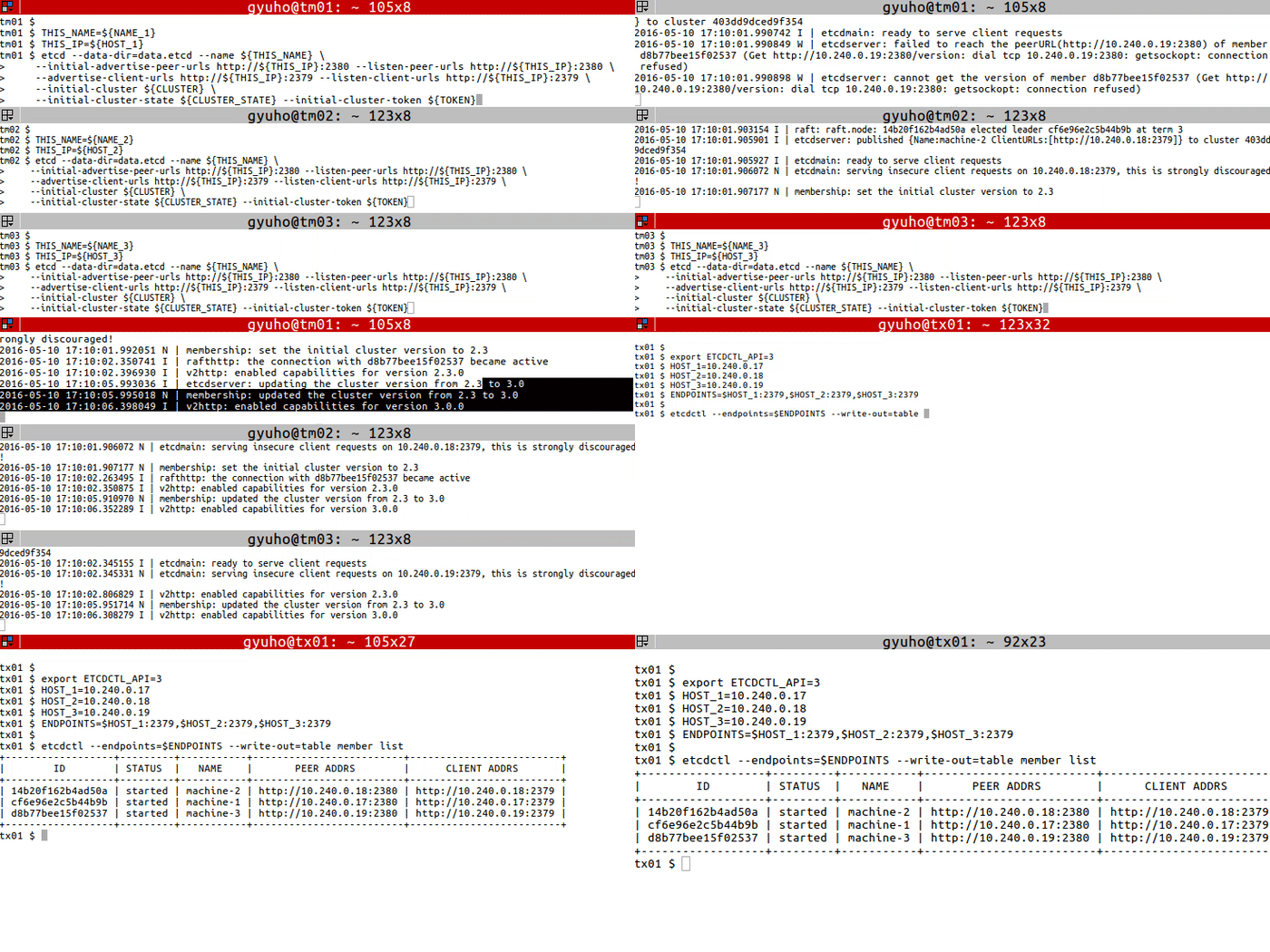
On each etcd node, specify the cluster members:
TOKEN = token-01
CLUSTER_STATE = new
NAME_1 = machine-1
NAME_2 = machine-2
NAME_3 = machine-3
HOST_1 = 10.240.0.17
HOST_2 = 10.240.0.18
HOST_3 = 10.240.0.19
CLUSTER = ${ NAME_1 } = http://${ HOST_1 } :2380,${ NAME_2 } = http://${ HOST_2 } :2380,${ NAME_3 } = http://${ HOST_3 } :2380Run this on each machine:
# For machine 1
THIS_NAME = ${ NAME_1 }
THIS_IP = ${ HOST_1 }
etcd --data-dir= data.etcd --name ${ THIS_NAME } \
--initial-advertise-peer-urls http://${ THIS_IP } :2380 --listen-peer-urls http://${ THIS_IP } :2380 \
--advertise-client-urls http://${ THIS_IP } :2379 --listen-client-urls http://${ THIS_IP } :2379 \
--initial-cluster ${ CLUSTER } \
--initial-cluster-state ${ CLUSTER_STATE } --initial-cluster-token ${ TOKEN }
# For machine 2
THIS_NAME = ${ NAME_2 }
THIS_IP = ${ HOST_2 }
etcd --data-dir= data.etcd --name ${ THIS_NAME } \
--initial-advertise-peer-urls http://${ THIS_IP } :2380 --listen-peer-urls http://${ THIS_IP } :2380 \
--advertise-client-urls http://${ THIS_IP } :2379 --listen-client-urls http://${ THIS_IP } :2379 \
--initial-cluster ${ CLUSTER } \
--initial-cluster-state ${ CLUSTER_STATE } --initial-cluster-token ${ TOKEN }
# For machine 3
THIS_NAME = ${ NAME_3 }
THIS_IP = ${ HOST_3 }
etcd --data-dir= data.etcd --name ${ THIS_NAME } \
--initial-advertise-peer-urls http://${ THIS_IP } :2380 --listen-peer-urls http://${ THIS_IP } :2380 \
--advertise-client-urls http://${ THIS_IP } :2379 --listen-client-urls http://${ THIS_IP } :2379 \
--initial-cluster ${ CLUSTER } \
--initial-cluster-state ${ CLUSTER_STATE } --initial-cluster-token ${ TOKEN } Or use our public discovery service:
curl https://discovery.etcd.io/new?size= 3
https://discovery.etcd.io/a81b5818e67a6ea83e9d4daea5ecbc92
# grab this token
TOKEN = token-01
CLUSTER_STATE = new
NAME_1 = machine-1
NAME_2 = machine-2
NAME_3 = machine-3
HOST_1 = 10.240.0.17
HOST_2 = 10.240.0.18
HOST_3 = 10.240.0.19
DISCOVERY = https://discovery.etcd.io/a81b5818e67a6ea83e9d4daea5ecbc92
THIS_NAME = ${ NAME_1 }
THIS_IP = ${ HOST_1 }
etcd --data-dir= data.etcd --name ${ THIS_NAME } \
--initial-advertise-peer-urls http://${ THIS_IP } :2380 --listen-peer-urls http://${ THIS_IP } :2380 \
--advertise-client-urls http://${ THIS_IP } :2379 --listen-client-urls http://${ THIS_IP } :2379 \
--discovery ${ DISCOVERY } \
--initial-cluster-state ${ CLUSTER_STATE } --initial-cluster-token ${ TOKEN }
THIS_NAME = ${ NAME_2 }
THIS_IP = ${ HOST_2 }
etcd --data-dir= data.etcd --name ${ THIS_NAME } \
--initial-advertise-peer-urls http://${ THIS_IP } :2380 --listen-peer-urls http://${ THIS_IP } :2380 \
--advertise-client-urls http://${ THIS_IP } :2379 --listen-client-urls http://${ THIS_IP } :2379 \
--discovery ${ DISCOVERY } \
--initial-cluster-state ${ CLUSTER_STATE } --initial-cluster-token ${ TOKEN }
THIS_NAME = ${ NAME_3 }
THIS_IP = ${ HOST_3 }
etcd --data-dir= data.etcd --name ${ THIS_NAME } \
--initial-advertise-peer-urls http://${ THIS_IP } :2380 --listen-peer-urls http://${ THIS_IP } :2380 \
--advertise-client-urls http://${ THIS_IP } :2379 --listen-client-urls http://${ THIS_IP } :2379 \
--discovery ${ DISCOVERY } \
--initial-cluster-state ${ CLUSTER_STATE } --initial-cluster-token ${ TOKEN } Now etcd is ready! To connect to etcd with etcdctl:
export ETCDCTL_API = 3
HOST_1 = 10.240.0.17
HOST_2 = 10.240.0.18
HOST_3 = 10.240.0.19
ENDPOINTS = $HOST_1 :2379,$HOST_2 :2379,$HOST_3 :2379
etcdctl --endpoints= $ENDPOINTS member list